power steering TOYOTA HIGHLANDER HYBRID 2023 User Guide
[x] Cancel search | Manufacturer: TOYOTA, Model Year: 2023, Model line: HIGHLANDER HYBRID, Model: TOYOTA HIGHLANDER HYBRID 2023Pages: 572, PDF Size: 14.07 MB
Page 171 of 572
1713-4. Adjusting the steering wheel and mirrors
3
Before driving
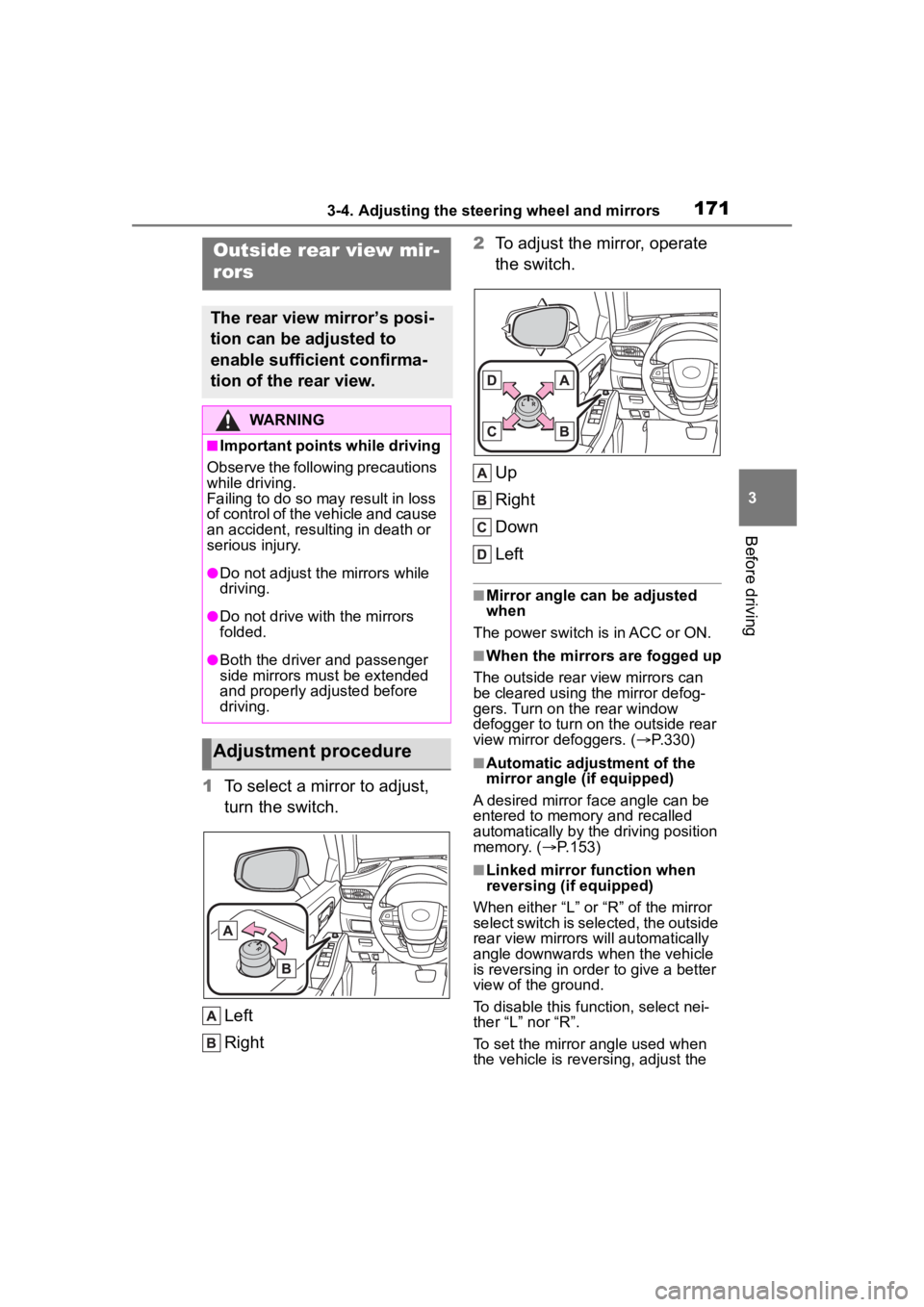
1To select a mirror to adjust,
turn the switch.
Left
Right 2
To adjust the mirror, operate
the switch.
Up
Right
Down
Left
■Mirror angle can be adjusted
when
The power switch is in ACC or ON.
■When the mirrors are fogged up
The outside rear view mirrors can
be cleared using the mirror defog-
gers. Turn on the rear window
defogger to turn on the outside rear
view mirror defoggers. ( P.330)
■Automatic adjustment of the
mirror angle (if equipped)
A desired mirror face angle can be
entered to memory and recalled
automatically by the driving position
memory. ( P.153)
■Linked mirror function when
reversing (if equipped)
When either “L” or “R” of the mirror
select switch is selected, the outside
rear view mirrors will automatically
angle downwards when the vehicle
is reversing in order to give a better
view of the ground.
To disable this function, select nei-
ther “L” nor “R”.
To set the mirror angle used when
the vehicle is reversing, adjust the
Outside rear view mir-
rors
The rear view mirror’s posi-
tion can be adjusted to
enable sufficient confirma-
tion of the rear view.
WARNING
■Important points while driving
Observe the following precautions
while driving.
Failing to do so may result in loss
of control of the vehicle and cause
an accident, resul ting in death or
serious injury.
●Do not adjust the mirrors while
driving.
●Do not drive with the mirrors
folded.
●Both the driver and passenger
side mirrors must be extended
and properly adjusted before
driving.
Adjustment procedure
Page 172 of 572
1723-4. Adjusting the steering wheel and mirrors
mirror angle at a desired position
with the shift lever in R.
The adjusted angle will be memo-
rized and the mirror will automati-
cally tilt to the memorized angle
whenever the shift lever is shifted to
R from next time.
The memorized downward tilt posi-
tion of the mirror is linked to the nor-
mal position (angle adjusted with
the shift lever in other than R).
Therefore, if the normal position is
changed after adjustment, the tilt
position will also change.
When the normal position is
changed, readjust the angle in
reversing.
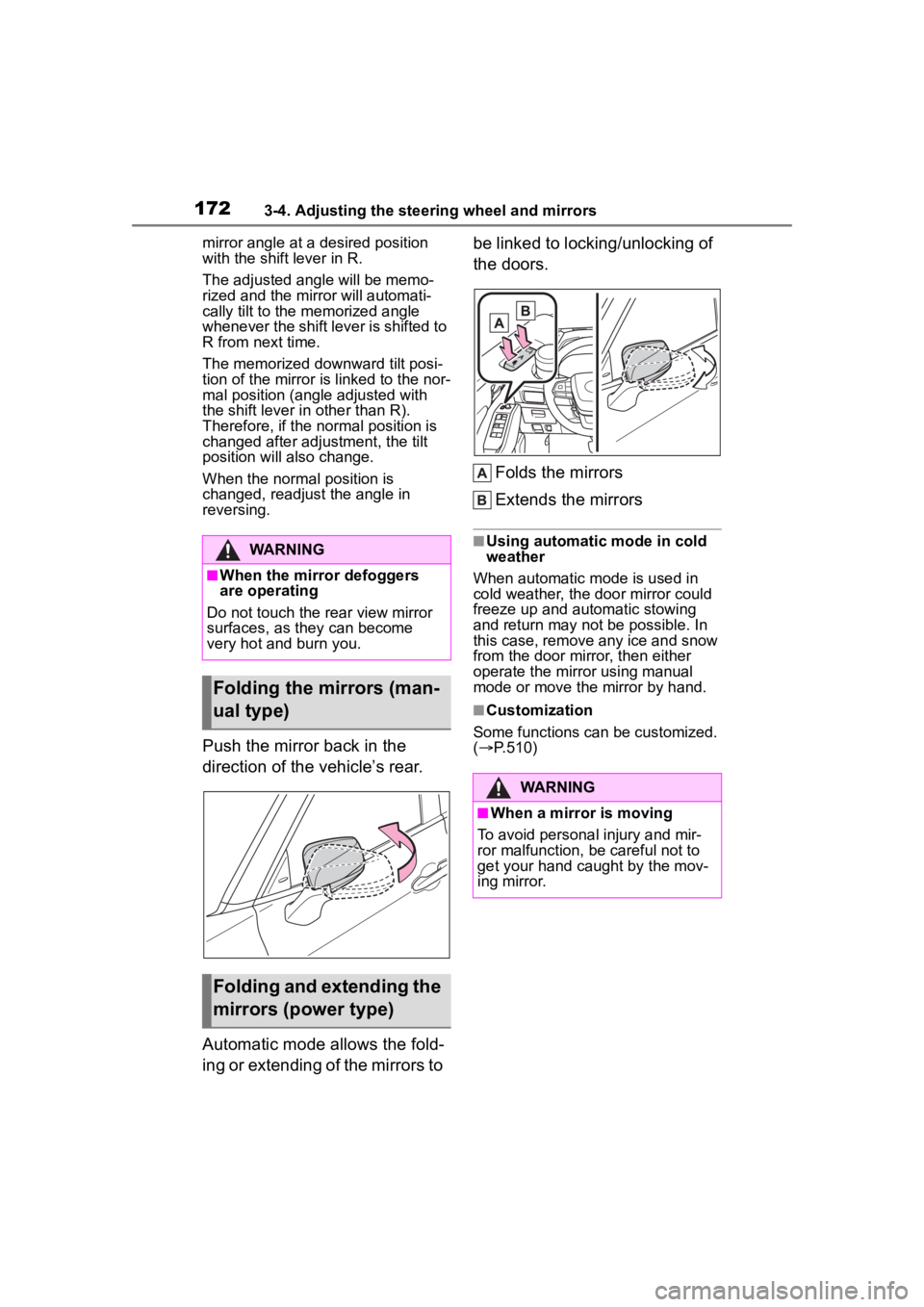
Push the mirror back in the
direction of the vehicle’s rear.
Automatic mode allows the fold-
ing or extending of the mirrors to be linked to locking/unlocking of
the doors.
Folds the mirrors
Extends the mirrors
■Using automatic mode in cold
weather
When automatic mode is used in
cold weather, the door mirror could
freeze up and automatic stowing
and return may not be possible. In
this case, remove any ice and snow
from the door mirror, then either
operate the mirror using manual
mode or move the mirror by hand.
■Customization
Some functions can be customized.
( P.510)
WARNING
■When the mirror defoggers
are operating
Do not touch the rear view mirror
surfaces, as they can become
very hot and burn you.
Folding the mirrors (man-
ual type)
Folding and extending the
mirrors (power type)
WARNING
■When a mirror is moving
To avoid personal injury and mir-
ror malfunction, be careful not to
get your hand caught by the mov-
ing mirror.
Page 187 of 572
1874-1. Before driving
4
Driving
WARNING
●During normal driving, do not
turn off the hybrid system. Turn-
ing the hybrid system off while
driving will not cause loss of
steering or braking control, how-
ever, power assist to the steer-
ing will be lost. This will make it
more difficult to steer smoothly,
so you should pull over and stop
the vehicle as soon as it is safe
to do so.In the event of an
emergency, such as if it
becomes impossible to stop the
vehicle in the normal way:
P. 4 3 8
●Use engine braking (downshift)
to maintain a safe speed when
driving down a steep hill.Using
the brakes con tinuously may
cause the brakes to overheat
and lose effectiveness.
(
P.213)
●Do not adjust the positions of
the steering wheel, the seat, or
the inside or ou tside rear view
mirrors while driving.Doing so
may result in a loss of vehicle
control.
●Always check that all passen-
gers’ arms, heads or other parts
of their body are not outside the
vehicle.
●AWD models: Do not drive the
vehicle off-road. This is not an
AWD vehicle designed for
off-road driving.Drive with due
care if it becomes unavoidable
to drive off-road.
●Do not drive across a river or
through other bodies of
water.This may cause elec-
tric/electronic components to
short circuit, damage the hybrid
system or cause other serious
damage to the vehicle.
●Do not drive in excess of the
speed limit. Even if the legal
speed limit permits it, do not
drive over 85 mph (140 km/h)
unless your vehicle has
high-speed capability tires. Driv-
ing over 85 mph (140 km/h)
may result in tire failure, loss of
control and possible injury. Be
sure to consult a tire dealer to
determine whether the tires on
your vehicle are high-speed
capability tires or not before
driving at such speeds.
■When driving on slippery
road surfaces
●Sudden braking, acceleration
and steering may cause tire
slippage and reduce your ability
to control the vehicle.
●Sudden acceleration, engine
braking due to shifting, or
changes in engine speed could
cause the vehicle to skid.
●After driving through a puddle,
lightly depress the brake pedal
to make sure that the brakes
are functioning properly. Wet
brake pads may prevent the
brakes from functioning prop-
erly. If the brakes on only one
side are wet and not functioning
properly, steering control may
be affected.
■When shifting the shift lever
●Do not let the vehicle roll back-
ward while a fo rward driving
position is selected, or roll for-
ward while the shift lever is in
R.Doing so may result in an
accident or damage to the vehi-
cle.
●Do not shift the sh ift lever to P
while the vehicle is mov-
ing.Doing so can damage the
transmission and may result in a
loss of vehicle control.
Page 190 of 572
1904-1. Before driving
NOTICE
●Do not use the accelerator
pedal or depress the accelera-
tor and brake pedals at the
same time to hold the vehicle on
a hill.
■When parking the vehicle
Always set the parking brake and
shift the shift lever to P. Failure to
do so may cause the vehicle to
move or the vehi cle may acceler-
ate suddenly if the accelerator
pedal is accidentally depressed.
■Avoiding damage to vehicle
parts
●Do not turn the steering wheel
fully in either direction and hold
it there for an extended period
of time.Doing so may damage
the power steering.
●When driving over bumps on
the road, drive as slowly as pos-
sible to avoid damaging the
wheels, underside of the vehi-
cle, etc.
■If you get a flat tire while driv-
ing
A flat or damaged tire may cause
the following situations. Hold the
steering wheel firmly and gradu-
ally depress the brake pedal to
slow down the vehicle.
●It may be difficult to control your
vehicle.
●The vehicle will make abnormal
sounds or vibrations.
●The vehicle will lean abnor-
mally.
Information on what to do in case
of a flat tire (
P.461)
■When encountering flooded
roads
Do not drive on a road that has
flooded after h eavy rain etc.
Doing so may cause the following
serious damage to the vehicle:
●Engine stalling
●Short in electrical components
●Engine damage caused by
water immersion
In the event that you drive on a
flooded road and the vehicle is
flooded, be sure to have your Toy-
ota dealer check the following:
●Brake function
●Changes in quantity and quality
of oil and fluid used for the
engine, hybrid transaxle (front
and rear [AWD models]), etc.
●Lubricant condition for bearings
and suspension joints (where
possible), and the function of all
joints, bearings, etc.
Page 196 of 572

1964-1. Before driving
●All trailer lights work as required
by law.
●All lights work each time you con-
nect them.
●The trailer ball is set at the proper
height for the coupler on the
trailer.
●The trailer is level when it is
hitched.
Do not drive if the trailer is not
level, and check for improper
tongue weight, overloading, worn
suspension, or other possible
causes.
●The trailer cargo is securely
loaded.
●The rear view mirrors conform to
all applicable federal, state/provin-
cial or local regu lations. If they do
not, install rear view mirrors
appropriate for towing purposes.
■Break-in schedule
If your vehicle is new or equipped
with any new power train compo-
nents (such as an engine, hybrid
transmission, rear differential or
wheel bearing), Toyota recommends
that you do not tow a trailer until the
vehicle has been driven for over 500
miles (800 km).
After the vehicle has been driven for
over 500 miles (800 km), you can
start towing. However, for the next
500 miles (800 km), drive the vehi-
cle at a speed of less than 50 mph
(80 km/h) when towing a trailer, and
avoid full throttle acceleration.
■Maintenance
●If you tow a trailer, your vehicle
will require more f requent mainte-
nance due to the additional load.
(See “Scheduled Maintenance
Guide” or “Owner’s Manual Sup-
plement”.)
●Retighten the fixing bolts of the
towing ball and bracket after
approximately 600 miles (1000
km) of trailer towing.
■If trailer sway occurs
One or more factors (crosswinds,
passing vehicles, rough roads, etc.)
can adversely affect handling of
your vehicle and trailer, causing
instability.
●If trailer swaying occurs:
• Firmly grip the steering wheel. Steer straight ahead.
Do not try to contr ol trailer sway-
ing by turning the steering wheel.
• Begin releasing the accelerator pedal immediately but very gradu-
ally to reduce speed.
Do not increase speed. Do not
apply vehicle brakes.
If you make no extreme correction
with the steering or brakes, your
vehicle and trailer should stabilize.
(if enabled, Trailer Sway Control can
also help to stabilize the vehicle and
trailer.)
●After the trailer swaying has
stopped:
• Stop in a safe place. Get all occu- pants out of the vehicle.
• Check the tires of the vehicle and the trailer.
• Check the load in the trailer.
Make sure the load has not
shifted.
Make sure the tongue weight is
appropriate, if possible.
• Check the load in the vehicle. Make sure the vehicle is not over-
loaded after occupants get in.
If you cannot find any problems, the
speed at which trailer swaying
occurred is beyond the limit of your
particular vehicle-trailer combina-
tion. Drive at a lower speed to pre-
vent instability. Remember that
swaying of the towing vehicle-trailer
increases as speed increases.
Page 209 of 572
2094-2. Driving procedures
4
Driving
cally shut off after approximately 1
hour if it has been left running
while the shift lever is in P.
●The timer for the automatic hybrid
system shut off feature will reset if
the brake pedal is depressed or if
the shift lever is in a position other
than P.
●After the vehicle is parked, if the
door is locked with the door lock
switch ( P.130) from the inside or
the mechanical key from the out-
side, the automatic hybrid system
shut off feature will be disabled.
The timer for the automatic hybrid
system shut off f eature will be
re-enabled if the driver’s door is
opened.
Modes can be changed by
pressing the power switch with
brake pedal released. (The
mode changes each time the
switch is pressed.)
WARNING
■Stopping the hybrid system
in an emergency
●If you want to stop the hybrid
system in an emergency while
driving the vehicle, press and
hold the power switch for more
than 2 seconds, or press it
briefly 3 times or more in suc-
cession. ( P.438)
However, do not touch the
power switch while driving
except in an emergency. Turn-
ing the hybrid system off while
driving will not cause loss of
steering or braking control, how-
ever, power assist to the steer-
ing will be lost. This will make it
more difficult to steer smoothly,
so you should pull over and stop
the vehicle as soon as it is safe
to do so.
●If the power switch is operated
while the vehicle is running, a
warning message will be shown
on the multi-info rmation display
and a buzzer sounds.
●To restart the hybrid system
after performing an emergency
shutdown, shift the shift lever to
N and then pre ss the power
switch.
■When parking
Exhaust gases include harmful
carbon monoxide (CO), which is
colorless and odorless. Observe
the following precautions.
Failure to do so may cause
exhaust gases to enter the vehicle
and may lead to an accident
caused by light-headedness, or
may lead to death or a serious
health hazard.
●If the vehicle is in a poorly venti-
lated area or a closed area,
such as a garage, stop the
hybrid system.
●Do not leave the vehicle with
the hybrid system operating for
a long time. If such a situation
cannot be avoided, park the
vehicle in an open space and
ensure that exhaust fumes do
not enter the vehicle interior.
●Do not leave the hybrid system
operating in an area with snow
build-up, or where it is snowing.
If snowbanks build up around
the vehicle while the hybrid sys-
tem is operating, exhaust gases
may collect and enter the vehi-
cle.
Changing power switch
modes
Page 246 of 572
2464-5. Using the driving support systems
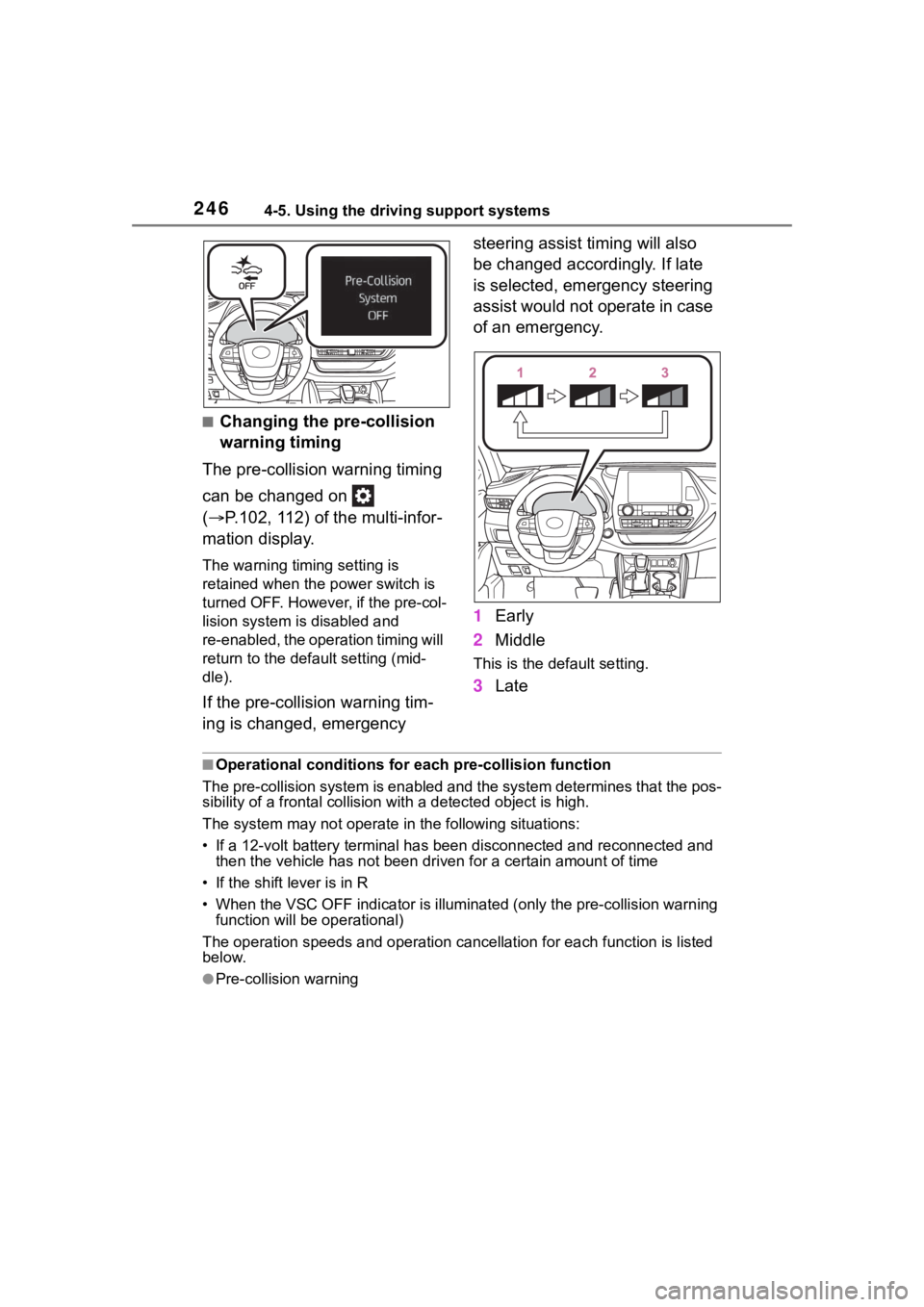
■Changing the pre-collision
warning timing
The pre-collision warning timing
can be changed on
( P.102, 112) of the multi-infor-
mation display.
The warning timing setting is
retained when the power switch is
turned OFF. However, if the pre-col-
lision system is disabled and
re-enabled, the operation timing will
return to the default setting (mid-
dle).
If the pre-collision warning tim-
ing is changed, emergency steering assist timing will also
be changed accordingly. If late
is selected, emergency steering
assist would not operate in case
of an emergency.
1
Early
2 Middle
This is the default setting.
3Late
■Operational conditions for e ach pre-collision function
The pre-collision syst em is enabled and the system determines t hat the pos-
sibility of a frontal c ollision with a detected object is high.
The system may not operate in the following situations:
• If a 12-volt battery terminal has been di sconnected and reconn ected and
then the vehicle has not been dr iven for a certain amount of time
• If the shift lever is in R
• When the VSC OFF indicator is illuminated (only the pre-collision warning
function will be operational)
The operation speeds and operati on cancellation for each function is listed
below.
●Pre-collision warning
Page 250 of 572
2504-5. Using the driving support systems
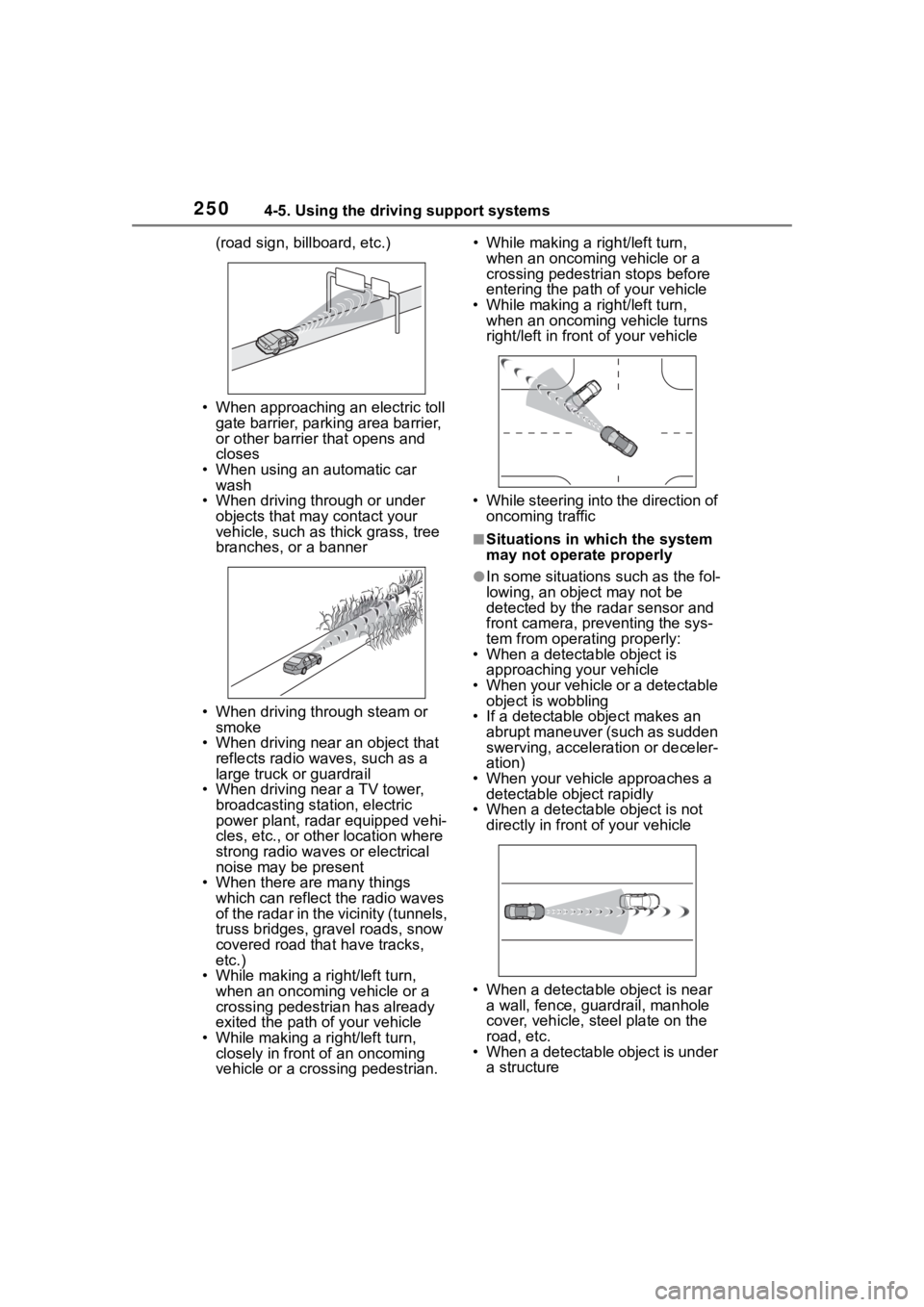
(road sign, billboard, etc.)
• When approaching an electric toll gate barrier, parking area barrier,
or other barrier that opens and
closes
• When using an automatic car wash
• When driving through or under
objects that may contact your
vehicle, such as thick grass, tree
branches, or a banner
• When driving through steam or smoke
• When driving near an object that reflects radio waves, such as a
large truck or guardrail
• When driving near a TV tower, broadcasting station, electric
power plant, radar equipped vehi-
cles, etc., or other location where
strong radio waves or electrical
noise may be present
• When there are many things which can reflect the radio waves
of the radar in the vicinity (tunnels,
truss bridges, gravel roads, snow
covered road that have tracks,
etc.)
• While making a right/left turn, when an oncoming vehicle or a
crossing pedestrian has already
exited the path of your vehicle
• While making a right/left turn, closely in front of an oncoming
vehicle or a crossing pedestrian. • While making a
right/left turn,
when an oncoming vehicle or a
crossing pedestrian stops before
entering the path of your vehicle
• While making a right/left turn,
when an oncoming vehicle turns
right/left in fron t of your vehicle
• While steering into the direction of oncoming traffic
■Situations in which the system
may not operate properly
●In some situations such as the fol-
lowing, an object may not be
detected by the radar sensor and
front camera, pre venting the sys-
tem from opera ting properly:
• When a detectable object is
approaching your vehicle
• When your vehicle or a detectable object is wobbling
• If a detectable object makes an abrupt maneuver (such as sudden
swerving, acceleration or deceler-
ation)
• When your vehicle approaches a detectable object rapidly
• When a detectable object is not
directly in front of your vehicle
• When a detectable object is near
a wall, fence, gua rdrail, manhole
cover, vehicle, steel plate on the
road, etc.
• When a detectable object is under a structure
Page 310 of 572
3104-5. Using the driving support systems
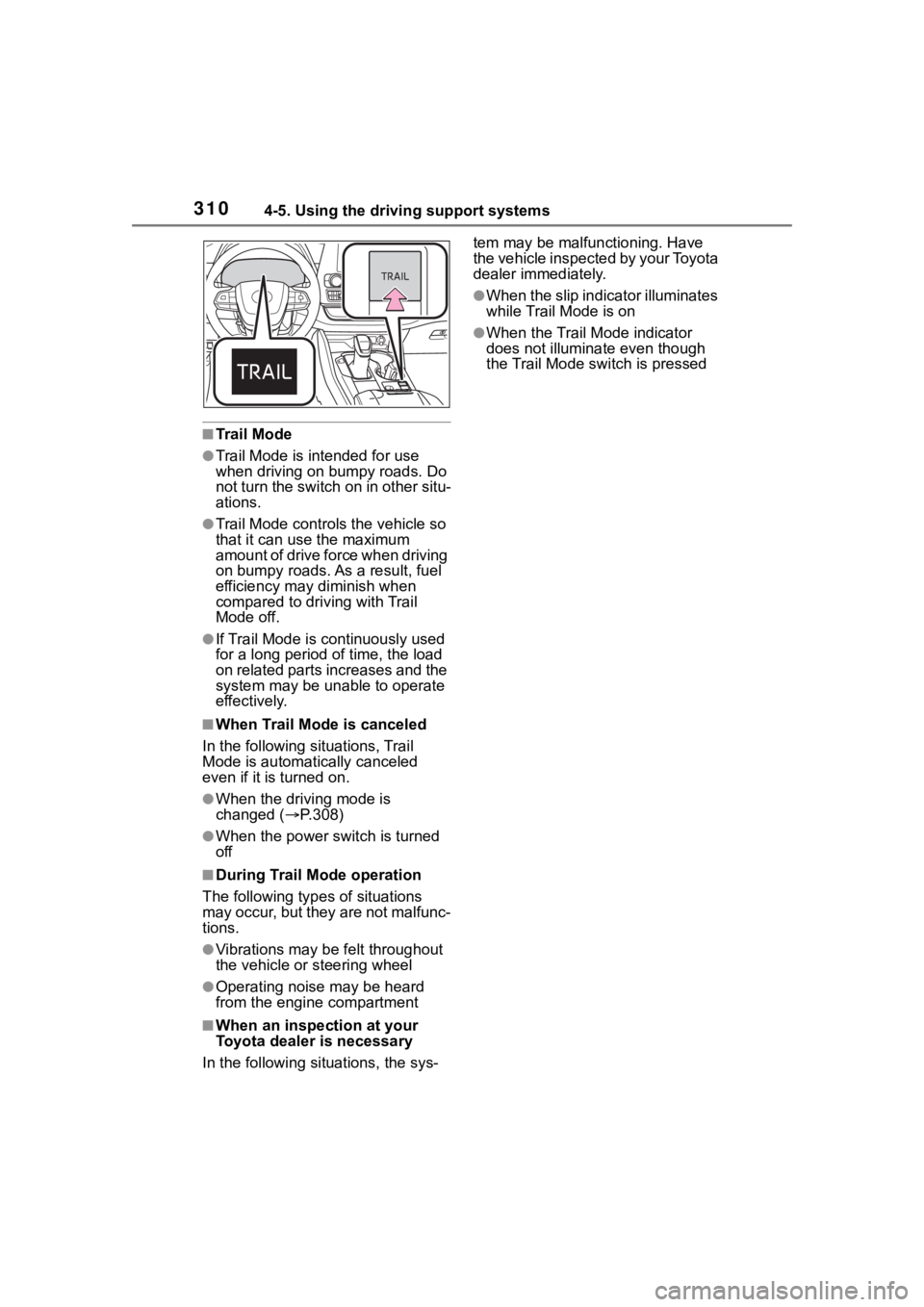
■Trail Mode
●Trail Mode is intended for use
when driving on bumpy roads. Do
not turn the switch on in other situ-
ations.
●Trail Mode controls the vehicle so
that it can use the maximum
amount of drive force when driving
on bumpy roads. As a result, fuel
efficiency may diminish when
compared to driving with Trail
Mode off.
●If Trail Mode is continuously used
for a long period of time, the load
on related parts increases and the
system may be un able to operate
effectively.
■When Trail Mode is canceled
In the following situations, Trail
Mode is automatically canceled
even if it is turned on.
●When the driving mode is
changed (P.308)
●When the power switch is turned
off
■During Trail Mode operation
The following types of situations
may occur, but they are not malfunc-
tions.
●Vibrations may be felt throughout
the vehicle or steering wheel
●Operating noise may be heard
from the engine compartment
■When an inspection at your
Toyota dealer is necessary
In the following si tuations, the sys- tem may be malf
unctioning. Have
the vehicle inspected by your Toyota
dealer immediately.
●When the slip indicator illuminates
while Trail Mode is on
●When the Trail Mode indicator
does not illuminat e even though
the Trail Mode switch is pressed
Page 311 of 572
3114-5. Using the driving support systems
4
Driving■ECB (Electronically Con-
trolled Brake System)
The electronically controlled
system generates braking force
corresponding to the brake
operation
■ABS (Anti-lock Brake Sys-
tem)
Helps to prevent wheel lock
when the brakes are applied
suddenly, or if the brakes are
applied while driving on a slip-
pery road surface
■Brake assist
Generates an increased level of
braking force after the brake
pedal is depressed when the
system detects a panic stop sit-
uation
■VSC (Vehicle Stability Con-
trol)
Helps the driver to control skid-
ding when swerving suddenly or
turning on slippery road sur-
faces
■Enhanced VSC (Enhanced
Vehicle Stability Control)
Provides cooperative control of
the ABS, TRAC, VSC and EPS.
Helps to maintain directional
stability when swerving on slip-
pery road surfaces by con-
trolling steering performance.
■Trailer Sway Control
Helps the driver to control trailer
sway by selectively applying
brake pressure for individual
wheels and reducing driving
torque when trailer sway is
detected.
■TRAC (Traction Control)
Helps to maintain drive power
and prevent the drive wheels
from spinning when starting the
vehicle or accelerating on slip-
pery roads
■Active Cornering Assist
(ACA)
Helps to prevent the vehicle
from drifting to the outer side by
performing inner wheel brake
control when attempting to
accelerate while turning
■Hill-start assist control
Helps to reduce the backward
movement of the vehicle when
Driving assist systems
To keep driving safety and
performance, the following
systems operate automati-
cally in response to various
driving situations. Be
aware, however, that these
systems are supplementary
and should not be relied
upon too heavily when oper-
ating the vehicle.
Summary of the driving
assist systems