change time TOYOTA HILUX 2023 Owner's Manual
[x] Cancel search | Manufacturer: TOYOTA, Model Year: 2023, Model line: HILUX, Model: TOYOTA HILUX 2023Pages: 810, PDF Size: 131.54 MB
Page 381 of 810
379
5
5-1. Basic Operations
Audio system
HILUX_OM_OM0K789E_(EE)
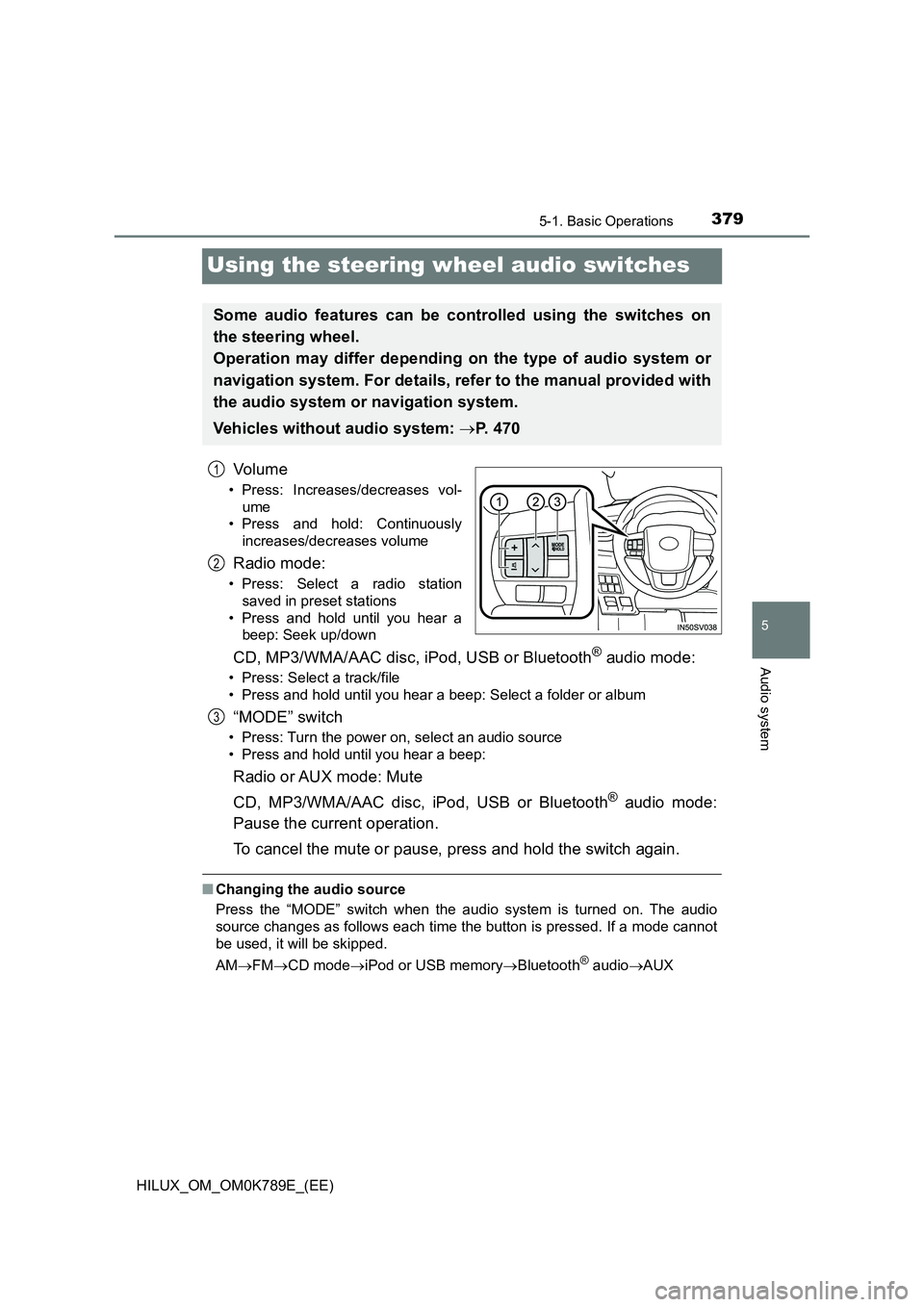
Using the steering wheel audio switches
Vo lu m e
• Press: Increases/decreases vol-
ume
• Press and hold: Continuously
increases/decreases volume
Radio mode:
• Press: Select a radio station
saved in preset stations
• Press and hold until you hear a
beep: Seek up/down
CD, MP3/WMA/AAC disc, iPod, USB or Bluetooth® audio mode:
• Press: Select a track/file
• Press and hold until you hear a beep: Select a folder or album
“MODE” switch
• Press: Turn the power on, select an audio source
• Press and hold until you hear a beep:
Radio or AUX mode: Mute
CD, MP3/WMA/AAC disc, iPod, USB or Bluetooth® audio mode:
Pause the current operation.
To cancel the mute or pause, press and hold the switch again.
■ Changing the audio source
Press the “MODE” switch when the audi o system is turned on. The audio
source changes as follows each time the button is pressed. If a mode cannot
be used, it will be skipped.
AM FMCD modeiPod or USB memoryBluetooth® audioAUX
Some audio features can be controlled using the switches on
the steering wheel.
Operation may differ depending on the type of audio system or
navigation system. For details, refer to the manual provided with
the audio system or navigation system.
Vehicles without audio system: P. 4 7 0
1
2
3
Page 391 of 810
3895-4. Playing an audio CD and MP3/WMA/AAC discs
5
Audio system
HILUX_OM_OM0K789E_(EE)
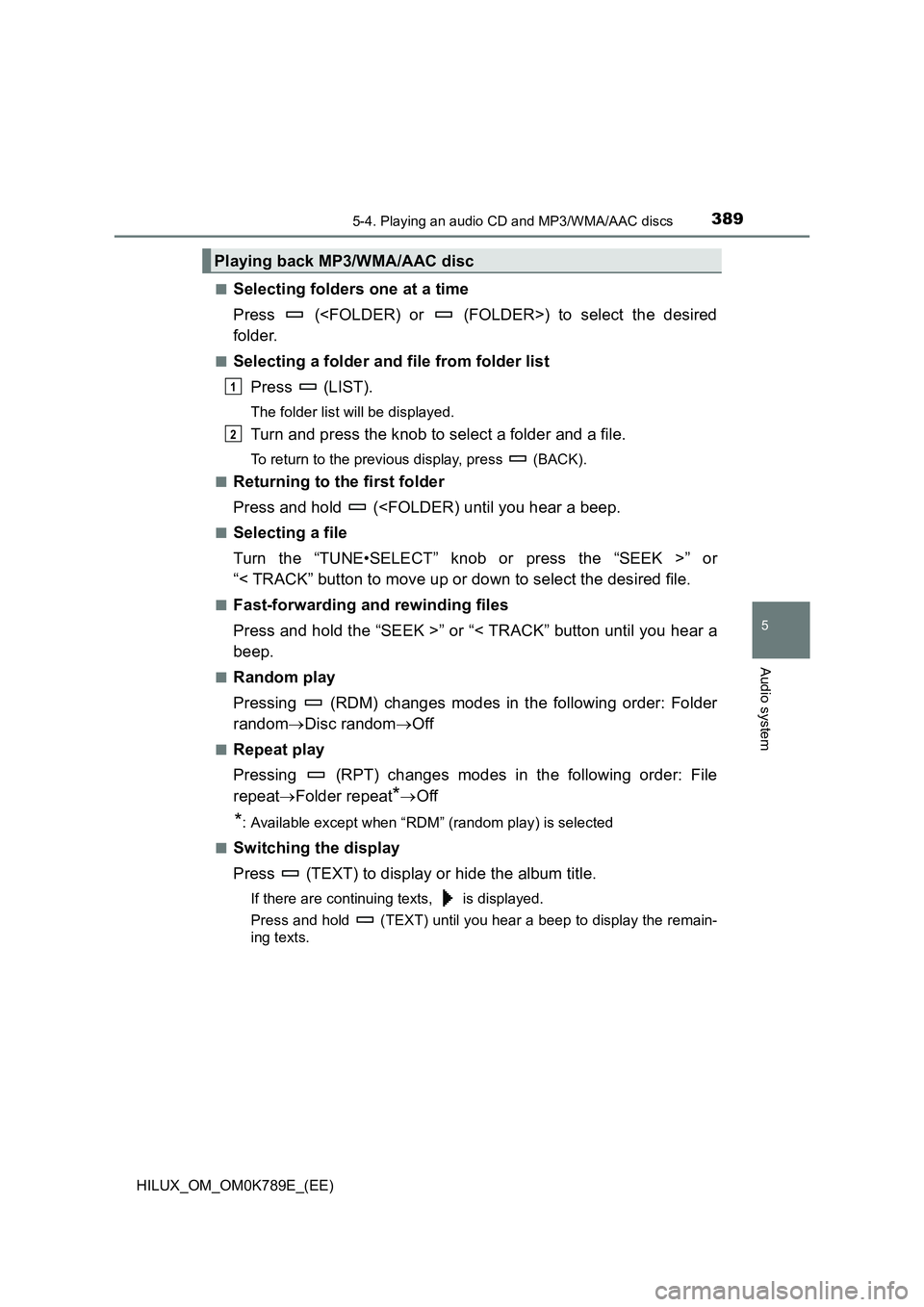
■Selecting folders one at a time
Press (
folder.
■Selecting a folder and file from folder list
Press (LIST).
The folder list will be displayed.
Turn and press the knob to select a folder and a file.
To return to the previous display, press (BACK).
■Returning to the first folder
Press and hold (
Turn the “TUNE•SELECT” knob or press the “SEEK >” or
“< TRACK” button to move up or down to select the desired file.
■Fast-forwarding and rewinding files
Press and hold the “SEEK >” or “< TRACK” button until you hear a
beep.
■Random play
Pressing (RDM) changes modes in the following order: Folder
random Disc randomOff
■Repeat play
Pressing (RPT) changes modes in the following order: File
repeat Folder repeat*Off
*: Available except when “RDM” (random play) is selected
■Switching the display
Press (TEXT) to display or hide the album title.
If there are continuing texts, is displayed.
Press and hold (TEXT) until you hear a beep to display the remain-
ing texts.
Playing back MP3/WMA/AAC disc
1
2
Page 404 of 810
4025-5. Using an external device
HILUX_OM_OM0K789E_(EE)
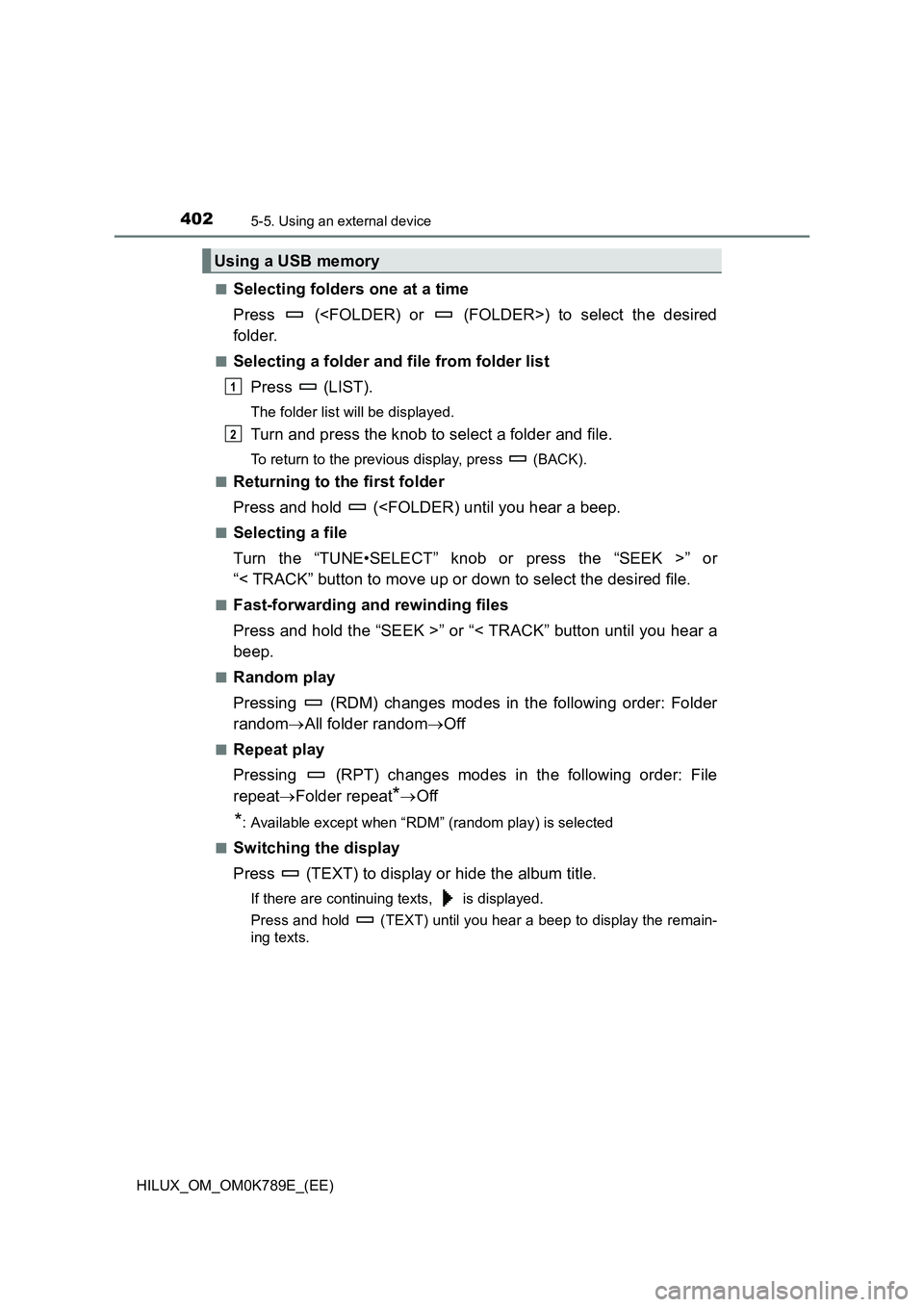
■Selecting folders one at a time
Press (
folder.
■Selecting a folder and file from folder list
Press (LIST).
The folder list will be displayed.
Turn and press the knob to select a folder and file.
To return to the previous display, press (BACK).
■Returning to the first folder
Press and hold (
Turn the “TUNE•SELECT” knob or press the “SEEK >” or
“< TRACK” button to move up or down to select the desired file.
■Fast-forwarding and rewinding files
Press and hold the “SEEK >” or “< TRACK” button until you hear a
beep.
■Random play
Pressing (RDM) changes modes in the following order: Folder
random All folder randomOff
■Repeat play
Pressing (RPT) changes modes in the following order: File
repeat Folder repeat*Off
*: Available except when “RDM” (random play) is selected
■Switching the display
Press (TEXT) to display or hide the album title.
If there are continuing texts, is displayed.
Press and hold (TEXT) until you hear a beep to display the remain-
ing texts.
Using a USB memory
1
2
Page 444 of 810
4426-1. Using the air conditioning system and defogger
HILUX_OM_OM0K789E_(EE)
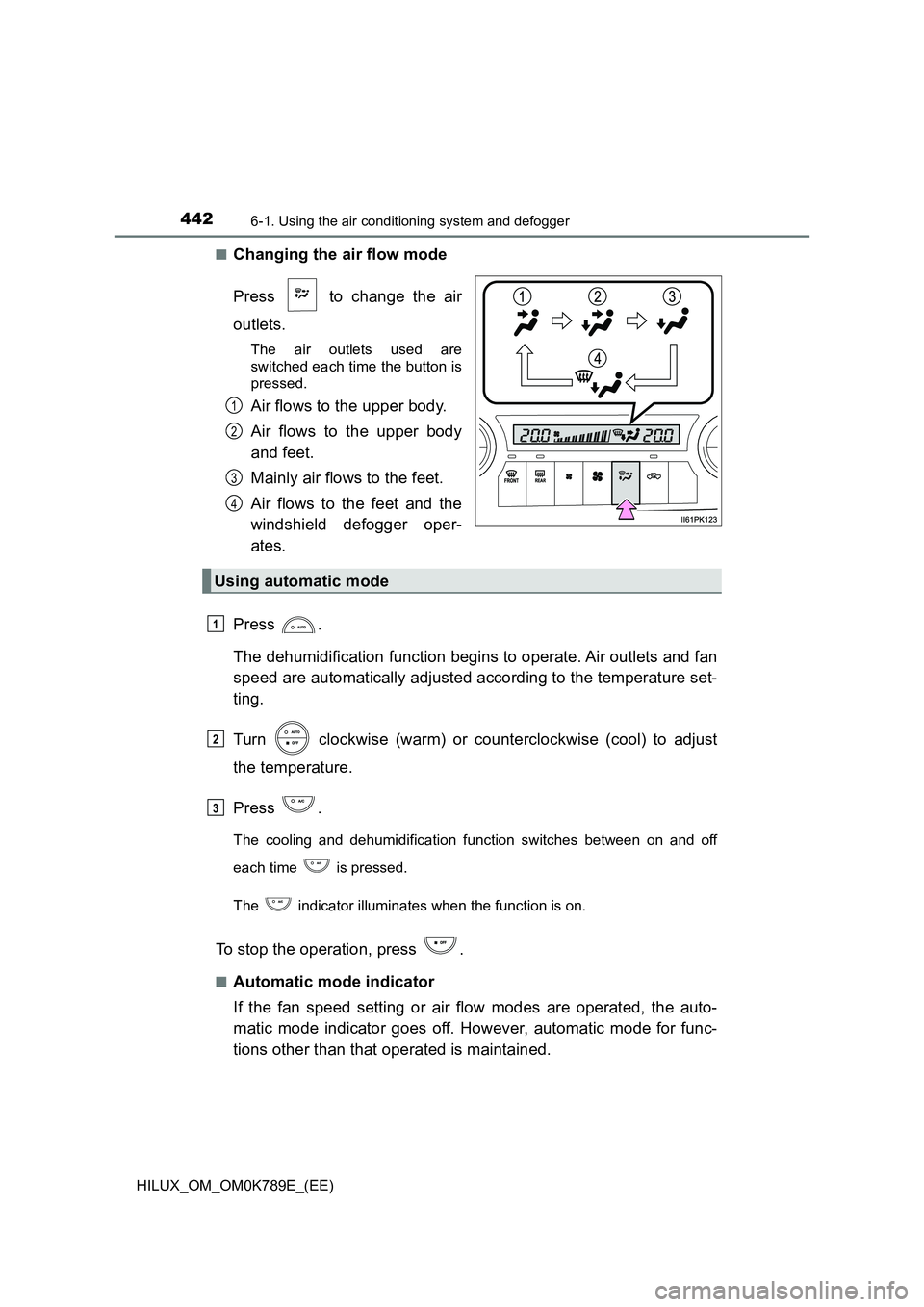
■Changing the air flow mode
Press to change the air
outlets.
The air outlets used are
switched each time the button is
pressed.
Air flows to the upper body.
Air flows to the upper body
and feet.
Mainly air flows to the feet.
Air flows to the feet and the
windshield defogger oper-
ates.
Press .
The dehumidification function begins to operate. Air outlets and fan
speed are automatically adjusted according to the temperature set-
ting.
Turn clockwise (warm) or counterclockwise (cool) to adjust
the temperature.
Press .
The cooling and dehumidification function switches between on and off
each time is pressed.
The indicator illuminates when the function is on.
To stop the operation, press .
■Automatic mode indicator
If the fan speed setting or air flow modes are operated, the auto-
matic mode indicator goes off. However, automatic mode for func-
tions other than that operated is maintained.
1
2
3
4
Using automatic mode
1
2
3
Page 493 of 810
4917-3. Do-it-yourself maintenance
HILUX_OM_OM0K789E_(EE)
7
Maintenance and care
■After changing the engine oil (models for model code destination W*)
The engine oil maintenance data should be reset. Perform the following pro-
cedures:
Switch the display to the trip meter A ( P. 130) when the engine switch is
in the “ON” position (vehicles without smart entry & start system) or IGNI-
TION ON mode (vehicles with smart entry & start system).
Turn the engine switch to the “LOCK” position (vehicles without smart entry
& start system) or off (vehicles with smart entry & start system).
While pressing the odometer/trip meter display change button ( P. 130),
turn the engine switch to the “ON” position (vehicles without smart entry &
start system) or IGNITION ON mode (vehicles with smart entry & start sys-
tem). (Do not start the engine because reset mode will be canceled.) Con-
tinue to press and hold the button for more than one second after the trip
meter displays “000000”.
*: See “Checking your vehicle’s model” if you are not sure of which model
your vehicle is. ( P. 1 2 )
WARNING
■Used engine oil
● Used engine oil contains potentially harmful contaminants which may
cause skin disorders such as inflammation and skin cancer, so care
should be taken to avoid prolonged and repeated contact. To remove used
engine oil from your skin, wash thoroughly with soap and water.
● Dispose of used oil and filters only in a safe and acceptable manner. Do
not dispose of used oil and filters in household trash, in sewers or onto the
ground. Call any authorized Toyota reta iler or Toyota authorized repairer,
or any reliable repairer, service station or auto parts store for information
concerning recycling or disposal.
● Do not leave used engine oil within the reach of children.
NOTICE
■To prevent serious engine damage
Check the oil level on a regular basis.
■ When replacing the engine oil
● Be careful not to spill engine oil on the vehicle components.
● Avoid overfilling, or the engine could be damaged.
● Check the oil level on the dipstick every time you refill the vehicle.
● Be sure the engine oil filler cap is properly tightened.
1
2
3
Page 580 of 810
5788-2. Steps to take in an emergency
HILUX_OM_OM0K789E_(EE)
■ If “Oil maintenance required soon” is shown
The engine oil is scheduled to be changed.
Check the engine oil, and change if necessary. After changing the engine oil,
the oil change system should be reset. ( P. 491)
For Russia, Armenia, Ukraine, Byelarus, Moldova, Bosnia Herzegovina, Mon-
tenegro, Serbia and Macedonia: You have forgotten to reset the oil change
system. Change the engine oil in accordance with the maintenance schedule.
■ If “Oil maintenance required” is shown
The engine oil is scheduled to be changed.
Check and change the engine oil, and oil filter by any authorized Toyota
retailer or Toyota authorized repairer, or any reliable repairer. After changing
the engine oil, the oil change system should be reset. ( P. 491)
For Russia, Armenia, Ukraine, Byelarus, Moldova, Bosnia Herzegovina, Mon-
tenegro, Serbia and Macedonia: You have forgotten to reset the oil change
system. Change the engine oil in accordance with the maintenance schedule.
■ If “Differential oil temp high Shift to 2WD mode Cooling time required” or
“Differential oil temp high Co oling time required” is shown
The differential oil temperature is too high.
Turn the front-wheel drive control switch to H2, and reduce the vehicle speed
or stop the vehicle in a safe place. ( P. 330)
■ If “Engine oil level low Add or replace” is shown
The engine oil level is low. (This warning message may be displayed if the
vehicle is stopped on a slope. Move the vehicle to a level surface and check
to see if the message goes off.)
Check the level of the engine oil and add or replace oil if necessary.
( P. 479)
■ If “Power turned off to save battery” is shown
Power was turned off due to the automatic power off function.
Next time when starting the engine, increase the engine speed slightly and
maintain that level for approximately 5 minutes to recharge the battery.
■ If “DPF full Manual regeneration required See owner’s manual” is shown
The deposit collected in the filter needs to be regenerated. ( P. 370)
■ If “DPF regeneration in progress” is shown
Regeneration is being automatically carried out by the DPF system.
( P. 369)
Page 605 of 810
6038-2. Steps to take in an emergency
HILUX_OM_OM0K789E_(EE)
8
When trouble arises
■Stopping the engine
Shift the shift lever to P (automatic transmission) or N (manual transmission)
and press the engine switch as you normally do when stopping the engine.
■ Replacing the key battery
As the above procedure is a temporary measure, it is recommended that the
electronic key battery be replaced immediately when the battery is depleted.
( P. 516)
■ Alarm (vehicles with alarm for models for model code destination Blank
[for Kazakhstan, Kyrgyzstan and Russia] and W*)
Using the mechanical key to lock the doors will not set the alarm system.
If a door is unlocked using the mechanical key and is opened when the alarm
system is set, the alarm may be triggered.
*: See “Checking your vehicle’s model” if you are not sure of which model
your vehicle is. ( P. 12)
■ Changing engine switch modes
Release the brake pedal (automatic transmission) or clutch pedal (manual
transmission) and press the engine switch in step above.
The engine does not start and modes will be changed each time the switch is
pressed. ( P. 225)
■ When the electronic key does not work properly
● Make sure that the smart entry & start system has not been deactivated in
the customization setting. If it is off, turn the function on.
(Customizable features: P. 647)
● Check if battery-saving mode is set. If it is set, cancel the function.
( P. 162)
3
Page 649 of 810
6479-2. Customization
HILUX_OM_OM0K789E_(EE)
9
Vehicle specifications
Customizable features
■Changing using the multi-information display
Use the meter control switches to select while the vehicle is
stopped, and then press to display the customize mode
screen.
Select the desired item, and then press .
Select the desired setting, and then press .
To go back to the previous screen or exit the customize mode,
press .
■Changing using the navigation system or multimedia system
type A
Press the “SETUP” button while the vehicle is stopped.
Select “Vehicle”.
Select “TOYOTA park assist”.
Your vehicle includes a variety of electronic features that can be
personalized to your preferences. The settings of these features
can be changed using the multi-information display, navigation
system, multimedia system type A* or at any authorized Toyota
retailer or Toyota authorized repairer, or any reliable repairer.
Some function settings are changed simultaneously with other func-
tions being customized. Contact any authorized Toyota retailer or
Toyota authorized repairer, or any reliable repairer for further details.
*: See “How to identify multimedia system type” to check the type of your
multimedia system. ( P. 653)
Customizing vehicle features
1
2
3
1
2
3
Page 650 of 810
6489-2. Customization
HILUX_OM_OM0K789E_(EE)
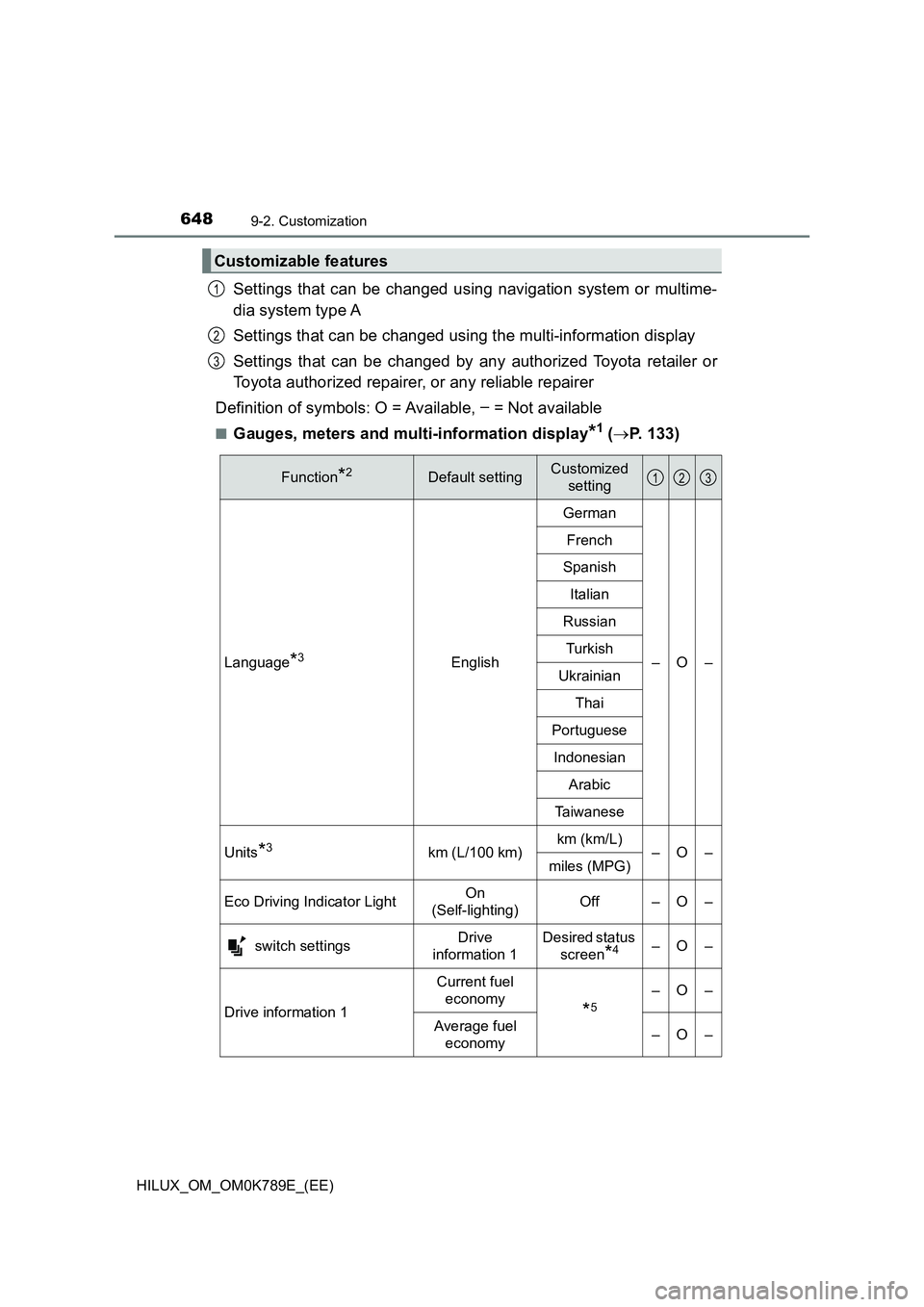
Settings that can be changed using navigation system or multime-
dia system type A
Settings that can be changed using the multi-information display
Settings that can be changed by any authorized Toyota retailer or
Toyota authorized repairer, or any reliable repairer
Definition of symbols: O = Available, – = Not available
■Gauges, meters and multi-information display*1 ( P. 133)
Customizable features
1
2
3
Function*2Default settingCustomized
setting
Language*3English
German
–O–
French
Spanish
Italian
Russian
Turkish
Ukrainian
Thai
Portuguese
Indonesian
Arabic
Taiwanese
Units*3km (L/100 km) km (km/L) –O– miles (MPG)
Eco Driving Indicator Light On
(Self-lighting) Off – O –
switch settings Drive
information 1
Desired status
screen*4–O–
Drive information 1
Current fuel
economy*5
–O–
Average fuel
economy –O–
123
Page 651 of 810
6499-2. Customization
HILUX_OM_OM0K789E_(EE)
9
Vehicle specifications
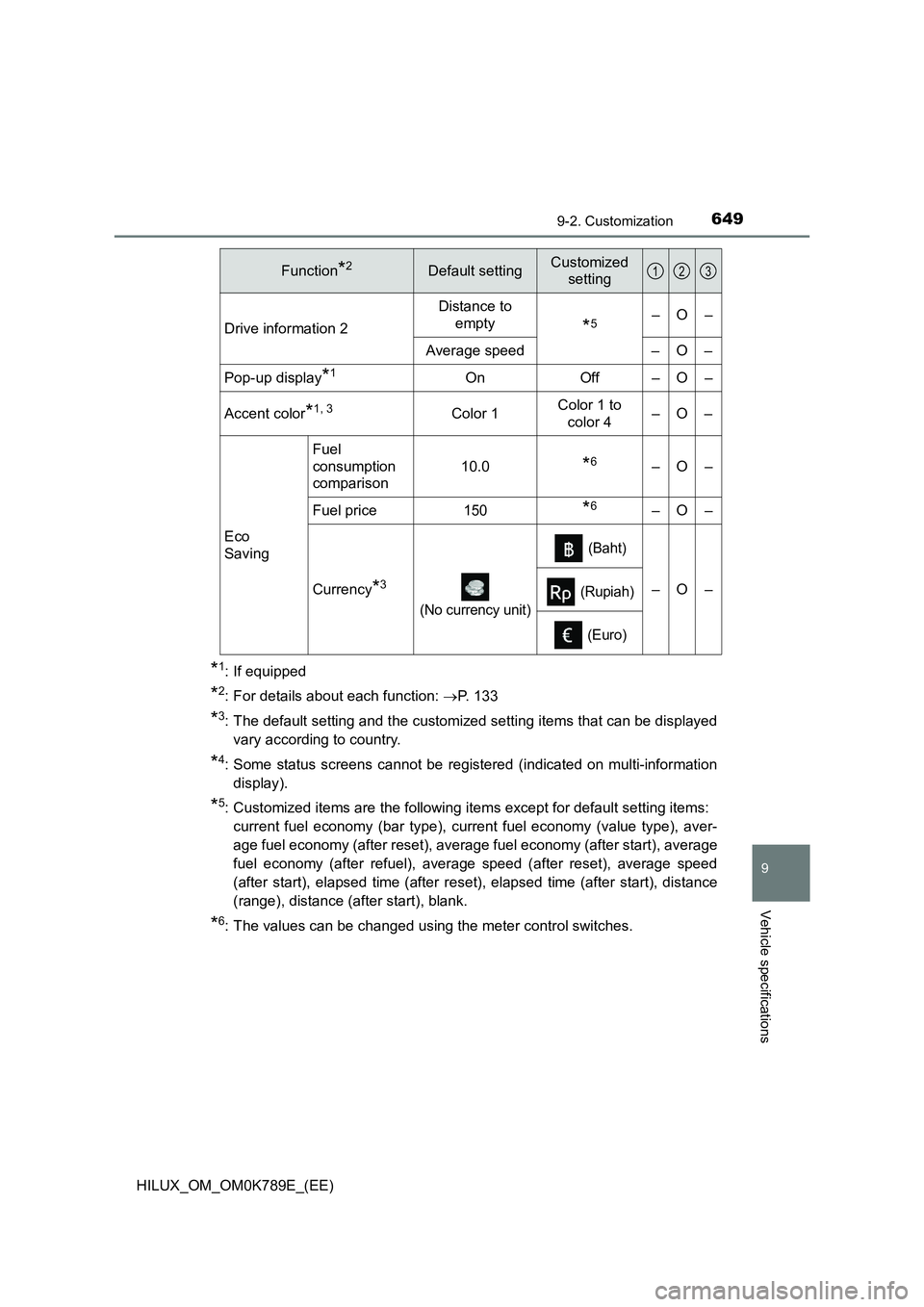
*1: If equipped
*2: For details about each function: P. 133
*3: The default setting and the customized setting items that can be displayed
vary according to country.
*4: Some status screens cannot be registered (indicated on multi-information
display).
*5: Customized items are the following items except for default setting items:
current fuel economy (bar type), curr ent fuel economy (value type), aver-
age fuel economy (after reset), average fuel economy (after start), average
fuel economy (after refuel), average speed (after reset), average speed
(after start), elapsed time (after reset), elapsed time (after start), distance
(range), distance (after start), blank.
*6: The values can be changed using the meter control switches.
Drive information 2
Distance to
empty*5–O–
Average speed – O –
Pop-up display*1On Off – O –
Accent color*1, 3Color 1 Color 1 to
color 4 –O–
Eco
Saving
Fuel
consumption
comparison
10.0*6–O–
Fuel price150*6–O–
Currency*3
(No currency unit)
(Baht)
–O– (Rupiah)
(Euro)
Function*2Default settingCustomized
setting123