handle TOYOTA HILUX 2023 Owners Manual
[x] Cancel search | Manufacturer: TOYOTA, Model Year: 2023, Model line: HILUX, Model: TOYOTA HILUX 2023Pages: 810, PDF Size: 131.54 MB
Page 105 of 810
1031-3. Emergency assistance
1
HILUX_OM_OM0K789E_(EE)
For safety and security
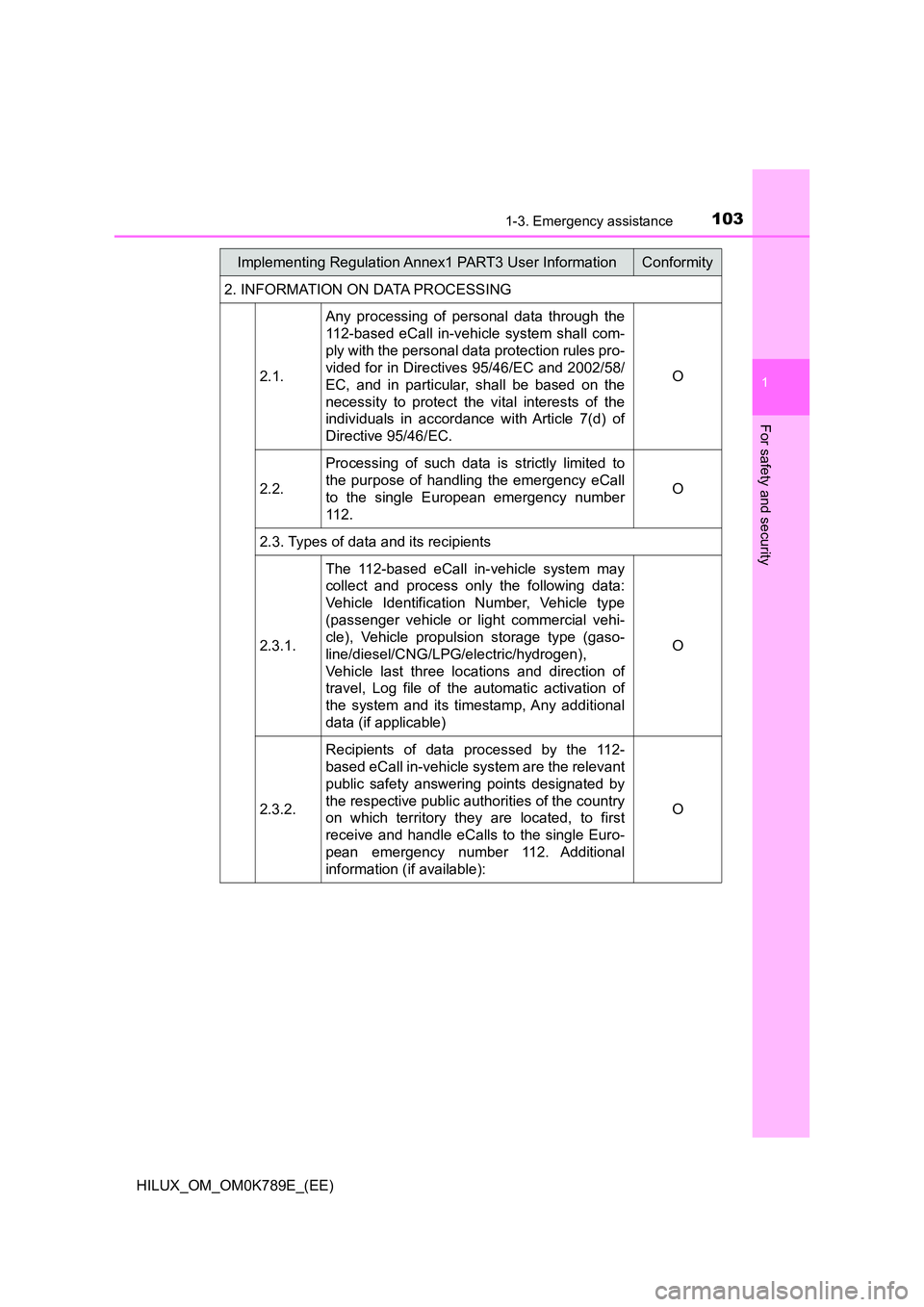
2. INFORMATION ON DATA PROCESSING
2.1.
Any processing of personal data through the
112-based eCall in-vehicle system shall com-
ply with the personal data protection rules pro-
vided for in Directives 95/46/EC and 2002/58/
EC, and in particular, shall be based on the
necessity to protect the vital interests of the
individuals in accordance with Article 7(d) of
Directive 95/46/EC.
O
2.2.
Processing of such data is strictly limited to
the purpose of handling the emergency eCall
to the single European emergency number
112.
O
2.3. Types of data and its recipients
2.3.1.
The 112-based eCall in-vehicle system may
collect and process only the following data:
Vehicle Identification Number, Vehicle type
(passenger vehicle or light commercial vehi-
cle), Vehicle propulsion storage type (gaso-
line/diesel/CNG/LPG/electric/hydrogen),
Vehicle last three locations and direction of
travel, Log file of the automatic activation of
the system and its timestamp, Any additional
data (if applicable)
O
2.3.2.
Recipients of data processed by the 112-
based eCall in-vehicle system are the relevant
public safety answering points designated by
the respective public authorities of the country
on which territory they are located, to first
receive and handle eCalls to the single Euro-
pean emergency number 112. Additional
information (if available):
O
Implementing Regulation Annex1 PART3 User InformationConformity
Page 155 of 810
1533-2. Opening, closing and locking the doors
3
Operation of each component
HILUX_OM_OM0K789E_(EE)
■ Setting the alarm (if equipped)
Locking the doors will set the alarm system. ( P. 115)
■ If a symbol indicating one or more doors are open is shown on the multi-
information display
One or more of the doors is not fully closed. The system also indicates which
doors are not fully closed. If the vehicle reaches a speed of 5 km/h (3 mph),
master warning light flashes and a buzzer sounds to indicate that the door(s)
are not yet fully closed.
Make sure that all the doors are closed.
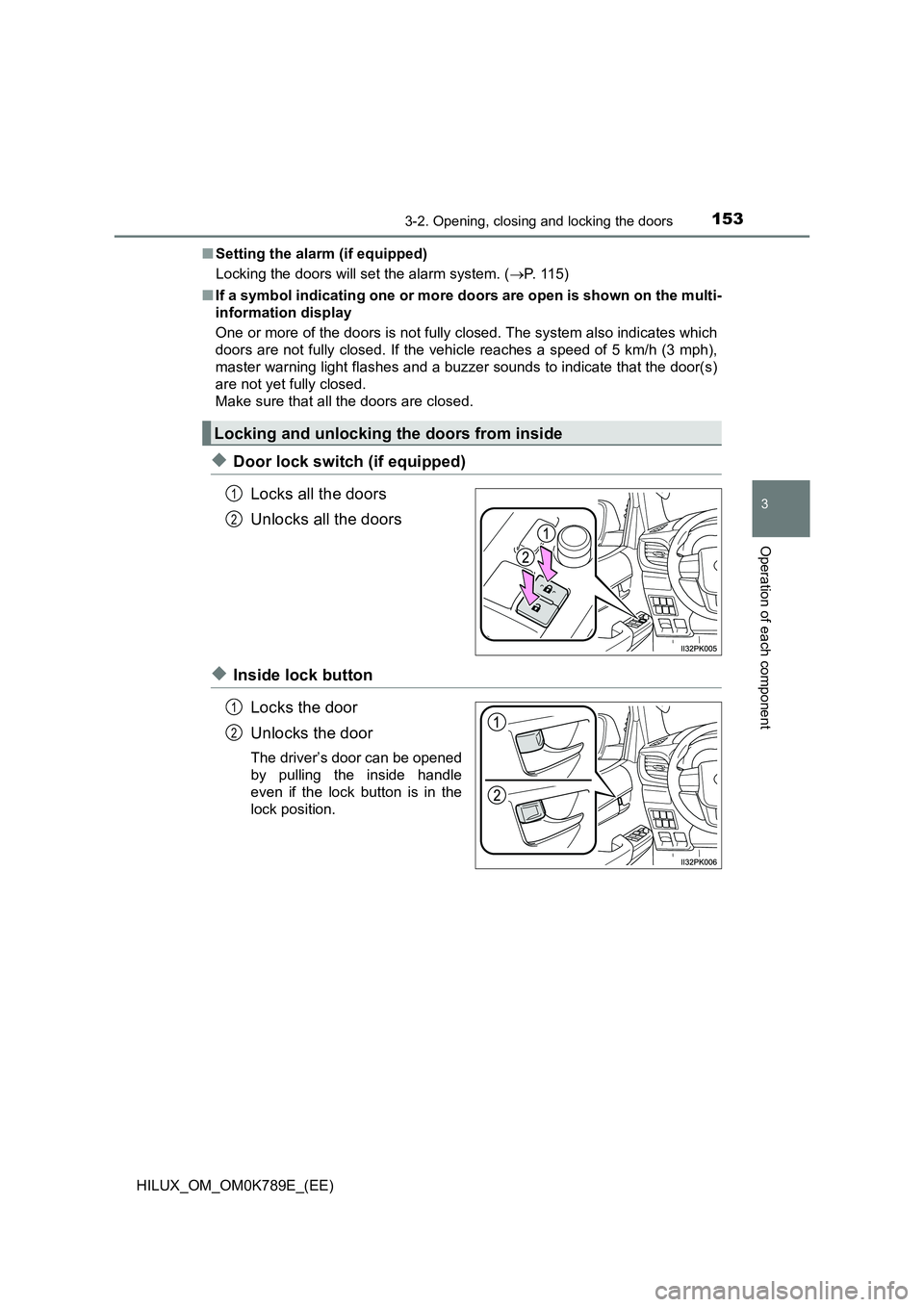
◆Door lock switch (if equipped)
Locks all the doors
Unlocks all the doors
◆Inside lock button
Locks the door
Unlocks the door
The driver’s door can be opened
by pulling the inside handle
even if the lock button is in the
lock position.
Locking and unlocking the doors from inside
1
2
1
2
Page 156 of 810
1543-2. Opening, closing and locking the doors
HILUX_OM_OM0K789E_(EE)
Move the inside lock button to the lock position.
Close the door while pulling the door handle.
Vehicles without smart entry & start system (vehicles with power door
lock system): The driver’s door cannot be locked if either of the door is
open and the key is in the engine switch.
Vehicles with smart entry & start system: The door cannot be locked if
the engine switch is in ACCESSORY or IGNITION ON mode, or the
electronic key is left inside the vehicle.
However, the key may not be detected correctly and the door may be
locked.
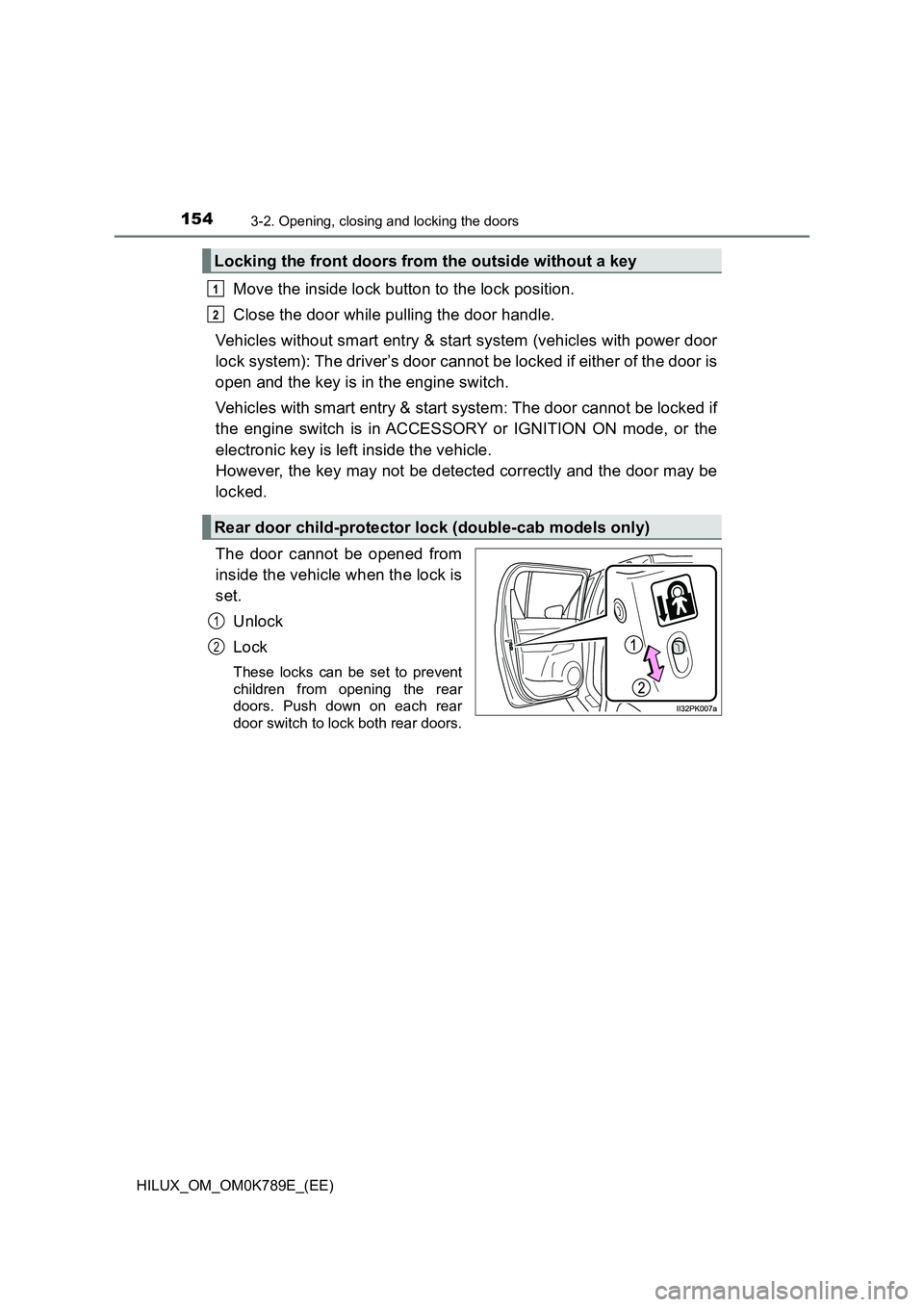
The door cannot be opened from
inside the vehicle when the lock is
set.
Unlock
Lock
These locks can be set to prevent
children from opening the rear
doors. Push down on each rear
door switch to lock both rear doors.
Locking the front doors from the outside without a key
Rear door child-protector lock (double-cab models only)
1
2
1
2
Page 158 of 810
1563-2. Opening, closing and locking the doors
HILUX_OM_OM0K789E_(EE)
■Impact detection door lock release system (if equipped)
In the event that the vehicle is subject to a strong impact, all the doors are
unlocked. Depending on the force of the impact or the type of accident, how-
ever, the system may not operate.
■ Conditions affecting operation
Vehicles without smart entry & start system
The wireless remote control function may not operate normally in the follow-
ing situations:
● Near a TV tower, radio station, electric power plant, airport or other facility
that generates strong radio waves
● When carrying a portable radio, cellular phone or other wireless communi-
cation device
● When multiple wireless keys are in the vicinity
● When the wireless key is in contact with, or is covered by a metallic object
● When a wireless key (that emits radio waves) is being used nearby
● When the wireless key has been left near an electrical appliance such as a
personal computer
Vehicles with smart entry & start system
P. 164
WARNING
■To prevent an accident
Observe the following precautions while driving the vehicle.
Failing to do so may result in a door opening and an occupant falling out,
resulting in death or serious injury.
● Ensure that all doors are properly closed and locked.
● Do not pull the inside handle of the doors while driving.
Be especially careful for the driver’s door, as the door may be opened
even if the inside lock button is in locked position.
● Set the rear door child-protector locks when children are seated in the rear
seats.
Page 159 of 810
157
3
3-2. Opening, closing and locking the doors
Operation of each component
HILUX_OM_OM0K789E_(EE)
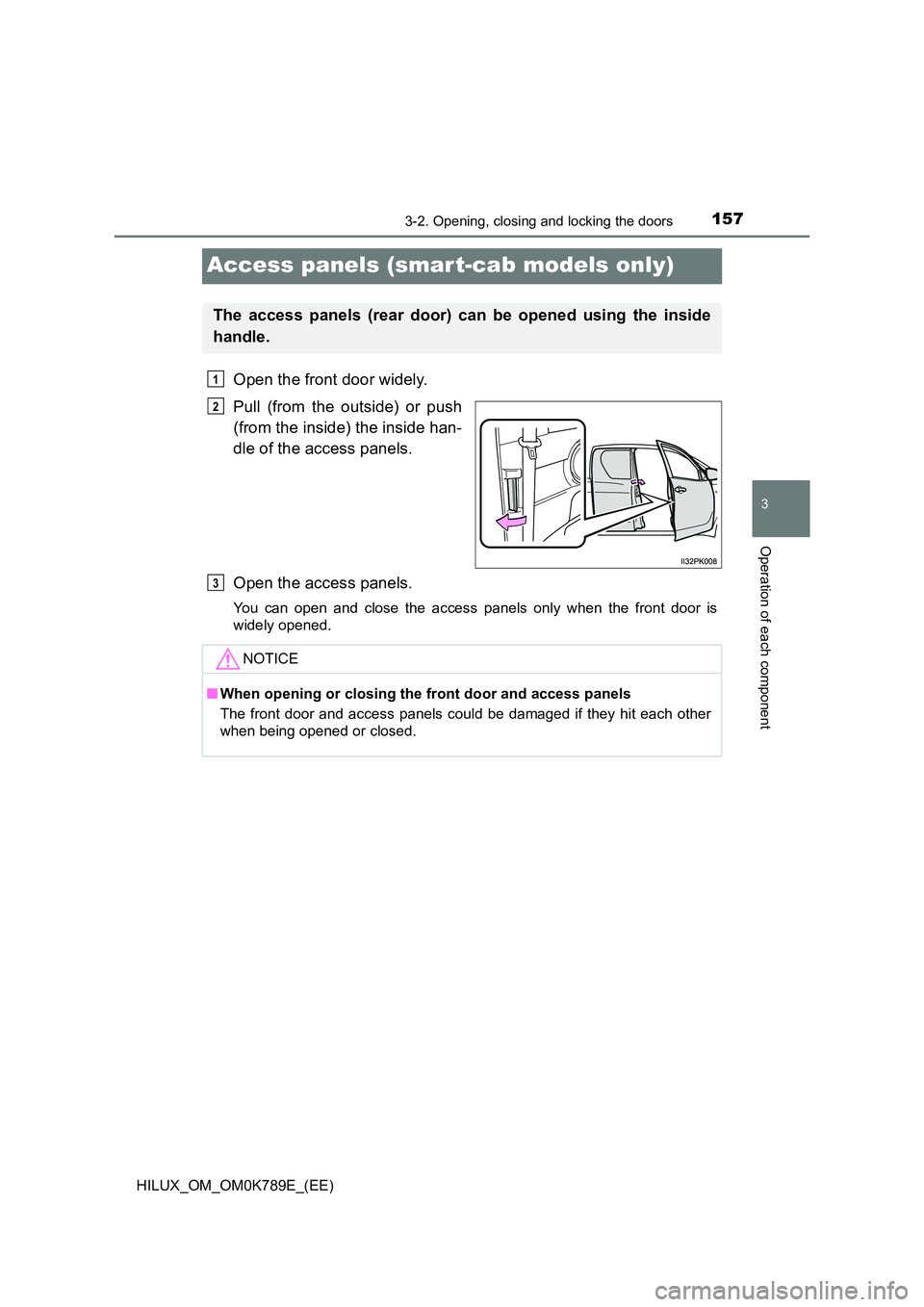
Access panels (smar t-cab models only)
Open the front door widely.
Pull (from the outside) or push
(from the inside) the inside han-
dle of the access panels.
Open the access panels.
You can open and close the access panels only when the front door is
widely opened.
The access panels (rear door) can be opened using the inside
handle.
1
2
NOTICE
■ When opening or closing the front door and access panels
The front door and access panels could be damaged if they hit each other
when being opened or closed.
3
Page 161 of 810
1593-2. Opening, closing and locking the doors
3
Operation of each component
HILUX_OM_OM0K789E_(EE)
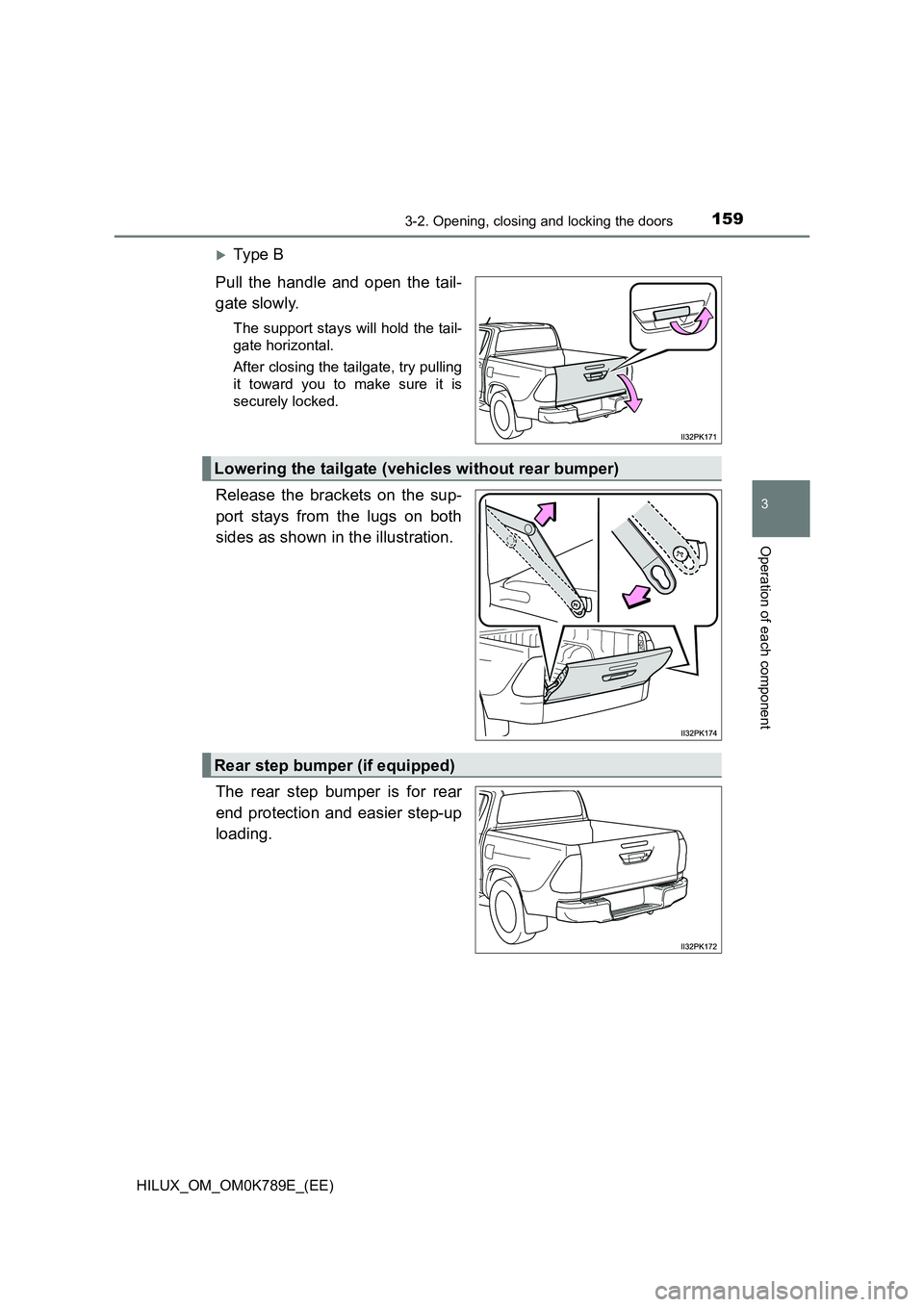
Ty pe B
Pull the handle and open the tail-
gate slowly.
The support stays will hold the tail-
gate horizontal.
After closing the tailgate, try pulling
it toward you to make sure it is
securely locked.
Release the brackets on the sup-
port stays from the lugs on both
sides as shown in the illustration.
The rear step bumper is for rear
end protection and easier step-up
loading.
Lowering the tailgate (vehicles without rear bumper)
Rear step bumper (if equipped)
Page 162 of 810
1603-2. Opening, closing and locking the doors
HILUX_OM_OM0K789E_(EE)
WARNING
Observe the following precautions.
Failure to do so may result in death or serious injury.
■ Caution while driving
● Do not drive with the tailgate open.
● Do not get on the rear step bumper.
■ When opening or closing the tailgate
● Check the safety of the surrounding area, and be careful not to catch fin-
gers etc. in the tailgate.
● Do not allow a child to open or close the tailgate. Doing so may cause the
child’s hand, head, arm or neck to be caught in the tailgate, resulting in
death or serious injury.
● On an incline, it may be more difficult to open or close the tailgate than on
a level surface.
Also, the tailgate may suddenly open or close. Be careful not to catch fin-
gers etc. in the tailgate.
● When pulling the handle or releasing the support stays, hold and operate
them properly. Failure to do so may cause the hands etc. to be caught,
resulting in serious injury or an unexpected accident.
● Be careful when opening or closing the tailgate in windy weather, as it may
forcefully move.
● After closing the tailgate, make sure it is securely locked.
NOTICE
■To prevent damage to the rear step bumper
Do not allow more than one person to get on the rear step bumper at a time.
■ Handling of the tailgate (vehicles with rear bumper)
If the support stays are removed, the tailgate comes into contact with the
rear bumper and may be damaged.
Page 164 of 810
1623-2. Opening, closing and locking the doors
HILUX_OM_OM0K789E_(EE)
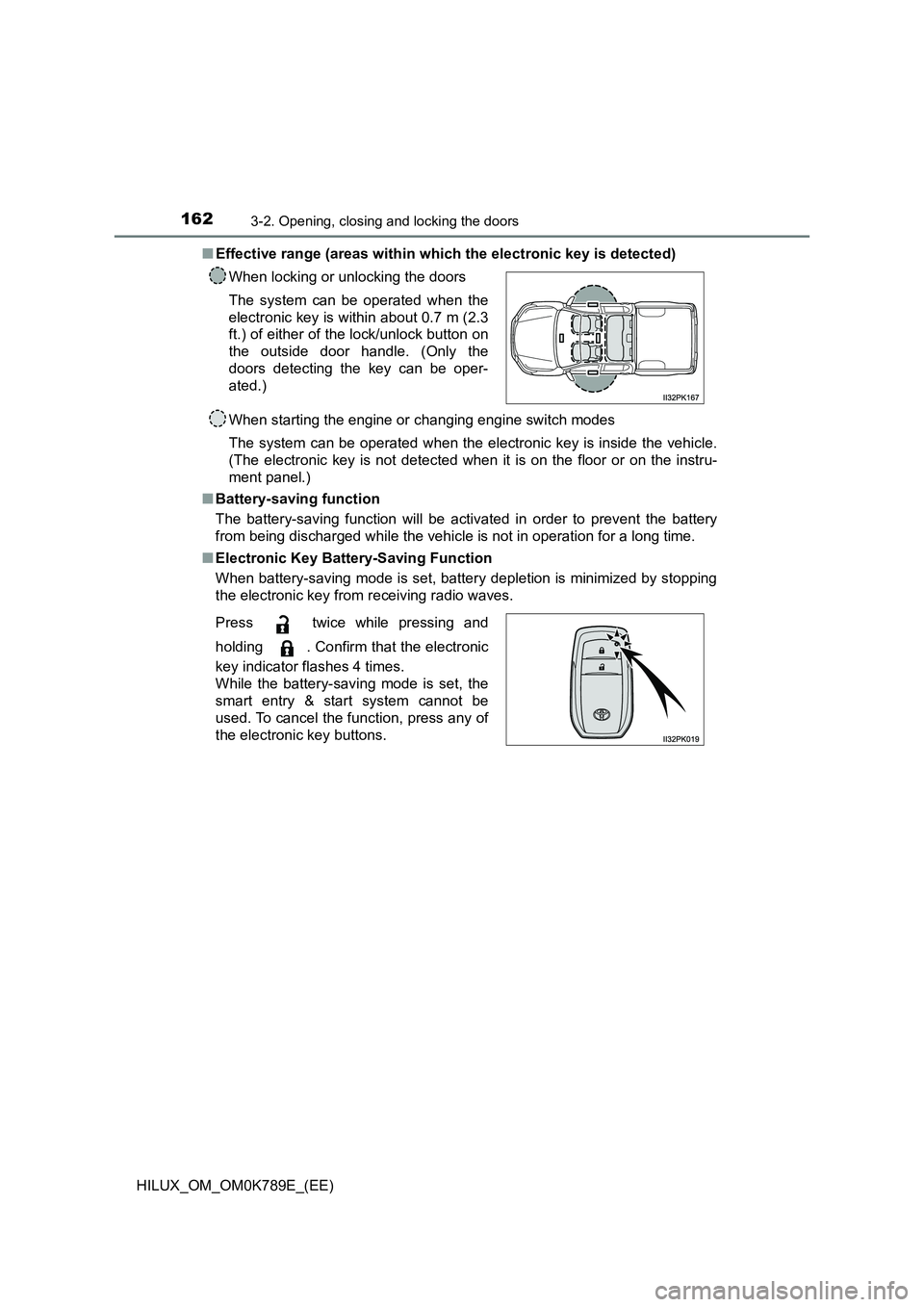
■ Effective range (areas within which the electronic key is detected)
When starting the engine or changing engine switch modes
The system can be operated when the electronic key is inside the vehicle.
(The electronic key is not detected when it is on the floor or on the instru-
ment panel.)
■ Battery-saving function
The battery-saving function will be acti vated in order to prevent the battery
from being discharged while the vehicle is not in operation for a long time.
■ Electronic Key Battery-Saving Function
When battery-saving mode is set, battery depletion is minimized by stopping
the electronic key from receiving radio waves.
When locking or unlocking the doors
The system can be operated when the
electronic key is within about 0.7 m (2.3
ft.) of either of the lock/unlock button on
the outside door handle. (Only the
doors detecting the key can be oper-
ated.)
Press twice while pressing and
holding . Confirm that the electronic
key indicator flashes 4 times.
While the battery-saving mode is set, the
smart entry & start system cannot be
used. To cancel the function, press any of
the electronic key buttons.
Page 167 of 810
1653-2. Opening, closing and locking the doors
3
Operation of each component
HILUX_OM_OM0K789E_(EE)
■ Note for the entry function
● Even if the electronic key is within the effective range (detection areas)
when locking or unlocking the doors, the system may not operate properly if
the electronic key is too close to the window or outside door handle, near
the ground, or in a high place.
● Do not leave the electronic key on top of the instrument panel or near the
door pockets when exiting the vehicle. Depending on the radio wave recep-
tion conditions, it may be detected by the antenna outside the cabin and the
doors will become lockable from the outside, possibly trapping the electronic
key inside the vehicle.
● As long as the electronic key is within the effective range, the doors may be
locked or unlocked by anyone. However, only the doors detecting the elec-
tronic key can be used to unlock the vehicle.
● Even if the electronic key is not inside the vehicle, it may be possible to start
the engine if the electronic key is near the window.
● If the wireless remote control is used to lock the doors when the electronic
key is near the vehicle, there is a possibility that the door may not be
unlocked by the entry function. (Use the wireless remote control to unlock
the doors.)
● Pulling the outside door handle while pressing the lock/unlock button on the
outside door handle may prevent the doors from being unlocked. In this
case, return the door handle to the original position, press the lock/unlock
button again, and check that the doors unlock before pulling the door handle
again.
● Unlocking the vehicle may take more time if another electronic key is within
the effective range.
■ When the vehicle is not driven for extended periods
● To prevent theft of the vehicle, do not leave the electronic key within 2 m
(6 ft.) of the vehicle.
● The smart entry & start system can be deactivated in advance. Ask any
authorized Toyota retailer or Toyota authorized repairer, or any reliable
repairer for details.
■ To operate the system properly
Make sure to carry the electronic key when operating the system. Do not get
the electronic key too close to the vehicle when operating the system from the
outside of the vehicle.
Depending on the position and holding condition of the electronic key, the key
may not be detected correctly and the system may not operate properly. (The
alarm may go off accidentally, or the door lock prevention function may not
operate.)
Page 168 of 810
1663-2. Opening, closing and locking the doors
HILUX_OM_OM0K789E_(EE)
■ If the smart entry & start system does not operate properly
● Locking and unlocking the doors: Use the mechanical key. (P. 600)
● Starting the engine: P. 601
■ Electronic key battery depletion
● The standard battery life is 1 to 2 years.
● If the battery becomes low, an alarm will sound in the cabin when the engine
stops.
● As the electronic key always receives radio waves, the battery will become
depleted even if the electronic key is not used. The following symptoms indi-
cate that the electronic key battery may be depleted. Replace the battery
when necessary. ( P. 516)
• The smart entry & start system or the wireless remote control does not
operate.
• The detection area becomes smaller.
• The LED indicator on the key surface does not turn on.
● To avoid serious deterioration, do not leave the electronic key within 1 m (3
ft.) of the following electrical appliances that produce a magnetic field:
•TVs
• Personal computers
• Cellular phones, cordless phones and battery chargers
• Recharging cellular phones or cordless phones
• Table lamps
• Induction cookers
■ If “Key left inside vehicle” is shown on the multi-information display
An attempt was made to lock the doors using the smart entry & start system
while the electronic key was still inside the vehicle, or an attempt was made
to lock either front door by opening a door and putting the inside lock button
into the lock position, then closing the door by pulling on the outside door
handle with the electronic key still inside the vehicle.
Retrieve the electronic key from the vehicle and lock the doors again.
■ Customization that can be configured at any authorized Toyota retailer
or Toyota authorized repairer, or any reliable repairer
Settings (e.g. smart entry & start system) can be changed.
(Customizable features: P. 647)
■ If the smart entry & start system has been deactivated in a customized
setting
● Locking and unlocking the doors:
Use the wireless remote control or mechanical key. ( P. 151, 600)
● Starting the engine and changing engine switch modes: P. 601
● Stopping the engine: P. 224