ignition TOYOTA iM 2016 Owners Manual (in English)
[x] Cancel search | Manufacturer: TOYOTA, Model Year: 2016, Model line: iM, Model: TOYOTA iM 2016Pages: 28, PDF Size: 0.76 MB
Page 5 of 28
OVERVIEW
FEATURES/OPERATIONS
SAFETY AND EMERGENCY FEATURES
3
1
For more information, refer to Scion.com to download the SCION Audio System Owner’s
Manual.
2
If equipped.
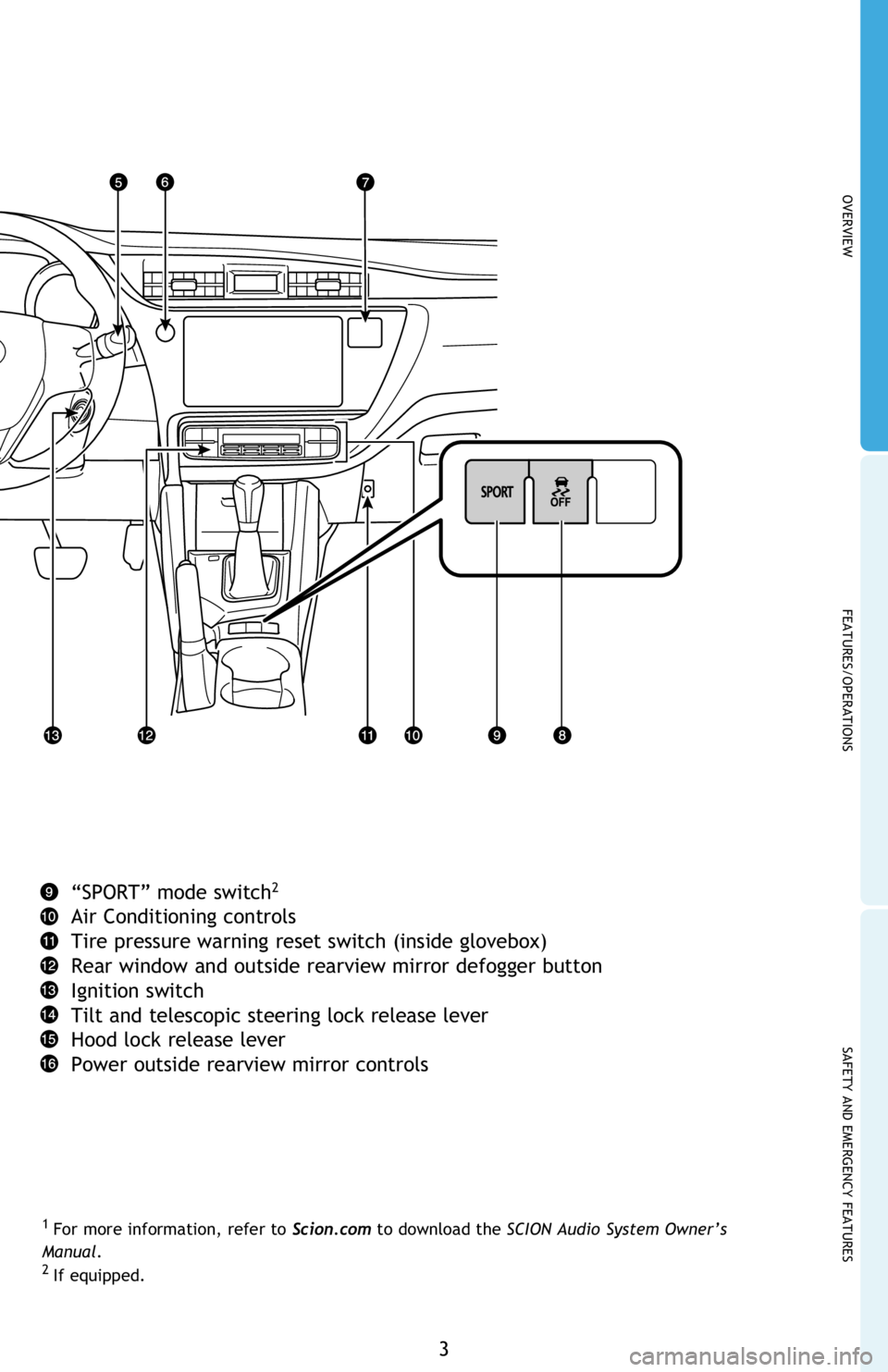
“SPORT” mode switch2
Air Conditioning controls
Tire pressure warning reset switch (inside glovebox)
Rear window and outside rearview mirror defogger button
Ignition switch
Tilt and telescopic steering lock release lever
Hood lock release lever
Power outside rearview mirror controls
Page 10 of 28
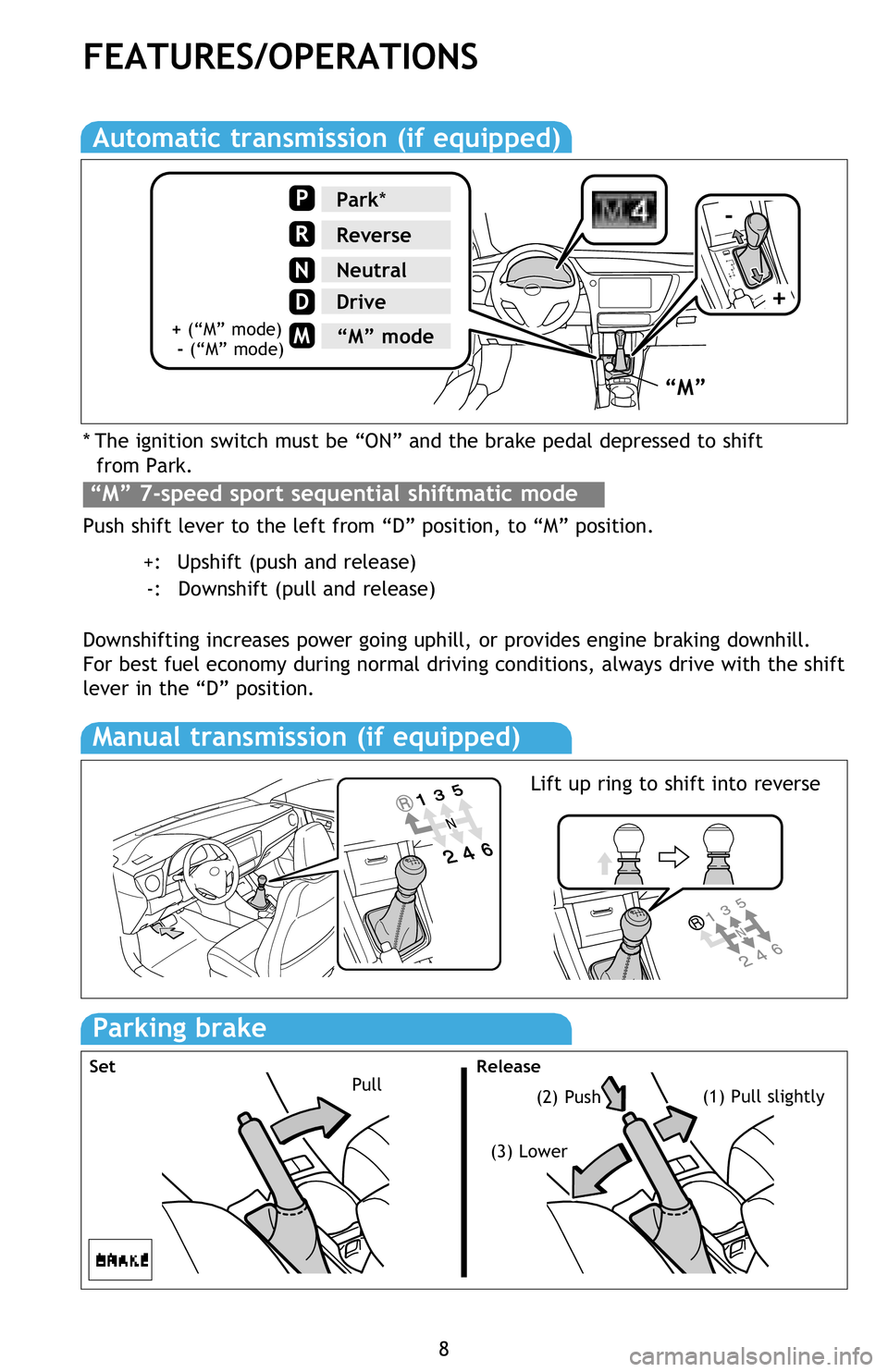
* The ignition switch must be “ON” and the brake pedal depressed to shift
from Park.
Push shift lever to the left from “D” position, to “M” position.
+: Upshift (push and release)
-: Downshift (pull and release)
Downshifting increases power going uphill, or provides engine braking downhill.
For best fuel economy during normal driving conditions, always drive with the shift
lever in the “D” position.
8
FEATURES/OPERATIONS
Automatic transmission (if equipped)
“M” 7-speed sport sequential shiftmatic mode
Manual transmission (if equipped)
Parking brake
Pull(2) Push(1) Pull slightly
(3) Lower
Set Release
“M”
-
+
Park*
Reverse
Neutral
Drive
P
R
N
D
M“M” mode+ (“M” mode)
- (“M” mode)
Lift up ring to shift into reverse
Page 14 of 28
12
FEATURES/OPERATIONS
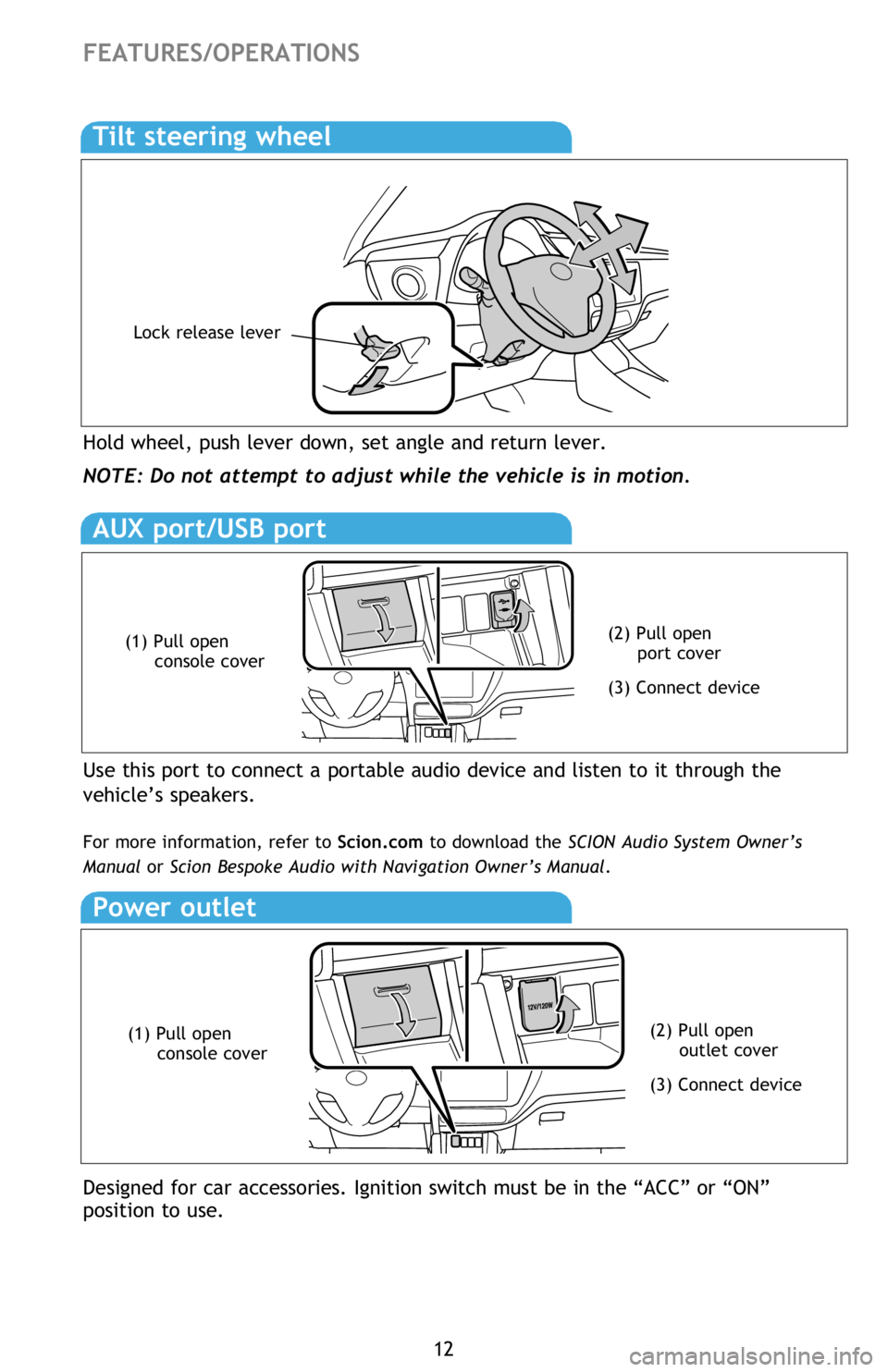
Hold wheel, push lever down, set angle and return lever.
NOTE: Do not attempt to adjust while the vehicle is in motion.
Tilt steering wheel
Lock release lever
AUX port/USB port
Use this port to connect a portable audio device and listen to it through the
vehicle’s speakers.
For more information, refer to Scion.com to download the SCION Audio System Owner’s
Manual or Scion Bespoke Audio with Navigation Owner’s Manual.
(2) Pull open
port cover
(3) Connect device
(1) Pull open
console cover
Power outlet
Designed for car accessories. Ignition switch must be in the “ACC” or “ON”
position to use.
(2) Pull open
outlet cover
(3) Connect device
(1) Pull open
console cover
Page 16 of 28
14
If you shift the vehicle out of the “R” position, the screen returns to the
previous image.
The rear view monitor system is a device intended to supplement the driver
when motoring in reverse and should not be relied upon solely. Drivers should
check behind the vehicle before entering and are reminded to use the rear
view and side mirrors once seated to ensure the intended path is clear before
moving the vehicle.
FEATURES/OPERATIONS
INFORMATION
If the camera lens becomes dirty, it cannot transmit a clear image. If water
droplets, snow or mud adhere to the lens, rinse with water and wipe with a soft
clean cloth. If the lens is extremely dirty, wash it with a mild cleaner and rinse
immediately.
AREA DISPLAYED ON SCREEN
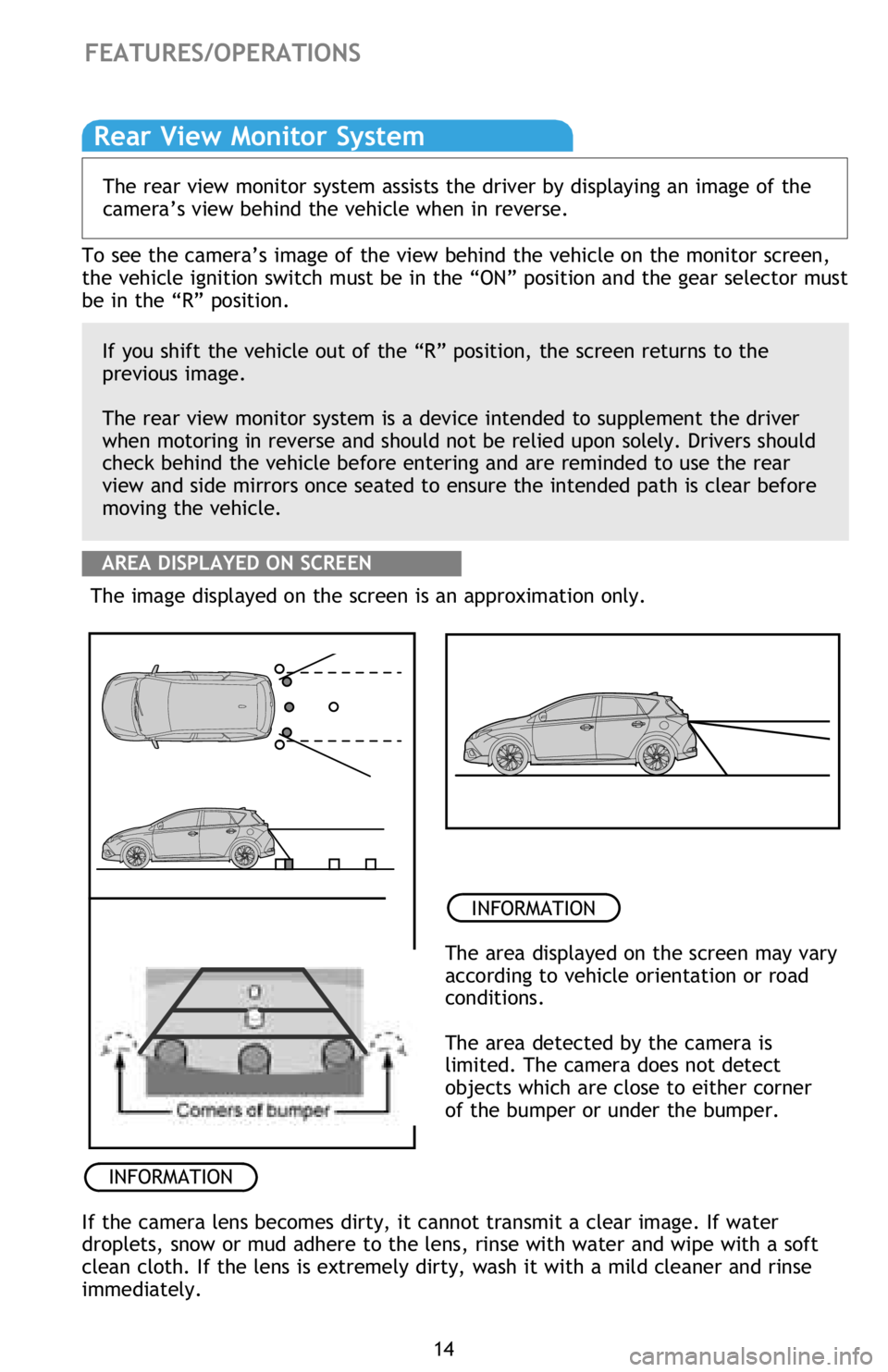
The image displayed on the screen is an approximation only.
INFORMATION
The area displayed on the screen may vary
according to vehicle orientation or road
conditions.
The area detected by the camera is
limited. The camera does not detect
objects which are close to either corner
of the bumper or under the bumper.
Rear View Monitor System
The rear view monitor system assists the driver by displaying an image of the
camera’s view behind the vehicle when in reverse.
To see the camera’s image of the view behind the vehicle on the monitor screen,
the vehicle ignition switch must be in the “ON” position and the gear selector must
be in the “R” position.
Page 22 of 28
20
SAFETY AND EMERGENCY FEATURES
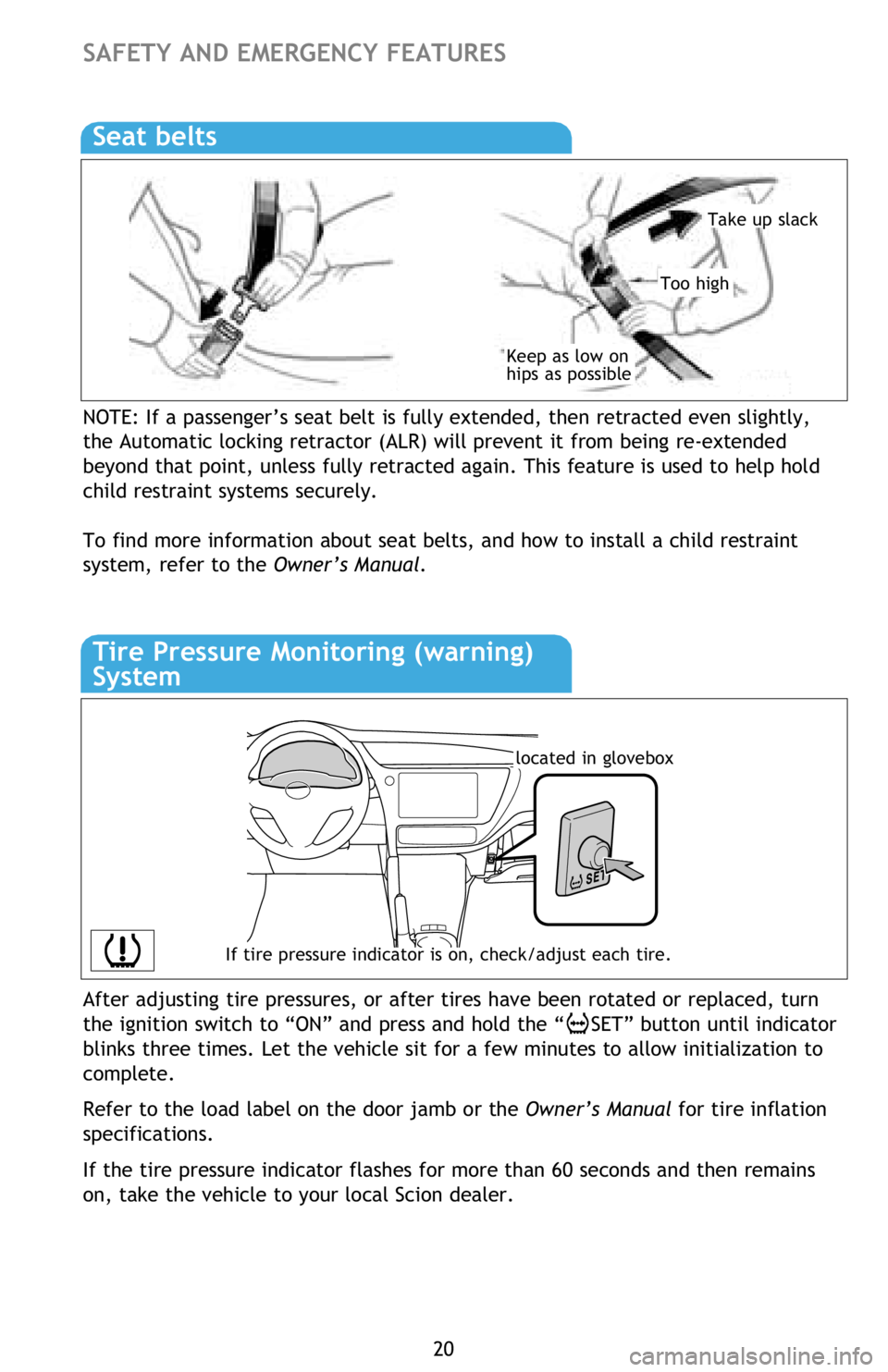
NOTE: If a passenger’s seat belt is fully extended, then retracted even slightly,
the Automatic locking retractor (ALR) will prevent it from being re-extended
beyond that point, unless fully retracted again. This feature is used to help hold
child restraint systems securely.
To find more information about seat belts, and how to install a child restraint
system, refer to the Owner’s Manual.
Keep as low on
hips as possible
Take up slack
Too high
Seat belts
If tire pressure indicator is on, check/adjust each tire.
located in glovebox
Tire Pressure Monitoring (warning)
System
After adjusting tire pressures, or after tires have been rotated or replaced, turn
the ignition switch to “ON” and press and hold the “
SET” button until indicator
blinks three times. Let the vehicle sit for a few minutes to allow initialization to
complete.
Refer to the load label on the door jamb or the Owner’s Manual for tire inflation
specifications.
If the tire pressure indicator flashes for more than 60 seconds and then remains
on, take the vehicle to your local Scion dealer.