key TOYOTA LAND CRUISER 2000 Owner's Manual
[x] Cancel search | Manufacturer: TOYOTA, Model Year: 2000, Model line: LAND CRUISER, Model: TOYOTA LAND CRUISER 2000Pages: 235, PDF Size: 5.13 MB
Page 80 of 235

L/C 100_U
102 2000 L/C 100 (OM60866U)
3. Close the door.
The open door warning light should go
off.
4. Place the four −wheel drive control lever
in ”N” position and the selector lever
in ”P” position.
5. Turn the ignition key to ”ACC”. The SRS warning light should come on.
It goes off after 6 seconds.
6. Turn the ignition key to ”ON”, but do not start the engine.
All the service reminder indicators ex-
cept the open door warning light and
SRS warning light should come on. The
”ABS”, ”VSC/TRAC”, ”VSC OFF”, ”AC-
TIVE TRAC”, and slip indicator light go
off after a few seconds.
There may be the case that the ”ABS”,
”VSC/TRAC” and ”VSC OFF” stay on
for about 60 seconds after the engine
is started. It is normal if they go out
after a while.
If any service reminder indicator or warn-
ing buzzer does not function as described
above, either the bulb is burned out or the
circuit is in need of repair. Have it
checked by your Toyota dealer as soon as
possible.
Page 82 of 235
L/C 100_U
104 2000 L/C 100 (OM60866U)
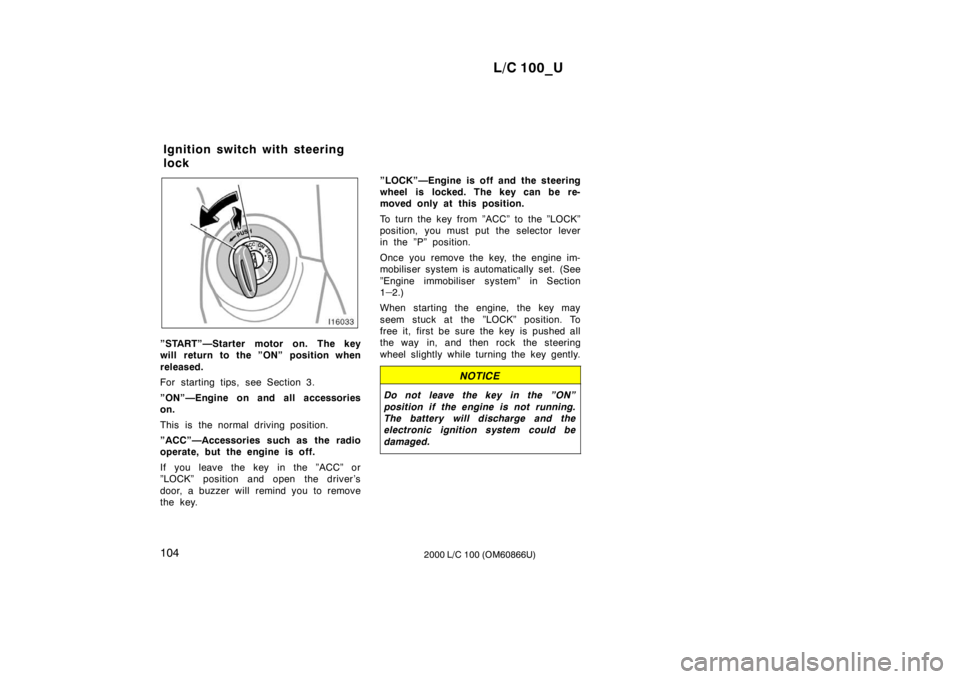
”START”—Starter motor on. The key
will return to the ”ON” position when
released.
For starting tips, see Section 3.
”ON”—Engine on and all accessories on.
This is the normal driving position.
”ACC”—Accessories such as the radio
operate, but the engine is off.
If you leave the key in the ”ACC” or
”LOCK” position and open the driver’s
door, a buzzer will remind you to remove
the key.”LOCK”—Engine is off and the steering
wheel is locked. The key can be re-
moved only at this position.
To turn the key from ”ACC” to the ”LOCK”
position, you must put the selector lever
in the ”P” position.
Once you remove the key, the engine im-
mobiliser system is automatically set. (See
”Engine immobiliser system” in Section 1
–
2.)
When starting the engine, the key may
seem stuck at the ”LOCK” position. To
free it, first be sure the key is pushed all
the way in, and then rock the steering
wheel slightly while turning the key gently.
NOTICE
Do not leave the key in the ”ON”
position if the engine is not running.
The battery will discharge and the
electronic ignition system could be damaged.
Ignition switch with steering
lock
Page 83 of 235
L/C 100_U105
2000 L/C 100 (OM60866U)
Automatic transmission
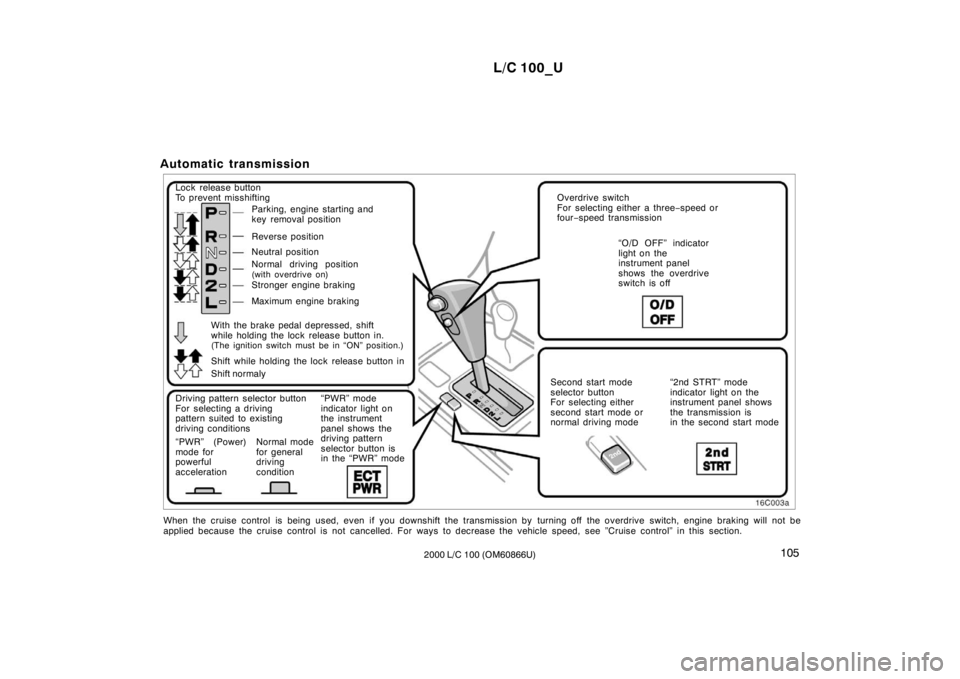
Lock release button
To prevent misshifting
Parking, engine starting and
key removal position
Reverse position
Neutral position
Normal driving position
(with overdrive on)
Stronger engine braking
Maximum engine braking
Driving pattern selector button
For selecting a driving
pattern suited to existing
driving conditions
“PWR” (Power)
mode for
powerful
acceleration Normal mode
for general
driving
condition“PWR” mode
indicator light on
the instrument
panel shows the
driving pattern
selector button is
in the “PWR” mode Overdrive switch
For selecting either a three
−speed or
four −speed transmission
“O/D OFF” indicator
light on the
instrument panel
shows the overdrive
switch is off
Second start mode
selector button
For selecting either
second start mode or
normal driving mode “2nd STRT” mode
indicator light on the
instrument panel shows
the transmission is
in the second start mode
Shift while holding the lock release button in
With the brake pedal depressed, shift
while holding the lock release button in.
(The ignition switch must be in “ON” position.)
Shift normaly
When the cruise control is being used, even if you downshift the transmis sion by turning off the overdrive switch, engine braking will not be
applied because the cruise control is not cancelled. For ways to decrease t he vehicle speed, see ”Cruise control” in this section.
Page 94 of 235
L/C 100_U
11 6 2000 L/C 100 (OM60866U)
The brake actuator temperature increases
during the active traction control system
or vehicle skid control system operating.
If the brake actuator temperature becomes
too high while the active traction control
system or vehicle skid control system is
operating, a buzzer will start to sound
intermittently to indicate that the active
traction control system can no longer op-
erate. In this case, immediately stop your
vehicle at a safe place. If the system
continues to operate, the buzzer sound
changes from intermittent to continuous
and at the same time, “VSC/TRAC” warn-
ing light will come on. After the continu-
ous buzzer sound stopped after about 3
seconds, the active traction control system
temporarily stops operating in order to
protect the brake actuator. (Although the
active traction control system does not
operate, there is no problem to continue
your driving.) The system will be automati-
cally restored after a short time and
“VSC/TRAC” warning light goes off if the
accelerator pedal is released.
When the “ABS” warning light come on,
the active traction control system is not
operating.
The “VSC/TRAC” warning light will come
on when the ignition key is turned “ON”,
and will go off after a few seconds.
The “VSC/TRAC” warning light may stay
on for 60 seconds after the engine is
started. It is normal if it goes off after a
few seconds.
Depressing the brake pedal repeatedly
may turn on the “VSC/TRAC” warning
light. It is normal if it goes off after a few
seconds.
When the “VSC/TRAC” warning light
comes on the active traction control sys-
tem is not operating, but there is no prob-
lem if you continue to drive.
In the following cases, contact your Toyota
dealer:
The “VSC/TRAC” warning light does not
come on after the ignition key is turned
“ON”.
The “VSC/TRAC” remains on after the
ignition key is turned “ON”.
CAUTION
Under certain slippery road condi-
tions, full traction of the vehicles and
power to 4 wheels may not be main-
tained, even though the active trac-
tion control system is in operation.
Do not drive the vehicle under any
speed or maneuvering conditions
which will cause the vehicle to lose
traction. In situations where the road
surface is covered with ice or snow,
your vehicle should be fitted with
snow tires or tire chains. Always
drive at an appropriate and cautious
speed for the road conditions pres-
ent.
Page 96 of 235
L/C 100_U
11 8 2000 L/C 100 (OM60866U)
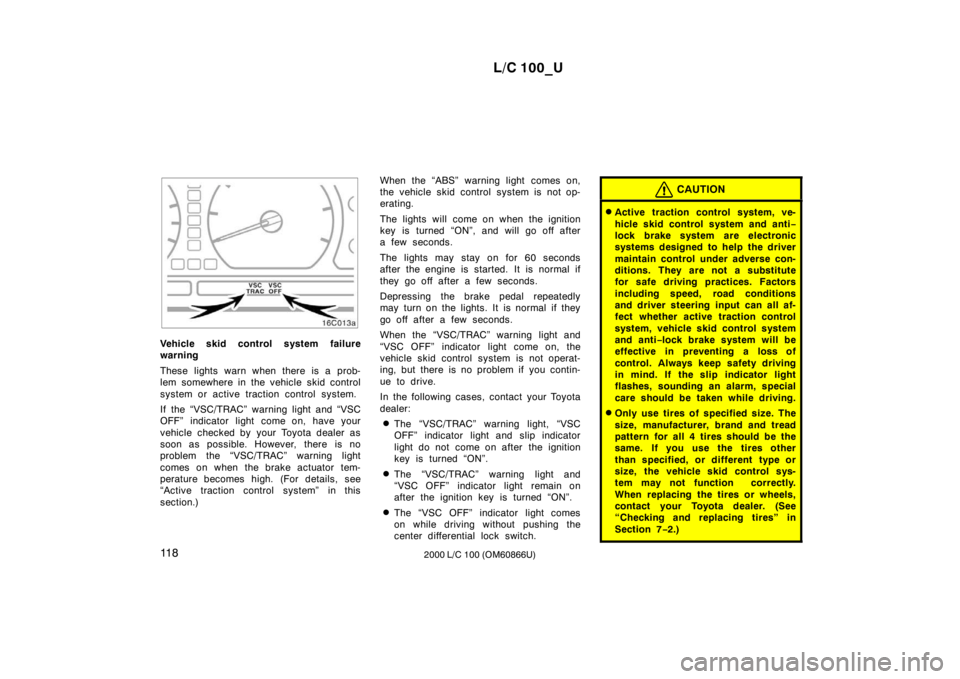
Vehicle skid control system failure
warning
These lights warn when there is a prob-
lem somewhere in the vehicle skid control
system or active traction control system.
If the “VSC/TRAC” warning light and “VSC
OFF” indicator light come on, have your
vehicle checked by your Toyota dealer as
soon as possible. However, there is no
problem the “VSC/TRAC” warning light
comes on when the brake actuator tem-
perature becomes high. (For details, see
“Active traction control system” in this
section.)When the “ABS” warning light comes on,
the vehicle skid control system is not op-
erating.
The lights will come on when the ignition
key is turned “ON”, and will go off after
a few seconds.
The lights may stay on for 60 seconds
after the engine is started. It is normal if
they go off after a few seconds.
Depressing the brake pedal repeatedly
may turn on the lights. It is normal if they
go off after a few seconds.
When the “VSC/TRAC” warning light and
“VSC OFF” indicator light come on, the
vehicle skid control system is not operat-
ing, but there is no problem if you contin-
ue to drive.
In the following cases, contact your Toyota
dealer:
The “VSC/TRAC” warning light, “VSC
OFF” indicator light and slip indicator
light do not come on after the ignition
key is turned “ON”.
The “VSC/TRAC” warning light and
“VSC OFF” indicator light remain on
after the ignition key is turned “ON”.
The “VSC OFF” indicator light comes
on while driving without pushing the
center differential lock switch.
CAUTION
Active traction control system, ve-
hicle skid control system and anti −
lock brake system are electronic
systems designed to help the driver
maintain control under adverse con-
ditions. They are not a substitute
for safe driving practices. Factors
including speed, road conditions
and driver steering input can all af-
fect whether active traction control
system, vehicle skid control system
and anti −lock brake system will be
effective in preventing a loss of
control. Always keep safety driving
in mind. If the slip indicator light
flashes, sounding an alarm, special
care should be taken while driving.
Only use tires of specified size. The
size, manufacturer, brand and tread
pattern for all 4 tires should be the
same. If you use the tires other
than specified, or different type or
size, the vehicle skid control sys-
tem may not function correctly.
When replacing the tires or wheels,
contact your Toyota dealer. (See
“Checking and replacing tires” in
Section 7 −2.)
Page 98 of 235
L/C 100_U
120 2000 L/C 100 (OM60866U)
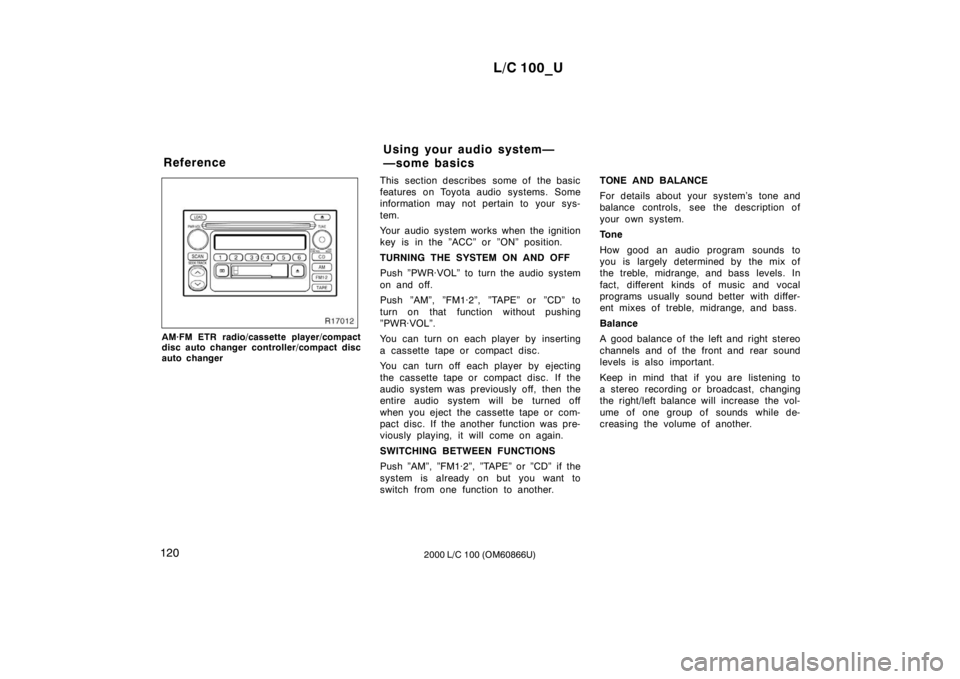
AM·FM ETR radio/cassette player/compact
disc auto changer controller/compact disc
auto changerThis section describes some of the basic
features on Toyota audio systems. Some
information may not pertain to your sys-
tem.
Your audio system works when the ignition
key is in the ”ACC” or ”ON” position.
TURNING THE SYSTEM ON AND OFF
Push ”PWR·VOL” to turn the audio system
on and off.
Push ”AM”, ”FM1·2”, ”TAPE” or ”CD” to
turn on that function without pushing
”PWR·VOL”.
You can turn on each player by inserting
a cassette tape or compact disc.
You can turn off each player by ejecting
the cassette tape or compact disc. If the
audio system was previously off, then the
entire audio system will be turned off
when you eject the cassette tape or com-
pact disc. If the another function was pre-
viously playing, it will come on again.
SWITCHING BETWEEN FUNCTIONS
Push ”AM”, ”FM1·2”, ”TAPE” or ”CD” if the
system is alr
eady on but you want to
switch from one function to another. TONE AND BALANCE
For details about your system’s tone and
balance controls, see the description of
your own system.
Tone
How good an audio program sounds to
you is largely determined by the mix of
the treble, midrange, and bass levels. In
fact, different kinds of music and vocal
programs usually sound better with differ-
ent mixes of treble, midrange, and bass.
Balance
A good balance of the left and right stereo
channels and of the front and rear sound
levels is also important.
Keep in mind that if you are listening to
a stereo recording or broadcast, changing
the right/left balance will increase the vol-
ume of one group of sounds while de-
creasing the volume of another.
Reference
Using your audio system—
—some basics
Page 99 of 235
L/C 100_U121
2000 L/C 100 (OM60866U)
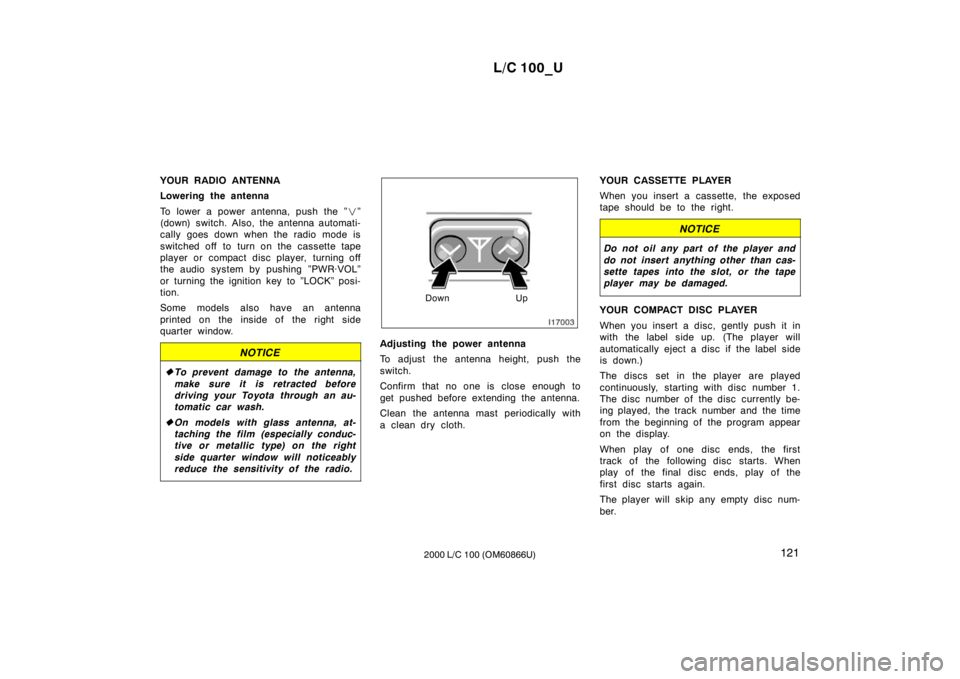
YOUR RADIO ANTENNA
Lowering the antenna
To lower a power antenna, push the ”
”
(down) switch. Also, the antenna automati-
cally goes down when the radio mode is
switched off to turn on the cassette tape
player or compact disc player, turning off
the audio system by pushing ”PWR·VOL”
or turning the ignition key to ”LOCK” posi-
tion.
Some models also have an antenna
printed on the inside of the right side
quarter window.
NOTICE
To prevent damage to the antenna,
make sure it is retracted before
driving your Toyota through an au-
tomatic car wash.
On models with glass antenna, at-
taching the film (especially conduc-
tive or metallic type) on the right
side quarter window will noticeably
reduce the sensitivity of the radio.
Down Up
Adjusting the power antenna
To adjust the antenna height, push the
switch.
Confirm that no one is close enough to
get pushed before extending the antenna.
Clean the antenna mast periodically with
a clean dry cloth. YOUR CASSETTE PLAYER
When you insert a cassette, the exposed
tape should be to the right.
NOTICE
Do not oil any part of the player and
do not insert anything other than cas-
sette tapes into the slot, or the tape
player may be damaged.
YOUR COMPACT DISC PLAYER
When you insert a disc, gently push it in
with the label side up. (The player will
automatically eject a disc if the label side
is down.)
The discs set in the player are played
continuously, starting with disc number 1.
The disc number of the disc currently be-
ing played, the track number and the time
from the beginning of the program appear
on the display.
When play of one disc ends, the first
track of the following disc starts. When
play of the final disc ends, play of the
first disc starts again.
The player will skip any empty disc num-
ber.
Page 104 of 235

L/C 100_U
126 2000 L/C 100 (OM60866U)
If “WAIT” appears on the display,
it indi-
cates that the inside of the player unit
may be too hot due to the very high ambi-
ent temperature. Remove the disc or mag-
azine from the player and allow the player
to cool down.
If “Err 1” appears on the display, it
indicates the disc is dirty, damaged. Clean
the disc or insert it correctly.
If “Err 3” appears on the display, it
indicates there is a trouble inside the sys-
tem. Eject the disc. Set the disc again.
If the malfunction is not rectified, take
your vehicle to your Toyota dealer.
DISC
By using this button, you can select a
disc you wish to listen to.
Push either side of the button until the
number of the disc you want to listen to
appears on the display.
Dolby
B NR
If you are listening to a tape that was
recorded with Dolby B Noise Reduction,
push the button marked with the double −D
symbol. The double −D symbol will appear
on the display. Push the button again to
turn off Dolby B NR. The Dolby NR mode reduces tape noise
by about 10 dB. For best sound reproduc-
tion, play your tapes with this button on
or off according to the mode used for
recording the tape.
: Dolby noise reduction manufactured under license from
Dolby Laboratories Licensing Corporation. “DOLBY” and the
double D symbol
are trademarks of Dolby Laboratories
Licensing Corporation.
FM1·2
Push “FM1·2” to turn on the radio and
select the FM band. “FM1” or “FM2” will
appear on the display. This system allows
you to set twelve FM stations, two for
each button.
If the audio system is off, you can turn
on the radio by pushing “FM1·2”. Also,
push “FM1·2” to switch from cassette or
compact disc operation to radio operation. LOAD
This button is used to load the compact
discs in the compact disc auto changer
which is integrated with the radio and cas-
sette player. This compact disc auto
changer can store up to 6 di scs.
The key must be in the “ACC” or “ON”
position. Loading one compact disc only—
To load one compact disc only, quickly
push and release the button. If you hold
the button too long (if the audio system
is on at this time, you hear a beep.), the
mechanism will change to the mode for
loading multiple compact discs. After
pushing the button, insert a compact disc.
At this time, the indicators on both sides
of the slot are flashing. After the disc is
loaded, the shutter of the slot will close
and the indicators will stop flashing.
If no compact disc is inserted, the shutter
will close after 15 seconds.
Loading multiple compact di
scs—
To load multiple compact discs, push and
hold (until you hear a beep when the au-
dio system is on). After pushing the but-
ton, insert the first compact disc. At this
time, the indicators on both sides of the
slot are flashing. After the disc is loaded,
the shutter of the slot will close and the
indicators will stop flashing. After a few
seconds, the shutter will automatically
open again so the next disc can be in-
serted. The same process can be applied
for loading the rest of the di scs.
If no compact disc is inserted, the shutter
will close after 15 seconds.
Page 124 of 235
L/C 100_U
146 2000 L/C 100 (OM60866U)
Clock
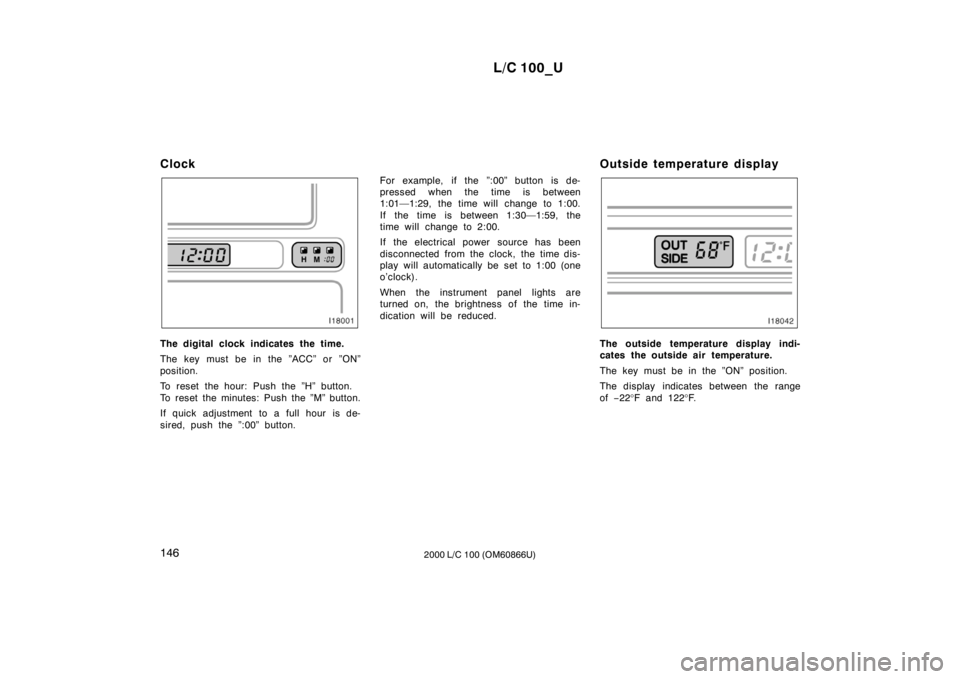
The digital clock indicates the time.
The key must be in the ”ACC” or ”ON”
position.
To reset the hour: Push the ”H” button.
To reset the minutes: Push the ”M” button.
If quick adjustment to a full hour is de-
sired, push the ”:00” button.
For example, if the ”:00” button is de-
pressed when the time is between
1:01—1:29, the time will change to 1:00.
If the time is between 1:30—1:59, the
time will change to 2:00.
If the electrical power source has been
disconnected from the clock, the time dis-
play will automatically be set to 1:00 (one
o’clock).
When the instrument panel lights are
turned on, the brightness of the time in-
dication will be reduced.
Outside temperature displayThe outside temperature display indi-
cates the outside air temperature.
The key must be in the ”ON” position.
The display indicates between the range of
−22 °F and 122 °F.
Page 125 of 235
L/C 100_U147
2000 L/C 100 (OM60866U)
Cigarette lighter and ashtray
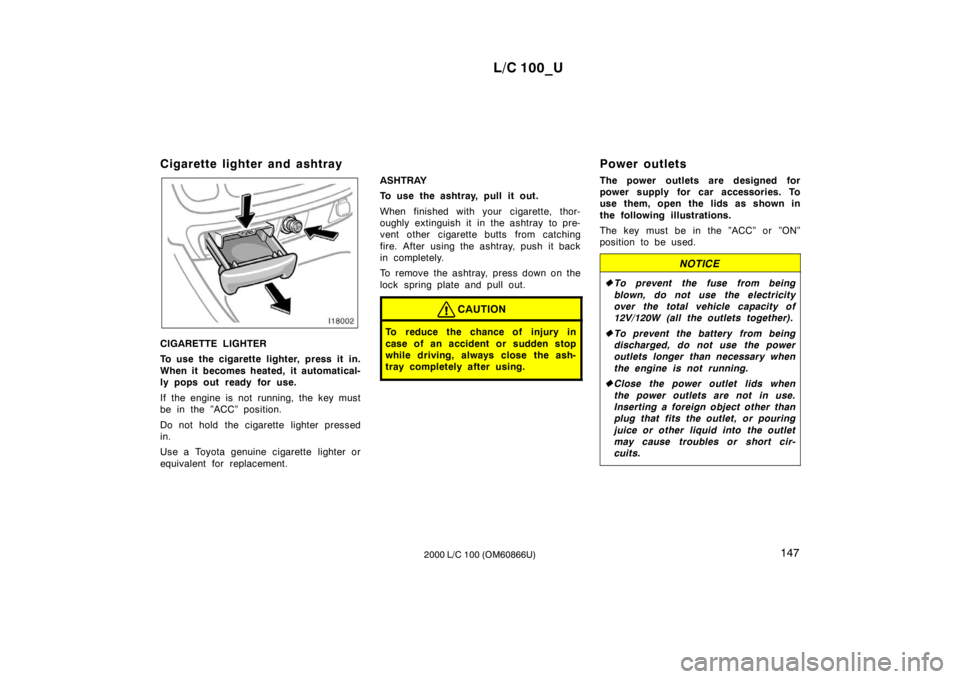
CIGARETTE LIGHTER
To use the cigarette lighter, press it in.
When it becomes heated, it automatical-
ly pops out ready for use.
If the engine is not running, the key must
be in the ”ACC” position.
Do not hold the cigarette lighter pressed
in.
Use a Toyota genuine cigarette lighter or
equivalent for replacement.
ASHTRAY
To use the ashtray, pull it out.
When finished with your cigarette, thor-
oughly extinguish it in the ashtray to pre-
vent other cigarette butts from catching
fire. After using the ashtray, push it back
in completely.
To remove the ashtray, press down on the
lock spring plate and pull out.
CAUTION
To reduce the chance of injury in
case of an accident or sudden stop
while driving, always close the ash-
tray completely after using.
Power outlets
The power outlets are designed for
power supply for car accessories. To
use them, open the lids as shown in
the following illustrations.
The key must be in the ”ACC” or ”ON”
position to be used.
NOTICE
To prevent the fuse from being
blown, do not use the electricity
over the total vehicle capacity of
12V/120W (all the outlets together).
To prevent the battery from being
discharged, do not use the power
outlets longer than necessary when
the engine is not running.
Close the power outlet lids when
the power outlets are not in use.
Inserting a foreign object other than
plug that fits the outlet, or pouring
juice or other liquid into the outlet
may cause troubles or short cir-
cuits.