audio TOYOTA LAND CRUISER 2012 User Guide
[x] Cancel search | Manufacturer: TOYOTA, Model Year: 2012, Model line: LAND CRUISER, Model: TOYOTA LAND CRUISER 2012Pages: 692, PDF Size: 29.3 MB
Page 246 of 692
246 2-4. Using other driving systems
L/C200_EE (OM60G38E)
The shape of the obstacle may prevent the sensor from detecting it. Pay
particular attention to the following obstacles:
• Wires, fences, ropes, etc.
• Cotton, snow and other materials that absorb sound waves
• Sharply-angled objects
• Low obstacles
• Tall obstacles with upper sections projecting outwards in the direction
of your vehicle
The following situations may occur during use.
• Depending on the shape of the obstacle and other factors, the detec-
tion distance may shorten, or detection may be impossible.
• Obstacles may not be detected if they are too close to the sensor
• There will be a short delay between obstacle detection and display.
Even at slow speeds, there is a possibility that the obstacle will come
within the sensor’s detection areas before the display is shown and the
warning beep sounds.
• Thin posts or objects lower than the sensor may not be detected for
collision when approached, even if they have been detected once.
• It might be difficult to hear beeps due to the volume of audio system or
air flow noise of air conditioning system.
If a message is displayed on the multi-information display
P. 579
Page 334 of 692
334
L/C200_EE (OM60G38E)
3-1. Using the air conditioning
system and defogger
Front air conditioning
system ............................ 336
Rear air conditioning
system ............................ 350
Heater idle up switch ........ 354
Power heater .................... 355
Rear window and
outside rear view mirror
defoggers........................ 356
Windshield wiper de-icer... 358
3-2. Using the audio system
Audio system types........... 360
Using the radio.................. 362
Using the CD player.......... 366
Playing back MP3 and
WMA discs...................... 373
Operating an iPod ............. 380
Operating
a USB memory ............... 388
Optimal use of
the audio system ............ 396
Using the AUX port ........... 398
Using the steering
switches .......................... 399
Page 335 of 692
3Interior features
335
L/C200_EE (OM60G38E)
3-3. Using the Bluetooth® audio
system
Bluetooth
® audio
system ............................ 402
Using the Bluetooth
®
audio system .................. 407
Operating a Bluetooth
®
enabled portable
player .............................. 410
Setting up a Bluetooth
®
enabled portable
player .............................. 413
Bluetooth
® audio
system setup .................. 417
3-4. Using the hands-free system
(for cellular phone)
Hands-free system
(for cellular phone).......... 418
Using the hands-free
system ............................ 423
Making a phone call.......... 430
Setting a cellular phone .... 434
Security and
system setup .................. 438
Using the phone book....... 442
3-5. Using the interior lights
Interior lights list................ 448
• Interior lights ................... 449
• Personal lights ................ 4503-6. Using the storage features
List of storage features ..... 452
• Glove box ....................... 453
• Console box.................... 454
• Overhead console .......... 455
• Cup holders .................... 456
• Bottle holders.................. 458
• Card holder ..................... 460
• Auxiliary box ................... 460
3-7. Other interior features
Cool box............................ 461
Sun visors ......................... 463
Vanity mirror ..................... 464
Clock ................................. 465
Outside temperature
display ............................ 466
Ashtray.............................. 468
Cigarette lighter ................ 470
Power outlet ...................... 471
Heated steering wheel ...... 474
Seat heaters and
ventilators ....................... 476
Armrest ............................. 480
Assist grip ......................... 481
Floor mats ......................... 482
Luggage compartment
features........................... 484
Page 360 of 692
360
L/C200_EE (OM60G38E)
3-2. Using the audio system
Audio system types
With navigation system
Owners of models equipped with a navigation system should
refer to the “Navigation System Owner’s Manual”.
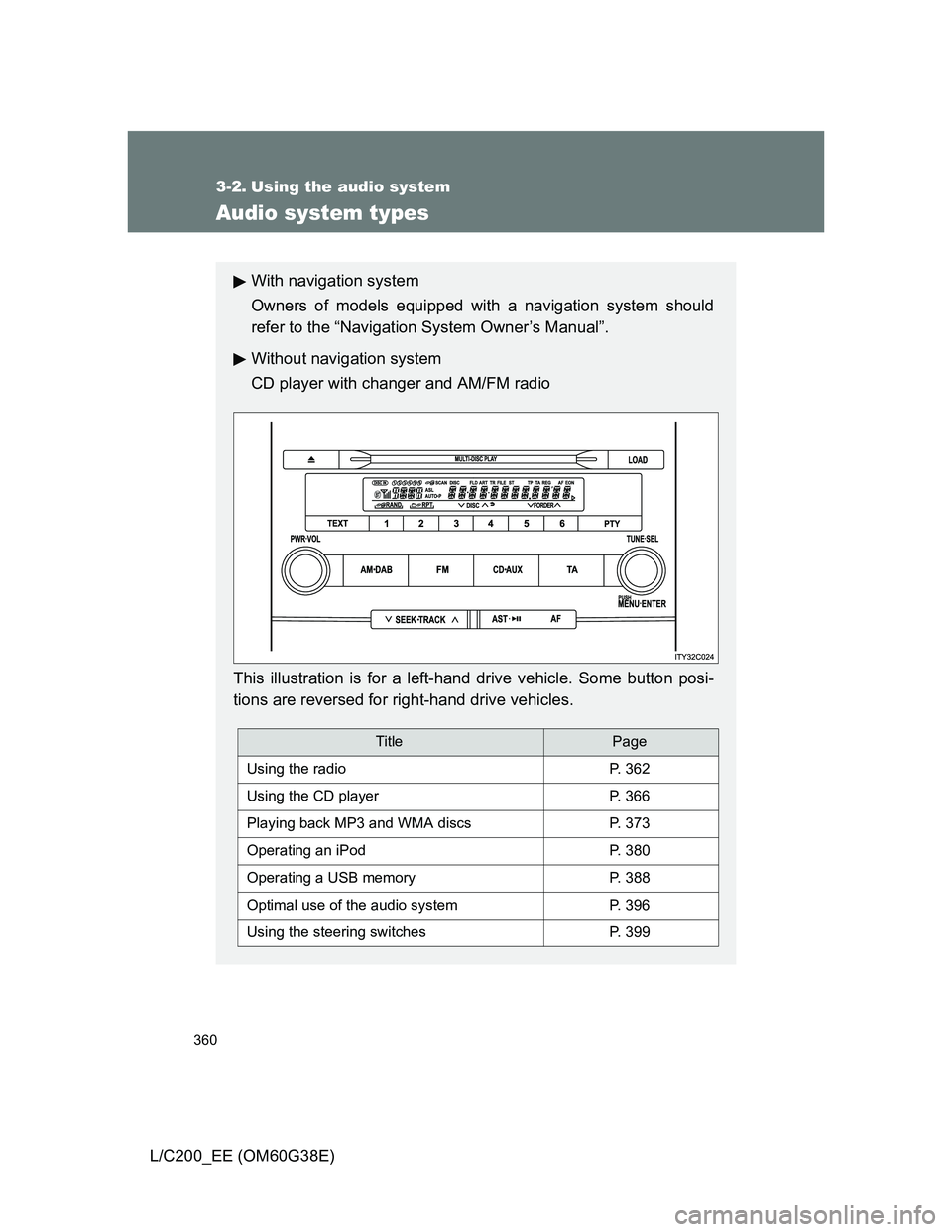
Without navigation system
CD player with changer and AM/FM radio
This illustration is for a left-hand drive vehicle. Some button posi-
tions are reversed for right-hand drive vehicles.
TitlePage
Using the radioP. 362
Using the CD playerP. 366
Playing back MP3 and WMA discsP. 373
Operating an iPodP. 380
Operating a USB memoryP. 388
Optimal use of the audio systemP. 396
Using the steering switchesP. 399
Page 361 of 692
361 3-2. Using the audio system
3
Interior features
L/C200_EE (OM60G38E)
Using cellular phones
Interference may be heard through the audio system’s speakers if a cellular
phone is being used inside or close to the vehicle while the audio system is
operating.
NOTICE
To prevent battery discharge
Do not leave the audio system on longer than necessary with the engine off.
To avoid damaging the audio system
Take care not to spill drinks or other fluids over the audio system.
Page 362 of 692
362
3-2. Using the audio system
L/C200_EE (OM60G38E)
Using the radio
Setting station presets
Manually
In AF-ON mode the radio changes frequency to the strongest sig-
nal of the selected station.
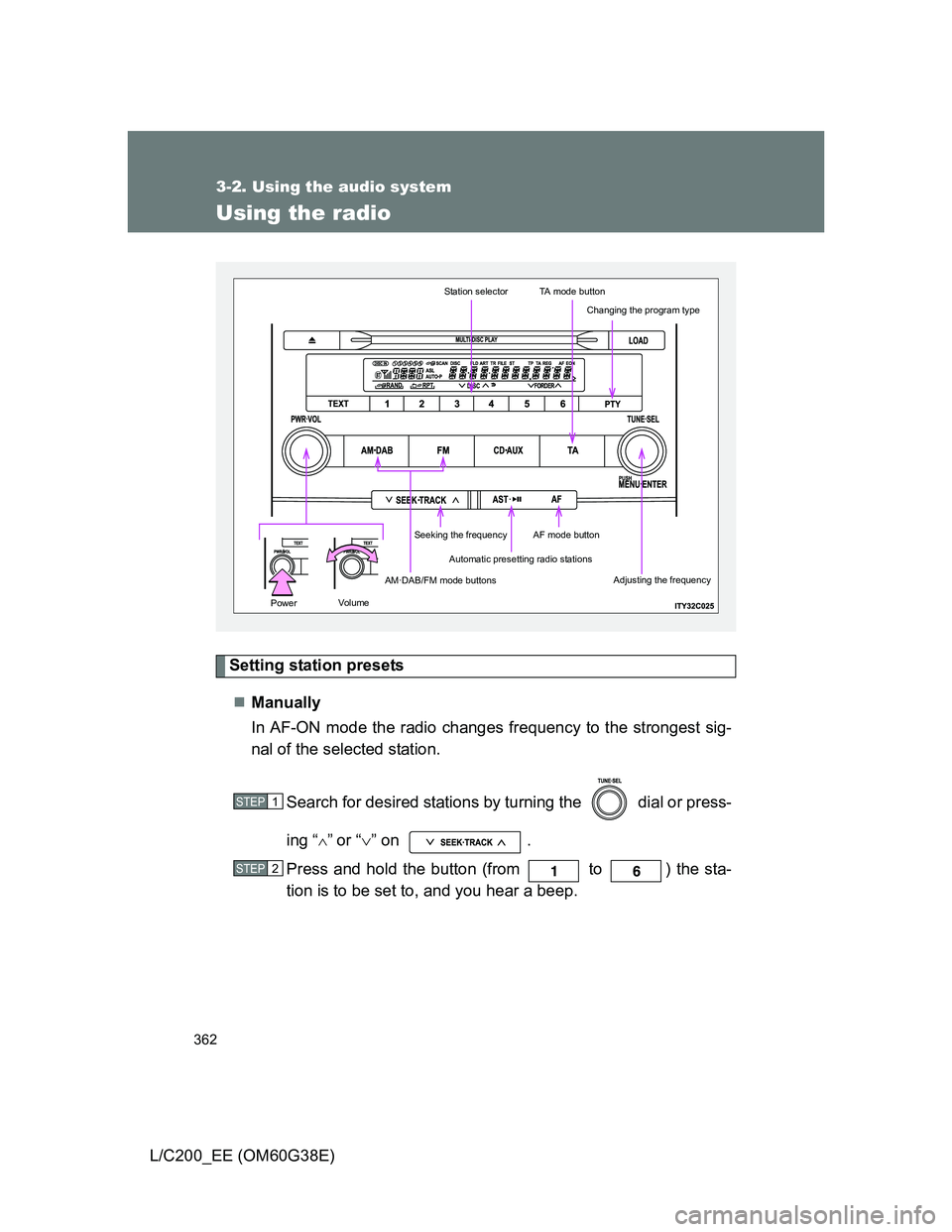
Search for desired stations by turning the dial or press-
ing “
”or “” on .
Press and hold the button (from to ) the sta-
tion is to be set to, and you hear a beep.
Automatic presetting radio stations
Station selectorTA mode button
AM·DAB/FM mode buttons
Seeking the frequencyAF mode button
Changing the program type
Adjusting the frequency
Volu mePower
STEP1
STEP2
Page 363 of 692
363 3-2. Using the audio system
3
Interior features
L/C200_EE (OM60G38E)Automatically
Press and hold until you hear a beep.
Up to 6 stations are set in order of reception quality. When the settings
are finished, 2 beeps will be heard.
In the FM1 or FM2 mode, the stations automatically set by the audio sys-
tem will be set in the FM3 presets.
RDS (Radio Data System)
This feature allows your radio to receive station and program informa-
tion (classical, news, etc.) from radio stations that broadcast this
information.
Listening to stations of the same network
Press .
AF-ON, REG-OFF modes: A station among those of the same net-
work with strong reception is selected.
Switching between different regional
programs of the same station might
occur.
AF-ON, REG-ON modes: A station among those of the same net-
work with strong reception and broad-
casting the same program is selected.
Each time is pressed, the mode changes in the order of AF-ON,
REG-OFF AF-ON, REG-ON AF-OFF, REG-OFF.
Specifying program type
Press .
Each time is pressed, the program type changes in the order of
“NEWS” “SPORTS” “TALK” “POP” “CLASSICS”.
Page 364 of 692
364 3-2. Using the audio system
L/C200_EE (OM60G38E)Traffic information
Press .
TP mode: The system automatically switches to traffic information
when a broadcast with a traffic information signal is
received.
The station returns to the previous one when the traffic infor-
mation ends.
TA mode: Traffic information can be heard only when a signal is
received. The system switches to the mute mode when
a signal is not received. In the CD or MP3/WMA mode,
the system automatically switches to traffic information
when a signal is received.
The audio system returns to the mute, CD or MP3/WMA
mode when the traffic information ends.
The audio system mode changes as follows each time is
pressed.
FM modes: TP TA OFF
Modes other than the radio modes: TA OFF
Emergency broadcast reception mode
“ALARM” appears in the display in the event that an emergency
broadcast is received, and the emergency broadcast is aired.
Page 365 of 692
365 3-2. Using the audio system
3
Interior features
L/C200_EE (OM60G38E)
EON (Enhanced Other Network) system (for traffic announcement
function)
If the RDS station (with EON data) you are listening to is not broadcasting a
traffic information program and the audio system is in the TA (traffic
announcement) mode, the radio will be switched automatically to a station
broadcasting a traffic information program in the EON AF list when traffic
information begins.
When the battery is disconnected
All preset stations are erased.
Reception sensitivity
Maintaining perfect radio reception at all times is difficult due to the con-
tinually changing position of the antenna, differences in signal strength
and surrounding objects, such as trains, transmitters, etc.
When is used, automatic station selection and automatic registering
of stations may not be possible.
The radio antenna is mounted inside the rear quarter window. To main-
tain clear radio reception, do not attach metallic window tinting or other
metallic objects to the antenna wire mounted inside the rear quarter win-
dow.
Digital Audio Broadcast (DAB) radio
The optional radio antenna and tuner are necessary for the use of Digital
Audio Broadcast (DAB) radio.
Page 366 of 692
366
3-2. Using the audio system
L/C200_EE (OM60G38E)
Using the CD player
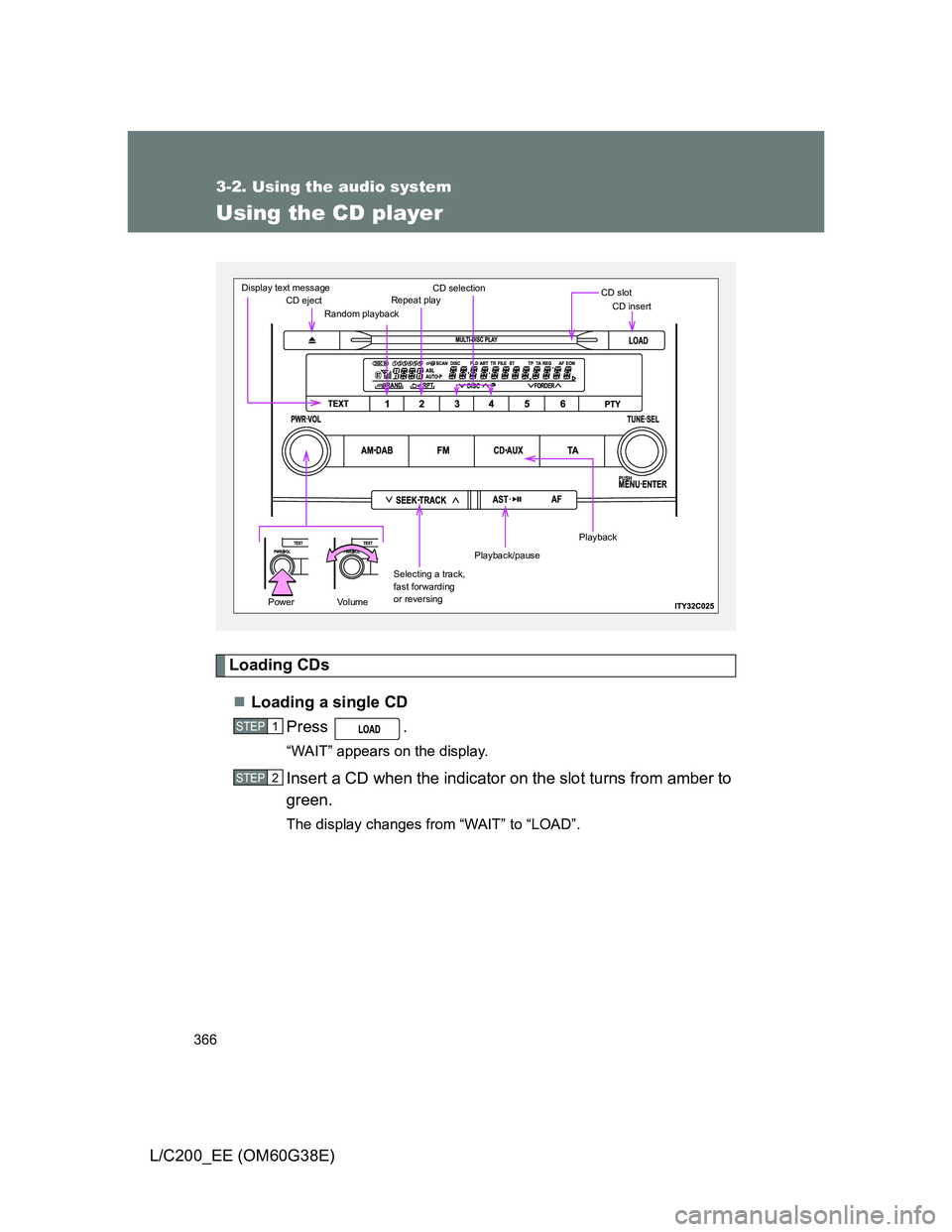
Loading CDs
Loading a single CD
Press .
“WAIT” appears on the display.
Insert a CD when the indicator on the slot turns from amber to
green.
The display changes from “WAIT” to “LOAD”.
CD ejectRandom playbackRepeat playCD selectionCD slotCD insert
Selecting a track,
fast forwarding
or reversing
Playback/pause
Display text message
PowerVo l u m e
Playback
STEP1
STEP2