height TOYOTA LAND CRUISER 2012 User Guide
[x] Cancel search | Manufacturer: TOYOTA, Model Year: 2012, Model line: LAND CRUISER, Model: TOYOTA LAND CRUISER 2012Pages: 692, PDF Size: 29.3 MB
Page 184 of 692
184 2-1. Driving procedures
L/C200_EE (OM60G38E)
CAUTION
When stopped on an inclined surface, use the brake pedal and parking
brake to prevent the vehicle from rolling backward or forward and causing
an accident.
Do not adjust the position of the steering wheel, the seat, or the inside or
outside rear view mirrors while driving.
Doing so may result in a loss of vehicle control that can cause accidents
that may result in death or serious injury.
Always check that all passengers’ arms, heads or other parts of their bod-
ies are not outside the vehicle, as this may result in death or serious injury.
Vehicles with the 4-Wheel AHC & AVS: When crossing rivers, turn off
height control after putting the vehicle height in high mode, and drive at
30 km/h (18 mph) or less. Otherwise the vehicle height may change due to
the automatic leveling function, resulting in an accident. (P. 248)
When driving on slippery road surfaces
Sudden braking, acceleration and steering may cause tire slippage and
reduce your ability to control the vehicle, resulting in an accident.
Sudden acceleration, engine braking due to shift changing, or changes in
engine speed could cause the vehicle to skid, resulting in an accident
After driving through a puddle, lightly depress the brake pedal to make
sure that the brakes are functioning properly. Wet brake pads may prevent
the brakes from functioning properly. If the brakes on only one side are wet
and not functioning properly, steering control may be affected, resulting in
an accident.
When shifting the shift lever
Be careful not to shift the shift lever with the accelerator pedal depressed.
This may lead to unexpected rapid acceleration of the vehicle that may
cause an accident and result in death or serious injury.
If you hear a squealing or scraping noise (brake pad wear indicators)
Have your Toyota dealer check and replace the brake pads as soon as pos-
sible.
Rotor damage may result if the pads are not replaced when needed.
It is dangerous to drive the vehicle when the wear limits of the brake pads
and/or those of the rotors are exceeded.
Page 248 of 692
248
2-4. Using other driving systems
L/C200_EE (OM60G38E)
4-Wheel AHC (Active Height Control Suspension)
The 4-Wheel AHC adjusts the vehicle height in accordance with driv-
ing conditions. There are 3 selectable modes, “HI” (high), “N” (nor-
mal), and “LO” (low).
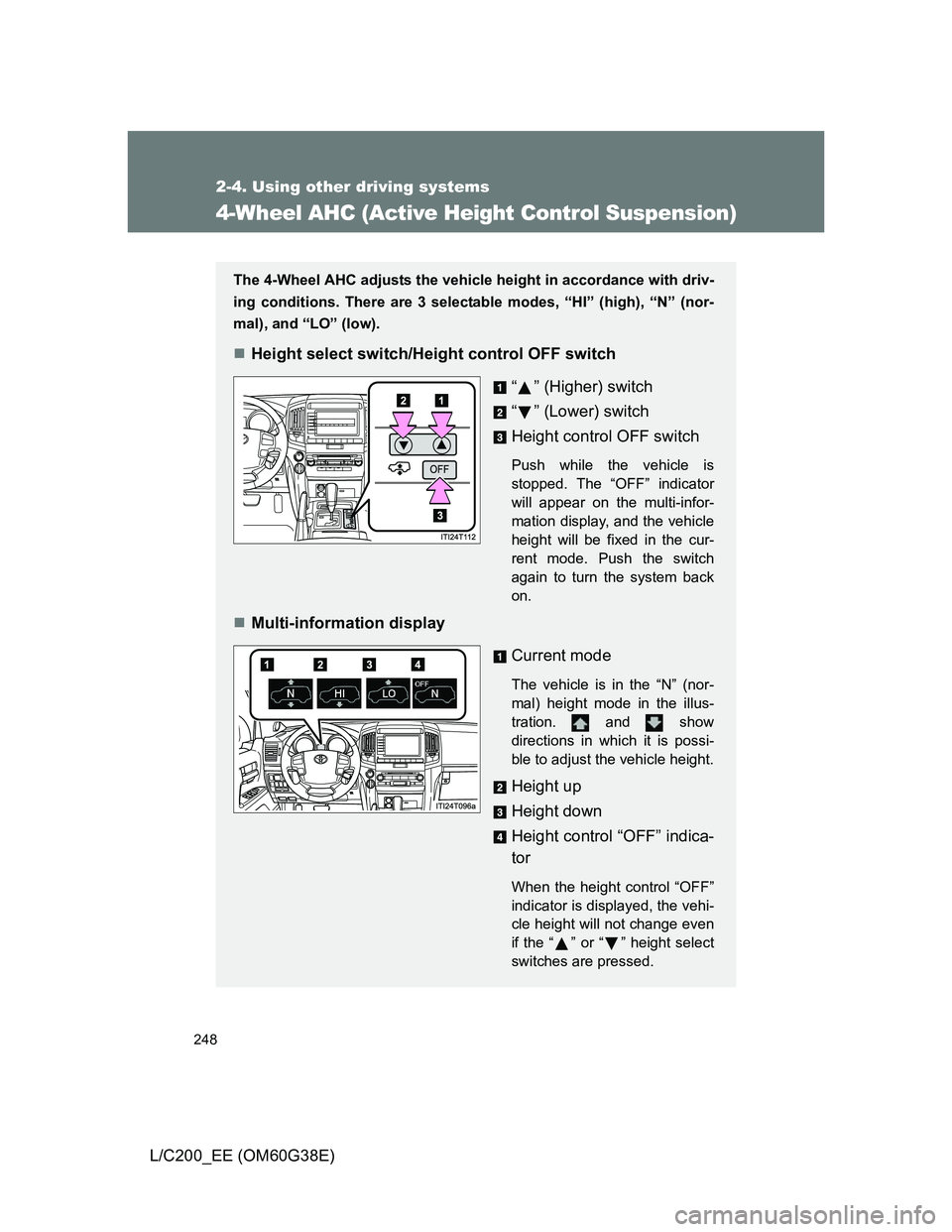
Height select switch/Height control OFF switch
“ ” (Higher) switch
“” (Lower) switch
Height control OFF switch
Push while the vehicle is
stopped. The “OFF” indicator
will appear on the multi-infor-
mation display, and the vehicle
height will be fixed in the cur-
rent mode. Push the switch
again to turn the system back
on.
Multi-information display
Current mode
The vehicle is in the “N” (nor-
mal) height mode in the illus-
tration. and show
directions in which it is possi-
ble to adjust the vehicle height.
Height up
Height down
Height control “OFF” indica-
tor
When the height control “OFF”
indicator is displayed, the vehi-
cle height will not change even
if the “ ” or “ ” height select
switches are pressed.
Page 249 of 692
249 2-4. Using other driving systems
2
When driving
L/C200_EE (OM60G38E)
Vehicle height modes
Press “ ” to step up one height mode, and “ ” to step down one
height mode. (Ex. When in the low height mode, press “ ” once to
switch to the normal height mode, and twice to switch to the high
height mode.)
“HI” (high) height mode
Vehicle height is about 50 mm (2.0 in.) higher at the front, and
about 60 mm (2.4 in.) higher at the rear than the normal mode
height.
This mode is suitable when driving on bumpy roads or through
water.
High height mode is only available when the vehicle speed is under
30 km/h (18 mph).
“N” (normal) height mode
The standard vehicle height. This mode is suitable for ordinary
driving.
When driving at high speeds, the vehicle height is automatically
lowered by 20 mm (0.8 in.) in the front and 15 mm (0.6 in.) in the
rear, to ensure excellent aerodynamic characteristics and stability.
If the vehicle speed drops, normal height mode is automatically
resumed.
“LO” (low) height mode
Vehicle height is about 60 mm (2.4 in.) lower at the front, and about
40 mm (1.6 in.) lower at the rear than the normal mode height.
This mode allows easy access to the vehicle.
Low height mode is only available when the vehicle is travelling at
12 km/h or less. When the vehicle speed exceeds 12 km/h (7
mph), normal height mode is automatically selected.
Page 250 of 692
250 2-4. Using other driving systems
L/C200_EE (OM60G38E)
Conditions for changing the vehicle height mode
Some modes may not be selectable depending on the vehicle speed
when the four-wheel drive control switch is in the “H4” position. Refer
to the following table.
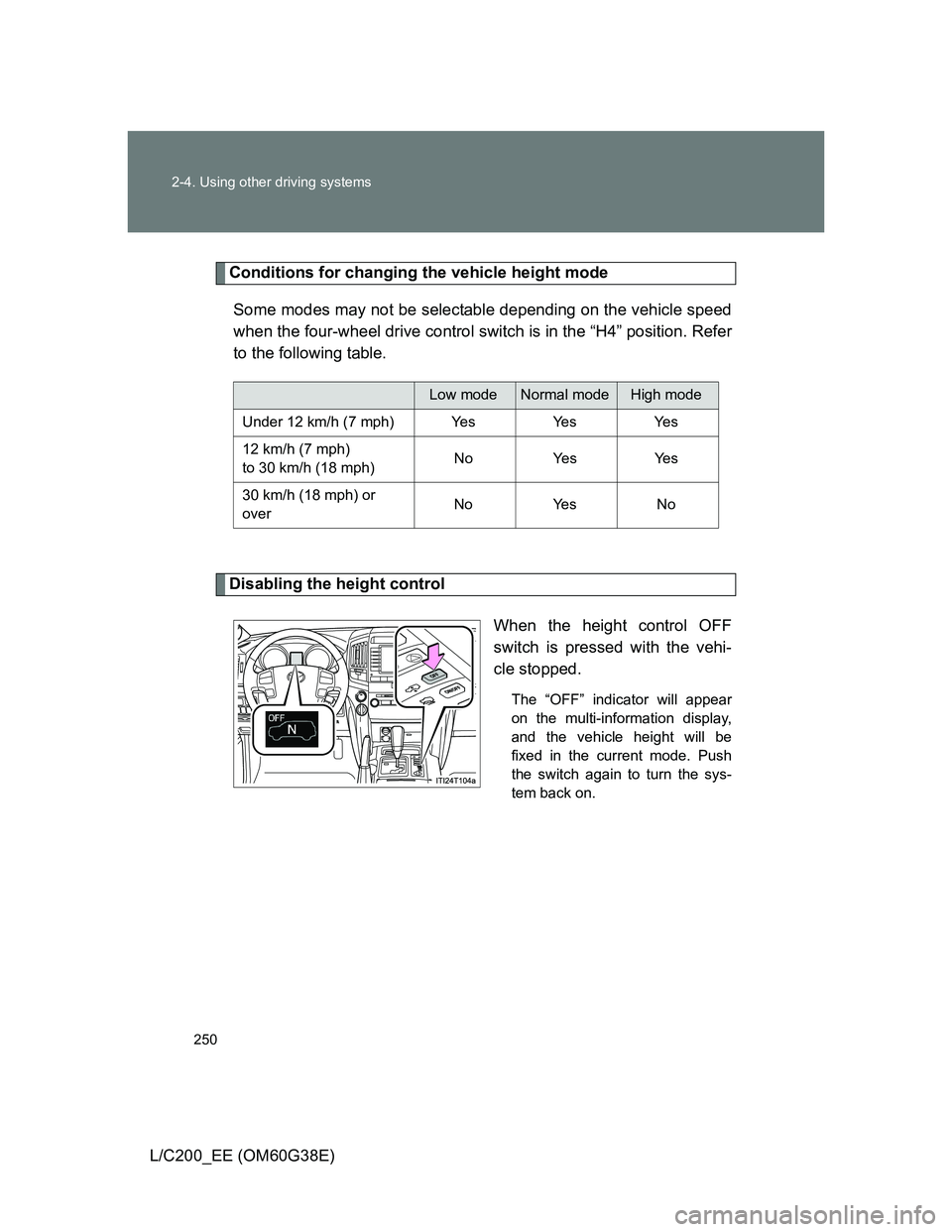
Disabling the height control
When the height control OFF
switch is pressed with the vehi-
cle stopped.
The “OFF” indicator will appear
on the multi-information display,
and the vehicle height will be
fixed in the current mode. Push
the switch again to turn the sys-
tem back on.
Low modeNormal modeHigh mode
Under 12 km/h (7 mph) Yes Yes Yes
12 km/h (7 mph)
to 30 km/h (18 mph)No Yes Yes
30 km/h (18 mph) or
overNo Yes No
Page 251 of 692
251 2-4. Using other driving systems
2
When driving
L/C200_EE (OM60G38E)
Operating conditions
The engine must be running.
Vehicle height control must be turned off.
All side doors and the back door must be closed.
Switching vehicle height mode while the engine is stopped
If the engine is stopped while the vehicle height is being lowered, lower-
ing will continue.
If any luggage is removed from the vehicle or if any occupants leave the
vehicle within approximately 30 seconds of the “ENGINE START STOP”
switch being turned OFF, the vehicle height may be lowered by the auto
leveling function.
Operating the height select switch will have no effect while the engine is
stopped.
Automatic change in vehicle height when the four-wheel drive control
switch is in the “L4” position
If the vehicle speed exceeds 3 km/h (2 mph) while driving on an uneven
road with the four-wheel drive control switch in the “L4” position, high mode
is automatically selected.
(On even roads, the height mode will not change.)
Automatic change in vehicle height when in the high mode
If the vehicle speed exceeds 30 km/h (18 mph) with the four-wheel drive
control switch in the “H4” position, normal mode is automatically
selected.
If the vehicle speed exceeds 40 km/h (25 mph) with the four-wheel drive
control switch in the “L4” position, the vehicle height is lowered to 25 mm
(1.0 in.) higher than the normal mode height. If the vehicle speed drops
to 20 km/h (13 mph) or less, high mode is automatically resumed.
Page 252 of 692
252 2-4. Using other driving systems
L/C200_EE (OM60G38E)
Extra high mode
If the vehicle becomes stuck or the Crawl Control system requests the vehi-
cle height be raised, extra high mode may be automatically selected when
the vehicle height is in high mode with the four-wheel drive control switch in
the “L4” position.
The vehicle height is raised to 20 mm (0.8 in.) higher than the high mode
height, or slightly higher.
Extra high mode will change back to high mode when:
• The vehicle speed exceeds 10 km/h (6 mph)
• The four-wheel drive control switch is shifted to “H4”.
If you push “ ” when in extra high mode, normal mode is selected.
Extra high mode cannot be manually selected.
Turning off the height control
The system will remain off until the height control OFF switch is pushed
again, even if the “ENGINE START STOP” switch is turned off.
Even if the system is turned off, the system automatically modulated if
the vehicle speed exceeds following.
• 30 km/h (18 mph) with high or low mode
• 80 km/h (50 mph) with normal mode
Page 253 of 692
253 2-4. Using other driving systems
2
When driving
L/C200_EE (OM60G38E)
Automatic leveling function
The vehicle is adjusted to a fixed height for each mode, regardless of the
number of occupants and the luggage load.
However the vehicle cannot be raised if the vehicle load exceeds the fol-
lowing limits:
• Up to 4 occupants
* plus approximately 300 kg (661 lb.) in the normal
mode
• Up to 4 occupants
* plus approximately 200 kg (441 lb.) in the high
mode
*: average weight 68 kg (150 lb.) per person
If the vehicle height cannot be raised when in the normal mode, and “LO”
appears on the display, the vehicle is loaded too heavily. Take extra care
when driving in this condition.
If the vehicle height cannot be raised even after unloading the vehicle,
press “ ” then “ ” on the height select switch. If the vehicle height still
cannot be raised, turn the ignition off then on again, then try once more.
When the vehicle is stopped during driving
The activation of the automatic leveling function may cause the vehicle
height to change. This is not a malfunction.
If the vehicle height does not change
If the vehicle is loaded too heavily, or the undercarriage has come into con-
tact with the road surface, the vehicle height cannot be raised/lowered.
Page 254 of 692
254 2-4. Using other driving systems
L/C200_EE (OM60G38E)
In the following cases the 4-Wheel AHC will not operate
The brake pedal has been depressed for a few seconds or longer while
the vehicle is stopped.
Vehicle height control has not been frequently used.
The suspension fluid temperature is lower than -30°C (-22°F).
There is ice on the suspension.
Driving on bumpy roads which may cause the suspension to fully elon-
gate.
If the steering wheel is abruptly turned more than 3/4 of a revolution with
the center differential lock system activated.
Cold weather operation
It may take longer for the vehicle height to change if the suspension fluid
temperature drops below -15°C (5°F).
The 4-Wheel AHC does not operate when the suspension fluid temperature
drops below -30°C (-22°F).
In this case, even if the height select switch is pressed, the vehicle height
will not change. Once the vehicle has been driven for a short time and
the suspension fluid has been warmed to within normal operating limits,
the 4-Wheel AHC will begin operating and the vehicle height will auto-
matically change to the selected mode.
When the suspension fluid is around -30°C (-22°F), the vehicle height
may not be able to be raised, even if the 4-Wheel AHC is operating. In
this case, push “ ” then “ ” on the height select switch after driving for
a short time longer to select the desired vehicle height.
Parking and stopping tips
If you immediately stop the engine after off-road driving, the vehicle
height may gradually lower. When parking, make sure there is nothing
under the vehicle that may come in contact with the underbody. The vehi-
cle will return to the set height when the engine is started.
The vehicle height may change as the temperature changes when the
engine is stopped. The vehicle will return to the set height when the
engine is started.
Page 255 of 692
255 2-4. Using other driving systems
2
When driving
L/C200_EE (OM60G38E)
Propeller shaft noise
If the vehicle height is adjusted on a slope, or with the shift lever in a position
other than “P” or “N” while the vehicle is stopped, you may hear a sound
caused by the expansion and contraction of the propeller shaft. This does
not indicate a malfunction.
4-Wheel AHC failure warning
If a malfunction occurs in the 4-Wheel AHC, normal mode is automatically
selected. However, the system may not switch to normal mode depending
on the location of the malfunction.
The warning message is displayed on the multi-information display, and the
4-Wheel AHC cannot be activated until the malfunction is corrected.
Stop the engine and start it again. If the warning message turns off, the sys-
tem is operating correctly. If the warning message continues to be displayed,
have the vehicle checked at any authorized Toyota dealer or repairer, or
another duly qualified and equipped professional as soon as possible.
Page 256 of 692
256 2-4. Using other driving systems
L/C200_EE (OM60G38E)
CAUTION
When switching the vehicle height mode
Before lowering the vehicle height, check that there are no people under or
around the vehicle, and check for obstacles.
If you do not do this, body parts may be caught in the vehicle, possibly lead-
ing to an accident.
Using the high mode
The high mode should only be used when driving on rough roads, for exam-
ple when driving off-road. Because the vehicle’s center of gravity will
become higher when in the mode, the vehicle may become unstable when
turning abruptly, resulting in an accident.
When jacking up the vehicle or installing tire chains
Turn off the height control and stop the engine, otherwise the vehicle height
may change due to the automatic leveling function, and you may catch part
of your body in the vehicle, resulting in an accident.
When crossing rivers
Select the high mode and turn off the height control. Drive at 30 km/h
(18 mph) or lower. Otherwise the vehicle height may change due to the auto-
matic leveling function, resulting in an accident.
If your vehicle must be towed
Put the vehicle height in the normal mode and turn off the height control, oth-
erwise the vehicle height may change due to the automatic leveling function
and you may catch part of your body in the vehicle, resulting in an accident.
If your vehicle becomes stuck in a ditch
Turn off the height control, otherwise the vehicle height may change due to
the automatic leveling function, resulting in an accident.
When loading cargo on the roof luggage carrier
Do not switch to high mode. Sudden steering could cause the vehicle to lose
stability due to the vehicle’s higher center of gravity, possibly leading to an
accident.