remote start TOYOTA LAND CRUISER 2012 User Guide
[x] Cancel search | Manufacturer: TOYOTA, Model Year: 2012, Model line: LAND CRUISER, Model: TOYOTA LAND CRUISER 2012Pages: 692, PDF Size: 29.3 MB
Page 114 of 692
114 1-4. Opening and closing the windows and moon roof
L/C200_EE (OM60G38E)
The moon roof can be operated when
The “ENGINE START STOP” switch is in IGNITION ON mode.
Door lock linked moon roof operation
The following functions can be used if customized at any authorized Toyota
dealer or repairer, or another duly qualified and equipped professional.
The moon roof can be opened and closed using the wireless remote con-
trol or mechanical key. (P. 5 5627)
The moon roof can be closed using the entry function.
Operating the moon roof after turning the “ENGINE START STOP”
switch OFF
The moon roof can be operated for approximately 45 seconds even after the
“ENGINE START STOP” switch is turned to ACCESSORY mode or turned
OFF. It cannot, however, be operated once either front door is opened.
Jam protection function
If an object is detected between the moon roof and the frame while closing
or tilting down, travel is stopped and the moon roof opens slightly.
If the moon roof cannot be closed automatically
Keep the switch depressed.
To reduce moon roof wind noise
When the moon roof is opened automatically, it will stop slightly before the
fully open position. Driving with the moon roof in this position can help
reduce wind noise.
Sunshade
The sunshade can be opened and closed manually. However, the sunshade
will open automatically when the moon roof is opened.
Page 125 of 692
125
1
1-6. Theft deterrent system
Before driving
L/C200_EE (OM60G38E)
Double locking system
Setting the double locking system
Turn the “ENGINE START STOP” switch OFF, have all the passen-
gers exit the vehicle and ensure that all the doors are closed.
Using the entry function:
Press the lock button on the outside door handle twice within 5 sec-
onds.
Using the wireless remote control:
Press the
button twice within 5 seconds.
: If equipped
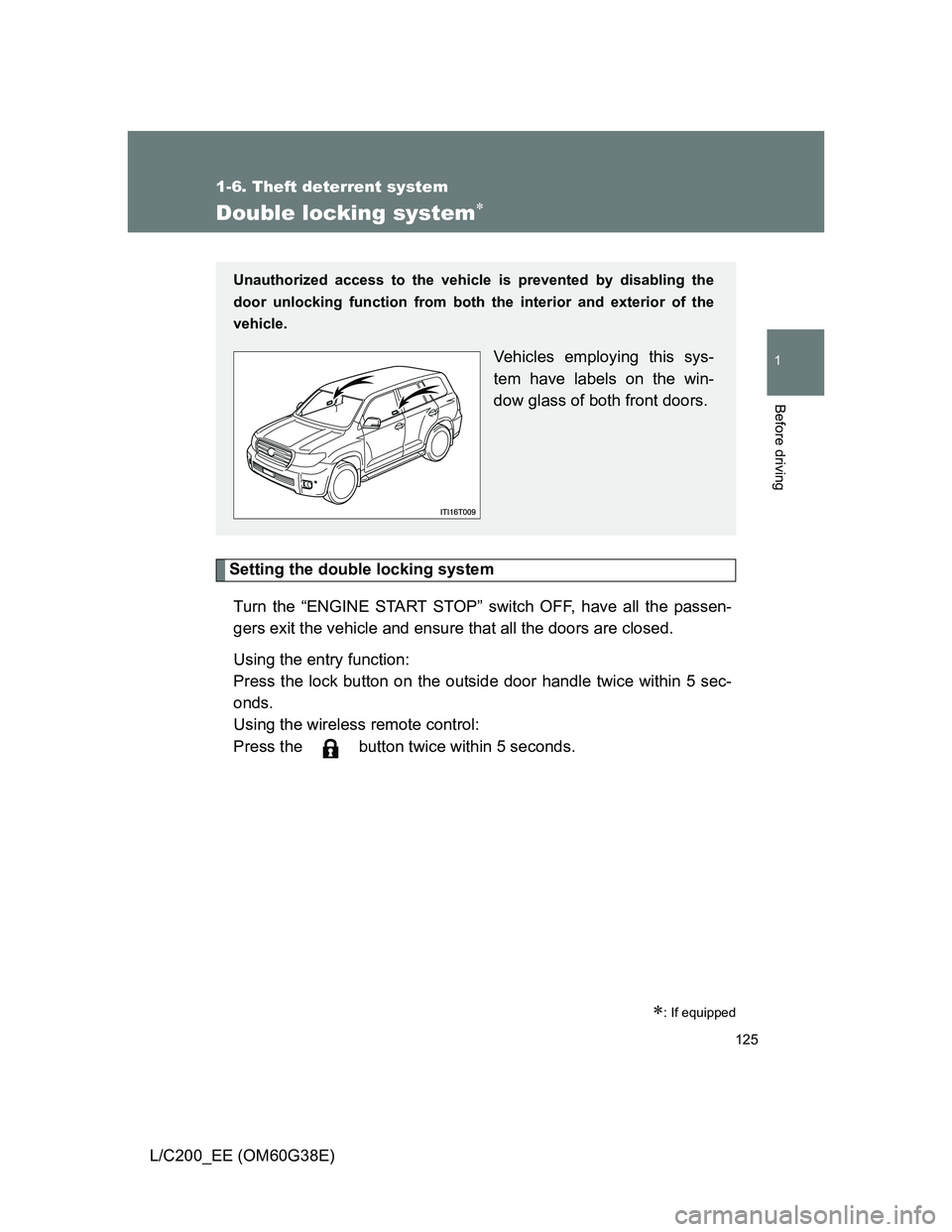
Unauthorized access to the vehicle is prevented by disabling the
door unlocking function from both the interior and exterior of the
vehicle.
Vehicles employing this sys-
tem have labels on the win-
dow glass of both front doors.
Page 128 of 692

128 1-6. Theft deterrent system
L/C200_EE (OM60G38E)
Setting the alarm system
Vehicles with navigation system
Close the doors and hood,
and lock all the doors using
the entry function or wireless
remote control. The system
will be set automatically after
30 seconds.
The indicator light changes
from being on to flashing when
the system is set.
Vehicles without navigation system
Deactivating or stopping the alarm
Do one of the following to deactivate or stop the alarm.
Unlock the doors using the entry function or the wireless
remote control.
Start the engine. (The alarm will be deactivated or stopped
after a few seconds.)
Page 131 of 692
131 1-6. Theft deterrent system
1
Before driving
L/C200_EE (OM60G38E)
Alarm-operated door lock
When the alarm is operating, the doors are locked automatically to pre-
vent intruders.
Do not leave the key inside the vehicle when the alarm is operating, and
make sure the key is not inside the vehicle when recharging or replacing
the battery.
Canceling and automatic re-enabling of the intrusion sensor and tilt
sensor
The alarm will still be set even when the intrusion sensor and tilt sensor
are canceled.
After the intrusion sensor and tilt sensor are canceled, pressing the
“ENGINE START STOP” switch or unlocking the doors using the entry
function or wireless remote control will re-enable the intrusion sensor and
tilt sensor.
When the alarm system is set again, the intrusion sensor and tilt sensor
will be set.
Page 529 of 692
529 4-3. Do-it-yourself maintenance
4
Maintenance and care
L/C200_EE (OM60G38E)
If the electronic key battery is discharged
The following symptoms may occur.
The smart entry & start system and wireless remote control will not func-
tion properly.
The operational range is reduced.
Use a CR1632 lithium battery
Batteries can be purchased at any authorized Toyota dealer or repairer,
or another duly qualified and equipped professional, jewelers, or camera
stores.
Replace only with the same or equivalent type recommended by any
authorized Toyota dealer or repairer, or another duly qualified and
equipped professional.
Dispose of used batteries according to the local laws.
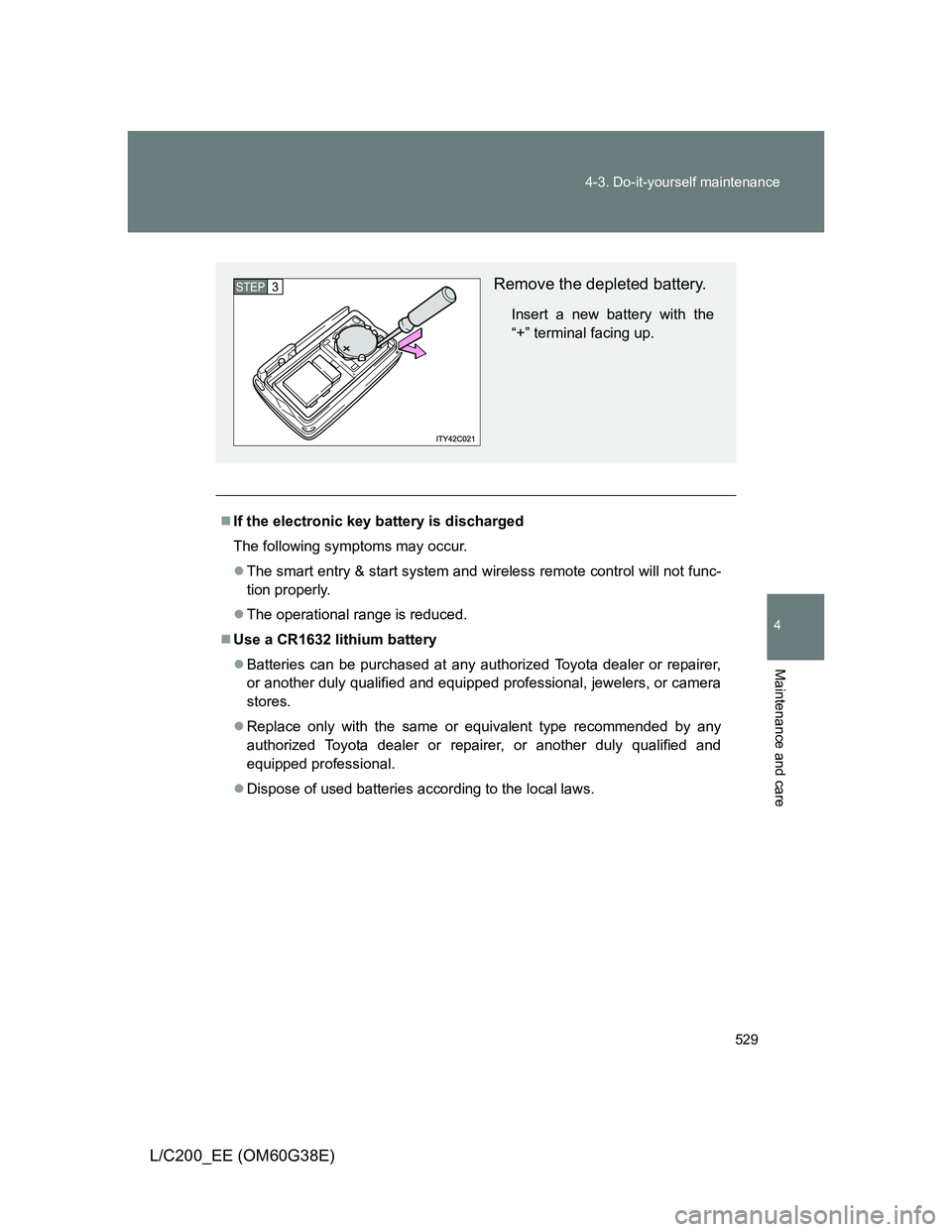
Remove the depleted battery.
Insert a new battery with the
“+” terminal facing up.
STEP3
Page 627 of 692
5
627
5-2. Steps to take in an emergency
When trouble arises
L/C200_EE (OM60G38E)
If the electronic key does not operate properly
Locking and unlocking the doors and key linked functions
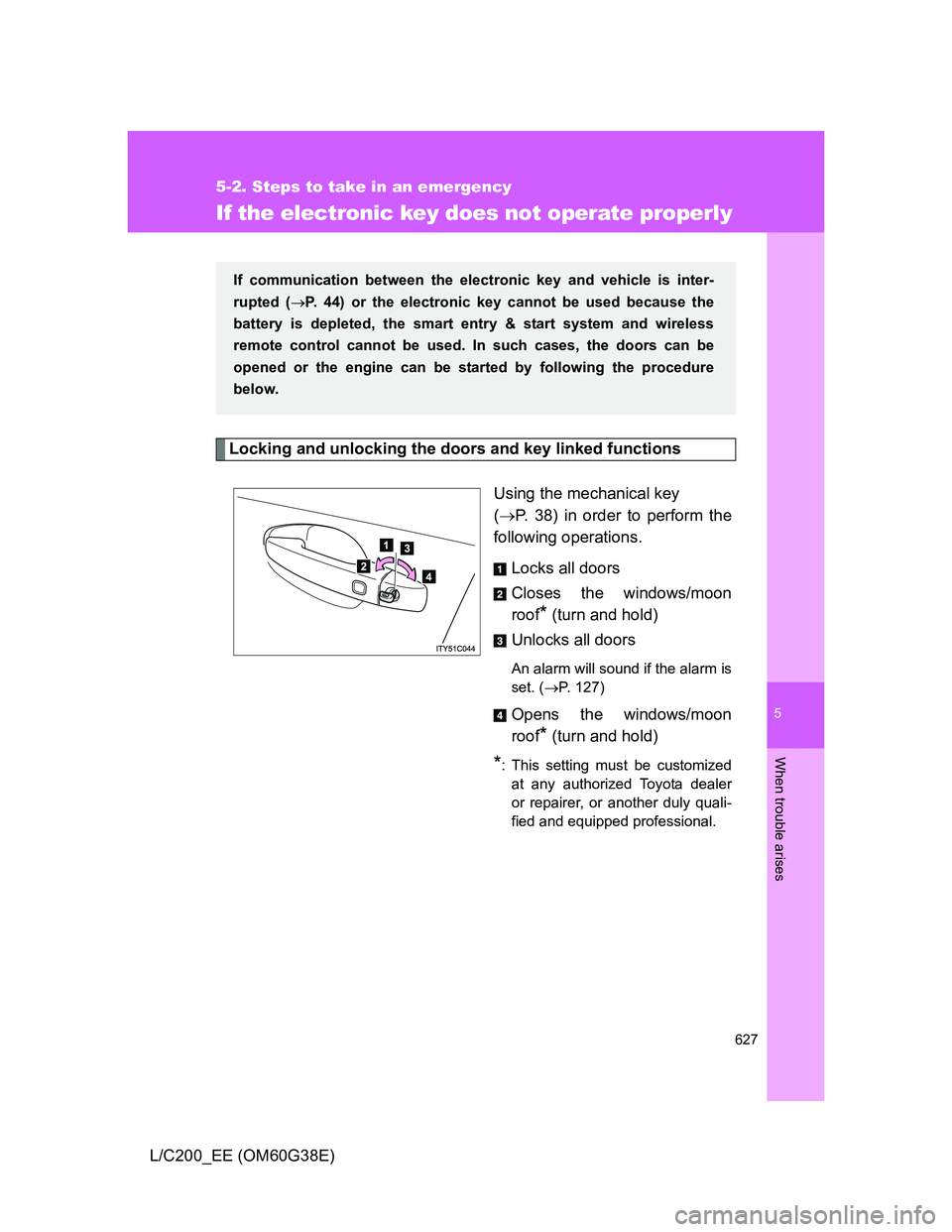
Using the mechanical key
(P. 38) in order to perform the
following operations.
Locks all doors
Closes the windows/moon
roof
* (turn and hold)
Unlocks all doors
An alarm will sound if the alarm is
set. (P. 127)
Opens the windows/moon
roof
* (turn and hold)
*: This setting must be customized
at any authorized Toyota dealer
or repairer, or another duly quali-
fied and equipped professional.
If communication between the electronic key and vehicle is inter-
rupted (P. 44) or the electronic key cannot be used because the
battery is depleted, the smart entry & start system and wireless
remote control cannot be used. In such cases, the doors can be
opened or the engine can be started by following the procedure
below.
Page 667 of 692
667 6-2. Customization
6
Vehicle specifications
L/C200_EE (OM60G38E)
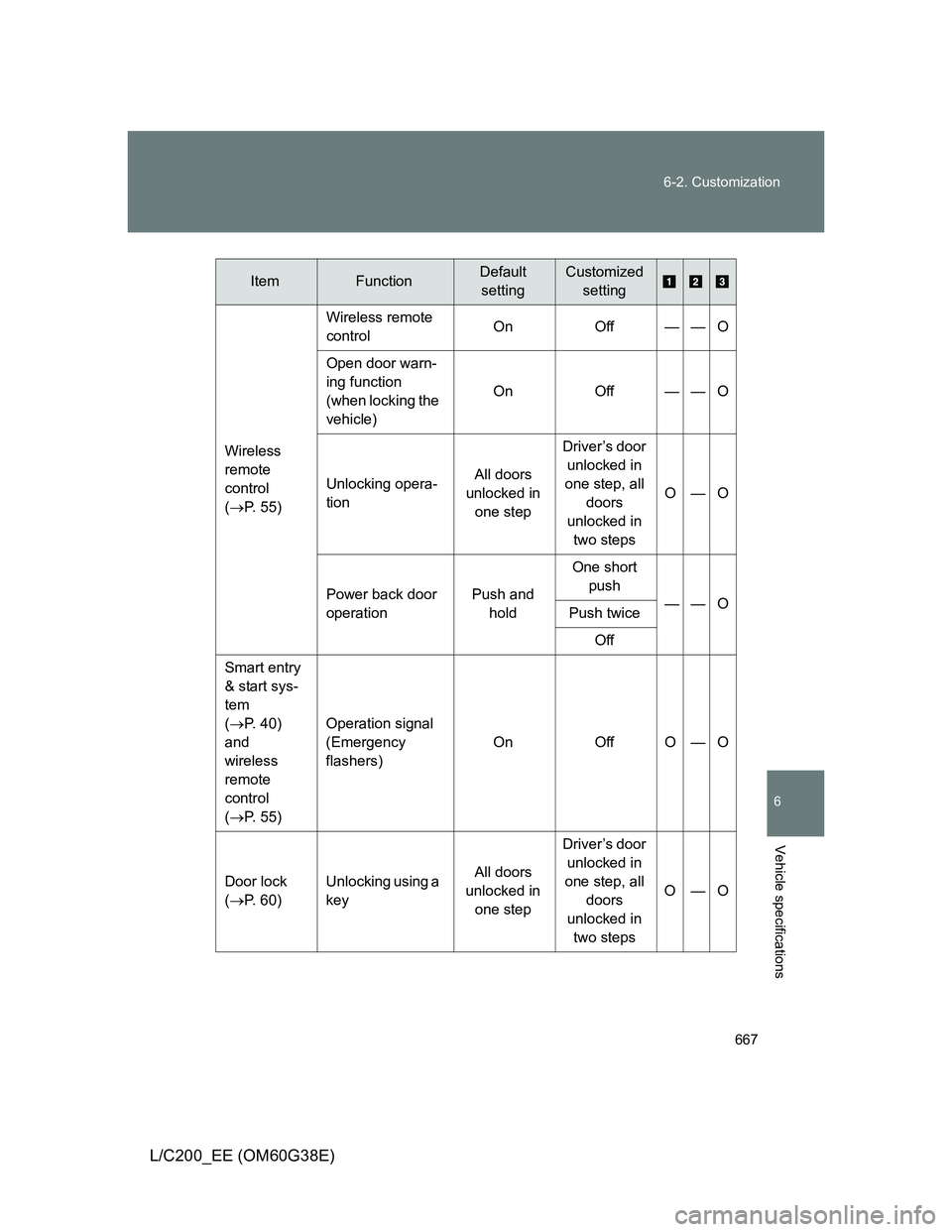
Wireless
remote
control
(P. 55)Wireless remote
controlOn Off — — O
Open door warn-
ing function
(when locking the
vehicle)On Off — — O
Unlocking opera-
tionAll doors
unlocked in
one stepDriver’s door
unlocked in
one step, all
doors
unlocked in
two stepsO—O
Power back door
operationPush and
holdOne short
push
——O
Push twice
Off
Smart entry
& start sys-
tem
(P. 40)
and
wireless
remote
control
(P. 55) Operation signal
(Emergency
flashers)On Off O — O
Door lock
(P. 60)Unlocking using a
keyAll doors
unlocked in
one stepDriver’s door
unlocked in
one step, all
doors
unlocked in
two stepsO—O
ItemFunctionDefault
settingCustomized
setting