remote start TOYOTA LAND CRUISER 2012 Owners Manual
[x] Cancel search | Manufacturer: TOYOTA, Model Year: 2012, Model line: LAND CRUISER, Model: TOYOTA LAND CRUISER 2012Pages: 692, PDF Size: 29.3 MB
Page 2 of 692
TABLE OF CONTENTSIndex
2
L/C200_EE (OM60G38E)
1-1. Key information
Keys ...................................... 38
1-2. Opening, closing and locking
the doors
Smart entry &
start system ........................ 40
Wireless remote control ........ 55
Side doors............................. 60
Back door.............................. 63
1-3. Adjustable components
(seats, mirrors, steering
wheel)
Front seats ............................ 75
Rear seats ............................ 78
Driving position memory
system ................................ 86
Head restraints ..................... 91
Seat belts .............................. 95
Steering wheel .................... 101
Anti-glare inside
rear view mirror................. 104
Outside
rear view mirrors ............... 1061-4. Opening and closing
the windows and moon roof
Power windows .................. 109
Moon roof ........................... 113
1-5. Refueling
Opening
the fuel tank cap............... 116
1-6. Theft deterrent system
Engine immobilizer
system.............................. 120
Double locking system ....... 125
Alarm .................................. 127
1-7. Safety information
Correct driving posture ....... 135
SRS airbags ....................... 137
Child restraint systems ....... 151
Installing child restraints ..... 160
Airbag manual
on-off system ................... 174
1Before driving
For vehicles with a navigation system, refer to the “Navigation System Owner’s
Manual” for information regarding the equipment listed below.
• Navigation system
• Air conditioning
• Windshield wiper de-icer• Audio/video system
• Toyota parking assist monitor
Page 37 of 692
1Before driving
37
L/C200_EE (OM60G38E)
1-1. Key information
Keys.................................... 38
1-2. Opening, closing and locking
the doors
Smart entry &
start system ...................... 40
Wireless remote control ...... 55
Side doors .......................... 60
Back door ........................... 63
1-3. Adjustable components
(seats, mirrors, steering
wheel)
Front seats.......................... 75
Rear seats .......................... 78
Driving position memory
system .............................. 86
Head restraints ................... 91
Seat belts............................ 95
Steering wheel .................. 101
Anti-glare inside
rear view mirror............... 104
Outside
rear view mirrors ............. 1061-4. Opening and closing
the windows and moon roof
Power windows ................. 109
Moon roof.......................... 113
1-5. Refueling
Opening
the fuel tank cap ............. 116
1-6. Theft deterrent system
Engine immobilizer
system ............................ 120
Double locking system ...... 125
Alarm ................................ 127
1-7. Safety information
Correct driving posture ..... 135
SRS airbags...................... 137
Child restraint systems ..... 151
Installing
child restraints ................ 160
Airbag manual
on-off system .................. 174
Page 38 of 692
38
L/C200_EE (OM60G38E)
1-1. Key information
Keys
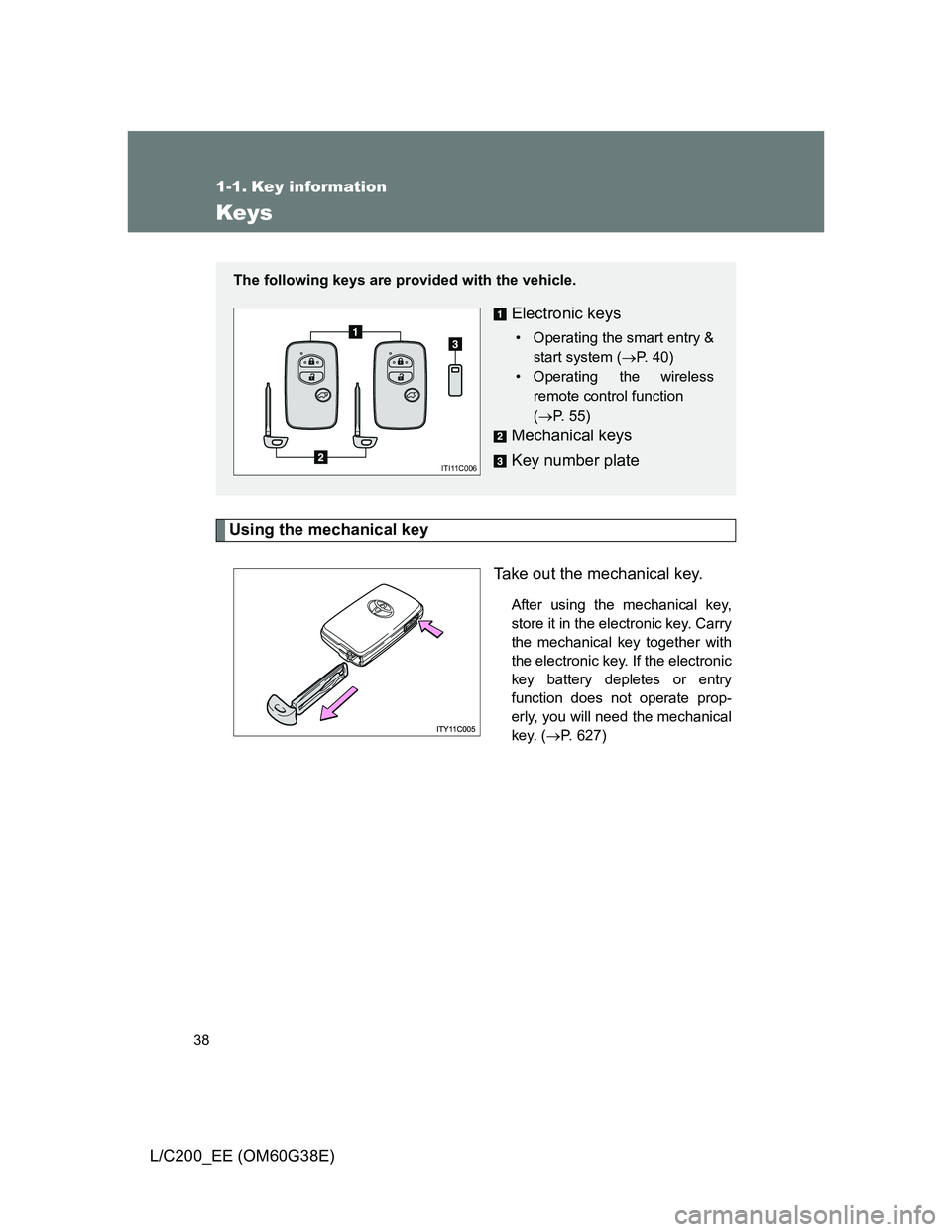
Using the mechanical key
Take out the mechanical key.
After using the mechanical key,
store it in the electronic key. Carry
the mechanical key together with
the electronic key. If the electronic
key battery depletes or entry
function does not operate prop-
erly, you will need the mechanical
key. (P. 627)
The following keys are provided with the vehicle.
Electronic keys
• Operating the smart entry &
start system (P. 40)
• Operating the wireless
remote control function
(P. 55)
Mechanical keys
Key number plate
ITI11C006
Page 44 of 692
44 1-2. Opening, closing and locking the doors
L/C200_EE (OM60G38E)
Operation signals
The emergency flashers flash to indicate that the doors have been locked/
unlocked.
Conditions affecting operation
The smart entry & start system uses weak radio waves. In the following situ-
ations, the communication between the electronic key and the vehicle may
be affected, preventing the smart entry & start system and wireless remote
control from operating properly. (Ways of coping: P. 627)
When the electronic key battery is depleted
Near a TV tower, electric power plant, gas station, radio station, large dis-
play, airport or other facility that generates strong radio waves or electri-
cal noise
When carrying a portable radio, cellular phone, cordless phone or other
wireless communication devices
When the electronic key has come into contact with, or is covered by a
metallic object
When multiple electronic keys are in the vicinity
When carrying or using the electronic key together with the following
devices that emit radio waves
• Another vehicle’s electronic key
• A wireless key that emits radio waves
• Personal computer
If window tint with a metallic content or metallic objects are attached to
the rear window
Page 46 of 692
46 1-2. Opening, closing and locking the doors
L/C200_EE (OM60G38E)
To prevent unintended triggering of the alarm, unlock the doors using the
wireless remote control and open and close a door once after the setting
have been changed. (If a door is not opened within 30 seconds after
is pressed, the doors will be locked again and the alarm will automatically be
set.)
In case that the alarm is triggered, immediately stop the alarm. (P. 127)
Battery-saving function
In the following circumstances, the entry function is disabled in order to pre-
vent the vehicle and electronic key batteries from discharging.
When the entry function has not been used for 2 weeks or more
When the electronic key has been left within approximately 1 m (3 ft.) of
the vehicle for 10 minutes or more
The system will resume operation when...
The vehicle is locked using the door handle lock switch.
The vehicle is locked/unlocked using the wireless remote control function
(P. 55) or the mechanical key. (P. 627)
Electronic key battery depletion
The standard battery life is 1 to 2 years. (The battery becomes depleted
even if the electronic key is not used.) If the smart entry & start system or
the wireless remote control function does not operate, or the detection
area becomes smaller, the battery may be depleted. Replace the battery
when necessary. (P. 528)
If the battery becomes low, an alarm will sound in the cabin when the
engine stops. (P. 49)
To avoid serious deterioration, do not leave the electronic key within 1 m
(3 ft.) of the following electrical appliances that produce a magnetic field.
•TVs
• Personal computers
• Recharging cellular phones or cordless phones
• Table lamps
Page 55 of 692
55
1
1-2. Opening, closing and locking the doors
Before driving
L/C200_EE (OM60G38E)
Wireless remote control
Operation signals
The emergency flashers flash to indicate that the doors have been locked/
unlocked. (Locked: Once; Unlocked: Twice)
Operating conditions
The wireless remote control will not operate when the “ENGINE START
STOP” switch is in any position other than OFF.
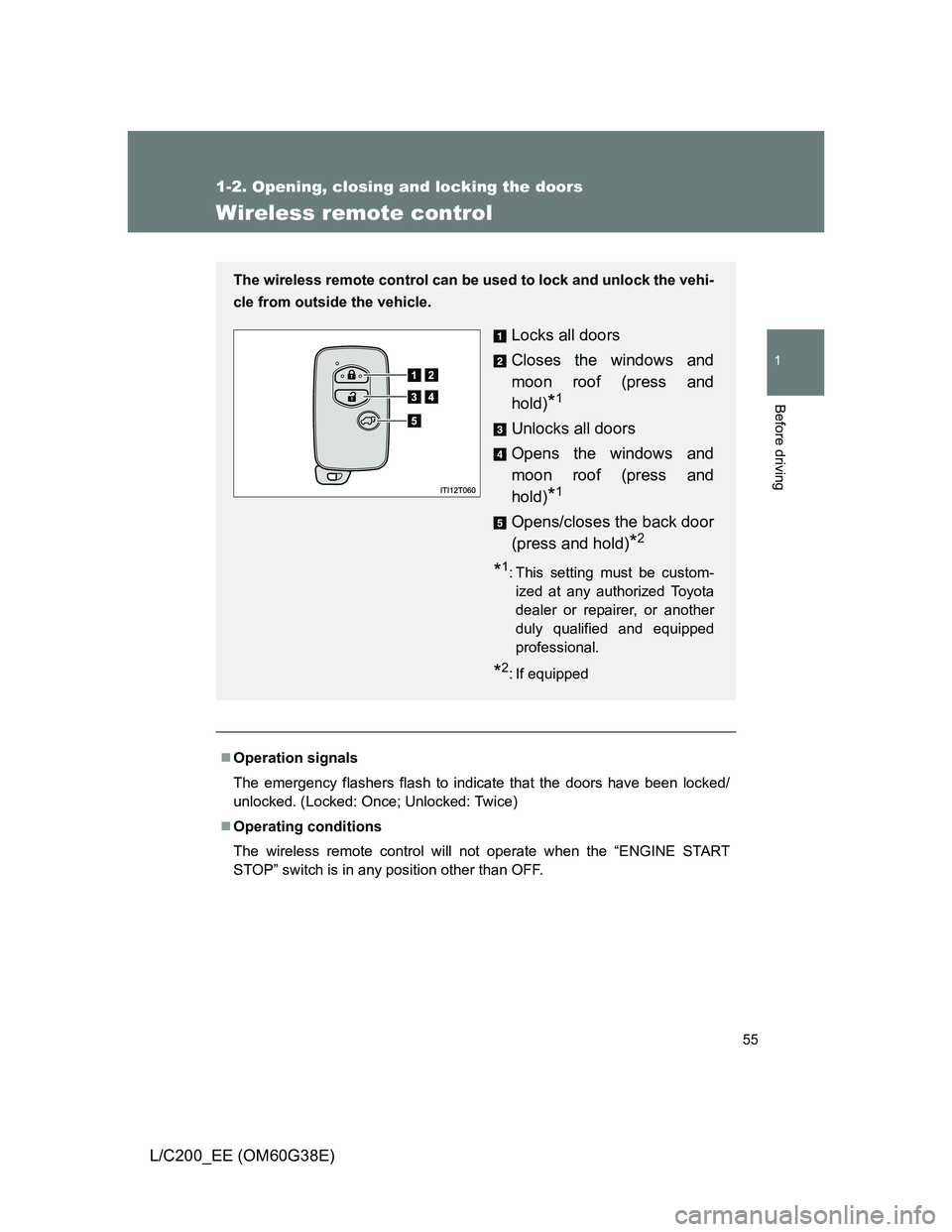
The wireless remote control can be used to lock and unlock the vehi-
cle from outside the vehicle.
Locks all doors
Closes the windows and
moon roof (press and
hold)
*1
Unlocks all doors
Opens the windows and
moon roof (press and
hold)
*1
Opens/closes the back door
(press and hold)
*2
*1: This setting must be custom-
ized at any authorized Toyota
dealer or repairer, or another
duly qualified and equipped
professional.
*2: If equipped
Page 56 of 692
56 1-2. Opening, closing and locking the doors
L/C200_EE (OM60G38E)
Door lock buzzer
If a door is not fully closed, a buzzer sounds continuously for 5 seconds if an
attempt to lock the door is made. Fully close the door to stop the buzzer, and
lock the vehicle once more.
Power back door operation (if equipped)
The power back door can be opened while the vehicle is locked. (one
motion)
Alarm
Using the wireless remote control to lock the door will set the alarm system.
Electronic key battery depletion
P. 4 6
Security feature
P. 4 8
If the wireless remote control does not operate properly
Locking and unlocking the doors: Use the mechanical key. (P. 627)
Starting the engine: P. 628
When the electronic key battery is fully depleted
P. 528
Conditions affecting operation
P. 4 4
Customization that can be configured at any authorized Toyota dealer
or repairer, or another duly qualified and equipped professional
Settings (e.g. unlocking function) can be changed.
(Customizable features P. 665)
Page 88 of 692
88 1-3. Adjustable components (seats, mirrors, steering wheel)
L/C200_EE (OM60G38E)
’
Linking driving position memory with door unlock operation
Record your driving position to button “1”, “2” or “3” before performing
the following:
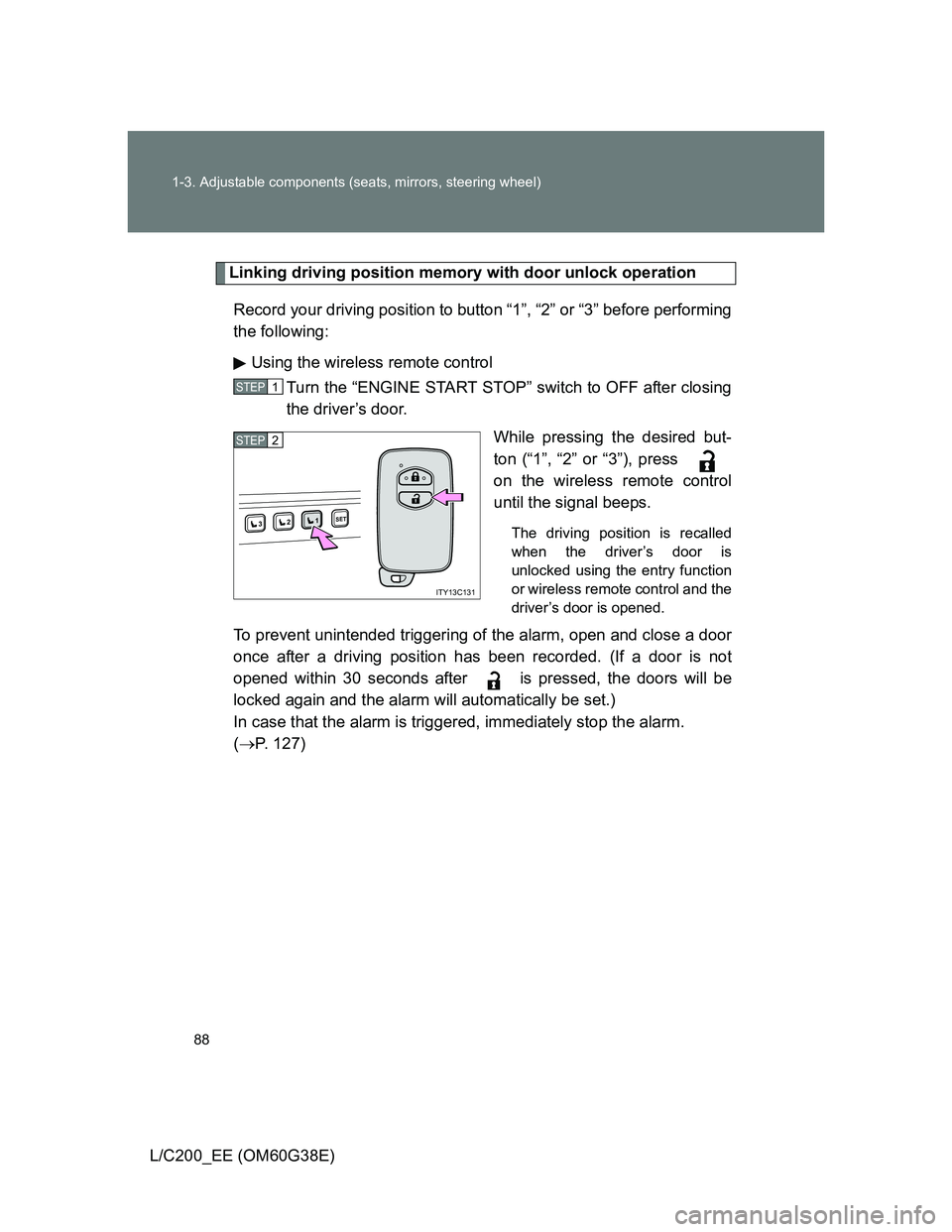
Using the wireless remote control
Turn the “ENGINE START STOP” switch to OFF after closing
the driver’s door.
While pressing the desired but-
ton (“1”, “2” or “3”), press
on the wireless remote control
until the signal beeps.
The driving position is recalled
when the driver’s door is
unlocked using the entry function
or wireless remote control and the
driver’s door is opened.
To prevent unintended triggering of the alarm, open and close a door
once after a driving position has been recorded. (If a door is not
opened within 30 seconds after is pressed, the doors will be
locked again and the alarm will automatically be set.)
In case that the alarm is triggered, immediately stop the alarm.
(P. 127)
STEP1
1SET23
ITY13C131
STEP2
Page 89 of 692
89 1-3. Adjustable components (seats, mirrors, steering wheel)
1
Before driving
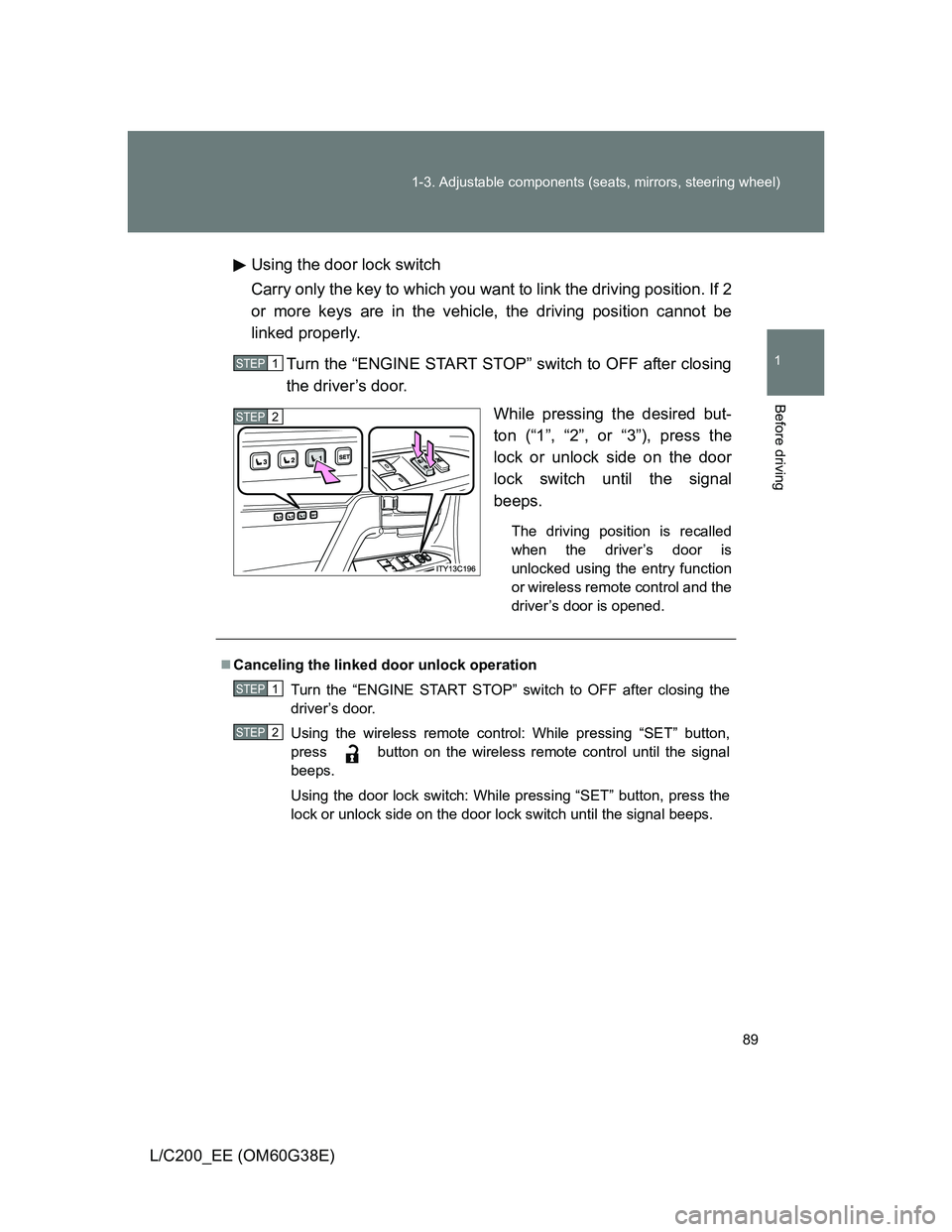
L/C200_EE (OM60G38E)Using the door lock switch
Carry only the key to which you want to link the driving position. If 2
or more keys are in the vehicle, the driving position cannot be
linked properly.
Turn the “ENGINE START STOP” switch to OFF after closing
the driver’s door.
While pressing the desired but-
ton (“1”, “2”, or “3”), press the
lock or unlock side on the door
lock switch until the signal
beeps.
The driving position is recalled
when the driver’s door is
unlocked using the entry function
or wireless remote control and the
driver’s door is opened.
STEP1
STEP2
Canceling the linked door unlock operation
Turn the “ENGINE START STOP” switch to OFF after closing the
driver’s door.
Using the wireless remote control: While pressing “SET” button,
press button on the wireless remote control until the signal
beeps.
Using the door lock switch: While pressing “SET” button, press the
lock or unlock side on the door lock switch until the signal beeps.
STEP1
STEP2
Page 110 of 692
110 1-4. Opening and closing the windows and moon roof
L/C200_EE (OM60G38E)
The power windows can be operated when
The “ENGINE START STOP” switch is in IGNITION ON mode.
Door lock linked window operation
The following functions can be used if customized at any authorized Toyota
dealer or repairer, or another duly qualified and equipped professional.
The power windows can be opened and closed using the wireless
remote control or mechanical key. (P. 5 5627)
The power windows can be closed using the entry function.
Operating the power windows after turning the “ENGINE START STOP”
switch OFF
The power windows can be operated for approximately 45 seconds even
after the “ENGINE START STOP” switch is turned to ACCESSORY mode or
turned OFF. They cannot, however, be operated once either front door is
opened.
Jam protection function
If an object becomes caught between the window and the window frame,
window travel is stopped and the window is opened slightly.