brake TOYOTA LAND CRUISER 2012 Owner's Manual
[x] Cancel search | Manufacturer: TOYOTA, Model Year: 2012, Model line: LAND CRUISER, Model: TOYOTA LAND CRUISER 2012Pages: 692, PDF Size: 29.3 MB
Page 219 of 692
219 2-3. Operating the lights and wipers
2
When driving
L/C200_EE (OM60G38E)
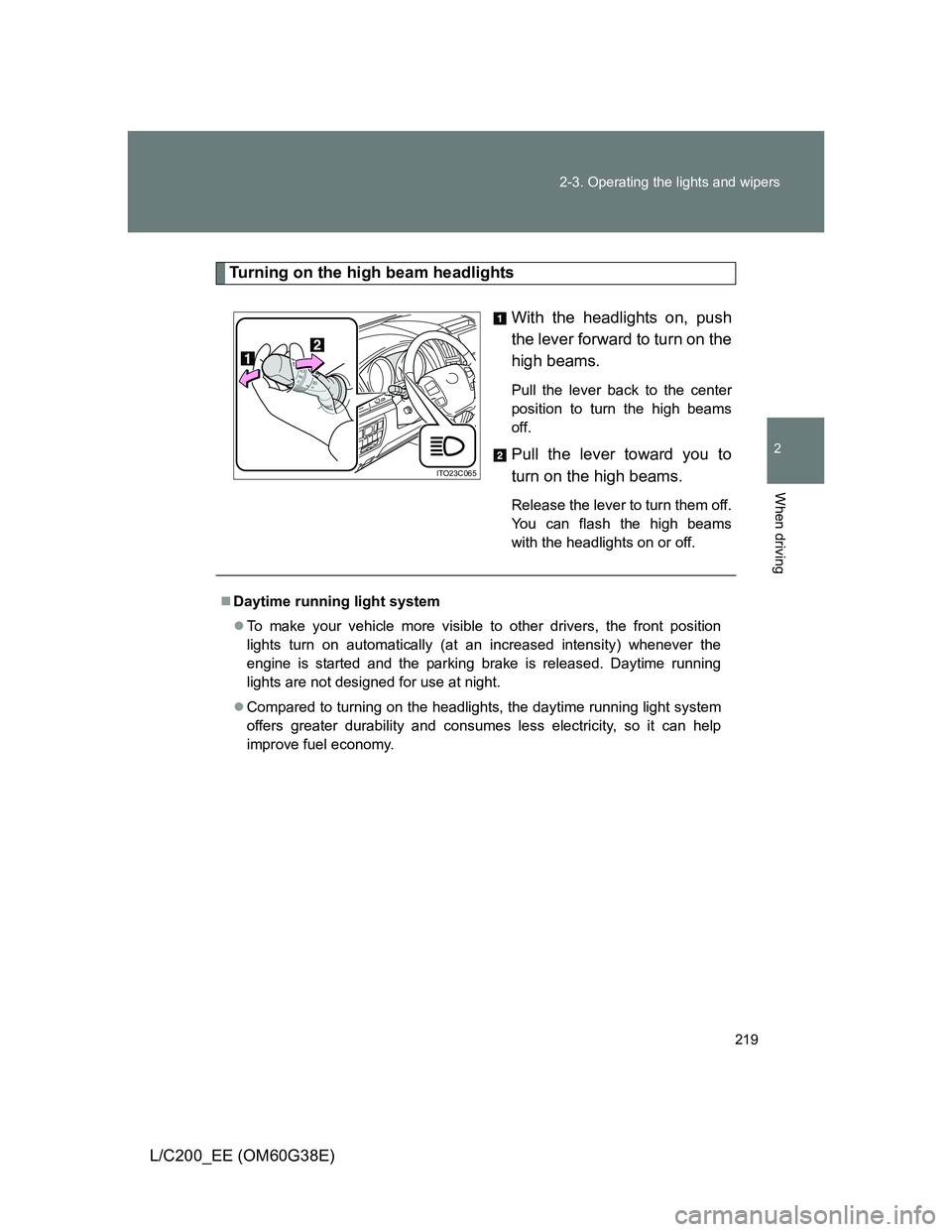
Turning on the high beam headlights
With the headlights on, push
the lever forward to turn on the
high beams.
Pull the lever back to the center
position to turn the high beams
off.
Pull the lever toward you to
turn on the high beams.
Release the lever to turn them off.
You can flash the high beams
with the headlights on or off.
ITO23C065
Daytime running light system
To make your vehicle more visible to other drivers, the front position
lights turn on automatically (at an increased intensity) whenever the
engine is started and the parking brake is released. Daytime running
lights are not designed for use at night.
Compared to turning on the headlights, the daytime running light system
offers greater durability and consumes less electricity, so it can help
improve fuel economy.
Page 234 of 692
234 2-4. Using other driving systems
L/C200_EE (OM60G38E)
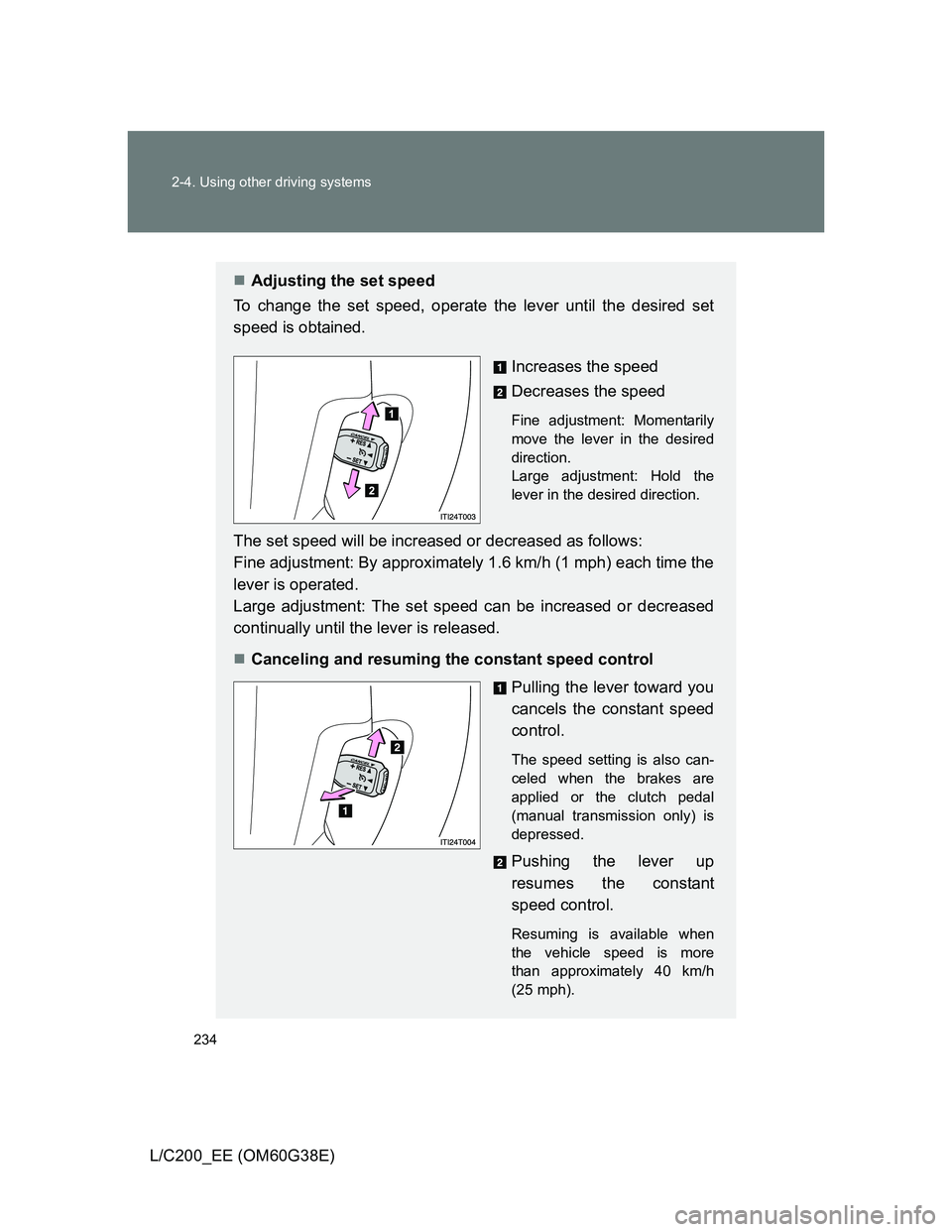
Adjusting the set speed
To change the set speed, operate the lever until the desired set
speed is obtained.
Increases the speed
Decreases the speed
Fine adjustment: Momentarily
move the lever in the desired
direction.
Large adjustment: Hold the
lever in the desired direction.
The set speed will be increased or decreased as follows:
Fine adjustment: By approximately 1.6 km/h (1 mph) each time the
lever is operated.
Large adjustment: The set speed can be increased or decreased
continually until the lever is released.
Canceling and resuming the constant speed control
Pulling the lever toward you
cancels the constant speed
control.
The speed setting is also can-
celed when the brakes are
applied or the clutch pedal
(manual transmission only) is
depressed.
Pushing the lever up
resumes the constant
speed control.
Resuming is available when
the vehicle speed is more
than approximately 40 km/h
(25 mph).
Page 245 of 692
245 2-4. Using other driving systems
2
When driving
L/C200_EE (OM60G38E)
Sensor detection information
The sensor’s detection areas are limited to the areas around the vehi-
cle’s front corner and rear bumpers.
Certain vehicle conditions and the surrounding environment may affect
the ability of the sensor to correctly detect obstacles. Particular instances
where this may occur are listed below.
• There is dirt, snow or ice on the sensor. (Wiping the sensors will
resolve this problem.)
• The sensor is frozen. (Thawing the area will resolve this problem.)
In especially cold weather, if a sensor is frozen the screen may show
an abnormal display, or obstacles may not be detected.
• The sensor is covered in any way.
• The vehicle is leaning considerably to one side.
• On an extremely bumpy road, on an incline, on gravel, or on grass
• The vicinity of the vehicle is noisy due to vehicle horns, motorcycle
engines, air brakes of large vehicles, or other loud noises producing
ultrasonic waves.
• There is another vehicle equipped with parking assist sensors in the
vicinity.
• The sensor is coated with a sheet of spray or heavy rain.
• The vehicle is equipped with a fender pole or wireless antenna.
• Towing eyelets are installed.
• The bumper or sensor receives a strong impact.
• The vehicle is approaching a tall or curved curb.
• In harsh sunlight or intense cold weather
• The area directly under the bumpers is not detected.
• If obstacles draw too close to the sensor.
• A non-genuine Toyota suspension (lowered suspension etc.) is
installed.
• People may not be detected if they are wearing certain types of cloth-
ing.
In addition to the examples above, there are instances in which, because
of their shape, signs and other objects may be judged by the sensor to be
closer than they are.
Page 247 of 692
247 2-4. Using other driving systems
2
When driving
L/C200_EE (OM60G38E)
CAUTION
When using the Toyota parking assist-sensor
Observe the following precautions.
Failing to do so may result in the vehicle being unable to be driven safely
and possibly cause an accident.
Do not use the sensor at speeds in excess of 10 km/h (6 mph).
The sensors’ detection areas and reaction times are limited. When moving
forward or reversing, check the areas surrounding the vehicle (especially
the sides of the vehicle) for safety, and drive slowly, using the brake to
control the vehicle’s speed.
Do not install accessories within the sensors’ detection areas.
NOTICE
When using Toyota parking assist-sensor
In the following situations, the system may not function correctly due to a
sensor malfunction etc. Have the vehicle checked by any authorized Toyota
dealer or repairer, or another duly qualified and equipped professional,
immediately.
A beep does not sound when you turn the main switch on.
The Toyota parking assist-sensor operation display flashes, and a beep
sounds when no obstacles are detected.
If the area around a sensor collides with something, or is subjected to
strong impact.
If the bumper collides with something.
If the display shows continuously without a beep.
If a display error occurs, first check the sensor.
If the error occurs even if there is no ice, snow or mud on the sensor, it is
likely that the sensor is malfunctioning.
Notes when washing the vehicle
Do not apply intensive bursts of water or steam to the sensor area.
Doing so may result in the sensor malfunctioning.
Page 254 of 692
254 2-4. Using other driving systems
L/C200_EE (OM60G38E)
In the following cases the 4-Wheel AHC will not operate
The brake pedal has been depressed for a few seconds or longer while
the vehicle is stopped.
Vehicle height control has not been frequently used.
The suspension fluid temperature is lower than -30°C (-22°F).
There is ice on the suspension.
Driving on bumpy roads which may cause the suspension to fully elon-
gate.
If the steering wheel is abruptly turned more than 3/4 of a revolution with
the center differential lock system activated.
Cold weather operation
It may take longer for the vehicle height to change if the suspension fluid
temperature drops below -15°C (5°F).
The 4-Wheel AHC does not operate when the suspension fluid temperature
drops below -30°C (-22°F).
In this case, even if the height select switch is pressed, the vehicle height
will not change. Once the vehicle has been driven for a short time and
the suspension fluid has been warmed to within normal operating limits,
the 4-Wheel AHC will begin operating and the vehicle height will auto-
matically change to the selected mode.
When the suspension fluid is around -30°C (-22°F), the vehicle height
may not be able to be raised, even if the 4-Wheel AHC is operating. In
this case, push “ ” then “ ” on the height select switch after driving for
a short time longer to select the desired vehicle height.
Parking and stopping tips
If you immediately stop the engine after off-road driving, the vehicle
height may gradually lower. When parking, make sure there is nothing
under the vehicle that may come in contact with the underbody. The vehi-
cle will return to the set height when the engine is started.
The vehicle height may change as the temperature changes when the
engine is stopped. The vehicle will return to the set height when the
engine is started.
Page 261 of 692
261 2-4. Using other driving systems
2
When driving
L/C200_EE (OM60G38E)
Advice for driving on slippery roads
If you shift the four-wheel drive control switch to “L4” and the shift lever to
the “2” range of “S” while driving in steep off-road areas, the output of the
brake can be controlled effectively by the Active TRC, which assists the
driver to control the driving power of 4 wheels.
Use the “1” range of “S” of the shift lever for maximum power and traction
when your wheels get stuck or when driving down a steep incline.
The center differential lock indicator light
The indicator light blinks while locking/unlocking the center differential.
The center differential lock/unlock button can be operated when
The “ENGINE START STOP” switch is in IGNITION ON mode.
The vehicle speed is less than 100 km/h (60 mph).
Locking/unlocking the center differential
When the center differential is locked, VSC is automatically turned off.
(The center differential lock and VSC OFF indicator lights come on.)
If the operation is not completed, the center differential lock indicator
blinks. If the indicator light does not turn off when unlocking the center
differential, drive straight ahead while accelerating or decelerating, or
drive in reverse.
If the center differential lock/unlock is not completed within 5 seconds
while the cruise control system is on, cancel the cruise control system.
Page 262 of 692
262 2-4. Using other driving systems
L/C200_EE (OM60G38E)
If the low speed four-wheel drive indicator light or the center differen-
tial lock indicator light blinks
If the low speed four-wheel drive indicator light continues to blink when
using the four-wheel drive control switch, stop the vehicle completely,
move the shift lever to “N” and operate the switch again.
If the shift lever is moved before the low speed four-wheel drive indicator
turns on/off, the transfer mode may not be shifted completely. The trans-
fer mode disengages both the front and rear driveshafts from the power-
train and allows the vehicle to move regardless of the shift position. (At
this time, the indicator blinks and the buzzer sounds.)
Therefore, the vehicle is free to roll even if the automatic transmission is in
“P”. You or someone else could be seriously injured. You must complete
the shifting of the transfer mode.
To complete the shifting, stop the vehicle completely, return the shift lever
to “N”, and confirm that the shift was completed (the indicator turns on/off).
If the engine coolant temperature is too low, the four-wheel drive control
system may not be able to shift. When the engine is warmer operate the
switch again.
If the low speed four-wheel drive indicator light or the center differential lock
indicator light continues to blink even after attempting the above, there may
be a malfunction in the engine, the brake system or the four-wheel drive sys-
tem. In this case, you may not be able to shift between “H4” and “L4”, and
the center differential lock may not be operable. Have the vehicle inspected
by any authorized Toyota dealer or repairer, or another duly qualified and
equipped professional immediately.
Page 264 of 692
264
2-4. Using other driving systems
L/C200_EE (OM60G38E)
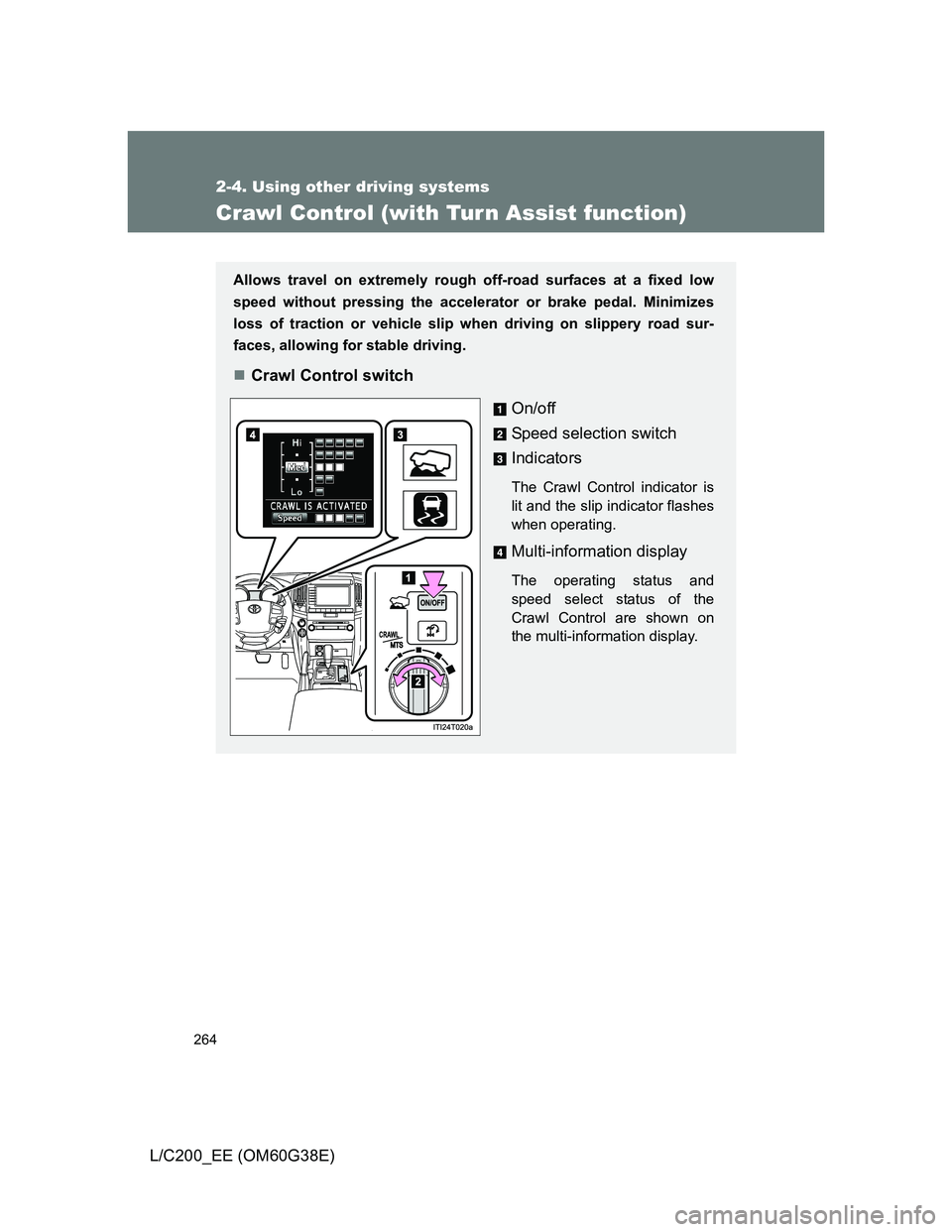
Crawl Control (with Tur n Assist function)
Allows travel on extremely rough off-road surfaces at a fixed low
speed without pressing the accelerator or brake pedal. Minimizes
loss of traction or vehicle slip when driving on slippery road sur-
faces, allowing for stable driving.
Crawl Control switch
On/off
Speed selection switch
Indicators
The Crawl Control indicator is
lit and the slip indicator flashes
when operating.
Multi-information display
The operating status and
speed select status of the
Crawl Control are shown on
the multi-information display.
Page 267 of 692
267 2-4. Using other driving systems
2
When driving
L/C200_EE (OM60G38E)
The Crawl Control and Turn Assist function can be operated when
Crawl Control
The engine is running.
The shift lever is in any gear other than “P” or “N”.
The four-wheel drive control switch is in “L4”.
The driver’s door is closed.
Turn Assist function
Crawl Control is operating.
The center differential is not locked.
The accelerator and brake are not being operated.
The shift lever is in any gear other than “P”, “R” or “N”.
The steering wheel is turned very far.
Automatic system cancelation
Crawl Control
In the following situations, the buzzer will sound intermittently and Crawl
Control will be canceled automatically. In this event, the Crawl Control indi-
cator will flash and then go off, the Turn Assist indicator will go off (if the Turn
Assist function is in use), and a message stating that Crawl Control has
been turned off will be displayed on the multi-information display for several
seconds
When the shift lever is moved to “P” or “N”.
When the four-wheel drive control switch is in “H4”.
When the driver’s door is opened.
Turn Assist function
When the center differential is locked, the buzzer will sound intermittently
and the Turn Assist function will be canceled automatically. In this event, the
Turn Assist indicator will go off, and a message stating that the Turn Assist
function has been turned off will be displayed on the multi-information dis-
play for several seconds.
Page 268 of 692
268 2-4. Using other driving systems
L/C200_EE (OM60G38E)
Function limitations
Crawl Control
In the following situations, brake control can be used to drive downhill at
a constant speed. However, engine control is not available when driving
uphill at a constant speed.
• When switched to second start mode.
In the following situation, engine control and brake control will stop tem-
porarily. In this event, the Crawl Control indicator will flash.
• When the vehicle speed exceeds approximately 25 km/h (15 mph).
Turn Assist function
In the following situations, the Turn Assist function will stop temporarily. In
this event, the Turn Assist indicator will flash.
When the vehicle speed exceeds approximately 10km/h (6 mph).
When the shift lever is moved to “R”.
When the Crawl Control system is operated continuously
If Crawl Control is used continuously for a long time, the buzzer will
sound, a malfunction notification will be displayed on the multi-informa-
tion display, the Crawl Control indicator will go off, and Crawl Control will
be temporarily inoperable as a result of the brake system overheating. In
this event, stop the vehicle immediately in a safe place, and allow the
brake system to cool down sufficiently until the “TRC OFF” on the multi-
information display go off. (In the meantime, normal driving is possible.)
If Crawl Control is used continuously for a long time, the buzzer will
sound, the system will be temporarily canceled, and a malfunction notifi-
cation will be displayed on the multi-information display as a result of the
automatic transmission system overheating. Stop the vehicle in a safe
place until the display goes off.