length TOYOTA LAND CRUISER 2012 Owners Manual
[x] Cancel search | Manufacturer: TOYOTA, Model Year: 2012, Model line: LAND CRUISER, Model: TOYOTA LAND CRUISER 2012Pages: 692, PDF Size: 29.3 MB
Page 101 of 692

101
1
1-3. Adjustable components (seats, mirrors, steering wheel)
Before driving
L/C200_EE (OM60G38E)
Steering wheel
Manual tilt & telescopic steering wheel
The steering wheel can be adjusted to a comfortable position.
To change the angle
Hold the steering
wheel and pull the lock
release lever toward
you.
Tilt the steering wheel
to the desired angle
and release the lever.
To change the column length
Hold the steering
wheel and push down
the lock release lever.
Set the steering wheel
to the desired length
and return the lever to
its original position.
ITY13C063
STEP1
STEP2
ITY13C104
STEP1
STEP2
Page 299 of 692
299 2-4. Using other driving systems
2
When driving
L/C200_EE (OM60G38E)
CAUTION
Conditions which may affect the Multi-terrain Monitor system
If the tires are changed, the position of the guide lines displayed on the
screen may be incorrect. When changing the tires, consult any authorized
Toyota dealer or repairer, or another duly qualified and equipped profes-
sional.
Depending on the circumstances of the vehicle (number of passengers,
amount of luggage, etc.), the position of the guide lines displayed on the
screen may change. Be sure to check visually behind and all around the
vehicle before proceeding.
Depending on the overall length of the vehicle (if a frontal protection sys-
tem is installed or the bumper has been replaced, etc.), the position of the
distance guidelines displayed on the front monitor may change. Be sure to
check visually behind and all around the vehicle before proceeding.
When washing the vehicle, do not apply intensive bursts of water to the
camera or camera area. Doing so may result in the camera malfunction-
ing.
NOTICE
When using the Multi-terrain Monitor
Even if an obstacle is no longer visible on the side monitor, do not turn the
steering wheel further in the direction the vehicle is turning until the vehicle
has moved completely past the obstacle. If the steering wheel is turned to
full lock, the vehicle will turn in the smallest possible turning circle, and
may collide with the obstacle.
It may be difficult to judge distance with the image from the front camera
due to the characteristics of the lens. Drive carefully while checking the
actual distance to the obstacles displayed on the screen. Also, give your
full attention to sudden bumps in the road.
Page 330 of 692
330 2-5. Driving information
L/C200_EE (OM60G38E)
Guidance
Your vehicle will handle differently when towing a trailer. In order to
avoid accident, death or serious injury, keep the following in mind
when towing:
Checking connections between trailer and lights
Stop the vehicle and check the operation of the connection
between the trailer and lights after driving for a brief period as well
as before setting off.
Practicing driving with a coupled trailer
Get the feel for turning, stopping and reversing with the trailer
coupled by practicing in an area with no or light traffic.
When reversing with a coupled trailer, hold the section of the
steering wheel nearest to you and rotate clockwise to turn the
trailer left or counterclockwise to turn right. Always rotate gradu-
ally to prevent steering error. Have someone guide you when
reversing to lessen the risk of accident.
Increasing vehicle-to-vehicle distance
At a speed of 10 km/h (6 mph), the distance to the vehicle running
ahead of you should be equivalent to or greater than the combined
length of your vehicle and trailer. Avoid sudden braking that may
cause skidding. Otherwise, the vehicle may spin out of control.
This is especially true when driving on wet or slippery road sur-
faces.
Page 331 of 692
331 2-5. Driving information
2
When driving
L/C200_EE (OM60G38E)Sudden acceleration/steering input/cornering
Executing sharp turns when towing may result in the trailer collid-
ing with your vehicle. Decelerate well in advance when approach-
ing turns and take them slowly and carefully to avoid sudden
braking.
Important points regarding turning
The wheels of the trailer will travel closer to the inside of the curve
than the wheels of the vehicle. To make allowance for this, take the
turns wider than you would normally.
Important points regarding stability
Vehicle movement resulting from uneven road surfaces and strong
crosswinds will affect handling. The vehicle may also be rocked by
passing buses or large trucks. Frequently check behind when mov-
ing alongside such vehicles. As soon as such vehicle movement
occurs, immediately start to decelerate smoothly by slowly apply-
ing the brakes. Always steer the vehicle straight ahead while brak-
ing.
Passing other vehicles
Consider the total combined length of your vehicle and trailer, and
ensure that the vehicle-to-vehicle distance is sufficient before exe-
cuting lane changes.
Page 378 of 692
378 3-2. Using the audio system
L/C200_EE (OM60G38E)
Compatible media
Media that can be used for MP3 and WMA playback are CD-Rs and CD-
RWs.
Playback in some instances may not be possible, depending on the status
of the CD-R or CD-RW. Playback may not be possible or the audio may
jump if the disc is scratched or marked with fingerprints.
Compatible disc formats
The following disc formats can be used.
• Disc formats: CD-ROM Mode 1 and Mode 2
CD-ROM XA Mode 2, Form 1 and Form 2
• File formats: ISO9660 Level 1, Level 2, (Romeo, Joliet)
MP3 and WMA files written in any format other than those listed above
may not play correctly, and their file names and folder names may not
be displayed correctly.
Items related to standards and limitations are as follows.
• Maximum directory hierarchy: 8 levels
• Maximum length of folder names/file names: 32 characters
• Maximum number of folders: 192 (including the root)
• Maximum number of files per disc: 255
File names
The only files that can be recognized as MP3/WMA and played are those
with the extension .mp3 or .wma.
Multi-sessions
As the audio system is compatible with multi-sessions, it is possible to play
discs that contain MP3 and WMA files. However, only the first session can
be played.
ID3 and WMA tags
ID3 tags can be added to MP3 files, making it possible to record the track
title and artist name, etc.
The system is compatible with ID3 Ver. 1.0, 1.1, and Ver. 2.2, 2.3 ID3 tags.
(The number of characters is based on ID3 Ver. 1.0 and 1.1.)
WMA tags can be added to WMA files, making it possible to record the
track title and artist name in the same way as with ID3 tags.
Page 644 of 692
644
L/C200_EE (OM60G38E)
6-1. Specifications
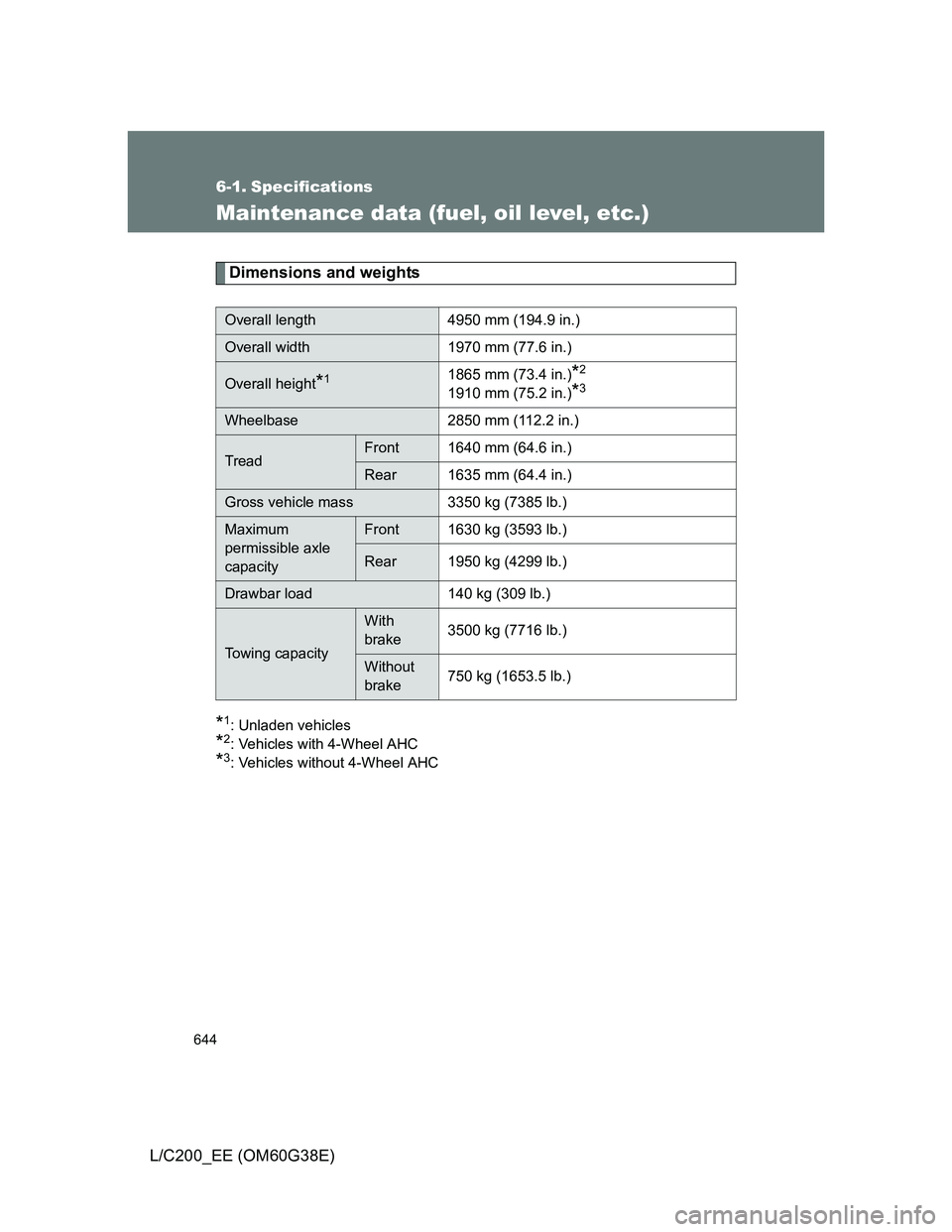
Maintenance data (fuel, oil level, etc.)
Dimensions and weights
*1: Unladen vehicles
*2: Vehicles with 4-Wheel AHC
*3: Vehicles without 4-Wheel AHC
Overall length 4950 mm (194.9 in.)
Overall width 1970 mm (77.6 in.)
Overall height*11865 mm (73.4 in.)*2
1910 mm (75.2 in.)*3
Wheelbase 2850 mm (112.2 in.)
TreadFront 1640 mm (64.6 in.)
Rear 1635 mm (64.4 in.)
Gross vehicle mass 3350 kg (7385 lb.)
Maximum
permissible axle
capacityFront 1630 kg (3593 lb.)
Rear 1950 kg (4299 lb.)
Drawbar load 140 kg (309 lb.)
Towing capacity
With
brake3500 kg (7716 lb.)
Without
brake750 kg (1653.5 lb.)