phone TOYOTA LAND CRUISER 2012 Owners Manual
[x] Cancel search | Manufacturer: TOYOTA, Model Year: 2012, Model line: LAND CRUISER, Model: TOYOTA LAND CRUISER 2012Pages: 692, PDF Size: 29.3 MB
Page 4 of 692
TABLE OF CONTENTSIndex
4
L/C200_EE (OM60G38E)
3-1. Using the air conditioning
system and defogger
Front air conditioning
system .............................. 336
Rear air conditioning
system .............................. 350
Heater idle up switch .......... 354
Power heater ...................... 355
Rear window and
outside rear view mirror
defoggers.......................... 356
Windshield wiper de-icer..... 358
3-2. Using the audio system
Audio system types............. 360
Using the radio.................... 362
Using the CD player............ 366
Playing back MP3 and
WMA discs........................ 373
Operating an iPod ............... 380
Operating
a USB memory ................. 388
Optimal use of
the audio system .............. 396
Using the AUX port ............. 398
Using the steering
switches ............................ 3993-3. Using the Bluetooth
® audio
system
Bluetooth
® audio system .... 402
Using the Bluetooth®
audio system .................... 407
Operating a Bluetooth
®
enabled portable
player ............................... 410
Setting up a Bluetooth
®
enabled portable
player ............................... 413
Bluetooth
® audio
system setup .................... 417
3-4. Using the hands-free system
(for cellular phone)
Hands-free system
(for cellular phone) ........... 418
Using the hands-free
system.............................. 423
Making a phone call ........... 430
Setting a cellular phone...... 434
Security and
system setup .................... 438
Using the phone book ........ 442
3Interior features
Page 17 of 692
17
L/C200_EE (OM60G38E)
B
: If equipped
*: Refer to “Navigation System Owner’s Manual”.
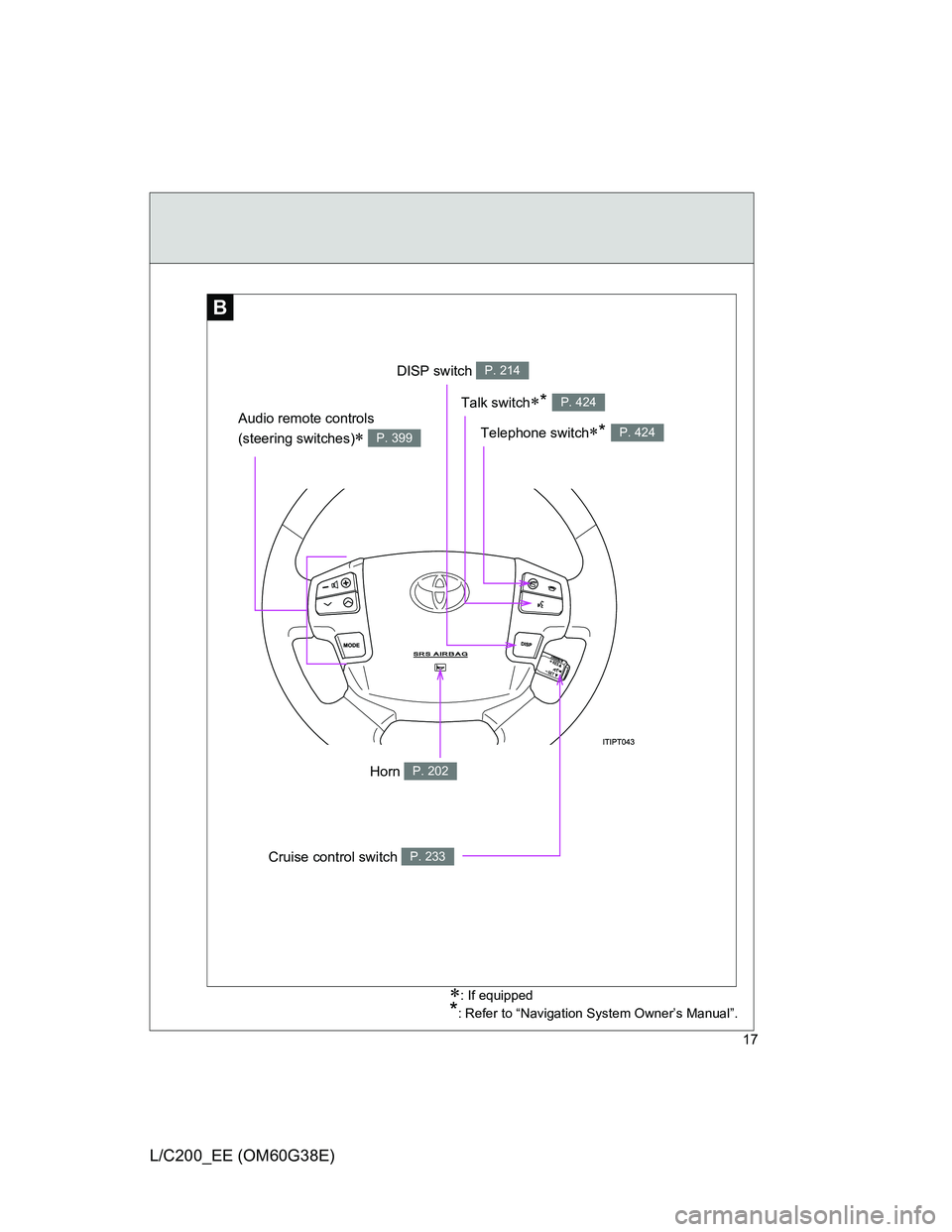
DISP switch P. 214
Cruise control switch P. 233
Telephone switch* P. 424
Talk switch* P. 424
Audio remote controls
(steering switches)
P. 399
Horn P. 202
Page 27 of 692
27
L/C200_EE (OM60G38E)
B
: If equipped
*: Refer to “Navigation System Owner’s Manual”.
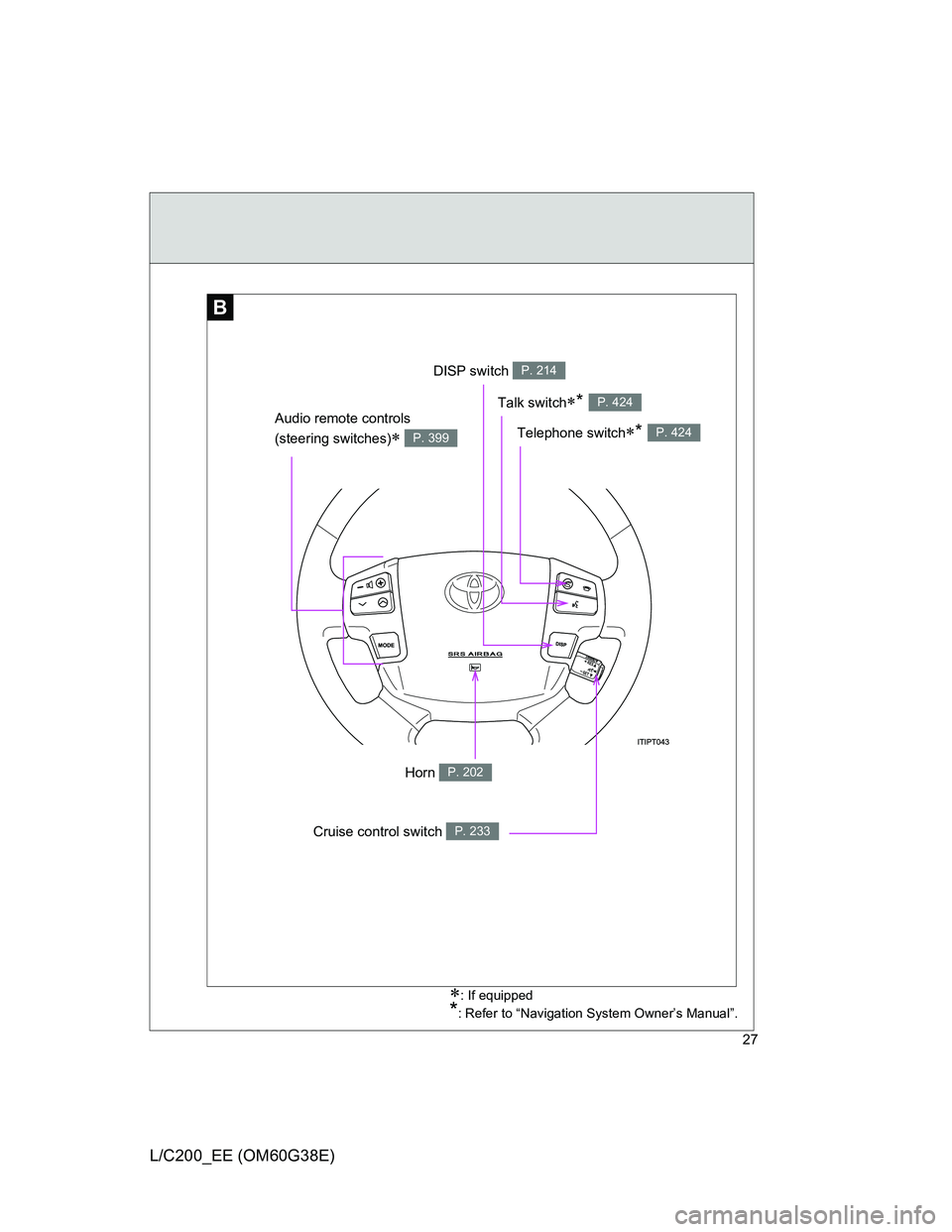
DISP switch P. 214
Telephone switch* P. 424
Talk switch* P. 424
Audio remote controls
(steering switches)
P. 399
Cruise control switch P. 233
Horn P. 202
Page 34 of 692
34
L/C200_EE (OM60G38E)
CAUTION
General precautions while driving
Driving under the influence: Never drive your vehicle when under the influ-
ence of alcohol or drugs that have impaired your ability to operate your vehi-
cle. Alcohol and certain drugs delay reaction time, impair judgment and
reduce coordination, which could lead to an accident that could result in
death or serious injury.
Defensive driving: Always drive defensively. Anticipate mistakes that other
drivers or pedestrians might make and be ready to avoid accidents.
Driver distraction: Always give your full attention to driving. Anything that dis-
tracts the driver, such as adjusting controls, talking on a cellular phone or
reading can result in a collision with resulting death or serious injury to you,
your occupants or others.
General precaution regarding children’s safety
Never leave children unattended in the vehicle, and never allow children to
have or use the key.
Children may be able to start the vehicle or shift the vehicle into neutral.
There is also a danger that children may injure themselves by playing with
the cigarette lighter, the windows, the moon roof, or other features of the
vehicle. In addition, heat build-up or extremely cold temperatures inside the
vehicle can be fatal to children.
Your vehicle contains batteries and/or accumulators. Do not discard them
into the environment but cooperate with separate collection (Directive
2006/66/EC).
Page 44 of 692
44 1-2. Opening, closing and locking the doors
L/C200_EE (OM60G38E)
Operation signals
The emergency flashers flash to indicate that the doors have been locked/
unlocked.
Conditions affecting operation
The smart entry & start system uses weak radio waves. In the following situ-
ations, the communication between the electronic key and the vehicle may
be affected, preventing the smart entry & start system and wireless remote
control from operating properly. (Ways of coping: P. 627)
When the electronic key battery is depleted
Near a TV tower, electric power plant, gas station, radio station, large dis-
play, airport or other facility that generates strong radio waves or electri-
cal noise
When carrying a portable radio, cellular phone, cordless phone or other
wireless communication devices
When the electronic key has come into contact with, or is covered by a
metallic object
When multiple electronic keys are in the vicinity
When carrying or using the electronic key together with the following
devices that emit radio waves
• Another vehicle’s electronic key
• A wireless key that emits radio waves
• Personal computer
If window tint with a metallic content or metallic objects are attached to
the rear window
Page 46 of 692
46 1-2. Opening, closing and locking the doors
L/C200_EE (OM60G38E)
To prevent unintended triggering of the alarm, unlock the doors using the
wireless remote control and open and close a door once after the setting
have been changed. (If a door is not opened within 30 seconds after
is pressed, the doors will be locked again and the alarm will automatically be
set.)
In case that the alarm is triggered, immediately stop the alarm. (P. 127)
Battery-saving function
In the following circumstances, the entry function is disabled in order to pre-
vent the vehicle and electronic key batteries from discharging.
When the entry function has not been used for 2 weeks or more
When the electronic key has been left within approximately 1 m (3 ft.) of
the vehicle for 10 minutes or more
The system will resume operation when...
The vehicle is locked using the door handle lock switch.
The vehicle is locked/unlocked using the wireless remote control function
(P. 55) or the mechanical key. (P. 627)
Electronic key battery depletion
The standard battery life is 1 to 2 years. (The battery becomes depleted
even if the electronic key is not used.) If the smart entry & start system or
the wireless remote control function does not operate, or the detection
area becomes smaller, the battery may be depleted. Replace the battery
when necessary. (P. 528)
If the battery becomes low, an alarm will sound in the cabin when the
engine stops. (P. 49)
To avoid serious deterioration, do not leave the electronic key within 1 m
(3 ft.) of the following electrical appliances that produce a magnetic field.
•TVs
• Personal computers
• Recharging cellular phones or cordless phones
• Table lamps
Page 335 of 692
3Interior features
335
L/C200_EE (OM60G38E)
3-3. Using the Bluetooth® audio
system
Bluetooth
® audio
system ............................ 402
Using the Bluetooth
®
audio system .................. 407
Operating a Bluetooth
®
enabled portable
player .............................. 410
Setting up a Bluetooth
®
enabled portable
player .............................. 413
Bluetooth
® audio
system setup .................. 417
3-4. Using the hands-free system
(for cellular phone)
Hands-free system
(for cellular phone).......... 418
Using the hands-free
system ............................ 423
Making a phone call.......... 430
Setting a cellular phone .... 434
Security and
system setup .................. 438
Using the phone book....... 442
3-5. Using the interior lights
Interior lights list................ 448
• Interior lights ................... 449
• Personal lights ................ 4503-6. Using the storage features
List of storage features ..... 452
• Glove box ....................... 453
• Console box.................... 454
• Overhead console .......... 455
• Cup holders .................... 456
• Bottle holders.................. 458
• Card holder ..................... 460
• Auxiliary box ................... 460
3-7. Other interior features
Cool box............................ 461
Sun visors ......................... 463
Vanity mirror ..................... 464
Clock ................................. 465
Outside temperature
display ............................ 466
Ashtray.............................. 468
Cigarette lighter ................ 470
Power outlet ...................... 471
Heated steering wheel ...... 474
Seat heaters and
ventilators ....................... 476
Armrest ............................. 480
Assist grip ......................... 481
Floor mats ......................... 482
Luggage compartment
features........................... 484
Page 361 of 692
361 3-2. Using the audio system
3
Interior features
L/C200_EE (OM60G38E)
Using cellular phones
Interference may be heard through the audio system’s speakers if a cellular
phone is being used inside or close to the vehicle while the audio system is
operating.
NOTICE
To prevent battery discharge
Do not leave the audio system on longer than necessary with the engine off.
To avoid damaging the audio system
Take care not to spill drinks or other fluids over the audio system.
Page 386 of 692
386 3-2. Using the audio system
L/C200_EE (OM60G38E)
iPod problems
To resolve most problems encountered when using your iPod, disconnect
your iPod from the vehicle iPod connection and reset it.
For instructions on how to reset your iPod, refer to your iPod Owner’s Man-
ual.
Display
P. 369
Error messages
“ERROR”: This indicates a problem in the iPod or its connection.
“NO MUSIC”: This indicates that there is no music data in the iPod.
“EMPTY”: This indicates that an empty playlist is selected.
“UPDATE”: This indicates that the version of the iPod is not compatible.
Upgrade your iPod software to the latest version.
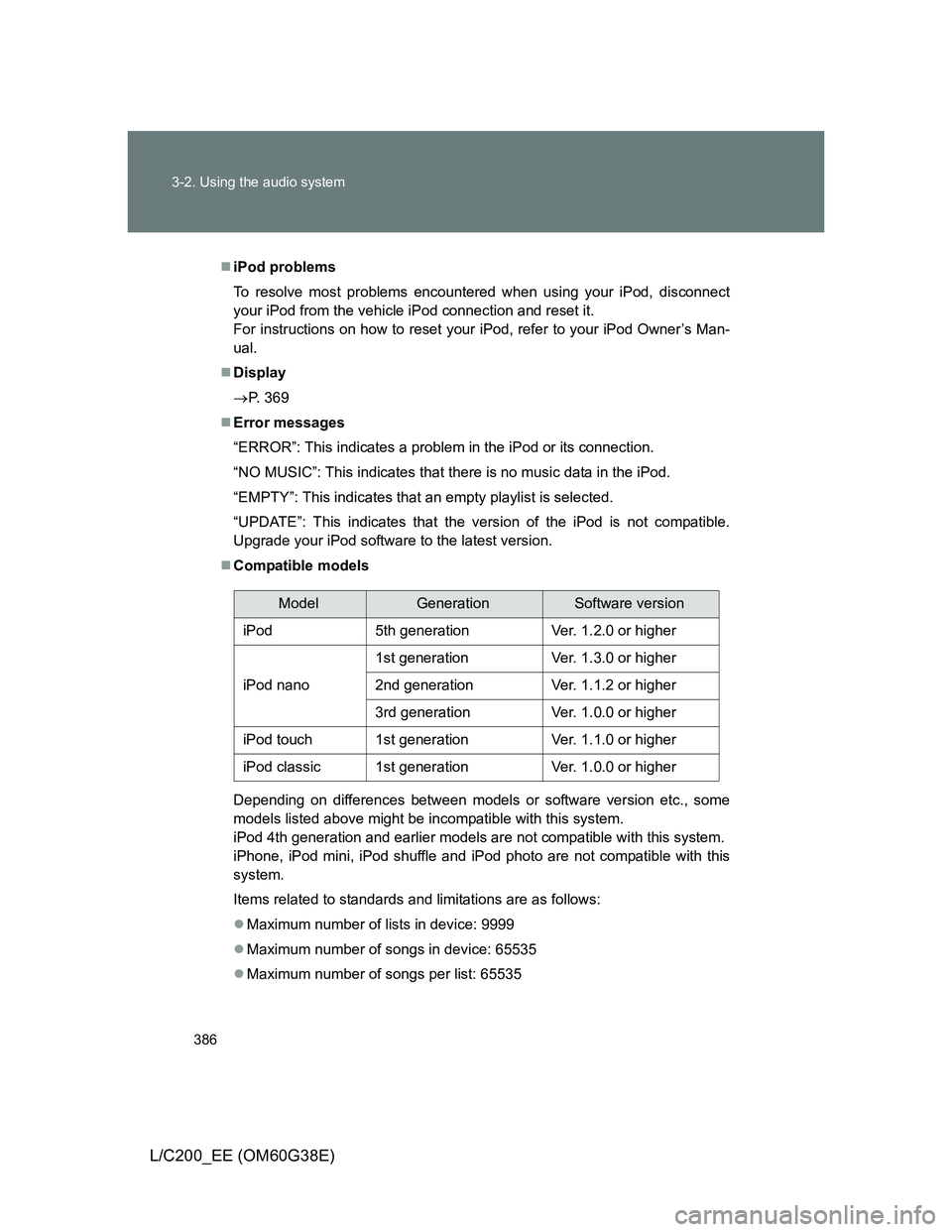
Compatible models
Depending on differences between models or software version etc., some
models listed above might be incompatible with this system.
iPod 4th generation and earlier models are not compatible with this system.
iPhone, iPod mini, iPod shuffle and iPod photo are not compatible with this
system.
Items related to standards and limitations are as follows:
Maximum number of lists in device: 9999
Maximum number of songs in device: 65535
Maximum number of songs per list: 65535
ModelGenerationSoftware version
iPod5th generationVer. 1.2.0 or higher
iPod nano
1st generationVer. 1.3.0 or higher
2nd generationVer. 1.1.2 or higher
3rd generationVer. 1.0.0 or higher
iPod touch1st generationVer. 1.1.0 or higher
iPod classic1st generationVer. 1.0.0 or higher
Page 408 of 692
408 3-3. Using the Bluetooth
® audio system
L/C200_EE (OM60G38E)
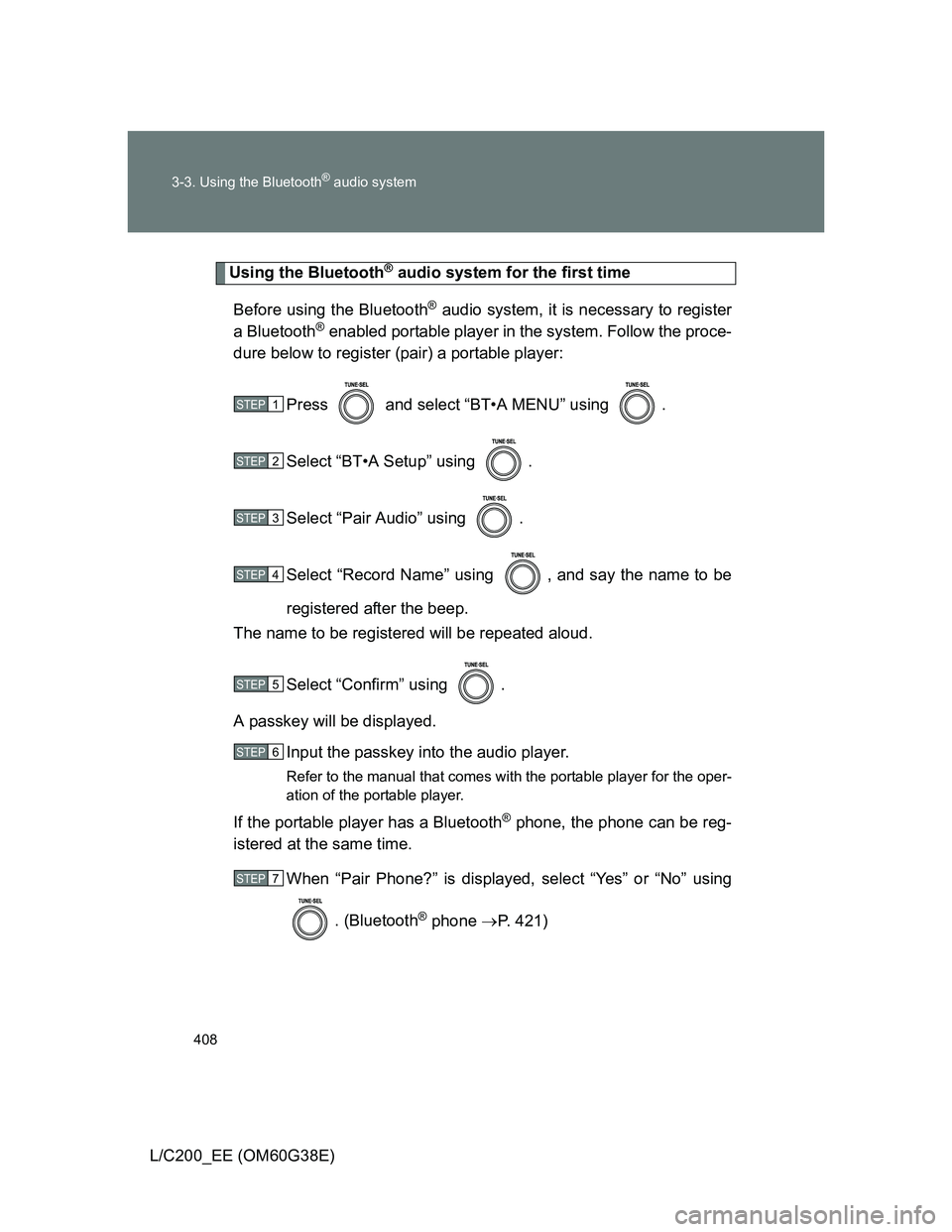
Using the Bluetooth® audio system for the first time
Before using the Bluetooth
® audio system, it is necessary to register
a Bluetooth
® enabled portable player in the system. Follow the proce-
dure below to register (pair) a portable player:
Press and select “BT•A MENU” using .
Select “BT•A Setup” using .
Select “Pair Audio” using .
Select “Record Name” using , and say the name to be
registered after the beep.
The name to be registered will be repeated aloud.
Select “Confirm” using .
A passkey will be displayed.
Input the passkey into the audio player.
Refer to the manual that comes with the portable player for the oper-
ation of the portable player.
If the portable player has a Bluetooth® phone, the phone can be reg-
istered at the same time.
When “Pair Phone?” is displayed, select “Yes” or “No” using
. (Bluetooth
® phone P. 421)
STEP1
STEP2
STEP3
STEP4
STEP5
STEP6
STEP7