Disc TOYOTA LAND CRUISER 2014 J200 Navigation Manual
[x] Cancel search | Manufacturer: TOYOTA, Model Year: 2014, Model line: LAND CRUISER, Model: TOYOTA LAND CRUISER 2014 J200Pages: 427, PDF Size: 25.75 MB
Page 33 of 427
33
1. BASIC INFORMATION BEFORE OPERATION
2
BASIC FUNCTION
L/C200_Navi_OM60L27U_(U)
13.06.03 19:43
5. MAP SCREEN OPERATION
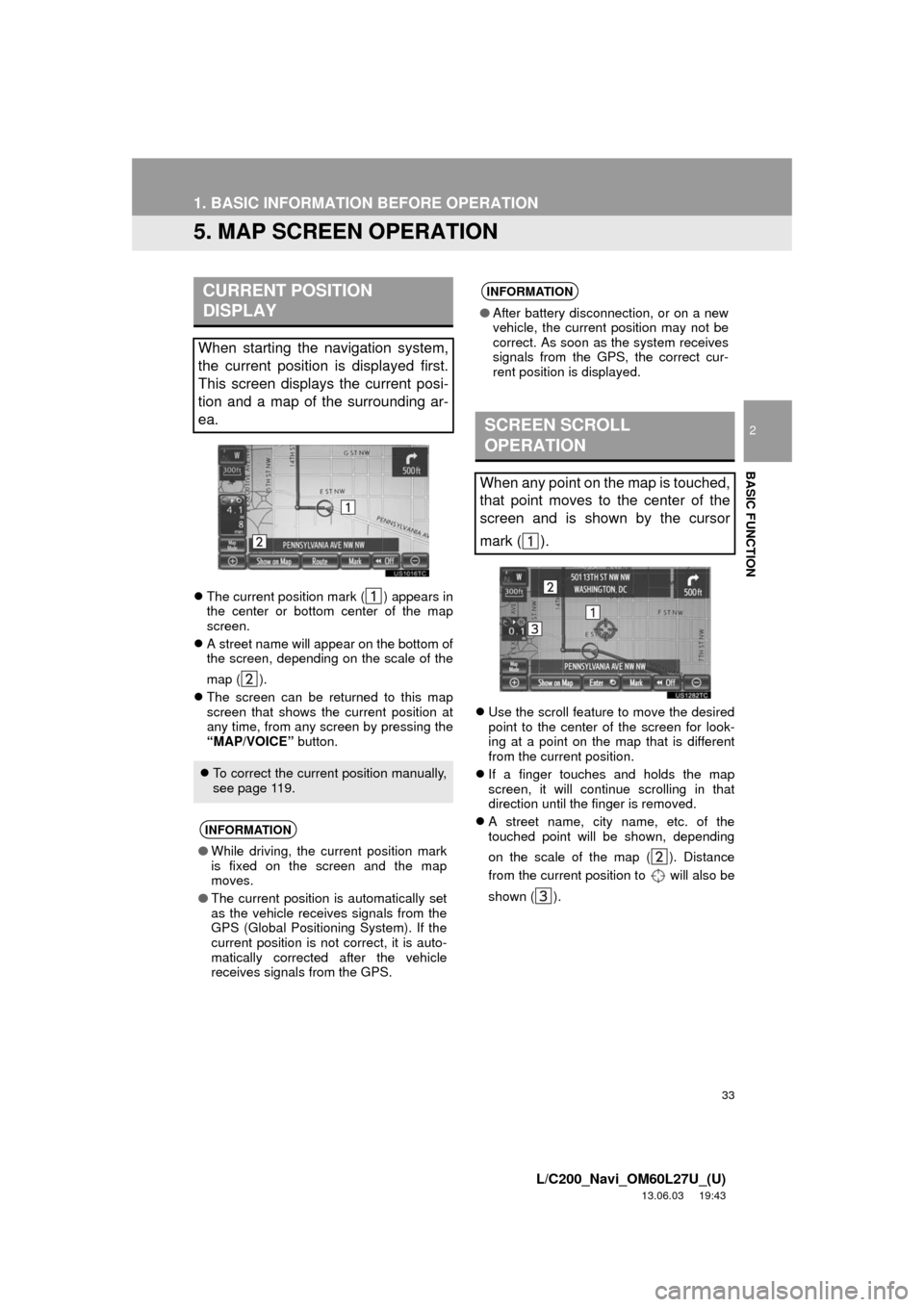
The current position mark ( ) appears in
the center or bottom center of the map
screen.
A street name will appear on the bottom of
the screen, depending on the scale of the
map ( ).
The screen can be returned to this map
screen that shows the current position at
any time, from any screen by pressing the
“MAP/VOICE” button.Use the scroll feature to move the desired
point to the center of the screen for look-
ing at a point on the map that is different
from the current position.
If a finger touches and holds the map
screen, it will continue scrolling in that
direction until the finger is removed.
A street name, city name, etc. of the
touched point will be shown, depending
on the scale of the map ( ). Distance
from the current position to will also be
shown ( ).
CURRENT POSITION
DISPLAY
When starting the navigation system,
the current position is displayed first.
This screen displays the current posi-
tion and a map of the surrounding ar-
ea.
To correct the current position manually,
see page 119.
INFORMATION
●While driving, the current position mark
is fixed on the screen and the map
moves.
●The current position is automatically set
as the vehicle receives signals from the
GPS (Global Positioning System). If the
current position is not correct, it is auto-
matically corrected after the vehicle
receives signals from the GPS.
INFORMATION
●After battery disconnection, or on a new
vehicle, the current position may not be
correct. As soon as the system receives
signals from the GPS, the correct cur-
rent position is displayed.
SCREEN SCROLL
OPERATION
When any point on the map is touched,
that point moves to the center of the
screen and is shown by the cursor
mark ( ).
Page 127 of 427
127
4. SETUP
3
NAVIGATION SYSTEM
L/C200_Navi_OM60L27U_(U)
13.06.03 19:43
1Press the “SETUP” button.
2Touch “Vehicle” on the “Setup”
screen.
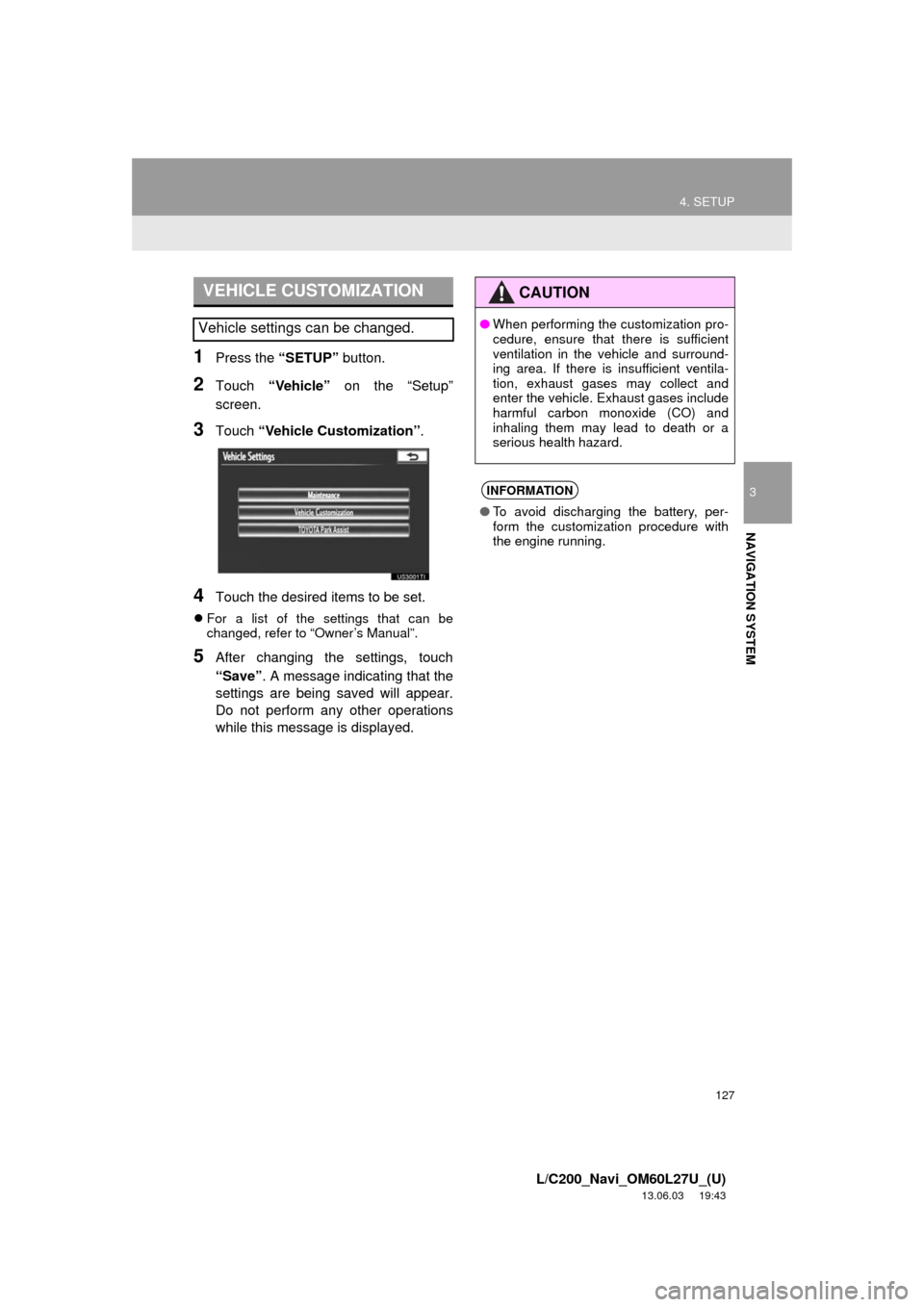
3Touch “Vehicle Customization”.
4Touch the desired items to be set.
For a list of the settings that can be
changed, refer to “Owner’s Manual”.
5After changing the settings, touch
“Save”. A message indicating that the
settings are being saved will appear.
Do not perform any other operations
while this message is displayed.
VEHICLE CUSTOMIZATION
Vehicle settings can be changed.
CAUTION
●When performing the customization pro-
cedure, ensure that there is sufficient
ventilation in the vehicle and surround-
ing area. If there is insufficient ventila-
tion, exhaust gases may collect and
enter the vehicle. Exhaust gases include
harmful carbon monoxide (CO) and
inhaling them may lead to death or a
serious health hazard.
INFORMATION
●To avoid discharging the battery, per-
form the customization procedure with
the engine running.
Page 139 of 427
139
1. PHONE OPERATION
4
PHONE
L/C200_Navi_OM60L27U_(U)
13.06.03 19:39
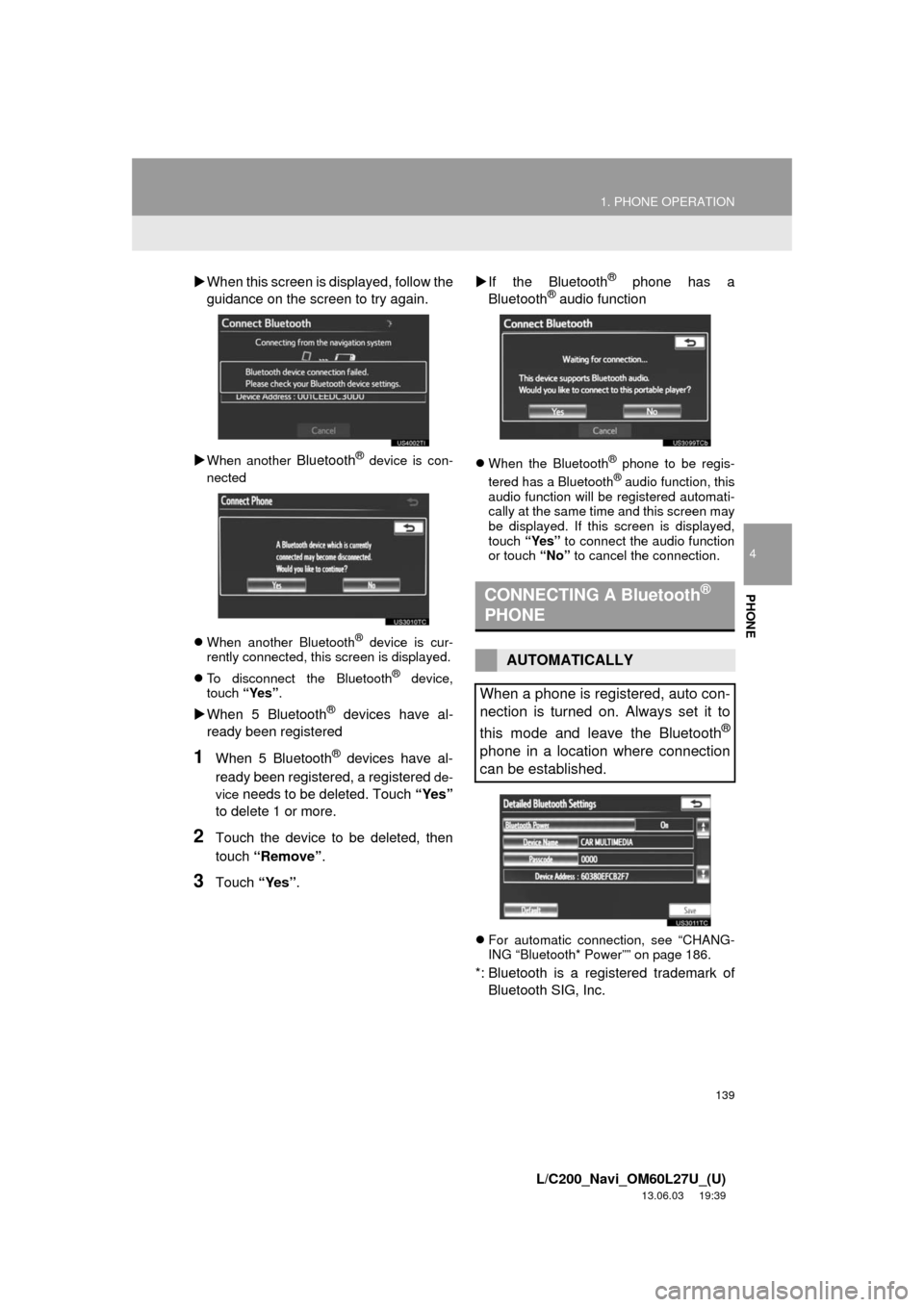
When this screen is displayed, follow the
guidance on the screen to try again.
When another Bluetooth® device is con-
nected
When another Bluetooth
® device is cur-
rently connected, this screen is displayed.
To disconnect the Bluetooth
® device,
touch “Yes”.
When 5 Bluetooth® devices have al-
ready been registered
1When 5 Bluetooth® devices have al-
ready been registered, a registered
de-
vice
needs to be deleted. Touch “Yes”
to delete 1 or more.
2Touch the device to be deleted, then
touch “Remove”.
3Touch “Yes”.If the Bluetooth
® phone has a
Bluetooth® audio function
When the Bluetooth® phone to be regis-
tered has a Bluetooth® audio function, this
audio function will be registered automati-
cally at the same time and this screen may
be displayed. If this screen is displayed,
touch “Yes” to connect the audio function
or touch “No” to cancel the connection.
For automatic connection, see “CHANG-
ING “Bluetooth* Power”” on page 186.
*: Bluetooth is a registered trademark of
Bluetooth SIG, Inc.
CONNECTING A Bluetooth®
PHONE
AUTOMATICALLY
When a phone is registered, auto con-
nection is turned on. Always set it to
this mode and leave the Bluetooth
®
phone in a location where connection
can be established.
Page 141 of 427
141
1. PHONE OPERATION
4
PHONE
L/C200_Navi_OM60L27U_(U)
13.06.03 19:39
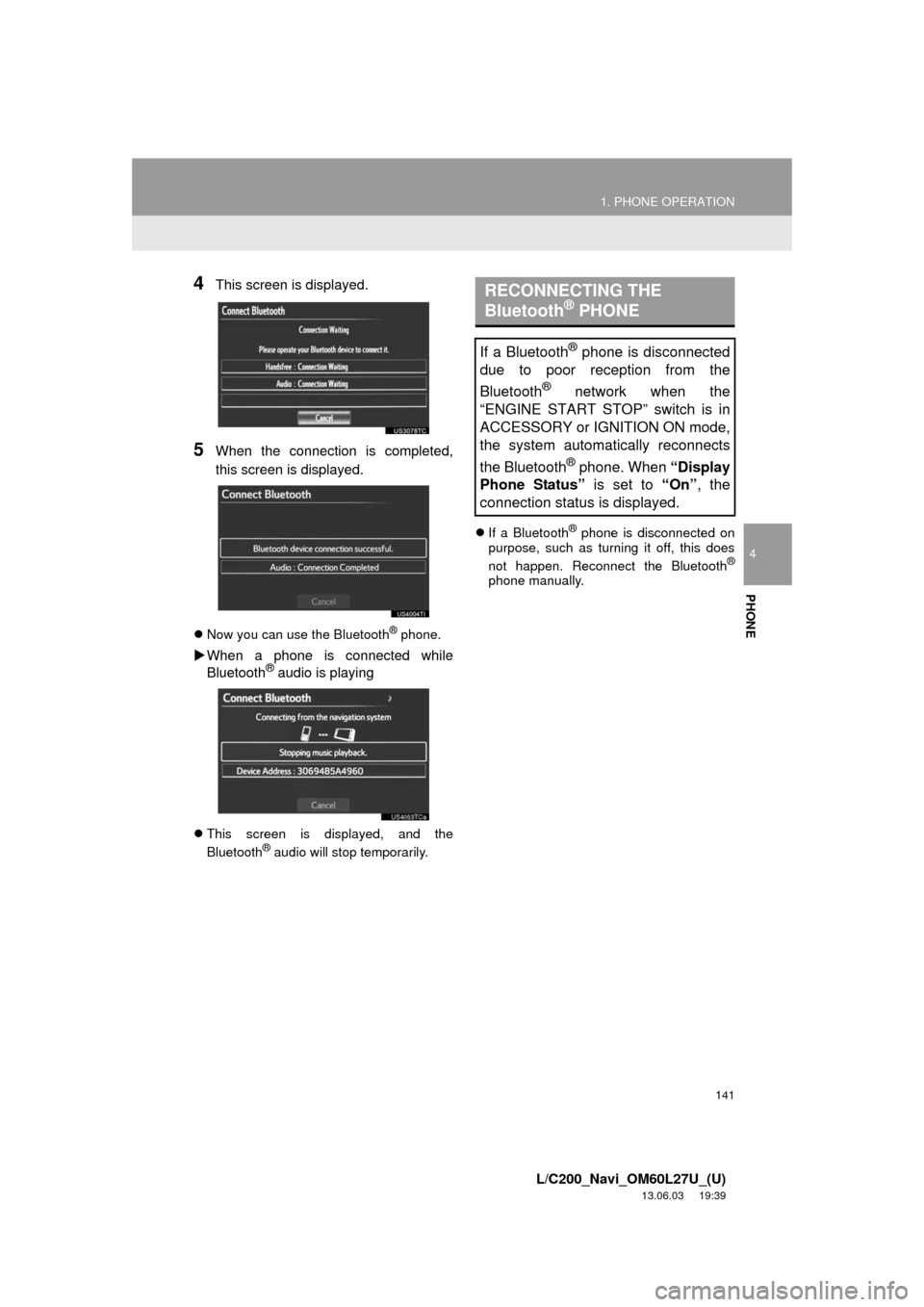
4This screen is displayed.
5When the connection is completed,
this screen is displayed.
Now you can use the Bluetooth® phone.
When a phone is connected while
Bluetooth® audio is playing
This screen is displayed, and the
Bluetooth® audio will stop temporarily.If a Bluetooth
® phone is disconnected on
purpose, such as turning it off, this does
not happen. Reconnect the Bluetooth
®
phone manually.
RECONNECTING THE
Bluetooth® PHONE
If a Bluetooth® phone is disconnected
due to poor reception from the
Bluetooth
® network when the
“ENGINE START STOP” switch is in
ACCESSORY or IGNITION ON mode,
the system automatically reconnects
the Bluetooth
® phone. When “Display
Phone Status” is set to “On”, the
connection status is displayed.
Page 160 of 427
160
2. SETUP
L/C200_Navi_OM60L27U_(U)
13.06.03 19:43
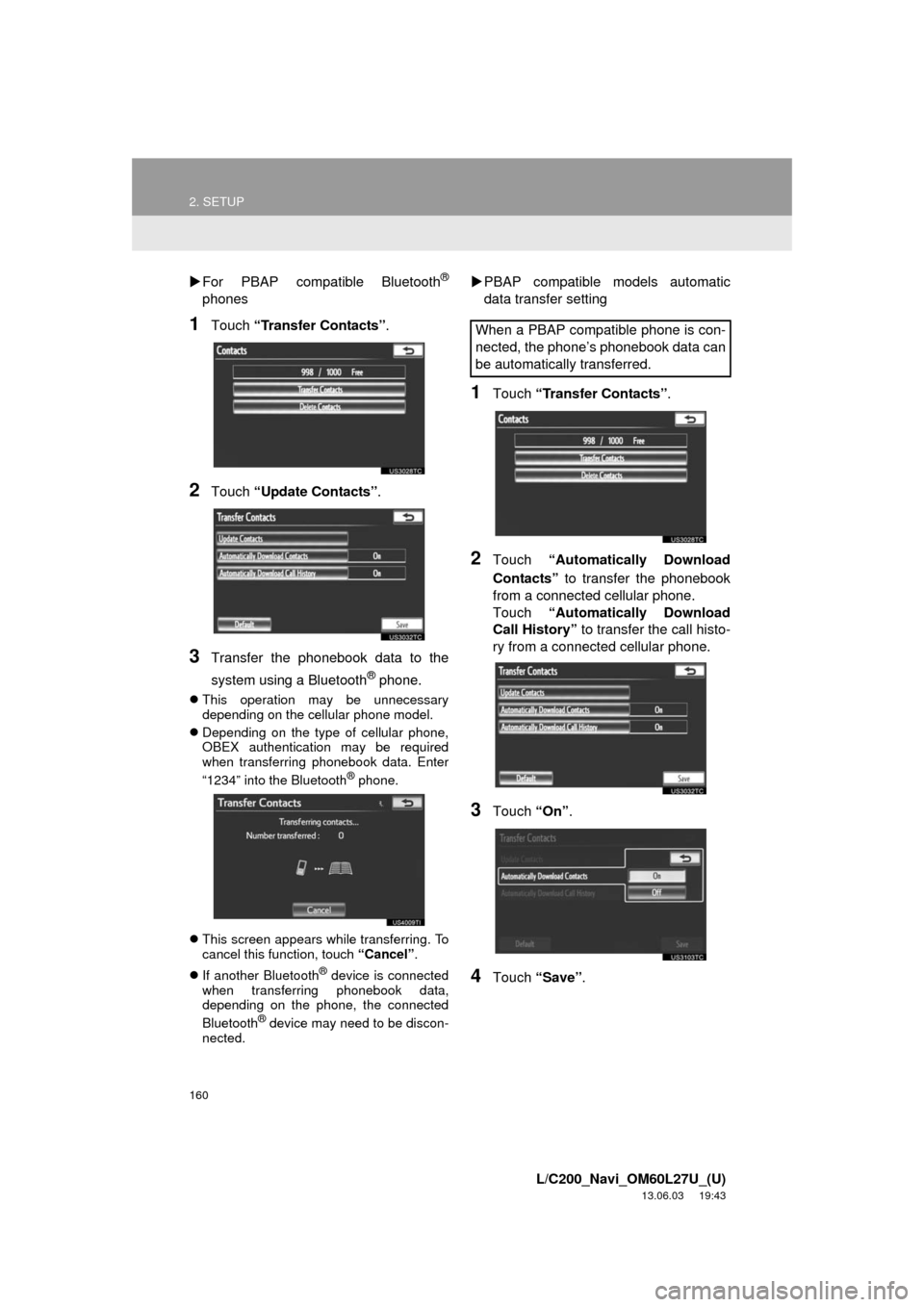
For PBAP compatible Bluetooth®
phones
1Touch “Transfer Contacts”.
2Touch “Update Contacts”.
3Transfer the phonebook data to the
system using a Bluetooth
® phone.
This operation may be unnecessary
depending on the cellular phone model.
Depending on the type of cellular phone,
OBEX authentication may be required
when transferring phonebook data. Enter
“1234” into the Bluetooth
® phone.
This screen appears while transferring. To
cancel this function, touch “Cancel”.
If another Bluetooth
® device is connected
when transferring phonebook data,
depending on the phone, the connected
Bluetooth
® device may need to be discon-
nected.
PBAP compatible models automatic
data transfer setting
1Touch “Transfer Contacts”.
2Touch “Automatically Download
Contacts” to transfer the phonebook
from a connected cellular phone.
Touch “Automatically Download
Call History” to transfer the call histo-
ry from a connected cellular phone.
3Touch “On”.
4Touch “Save”.
When a PBAP compatible phone is con-
nected, the phone’s phonebook data can
be automatically transferred.
Page 161 of 427
161
2. SETUP
4
PHONE
L/C200_Navi_OM60L27U_(U)
13.06.03 19:43
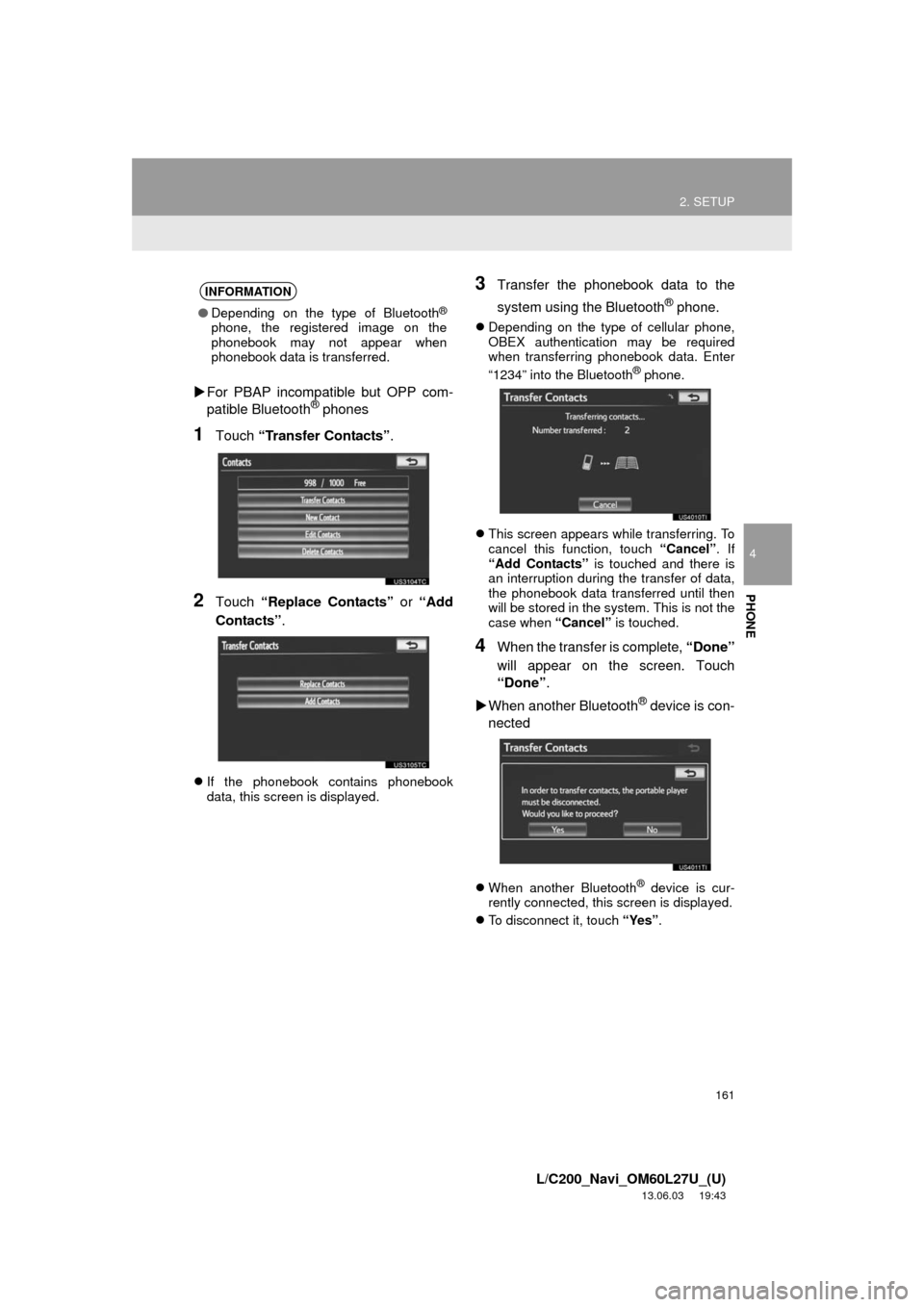
For PBAP incompatible but OPP com-
patible Bluetooth® phones
1Touch “Transfer Contacts”.
2Touch “Replace Contacts” or “Add
Contacts”.
If the phonebook contains phonebook
data, this screen is displayed.
3Transfer the phonebook data to the
system using the Bluetooth
® phone.
Depending on the type of cellular phone,
OBEX authentication may be required
when transferring phonebook data. Enter
“1234” into the Bluetooth
® phone.
This screen appears while transferring. To
cancel this function, touch “Cancel”. If
“Add Contacts” is touched and there is
an interruption during the transfer of data,
the phonebook data transferred until then
will be stored in the system. This is not the
case when “Cancel” is touched.
4When the transfer is complete, “Done”
will appear on the screen. Touch
“Done”.
When another Bluetooth
® device is con-
nected
When another Bluetooth® device is cur-
rently connected, this screen is displayed.
To disconnect it, touch “Yes”.
INFORMATION
●Depending on the type of Bluetooth®
phone, the registered image on the
phonebook may not appear when
phonebook data is transferred.
Page 180 of 427
180
2. SETUP
L/C200_Navi_OM60L27U_(U)
13.06.03 19:43
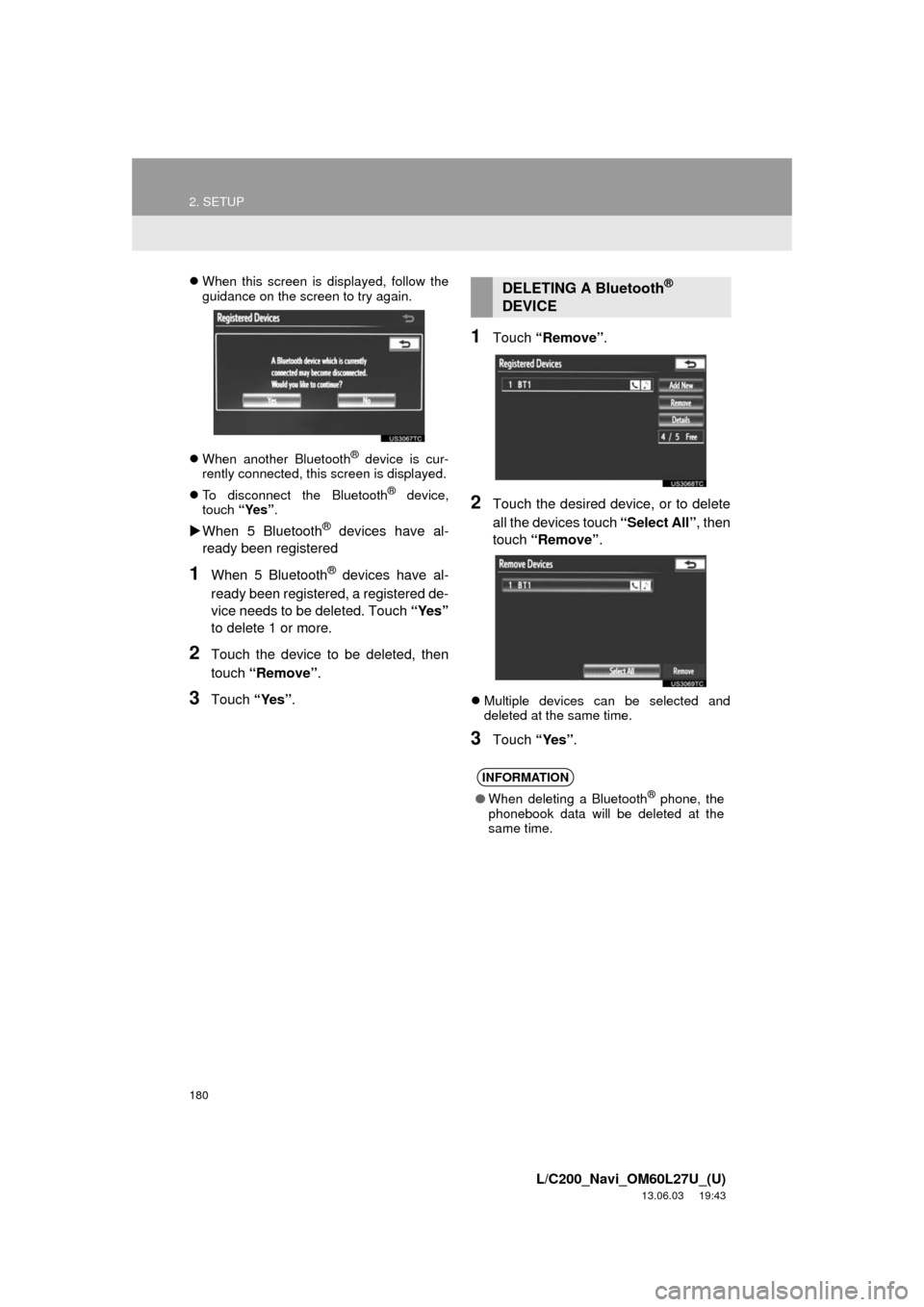
When this screen is displayed, follow the
guidance on the screen to try again.
When another Bluetooth
® device is cur-
rently connected, this screen is displayed.
To disconnect the Bluetooth
® device,
touch “Yes”.
When 5 Bluetooth® devices have al-
ready been registered
1When 5 Bluetooth® devices have al-
ready been registered, a registered de-
vice needs to be deleted. Touch “Yes”
to delete 1 or more.
2Touch the device to be deleted, then
touch “Remove”.
3Touch “Yes”.
1Touch “Remove”.
2Touch the desired device, or to delete
all the devices touch “Select All”, then
touch “Remove”.
Multiple devices can be selected and
deleted at the same time.
3Touch “Yes”.
DELETING A Bluetooth®
DEVICE
INFORMATION
●When deleting a Bluetooth® phone, the
phonebook data will be deleted at the
same time.
Page 183 of 427
183
2. SETUP
4
PHONE
L/C200_Navi_OM60L27U_(U)
13.06.03 19:43
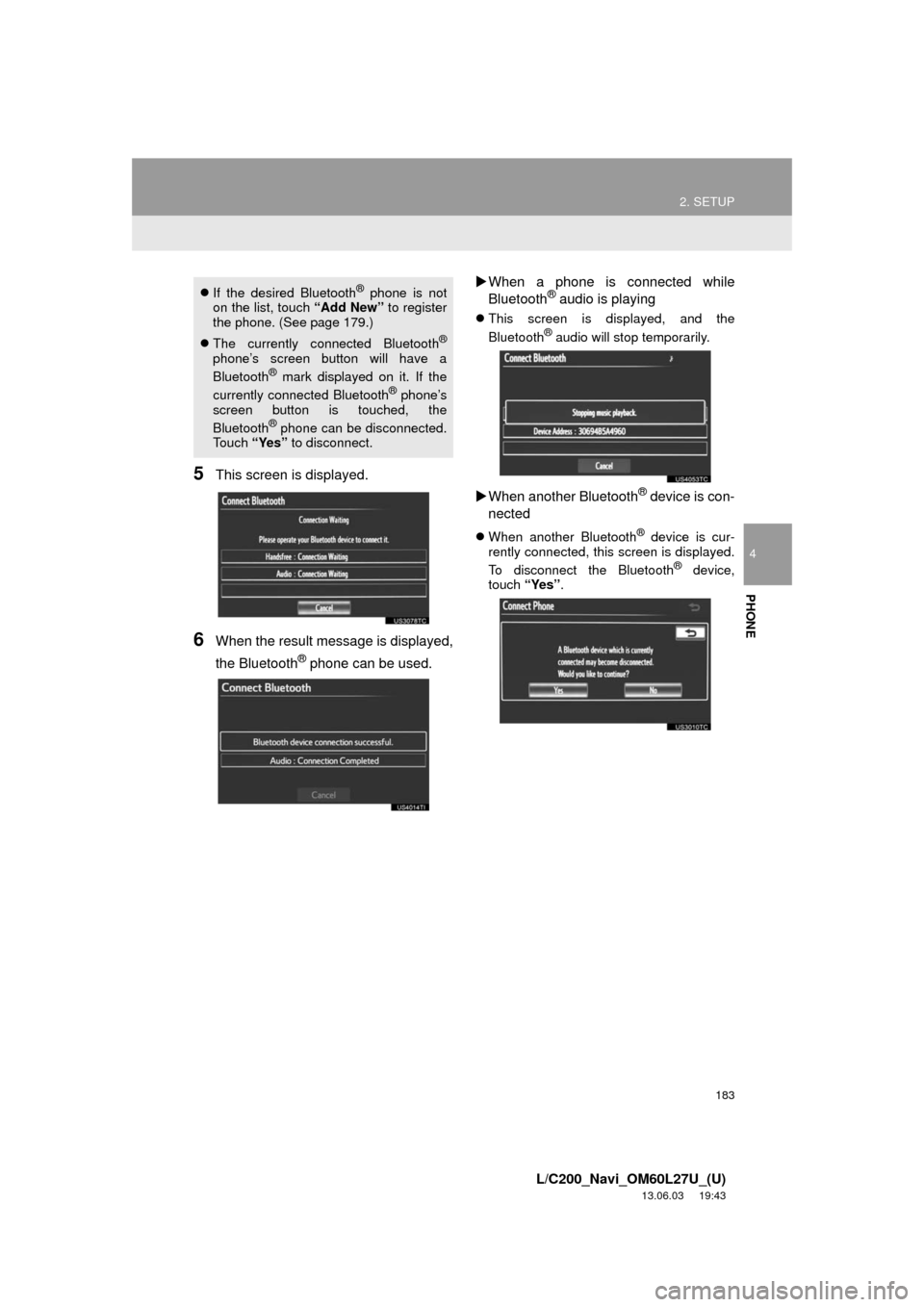
5This screen is displayed.
6When the result message is displayed,
the Bluetooth
® phone can be used.When a phone is connected while
Bluetooth
® audio is playing
This screen is displayed, and the
Bluetooth® audio will stop temporarily.
When another Bluetooth® device is con-
nected
When another Bluetooth® device is cur-
rently connected, this screen is displayed.
To disconnect the Bluetooth
® device,
touch “Yes”.
If the desired Bluetooth® phone is not
on the list, touch “Add New” to register
the phone. (See page 179.)
The currently connected Bluetooth
®
phone’s screen button will have a
Bluetooth® mark displayed on it. If the
currently connected Bluetooth® phone’s
screen button is touched, the
Bluetooth
® phone can be disconnected.
Touch “Yes” to disconnect.
Page 184 of 427
184
2. SETUP
L/C200_Navi_OM60L27U_(U)
13.06.03 19:43
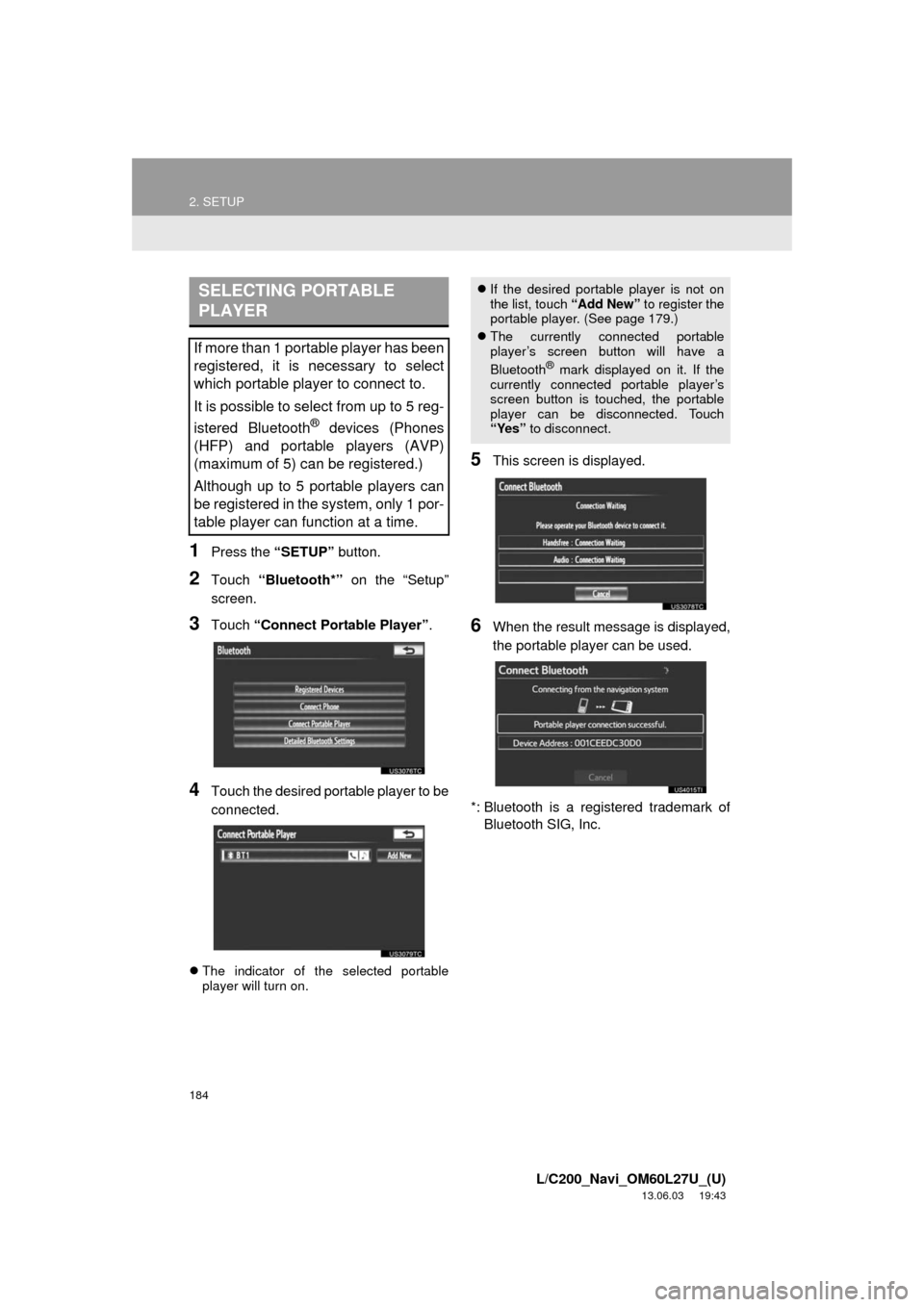
1Press the “SETUP” button.
2Touch “Bluetooth*” on the “Setup”
screen.
3Touch “Connect Portable Player”.
4Touch the desired portable player to be
connected.
The indicator of the selected portable
player will turn on.
5This screen is displayed.
6When the result message is displayed,
the portable player can be used.
*: Bluetooth is a registered trademark of
Bluetooth SIG, Inc.
SELECTING PORTABLE
PLAYER
If more than 1 portable player has been
registered, it is necessary to select
which portable player to connect to.
It is possible to select from up to 5 reg-
istered Bluetooth
® devices (Phones
(HFP) and portable players (AVP)
(maximum of 5) can be registered.)
Although up to 5 portable players can
be registered in the system, only 1 por-
table player can function at a time.
If the desired portable player is not on
the list, touch “Add New” to register the
portable player. (See page 179.)
The currently connected portable
player’s screen button will have a
Bluetooth
® mark displayed on it. If the
currently connected portable player’s
screen button is touched, the portable
player can be disconnected. Touch
“Yes” to disconnect.
Page 185 of 427
185
2. SETUP
4
PHONE
L/C200_Navi_OM60L27U_(U)
13.06.03 19:43
When another Bluetooth® device is con-
nected
When another Bluetooth® device is cur-
rently connected, this screen is displayed.
To disconnect it, touch “Yes”.
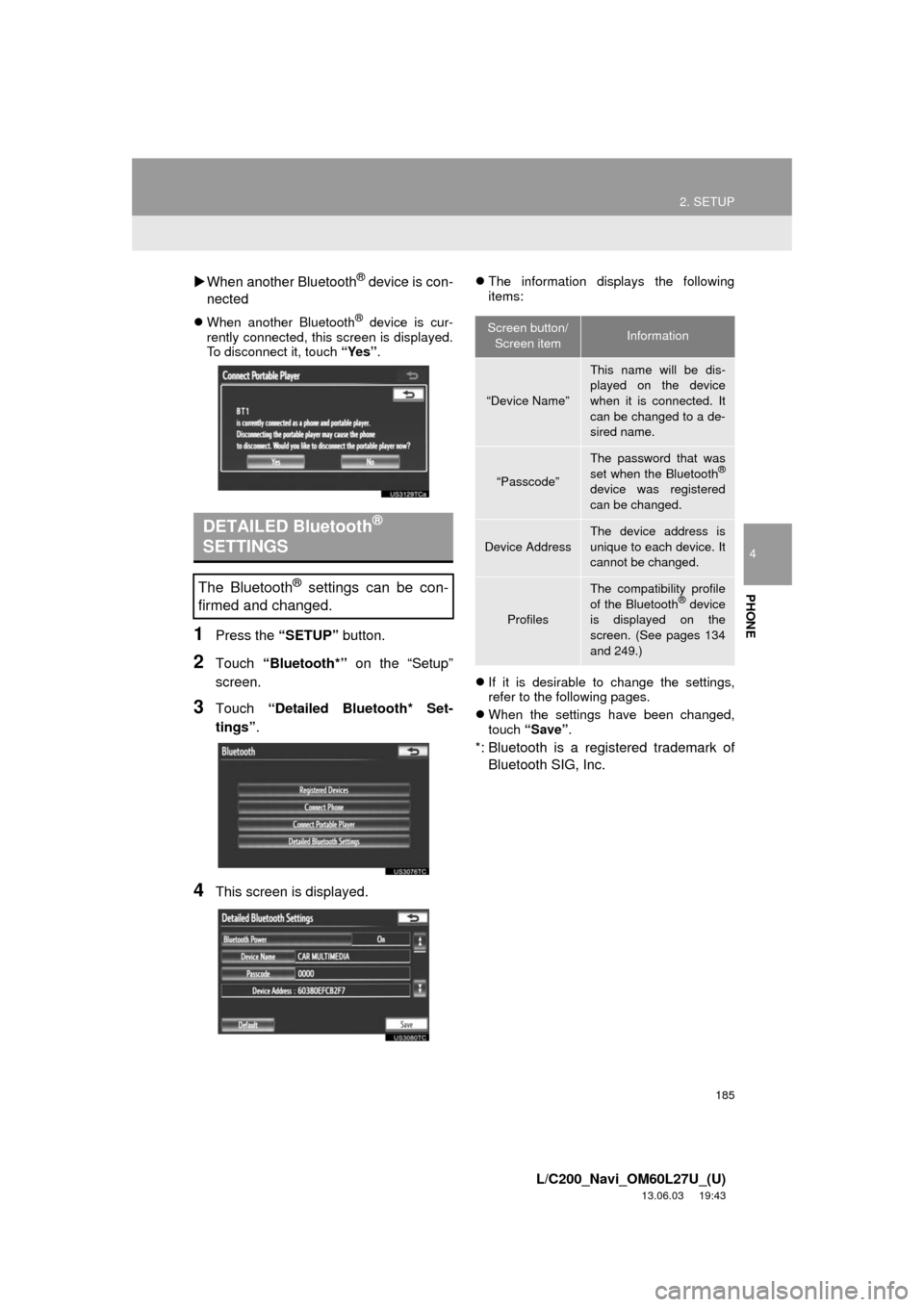
1Press the “SETUP” button.
2Touch “Bluetooth*” on the “Setup”
screen.
3Touch “Detailed Bluetooth* Set-
tings”.
4This screen is displayed.
The information displays the following
items:
If it is desirable to change the settings,
refer to the following pages.
When the settings have been changed,
touch “Save”.
*: Bluetooth is a registered trademark of
Bluetooth SIG, Inc.
DETAILED Bluetooth®
SETTINGS
The Bluetooth® settings can be con-
firmed and changed.
Screen button/
Screen itemInformation
“Device Name”
This name will be dis-
played on the device
when it is connected. It
can be changed to a de-
sired name.
“Passcode”
The password that was
set when the Bluetooth®
device was registered
can be changed.
Device Address
The device address is
unique to each device. It
cannot be changed.
Profiles
The compatibility profile
of the Bluetooth® device
is displayed on the
screen. (See pages 134
and 249.)