remote start TOYOTA LAND CRUISER 2015 J200 User Guide
[x] Cancel search | Manufacturer: TOYOTA, Model Year: 2015, Model line: LAND CRUISER, Model: TOYOTA LAND CRUISER 2015 J200Pages: 728, PDF Size: 10.53 MB
Page 103 of 728
103
1-4. Opening and closing the windows and moon roof
1
Before driving
LC200_OM_OM60L83U_(U)
CAUTION
■
Closing the moon roof
Observe the following precautions.
Failing to do so may result in death or serious injury.
●The driver is responsible for moon roof opening and closing operations.
In order to prevent accidental operation, especially by a child, do not let a
child operate the moon roof. It is possible for children and other passen-
gers to have body parts caught in the moon roof.
● Check to make sure that all passengers do not have any part of their bod-
ies in a position where they could be caught when the moon roof is being
operated.
● When using the smart key system, wireless remote control or mechanical
key and operating the moon roof, operate the moon roof after checking to
make sure that there is no possibility of any passenger having any of their
body parts caught in the moon roof. Also, do not let a child operate moon
roof by the smart key system, wireless remote control or mechanical key. It
is possible for children and other passengers to get caught in the moon
roof.
● When exiting the vehicle, turn the “ENGINE START STOP” switch off,
carry the key and exit the vehicle along with the child. There may be acci-
dental operation, due to mischief, etc., that may possibly lead to an acci-
dent.
■ Jam protection function
●Never try jamming any part of your body to activate the jam protection
function intentionally.
● The jam protection function may not work if something gets caught just
before the moon roof fully closes.
Page 505 of 728
505
3-7. Other interior features
3
Interior features
LC200_OM_OM60L83U_(U)
■
Programming an entry gate (f or U.S.A. owners)/Programming
all devices in the Canadian market
Place your transmitter 1 to 3 in. (25 to 75 mm) away from the
surface of the HomeLink
.
Keep the HomeLink indicator light in view while programming.
Press and hold the selected HomeLink button.
Repeatedly press and releas e (cycle) the device’s remote
control button for 2 second s each until is completed.
When the indicator light on the HomeLink
compatible trans-
ceiver starts to flash rapidly, release the buttons.
Test the operation of the HomeLink
by pressing the newly
programmed button. Check to see if the gate/device operates
correctly.
Repeat the steps above to program another device for each of
the remaining HomeLink
buttons.
■ Programming other devices
To program other devices such as home security systems, home
door locks or lighting, contact y our Toyota dealer for assistance.
■ Reprogramming a button
The individual HomeLink
buttons cannot be erased but can be
reprogrammed. To reprogram a button, follow the “Reprogramming
a HomeLink
button” instructions.
STEP1
STEP2
STEP3
STEP4
STEP4
STEP5
STEP6
Page 659 of 728
5
When trouble arises
659
5-2. Steps to take in an emergency
LC200_OM_OM60L83U_(U)
If the electronic key does not operate properly
Locking and unlocking the doors and key linked functions
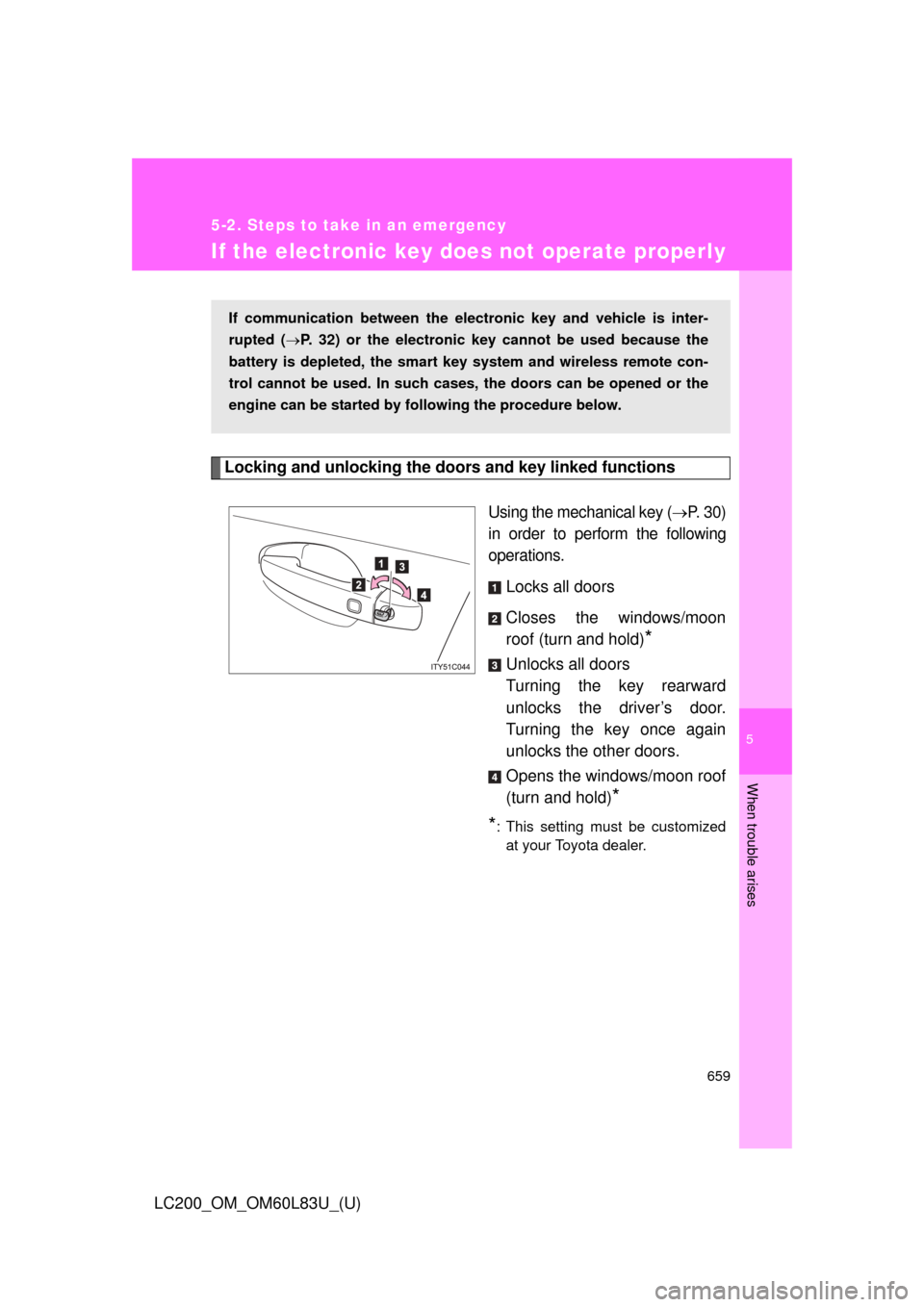
Using the mechanical key (P. 3 0 )
in order to perform the following
operations.
Locks all doors
Closes the windows/moon
roof (turn and hold)
*
Unlocks all doors
Turning the key rearward
unlocks the driver’s door.
Turning the key once again
unlocks the other doors.
Opens the windows/moon roof
(turn and hold)
*
*
: This setting must be customized at your Toyota dealer.
If communication between the electronic key and vehicle is inter-
rupted ( P. 32) or the electronic key cannot be used because the
battery is depleted, the smart key system and wireless remote con-
trol cannot be used. In such cases, the doors can be opened or the
engine can be started by following the procedure below.
Page 707 of 728
707
6-2. Customization
6
Vehicle specifications
LC200_OM_OM60L83U_(U)
*1: The settings can be changed when the mechanical key linked operation of
the power window is set to ON.
*2: The settings can be changed when the wireless remote control linked oper-ation of the power window is set to ON.
*3: The settings can be changed when the entry function linked operation of thepower window is set to ON.
■ Vehicle customization
●If the smart key system is turned “OFF”, unlock door cannot be selected.
● If the doors are not opened after unlocking and are then automatically re-
locked, a signal will be given if “Operation signal (Emergency flashers)”
or “Operation signal (Buzzer)” are set to ON.
■ When setting using the vehicle switches (vehicles with navigation sys-
tem)
When using the vehicle switches to set an item that can also be set using the
touch screen, the item displayed on the touch screen will not change imme-
diately.
If the “ENGINE START STOP” switch is first turned to OFF, the screen dis-
play will change once the “ENGINE START STOP” switch is turned to IGNI-
TION ON mode again.
■ When customizing using the touch screen (vehicles with navigation
system)
Stop the vehicle in a safe place, apply the parking brake, and shift the shift
lever to “P”. Also, to prevent battery discharge, leave the engine running
while customizing the features.