tail TOYOTA LAND CRUISER 2017 J200 Owners Manual
[x] Cancel search | Manufacturer: TOYOTA, Model Year: 2017, Model line: LAND CRUISER, Model: TOYOTA LAND CRUISER 2017 J200Pages: 608, PDF Size: 15.88 MB
Page 15 of 608
15Pictorial index
LC200_OM_OM60P24U_(U)Windshield wipers . . . . . . . . . . . . . . . . . . . . . . . . . . . . . . . . . P. 217
Rear window wiper . . . . . . . . . . . . . . . . . . . . . . . . . . . . . . . . P. 221
Precautions against winter season . . . . . . . . . . . . . . . . . . . . . P. 370
To prevent freezing (windshield wiper de-icer
*). . . . . . . . . . . . P. 380
Precautions against car wash . . . . . . . . . . . . . . . . . . . . . . . . . P. 435
Fuel filler door . . . . . . . . . . . . . . . . . . . . . . . . . . . . . . . . . . . . P. 224
Refueling method . . . . . . . . . . . . . . . . . . . . . . . . . . . . . . . . . . . P. 224
Fuel type/fuel tank capacity . . . . . . . . . . . . . . . . . . . . . . . . . . . P. 554
Tires . . . . . . . . . . . . . . . . . . . . . . . . . . . . . . . . . . . . . . . . . . P. 463
Tire size/inflation pressure . . . . . . . . . . . . . . . . . . . . . . . . . P. 558
Winter tires/tire chain . . . . . . . . . . . . . . . . . . . . . . . . . . . . . P. 370
Checking/rotation/tire pressure warning system . . . . . . . . . P. 463
Coping with flat tires . . . . . . . . . . . . . . . . . . . . . . . . . . . . . . P. 524
Hood . . . . . . . . . . . . . . . . . . . . . . . . . . . . . . . . . . . . . . . . . . . . P. 449
Opening . . . . . . . . . . . . . . . . . . . . . . . . . . . . . . . . . . . . . . . . . . P. 449
Engine oil . . . . . . . . . . . . . . . . . . . . . . . . . . . . . . . . . . . . . . . . . P. 554
Coping with overheat . . . . . . . . . . . . . . . . . . . . . . . . . . . . . . . . P. 546
Camera
* . . . . . . . . . . . . . . . . . . . . . . . . . . . . . . . . . . . . . . . . . P. 294
Headlights/daytime running lights . . . . . . . . . . . . . . . . . . . . P. 207
Parking lights . . . . . . . . . . . . . . . . . . . . . . . . . . . . . . . . . . . . . P. 207
Fog lights . . . . . . . . . . . . . . . . . . . . . . . . . . . . . . . . . . . . . . . . P. 216
Turn signal lights . . . . . . . . . . . . . . . . . . . . . . . . . . . . . . . . . . P. 205
Stop/tail lights
Hill-start assist control . . . . . . . . . . . . . . . . . . . . . . . . . . . . . . . P. 358
License plate lights . . . . . . . . . . . . . . . . . . . . . . . . . . . . . . . . P. 207
Back-up lights
Shifting the shift lever to R . . . . . . . . . . . . . . . . . . . . . . . . . . . . P. 199
Side marker lights . . . . . . . . . . . . . . . . . . . . . . . . . . . . . . . . . P. 207
4
5
6
7
8
Light bulbs of the exter ior lights for driving
(Replacing method: P. 487, Watts: P. 552)
*: If equipped
9
10
11
12
13
14
15
16
Page 17 of 608
17Pictorial index
LC200_OM_OM60P24U_(U)Multi-information display . . . . . . . . . . . . . . . . . . . . . . . . . . . . P. 89
Display . . . . . . . . . . . . . . . . . . . . . . . . . . . . . . . . . . . . . . . . . . . . P. 89
When the warning messages are displayed . . . . . . . . . . . . . . P. 519
Parking brake . . . . . . . . . . . . . . . . . . . . . . . . . . . . . . . . . . . . . P. 206
Applying/releasing . . . . . . . . . . . . . . . . . . . . . . . . . . . . . . . . . . P. 206
Precautions against winter season . . . . . . . . . . . . . . . . . . . . . P. 371
Warning buzzer/message . . . . . . . . . . . . . . . . . . . . . . . . P. 206, 519
Turn signal lever . . . . . . . . . . . . . . . . . . . . . . . . . . . . . . . . . . P. 205
Headlight switch . . . . . . . . . . . . . . . . . . . . . . . . . . . . . . . . . . P. 207
Headlights/parking lights/tail lights/daytime running lights . . . . P. 207
Fog lights . . . . . . . . . . . . . . . . . . . . . . . . . . . . . . . . . . . . . . . . . P. 216
Windshield wiper and washer switch . . . . . . . . . . . . . . . . . P. 217
Rear window wiper and washer switch . . . . . . . . . . . . . . . . P. 221
Usage . . . . . . . . . . . . . . . . . . . . . . . . . . . . . . . . . . . . . . . P. 217, 221
Adding washer fluid . . . . . . . . . . . . . . . . . . . . . . . . . . . . . . . . . P. 462
Emergency flasher switch . . . . . . . . . . . . . . . . . . . . . . . . . . P. 500
Fuel filler door opener . . . . . . . . . . . . . . . . . . . . . . . . . . . . . . P. 226
Hood lock release lever. . . . . . . . . . . . . . . . . . . . . . . . . . . . . P. 449
Tilt and telescopic steering control switch . . . . . . . . . . . . . P. 143
Adjustment . . . . . . . . . . . . . . . . . . . . . . . . . . . . . . . . . . . . . . . . P. 143
Driving position memory . . . . . . . . . . . . . . . . . . . . . . . . . . . . . P. 136
Air conditioning system . . . . . . . . . . . . . . . . . . . . . . . . . . . . P. 374
Usage . . . . . . . . . . . . . . . . . . . . . . . . . . . . . . . . . . . . . . . . . . . P. 374
Rear window defogger . . . . . . . . . . . . . . . . . . . . . . . . . . . . . . . P. 380
Audio system
*
Navigation system*
*
: Refer to “NAVIGATION SYSTEM OWNER’S MANUAL”.
4
5
6
7
8
9
10
11
12
13
Page 58 of 608
581-1. For safe use
LC200_OM_OM60P24U_(U)
Child restraint systems
Studies have shown that installing a child re straint on a rear seat is
much safer than installing one on the front passenger seat.
● Choose a child restraint system that suits your vehicle and is appro-
priate to the age and size of the child.
● For installation details, follow the instructions provided with the child
restraint system.
General installation instructions are provided in this manual.
( → P. 63)
A child restraint system for a small child or baby must itself be
properly restrained on the seat with the LATCH anchors or the
lap portion of the lap/shoulder belt.
The laws of all 50 states of the U.S.A. and Canada now require
the use of child restraint systems.
Points to remember
Page 87 of 608
LC200_OM_OM60P24U_(U)
872. Instrument cluster
2
Instrument cluster
■The meters and display illuminate when
The engine switch is in IGNITION ON mode.
■ The brightness of the instrument panel lights
When the tail lights are turned on, the meter’s brightness will be reduced
slightly unless the meter brightness level adjustment is set to the brightest
setting.
If the tail lights are turned on when the surroundings are dark, the meter’s
brightness will reduce slightly. Howe ver, when the surroundings are bright,
such as during the daytime, the meter’s brightness will not be reduced even if
the tail lights are turned on.
■ Customization
The meter display can be customized on the multi-information display.
(Customizable features: →P. 574)
WARNING
■ The information display at low temperatures
Allow the interior of the vehicle to warm up before using the liquid crystal
information display. At extremely low temperatures, the information display
monitor may respond slowly, and display changes may be delayed.
For example, there is a lag between the driver’s shifting and the new gear
number appearing on the display. This l ag could cause the driver to down-
shift again, causing rapid and excessive engine braking and possibly an
accident resulting in death or injury.
Page 126 of 608

126
LC200_OM_OM60P24U_(U)
3-2. Opening, closing and locking the doors
WARNING
■Caution regarding interfer ence with electronic devices
● People with implantable cardiac pacemakers, cardiac resynchronization
therapy-pacemakers or implantable card ioverter defibrillators should keep
away from the smart key system antennas. ( →P. 120)
The radio waves may affect the operation of such devices. If necessary,
the entry function can be disabled. Ask your Toyota dealer for details, such
as the frequency of radio waves and timing of the emitted radio waves.
Then, consult your doctor to see if you should disable the entry function.
● Users of any electrical medical device other than implantable cardiac
pacemakers, cardiac resynchronization therapy-pacemakers or implant-
able cardioverter defibrillators should consult the manufacturer of the
device for information about its operation under the influence of radio
waves.
Radio waves could have unexpected effects on the operation of such
medical devices.
Ask your Toyota dealer for details on disabling the entry function.
Page 175 of 608
175
LC200_OM_OM60P24U_(U)
4-1. Before driving
4
Driving
Vehicle load limits
◆Total load capacity (vehicle capacity weight): →P. 552
Total load capacity means the comb ined weight of occupants, cargo
and luggage.
◆Seating capacity: 8 occupants (Front 2, Rear 6)
Seating capacity means the maximum number of occupants whose
estimated average weight is 150 lb. (68 kg) per person.
◆TWR (Trailer Weight Rating): →P. 180, 552
TWR means the maximum gross trailer weight (trailer weight plus
its cargo weight) that your vehicle is able to tow.
◆Cargo capacity
Cargo capacity may increase or decrease depending on the weight
and the number of occupants.
■Total load capacity and seating capacity
These details are also described on the tire and loading information label.
(→P. 472)
Vehicle load limits include total load capacity, seating capacity,
TWR (Trailer Weight Rating) and cargo capacity.
WARNING
■ Overloading the vehicle
Do not overload the vehicle.
It may not only cause damage to the tires, but also degrade steering and
braking ability, resulting in an accident.
Page 182 of 608
182
LC200_OM_OM60P24U_(U)
4-1. Before driving
Trailer hitch assemblies have different weight capacities. Toyota rec-
ommends the use of Toyota hitch/bracket for your vehicle. For details,
contact your Toyota dealer.
● If you wish to install a trailer hitch, contact your Toyota dealer.
● Use only a hitch that conforms to the gross trailer weight require-
ment of your vehicle.
● Follow the directions supplied by the hitch manufacturer.
● Lubricate the hitch ball with a light coating of grease.
● Remove the trailer hitch whenever you are not towing a trailer. After
removing the hitch, seal any mounting hole in the vehicle body to
prevent entry of any subs tances into the vehicle.
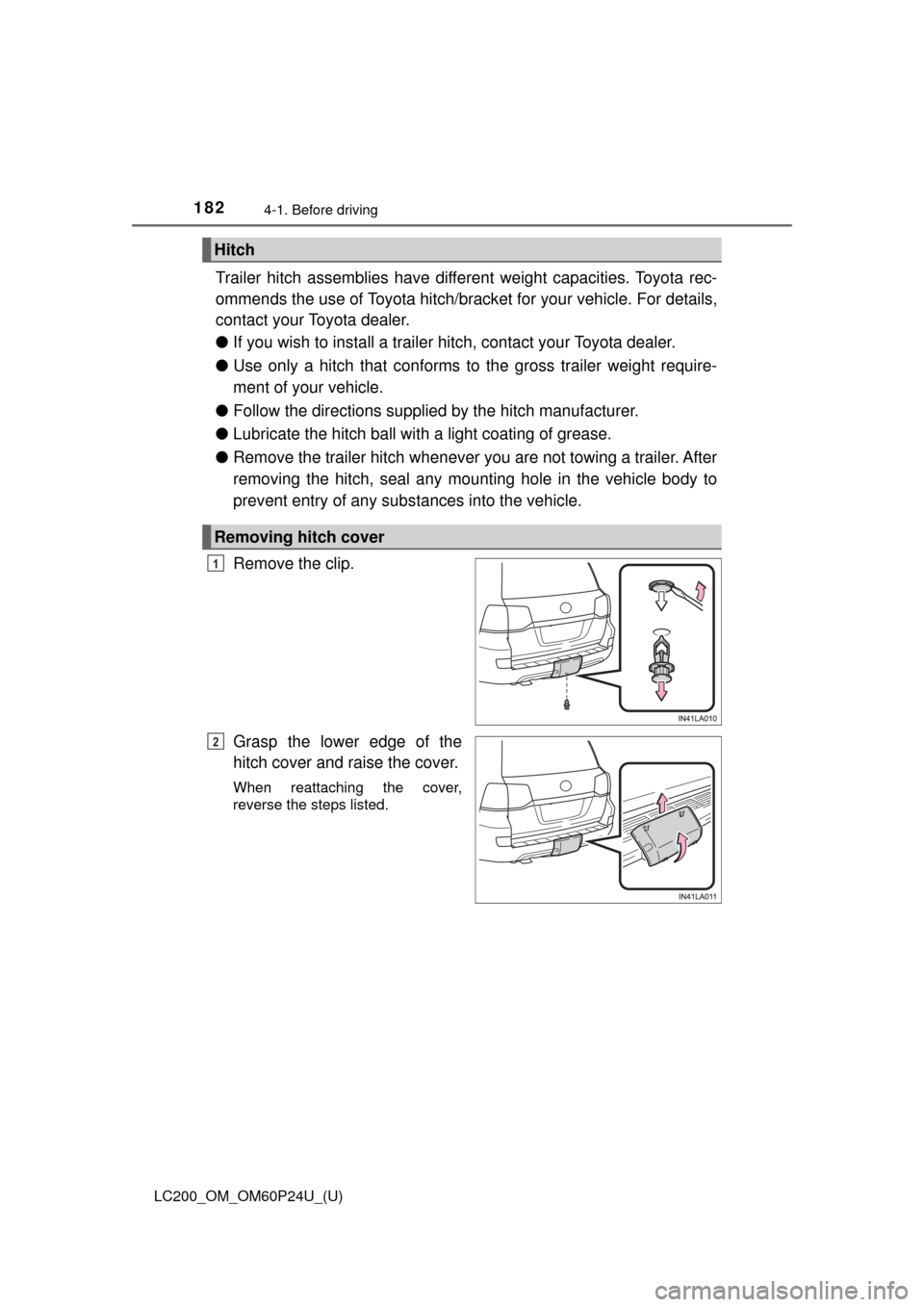
Remove the clip.
Grasp the lower edge of the
hitch cover and raise the cover.
When reattaching the cover,
reverse the steps listed.
Hitch
Removing hitch cover
1
2
Page 207 of 608
207
LC200_OM_OM60P24U_(U)
4-3. Operating the lights and wipers
4
Driving
Headlight switch
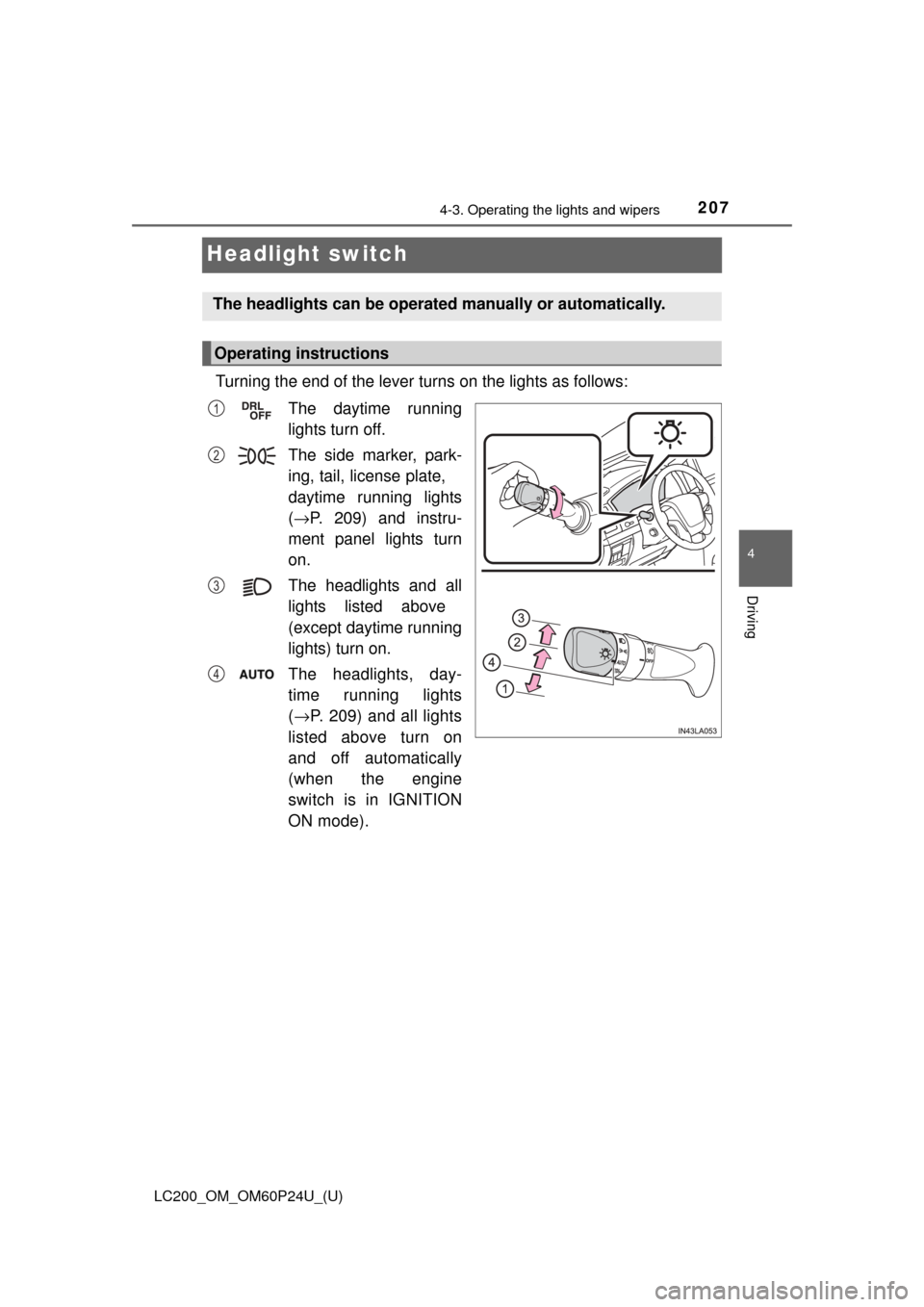
Turning the end of the lever turns on the lights as follows:The daytime running
lights turn off.
The side marker, park-
ing, tail, license plate,
daytime running lights
( → P. 209) and instru-
ment panel lights turn
on.
The headlights and all
lights listed above
(except daytime running
lights) turn on.
The headlights, day-
time running lights
( → P. 209) and all lights
listed above turn on
and off automatically
(when the engine
switch is in IGNITION
ON mode).
The headlights can be operated manually or automatically.
Operating instructions
1
2
3
4
Page 209 of 608
LC200_OM_OM60P24U_(U)
2094-3. Operating the lights and wipers
4
Driving
■Daytime running light system
●To make your vehicle more visible to other drivers during daytime driving,
the daytime running lights turn on automatically whenever the engine is
started and the parking brake is released. (Illuminate dimmer than the head-
lights.) Daytime running lights are not designed for use at night.
For the U.S.A.: Daytime running lights can be turned off by operating the
switch.
● Compared to turning on the headlights, the daytime running light system
offers greater durability and consumes less electricity, so it can help improve
fuel economy.
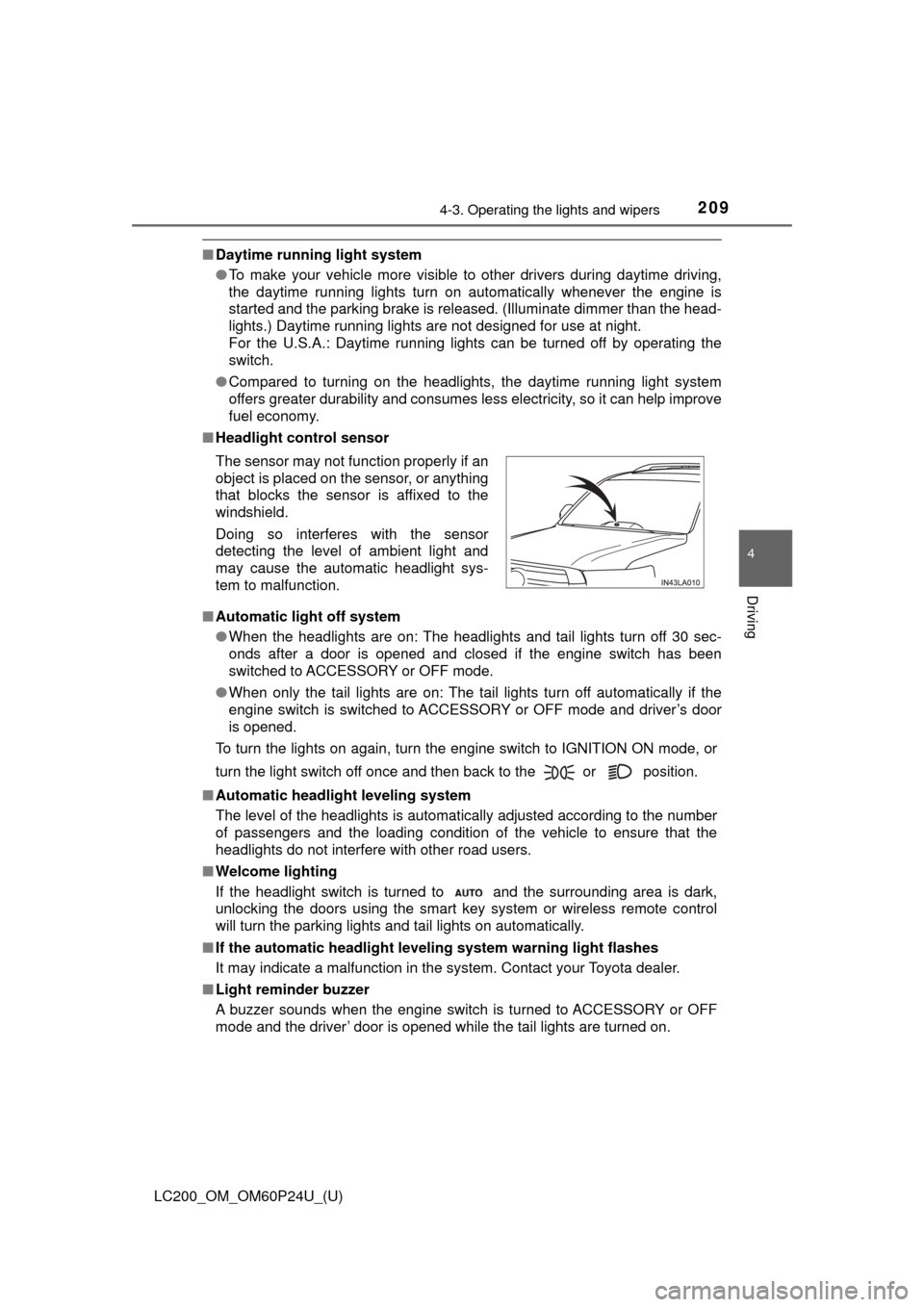
■ Headlight control sensor
■ Automatic light off system
●When the headlights are on: The headlights and tail lights turn off 30 sec-
onds after a door is opened and closed if the engine switch has been
switched to ACCESSORY or OFF mode.
● When only the tail lights are on: The tail lights turn off automatically if the
engine switch is switched to ACCESSORY or OFF mode and driver’s door
is opened.
To turn the lights on again, turn the engine switch to IGNITION ON mode, or
turn the light switch off once and then back to the or position.
■ Automatic headlight leveling system
The level of the headlights is automatically adjusted according to the n\
umber
of passengers and the loading condition of the vehicle to ensure that the
headlights do not interfere with other road users.
■ Welcome lighting
If the headlight switch is turned to and the surrounding area is dark,
unlocking the doors using the smart key system or wireless remote control
will turn the parking lights and tail lights on automatically.
■ If the automatic headlight level ing system warning light flashes
It may indicate a malfunction in the system. Contact your Toyota dealer.
■ Light reminder buzzer
A buzzer sounds when the engine switch is turned to ACCESSORY or OFF
mode and the driver’ door is opened while the tail lights are turned on. The sensor may not function properly if an
object is placed on the sensor, or anything
that blocks the sensor is affixed to the
windshield.
Doing so interferes with the sensor
detecting the level of ambient light and
may cause the automatic headlight sys-
tem to malfunction.
Page 213 of 608
LC200_OM_OM60P24U_(U)
2134-3. Operating the lights and wipers
4
Driving
■High beam automatic turning on or off conditions
●When all of the following conditions are fulfilled, the high beam will be auto-
matically turned on (after approximately 1 second):
• Vehicle speed is above approximately 21 mph (34 km/h).
• The area ahead of the vehicle is dark.
• There are no vehicles ahead with headlights or tail lights turned on.
• There are few streetlights on the road ahead.
● If any of the following conditions are fulfilled, the high beam will be automat-
ically turned off:
• Vehicle speed drops below approximately 17 mph (27 km/h).
• The area ahead of the vehicle is not dark.
• Vehicles ahead have headlights or tail lights turned on.
• There are many streetlights on the road ahead.
■ Camera sensor detection information
●The high beam may not be automatically turned off in the following situa-
tions:
• When oncoming vehicles suddenly appear from a curve
• When the vehicle is cut in front of by another vehicle
• When vehicles ahead are hidden from sight due to repeated curves, road
dividers or roadside trees
• When vehicles ahead appear from the faraway lane on wide road
• When vehicles ahead have no lights
● The high beam may be turned off if a vehicle ahead that is using fog lights
without using the headlights is detected.
● Houselights, streetlights, traffic signals, and illuminated billboards or signs
may cause the high beam to switch to the low beams, or the low beams to
remain on.
● The following factors may affect the amount of time taken to turn the high
beam on or off:
• The brightness of headlights, fog lights, and tail lights of vehicles ahe\
ad
• The movement and direction of vehicles ahead
• When a vehicle ahead only has operational lights on one side
• When a vehicle ahead is a two-wheeled vehicle
• The condition of the road (gradient, curve, condition of the road surface
etc.)
• The number of passengers and amount of baggage
● The high beam may be turned on or off when the driver does not expect it.
● Bicycles or similar objects may not be detected.