air conditioning TOYOTA MATRIX 2012 E140 / 2.G User Guide
[x] Cancel search | Manufacturer: TOYOTA, Model Year: 2012, Model line: MATRIX, Model: TOYOTA MATRIX 2012 E140 / 2.GPages: 516, PDF Size: 7.02 MB
Page 191 of 516
191
3-1. Using the air conditioning system
and defogger
3
Interior features
■For quick cooling (vehicles wi th air conditioning system)
Turn the temperature control dial to the “MAX A/C” position and select the
recirculated air mode.
■ For quick clearing of th e windshield and side windows (vehicles with
air conditioning system)
Press to turn the air conditioning on.
■ Using the recirculated air mode
The windows will fog up more easily if the recirculated air mode is used for
an extended period.
■ When outside air temperature appro aches 32°F (0°C) (vehicles with air
conditioning system)
The air conditioning system may not operate even when
is pressed.
■ When
is selected for the air outlets used
For your driving comfort, air flowing to the feet may be warmer than air flow-
ing to the upper body depending on the position of the temperature adjust-
ment dial.
■ Air conditioning odors
●During use, various odors from inside and outside the vehicle may enter
into and accumulate in the air conditioning system. This may then cause
odor to be emitted from the vents.
● To reduce potential odors from occurring:
It is recommended that the air conditioning system be set to outside air
mode prior to turning the vehicle off.
CAUTION
■To prevent the windshield from fogging up
Do not set the air outlet selection dial to during cool air operation in
extremely humid weather. The difference between the temperature of the
outside air and that of the windshield can cause the outer surface of the
windshield to fog up, blocking your vision.
Page 192 of 516

192 3-1. Using the air conditioning system and defogger
NOTICE
■To prevent battery discharge
Do not leave the air conditioning system on longer than necessary when the
engine is stopped.
Page 193 of 516
193
3-1. Using the air conditioning system and defogger
3
Interior features
Rear window and outside rear view mirror defoggers
■Outside rear view mirror defogger (if equipped)
Turning the rear window defogger on will turn the outside rear view mirror
defoggers on.
CAUTION
■Outside rear view mirror defogger (if equipped)
The surfaces of the outside rear view mirrors become hot. Do not touch
them to prevent from burning yourself.
NOTICE
■To prevent battery discharge
Do not leave the rear window defogger on longer than necessary when the
engine is not running.
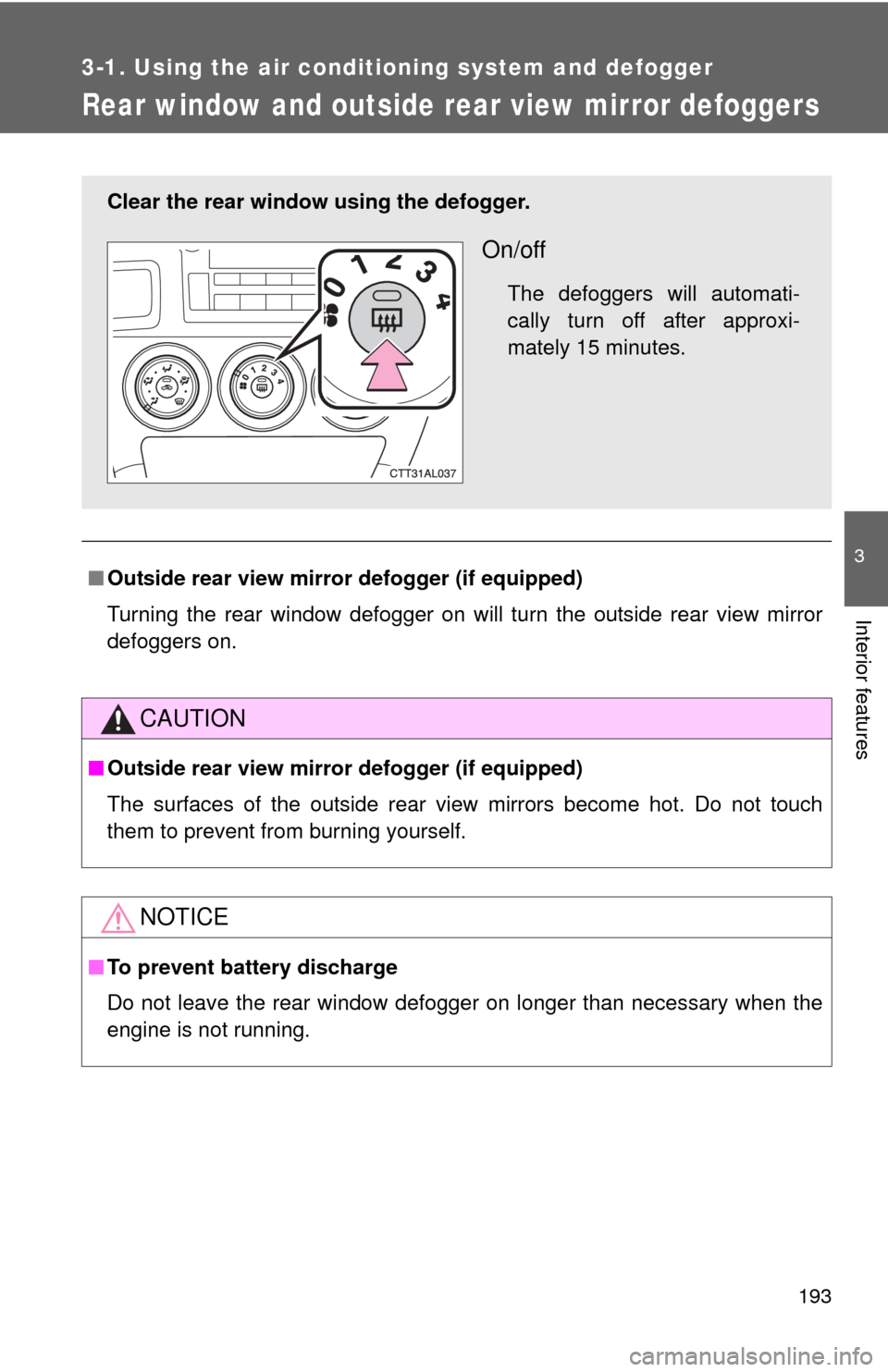
Clear the rear window using the defogger.
On/off
The defoggers will automati-
cally turn off after approxi-
mately 15 minutes.
Page 252 of 516
252 3-3. Using the Bluetooth
® audio system
■When using a voice command
For numbers, say a combination of single digits from zero to nine.
Say the command correctly and clearly.
■ Situations where the system m ay not recognize your voice
● When driving on rough roads
● When driving at high speeds
● When air is blowing out of the vents onto the microphone
● When the air conditioning fan emits a loud noise
■ Operations that cannot be performed while driving
● Operating the system with
● Registering a portable player to the system
■ Changing the passkey
P. 258
Page 275 of 516
275
3-4. Using the hand
s-free phone system (for cellular phone)
3
Interior features
■Automatic adjustment of volume
When vehicle speed reaches 50 mph (80 km/h) or more, the volume auto-
matically increases. The volume returns to the previous volume setting when
vehicle speed drops to 43 mph (70 km/h) or less.
■ When using a voice command
For numbers, say a combination of single digits from zero to nine, # (pound),
(star), and + (plus).
Say a command correctly and clearly.
■ Situations that the system ma y not recognize your voice
● When driving on a rough road
● When driving at high speeds
● When air is blowing out of the vents onto the microphone
● When the air conditioning fan emits a loud noise
■ Operations that cannot be performed while driving
●Operating the system with
● Registering a cellular phone to the system
■ Changing the passkey
P. 283
Page 329 of 516
Maintenance and care4
329
4-1. Maintenance and careCleaning and protecting the vehicle exterior......... 330
Cleaning and protecting the vehicle interior.......... 333
4-2. Maintenance Maintenance requirements .................. 336
General maintenance....... 338
Emission inspection and maintenance (I/M)
programs........................ 341 4-3. Do-it-yourself
maintenance
Do-it-yourself service precautions .................... 342
Hood ................................ 346
Positioning a floor jack ..... 348
Engine compartment ........ 351
Tires ................................. 365
Tire inflation pressure ...... 374
Wheels ............................. 378
Air conditioning filter......... 381
Key battery ....................... 383
Checking and replacing fuses .............................. 385
Light bulbs........................ 394
Page 381 of 516
381
4-3. Do-it-yourself maintenance
4
Maintenance and care
Air conditioning filter
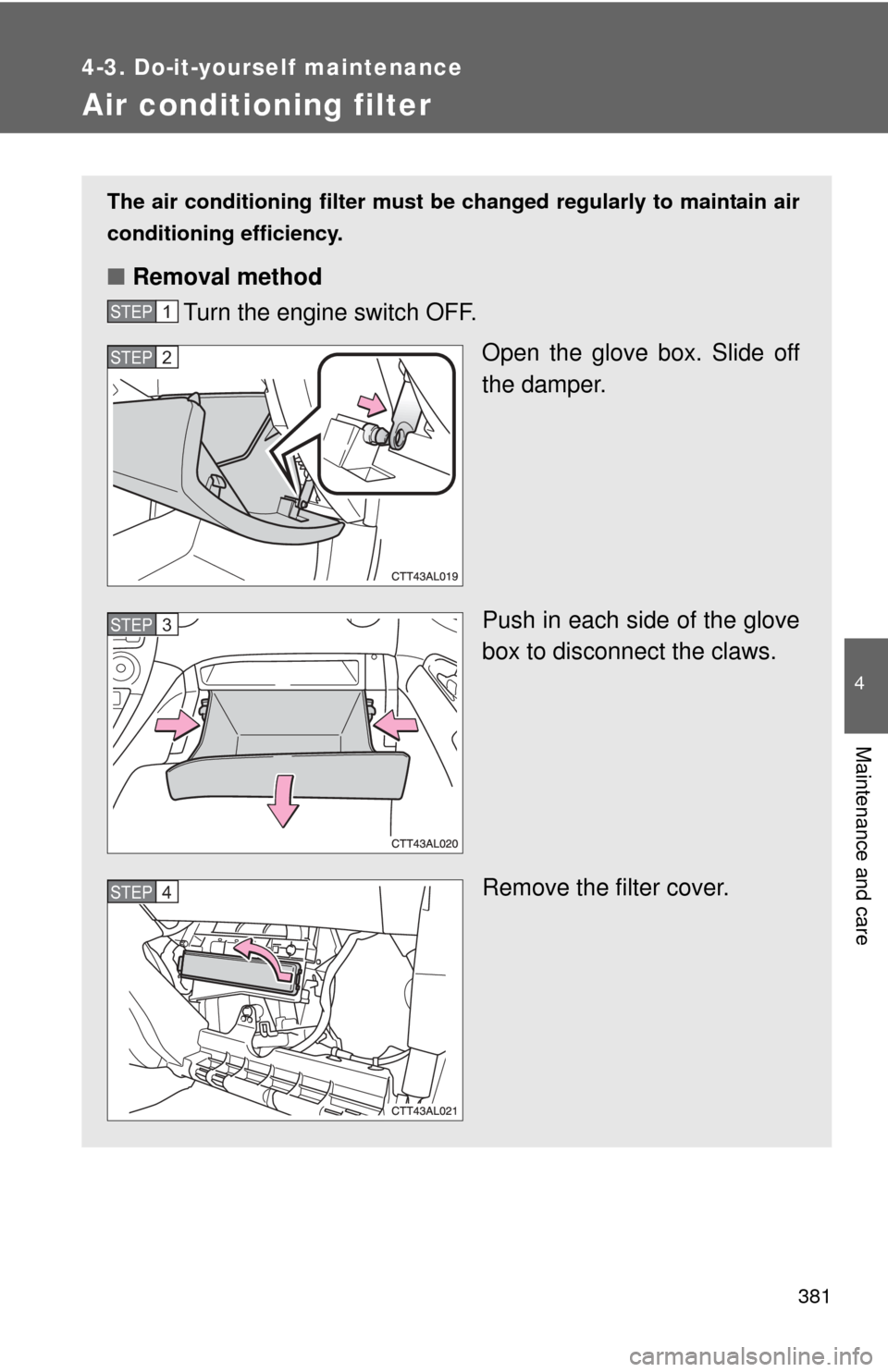
The air conditioning filter must be changed regularly to maintain air
conditioning efficiency.
■ Removal method
Turn the engine switch OFF.
Open the glove box. Slide off
the damper.
Push in each side of the glove
box to disconnect the claws.
Remove the filter cover.
STEP1
STEP2
STEP3
STEP4
Page 382 of 516
382 4-3. Do-it-yourself maintenance
■Checking interval
Replace the air conditioning filter according to the maintenance schedule. In
dusty areas or areas with heavy traffic flow, early replacement may be
required. (For scheduled maintenance information, please refer to the
“Scheduled Maintenance Guide” or “Owner’s Manual Supplement”.)
■ If air flow from the vents decreases dramatically
The filter may be clogged. Check the filter and replace if necessary.
NOTICE
■When using the air conditioning system
Make sure that a filter is always installed.
Using the air conditioning system without a filter may cause damage to the
system.
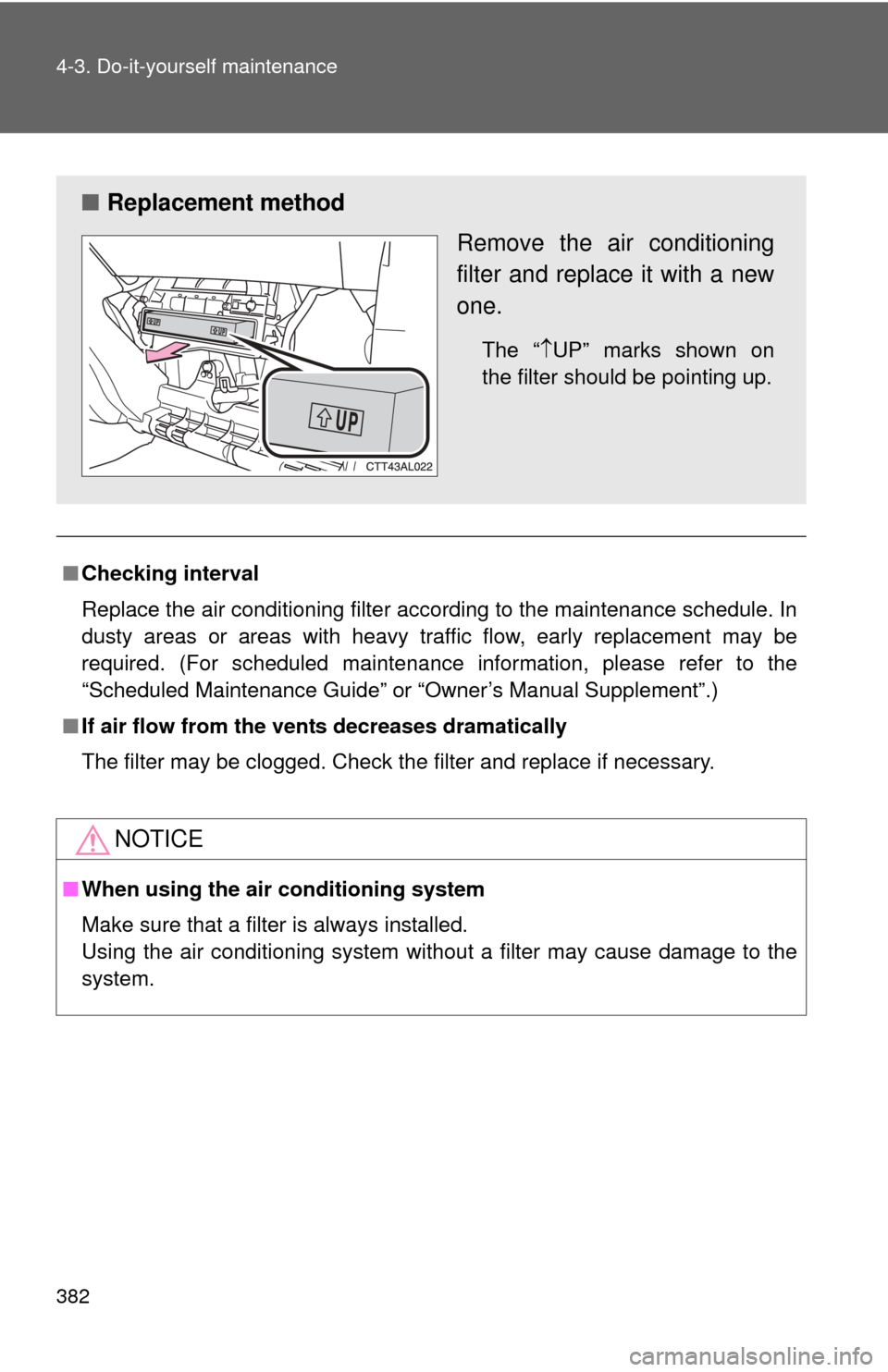
■ Replacement method
Remove the air conditioning
filter and replace it with a new
one.
The “UP” marks shown on
the filter should be pointing up.
Page 388 of 516
388 4-3. Do-it-yourself maintenance
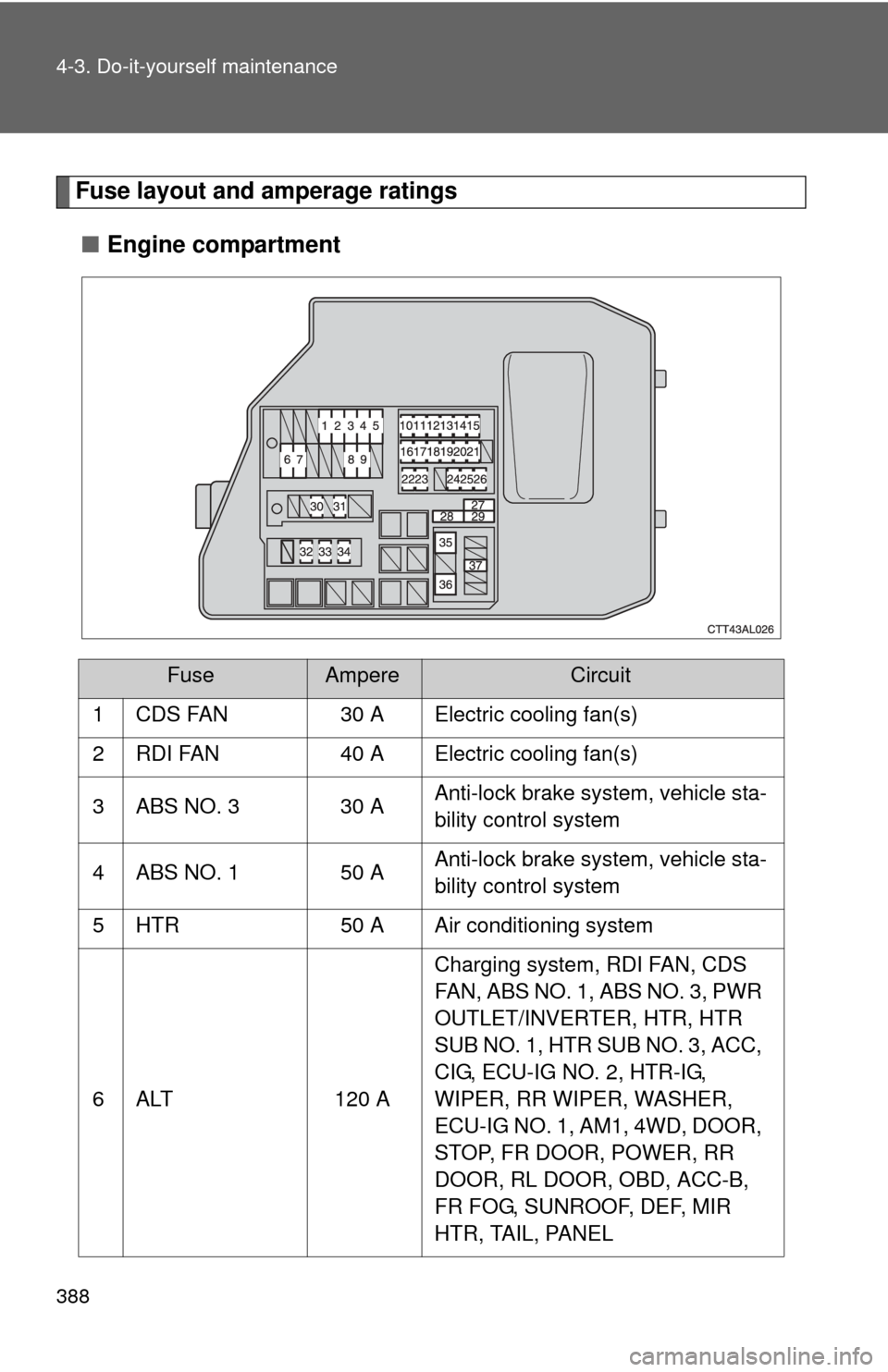
Fuse layout and amperage ratings■ Engine compartment
FuseAmpereCircuit
1 CDS FAN 30 A Electric cooling fan(s)
2 RDI FAN 40 A Electric cooling fan(s)
3 ABS NO. 3 30 A Anti-lock brake system, vehicle sta-
bility control system
4 ABS NO. 1 50 A Anti-lock brake system, vehicle sta-
bility control system
5 HTR 50 A Air conditioning system
6 ALT 120 A Charging system, RDI FAN, CDS
FAN, ABS NO. 1, ABS NO. 3, PWR
OUTLET/INVERTER, HTR, HTR
SUB NO. 1, HTR SUB NO. 3, ACC,
CIG, ECU-IG NO. 2, HTR-IG,
WIPER, RR WIPER, WASHER,
ECU-IG NO. 1, AM1, 4WD, DOOR,
STOP, FR DOOR, POWER, RR
DOOR, RL DOOR, OBD, ACC-B,
FR FOG, SUNROOF, DEF, MIR
HTR, TAIL, PANEL
Page 392 of 516

392 4-3. Do-it-yourself maintenance
11 IGN7.5 ASRS airbag system, multiport fuel
injection system/sequential multi-
port fuel injection system, front
passenger occupant classification
system
12 METER 7.5 A Gauge and meters
13 HTR-IG 10 AAir conditioning system, rear win-
dow defogger, PTC heater
14 WIPER 25 A Windshield wipers
15 RR WIPER 15 A Rear window wiper
16 WASHER 15 A Windshield washer
17 ECU-IG NO. 1 10 A Main body ECU, electric power
steering, electric cooling fan(s),
shift lock control system, anti-lock
brake system, multiport fuel injec-
tion system/sequential multiport
fuel injection system, tire pressure
warning system, vehicle stability
control system, all wheel drive sys-
tem
18 ECU-IG NO. 2 10 A Back-up lights, charging system,
rear window defogger, auto anti-
glare inside rear view mirror
19 OBD 7.5 A On-board diagnosis system
20 STOP 10 AStop lights, high mounted stop-
light, anti-lock brake system, vehi-
cle stability control system,
multiport fuel injection system/
sequential multiport fuel injection
system, shift lock control system
21 DOOR 25 A Power door lock system
22 ACC-B 25 A CIG, ACC
23 4WD 7.5 A All wheel drive system
FuseAmpereCircuit