ECU TOYOTA MATRIX 2012 E140 / 2.G Owner's Guide
[x] Cancel search | Manufacturer: TOYOTA, Model Year: 2012, Model line: MATRIX, Model: TOYOTA MATRIX 2012 E140 / 2.GPages: 516, PDF Size: 7.02 MB
Page 273 of 516
273
3-4. Using the hand
s-free phone system (for cellular phone)
3
Interior features
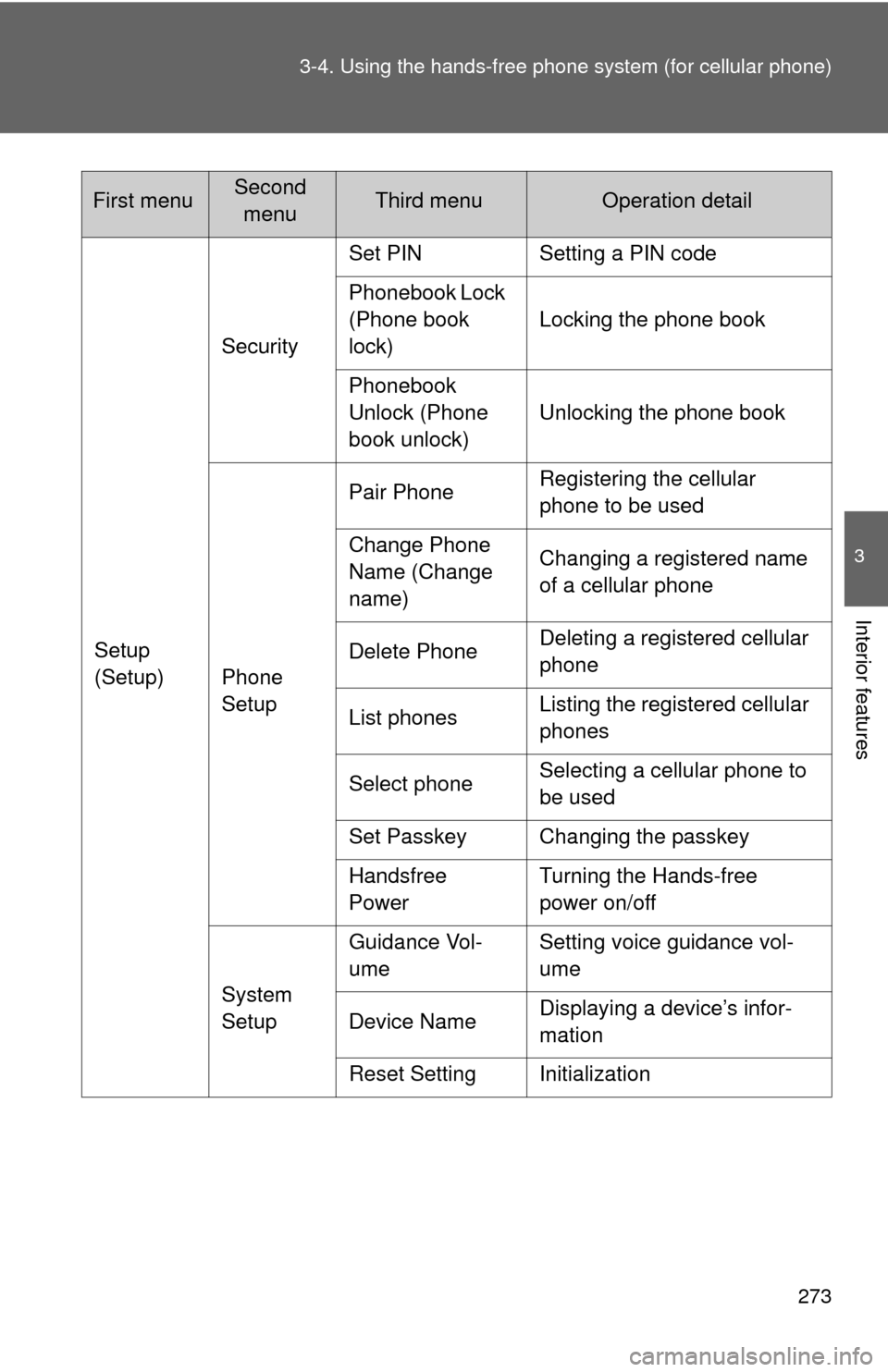
Setup
(Setup)Security
Set PIN Setting a PIN code
Phonebook Lock
(Phone book
lock)
Locking the phone book
Phonebook
Unlock (Phone
book unlock) Unlocking the phone book
Phone
Setup Pair Phone
Registering the cellular
phone to be used
Change Phone
Name (Change
name) Changing a registered name
of a cellular phone
Delete Phone Deleting a registered cellular
phone
List phones Listing the registered cellular
phones
Select phone Selecting a cellular phone to
be used
Set Passkey Changing the passkey
Handsfree
Power Turning the Hands-free
power on/off
System
Setup Guidance Vol-
ume
Setting voice guidance vol-
ume
Device Name Displaying a device’s infor-
mation
Reset Setting Initialization
First menuSecond menuThird menuOperation detail
Page 285 of 516
285
3-4. Using the hands-free phone system (for cellular phone)
3
Interior features
Security and system setup
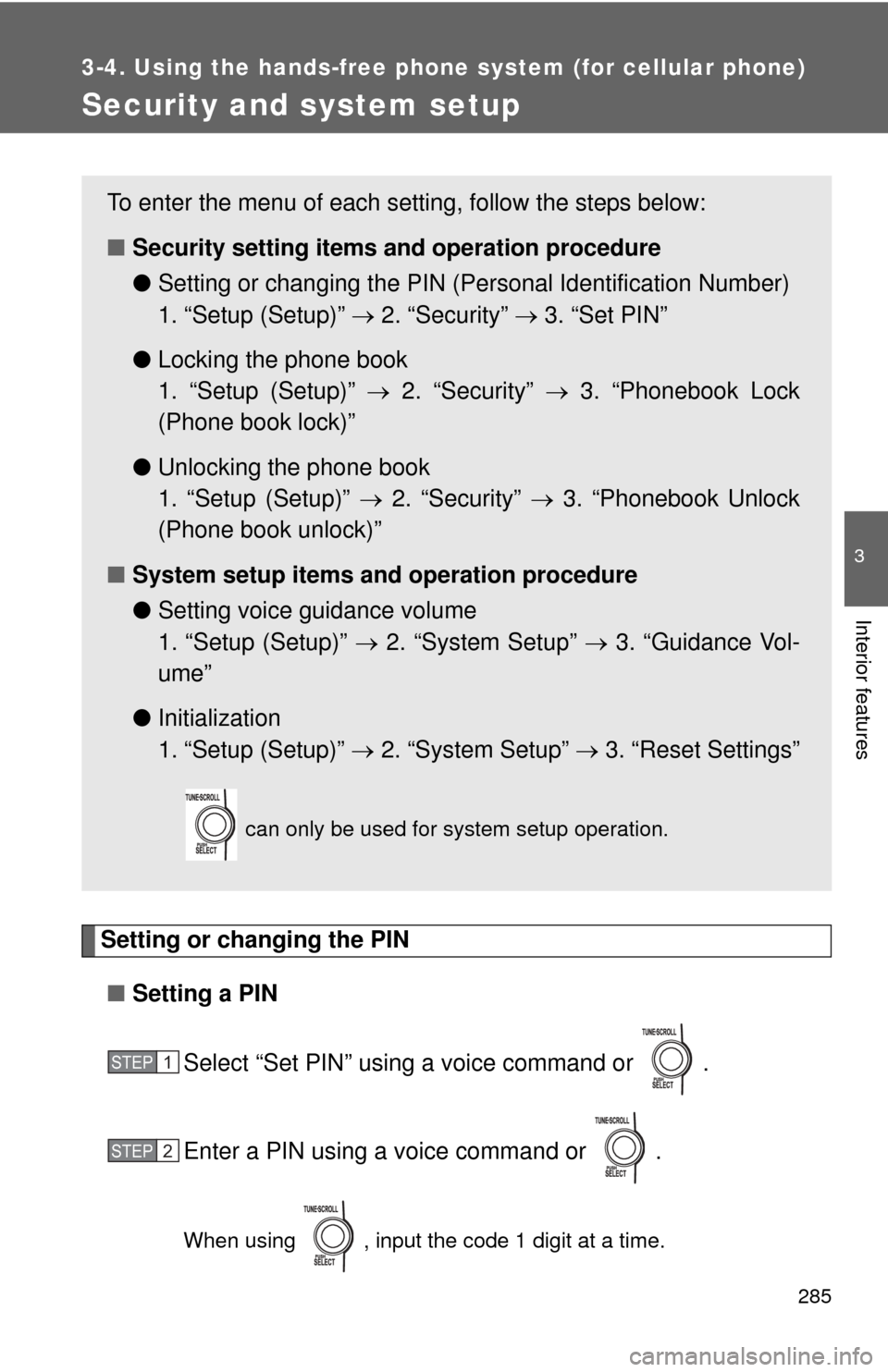
Setting or changing the PIN■ Setting a PIN
Select “Set PIN” using a voice command or .
Enter a PIN using a voice command or .
When using , input the code 1 digit at a time.
To enter the menu of each setting, follow the steps below:
■Security setting items and operation procedure
● Setting or changing t he PIN (Personal Identification Number)
1. “Setup (Setup)” 2. “Security” 3. “Set PIN”
● Locking the phone book
1. “Setup (Setup)” 2. “Security” 3. “Phonebook Lock
(Phone book lock)”
● Unlocking the phone book
1. “Setup (Setup)” 2. “Security” 3. “Phonebook Unlock
(Phone book unlock)”
■ System setup items and operation procedure
●Setting voice guidance volume
1. “Setup (Setup)” 2. “System Setup” 3. “Guidance Vol-
ume”
● Initialization
1. “Setup (Setup)” 2. “System Setup” 3. “Reset Settings”
can only be used for system setup operation.
STEP1
STEP2
Page 288 of 516
288 3-4. Using the hands-free phone system (for cellular phone)
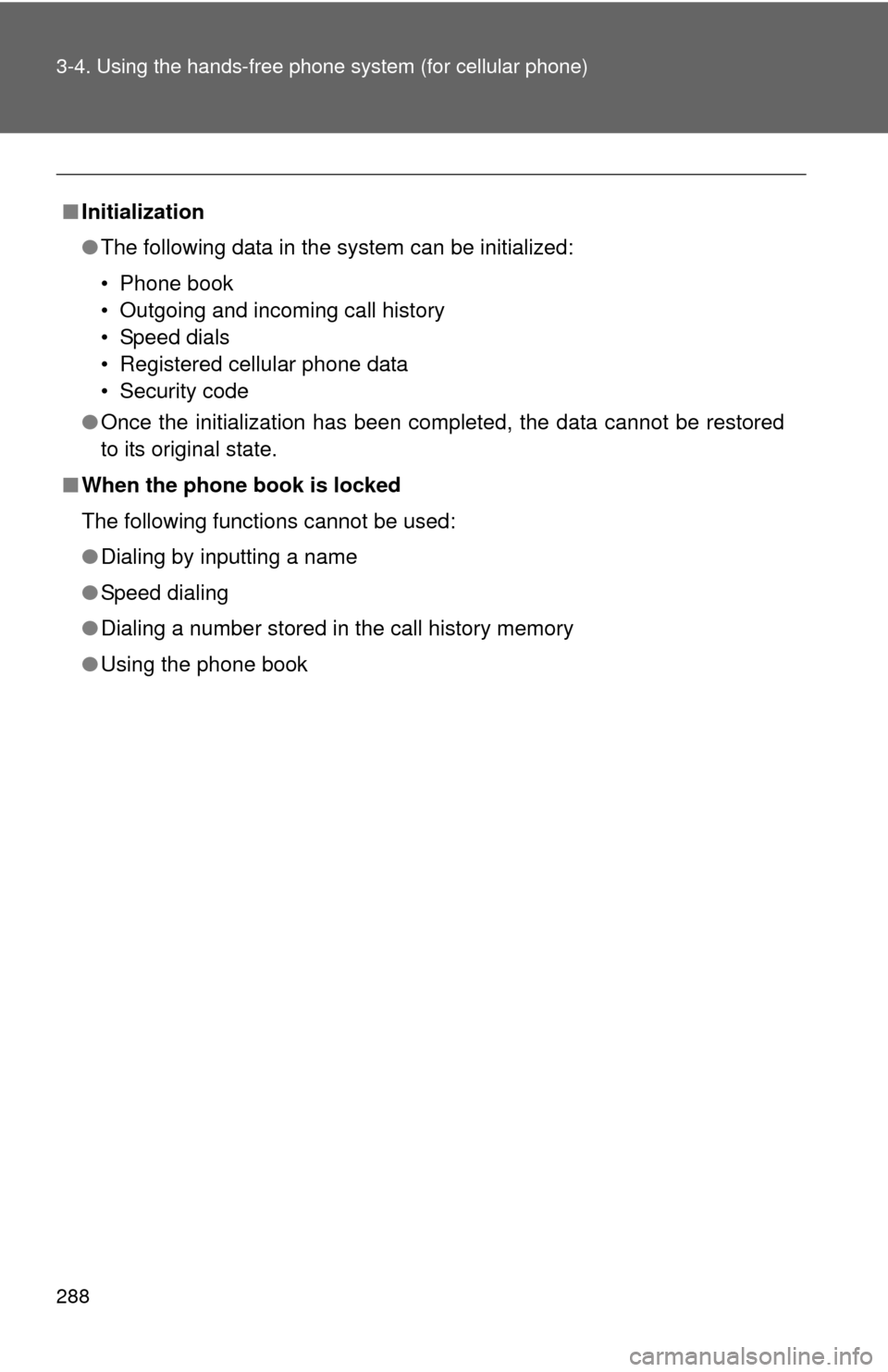
■Initialization
●The following data in the system can be initialized:
• Phone book
• Outgoing and incoming call history
• Speed dials
• Registered cellular phone data
• Security code
● Once the initialization has been completed, the data cannot be restored
to its original state.
■ When the phone book is locked
The following functions cannot be used:
●Dialing by inputting a name
● Speed dialing
● Dialing a number stored in the call history memory
● Using the phone book
Page 317 of 516
317
3-7. Other interior features
3
Interior features
Floor mat
CAUTION
Observe the following precautions.
Failure to do so may cause the driver's floor mat to slip, possibly interfering
with the pedals while driving. An unexpectedly high speed may result or it may
become difficult to stop the vehicle, leading to a serious accident.
■When installing the driver's floor mat
●Do not use floor mats designed for other models or different model year
vehicles, even if they are Toyota Genuine floor mats.
● Only use floor mats designed for the driver's seat.
● Always install the floor mat securely using the retaining hooks (clips) pro-
vided.
● Do not use two or more floor mats on top of each other.
● Do not place the floor mat bottom-side up or upside-down.
■ Before driving
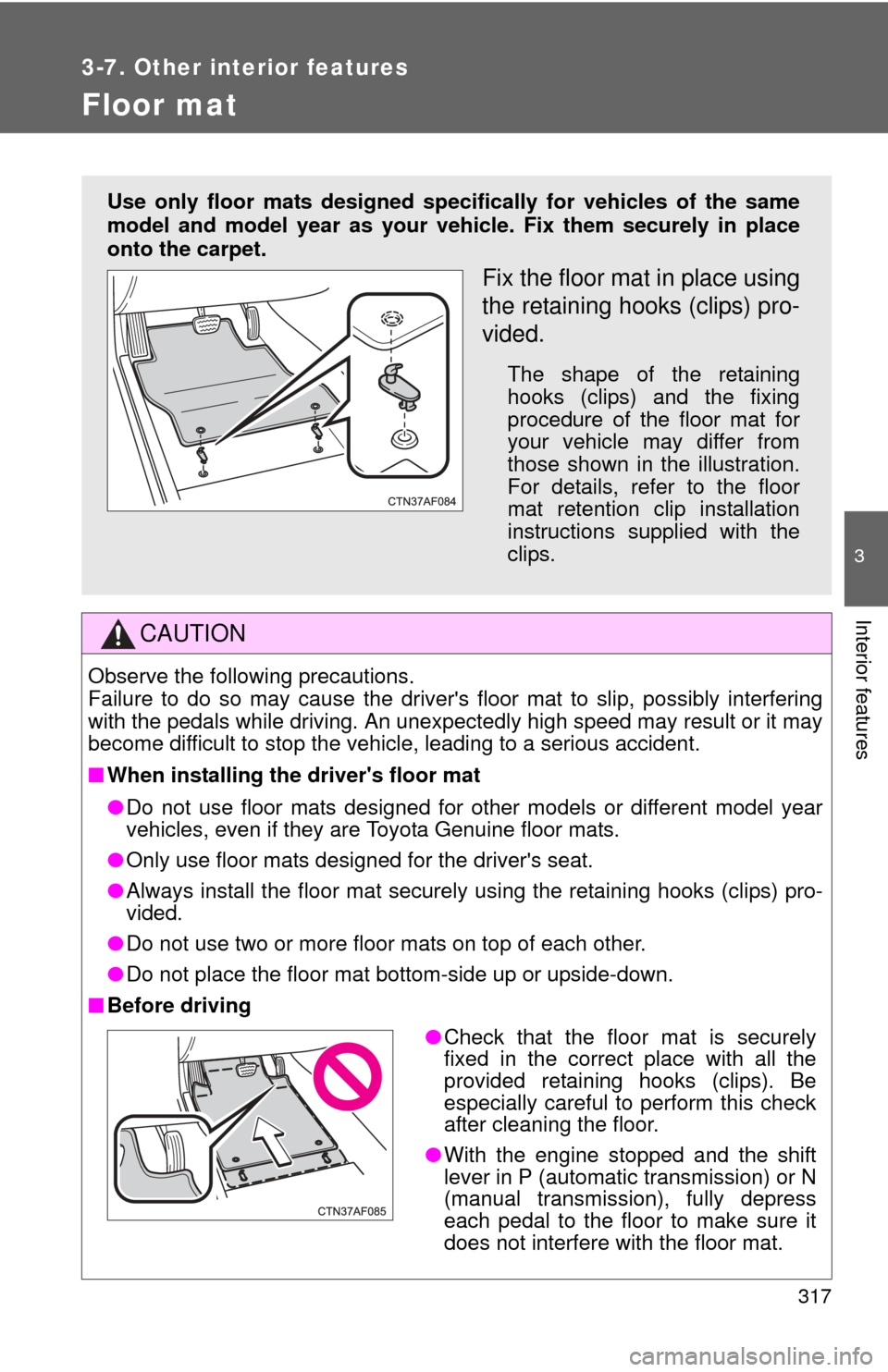
Use only floor mats designed specifically for vehicles of the same
model and model year as your vehic le. Fix them securely in place
onto the carpet.
Fix the floor mat in place using
the retaining hooks (clips) pro-
vided.
The shape of the retaining
hooks (clips) and the fixing
procedure of the floor mat for
your vehicle may differ from
those shown in the illustration.
For details, refer to the floor
mat retention clip installation
instructions supplied with the
clips.
● Check that the floor mat is securely
fixed in the correct place with all the
provided retaining hooks (clips). Be
especially careful to perform this check
after cleaning the floor.
● With the engine stopped and the shift
lever in P (automatic transmission) or N
(manual transmission), fully depress
each pedal to the floor to make sure it
does not interfere with the floor mat.
Page 318 of 516
318
3-7. Other interior features
Luggage compartment feature
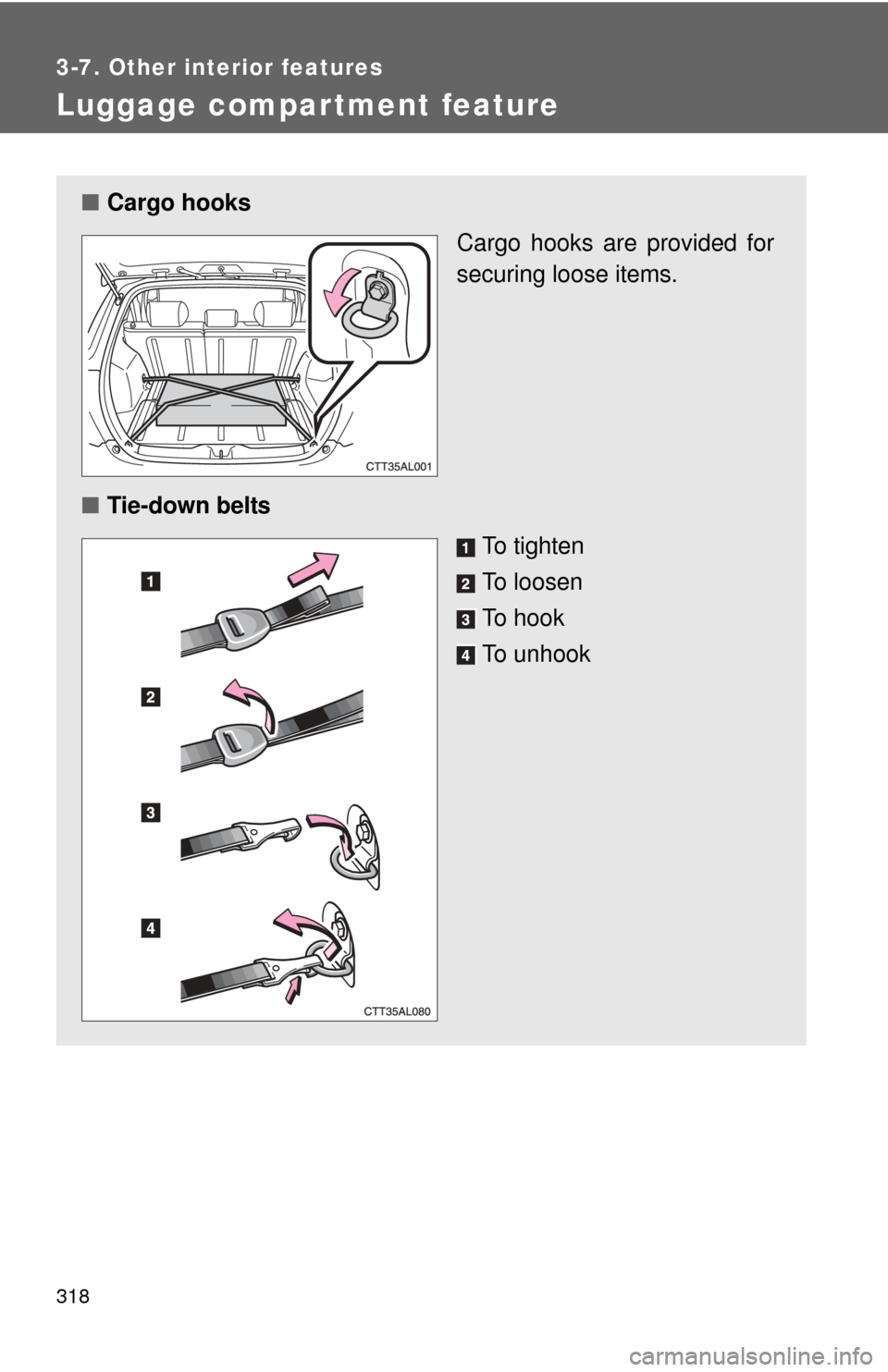
■Cargo hooks
Cargo hooks are provided for
securing loose items.
■ Tie-down belts
To tighten
To loosen
To hook
To unhook
Page 328 of 516
328 3-7. Other interior features
CAUTION
■While driving the vehicle
Do not adjust the display. Be sure to adjust the display only when the vehicle
is stopped.
■ When doing the circling calibration
Be sure to secure a wide space, and watch out for people and vehicles in the
neighborhood. Do not violate any local traffic rules while performing circling
calibration.
NOTICE
■To avoid compass malfunctions
Do not place magnets or any metal objects near the anti-glare inside rear
view mirror.
Doing this may cause a malfunction of the compass sensor.
■ To ensure normal operation of the compass
●Do not perform circling calibration of the compass in a place where the
earth's magnetic field is subject to interference by artificial magnetic fields.
● During calibration, do not operate electric systems (moon roof, power win-
dows, etc.) as they may interfere with the calibration.
Page 339 of 516
339
4-2. Maintenance
4
Maintenance and care
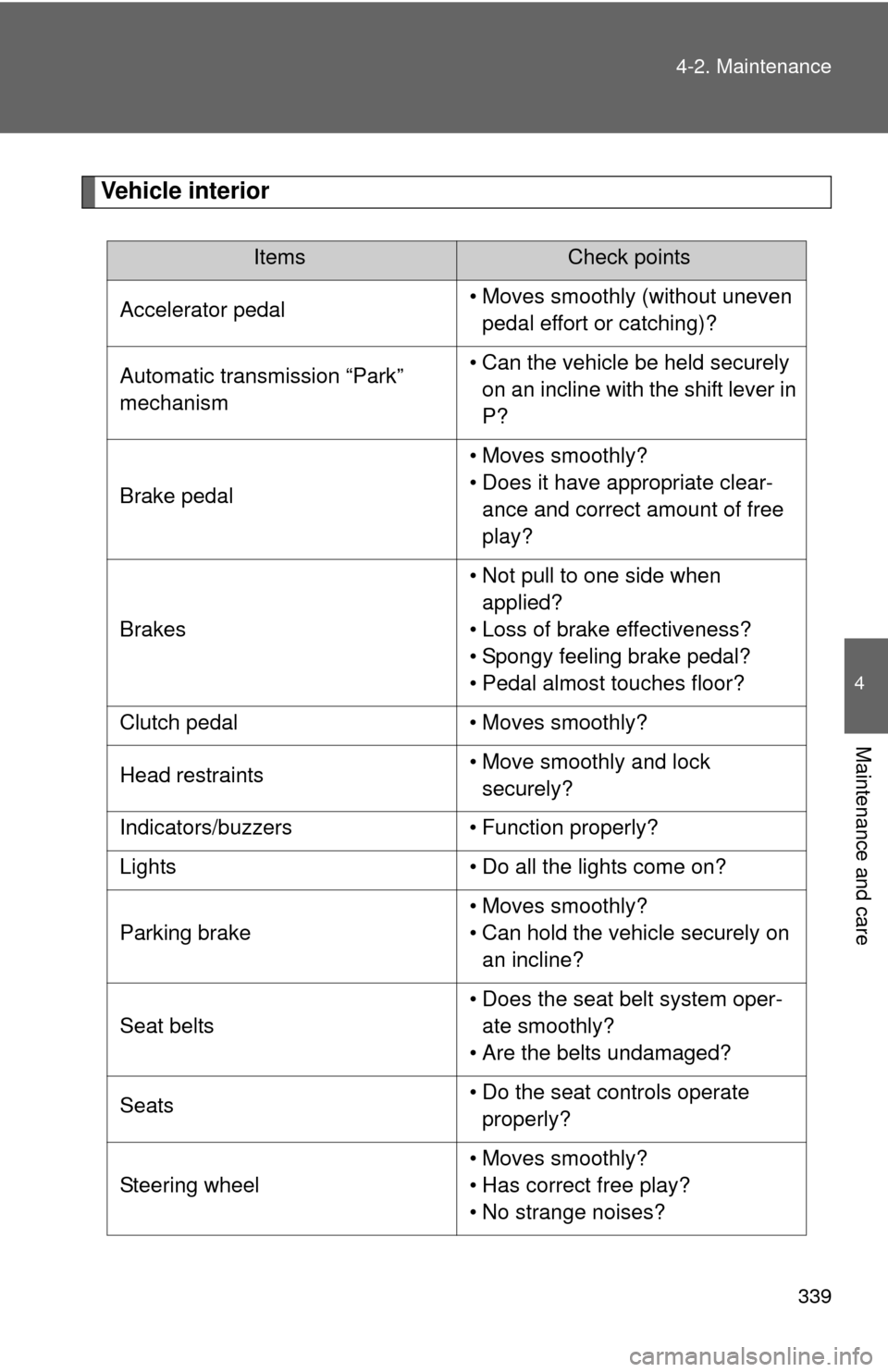
Vehicle interior
ItemsCheck points
Accelerator pedal • Moves smoothly (without uneven
pedal effort or catching)?
Automatic transmission “Park”
mechanism • Can the vehicle be held securely
on an incline with the shift lever in
P?
Brake pedal • Moves smoothly?
• Does it have appropriate clear-
ance and correct amount of free
play?
Brakes • Not pull to one side when
applied?
• Loss of brake effectiveness?
• Spongy feeling brake pedal?
• Pedal almost touches floor?
Clutch pedal • Moves smoothly?
Head restraints • Move smoothly and lock
securely?
Indicators/buzzers • Function properly?
Lights • Do all the lights come on?
Parking brake • Moves smoothly?
• Can hold the vehicle securely on
an incline?
Seat belts • Does the seat belt system oper-
ate smoothly?
• Are the belts undamaged?
Seats • Do the seat controls operate
properly?
Steering wheel • Moves smoothly?
• Has correct free play?
• No strange noises?
Page 347 of 516
347
4-3. Do-it-yourself maintenance
4
Maintenance and care
CAUTION
■
Pre-driving check
Check that the hood is fully closed and locked.
If the hood is not locked properly, it may open while the vehicle is in motion
and cause an accident, which may result in death or serious injury.
■ After installing the support rod into the slot
Make sure the rod supports the hood securely from falling down on to your
head or body.
NOTICE
■When closing the hood
Be sure to return the support rod to its clip before closing the hood. Closing
the hood with the support rod up could cause the hood to bend.
Page 388 of 516
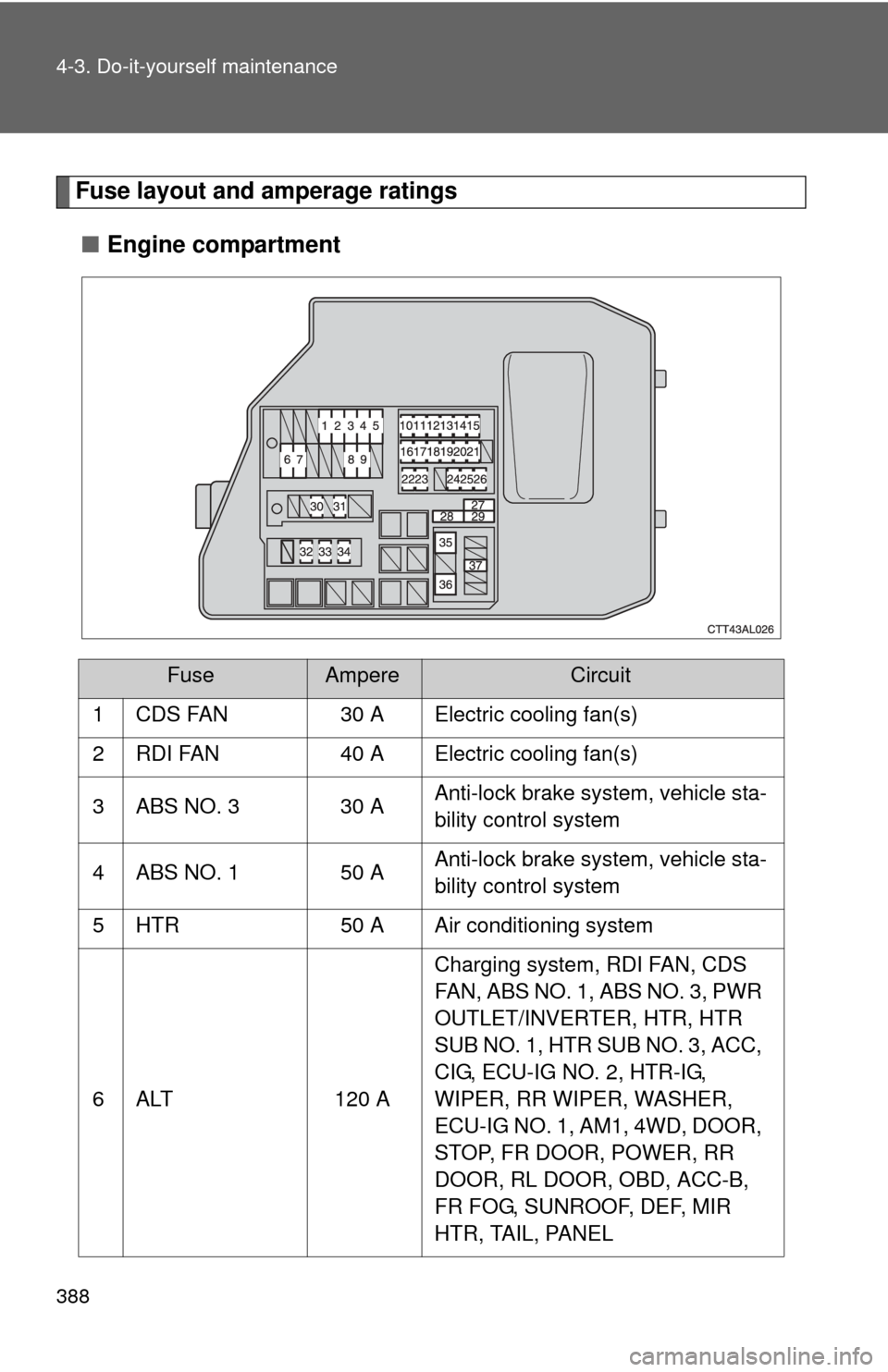
388 4-3. Do-it-yourself maintenance
Fuse layout and amperage ratings■ Engine compartment
FuseAmpereCircuit
1 CDS FAN 30 A Electric cooling fan(s)
2 RDI FAN 40 A Electric cooling fan(s)
3 ABS NO. 3 30 A Anti-lock brake system, vehicle sta-
bility control system
4 ABS NO. 1 50 A Anti-lock brake system, vehicle sta-
bility control system
5 HTR 50 A Air conditioning system
6 ALT 120 A Charging system, RDI FAN, CDS
FAN, ABS NO. 1, ABS NO. 3, PWR
OUTLET/INVERTER, HTR, HTR
SUB NO. 1, HTR SUB NO. 3, ACC,
CIG, ECU-IG NO. 2, HTR-IG,
WIPER, RR WIPER, WASHER,
ECU-IG NO. 1, AM1, 4WD, DOOR,
STOP, FR DOOR, POWER, RR
DOOR, RL DOOR, OBD, ACC-B,
FR FOG, SUNROOF, DEF, MIR
HTR, TAIL, PANEL
Page 389 of 516
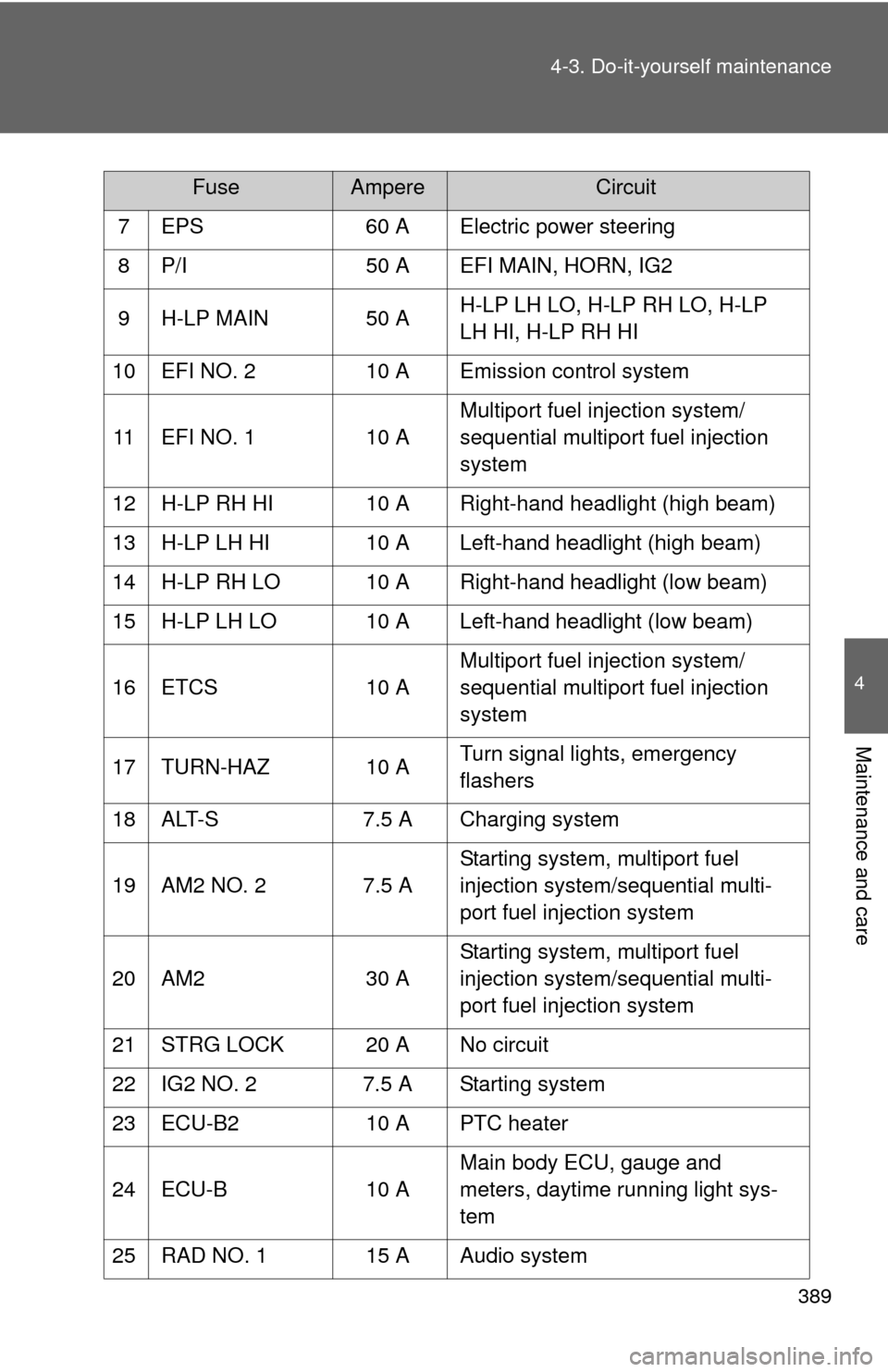
389
4-3. Do-it-yourself maintenance
4
Maintenance and care
7 EPS
60 A Electric power steering
8 P/I 50 A EFI MAIN, HORN, IG2
9 H-LP MAIN 50 A H-LP LH LO, H-LP RH LO, H-LP
LH HI, H-LP RH HI
10 EFI NO. 2 10 A Emission control system
11 EFI NO. 1 10 AMultiport fuel injection system/
sequential multiport fuel injection
system
12 H-LP RH HI 10 A Right-hand headlight (high beam)
13 H-LP LH HI 10 A Left-hand headlight (high beam)
14 H-LP RH LO 10 A Right-hand headlight (low beam)
15 H-LP LH LO 10 A Left-hand headlight (low beam)
16 ETCS 10 AMultiport fuel injection system/
sequential multiport fuel injection
system
17 TURN-HAZ 10 A Turn signal lights, emergency
flashers
18 ALT-S 7.5 A Charging system
19 AM2 NO. 2 7.5 A Starting system, multiport fuel
injection system/sequential multi-
port fuel injection system
20 AM2 30 AStarting system, multiport fuel
injection system/sequential multi-
port fuel injection system
21 STRG LOCK 20 A No circuit
22 IG2 NO. 2 7.5 A Starting system
23 ECU-B2 10 A PTC heater
24 ECU-B 10 AMain body ECU, gauge and
meters, daytime running light sys-
tem
25 RAD NO. 1 15 A Audio system
FuseAmpereCircuit