battery TOYOTA MIRAI 2017 1.G Owner's Manual
[x] Cancel search | Manufacturer: TOYOTA, Model Year: 2017, Model line: MIRAI, Model: TOYOTA MIRAI 2017 1.GPages: 464, PDF Size: 12.09 MB
Page 128 of 464
1284-2. Opening, closing and locking the doors
MIRAI_OM_USA_OM62023U
■Tr u n k l i g h t
The trunk light turns on when the trunk is opened.
■ Function to prevent the tr unk being locked with the electronic key inside
● When all doors are locked, closing the trunk lid with the electronic key left
inside the trunk will sound an alarm.
In this case, the trunk lid can be opened by pressing the trunk release but-
ton on the trunk lid.
● If the spare electronic key is put in the trunk with all the doors locked, the
key confinement prevention function is activated so the trunk can be
opened. In order to prevent theft, take all electronic keys with you when
leaving the vehicle.
● If the electronic key is put in the trunk with all the doors locked, the key may
not be detected depending on the location of the key and the surrounding
radio wave conditions. In this case, the key confinement prevention function
cannot be activated, causing the doors to lock when the trunk is closed.
Make sure to check where the key is before closing the trunk.
● The key confinement prevention function cannot be activated if any one of
the doors is unlocked. In this case, open the trunk using the trunk opener
switch.
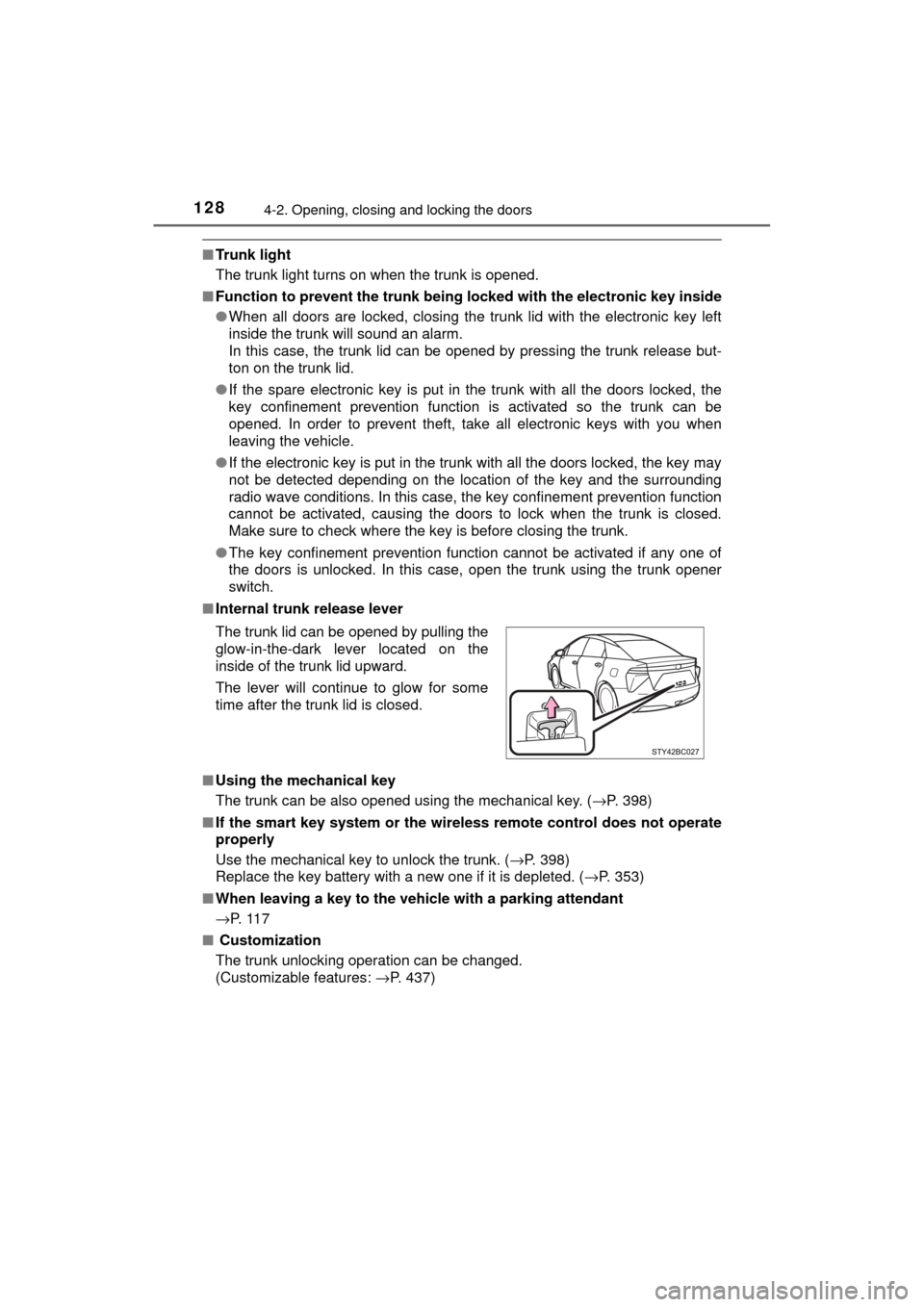
■ Internal trunk release lever
■ Using the mechanical key
The trunk can be also opened using the mechanical key. ( →P. 398)
■ If the smart key system or the wireless remote control does not operate
properly
Use the mechanical key to unlock the trunk. ( →P. 398)
Replace the key battery with a new one if it is depleted. ( →P. 353)
■ When leaving a key to the vehicle with a parking attendant
→P. 1 1 7
■ Customization
The trunk unlocking operation can be changed.
(Customizable features: →P. 437)
The trunk lid can be opened by pulling the
glow-in-the-dark lever located on the
inside of the trunk lid upward.
The lever will continue to glow for some
time after the trunk lid is closed.
Page 133 of 464
1334-2. Opening, closing and locking the doors
4
Operation of each component
MIRAI_OM_USA_OM62023U■
When “Smart Entry & Start System Malfunction See Owner’ Manual” will
be displayed on the multi-information display
The system may be malfunctioning. Have the vehicle inspected by your Toy-
ota dealer immediately.
■ Battery-saving function
The battery-saving function will be activated in order to prevent the electronic
key battery and the 12-volt battery from being discharged while the vehicle is
not in operation for a long time.
●In the following situations, the smart key system may take some time to
unlock the doors.
• The electronic key has been left in an area of approximately 6 ft. (2 m) of
the outside of the vehicle for 10 minutes or longer.
• The smart key system has not been used for 5 days or longer.
● If the smart key system has not been used for 14 days or longer, the doors
cannot be unlocked at any doors except the driver’s door. In this case, take
hold of the driver’s door handle, or use the wireless remote control or the
mechanical key, to unlock the doors.
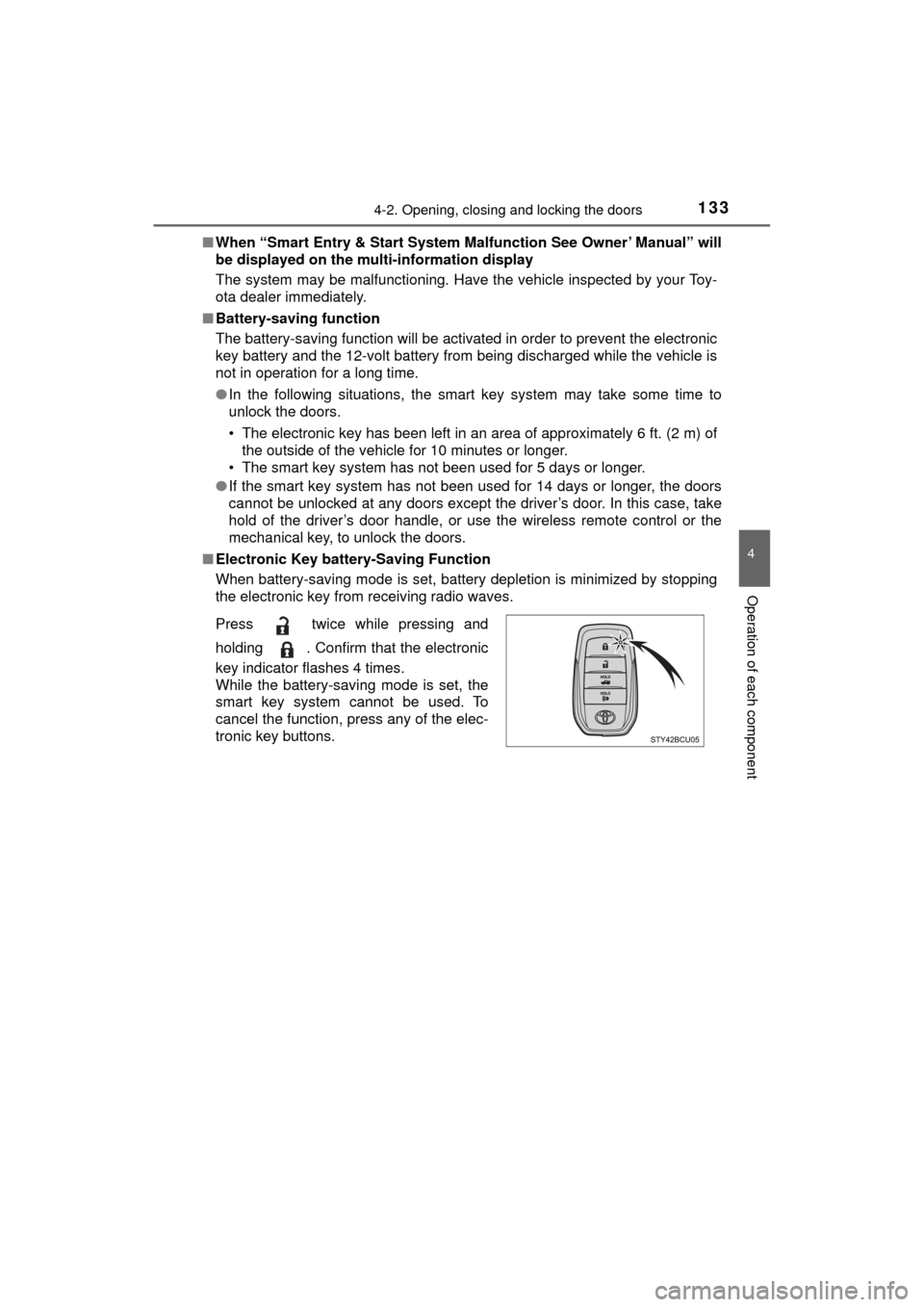
■ Electronic Key battery-Saving Function
When battery-saving mode is set, battery depletion is minimized by stopping
the electronic key from receiving radio waves.
Press twice while pressing and
holding . Confirm that the electronic
key indicator flashes 4 times.
While the battery-saving mode is set, the
smart key system cannot be used. To
cancel the function, press any of the elec-
tronic key buttons.
Page 134 of 464

1344-2. Opening, closing and locking the doors
MIRAI_OM_USA_OM62023U■
Conditions affecting operation
The smart key system uses weak radio waves. In the following situations, the
communication between the electronic key and the vehicle may be affected,
preventing the smart key system, wireless remote control and immobilizer
system from operating properly. (Ways of coping: →P. 398)
● When the electronic key battery is depleted
● Near a TV tower, electric power plant, gas station, radio station, large dis-
play, airport or other facility that generates strong radio waves or electrical
noise
● When the electronic key is in contact with, or is covered by the following
metallic objects
• Cards to which aluminum foil is attached
• Cigarette boxes that have aluminum foil inside
• Metallic wallets or bags
• Coins
• Hand warmers made of metal
• Media such as CDs and DVDs
● When other wireless keys (that emit radio waves) are being used nearby
● When carrying the electronic key together with the following devices that
emit radio waves
• Portable radio, cellular phone, cordless phone or other wireless commu-
nication devices
• Another vehicle’s electronic key or a wireless key that emits radio waves
• Personal computers or personal digital assistants (PDAs)
• Digital audio players
• Portable game systems
● If window tint with a metallic content or metallic objects are attached to the
rear window
● When the electronic key is placed near a battery charger or electronic
devices
Page 135 of 464

1354-2. Opening, closing and locking the doors
4
Operation of each component
MIRAI_OM_USA_OM62023U■
Note for the entry function
●Even when the electronic key is within the effective range (detection areas),
the system may not operate properly in the following cases:
• The electronic key is too close to the window or outside door handle, near
the ground, or in a high place when the doors are locked or unlocked.
• The electronic key is near the ground or in a high place, or too close to
the rear bumper center when the trunk is opened.
• The electronic key is on the instrument panel, rear package tray or floor, or in the door pockets or glove box when the fuel cell system is started or
power switch modes are changed.
● Do not leave the electronic key on top of the instrument panel or near t\
he
door pockets when exiting the vehicle. Depending on the radio wave recep-
tion conditions, it may be detected by the antenna outside the cabin and the
door will become lockable from the out side, possibly trapping the electronic
key inside the vehicle.
● As long as the electronic key is within the effective range, the doors may be
locked or unlocked by anyone. However, only the doors detecting the elec-
tronic key can be used to unlock the vehicle.
● Even if the electronic key is not inside the vehicle, it may be possible to start
the fuel cell system if the electronic key is near the window.
● The doors may unlock or lock if a large amount of water splashes on the
door handle, such as in the rain or in a car wash when the electronic key is
within the effective range. (The doors will automatically be locked after
approximately 60 seconds if the doors are not opened and closed.)
● If the wireless remote control is used to lock the doors when the electronic
key is near the vehicle, there is a possibility that the door may not be
unlocked by the entry function. (Use the wireless remote control to unlock
the doors.)
● Touching the door lock or unlock sensor while wearing gloves may prevent
lock or unlock operation.
● When the lock operation is performed using the lock sensor, recognition sig-
nals will be shown up to two consecutive times. After this, no recognition
signals will be given.
● If the door handle becomes wet while the electronic key is within the effec-
tive range, the door may lock and unlock repeatedly. In this case, follow the
following correction procedures to wash the vehicle:
• Place the electronic key in a location 6 ft. (2 m) or more away from the
vehicle. (Take care to ensure that the key is not stolen.)
• Set the electronic key to battery-saving mode to disable the smart key
system. ( →P. 133)
● If the electronic key is inside the vehicle and a door handle becomes wet
during a car wash, a message may be shown on the multi-information dis-
play and a buzzer will sound outside the vehicle. To turn off the alarm, lock
all the doors.
Page 165 of 464
1655-1. Before driving
5
Driving
MIRAI_OM_USA_OM62023U
NOTICE
■Avoiding damage to vehicle parts
● Do not turn the steering wheel fully in either direction and hold it there for
an extended period of time.
Doing so may damage the power steering motor.
● When driving over bumps in the road, drive as slowly as possible to avoid
damaging the wheels, underside of the vehicle, etc.
■ If you get a flat tire while driving
A flat or damaged tire may cause the following situations. Hold the steering
wheel firmly and gradually depress the brake pedal to slow down the vehi-
cle.
● It may be difficult to control your vehicle.
● The vehicle will make abnormal sounds or vibrations.
● The vehicle will lean abnormally.
Information on what to do in case of a flat tire ( →P. 381)
■ When encounterin g flooded roads
Do not drive on a road that has flooded after heavy rain, etc. Doing so may
cause the following serious damage to the vehicle:
● Fuel cell system stalling
● Short in electrical components
● Fuel cell system damage caused by water immersion
In the event that you drive on a flooded road and the vehicle is flooded, be
sure to have your Toyota dealer check the following:
● Fuel cell system
● Brake function
● Changes in quantity and quality of transmission fluid, etc.
● Lubricant condition for the bearings and suspension joints (where possi-
ble), and the function of all joints, bearings, etc.
If the shift control system is damaged by flooding, it may not be possible to
shift the shift position to P, or from P to other positions. When the shift posi-
tion cannot be changed from P to any other position, the front wheels will
lock, and you will be unable to tow the vehicle with the front wheels on the
ground, as the front wheels may be locked. In this case, transport the vehi-
cle with both front wheels or all four wheels lifted.
■ If the vehicle will not shift out of the P position
There is a possibility that the 12-volt battery is discharged. Check the 12-
volt battery in this situation.
Page 174 of 464
1745-2. Driving procedures
MIRAI_OM_USA_OM62023U
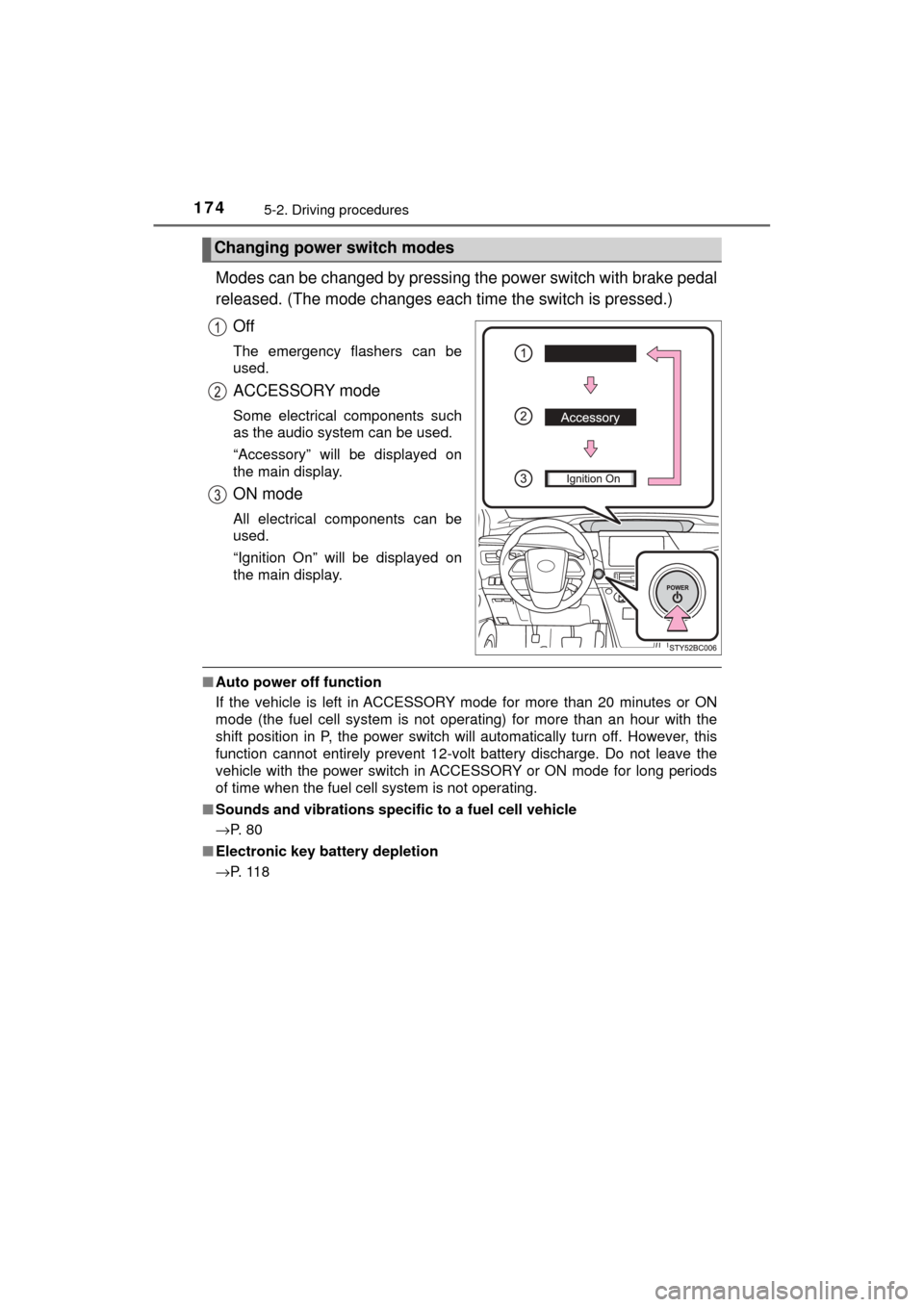
Modes can be changed by pressing the power switch with brake pedal
released. (The mode c hanges each time the switch is pressed.)
Off
The emergency flashers can be
used.
ACCESSORY mode
Some electrical components such
as the audio system can be used.
“Accessory” will be displayed on
the main display.
ON mode
All electrical components can be
used.
“Ignition On” will be displayed on
the main display.
■ Auto power off function
If the vehicle is left in ACCESSORY mode for more than 20 minutes or ON
mode (the fuel cell system is not operating) for more than an hour with the
shift position in P, the power switch will automatically turn off. However, this
function cannot entirely prevent 12-volt battery discharge. Do not leave\
the
vehicle with the power switch in ACCESSORY or ON mode for long periods
of time when the fuel cell system is not operating.
■ Sounds and vibrations specific to a fuel cell vehicle
→P. 8 0
■ Electronic key battery depletion
→P. 1 1 8
Changing power switch modes
Page 177 of 464

1775-2. Driving procedures
5
Driving
MIRAI_OM_USA_OM62023U■
If the electronic key battery is depleted
→P. 353
■ Operation of the power switch
When operating the power switch, one short, firm press is enough. If the
switch is pressed improperly, the fuel cell system may not start or the power
switch mode may not change. It is not necessary to press and hold the
switch.
■ Automatic P position selection function
●When the shift position is other than P, pressing the power switch with the
vehicle stopped completely will cause the shift position to change to P auto-
matically, and then the power switch will turn off.
● When turning the power switch off with the shift position other than P, firmly
depress the brake pedal and confirm that the shift position* has changed to
P before slowly releasing the brake pedal.
*: Even after the instrument panel display has been turned off, the shift
position indicator will continue to be displayed for several seconds.
■ If the shift control system malfunctions
The power switch will not be able to be turned off. In this occurs, the switch
can be turned off by applying the parking brake.
If the system malfunctions, have your vehicle serviced by your Toyota dealer
immediately.
■ If the smart key system has been d eactivated in a customized setting
→P. 436
WARNING
■ When starting the fuel cell system
Always start the fuel cell system while sitting in the driver’s seat. Do not
depress the accelerator pedal while starting the fuel cell system under any
circumstances.
Doing so may cause an accident resulting in death or serious injury.
■ Stopping the fuel cell system in an emergency
If you want to stop the fuel cell system in an emergency while driving the
vehicle, press and hold the power switch for more than 2 seconds, or press
it briefly 3 times or more in succession. ( →P. 361)
However, do not touch the power switch while driving except in an emer-
gency. Turning the fuel cell system off while driving will not cause loss of
steering or braking control, however, power assist to the steering will be
lost. This will make it more difficult to steer smoothly, so you should pull over
and stop the vehicle as soon as it is safe to do so.
Page 178 of 464

1785-2. Driving procedures
MIRAI_OM_USA_OM62023U
NOTICE
■To prevent 12-volt battery discharge
Do not leave the power switch in ACCESSORY or ON mode for long peri-
ods if the fuel cell system is off.
■ When starting the fuel cell system
If the fuel cell system becomes difficult to start, have your vehicle checked
by your Toyota dealer immediately.
■ Symptoms indicating a malf unction with the power switch
If the power switch seems to be operating somewhat differently than usual,
such as the switch sticking slightly, there may be a malfunction. Contact
your Toyota dealer immediately.
Page 182 of 464

1825-2. Driving procedures
MIRAI_OM_USA_OM62023U
■For the shift positions
●When the power switch is off, the shift position cannot be changed.
● When the power switch is in ON mode (the fuel cell system is not operating),
the shift position can only be changed to N. The shift position will be
changed to N even if the shift position is shifted to D or R and held in that
position.
● When the “READY” indicator is on, the shift position can be changed from P
to D, N or R.
● When the “READY” indicator is flashing, the shift position cannot be
changed from P to another position even if the shift lever is operated.
Wait until the “READY” indicator changes from a flashing to a solid light, and
then operate the shift lever again.
In addition, if an attempt is made to change the shift position by moving the
shift lever or by pressing the P position switch in any of the following situa-
tions, a buzzer will sound and the shifting operation will be disabled or the
shift position will automatically change to N. When this happens, select an
appropriate shift position.
● When attempting to change the shift position from P without depressing the
brake pedal, the shift position change is invalidated.
● Situations where the shift position will automatically change to N:
• When the P position switch is pressed while the vehicle is running.
*1
• When an attempt is made to select the R position by moving the shift
lever when the vehicle is moving forward.
*2
• When an attempt is made to select the D position by moving the shiftlever when the vehicle is moving in reverse.
*3
• When an attempt is made to change the shift position from R to Br modeby moving the shift lever.
*1: Shift position may be changed to P when driving at extremely low speeds.
*2: Shift position may be changed to R when driving at low speeds.
*3: Shift position may be changed to D when driving at low speeds.
■ Br mode
Depending on the condition of the traction battery, Br mode may not be avail-
able.
In that case, a message is displayed on the multi-information display.
■ Sounds when in Br mode
→P. 8 0
■ Restraining sudden star t (Drive-Start Control)
→P. 159
■ Reverse warning buzzer
When shifting into R, a buzzer will sound to inform the driver that the shift
position is in R.
Page 184 of 464
1845-2. Driving procedures
MIRAI_OM_USA_OM62023U
NOTICE
■Situations where shift control system malfunctions are possible
If any of the following situations occurs, shift control system malfunctions
are possible.
Immediately stop the vehicle in a safe place on level ground, apply the park-
ing brake, and then contact your Toyota dealer.
● When a warning message indicating malfunction appears on the multi-
information display. ( →P. 376)
● When the shift position indicator remains off.
■ If the vehicle cannot be shifted out of P
There is a possibility that the 12-volt battery is discharged. Check the
12-volt battery in this situation.
■ Notes regarding shift lever an d P position switch operation
Avoid repeatedly operating the shift lever and P position switch in quick suc-
cession.
The system protection function may activate and it will not be temporarily
possible to shift the shift position other than P. If this happens, please wait
for a while before attempting to change the shift position again.