warning TOYOTA MIRAI 2020 (in English) Workshop Manual
[x] Cancel search | Manufacturer: TOYOTA, Model Year: 2020, Model line: MIRAI, Model: TOYOTA MIRAI 2020Pages: 528, PDF Size: 11.98 MB
Page 110 of 528

1103. Instrument cluster
MIRAI_OM_USA_OM62073U
*1: Depending on the operating condition, the color and illuminating state of
the light change.
*2: The light turns on when the system is off.
*3: These lights turn on when the power switch is turned to ON mod e to indi-
cate that a system check is being performed. They will turn off after the fuel
cell system is on, or after a few seconds. There may be a malfu nction in a
system if a light does not come on, or turn off. Have the vehic le inspected
by your Toyota dealer.
*4: The light flashes to indicate that the system is operating.
*5: In order to confirm operation, the BSM outside rear view mirro r indicators
illuminate in the following situations:
• When the power switch is turned to ON mode while the BSM setti ngs are
set to ON.
• When the BSM settings are set to ON while the power switch is in ON
mode.
If the system is functioning correctly, the BSM outside rear vi ew mirror indi-
cators will turn off after a few seconds.
If the BSM outside rear view mirror indicators do not illuminat e or do not
turn off, there may be a malfunction in the system.
If this occurs, have the vehicle inspected by your Toyota deale r.
*6: This light illuminates on the outside rear view mirrors.
*7: This light illuminates on the main display.Br mode indicator
(
P. 195)
*3
(U.S.A.)
“AIR BAG ON/OFF”
indicator ( P. 49)
H
2O indicator
( P. 187)*3
(Canada)
“AIR BAG ON/OFF”
indicator ( P. 49)
WARNING
■If a safety system warning light does not come on
Should a safety system light such as the ABS and SRS warning lights not
come on when you start the fuel cell system, this could mean that these
systems are not available to help protect you in an accident, which could
result in death or serious injury. Have the vehicle inspected by your Toyota
dealer immediately if this occurs.
Page 111 of 528
1113. Instrument cluster
3
Instrument cluster
MIRAI_OM_USA_OM62073U
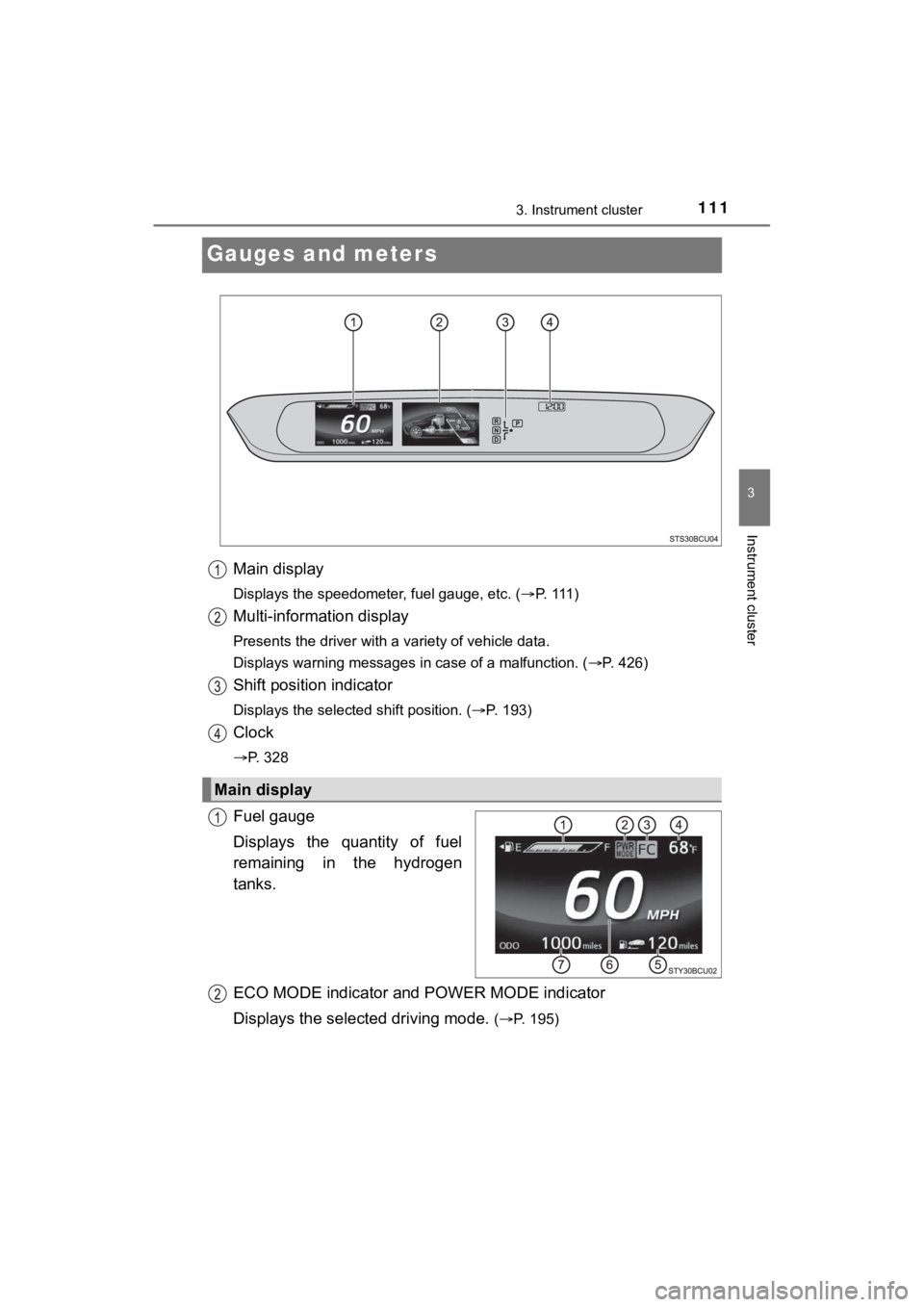
Gauges and meters
Main display
Displays the speedometer, fuel gauge, etc. (P. 111 )
Multi-information display
Presents the driver with a variety of vehicle data.
Displays warning messages in case of a malfunction. ( P. 426)
Shift position indicator
Displays the selected shift position. (P. 193)
Clock
P. 328
Fuel gauge
Displays the quantity of fuel
remaining in the hydrogen
tanks.
ECO MODE indicator and POWER MODE indicator
Displays the select ed driving mode.
(P. 195)
Main display
Page 116 of 528

1163. Instrument cluster
MIRAI_OM_USA_OM62073U
NOTICE
■To prevent damage to the fuel cell system and its components
This vehicle is equipped with high coolant temperature warning light
( P. 418), instead of, coolant temperature gauge.
The fuel cell system may be overheating if the high coolant temperature
warning light flashes or comes on. In this case, immediately st op the
vehicle in a safe place, and che ck the fuel cell system after it has cooled
completely.
Page 117 of 528
1173. Instrument cluster
3
Instrument cluster
MIRAI_OM_USA_OM62073U
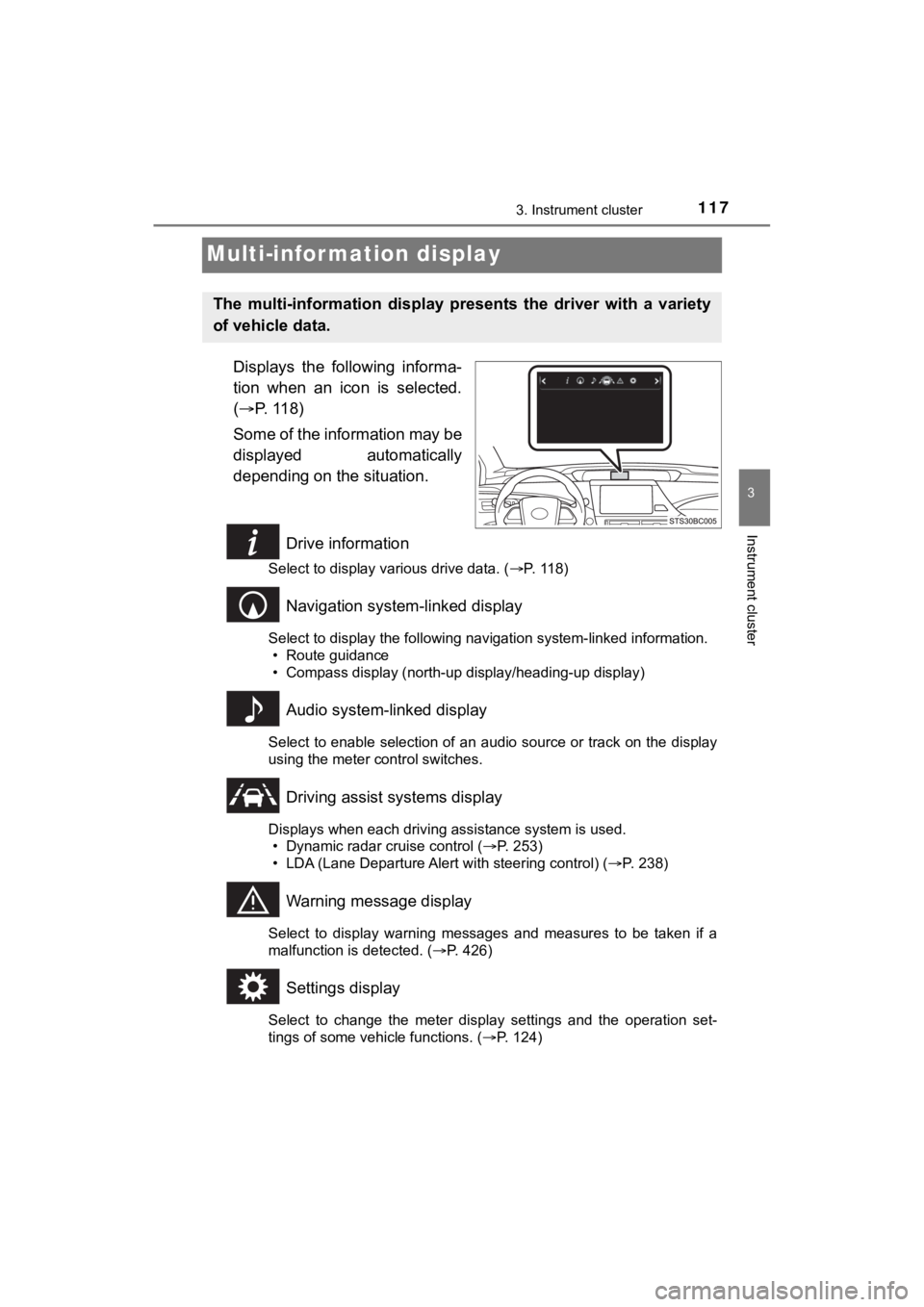
Multi-infor mation display
Displays the following informa-
tion when an icon is selected.
( P. 118)
Some of the information may be
displayed automatically
depending on the situation.
Drive information
Select to display various drive data. ( P. 118)
Navigation system-linked display
Select to display the following navigation system-linked information.
• Route guidance
• Compass display (north-up display/heading-up display)
Audio system-linked display
Select to enable selection of an audio source or track on the d isplay
using the meter control switches.
Driving assist systems display
Displays when each driving assistance system is used. • Dynamic radar cruise control ( P. 253)
• LDA (Lane Departure Alert with steering control) ( P. 238)
Warning message display
Select to display warning messages and measures to be taken if a
malfunction is detected. ( P. 426)
Settings display
Select to change the meter display settings and the operation set-
tings of some vehicle functions. ( P. 124)
The multi-information display pre sents the driver with a variety
of vehicle data.
Page 124 of 528
1243. Instrument cluster
MIRAI_OM_USA_OM62073U
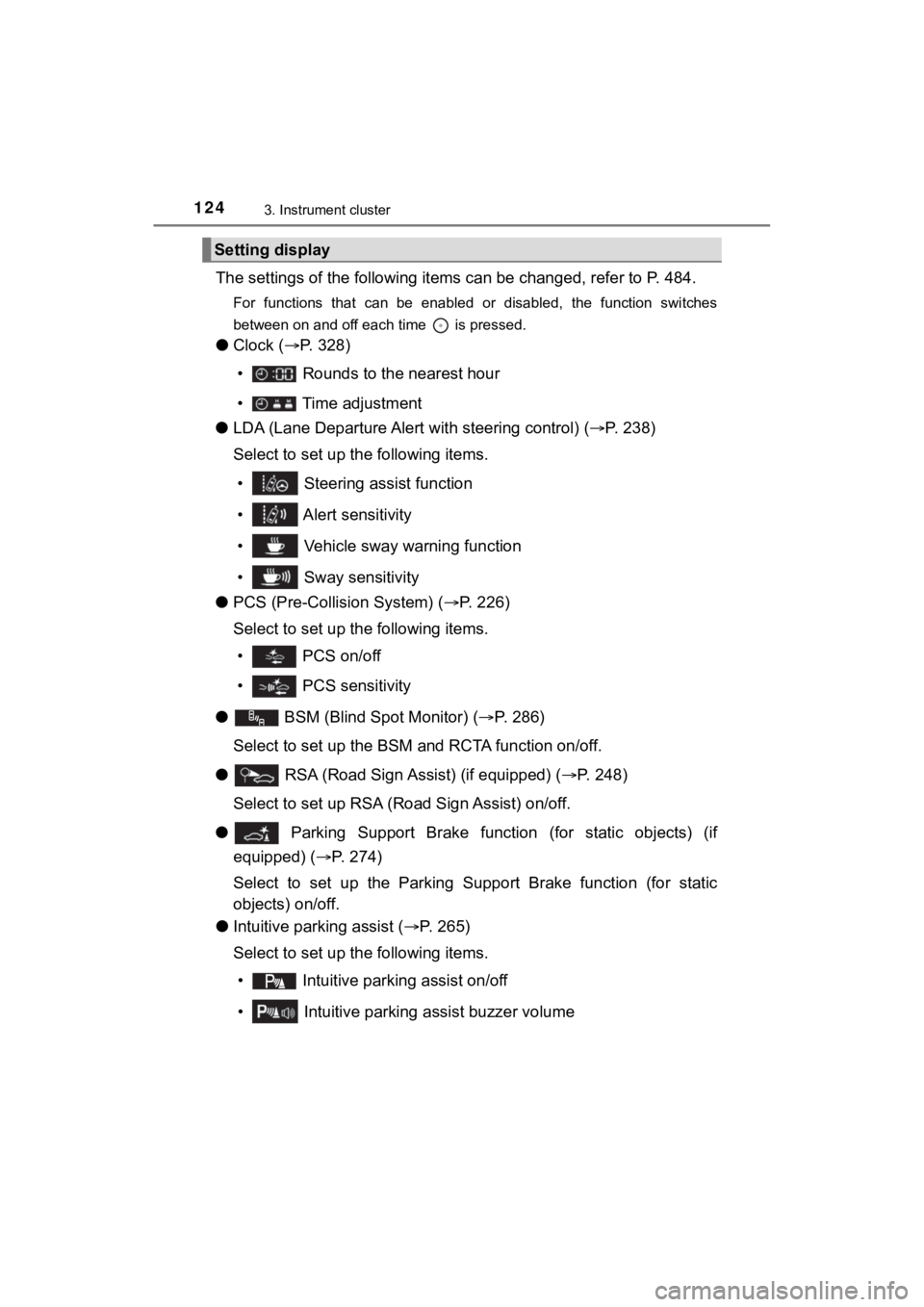
The settings of the following items can be changed, refer to P. 484.
For functions that can be enabled or disabled, the function swi tches
between on and off each time is pressed.
● Clock ( P. 328)
• Rounds to the nearest hour
• Time adjustment
● LDA (Lane Departure Alert with steering control) (P. 2 3 8 )
Select to set up the following items.
• Steering assist function
• Alert sensitivity
• Vehicle sway warning function
• Sway sensitivity
● PCS (Pre-Collis ion System) (P. 226)
Select to set up the following items.
• PCS on/off
• PCS sensitivity
●
BSM (Blind Spot Monitor) ( P. 286)
Select to set up the BSM and RCTA function on/off.
● RSA (Road Sign Assist) (if equipped) ( P. 248)
Select to set up RSA (Ro ad Sign Assist) on/off.
●
Parking Support Brake function (for static objects) (if
equipped) ( P. 274)
Select to set up the Parking Supp ort Brake function (for static
objects) on/off.
● Intuitive parking assist ( P. 265)
Select to set up the following items.
• Intuitive parkin g assist on/off
• Intuitive parking assist buzzer volume
Setting display
Page 126 of 528
![TOYOTA MIRAI 2020 (in English) Workshop Manual 1263. Instrument cluster
MIRAI_OM_USA_OM62073U
■Setting items
● [Meter settings] items are not selectable while driving and cannot be
operated.
Also, the settings screen is temporarily canceled](/img/14/42628/w960_42628-125.png "TOYOTA MIRAI 2020 (in English) Workshop Manual 1263. Instrument cluster
MIRAI_OM_USA_OM62073U
■Setting items
● [Meter settings] items are not selectable while driving and cannot be
operated.
Also, the settings screen is temporarily canceled")
1263. Instrument cluster
MIRAI_OM_USA_OM62073U
■Setting items
● [Meter settings] items are not selectable while driving and cannot be
operated.
Also, the settings screen is temporarily canceled in the follow ing situations.
• A warning message is displayed.
• The vehicle starts off.
● Settings for functions not equipped to the vehicle are not disp layed.
● When a function is turned off, the related settings for that fu nction are not
selectable.
■ When the 12-volt battery terminal is disconnected and reconnect ed
The following data is reset when the 12-volt battery terminal i s disconnected
and reconnected.
● 1-minute fuel consumption
● 5-minute fuel consumption
● Driving time
● Average vehicle speed
● Average fuel consumption
■ Liquid crystal display
P. 115
NOTICE
■During setting up the display
To prevent 12-volt battery discharge, ensure that the fuel cell system is
operating while setting up the display features.
Page 136 of 528
1364-2. Opening, closing and locking the doors
MIRAI_OM_USA_OM62073U
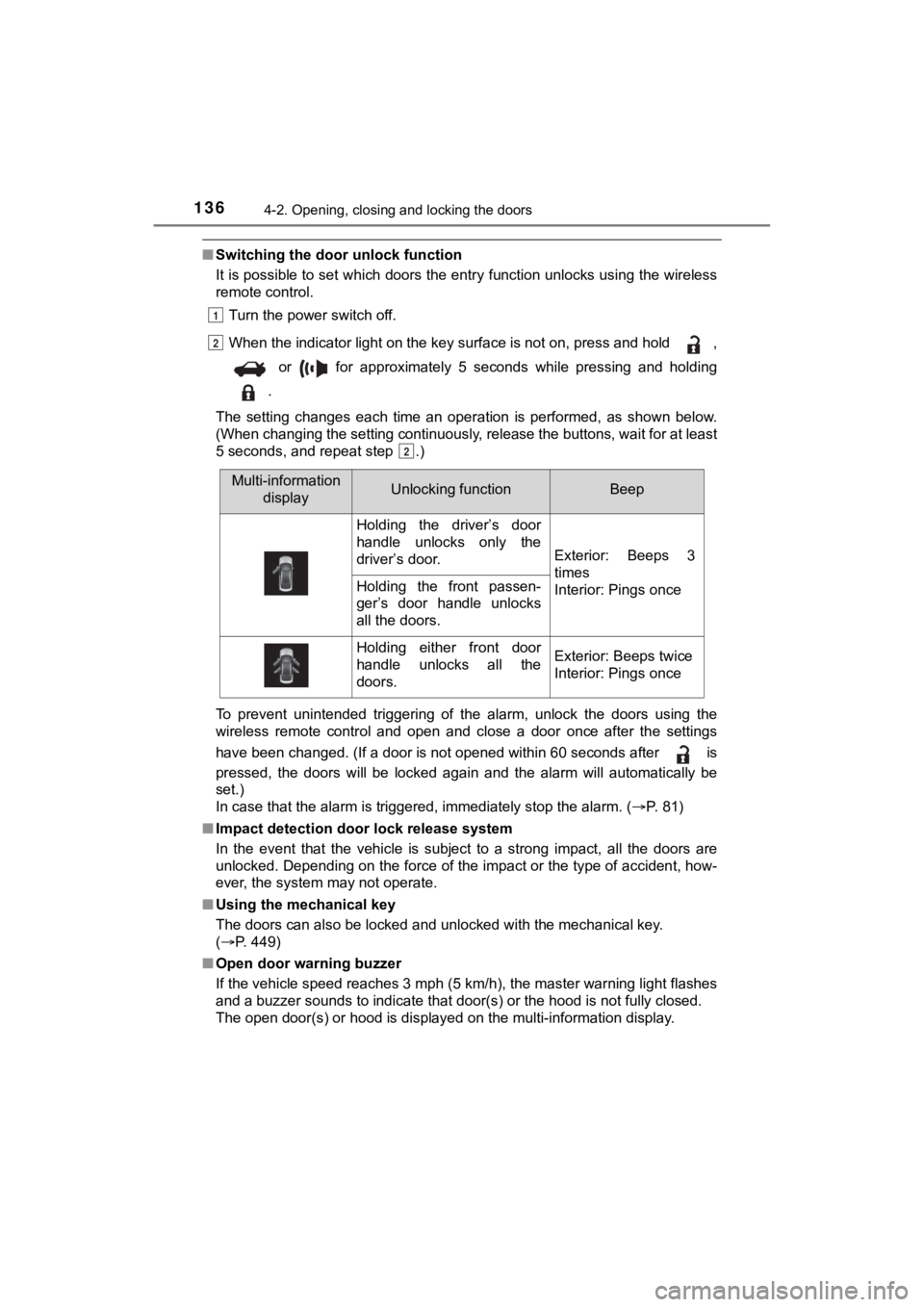
■Switching the door unlock function
It is possible to set which doors the entry function unlocks using the wireless
remote control.
Turn the power switch off.
When the indicator light on the key surface is not on, press and hold ,
or for approximately 5 seconds while pressing and holding
.
The setting changes each time an operation is performed, as sho wn below.
(When changing the setting continuously, release the buttons, w ait for at least
5 seconds, and repeat step .)
To prevent unintended triggering of the alarm, unlock the doors using the
wireless remote control and open and close a door once after th e settings
have been changed. (If a door is not opened within 60 seconds a fter is
pressed, the doors will be locked again and the alarm will auto matically be
set.)
In case that the alarm is triggered, immediately stop the alarm . ( P. 81)
■ Impact detection door lock release system
In the event that the vehicle is subject to a strong impact, all the doors are
unlocked. Depending on the force of the impact or the type of a ccident, how-
ever, the system may not operate.
■ Using the mechanical key
The doors can also be locked and unlocked with the mechanical k ey.
( P. 449)
■ Open door warning buzzer
If the vehicle speed reaches 3 mph (5 km/h), the master warning light flashes
and a buzzer sounds to indicate that door(s) or the hood is not fully closed.
The open door(s) or hood is displayed on the multi-information display.
1
2
2
Multi-information
displayUnlocking functionBeep
Holding the driver’s door
handle unlocks only the
driver’s door.
Exterior: Beeps 3
times
Interior: Pings once
Holding the front passen-
ger’s door handle unlocks
all the doors.
Holding either front door
handle unlocks all the
doors.Exterior: Beeps twice
Interior: Pings once
Page 137 of 528

1374-2. Opening, closing and locking the doors
4
Operation of each component
MIRAI_OM_USA_OM62073U■
Conditions affecting the operation of the smart key system or w ireless
remote control
P. 146
■ Customization
Settings (e.g. unlocking function using a key) can be changed.
(Customizable features: P. 485)
WARNING
■To prevent an accident
Observe the following precautions while driving the vehicle.
Failure to do so may result in a door opening and an occupant f alling out,
resulting in death or serious injury.
● Ensure that all doors are properly closed and locked.
● Do not pull the inside handle of the doors while driving.
Be especially careful for the front doors, as the doors may be opened
even if the inside lock buttons are in locked position.
● Set the rear door child-protector locks when children are seate d in the rear
seats.
■ When opening or closing a door
Check the surroundings of the vehicle such as whether the vehic le is on an
incline, whether there is enough space for a door to open and w hether a
strong wind is blowing.
When opening or closing the door, hold the door handle tightly to prepare
for any unpredictable movement.
■ When using the wireless remote control and operating the power win-
dows
Operate the power window after checking to make sure that there is no pos-
sibility of any passenger having any of their body parts caught in the win-
dow. Also, do not allow children to operate the wireless remote control. It is
possible for children and other passengers to get caught in the power win-
dow.
Page 140 of 528
1404-2. Opening, closing and locking the doors
MIRAI_OM_USA_OM62073U
■Tr u n k l i g h t
The trunk light turns on when the trunk is opened.
■ Function to prevent th e trunk being locked with the electronic key inside
● When all doors are locked, closing the trunk lid with the elect ronic key left
inside the trunk will sound an alarm.
In this case, the trunk lid can be opened by pressing the trunk release but-
ton on the trunk lid.
● If the spare electronic key is put in the trunk with all the doors locked, the
key confinement prevention function is activated so the trunk can be
opened. In order to prevent theft, take all electronic keys wit h you when
leaving the vehicle.
● If the electronic key is put in the trunk with all the doors lo cked, the key may
not be detected depending on the location of the key and the su rrounding
radio wave conditions. In this case, the key confinement preven tion function
cannot be activated, causing the doors to lock when the trunk i s closed.
Make sure to check where the key is before closing the trunk.
● The key confinement prevention function cannot be activated if any one of
the doors is unlocked. In this case, open the trunk using the t runk opener
switch.
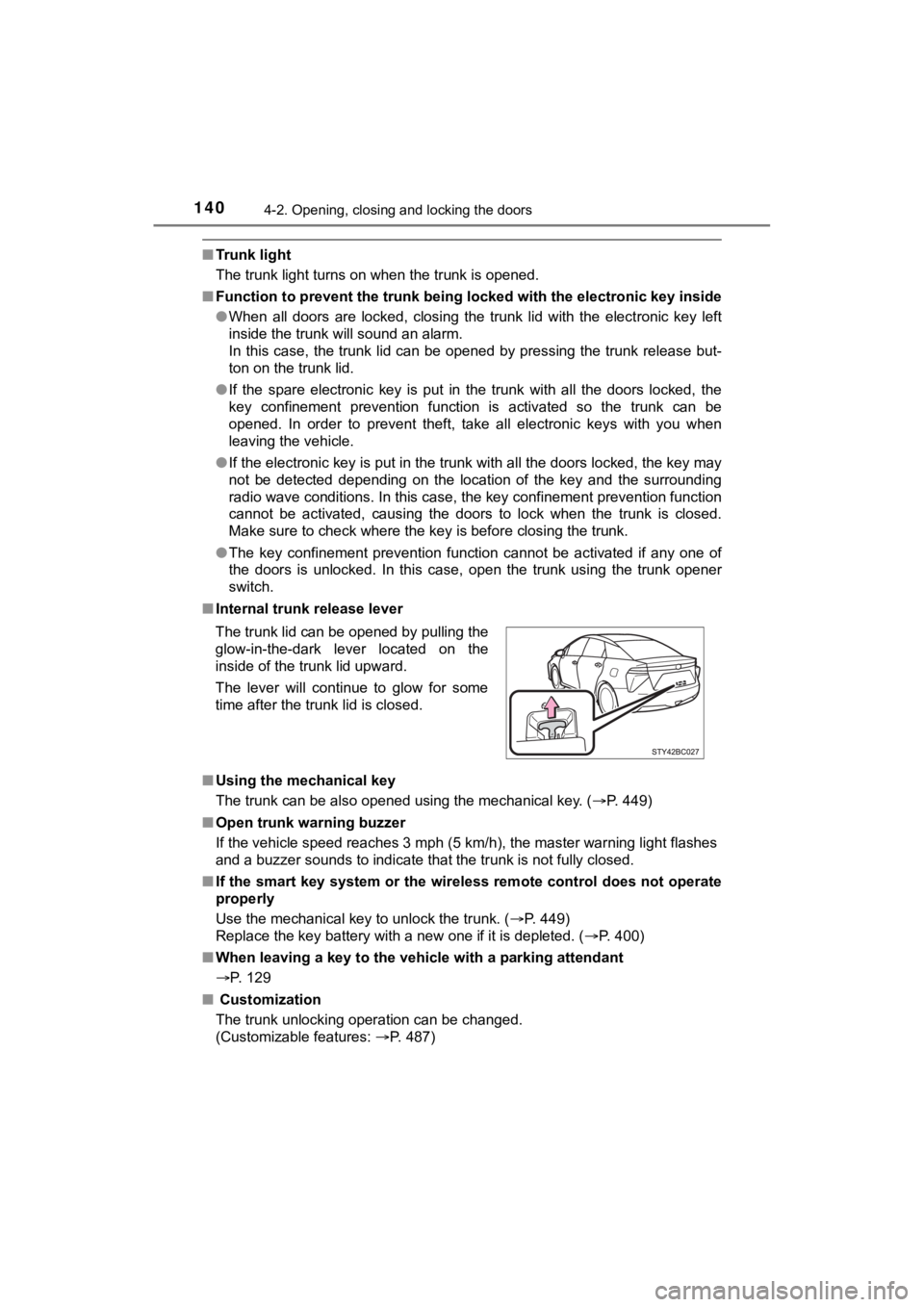
■ Internal trunk release lever
■ Using the mechanical key
The trunk can be also opened using the mechanical key. ( P. 449)
■ Open trunk warning buzzer
If the vehicle speed reaches 3 mph (5 km/h), the master warning light flashes
and a buzzer sounds to indicate that the trunk is not fully clo sed.
■ If the smart key system or the wireless remote control does not operate
properly
Use the mechanical key to unlock the trunk. ( P. 449)
Replace the key battery with a new one if it is depleted. ( P. 400)
■ When leaving a key to the vehicle with a parking attendant
P. 129
■ Customization
The trunk unlocking operation can be changed.
(Customizable features: P. 487)
The trunk lid can be opened by pulling the
glow-in-the-dark lever located on the
inside of the trunk lid upward.
The lever will continue to glow for some
time after the trunk lid is closed.
Page 141 of 528

1414-2. Opening, closing and locking the doors
4
Operation of each component
MIRAI_OM_USA_OM62073U
P. 1 2 9
WARNING
Observe the following precautions.
Failure to do so may result in death or serious injury.
■Before driving
● Make sure that the trunk lid is fully closed. If the trunk lid is not fully closed,
it may open unexpectedly while driving and hit near-by objects or luggage
in the trunk may be thrown out, causing an accident.
● Do not allow children to play in the trunk.
If a child is accidentally locked in the trunk, they could suff er from heat
exhaustion, suffocation or other injuries.
● Do not allow a child to open or close the trunk lid.
Doing so may cause the trunk lid to open unexpectedly, or cause the
child’s hands, head, or neck to be caught by the closing trunk lid.
■ Important points while driving
Never let anyone sit in the trunk. In the event of sudden braki ng or a colli-
sion, they are susceptible to death or serious injury.