air conditioning TOYOTA MIRAI 2020 Owners Manual (in English)
[x] Cancel search | Manufacturer: TOYOTA, Model Year: 2020, Model line: MIRAI, Model: TOYOTA MIRAI 2020Pages: 528, PDF Size: 11.98 MB
Page 4 of 528

TABLE OF CONTENTS4
MIRAI_OM_USA_OM62073U6-1. Using the air conditioning
system and defogger
Automatic air conditioning system............................. 306
Heated steering wheel/ seat heaters .................... 315
6-2. Using the interior lights Interior lights list ................ 317• Interior lights ................. 318
• Personal lights .............. 318
6-3. Using the storage features List of storage features...... 320• Glove box...................... 321
• Console box .................. 321
• Cup holders .................. 322
• Bottle holders ................ 324
• Auxiliary box ................. 324
Trunk features ................... 325
6-4. Other interior features Other interior features ....... 327• Sun visors ..................... 327
• Vanity mirrors................ 327
• Clock ............................. 328
• Armrest ......................... 329
• Coat hooks.................... 329
• Assist grips ................... 330
• Power outlet .................. 331
• USB charging ports....... 332
• Wireless charger ........... 334
Garage door opener .......... 343 7-1. Maintenance and care
Cleaning and protecting the vehicle exterior .......... 352
Cleaning and protecting the vehicle interior ........... 356
7-2. Maintenance Maintenance requirements ................... 359
General maintenance ........ 361
7-3. Do-it-yourself maintenance
Do-it-yourself service precautions ...................... 364
Hood .................................. 366
Positioning a floor jack....... 367
Motor compartment ........... 369
12-volt battery .................... 374
Tires................................... 378
Replacing the tire............... 386
Tire inflation pressure ........ 393
Wheels............................... 396
Air conditioning filter .......... 398
Electronic key battery ........ 400
Checking and replacing fuses ................................ 402
Light bulbs ......................... 405
6Interior features7Maintenance and care
Page 17 of 528
17Pictorial index
MIRAI_OM_USA_OM62073UParking brake . . . . . . . . . . . . . . . . . . . . . . . . . . . . . . . . . . . . . P. 200
Applying/releasing . . . . . . . . . . . . . . . . . . . . . . . . . . . . . . . . . . P. 200
Precautions against winter season . . . . . . . . . . . . . . . . . . . . . P. 302
Warning buzzer/warning message. . . . . . . . . . . . . . . . .
. P. 420, 426
Turn signal lever . . . . . . . . . . . . . . . . . . . . . . . . . . . . . . . . . . P. 199
Headlight switch . . . . . . . . . . . . . . . . . . . . . . . . . . . . . . . . . . P. 201
Headlights/parking lights/side marker lights/tail lights/
daytime running lights . . . . . . . . . . . . . . . . . . . . . . . . . . . . . . . P. 201
Windshield wiper and washer switch . . . . . . . . . . . . . . . . . P. 210
Usage . . . . . . . . . . . . . . . . . . . . . . . . . . . . . . . . . . . . . . . . . . . P. 210
Adding washer fluid . . . . . . . . . . . . . . . . . . . . . . . . . . . . . . . . . P. 373
Emergency flasher switch . . . . . . . . . . . . . . . . . . . . . . . . . . P. 408
Fuel door opener switch . . . . . . . . . . . . . . . . . . . . . . . . . . . . P. 213
Trunk opener switch . . . . . . . . . . . . . . . . . . . . . . . . . . . . . . . P. 138
Hood lock release lever. . . . . . . . . . . . . . . . . . . . . . . . . . . . . P. 366
Tilt and telescopic steering control switch . . . . . . . . . . . . . P. 160
Adjustment . . . . . . . . . . . . . . . . . . . . . . . . . . . . . . . . . . . . . . . . P. 160
Driving position memory . . . . . . . . . . . . . . . . . . . . . . . . . . . . . P. 154
Air conditioning system . . . . . . . . . . . . . . . . . . . . . . . . . . . . P. 306
Usage . . . . . . . . . . . . . . . . . . . . . . . . . . . . . . . . . . . . . . . . . . . P. 306
Rear window defogger . . . . . . . . . . . . . . . . . . . . . . . . . . . . . . . P. 309
Trunk opener main switch . . . . . . . . . . . . . . . . . . . . . . . . . . P. 139
Navigation system
*
*: Refer to the “NAVIGATION SYSTEM OWNER’S MANUAL”.
Page 91 of 528
912. Fuel cell vehicle
2
Fuel cell system
MIRAI_OM_USA_OM62073U
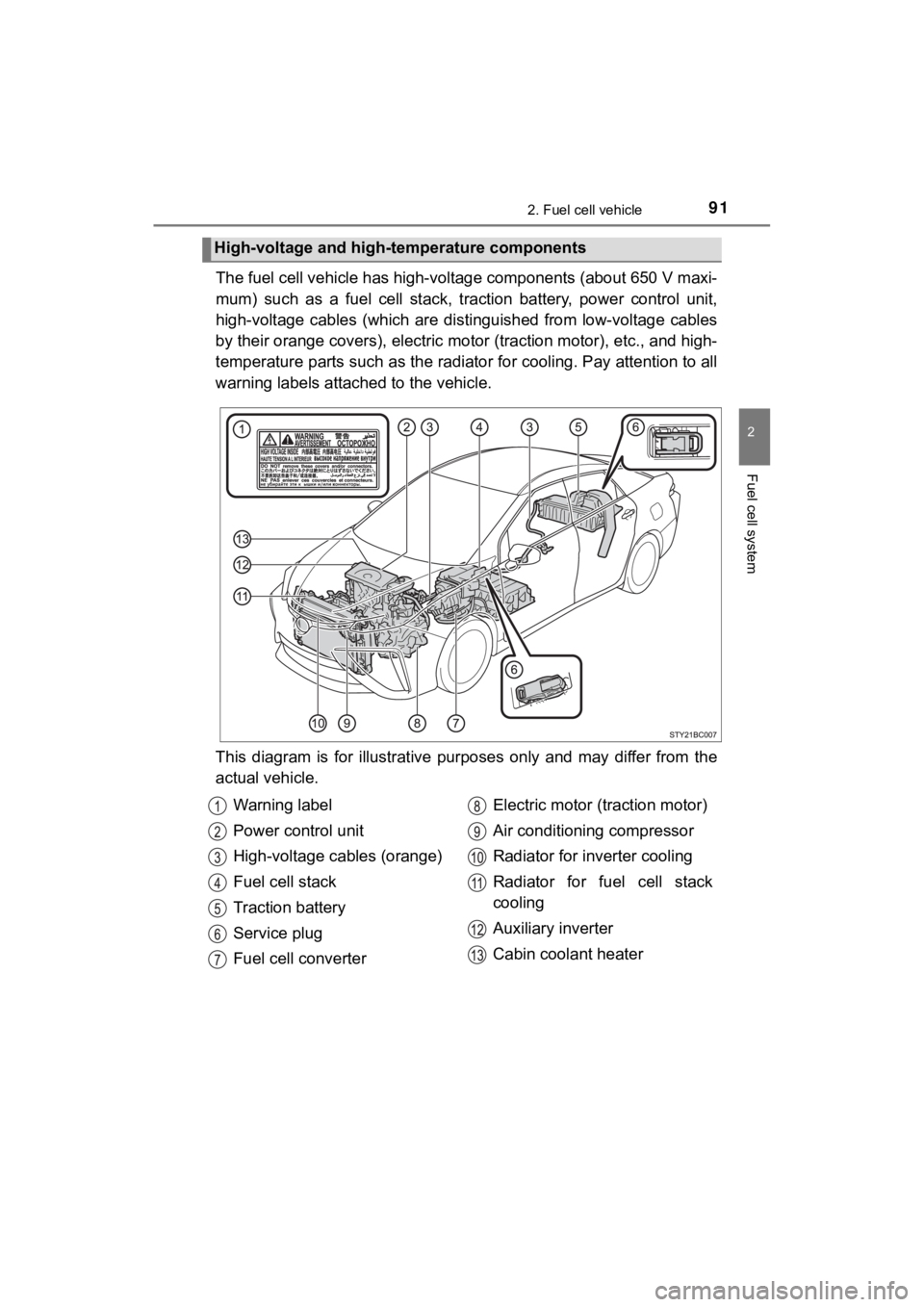
The fuel cell vehicle has high-voltage components (about 650 V m axi-
mum) such as a fuel cell stack, traction battery, power control unit,
high-voltage cables (which are di stinguished from low-voltage cables
by their orange covers), electric motor (traction motor), etc., and high-
temperature parts such as the radiator for cooling. Pay attenti on to all
warning labels attached to the vehicle.
This diagram is for illustrative purposes only and may differ f rom the
actual vehicle.
High-voltage and high-temperature components
Warning label
Power control unit
High-voltage cables (orange)
Fuel cell stack
Traction battery
Service plug
Fuel cell converter Electric motor (traction motor)
Air conditioning compressor
Radiator for inverter cooling
Radiator for fuel cell stack
cooling
Auxiliary inverter
Cabin coolant heater
Page 93 of 528
932. Fuel cell vehicle
2
Fuel cell system
MIRAI_OM_USA_OM62073U
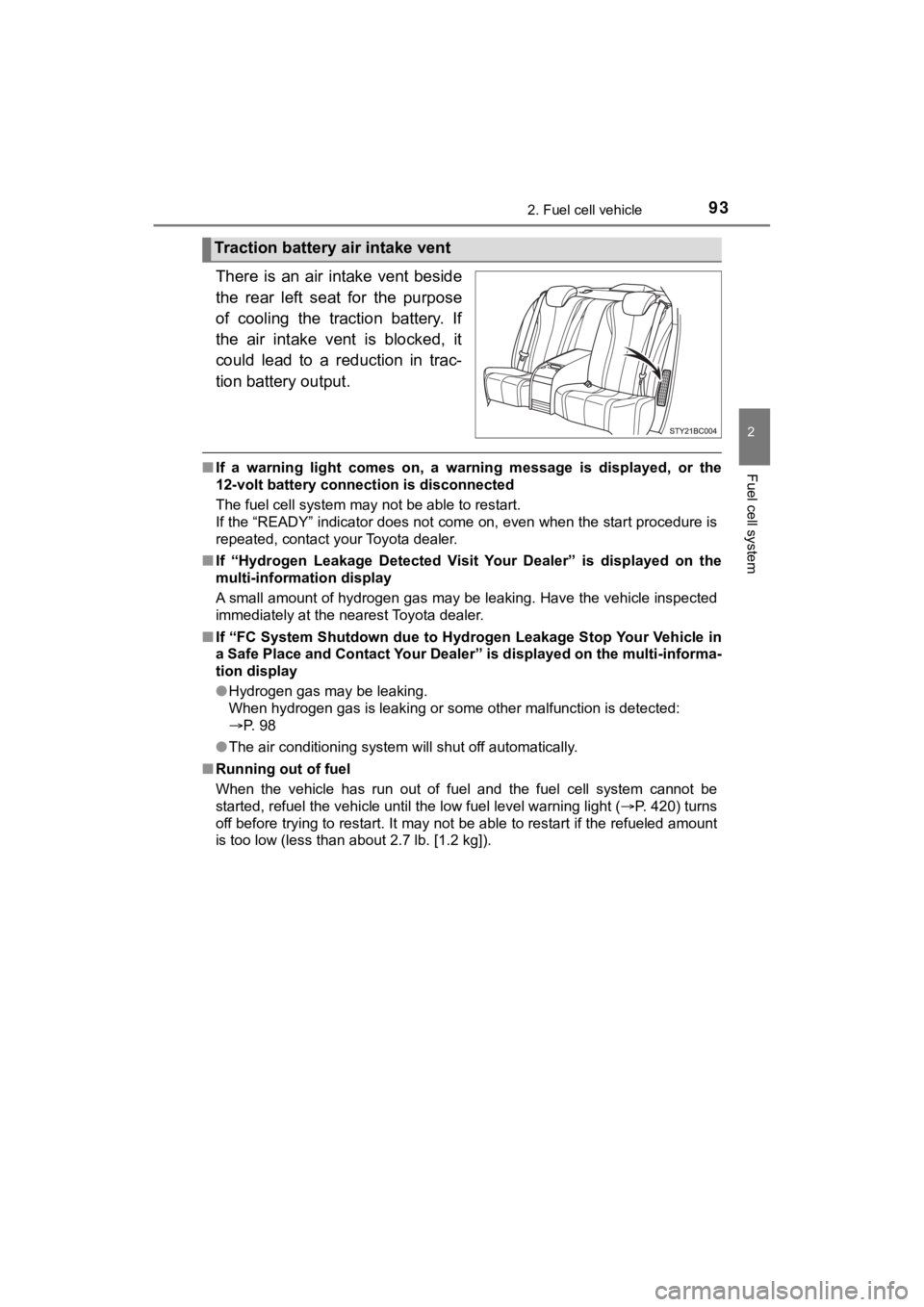
There is an air intake vent beside
the rear left seat for the purpose
of cooling the traction battery. If
the air intake vent is blocked, it
could lead to a reduction in trac-
tion battery output.
■If a warning light comes on, a warning message is displayed, or the
12-volt battery connection is disconnected
The fuel cell system may not be able to restart.
If the “READY” indicator does not come on, even when the start procedure is
repeated, contact your Toyota dealer.
■ If “Hydrogen Leakage Detected Visit Your Dealer” is displayed on the
multi-information display
A small amount of hydrogen gas may be leaking. Have the vehicle inspected
immediately at the nearest Toyota dealer.
■ If “FC System Shutdown due to Hydrogen Leakage Stop Your Vehicle in
a Safe Place and Contact Your Dealer” is displayed on the multi -informa-
tion display
● Hydrogen gas may be leaking.
When hydrogen gas is leaking or some other malfunction is detected:
P. 98
● The air conditioning system will shut off automatically.
■ Running out of fuel
When the vehicle has run out of fuel and the fuel cell system c annot be
started, refuel the vehicle until the low fuel level warning li ght (P. 420) turns
off before trying to restart. It may not be able to restart if the refueled amount
is too low (less than about 2.7 lb. [1.2 kg]).
Traction battery air intake vent
Page 103 of 528
1032. Fuel cell vehicle
2
Fuel cell system
MIRAI_OM_USA_OM62073U
◆Using Eco drive mode
Using Eco drive mode (P. 195) makes torque generation less
aggressive than normal when stepping on the accelerator pedal,
leading to improvement in fuel economy.
Also, is displayed on the air conditioning screen, indicating
the switch to ECO HEAT/COOL mode ( P. 3 0 8 ) .
◆Air conditioning system on/off
● Turn off the air conditioning system operation switch except
when necessary to help curb fuel consumption.
In summer: When the ambient temperature is high, use the recircu -
lated air mode. This decreases the load on the air con-
ditioning system.
In winter: Avoid excess heating. Use the seat heater to minimize the need for cabin heating ( P. 316).
● By pushing , ECO HEAT/COOL mode is turned on. This
helps curb fuel consumption even with the air conditioning syst em
turned on.
◆Checking tire inflation pressure
Make sure to check the tire inflation pressure frequently. Impr oper
tire inflation pressure can cause poor fuel economy.
Additionally, snow tires have mo re rolling friction and their use on
dry roads lead to poor fuel economy. Use tires that are appropr iate
for the season.
◆Luggage
Avoid carrying unnecessary luggage and unload excess weight in
order avoid poor fuel economy. Installing a large roof rack wil l also
reduce fuel economy.
Page 112 of 528

1123. Instrument cluster
MIRAI_OM_USA_OM62073U
Power restriction indicator
Blue: The fuel cell system output power is restricted, because the
coolant temperature is low.
Amber: The fuel cell system output power is restricted, because the
coolant temperature is high.
Outside temperature
Displays the outside temperature within the range of -40°F (-40 °C)
to 122°F (50°C).
Low outside temperature indicator flashes when the ambient tem-
perature is 37°F (3°C) or lower.
Driving range distance
Displays the estimated maximum distance that can be driven with
the quantity of fuel remaining. • Displays the possible driving d istance computed from the fuel
consumption studied f rom the driving history and the current
remaining amount of fuel. The ac tual possible driving distance
may differ as fuel consumpti on changes, depending on driving
environment (weather, traffic, etc.) and conditions (sudden acc el-
eration, air conditioning, etc.).
• When only a small amount of fuel is added to the hydrogen tanks, the display may not be updated.
Speedometer
Displays the vehicle speed.
Odometer and trip meter
Odometer:
Displays the total distance the vehicle has been driven.
Trip meter:
Displays the distance the vehicl e has been driven since the met er
was last reset.
Trip meters “A” and “B” can be used to record and display diffe rent
distances independently.
Distance after start:
Displays the distance driven afte r the fuel cell system was started.
Blank:
A blank is displayed.
Page 195 of 528
1955-2. Driving procedures
5
Driving
MIRAI_OM_USA_OM62073U
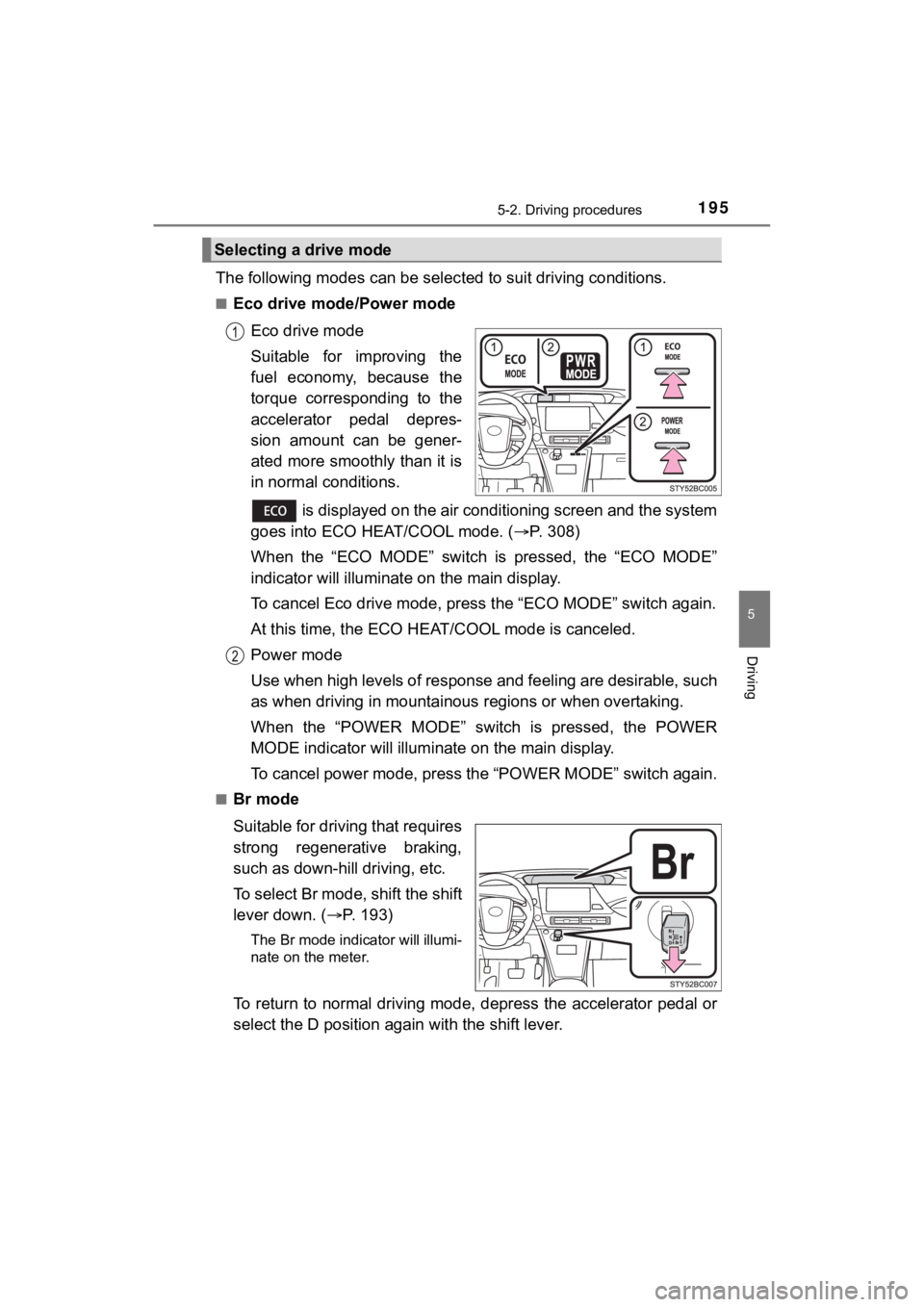
The following modes can be selected to suit driving conditions.
■Eco drive mode/Power mode
Eco drive mode
Suitable for improving the
fuel economy, because the
torque corresponding to the
accelerator pedal depres-
sion amount can be gener-
ated more smoothly than it is
in normal conditions.
is displayed on the air conditioning screen and the system
goes into ECO HEAT/COOL mode. ( P. 308)
When the “ECO MODE” switch is pressed, the “ECO MODE”
indicator will illuminate on the main display.
To cancel Eco drive mode, press the “ECO MODE” switch again.
At this time, the ECO HE AT/COOL mode is canceled.
Power mode
Use when high levels of response and feeling are desirable, such
as when driving in mountainous regions or when overtaking.
When the “POWER MODE” switch is pressed, the POWER
MODE indicator will illumi nate on the main display.
To cancel power mode, press the “POWER MODE” switch again.
■Br mode
Suitable for driving that requires
strong regenerative braking,
such as down-hill driving, etc.
To select Br mode, shift the shift
lever down. ( P. 193)
The Br mode indicator will illumi-
nate on the meter.
To return to normal driving mode, depress the accelerator pedal or
select the D position again with the shift lever.
Selecting a drive mode
Page 197 of 528
1975-2. Driving procedures
5
Driving
MIRAI_OM_USA_OM62073U■
Regenerative Braking
When the shift position is in D, regenerative braking is engage d when the foot
is released from the accelerator pedal.
■ ECO HEAT/COOL mode operation for Eco drive mode
●When the “ECO MODE” switch is pressed, the system switches over to
ECO HEAT/COOL mode. ( P. 311) During the use of Eco drive mode, only
the ECO HEAT/COOL mode can be canceled.
● When it is desired to improve the effectiveness of the air cond itioning sys-
tem, perform the following operations.
• Adjust the temperature settings and airflow mode.
• Press of the air conditioning operation panel ( P. 306) and can-
cel the ECO HEAT/COOL mode, or cancel Eco drive mode.
■ Power mode automatic deactivation
Power mode is automatically deactivated if the power switch is turned off after
driving in power mode.
■ Shifting from P on a slope
When changing to another position from P when parked on a slope in the P
position, vibrations may be felt.
WARNING
■When driving on slippery road surfaces
Do not accelerate or shift the shift position suddenly.
Sudden changes in regenerative braking may cause the vehicle to spin or
skid, resulting in an accident.
■ For the shift lever
Do not remove the shift lever knob or use anything but a genuin e Toyota
shift lever knob. Also, do not hang anything on the shift lever .
Doing so could prevent the shift lever from returning to position, causing
unexpected accidents to occur when the vehicle is in motion.
■ P position switch
Do not press the P position switch while the vehicle is moving.
If the P position switch is pressed when driving at very low speeds (for
example, directly before stopping the vehicle), the vehicle may stop sud-
denly when the shift position switches to P, which could lead t o an accident.
Page 224 of 528
2245-5. Using the driving support systems
MIRAI_OM_USA_OM62073U■
If a warning message is displayed on the multi-information disp lay
A system may be temporarily unavailable or there may be a malfu nction in
the system.
● In the following situations, perform the actions specified in t he table. When
the normal operating conditions are detected, the message will disappear
and the system will become operational.
If the message does not disappear, contact your Toyota dealer.
SituationActions
When the area around a sensor is
covered with dirt, moisture (fogged
up, covered with condensation, ice,
etc.), or other foreign matterTo clean the part of the windshield in
front of the front camera, use the
windshield wipers or the windshield
defogger of the air conditioning sys-
tem ( P. 309)
When the temperature around the
front camera is outside of the opera-
tional range, such as when the vehi-
cle is in the sun or in an extremely
cold environment
If the front camera is hot, such as
after the vehicle had been parked in
the sun, use the air conditioning sys-
tem to decrease the temperature
around the front camera.
If a sunshade was used when the
vehicle was parked, depending on its
type, the sunlight reflected from the
surface of the sunshade may cause
the temperature of the front camera
to become excessively high.
If the front camera is cold, such after
the vehicle is parked in an extremely
cold environment, use the air condi-
tioning system to increase the tem-
perature around the front camera.
The area in front of the front camera
is obstructed, such as when the hood
is open or a sticker is attached to the
part of the windshield in front of the
front camera.
Close the hood, remove the sticker,
etc. to clear the obstruction.
Page 271 of 528

2715-5. Using the driving support systems
5
Driving
MIRAI_OM_USA_OM62073U●
The following situations may occur during use.
• Depending on the shape of the obstacle and other factors, the detection
distance may shorten, or detection may be impossible.
• Obstacles may not be detected if they are too close to the sen sor.
• There will be a short delay between obstacle detection and dis play. Even
at slow speeds, there is a possibility that the obstacle will c ome within the
sensor’s detection areas before the display is shown and the bu zzer
sounds.
• Thin posts or objects lower than the sensor may not be detecte d when
approached, even if they have been detected once.
• It might be difficult to hear beeps due to the volume of audio system or air
flow noise of the air conditioning system.
■ Muting the buzzer sound
●To mute the buzzer sound
The buzzer can be temporarily muted by pressing of the meter c ontrol
switches while an obstacle detection display is shown on the mu lti-informa-
tion display.
● To cancel the mute
Mute will be automatically canceled in the following situations .
• When the shift position is changed
• When the vehicle speed has reac hed or exceeded approximately 6 mph
(10 km/h)
• When the intuitive parking assist is turned off once and turned on again
• When the power switch is turned off once and turned to ON mode again
• When a sensor is malfunctioning
■ If “Parking Assist Unavailable Clean Parking Assist Sensor” is displayed
on the multi-information display
A sensor may be dirty or covered with snow or ice. In such case s, if it is
removed from the sensor, the system should return to normal.
Also, due to the sensor being frozen at low temperatures, a mal function dis-
play may appear or an obstacle may not be detected. If the sens or thaws out,
the system should return to normal.
■ If “Parking Assist Malfunction Visit Your Dealer” is displayed on the
multi-information display
Depending on the malfunction of the sensor, the device may not be working
normally.
Have the vehicle inspected by your Toyota dealer.
■ Customization
Some functions can be customized.
(Customizable features: P. 492)