turn signal TOYOTA MIRAI 2022 User Guide
[x] Cancel search | Manufacturer: TOYOTA, Model Year: 2022, Model line: MIRAI, Model: TOYOTA MIRAI 2022Pages: 556, PDF Size: 17.34 MB
Page 218 of 556
2185-5. Using the driving support systems
Owners Manual_USA_M62084_en
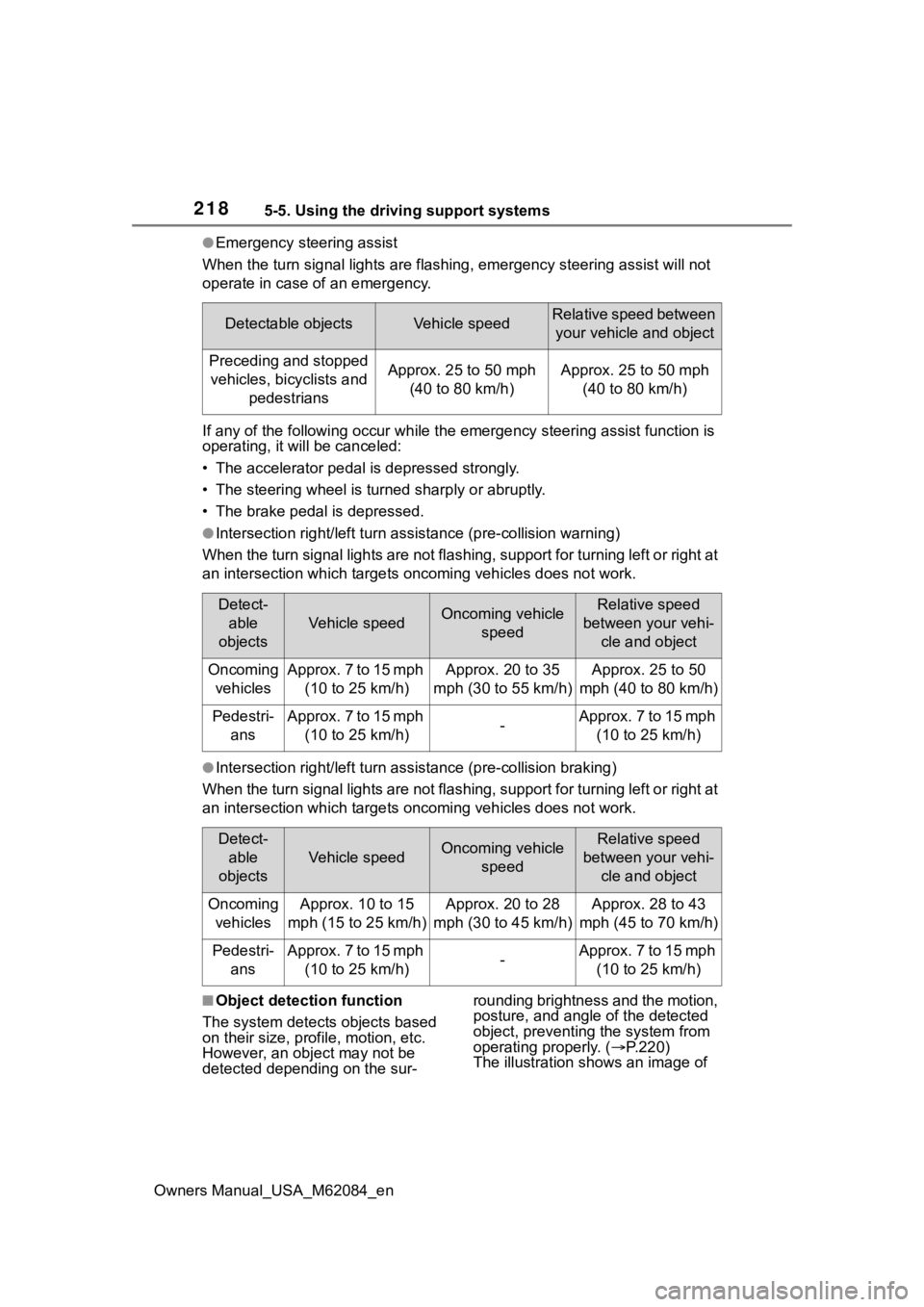
●Emergency steering assist
When the turn signal lights are flashing, emergency steering as sist will not
operate in case of an emergency.
If any of the following occur wh ile the emergency steering assi st function is
operating, it will be canceled:
• The accelerator pedal is depressed strongly.
• The steering wheel is tur ned sharply or abruptly.
• The brake pedal is depressed.
●Intersection right/left turn assistance (pre-collision warning)
When the turn signal lights are not flashing, support for turning left or right at
an intersection which targets on coming vehicles does not work.
●Intersection right/left turn assistance (pre-collision braking)
When the turn signal lights are not flashing, support for turning left or right at
an intersection which targets on coming vehicles does not work.
■Object detection function
The system detects objects based
on their size, profile, motion, etc.
However, an object may not be
detected depending on the sur- rounding brightness and the motion,
posture, and angle of the detected
object, preventing the system from
operating properly. (
P.220)
The illustration shows an image of
Detectable objectsVehicle speedRelative speed between
your vehicle and object
Preceding and stopped vehicles, bicyclists and pedestriansApprox. 25 to 50 mph (40 to 80 km/h)Approx. 25 to 50 mph (40 to 80 km/h)
Detect-able
objects
Vehicle speedOncoming vehicle speedRelative speed
between your vehi- cle and object
Oncoming vehiclesApprox. 7 to 15 mph (10 to 25 km/h)Approx. 20 to 35
mph (30 to 55 km/h)Approx. 25 to 50
mph (40 to 80 km/h)
Pedestri- ansApprox. 7 to 15 mph (10 to 25 km/h)-Approx. 7 to 15 mph (10 to 25 km/h)
Detect-able
objects
Vehicle speedOncoming vehicle speedRelative speed
between your vehi- cle and object
Oncoming vehiclesApprox. 10 to 15
mph (15 to 25 km/h)Approx. 20 to 28
mph (30 to 45 km/h)Approx. 28 to 43
mph (45 to 70 km/h)
Pedestri- ansApprox. 7 to 15 mph (10 to 25 km/h)-Approx. 7 to 15 mph (10 to 25 km/h)
Page 227 of 556
2275-5. Using the driving support systems
Owners Manual_USA_M62084_en
5
Driving
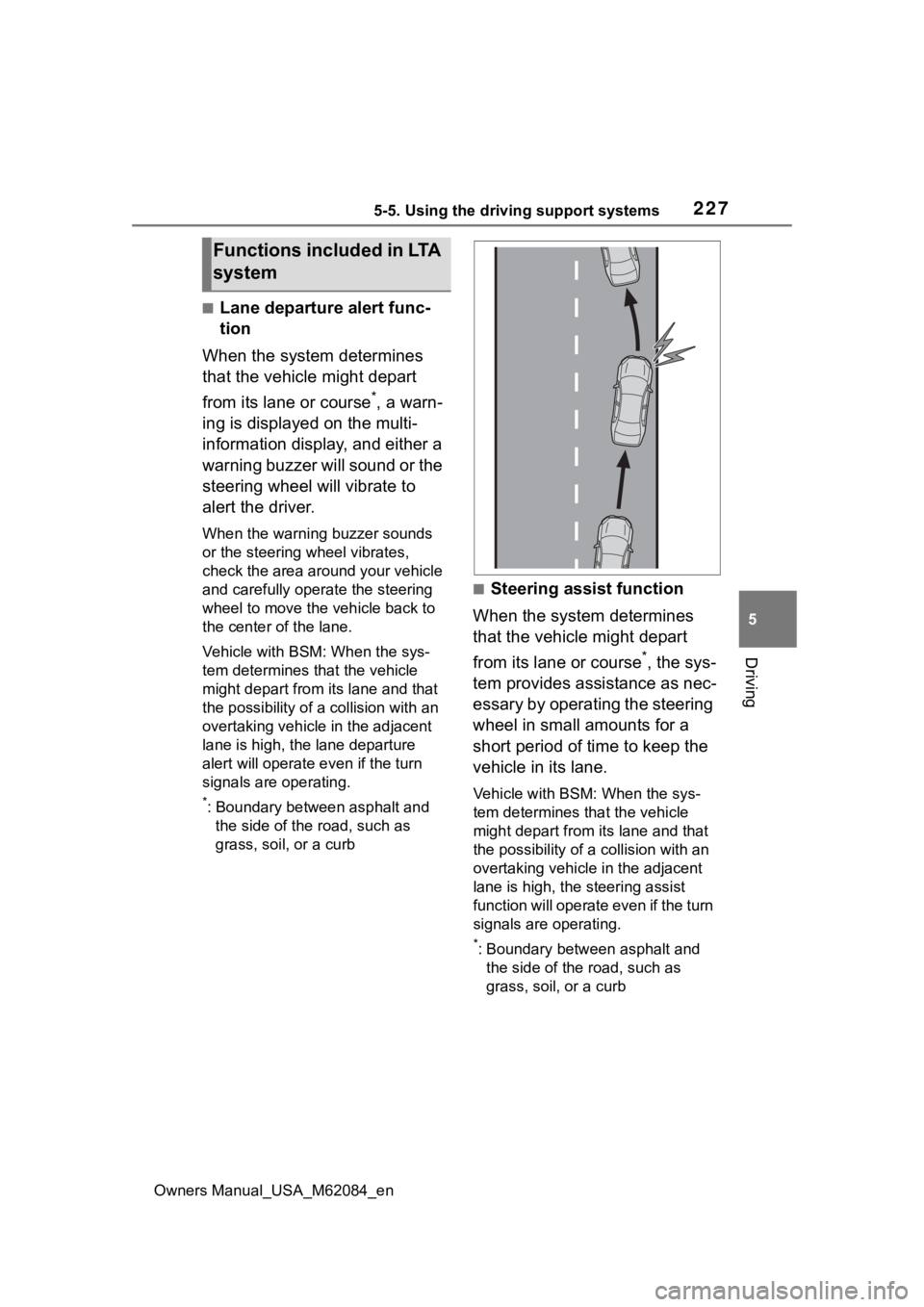
■Lane departure alert func-
tion
When the system determines
that the vehicle might depart
from its lane or course
*, a warn-
ing is displayed on the multi-
information display, and either a
warning buzzer will sound or the
steering wheel will vibrate to
alert the driver.
When the warning buzzer sounds
or the steering wheel vibrates,
check the area around your vehicle
and carefully operate the steering
wheel to move the vehicle back to
the center of the lane.
Vehicle with BSM: When the sys-
tem determines that the vehicle
might depart from its lane and that
the possibility of a collision with an
overtaking vehicle in the adjacent
lane is high, the lane departure
alert will operate e ven if the turn
signals are operating.
*: Boundary between asphalt and the side of the road, such as
grass, soil, or a curb
■Steering assist function
When the system determines
that the vehicle might depart
from its lane or course
*, the sys-
tem provides assistance as nec-
essary by operating the steering
wheel in small amounts for a
short period of time to keep the
vehicle in its lane.
Vehicle with BSM: When the sys-
tem determines that the vehicle
might depart from its lane and that
the possibility of a collision with an
overtaking vehicle in the adjacent
lane is high, the steering assist
function will operate even if the turn
signals are operating.
*: Boundary between asphalt and the side of the road, such as
grass, soil, or a curb
Functions included in LTA
system
Page 231 of 556
2315-5. Using the driving support systems
Owners Manual_USA_M62084_en
5
Driving
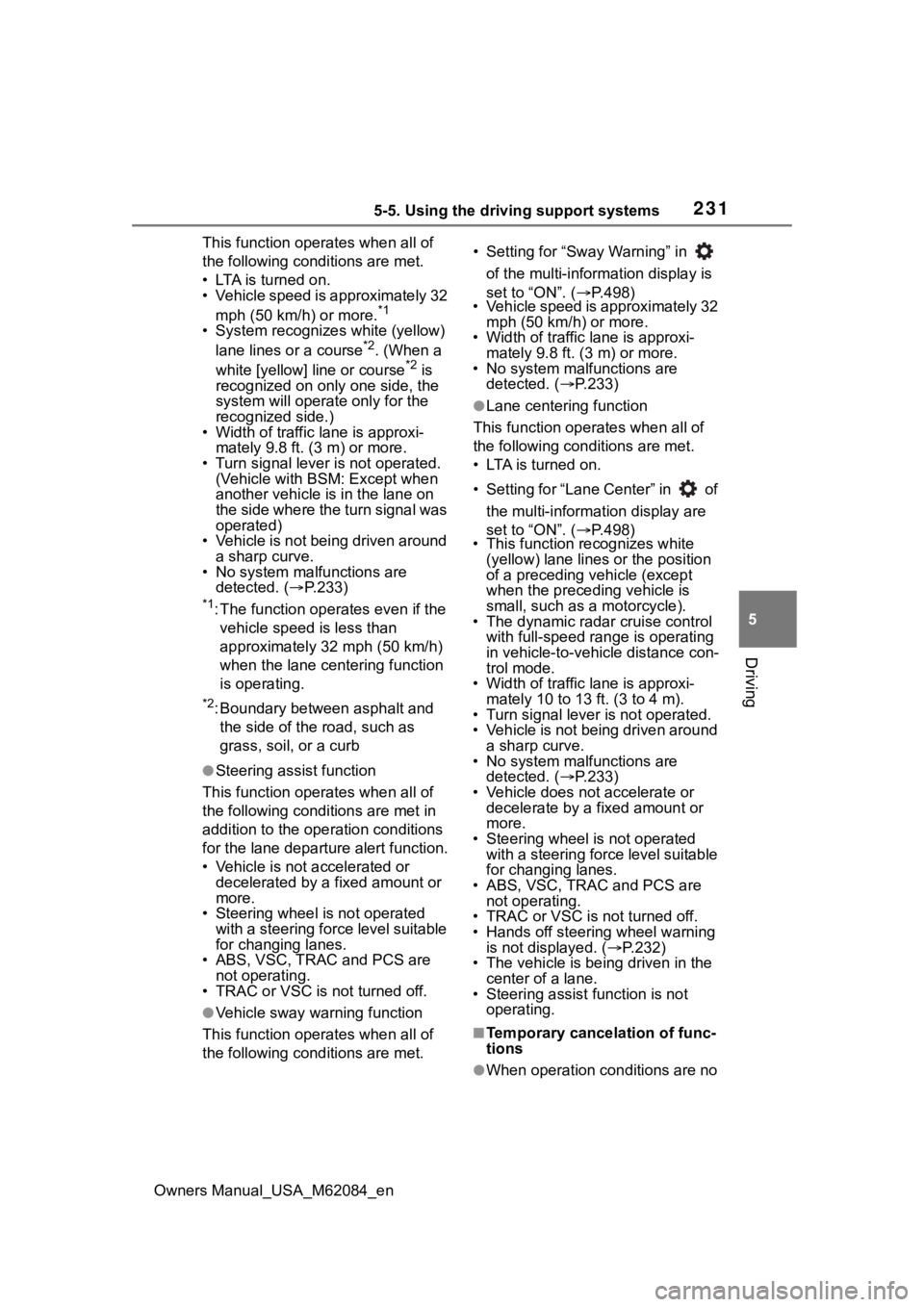
This function oper ates when all of
the following cond itions are met.
• LTA is turned on.
• Vehicle speed is approximately 32
mph (50 km/h) or more.
*1
• System recognizes white (yellow) lane lines or a course*2. (When a
white [yellow] line or course*2 is
recognized on only one side, the
system will operat e only for the
recognized side.)
• Width of traffic lane is approxi-
mately 9.8 ft. ( 3 m) or more.
• Turn signal lever is not operated.
(Vehicle with BSM : Except when
another vehicle is in the lane on
the side where the turn signal was
operated)
• Vehicle is not being driven around a sharp curve.
• No system malfunctions are
detected. ( P.233)
*1: The function opera tes even if the
vehicle speed is less than
approximately 32 mph (50 km/h)
when the lane centering function
is operating.
*2: Boundary between asphalt and the side of the road, such as
grass, soil, or a curb
●Steering assist function
This function oper ates when all of
the following conditions are met in
addition to the operation conditions
for the lane departure alert function.
• Vehicle is not accelerated or decelerated by a fixed amount or
more.
• Steering wheel is not operated with a steering force level suitable
for changing lanes.
• ABS, VSC, TRAC and PCS are not operating.
• TRAC or VSC is not turned off.
●Vehicle sway warning function
This function oper ates when all of
the following cond itions are met. • Setting for “Sway Warning” in
of the multi-information display is
set to “ON”. ( P.498)
• Vehicle speed is approximately 32
mph (50 km/h) or more.
• Width of traffic lane is approxi- mately 9.8 ft. (3 m) or more.
• No system malfunctions are detected. ( P.233)
●Lane centering function
This function operates when all of
the following conditions are met.
• LTA is turned on.
• Setting for “Lane Center” in of
the multi-information display are
set to “ON”. ( P.498)
• This function recognizes white
(yellow) lane lines or the position
of a preceding v ehicle (except
when the preceding vehicle is
small, such as a motorcycle).
• The dynamic radar cruise control with full-speed ran ge is operating
in vehicle-to-vehicle distance con-
trol mode.
• Width of traffic lane is approxi- mately 10 to 13 ft. (3 to 4 m).
• Turn signal lever is not operated.
• Vehicle is not being driven around
a sharp curve.
• No system malfunctions are
detected. ( P.233)
• Vehicle does not accelerate or decelerate by a fixed amount or
more.
• Steering wheel is not operated with a steering force level suitable
for changing lanes.
• ABS, VSC, TRAC and PCS are
not operating.
• TRAC or VSC is not turned off.
• Hands off steering wheel warning is not displayed. ( P.232)
• The vehicle is being driven in the center of a lane.
• Steering assist function is not
operating.
■Temporary cancelation of func-
tions
●When operation conditions are no
Page 241 of 556
2415-5. Using the driving support systems
Owners Manual_USA_M62084_en
5
Driving
control continues to keep your vehicle stopped.
When the turn signal lever is ope rated and your vehicle moves to an over-
taking lane while driving at 50 mph (80 km/h) or more, the vehi cle will accel-
erate to help to overt ake a passing vehicle.
The system’s identification of what is an overtaking lane may be determined
solely based on the location of the steering wheel in the vehicle (left side
driver position versus right side driver position.) If the vehi cle is driven to a
region where the overtaking lane is on a different side from wh ere the vehi-
cle is normally driven, the vehicle may accelerate when the tur n signal lever
is operated in the opposite direction to the overtaking lane (e .g., if the driver
normally operates the vehicle in a region where the overtaking lane is to the
right but then drives to a region where the overtaking lane is to the left, the
vehicle may accelerate when the right turn signal is activated).
Example of acceleration
When there are no longer any preceding vehicles driving slower
than the set speed
The system accelerates until the set speed is reached. The system then
returns to constan t speed cruising.
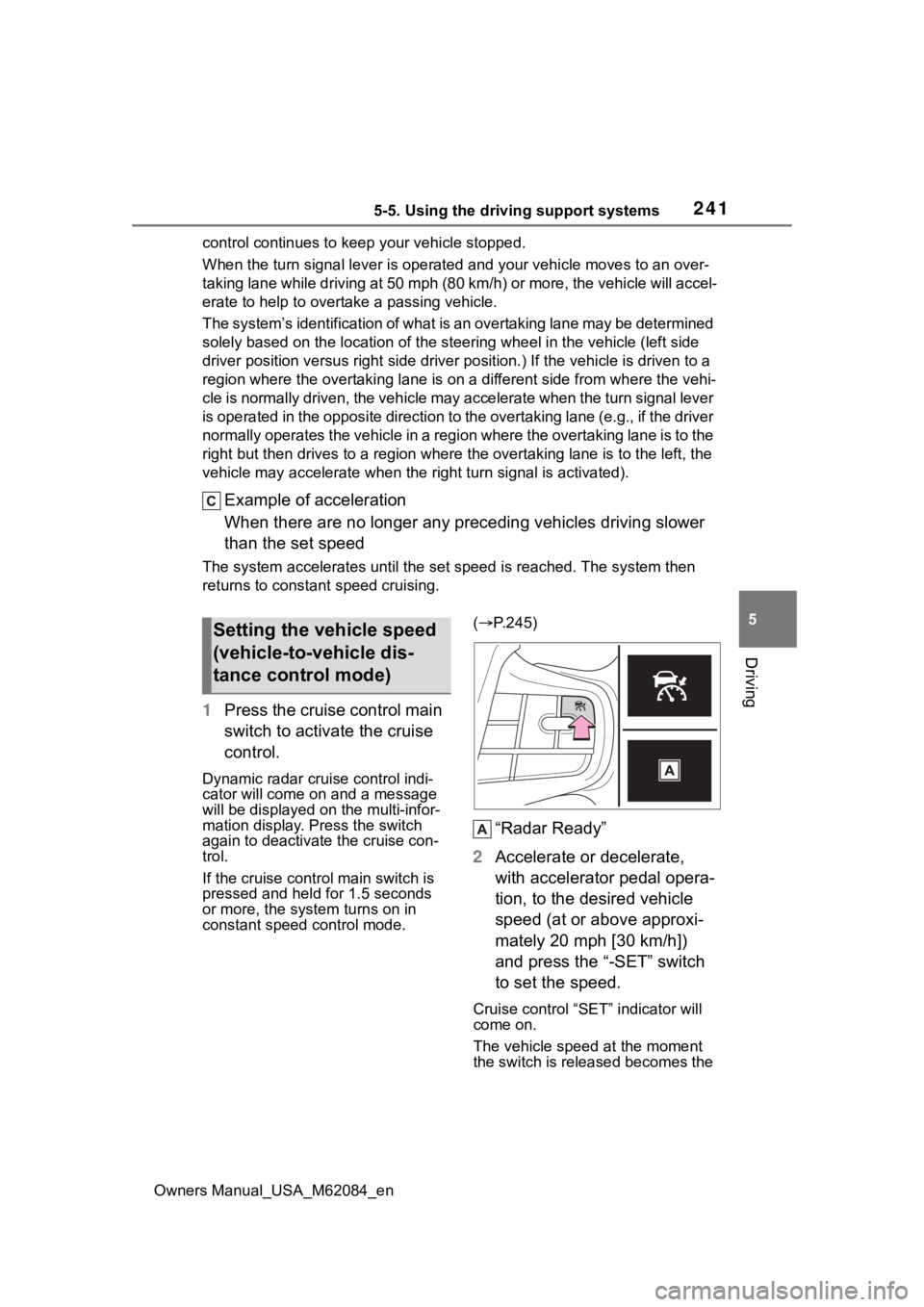
1Press the cruise control main
switch to activate the cruise
control.
Dynamic radar cruise control indi-
cator will come on and a message
will be displayed on the multi-infor-
mation display. Press the switch
again to deactivate the cruise con-
trol.
If the cruise cont rol main switch is
pressed and held for 1.5 seconds
or more, the syste m turns on in
constant speed control mode. (
P.245)
“Radar Ready”
2 Accelerate or decelerate,
with accelerator pedal opera-
tion, to the desired vehicle
speed (at or above approxi-
mately 20 mph [30 km/h])
and press the “-SET” switch
to set the speed.
Cruise control “SET” indicator will
come on.
The vehicle speed at the moment
the switch is released becomes the
Setting the vehicle speed
(vehicle-to-vehicle dis-
tance control mode)
Page 249 of 556
2495-5. Using the driving support systems
Owners Manual_USA_M62084_en
5
Driving
*: If equipped
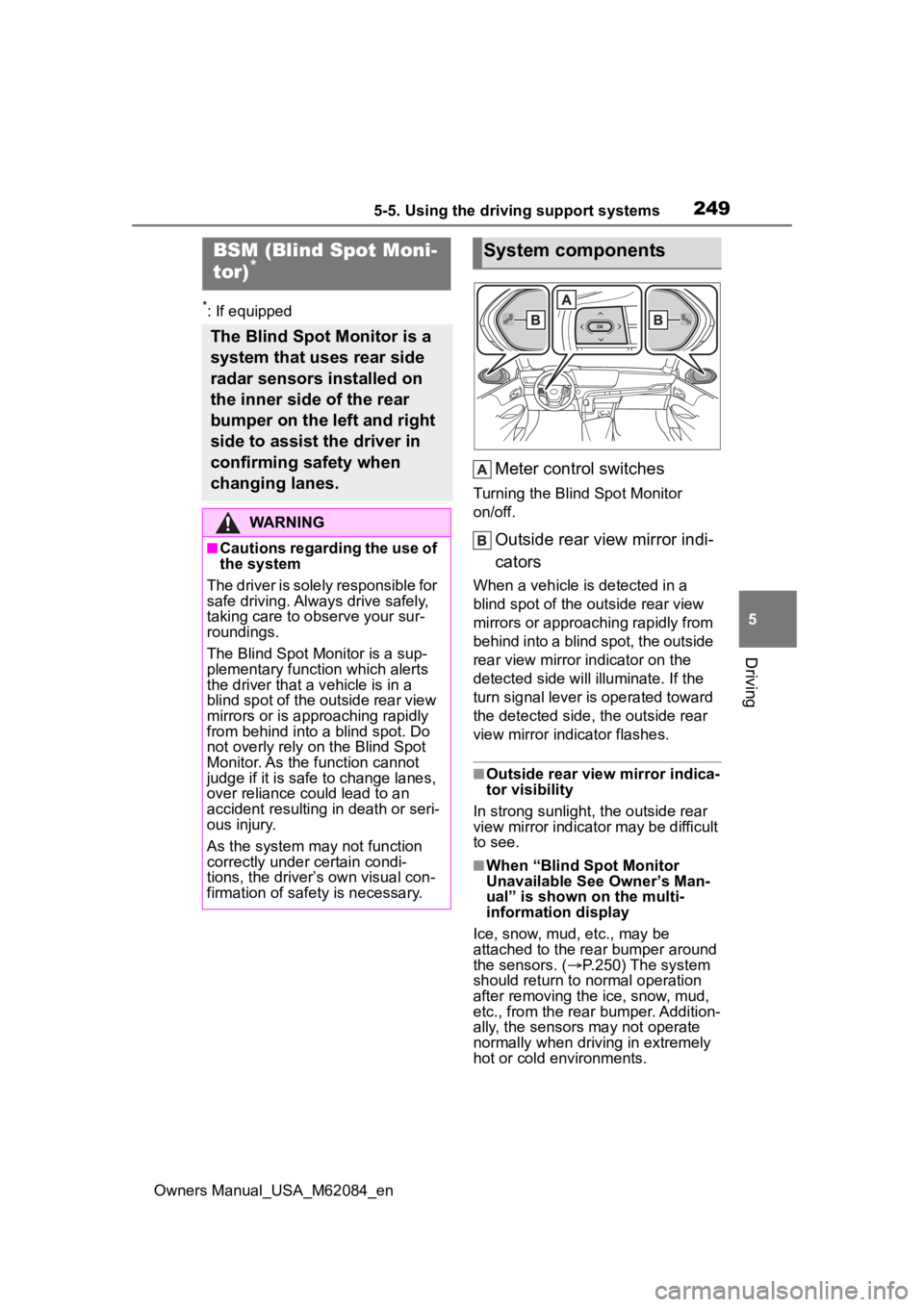
Meter control switches
Turning the Blind Spot Monitor
on/off.
Outside rear view mirror indi-
cators
When a vehicle is detected in a
blind spot of the outside rear view
mirrors or approaching rapidly from
behind into a blind spot, the outside
rear view mirror indicator on the
detected side will illuminate. If the
turn signal lever is operated toward
the detected side, the outside rear
view mirror indicator flashes.
■Outside rear vie w mirror indica-
tor visibility
In strong sunlight, the outside rear
view mirror indicator may be difficult
to see.
■When “Blind Spot Monitor
Unavailable See Owner’s Man-
ual” is shown on the multi-
information display
Ice, snow, mud, etc., may be
attached to the rear bumper around
the sensors. ( P.250) The system
should return to normal operation
after removing the ice, snow, mud,
etc., from the rear bumper. Addition-
ally, the sensors may not operate
normally when drivin g in extremely
hot or cold environments.
BSM (Blind Spot Moni-
tor)*
The Blind Spot Monitor is a
system that uses rear side
radar sensors installed on
the inner side of the rear
bumper on the left and right
side to assist the driver in
confirming safety when
changing lanes.
WARNING
■Cautions regarding the use of
the system
The driver is solely responsible for
safe driving. Always drive safely,
taking care to o bserve your sur-
roundings.
The Blind Spot Monitor is a sup-
plementary function which alerts
the driver that a v ehicle is in a
blind spot of the outside rear view
mirrors or is approaching rapidly
from behind into a blind spot. Do
not overly rely on the Blind Spot
Monitor. As the function cannot
judge if it is safe to change lanes,
over reliance could lead to an
accident resulting in death or seri-
ous injury.
As the system may not function
correctly under certain condi-
tions, the driver’s own visual con-
firmation of safety is necessary.
System components
Page 295 of 556
2955-5. Using the driving support systems
Owners Manual_USA_M62084_en
5
Driving
■Function description
When departing from a parallel
parking spot, by selecting the
direction you wish to depart, the
parallel parking departure func-
tion will provide assistance,
through shift position changes,
steering wheel, brake pedal,
and accelerator pedal opera-
tions, to guide the vehicle to a
position which you can depart
from the parking space.
■Leaving a parking space
using the parallel parking
departure function
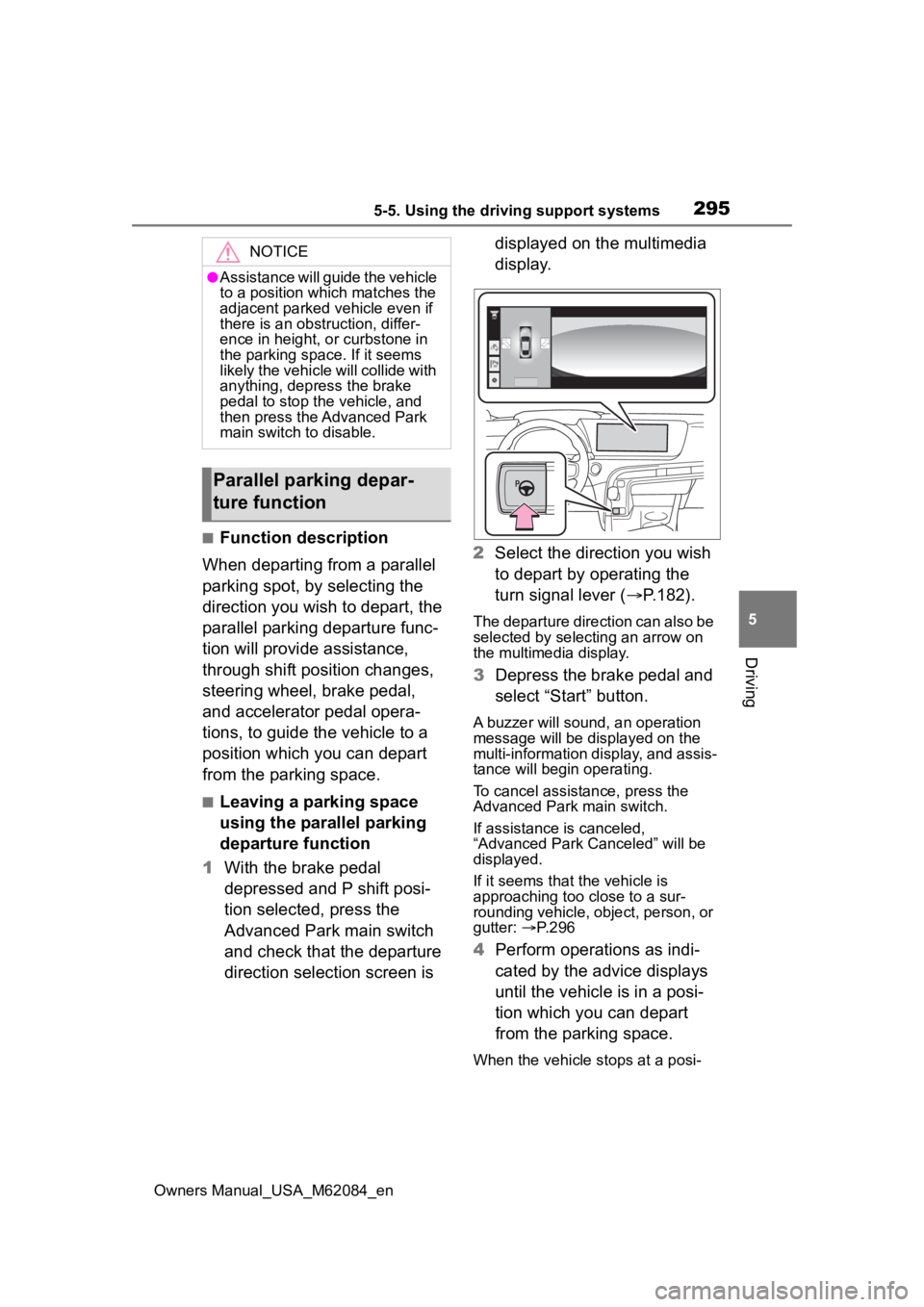
1 With the brake pedal
depressed and P shift posi-
tion selected, press the
Advanced Park main switch
and check that the departure
direction selection screen is displayed on the multimedia
display.
2 Select the direction you wish
to depart by operating the
turn signal lever ( P.182).
The departure direction can also be
selected by selecting an arrow on
the multimedia display.
3Depress the brake pedal and
select “Start” button.
A buzzer will sound, an operation
message will be displayed on the
multi-information display, and assis-
tance will begin operating.
To cancel assistance, press the
Advanced Park main switch.
If assistance is canceled,
“Advanced Park Canceled” will be
displayed.
If it seems that the vehicle is
approaching too close to a sur-
rounding vehicle, object, person, or
gutter: P. 2 9 6
4 Perform operations as indi-
cated by the advice displays
until the vehicle is in a posi-
tion which you can depart
from the parking space.
When the vehicle stops at a posi-
NOTICE
●Assistance will guide the vehicle
to a position which matches the
adjacent parked vehicle even if
there is an obstruction, differ-
ence in height, or curbstone in
the parking space. If it seems
likely the vehicle will collide with
anything, depress the brake
pedal to stop the vehicle, and
then press the Advanced Park
main switch to disable.
Parallel parking depar-
ture function
Page 406 of 556
4067-3. Do-it-yourself maintenance
Owners Manual_USA_M62084_en
■Situations in which the tire
pressure warning system may
not operate properly
●In the following cases, the tire
pressure warning system may not
operate properly.
• If non-genuine Toyota wheels are used.
• If a tire has been replaced with a tire that is not an OE (Original
Equipment) tire.
• If a tire has been replaced with a tire that is not of the specified size.
• If tire chains, etc. are installed.
• If a window tint that affects the
radio wave signals is installed.
• If there is a lot of snow or ice on
the vehicle, particularly around the
wheels or wheel housings.
• If the tire inflation pressure is
much higher than the specified
level.
• If wheels not equipped with tire
pressure warning valves and
transmitter are used.
• If the ID code on the tire pressure
warning valves and transmitters is
not registered in the tire pressure
warning computer.
●Performance may be affected in
the following situations.
• When driving near a TV tower, electric power plant, gas station,
radio station, large display, airport
or other facility that generates
strong radio waves or electrical
noise
• When carrying a portable radio, cellular phone, cordless phone or
other wireless communication
device
If tire position information is not cor-
rectly displayed due to the radio
wave conditions, the display may be
corrected by changing the location
of the vehicle as the radio wave
conditions may change.
●When the vehicle is stopped, the
time taken for the warning to start
or turn off may be longer.
●When the inflation pressure of a
tire drops rapidly, for example when a tire has burst, the warning
may not operate.
■Warning performance of the tire
pressure warning system
The warning of the tire pressure
warning system w ill change in
accordance the conditions under
which it was initia lized. For this rea-
son, the system may give a warning
even if the tire pressure does not
reach a low enough level, or if the
pressure is higher than the pressure
that was adjusted to when the sys-
tem was initialized.
■Tire pressure warning system
certification
P.553
When replacing the tires or
wheels, the tire pressure warn-
ing valves and transmitters must
be installed to the wheels which
will be installed to the vehicle.
When new tire pressure warning
valves and transmitters are
installed, new ID codes must be
registered in the tire pressure
warning computer and the tire
pressure warning system must
be initialized. ( P.409)
■Replacing tires and wheels
If the ID codes of the tire pressure
warning valves and transmitters are
not registered, the tire pressure
warning system will not work prop-
erly. In this case, after driving for
about 10 minutes, the tire pressure
warning light will blink for approxi-
mately 1 minute and then illuminate
to indicate a system malfunction.
Installing tire pressure
warning valves and trans-
mitters
Page 432 of 556
4328-1. Essential information
Owners Manual_USA_M62084_en
8-1.Essential information
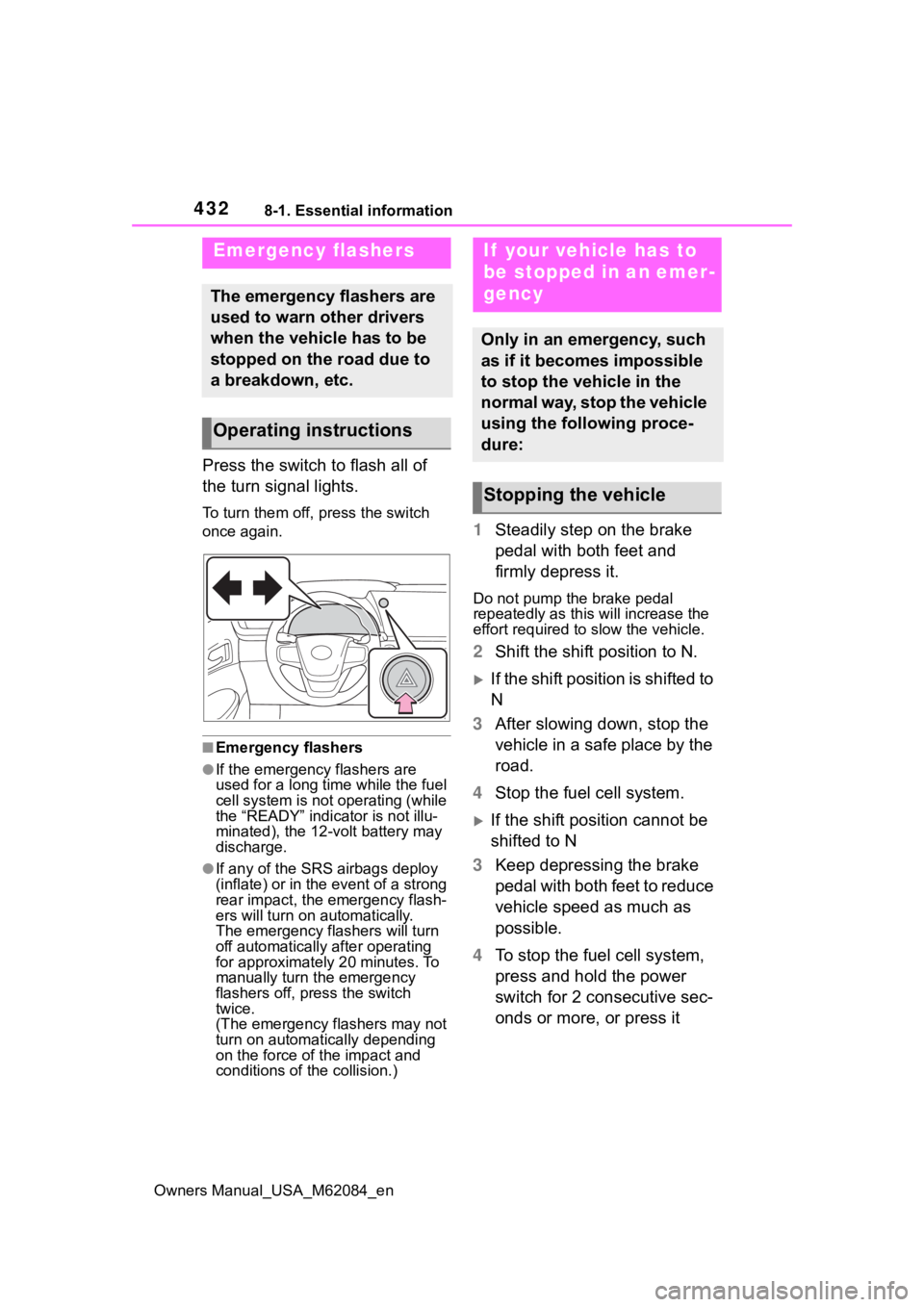
Press the switch to flash all of
the turn signal lights.
To turn them off, press the switch
once again.
■Emergency flashers
●If the emergency flashers are
used for a long time while the fuel
cell system is not operating (while
the “READY” indicator is not illu-
minated), the 12-volt battery may
discharge.
●If any of the SRS airbags deploy
(inflate) or in the event of a strong
rear impact, the emergency flash-
ers will turn on automatically.
The emergency flashers will turn
off automatically after operating
for approximately 20 minutes. To
manually turn t he emergency
flashers off, press the switch
twice.
(The emergency flashers may not
turn on automatically depending
on the force of the impact and
conditions of the collision.)
1 Steadily step on the brake
pedal with both feet and
firmly depress it.
Do not pump the brake pedal
repeatedly as this will increase the
effort required to slow the vehicle.
2Shift the shift position to N.
If the shift position is shifted to
N
3 After slowing down, stop the
vehicle in a safe place by the
road.
4 Stop the fuel cell system.
If the shift position cannot be
shifted to N
3 Keep depressing the brake
pedal with both feet to reduce
vehicle speed as much as
possible.
4 To stop the fuel cell system,
press and hold the power
switch for 2 consecutive sec-
onds or more, or press it
Emergency flashers
The emergency flashers are
used to warn other drivers
when the vehicle has to be
stopped on the road due to
a breakdown, etc.
Operating instructions
If your vehicle has to
be stopped in an emer-
gency
Only in an emergency, such
as if it becomes impossible
to stop the vehicle in the
normal way, stop the vehicle
using the following proce-
dure:
Stopping the vehicle
Page 504 of 556
5049-2. Customization
Owners Manual_USA_M62084_en
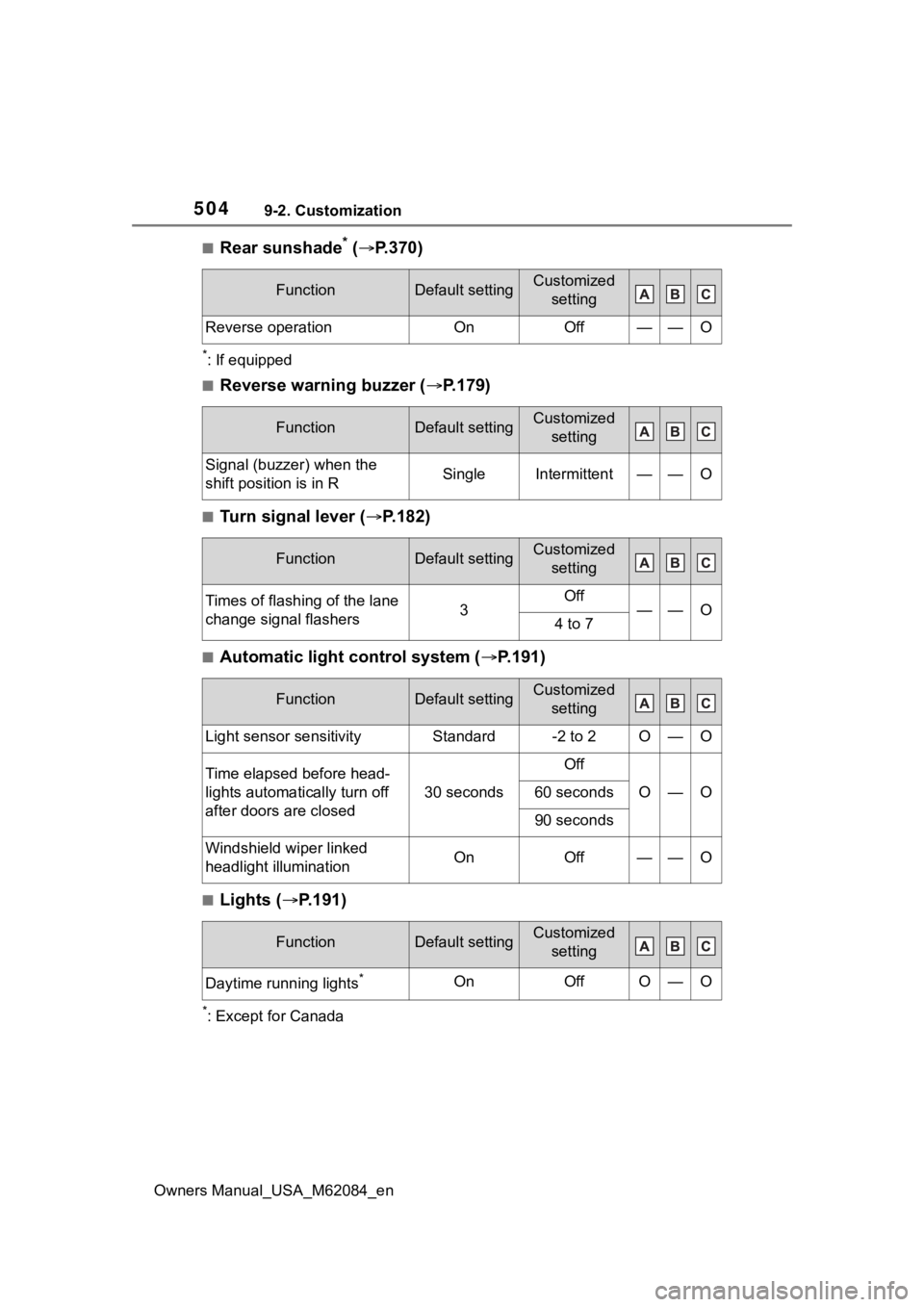
■Rear sunshade* ( P.370)
*: If equipped
■Reverse warning buzzer ( P.179)
■Turn signal lever ( P.182)
■Automatic light control system ( P.191)
■Lights ( P.191)
*: Except for Canada
FunctionDefault settingCustomized
setting
Reverse operationOnOff——O
FunctionDefault settingCustomized setting
Signal (buzzer) when the
shift position is in RSingleIntermittent——O
FunctionDefault settingCustomized setting
Times of flashing of the lane
change signal flashers3Off——O4 to 7
FunctionDefault settingCustomized setting
Light sensor sensitivityStandard-2 to 2O—O
Time elapsed before head-
lights automatically turn off
after doors are closed
30 seconds
Off
O—O60 seconds
90 seconds
Windshield wiper linked
headlight illuminationOnOff——O
FunctionDefault settingCustomized setting
Daytime running lights*OnOffO—O
Page 509 of 556
5099-2. Customization
Owners Manual_USA_M62084_en
9
Vehicle specifications
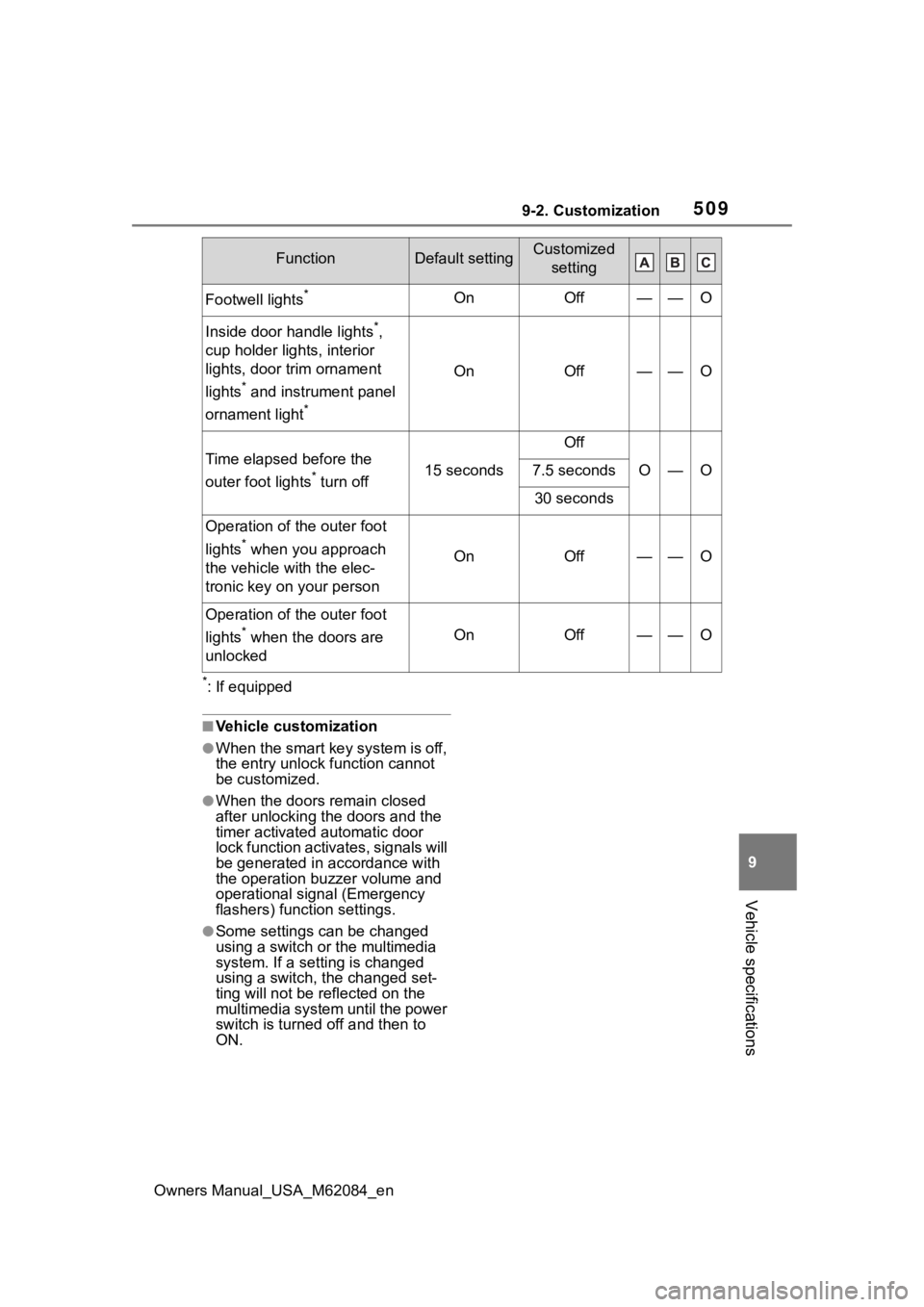
*: If equipped
■Vehicle customization
●When the smart key system is off,
the entry unlock function cannot
be customized.
●When the doors remain closed
after unlocking the doors and the
timer activated automatic door
lock function activates, signals will
be generated in accordance with
the operation bu zzer volume and
operational signal (Emergency
flashers) function settings.
●Some settings can be changed
using a switch or the multimedia
system. If a setting is changed
using a switch, the changed set-
ting will not be reflected on the
multimedia system until the power
switch is turned off and then to
ON.
Footwell lights*OnOff——O
Inside door handle lights*,
cup holder lights, interior
lights, door trim ornament
lights
* and instrument panel
ornament light
*
OnOff——O
Time elapsed before the
outer foot lights
* turn off15 seconds
Off
O—O7.5 seconds
30 seconds
Operation of the outer foot
lights
* when you approach
the vehicle wit h the elec-
tronic key on your personOnOff——O
Operation of the outer foot
lights
* when the doors are
unlockedOnOff——O
FunctionDefault settingCustomized setting