lights TOYOTA MIRAI 2022 Owner's Manual
[x] Cancel search | Manufacturer: TOYOTA, Model Year: 2022, Model line: MIRAI, Model: TOYOTA MIRAI 2022Pages: 556, PDF Size: 17.34 MB
Page 143 of 556
1434-4. Adjusting the steering wheel and mirrors
Owners Manual_USA_M62084_en
4
Before driving
*: If equipped
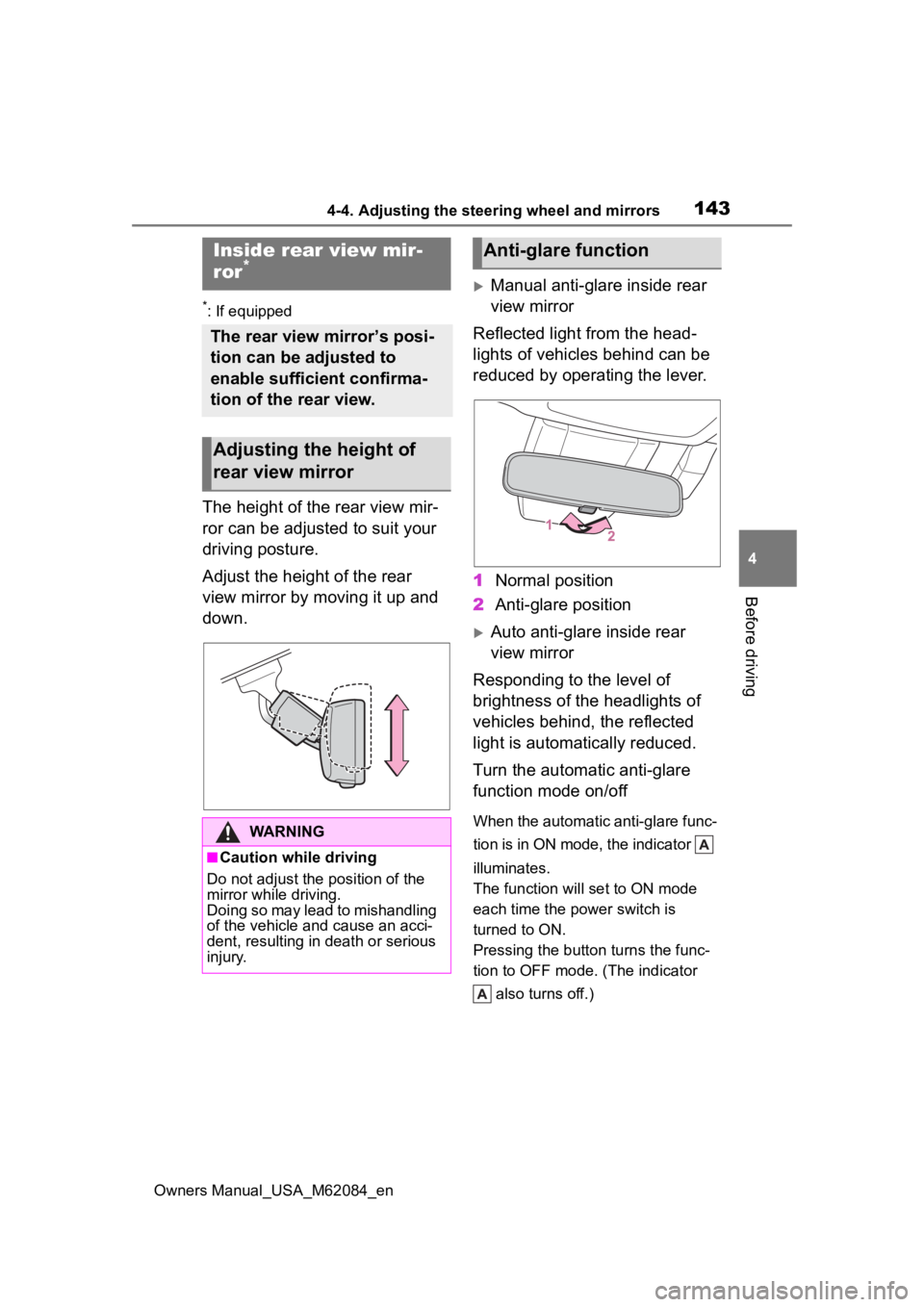
The height of the rear view mir-
ror can be adjusted to suit your
driving posture.
Adjust the height of the rear
view mirror by moving it up and
down.
Manual anti-glare inside rear
view mirror
Reflected light from the head-
lights of vehicles behind can be
reduced by operating the lever.
1 Normal position
2 Anti-glare position
Auto anti-glare inside rear
view mirror
Responding to the level of
brightness of the headlights of
vehicles behind, the reflected
light is automatically reduced.
Turn the automatic anti-glare
function mode on/off
When the automatic anti-glare func-
tion is in ON mode, the indicator
illuminates.
The function will set to ON mode
each time the power switch is
turned to ON.
Pressing the button turns the func-
tion to OFF mode. (The indicator also turns off.)
Inside rear view mir-
ror*
The rear view mirror’s posi-
tion can be adjusted to
enable sufficient confirma-
tion of the rear view.
Adjusting the height of
rear view mirror
WARNING
■Caution while driving
Do not adjust the position of the
mirror while driving.
Doing so may lead to mishandling
of the vehicle and cause an acci-
dent, resulting in death or serious
injury.
Anti-glare function
Page 145 of 556
1454-4. Adjusting the steering wheel and mirrors
Owners Manual_USA_M62084_en
4
Before driving
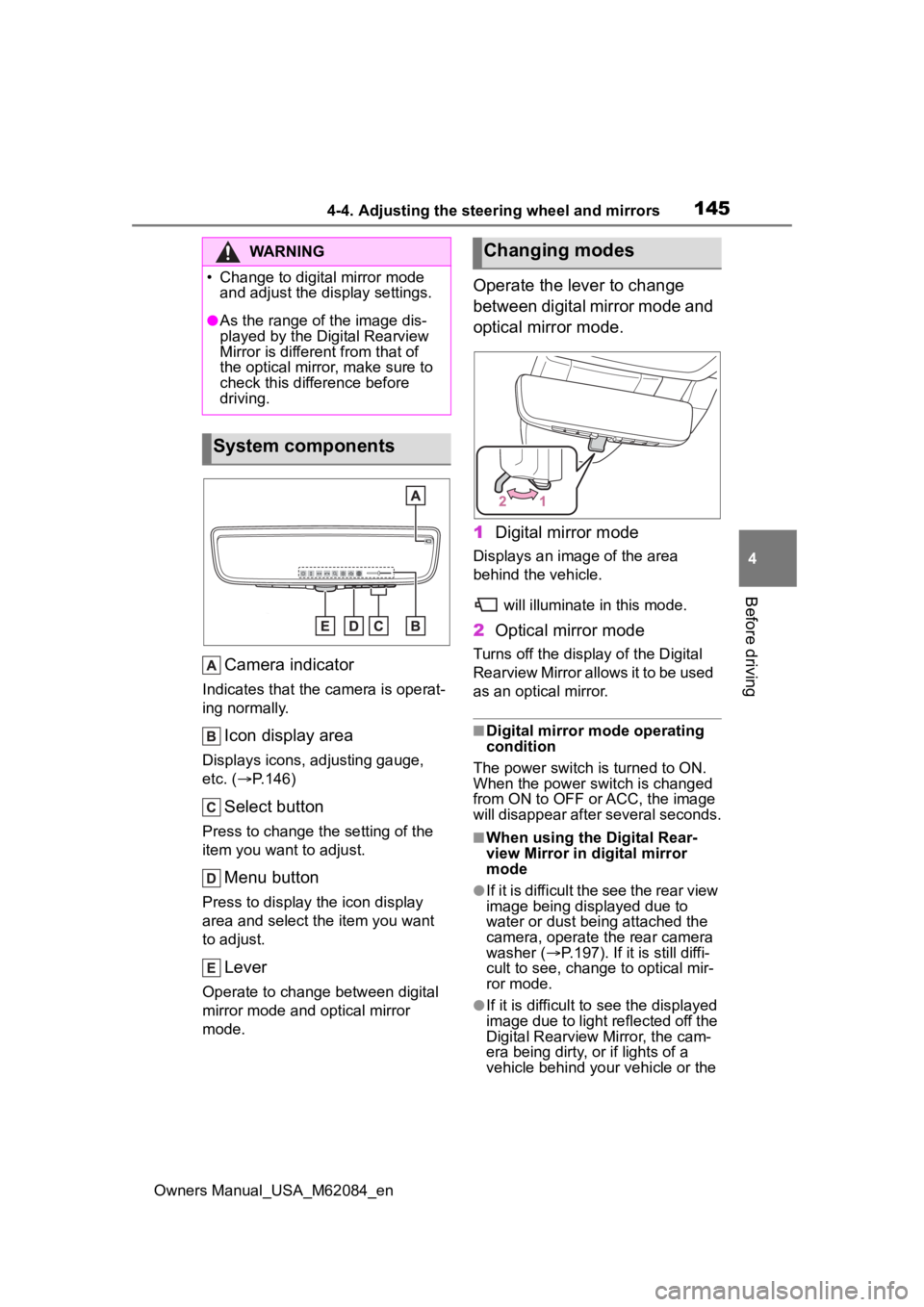
Camera indicator
Indicates that the camera is operat-
ing normally.
Icon display area
Displays icons, adjusting gauge,
etc. ( P.146)
Select button
Press to change the setting of the
item you want to adjust.
Menu button
Press to display the icon display
area and select the item you want
to adjust.
Lever
Operate to change between digital
mirror mode and optical mirror
mode.
Operate the lever to change
between digital mirror mode and
optical mirror mode.
1 Digital mirror mode
Displays an ima ge of the area
behind the vehicle.
will illuminate in this mode.
2Optical mirror mode
Turns off the display of the Digital
Rearview Mirror allows it to be used
as an optical mirror.
■Digital mirror mode operating
condition
The power switch is turned to ON.
When the power switch is changed
from ON to OFF o r ACC, the image
will disappear after several seconds.
■When using the Digital Rear-
view Mirror in d igital mirror
mode
●If it is difficult the see the rear view
image being displayed due to
water or dust being attached the
camera, operate the rear camera
washer ( P.197). If it is still diffi-
cult to see, change to optical mir-
ror mode.
●If it is difficult to see the displayed
image due to light reflected off the
Digital Rearview Mirror, the cam-
era being dirty, or if lights of a
vehicle behind your vehicle or the
WARNING
Page 146 of 556
1464-4. Adjusting the steering wheel and mirrors
Owners Manual_USA_M62084_endisplayed image are bothering
you, change to optical mirror
mode.
●When the trunk is open, the Digital
Rearview Mirror image may not
display properly. Before driving,
make sure the trunk is closed.
●If the display is difficult to see due
to reflected light, close the elec-
tronic sunshade for the panoramic
moon roof (if equipped).
●Any of the following conditions
may occur when d
riving in the
dark, such as at night. None of
them indicates that a malfunction
has occurred.
• Colors of objects in the displayed image may differ f rom their actual
color.
• Depending on the height of the lights of the vehicle behind, the
area around the vehicle may
appear white and blurry.
• Automatic image adjustment for
brighter surrounding image may
cause flickering.
If it is difficult to see the displayed
image or flickering bothers you,
change to optical mirror mode.
●The Digital Rearview Mirror may
become hot while it is in digital
mirror mode.
This is not a malfunction.
●Depending on your physical con-
dition or age, it may take longer
than usual to focus on the dis-
played image. In this case,
change to optical mirror mode.
●Do not let passengers stare at the
displayed image when the vehicle
is being driven, as doing so may
cause motion sickness.
■When the system malfunctions
If the symbol show n in the illustra-
tion is displayed when using the
Digital Rearview Mirror in digital mir-
ror mode, the system may be mal-
functioning. The symbol will
disappear in a few seconds. Oper-
ate the lever, chang e to optical mir-ror mode and have the vehicle
inspected by your Toyota dealer.
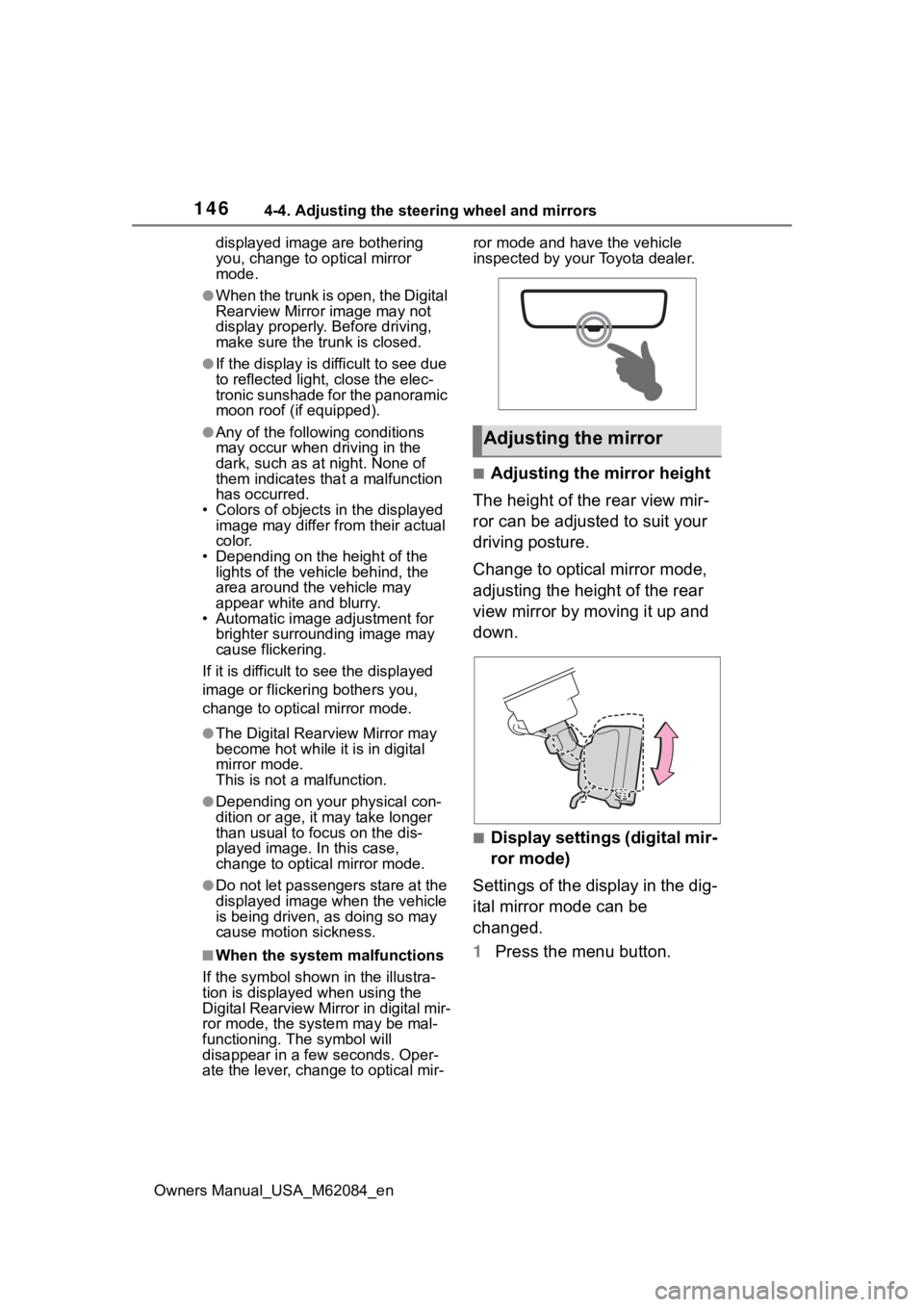
■Adjusting the mirror height
The height of the rear view mir-
ror can be adjusted to suit your
driving posture.
Change to optical mirror mode,
adjusting the height of the rear
view mirror by moving it up and
down.
■Display settings (digital mir-
ror mode)
Settings of the display in the dig-
ital mirror mode can be
changed.
1 Press the menu button.
Adjusting the mirror
Page 147 of 556
1474-4. Adjusting the steering wheel and mirrors
Owners Manual_USA_M62084_en
4
Before driving
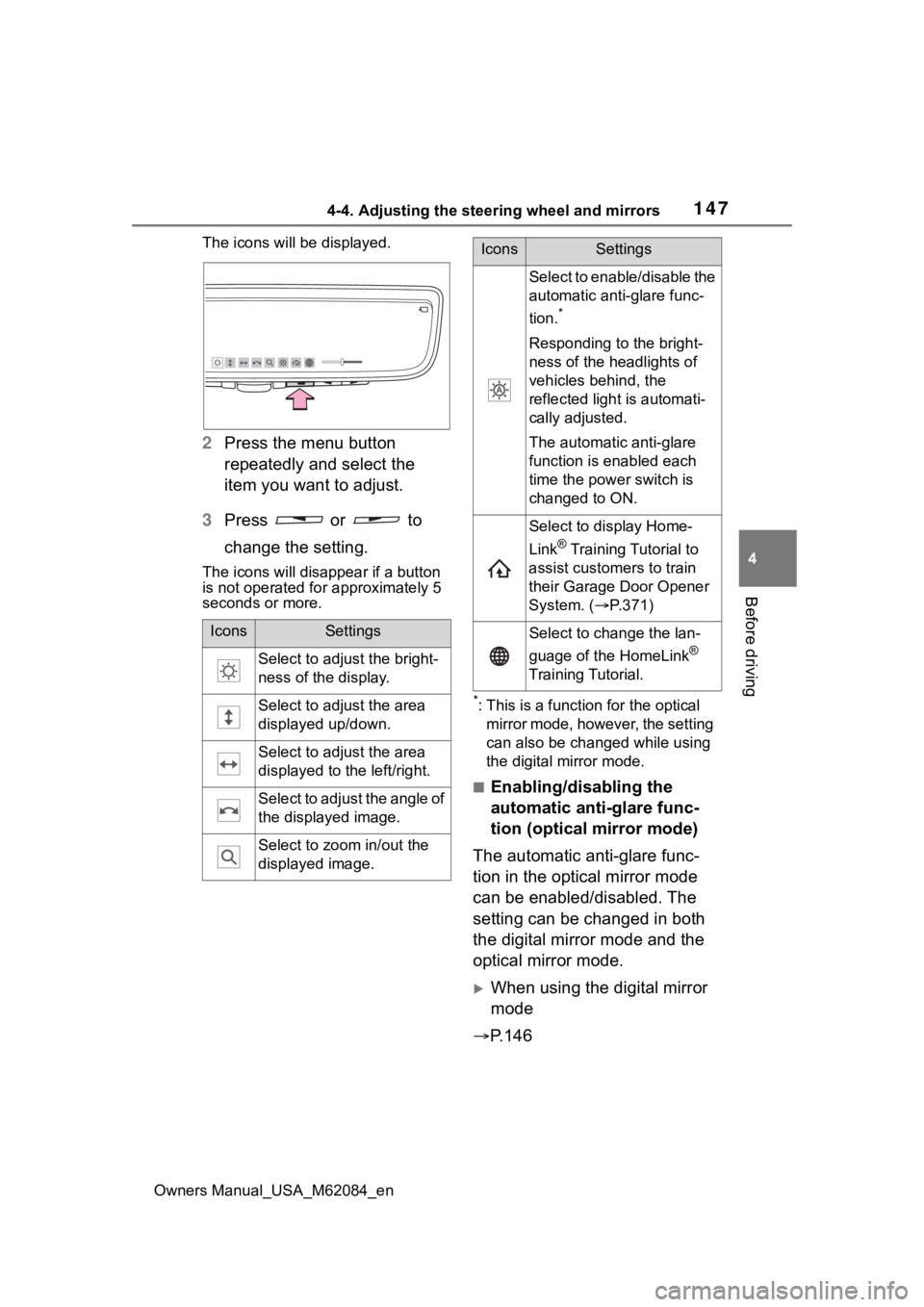
The icons will be displayed.
2 Press the menu button
repeatedly and select the
item you want to adjust.
3 Press or to
change the setting.
The icons will disapp ear if a button
is not operated fo r approximately 5
seconds or more.
*: This is a functi on for the optical
mirror mode, however, the setting
can also be changed while using
the digital mirror mode.
■Enabling/disabling the
automatic anti-glare func-
tion (optical mirror mode)
The automatic anti-glare func-
tion in the optical mirror mode
can be enabled/disabled. The
setting can be changed in both
the digital mirror mode and the
optical mirror mode.
When using the digital mirror
mode
P.146
IconsSettings
Select to adjust the bright-
ness of the display.
Select to adjust the area
displayed up/down.
Select to adjust the area
displayed to the left/right.
Select to adjust the angle of
the displayed image.
Select to zoom in/out the
displayed image.
Select to enable/disable the
automatic anti-glare func-
tion.
*
Responding to the bright-
ness of the headlights of
vehicles behind, the
reflected light is automati-
cally adjusted.
The automatic anti-glare
function is enabled each
time the power switch is
changed to ON.
Select to display Home-
Link
® Training Tutorial to
assist customers to train
their Garage Door Opener
System. ( P.371)
Select to change the lan-
guage of the HomeLink
®
Training Tutorial.
IconsSettings
Page 151 of 556
1514-4. Adjusting the steering wheel and mirrors
Owners Manual_USA_M62084_en
4
Before driving
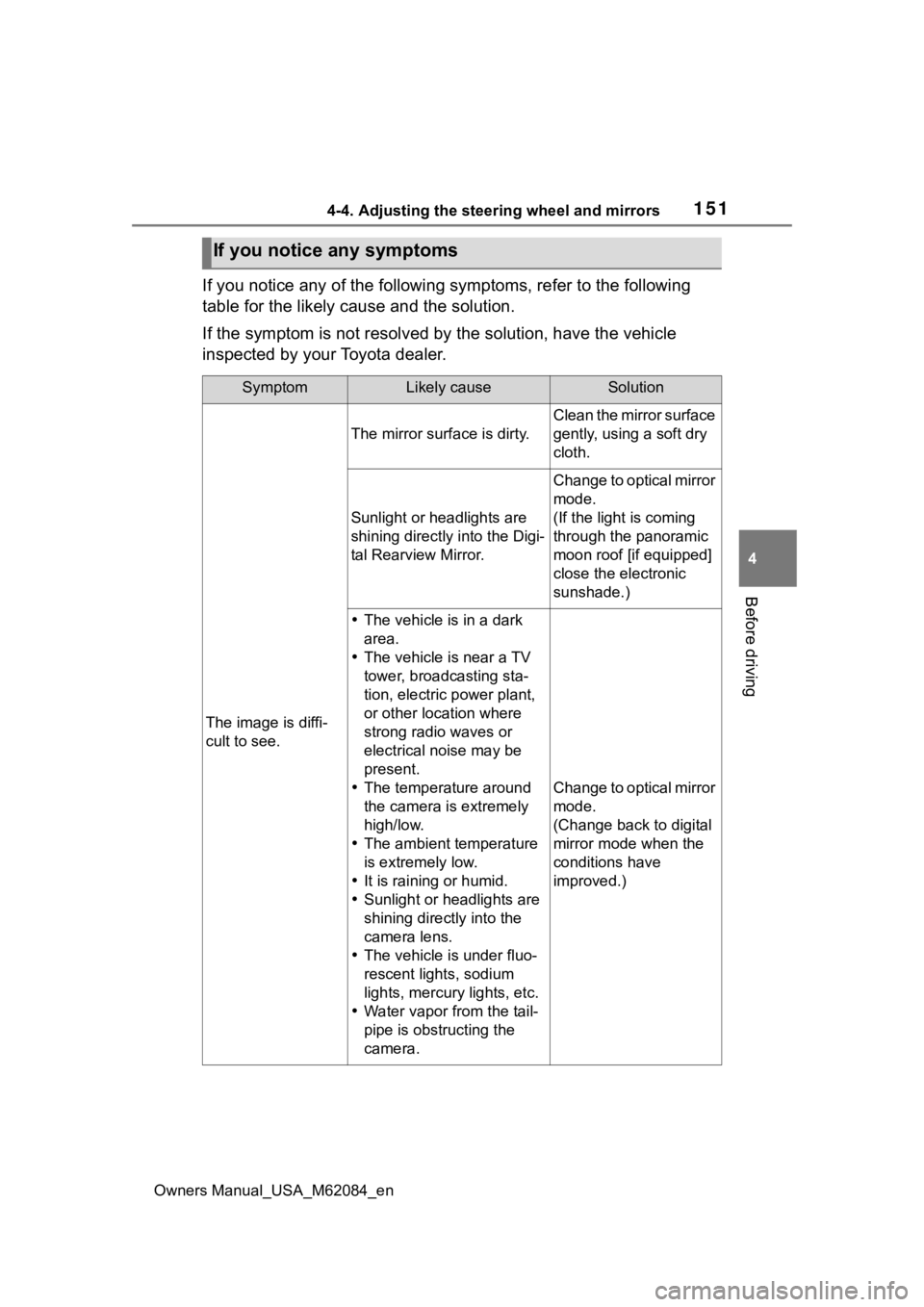
If you notice any of the following symptoms, refer to the follo wing
table for the likely cause and the solution.
If the symptom is not resolved by the solution, have the vehicl e
inspected by your Toyota dealer.
If you notice any symptoms
SymptomLikely causeSolution
The image is diffi-
cult to see.
The mirror surface is dirty.
Clean the mirror surface
gently, using a soft dry
cloth.
Sunlight or headlights are
shining directly into the Digi-
tal Rearview Mirror.
Change to optical mirror
mode.
(If the light is coming
through the panoramic
moon roof [if equipped]
close the electronic
sunshade.)
The vehicle is in a dark
area.
The vehicle is near a TV
tower, broadcasting sta-
tion, electric power plant,
or other location where
strong radio waves or
electrical noise may be
present.
The temperature around
the camera is extremely
high/low.
The ambient temperature
is extremely low.
It is raining or humid.
Sunlight or headlights are
shining directly into the
camera lens.
The vehicle is under fluo-
rescent lights, sodium
lights, mercury lights, etc.
Water vapor from the tail-
pipe is obstructing the
camera.
Change to optical mirror
mode.
(Change back to digital
mirror mode when the
conditions have
improved.)
Page 159 of 556
159
Owners Manual_USA_M62084_en
5
5
Driving
Driving
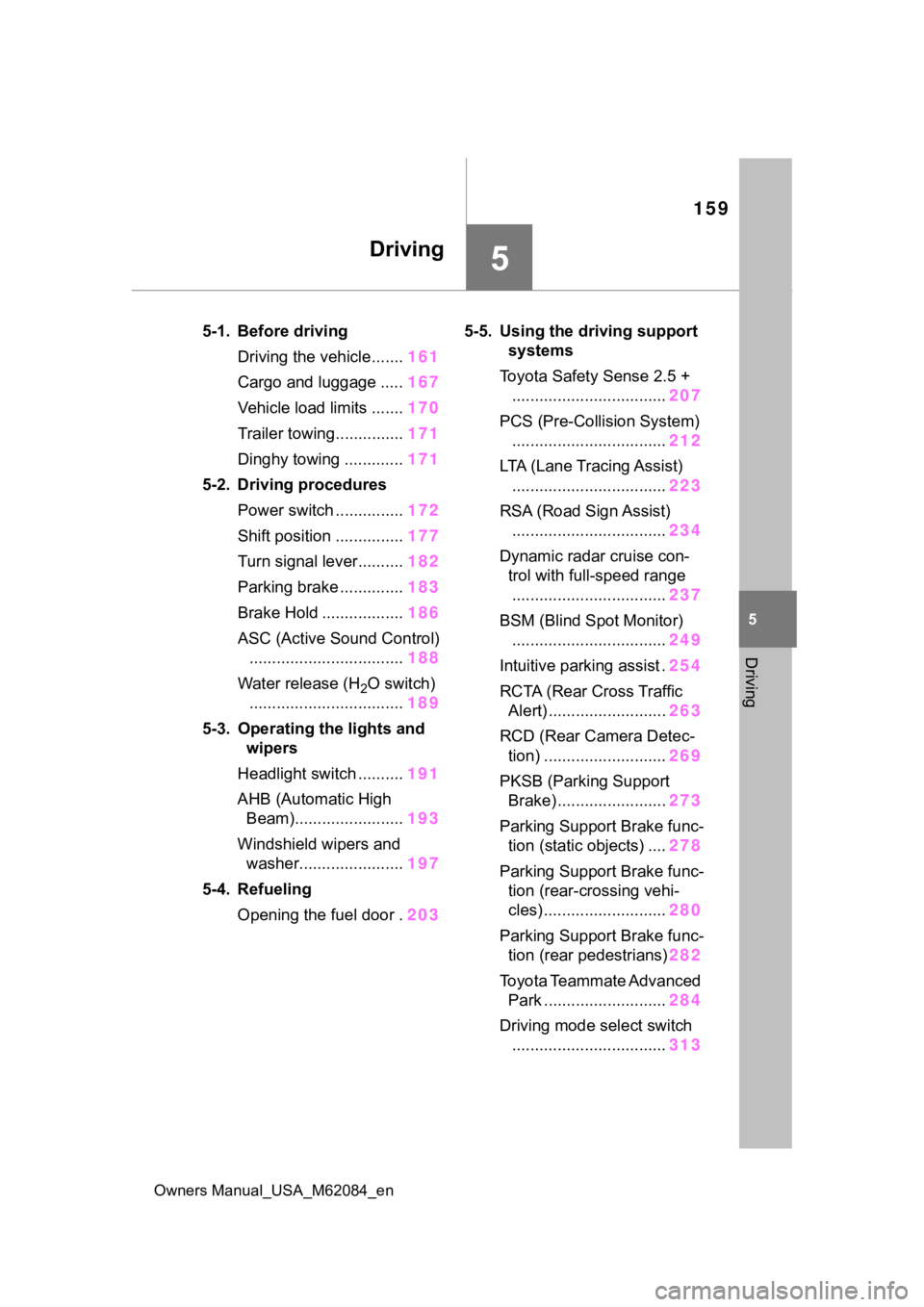
5-1. Before drivingDriving the vehicle....... 161
Cargo and luggage ..... 167
Vehicle load limits ....... 170
Trailer towing............... 171
Dinghy towing ............. 171
5-2. Driving procedures Power switch ............... 172
Shift position ............... 177
Turn signal lever.......... 182
Parking brake .............. 183
Brake Hold .................. 186
ASC (Active Sound Control) .................................. 188
Water release (H
2O switch)
.................................. 189
5-3. Operating the lights and wipers
Headlight switch .......... 191
AHB (Automatic High Beam)........................ 193
Windshield wipers and washer....................... 197
5-4. Refueling Opening the fuel door . 2035-5. Using the dr
iving support
systems
Toyota Safety Sense 2.5 + .................................. 207
PCS (Pre-Collision System) .................................. 212
LTA (Lane Tracing Assist) .................................. 223
RSA (Road Sign Assist) .................................. 234
Dynamic radar cruise con- trol with full-speed range
.................................. 237
BSM (Blind Spot Monitor) .................................. 249
Intuitive parking assist . 254
RCTA (Rear Cross Traffic Alert) .......................... 263
RCD (Rear Camera Detec- tion) ........................... 269
PKSB (Parking Support Brake) ........................ 273
Parking Support Brake func- tion (static objects) .... 278
Parking Support Brake func- tion (rear-crossing vehi-
cles) ........................... 280
Parking Support Brake func- tion (rear pedestrians) 282
Toyota Teammate Advanced Park ........................... 284
Driving mode select switch .................................. 313
Page 182 of 556
1825-2. Driving procedures
Owners Manual_USA_M62084_en
■Br mode
Depending on the condition of the
traction battery, Br mode may not be
available. In that case, a message is
displayed on the multi-information
display.
■Sounds when in Br mode
P. 7 5
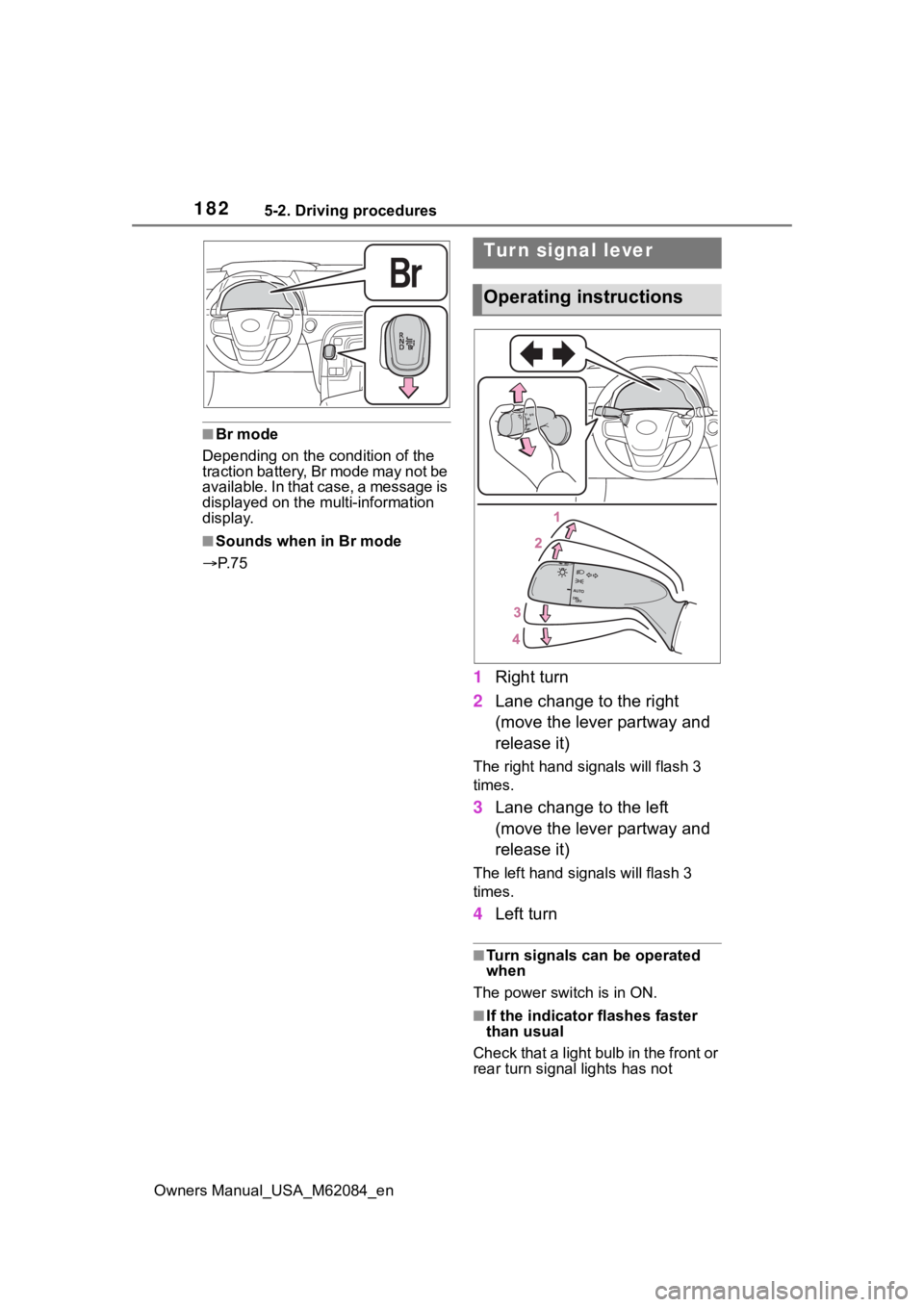
1 Right turn
2 Lane change to the right
(move the lever partway and
release it)
The right hand s ignals will flash 3
times.
3 Lane change to the left
(move the lever partway and
release it)
The left hand signals will flash 3
times.
4Left turn
■Turn signals can be operated
when
The power switch is in ON.
■If the indicator flashes faster
than usual
Check that a light bulb in the front or
rear turn signal lights has not
Tur n signal lever
Operating instructions
Page 191 of 556
1915-3. Operating the lights and wipers
Owners Manual_USA_M62084_en
5
Driving
5-3.Operating the lights and wipers
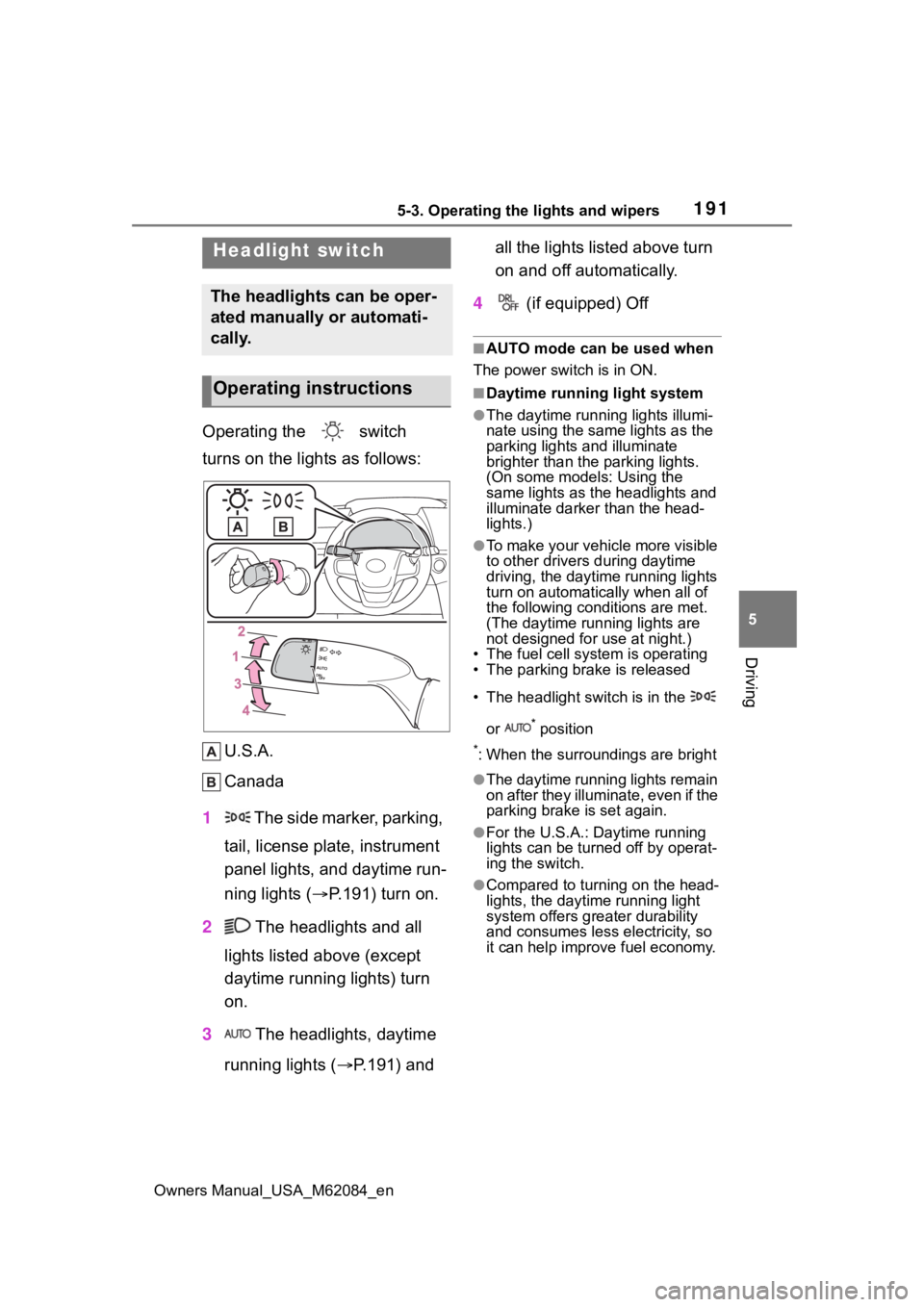
Operating the switch
turns on the lights as follows: U.S.A.
Canada
1 The side marker, parking,
tail, license plate, instrument
panel lights, and daytime run-
ning lights ( P.191) turn on.
2 The headlights and all
lights listed above (except
daytime running lights) turn
on.
3 The headlights, daytime
running lights ( P.191) and all the lights listed above turn
on and off automatically.
4 (if equipped) Off
■AUTO mode can be used when
The power switch is in ON.
■Daytime running light system
●The daytime runn ing lights illumi-
nate using the same lights as the
parking lights and illuminate
brighter than the parking lights.
(On some models: Using the
same lights as the headlights and
illuminate darker than the head-
lights.)
●To make your vehicle more visible
to other drivers during daytime
driving, the daytime running lights
turn on automatically when all of
the following conditions are met.
(The daytime running lights are
not designed for use at night.)
• The fuel cell system is operating
• The parking brake is released
• The headlight switch is in the
or
* position
*: When the surroundings are bright
●The daytime running lights remain
on after they illuminate, even if the
parking brake is set again.
●For the U.S.A.: Daytime running
lights can be turned off by operat-
ing the switch.
●Compared to turning on the head-
lights, the daytime running light
system offers greater durability
and consumes less electricity, so
it can help improve fuel economy.
Headlight switch
The headlights can be oper-
ated manually or automati-
cally.
Operating instructions
Page 192 of 556
1925-3. Operating the lights and wipers
Owners Manual_USA_M62084_en
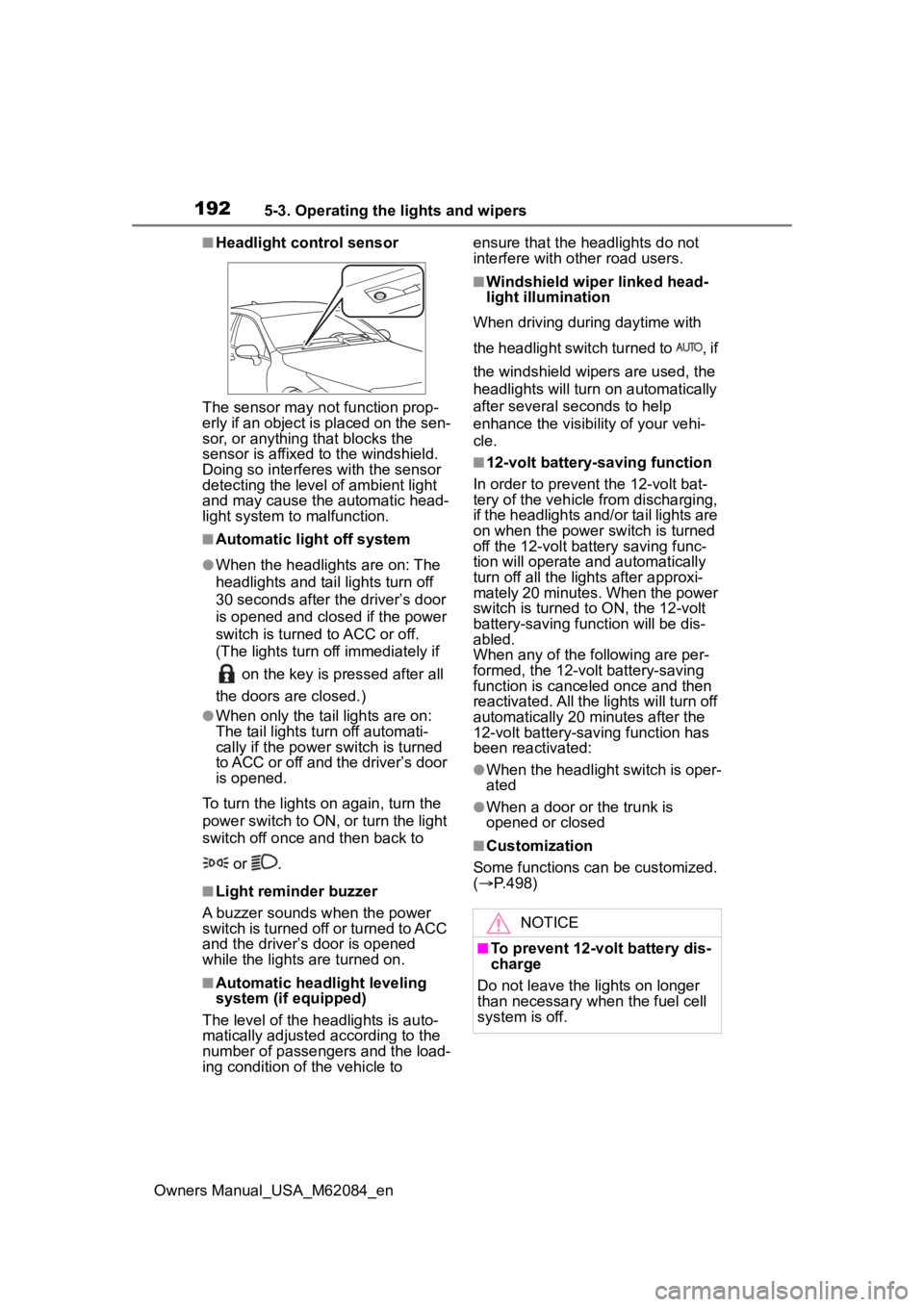
■Headlight control sensor
The sensor may not function prop-
erly if an object is placed on the sen-
sor, or anything that blocks the
sensor is affixed to the windshield.
Doing so interfere s with the sensor
detecting the level of ambient light
and may cause the automatic head-
light system to malfunction.
■Automatic light off system
●When the headlights are on: The
headlights and tail lights turn off
30 seconds after the driver’s door
is opened and clos ed if the power
switch is turned to ACC or off.
(The lights turn off immediately if
on the key is pressed after all
the doors are closed.)
●When only the tail lights are on:
The tail lights tu rn off automati-
cally if the power switch is turned
to ACC or off and the driver’s door
is opened.
To turn the lights on again, turn the
power switch to ON, or turn the light
switch off once and then back to
or .
■Light reminder buzzer
A buzzer sounds when the power
switch is turned off or turned to ACC
and the driver’s door is opened
while the lights are turned on.
■Automatic headlight leveling
system (if equipped)
The level of the headlights is auto-
matically adjusted according to the
number of passengers and the load-
ing condition of the vehicle to ensure that the headlights do not
interfere with other road users.
■Windshield wiper linked head-
light illumination
When driving during daytime with
the headlight switch turned to , if
the windshield wipers are used, the
headlights will turn o n automatically
after several seconds to help
enhance the visibility of your vehi-
cle.
■12-volt battery-saving function
In order to prevent the 12-volt bat-
tery of the vehicle from discharging,
if the headlights and/or tail lights are
on when the power switch is turned
off the 12-volt battery saving func-
tion will operate and automatically
turn off all the lig hts after approxi-
mately 20 minutes. When the power
switch is turned to ON, the 12-volt
battery-saving function will be dis-
abled.
When any of the following are per-
formed, the 12-volt battery-saving
function is canceled once and then
reactivated. All the lights will turn off
automatically 20 minutes after the
12-volt battery-saving function has
been reactivated:
●When the headlight switch is oper-
ated
●When a door or the trunk is
opened or closed
■Customization
Some functions can be customized.
( P.498)
NOTICE
■To prevent 12-volt battery dis-
charge
Do not leave the lights on longer
than necessary when the fuel cell
system is off.
Page 193 of 556
1935-3. Operating the lights and wipers
Owners Manual_USA_M62084_en
5
Driving
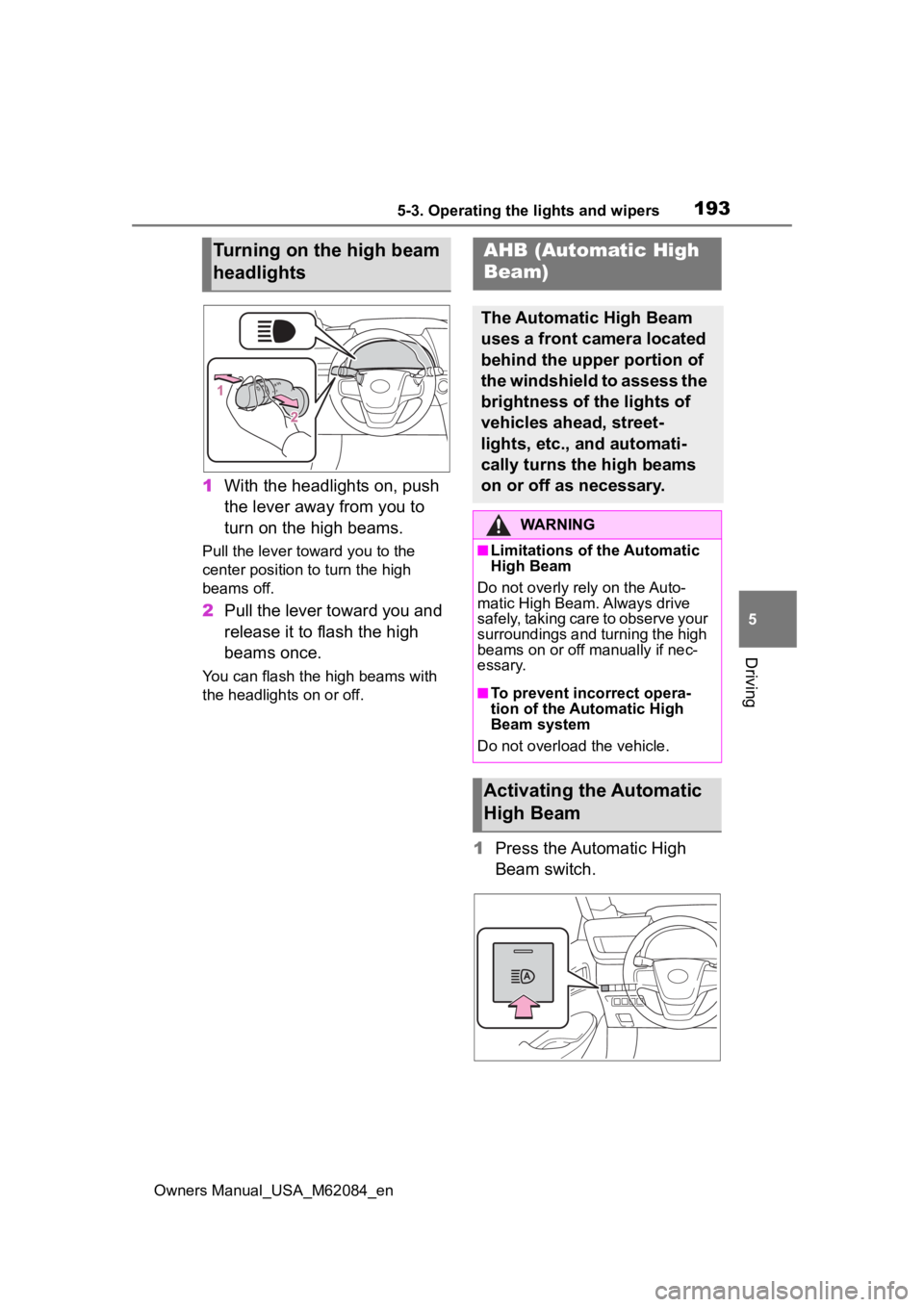
1 With the headlights on, push
the lever away from you to
turn on the high beams.
Pull the lever toward you to the
center position to turn the high
beams off.
2Pull the lever toward you and
release it to flash the high
beams once.
You can flash the high beams with
the headlights on or off.
1Press the Automatic High
Beam switch.
Turning on the high beam
headlightsAHB (Automatic High
Beam)
The Automatic High Beam
uses a front camera located
behind the upper portion of
the windshield to assess the
brightness of the lights of
vehicles ahead, street-
lights, etc., and automati-
cally turns the high beams
on or off as necessary.
WARNING
■Limitations of the Automatic
High Beam
Do not overly rely on the Auto-
matic High Beam. Always drive
safely, taking care to observe your
surroundings and turning the high
beams on or off manually if nec-
essary.
■To prevent inc orrect opera-
tion of the Automatic High
Beam system
Do not overload the vehicle.
Activating the Automatic
High Beam