ECU TOYOTA MIRAI 2022 Owner's Guide
[x] Cancel search | Manufacturer: TOYOTA, Model Year: 2022, Model line: MIRAI, Model: TOYOTA MIRAI 2022Pages: 556, PDF Size: 17.34 MB
Page 67 of 556
671-3. Emergency assistance
Owners Manual_USA_M62084_en
1
For safety and security
When the power switch is turned
to ON, the red indicator light
comes on for 2 seconds then
turns off. Afterward, the green
indicator light comes on, indicat-
ing that the service is active.
The following indicator light pat-
terns indicate specific system
usage conditions:
Green indicator light on =
Active service
Green indicator light flashing
= Safety Connect call in pro-
cess
Red indicator light (except at
vehicle start-up) = System
malfunction (contact your Toy-
ota dealer)
No indicator light (off) =
Safety Connect service not
active
■Automatic Collision Notifi-
cation
In case of either airbag deploy-
ment or severe rear-end colli-
sion, the system is designed to
automatically call the response
center. The responding agent
receives the vehicle’s location
and attempts to speak with the
vehicle occupants to assess the
level of emergency. If the occu- pants are unable to communi-
cate, the agent automatically
treats the call as an emergency,
contacts the nearest emer-
gency services provider to
describe the situation, and
requests that assistance be sent
to the location.
■Stolen Vehicle Location
If your vehicle is stolen, Safety
Connect can work with local
authorities to assist them in
locating and recovering the
vehicle. After filing a police
report, call the Safety Connect
response center at 1-800-331-
4331 in the United States, 1-
877-855-8377 in Puerto Rico or
1-888-869-6828 in Canada, and
follow the prompts for Safety
Connect to initiate this service.
In addition to assisting law
enforcement with recovery of a
stolen vehicle, Safety-Connect-
equipped vehicle location data
may, under certain circum-
stances, be shared with third
parties to locate your vehicle.
Further information is available
at Toyota.com.
■Emergency Assistance But-
ton (“SOS”)
In the event of an emergency on
the road, push the “SOS” button
to reach the Safety Connect
response center. The answer-
ing agent will determine your
vehicle’s location, assess the
emergency, and dispatch the
Safety Connect LED light
Indicators
Safety Connect services
Page 69 of 556
691-4. Theft deterrent system
Owners Manual_USA_M62084_en
1
For safety and security
1-4.Theft deterrent system
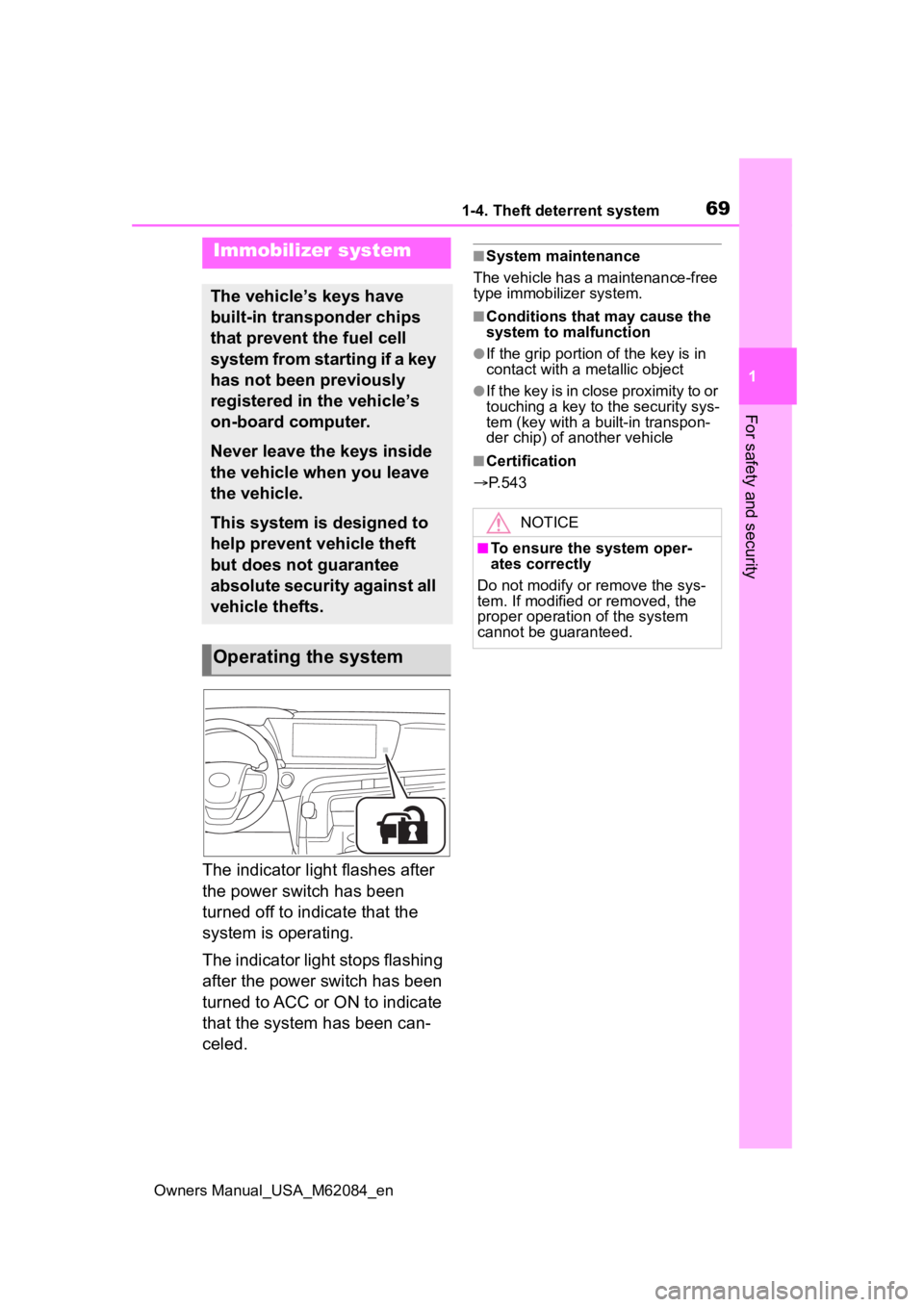
The indicator light flashes after
the power switch has been
turned off to indicate that the
system is operating.
The indicator light stops flashing
after the power switch has been
turned to ACC or ON to indicate
that the system has been can-
celed.
■System maintenance
The vehicle has a maintenance-free
type immobilizer system.
■Conditions that may cause the
system to malfunction
●If the grip portion of the key is in
contact with a metallic object
●If the key is in close proximity to or
touching a key to the security sys-
tem (key with a built-in transpon-
der chip) of another vehicle
■Certification
P.543
Immobilizer system
The vehicle’s keys have
built-in transponder chips
that prevent the fuel cell
system from starting if a key
has not been previously
registered in the vehicle’s
on-board computer.
Never leave the keys inside
the vehicle when you leave
the vehicle.
This system is designed to
help prevent vehicle theft
but does not guarantee
absolute security against all
vehicle thefts.
Operating the system
NOTICE
■To ensure the system oper-
ates correctly
Do not modify or remove the sys-
tem. If modified or removed, the
proper operation of the system
cannot be guaranteed.
Page 71 of 556
711-4. Theft deterrent system
Owners Manual_USA_M62084_en
1
For safety and security
trol.
Turn the power switch to ACC
or ON, or start the fuel cell
system. (The alarm will be
deactivated or stopped after a
few seconds.)
■System maintenance
The vehicle has a maintenance-free
type alarm system.
■Triggering of the alarm
The alarm may be triggered in the
following situations:
(Stopping the alarm deactivates the
alarm system.)
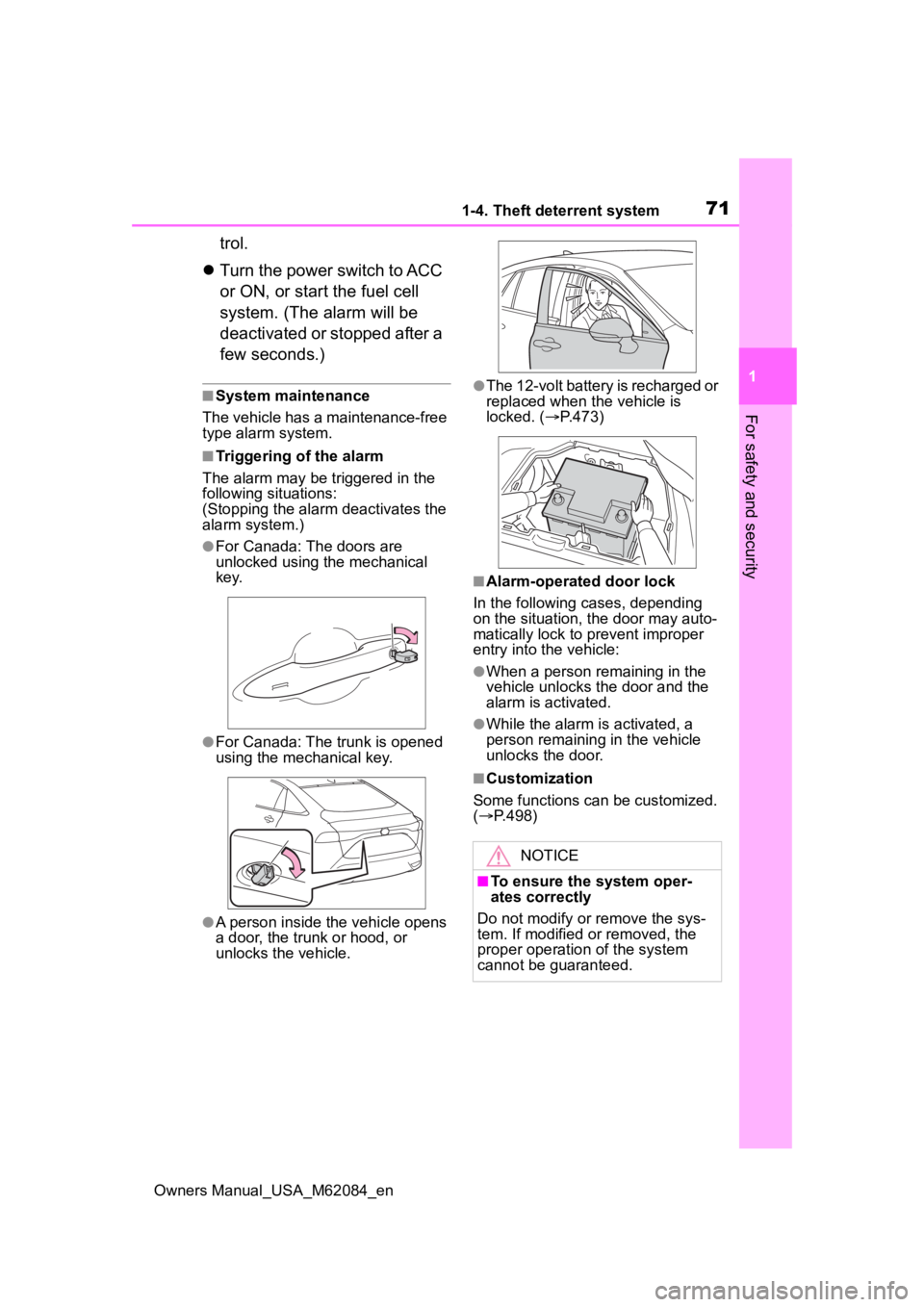
●For Canada: The doors are
unlocked using the mechanical
key.
●For Canada: The trunk is opened
using the mechanical key.
●A person inside the vehicle opens
a door, the trunk or hood, or
unlocks the vehicle.
●The 12-volt battery is recharged or
replaced when the vehicle is
locked. ( P.473)
■Alarm-operated door lock
In the following cases, depending
on the situation, the door may auto-
matically lock to prevent improper
entry into the vehicle:
●When a person remaining in the
vehicle unlocks the door and the
alarm is activated.
●While the alarm i s activated, a
person remaining in the vehicle
unlocks the door.
■Customization
Some functions can be customized.
( P.498)
NOTICE
■To ensure the system oper-
ates correctly
Do not modify or remove the sys-
tem. If modified or removed, the
proper operation of the system
cannot be guaranteed.
Page 95 of 556
953-1. Instrument cluster
Owners Manual_USA_M62084_en
3
Vehicle status information and indicators
*1: Indicates the coolant tempera- ture is cool.
*2: This light illuminates on the multi-information display.
*3: This light illuminates on the multi-information display with a
message.
*4: Depending on the operating con-ditions of the system, the color
and state (illuminat ed/blinking) of
the indicator change.
*5: The light comes on when the system is turned off.
*6: Intuitive parking assist OFF indi-cator turns on wh en the power
switch is turned t o ON while the
Intuitive parking assist function is
on. It will turn off after a few sec-
onds.
*7: These lights tu rn on when the
power switch is turned to ON to
indicate that a system check is
being performed. They will turn
off after the fuel cell system is
on, or after a few seconds. There
may be a malfunction in a sys-
tem if the lights do not turn on, or
turn off. Have the vehicle
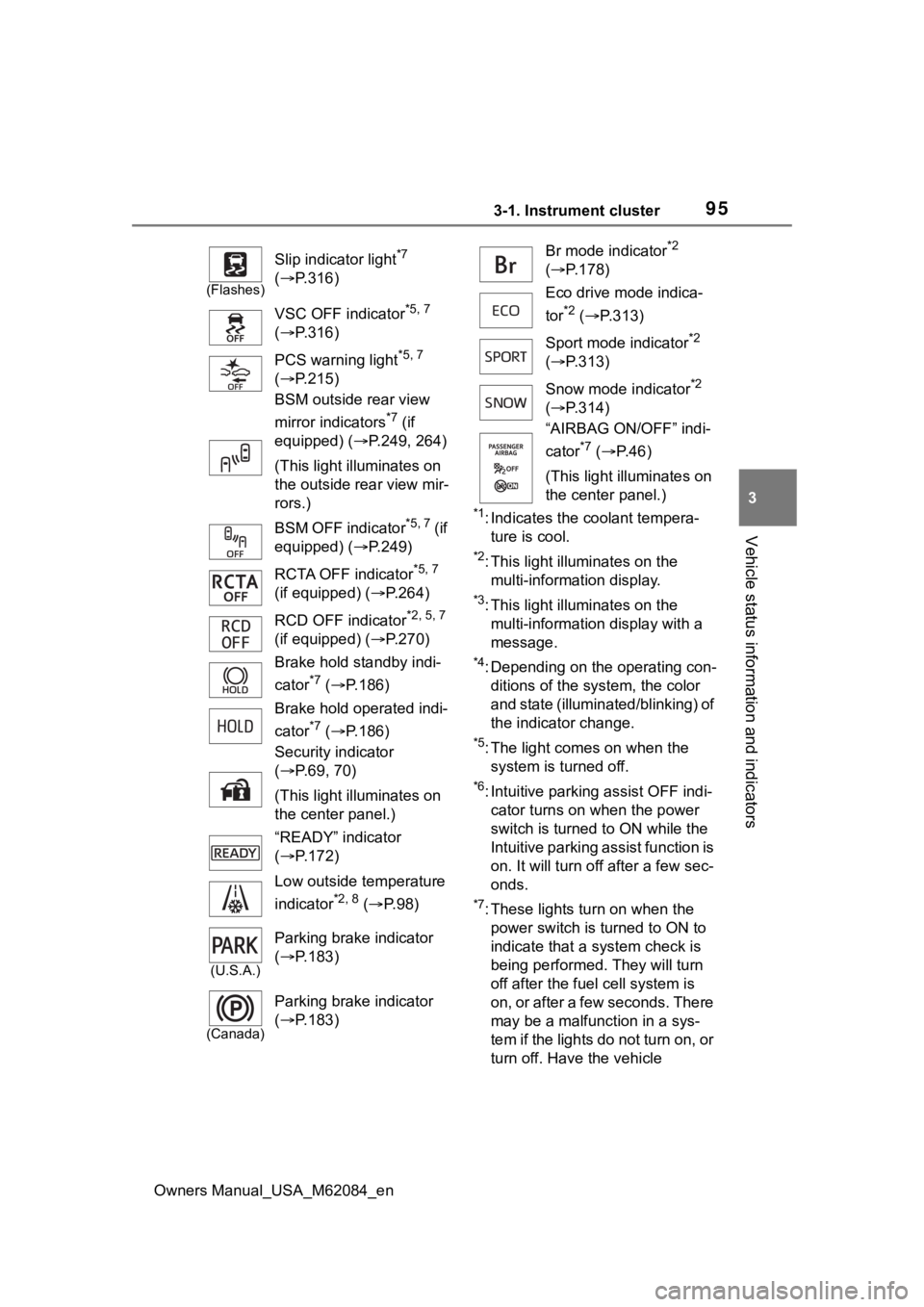
(Flashes)
Slip indicator light*7
( P.316)
VSC OFF indicator
*5, 7
( P.316)
PCS warning light
*5, 7
( P.215)
BSM outside rear view
mirror indicators
*7 (if
equipped) ( P.249, 264)
(This light illuminates on
the outside rear view mir-
rors.)
BSM OFF indicator
*5, 7 (if
equipped) ( P.249)
RCTA OFF indicator
*5, 7
(if equipped) ( P.264)
RCD OFF indicator
*2, 5, 7
(if equipped) ( P.270)
Brake hold standby indi-
cator
*7 ( P.186)
Brake hold operated indi-
cator
*7 ( P.186)
Security indicator
( P.69, 70)
(This light illuminates on
the center panel.)
“READY” indicator
( P.172)
Low outside temperature
indicator
*2, 8 ( P. 9 8 )
(U.S.A.)
Parking brake indicator
( P.183)
(Canada)
Parking brake indicator
( P.183)
Br mode indicator*2
( P.178)
Eco drive mode indica-
tor
*2 ( P.313)
Sport mode indicator
*2
( P.313)
Snow mode indicator
*2
( P.314)
“AIRBAG ON/OFF” indi-
cator
*7 ( P. 4 6 )
(This light illuminates on
the center panel.)
Page 121 of 556
1214-2. Opening, closing and locking the doors and trunk
Owners Manual_USA_M62084_en
4
Before driving
4-2.Opening, closing and locking the doors and trunk
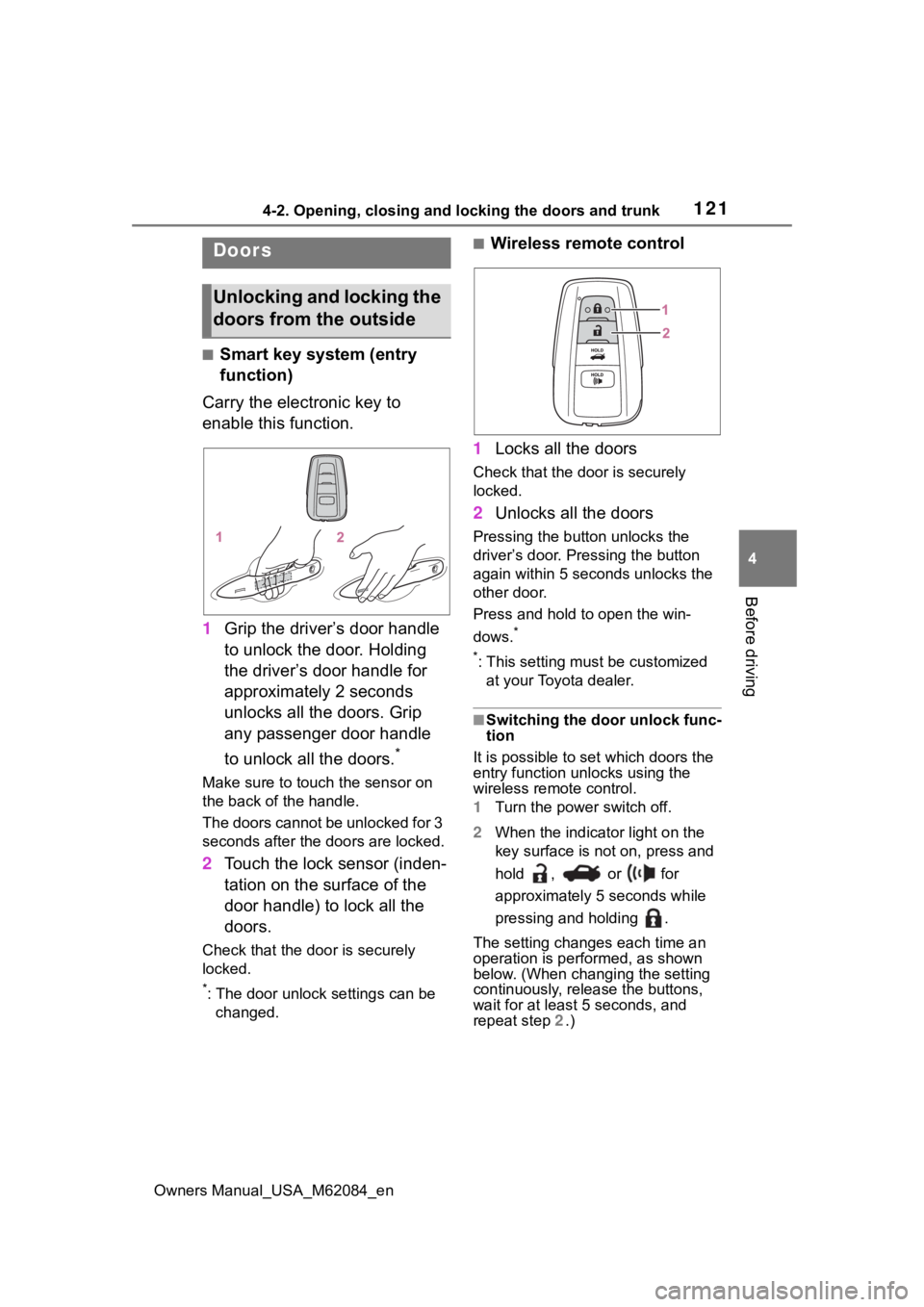
■Smart key system (entry
function)
Carry the electronic key to
enable this function.
1 Grip the driver’s door handle
to unlock the door. Holding
the driver’s door handle for
approximately 2 seconds
unlocks all the doors. Grip
any passenger door handle
to unlock all the doors.
*
Make sure to touch the sensor on
the back of the handle.
The doors cannot be unlocked for 3
seconds after the doors are locked.
2Touch the lock sensor (inden-
tation on the surface of the
door handle) to lock all the
doors.
Check that the door is securely
locked.
*: The door unlock settings can be
changed.
■Wireless remote control
1 Locks all the doors
Check that the d oor is securely
locked.
2 Unlocks all the doors
Pressing the button unlocks the
driver’s door. Pressing the button
again within 5 seconds unlocks the
other door.
Press and hold to open the win-
dows.
*
*
: This setting must be customized at your Toyota dealer.
■Switching the door unlock func-
tion
It is possible to set which doors the
entry function unlocks using the
wireless remote control.
1 Turn the power switch off.
2 When the indicator light on the
key surface is not on, press and
hold , or for
approximately 5 seconds while
pressing and holding .
The setting changes each time an
operation is per formed, as shown
below. (When changing the setting
continuously, release the buttons,
wait for at least 5 seconds, and
repeat step 2 .)
Doors
Unlocking and locking the
doors from the outside
Page 122 of 556
1224-2. Opening, closing and locking the doors and trunk
Owners Manual_USA_M62084_enTo prevent unintended triggering of
the alarm, unlock
the doors using
the wireless remote control and
open and close a door once after
the settings have been changed. (If
a door is not opened within 60 sec-
onds after is pressed, the doors
will be locked again and the alarm
will automatically be set.)
In a case that the alarm is triggered,
immediately stop the alarm. ( P. 7 0 )
■Impact detection door lock
release system
In the event that t he vehicle is sub-
ject to a strong impact, all the doors
are unlocked. Depending on the
force of the impact or the type of
accident, however, the system may
not operate.
■Operation signals
A buzzer sounds and the emer-
gency flashers flash to indicate that
the doors have been locked/unlocked. (Locked: once;
Unlocked: twice)
A buzzer sounds to indicate that the
windows are operating.
■Security feature
If a door is not opened within
approximately 60 s econds after the
vehicle is unlocked, the security fea-
ture automatically locks the vehicle
again.
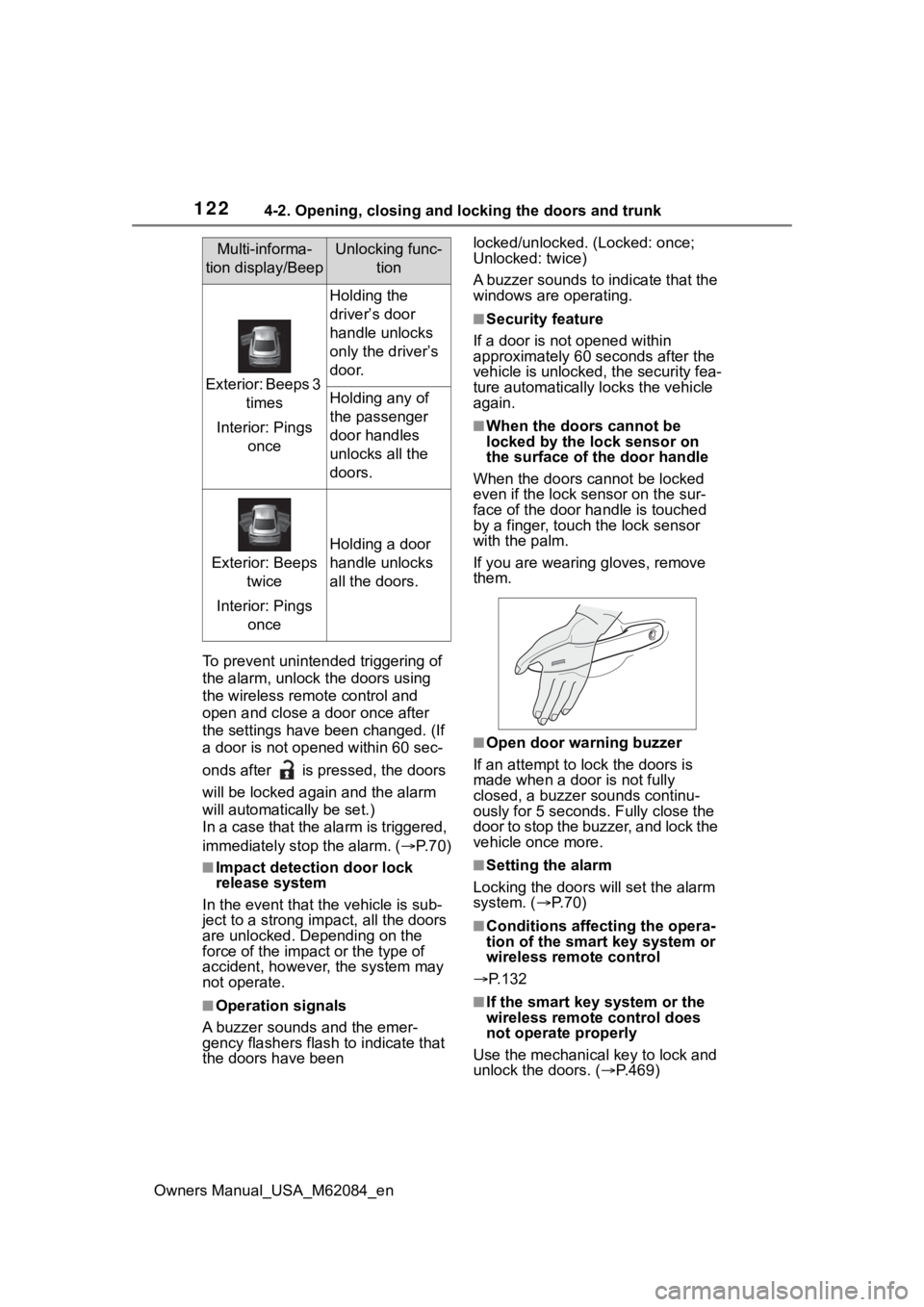
■When the doors cannot be
locked by the lock sensor on
the surface of the door handle
When the doors cannot be locked
even if the lock se nsor on the sur-
face of the door handle is touched
by a finger, touch the lock sensor
with the palm.
If you are wearing gloves, remove
them.
■Open door warning buzzer
If an attempt to lock the doors is
made when a door is not fully
closed, a buzzer sounds continu-
ously for 5 seconds. Fully close the
door to stop the buzzer, and lock the
vehicle once more.
■Setting the alarm
Locking the doors will set the alarm
system. ( P. 7 0 )
■Conditions affecting the opera-
tion of the smart key system or
wireless remote control
P.132
■If the smart key system or the
wireless remote control does
not operate properly
Use the mechanical key to lock and
unlock the doors. ( P.469)
Multi-informa-
tion display/BeepUnlocking func- tion
Exterior: Beeps 3 times
Interior: Pings once
Holding the
driver’s door
handle unlocks
only the driver’s
door.
Holding any of
the passenger
door handles
unlocks all the
doors.
Exterior: Beeps twice
Interior: Pings once
Holding a door
handle unlocks
all the doors.
Page 126 of 556
1264-2. Opening, closing and locking the doors and trunk
Owners Manual_USA_M62084_en
Tr unk
The trunk can be opened
using the trunk opener
switch, entry function or
wireless remote control.
WARNING
Observe the following precau-
tions.
Failure to do so may result in
death or serious injury.
■Before driving
●Make sure that the trunk lid is
fully closed. If the trunk lid is not
fully closed, it may open unex-
pectedly while driving and hit
near-by objects or luggage in
the trunk may be thrown out,
causing an accident.
●Do not allow child ren to play in
the trunk.
If a child is accidentally locked
in the trunk, they could suffer
from heat exhaustion, suffoca-
tion or other injuries.
●Do not allow a child to open or
close the trunk lid.
Doing so may cause the trunk
lid to open unexpectedly, or
cause the child’s hands, head,
or neck to be caught by the
closing trunk lid.
■Important points while driving
Never let anyone sit in the trunk.
In the event of sudden braking or
a collision, they are susceptible to
death or serious injury.
■Using the trunk
Observe the following precau-
tions.
Failure to do so may cause parts
of the body to be caught, resulting
in serious injury.
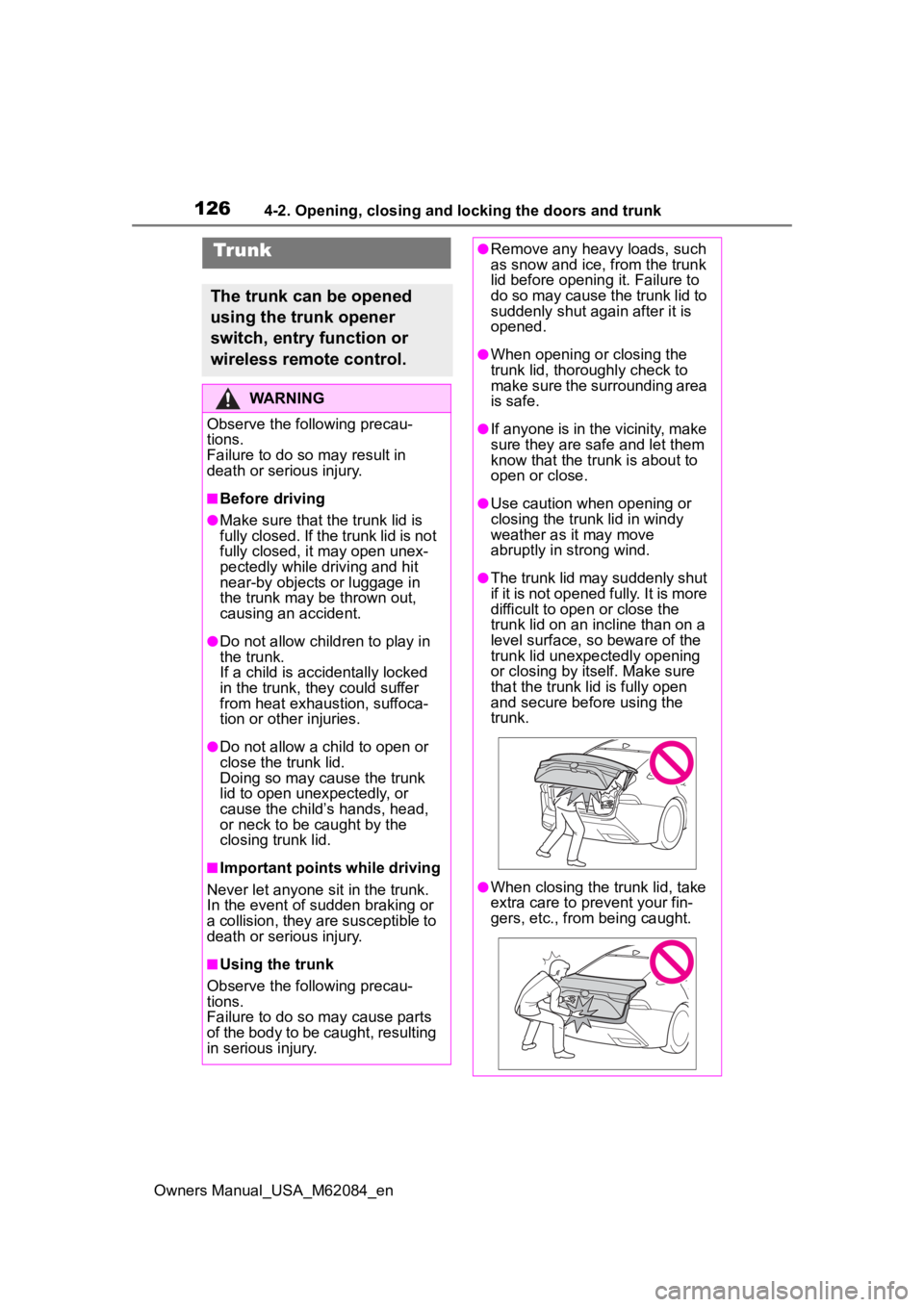
●Remove any heavy loads, such
as snow and ice, from the trunk
lid before openin g it. Failure to
do so may cause the trunk lid to
suddenly shut again after it is
opened.
●When opening or closing the
trunk lid, thoroughly check to
make sure the surrounding area
is safe.
●If anyone is in the vicinity, make
sure they are safe and let them
know that the trunk is about to
open or close.
●Use caution when opening or
closing the trunk lid in windy
weather as it may move
abruptly in strong wind.
●The trunk lid may suddenly shut
if it is not opened fully. It is more
difficult to ope n or close the
trunk lid on an incline than on a
level surface, so beware of the
trunk lid unexpectedly opening
or closing by itself. Make sure
that the trunk lid is fully open
and secure before using the
trunk.
●When closing the trunk lid, take
extra care to pre vent your fin-
gers, etc., from being caught.
Page 129 of 556
1294-2. Opening, closing and locking the doors and trunk
Owners Manual_USA_M62084_en
4
Before driving
■Using the mechanical key
The trunk can be also opened using
the mechanical key. ( P.469)
■If the smart key system or the
wireless remote control does
not operate properly
Use the mechanical key to unlock
the trunk. ( P.469)
Replace the key battery with a new
one if it is depleted.
■Open door warning buzzer
P. 1 2 4
■Customization
Some functions can be customized.
( P.498)
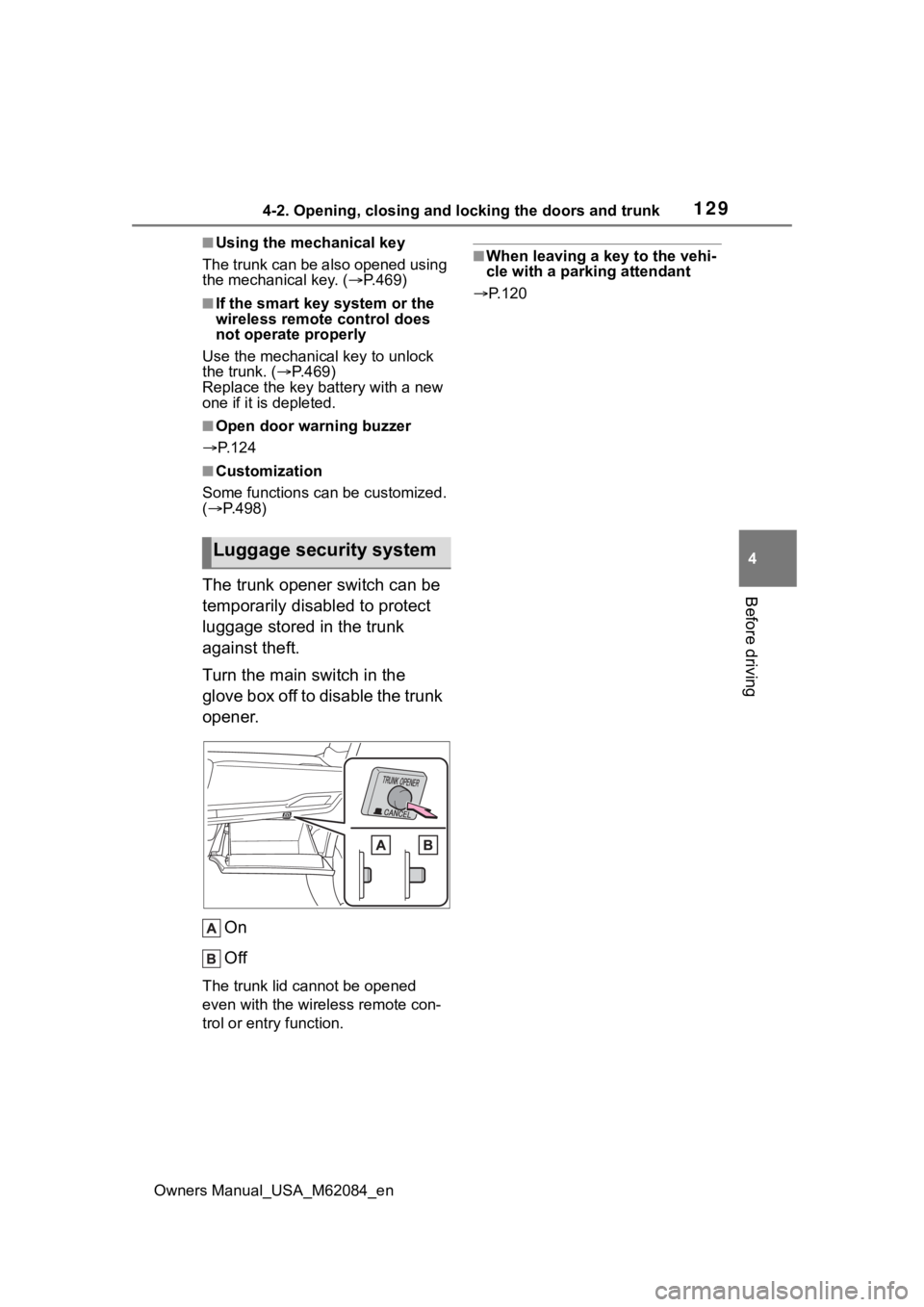
The trunk opener switch can be
temporarily disabled to protect
luggage stored in the trunk
against theft.
Turn the main switch in the
glove box off to disable the trunk
opener.
On
Off
The trunk lid cannot be opened
even with the wireless remote con-
trol or entry function.
■When leaving a key to the vehi-
cle with a parking attendant
P.120
Luggage security system
Page 133 of 556

1334-2. Opening, closing and locking the doors and trunk
Owners Manual_USA_M62084_en
4
Before driving
doors detecting the electronic key
can be used to unl ock the vehicle.
●Even if the electronic key is not
inside the vehicle, it may be possi-
ble to start the fuel cell system if
the electronic key is near the win-
dow.
●The doors may unlock or lock if a
large amount of water splashes on
the door handle, such as in the
rain or in a car wash, when the
electronic key is within the effec-
tive range. (The doors will auto-
matically be locked after
approximately 60 seconds if the
doors are not opened and closed.)
●If the wireless remote control is
used to lock the doors when the
electronic key is near the vehicle,
there is a possib ility that the door
may not be unlocke d by the entry
function. (Use the wireless remote
control to unloc k the doors.)
●Touching the door lock sensor
while wearing gloves may delay or
prevent lock operation.
●When the lock op eration is per-
formed using the lock sensor, rec-
ognition signals will be shown up
to two consecutive times. After
this, no recogniti on signals will be
given.
●If the door handle becomes wet
while the electronic key is within
the effective ran ge, the door may
lock and unlock repeatedly. In this
case, follow the fo llowing correc-
tion procedures to wash the vehi-
cle:
• Place the electronic key in a loca- tion 6 ft. (2 m) or more away from
the vehicle. (Take care to ensure
that the key is not stolen.)
• Set the electronic key to battery- saving mode to disable the smart
key system. ( P.131)
●If the electronic key is inside the
vehicle and a door handle
becomes wet during a car wash, a
message may be shown on the
multi-informatio n display and a buzzer will sound outside the vehi-
cle. To turn off the alarm, lock all
the doors.
●The lock sensor may not work
properly if it comes into contact
with ice, snow, m
ud, etc. Clean
the lock sensor and attempt to
operate it again.
●A sudden approach to the effec-
tive range or door handle may pre-
vent the doors from being
unlocked. In this case, return the
door handle to the original position
and check that t he doors unlock
before pulling the door handle
again.
●If there is another electronic key in
the detection area, it may take
slightly longer to unlock the doors
after the door handle is gripped.
■When the vehicle is not driven
for extended periods
●To prevent theft of the vehicle, do
not leave the electronic key within
6 ft. (2 m) of the vehicle.
●The smart key system can be
deactivated in advance.
●Setting the electronic key to bat-
tery-saving mode helps to reduce
key battery depletion. ( P.131)
■To operate the system properly
●Make sure to carry the electronic
key when operating the system.
Do not get the electronic key too
close to the vehicle when operat-
ing the system from the outside of
the vehicle.
Depending on the position and hold-
ing condition of the electronic key,
the key may not be detected cor-
rectly and the system may not oper-
ate properly. (The alarm may go off
accidentally, or the door lock pre-
vention function m ay not operate.)
●Do not leave the electronic key
inside the trunk.
The key confinement prevention
function may not operate, depend-
Page 141 of 556
1414-4. Adjusting the steering wheel and mirrors
Owners Manual_USA_M62084_en
4
Before driving
4-4.Adjusting the steering wheel and mirrors
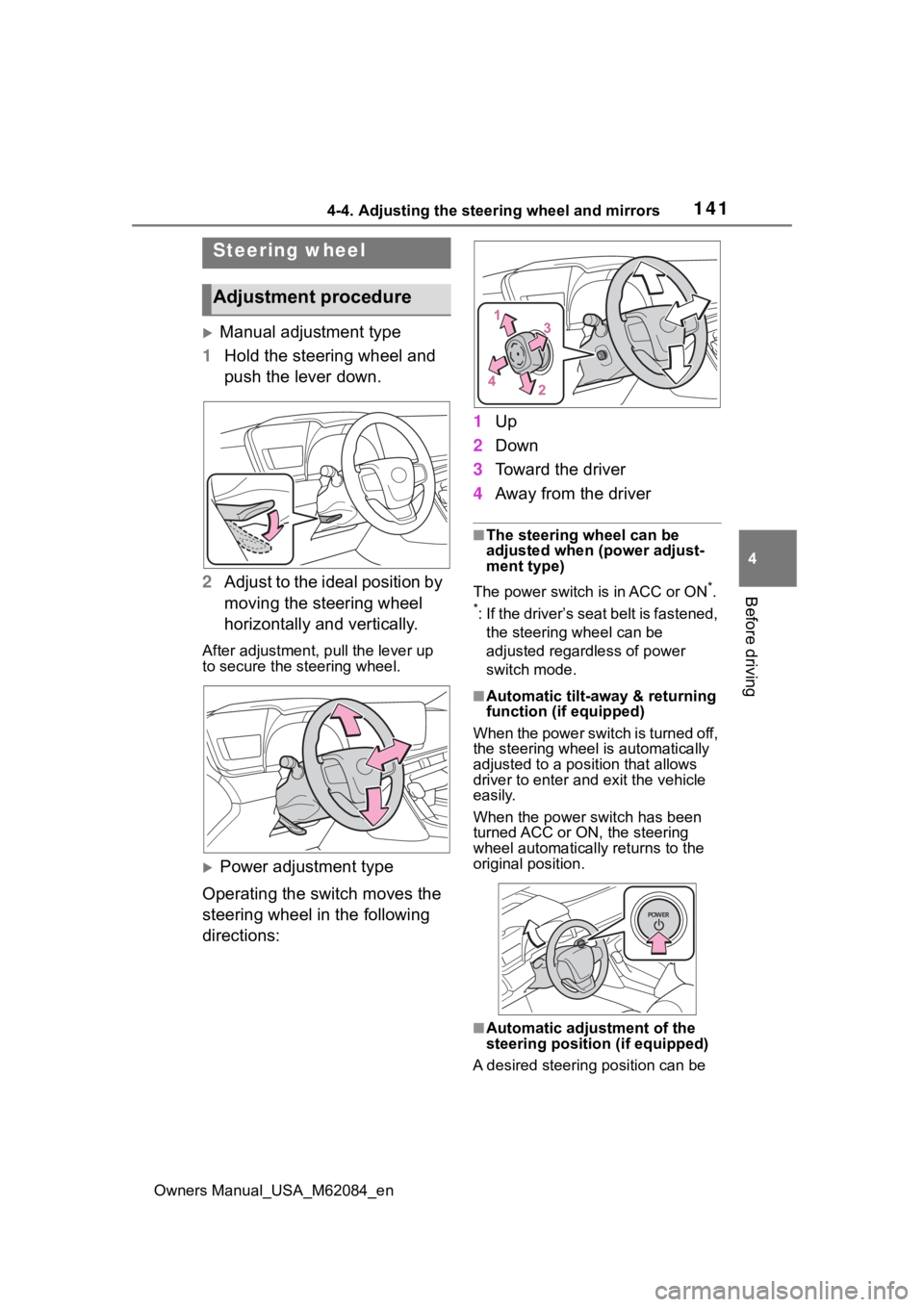
Manual adjustment type
1 Hold the steering wheel and
push the lever down.
2 Adjust to the ideal position by
moving the steering wheel
horizontally and vertically.
After adjustment, pull the lever up
to secure the steering wheel.
Power adjustment type
Operating the switch moves the
steering wheel in the following
directions: 1
Up
2 Down
3 Toward the driver
4 Away from the driver
■The steering wheel can be
adjusted when (power adjust-
ment type)
The power switch is in ACC or ON
*.
*: If the driver’s seat belt is fastened, the steering wheel can be
adjusted regardless of power
switch mode.
■Automatic tilt-away & returning
function (if equipped)
When the power switch is turned off,
the steering wheel is automatically
adjusted to a posit ion that allows
driver to enter and exit the vehicle
easily.
When the power switch has been
turned ACC or ON, the steering
wheel automatically returns to the
original position.
■Automatic adjustment of the
steering positi on (if equipped)
A desired steering position can be
Steering wheel
Adjustment procedure