park assist TOYOTA MIRAI 2022 Owner's Guide
[x] Cancel search | Manufacturer: TOYOTA, Model Year: 2022, Model line: MIRAI, Model: TOYOTA MIRAI 2022Pages: 556, PDF Size: 17.34 MB
Page 304 of 556
3045-5. Using the driving support systems
Owners Manual_USA_M62084_en
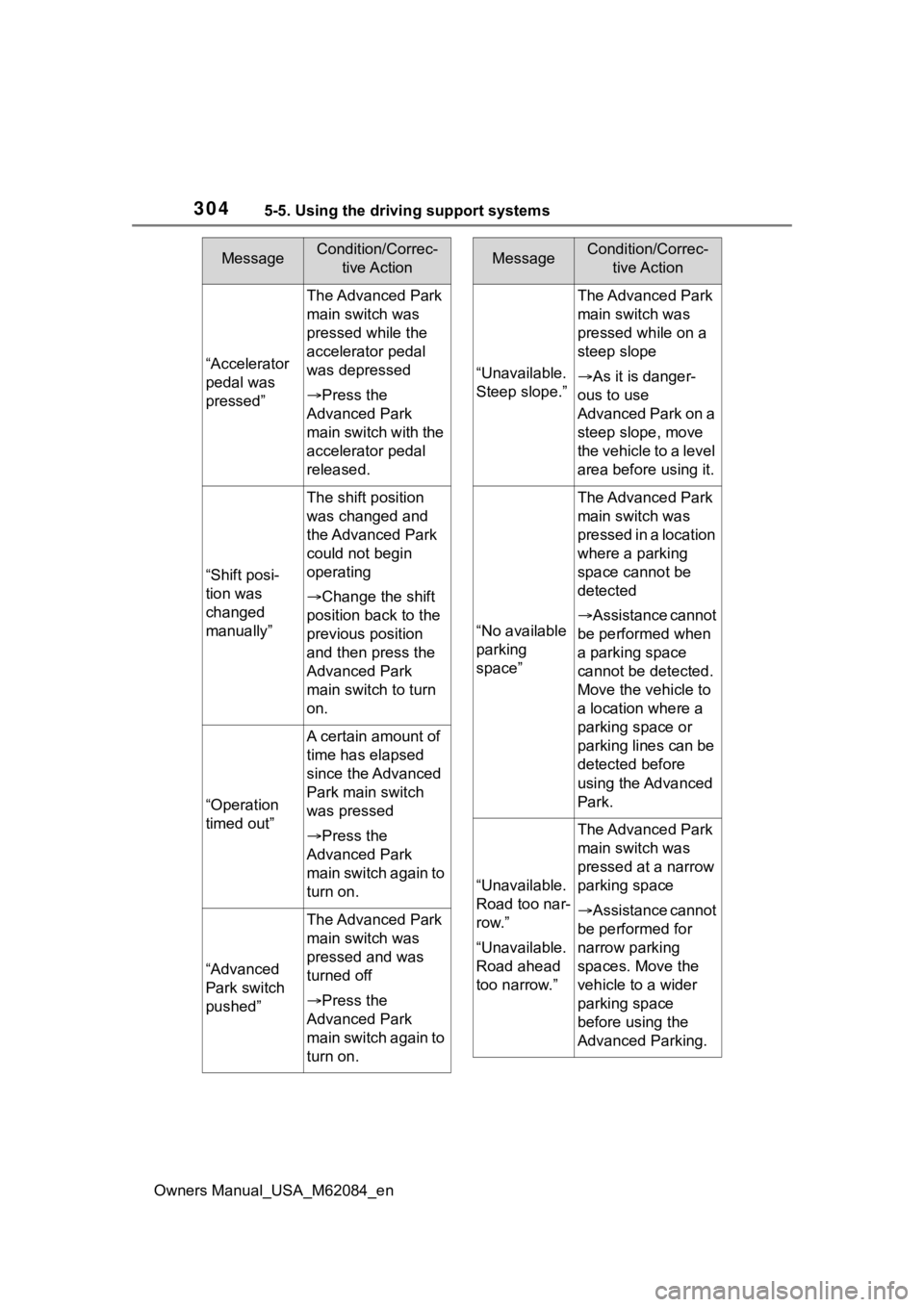
“Accelerator
pedal was
pressed”
The Advanced Park
main switch was
pressed while the
accelerator pedal
was depressed
Press the
Advanced Park
main switch with the
accelerator pedal
released.
“Shift posi-
tion was
changed
manually”
The shift position
was changed and
the Advanced Park
could not begin
operating
Change the shift
position back to the
previous position
and then press the
Advanced Park
main switch to turn
on.
“Operation
timed out”
A certain amount of
time has elapsed
since the Advanced
Park main switch
was pressed
Press the
Advanced Park
main switch again to
turn on.
“Advanced
Park switch
pushed”
The Advanced Park
main switch was
pressed and was
turned off
Press the
Advanced Park
main switch again to
turn on.
MessageCondition/Correc- tive Action
“Unavailable.
Steep slope.”
The Advanced Park
main switch was
pressed while on a
steep slope
As it is danger-
ous to use
Advanced Park on a
steep slope, move
the vehicle to a level
area before using it.
“No available
parking
space”
The Advanced Park
main switch was
pressed in a location
where a parking
space cannot be
detected
Assistance cannot
be performed when
a parking space
cannot be detected.
Move the vehicle to
a location where a
parking space or
parking lines can be
detected before
using the Advanced
Park.
“Unavailable.
Road too nar-
row.”
“Unavailable.
Road ahead
too narrow.”
The Advanced Park
main switch was
pressed at a narrow
parking space
Assistance cannot
be performed for
narrow parking
spaces. Move the
vehicle to a wider
parking space
before using the
Advanced Parking.
MessageCondition/Correc- tive Action
Page 305 of 556
3055-5. Using the driving support systems
Owners Manual_USA_M62084_en
5
Driving
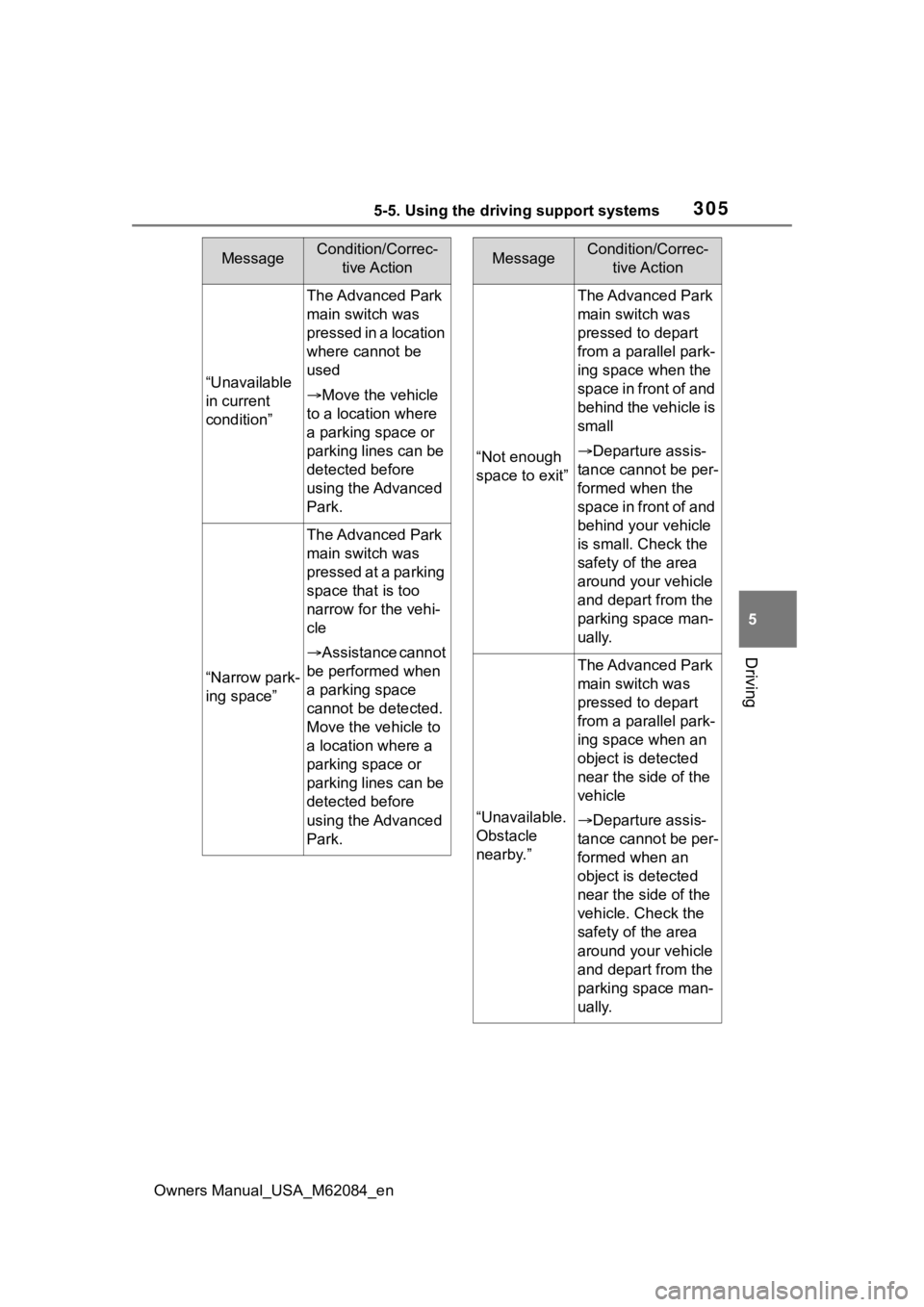
“Unavailable
in current
condition”
The Advanced Park
main switch was
pressed in a location
where cannot be
used
Move the vehicle
to a location where
a parking space or
parking lines can be
detected before
using the Advanced
Park.
“Narrow park-
ing space”
The Advanced Park
main switch was
pressed at a parking
space that is too
narrow for the vehi-
cle
Assistance cannot
be performed when
a parking space
cannot be detected.
Move the vehicle to
a location where a
parking space or
parking lines can be
detected before
using the Advanced
Park.
MessageCondition/Correc- tive Action
“Not enough
space to exit”
The Advanced Park
main switch was
pressed to depart
from a parallel park-
ing space when the
space in front of and
behind the vehicle is
small
Departure assis-
tance cannot be per-
formed when the
space in front of and
behind your vehicle
is small. Check the
safety of the area
around your vehicle
and depart from the
parking space man-
ually.
“Unavailable.
Obstacle
nearby.”
The Advanced Park
main switch was
pressed to depart
from a parallel park-
ing space when an
object is detected
near the side of the
vehicle
Departure assis-
tance cannot be per-
formed when an
object is detected
near the side of the
vehicle. Check the
safety of the area
around your vehicle
and depart from the
parking space man-
ually.
MessageCondition/Correc- tive Action
Page 306 of 556
3065-5. Using the driving support systems
Owners Manual_USA_M62084_en
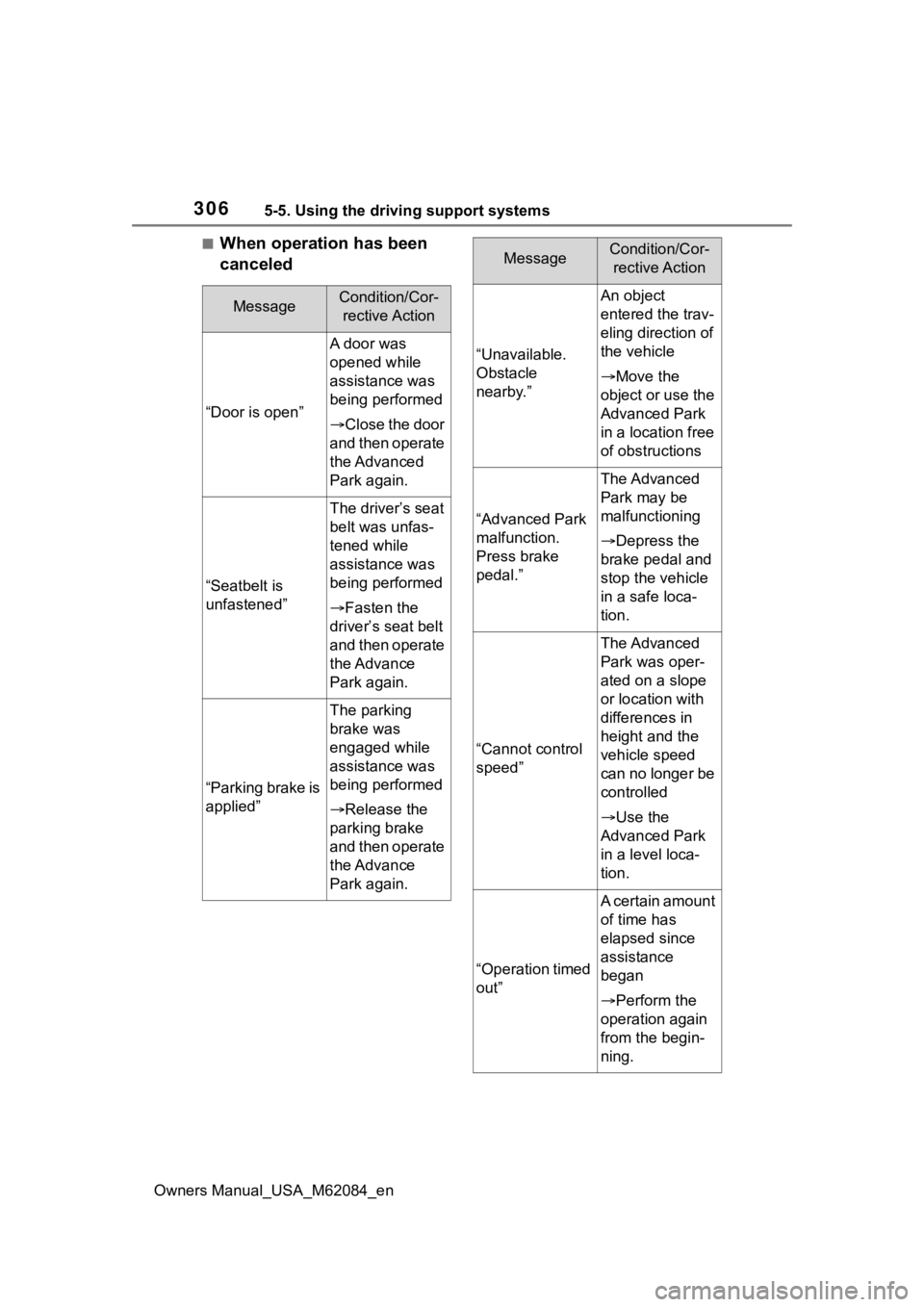
■When operation has been
canceled
MessageCondition/Cor-rective Action
“Door is open”
A door was
opened while
assistance was
being performed
Close the door
and then operate
the Advanced
Park again.
“Seatbelt is
unfastened”
The driver’s seat
belt was unfas-
tened while
assistance was
being performed
Fasten the
driver’s seat belt
and then operate
the Advance
Park again.
“Parking brake is
applied”
The parking
brake was
engaged while
assistance was
being performed
Release the
parking brake
and then operate
the Advance
Park again.
“Unavailable.
Obstacle
nearby.”
An object
entered the trav-
eling direction of
the vehicle
Move the
object or use the
Advanced Park
in a location free
of obstructions
“Advanced Park
malfunction.
Press brake
pedal.”
The Advanced
Park may be
malfunctioning
Depress the
brake pedal and
stop the vehicle
in a safe loca-
tion.
“Cannot control
speed”
The Advanced
Park was oper-
ated on a slope
or location with
differences in
height and the
vehicle speed
can no longer be
controlled
Use the
Advanced Park
in a level loca-
tion.
“Operation timed
out”
A certain amount
of time has
elapsed since
assistance
began
Perform the
operation again
from the begin-
ning.
MessageCondition/Cor- rective Action
Page 311 of 556
3115-5. Using the driving support systems
Owners Manual_USA_M62084_en
5
Driving
are detected, they may cause the
target parking space to be mis-
aligned.
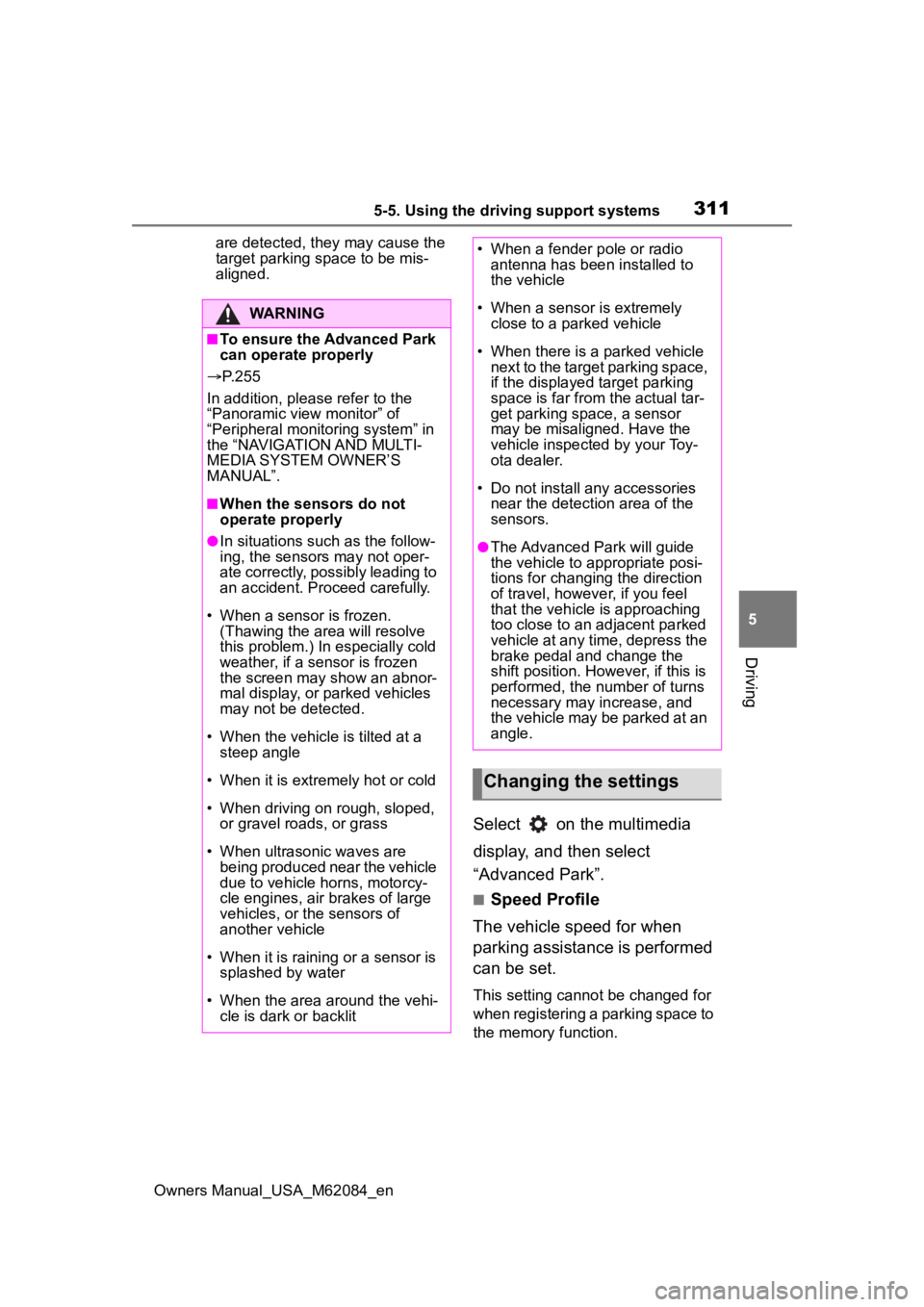
Select on the multimedia
display, and then select
“Advanced Park”.
■Speed Profile
The vehicle speed for when
parking assistance is performed
can be set.
This setting cannot be changed for
when registering a parking space to
the memory function.
WARNING
■To ensure the Advanced Park
can operate properly
P. 2 5 5
In addition, please refer to the
“Panoramic view monitor” of
“Peripheral monito ring system” in
the “NAVIGATION AND MULTI-
MEDIA SYSTEM OWNER’S
MANUAL”.
■When the sensors do not
operate properly
●In situations such as the follow-
ing, the sensors may not oper-
ate correctly, possibly leading to
an accident. Proceed carefully.
• When a sensor is frozen. (Thawing the area will resolve
this problem.) In especially cold
weather, if a sensor is frozen
the screen may show an abnor-
mal display, or parked vehicles
may not be detected.
• When the vehicl e is tilted at a
steep angle
• When it is extremely hot or cold
• When driving on rough, sloped, or gravel roads, or grass
• When ultrasonic waves are being produced near the vehicle
due to vehicle horns, motorcy-
cle engines, air brakes of large
vehicles, or the sensors of
another vehicle
• When it is raining or a sensor is splashed by water
• When the area around the vehi- cle is dark or backlit
• When a fender pole or radio antenna has been installed to
the vehicle
• When a sensor is extremely close to a parked vehicle
• When there is a parked vehicle next to the target parking space,
if the displayed target parking
space is far from the actual tar-
get parking space, a sensor
may be misaligned. Have the
vehicle inspected by your Toy-
ota dealer.
• Do not install any accessories near the detection area of the
sensors.
●The Advanced Park will guide
the vehicle to appropriate posi-
tions for changing the direction
of travel, however, if you feel
that the vehicle is approaching
too close to an adjacent parked
vehicle at any time, depress the
brake pedal and change the
shift position. However, if this is
performed, the number of turns
necessary may increase, and
the vehicle may be parked at an
angle.
Changing the settings
Page 312 of 556
3125-5. Using the driving support systems
Owners Manual_USA_M62084_en
■Obstacle Detection Range
The distance from which obsta-
cles will be avoided while park-
ing assistance is being
performed can be set.
■Preferred Parking Method
The preferred parking direction
displayed when at a parking
space which perpendicular or
parallel parking is possible can
be set.
■Parking Path Adjustment
The course for when parking
assistance is operating can be
adjusted inward or outward.
If the tires are worn, the path of
vehicle may be offset from the cen-
ter of the parking space. In this
case, use this setting to adjust the
parking course.
■Road Width Adjustment
The width of the area in which
the vehicle moves when using
parking assistance can be set.
■Clear Registered Parking
Space
Parking space information regis-
tered to the memory function
can be deleted. 1
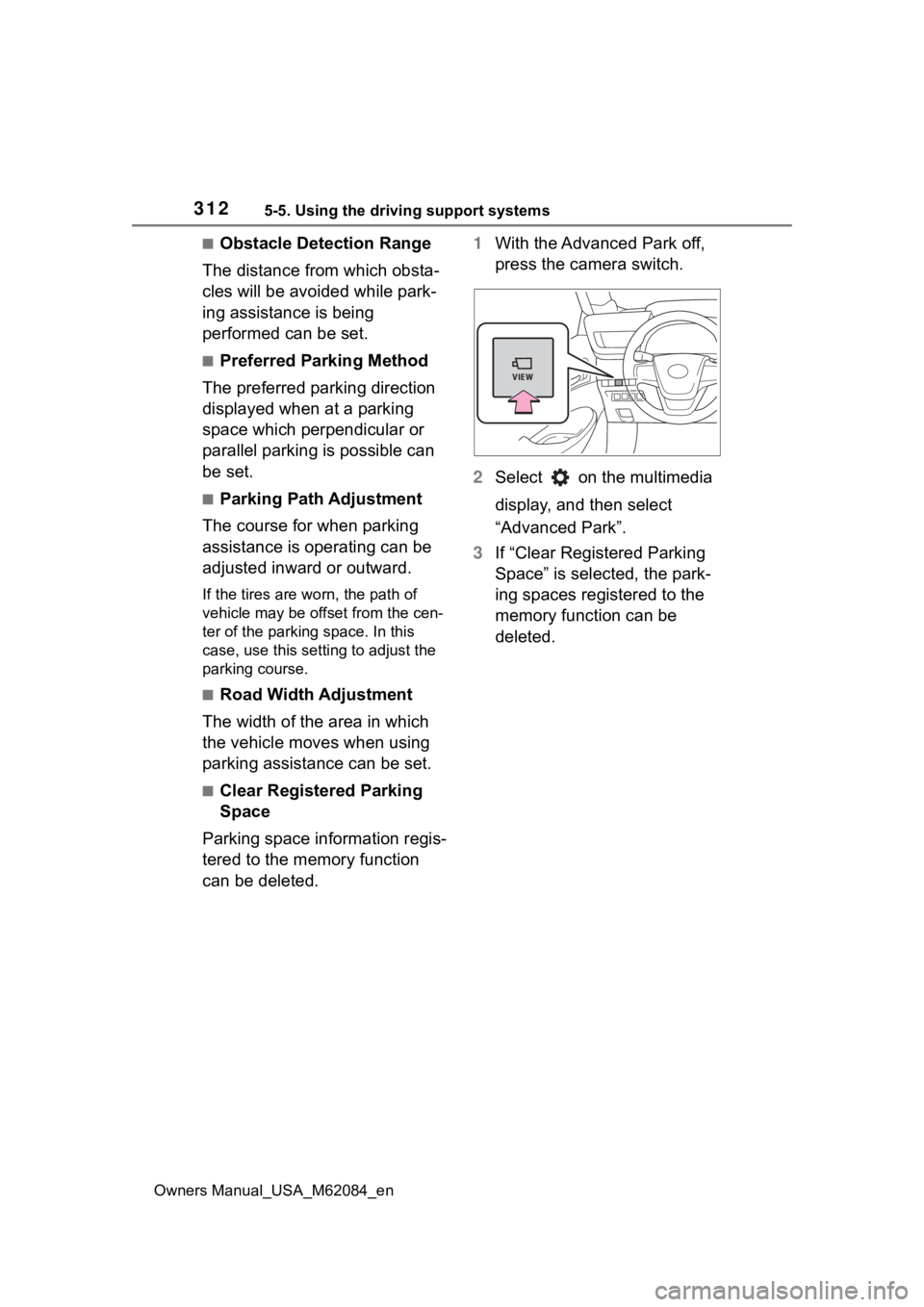
With the Advanced Park off,
press the camera switch.
2 Select on the multimedia
display, and then select
“Advanced Park”.
3 If “Clear Registered Parking
Space” is selected, the park-
ing spaces registered to the
memory function can be
deleted.
Page 317 of 556
3175-5. Using the driving support systems
Owners Manual_USA_M62084_en
5
Driving
■Operating conditions of hill-
start assist control
When the following five conditions
are met, the hill-start assist control
will operate:
●The shift position is in a position
other than P or N (when stating off
forward/backward on an upward
incline)
●The vehicle is stopped
●The accelerator pedal is not
depressed
●The parking brake is not engaged
●Power switch is turned to ON
■Automatic system cancelation
of hill-start as sist control
The hill-start assis t control will turn
off in any of the following situations:
●Shift the shift position to P or N
●The accelerator pedal is
depressed
●The parking brake is engaged
●2 seconds at maximum elapsed
after the brake pedal is released
●Power switch is turned to OFF
■Sounds and vibrations caused
by the ABS, brake assist, VSC,
TRAC and hill-start assist con-
trol systems
●A sound may be heard from the
fuel cell unit compartment when
the brake pedal is depressed
repeatedly, when the fuel cell sys-
tem is started or just after the vehi-
cle begins to move. This sound
does not indicate that a malfunc-
tion has occurred in any of these
systems.
●Any of the following conditions
may occur when t he above sys-
tems are operating. None of these
indicates that a malfunction has
occurred.
• Vibrations may be felt through the vehicle body and steering.
• A motor sound may be heard also
after the vehicle comes to a stop. • The brake pedal
may pulsate
slightly after the ABS is activated.
• The brake pedal may move down
slightly after the ABS is activated.
■ECB operating sound
ECB operating sound may be heard
in the following cases, but it does
not indicate that a malfunction has
occurred.
●Operating sound heard from the
fuel cell unit compartment when
the brake pedal is operated.
●Motor sound of the brake system
heard from the f ront part of the
vehicle when the driver’s door is
opened.
●Operating sound heard from the
fuel cell unit compartment when
one or two minutes passed after
the stop of the fuel cell system.
■Active Cornering Assist opera-
tion sounds and vibrations
When the Active Cornering Assist is
operated, operation sounds and
vibrations may be generated from
the brake system, but this is not a
malfunction.
■EPS operation sound
When the steering wheel is oper-
ated, a motor sound (whirring
sound) may be heard. This does not
indicate a malfunction.
■Automatic reactivation of TRAC
and VSC systems
After turning th e TRAC and VSC
systems off, the systems will be
automatically re-enabled in the fol-
lowing situations:
●When the power switch is turned
off
●If only the TRAC sy stem is turned
off, the TRAC will turn on when
vehicle speed increases
If both the TRAC and VSC sys-
tems are turned of f, automatic re-
enabling will not occur when vehi-
cle speed increases.
Page 319 of 556
3195-5. Using the driving support systems
Owners Manual_USA_M62084_en
5
Driving
WARNING
●When Active Cornering Assist
frequently operates, Active Cor-
nering Assist may temporarily
stop operating to ensure proper
operation of the brakes, TRAC
and VSC.
■Hill-start assist control does
not operate effectively when
●Do not overly rely on hill-start
assist control. Hill-start assist
control may not operate effec-
tively on steep inclines and
roads covered with ice.
●Unlike the parking brake, hill-
start assist control is not
intended to hold the vehicle sta-
tionary for an extended period
of time. Do not attempt to use
hill-start assist control to hold
the vehicle on an incline, as
doing so may lead to an acci-
dent.
■When the TRAC/ABS/VSC is
activated
The slip indicator light flashes.
Always drive carefully. Reckless
driving may cause an accident.
Exercise particular care when the
indicator light flashes.
■When the TRAC/VSC systems
are turned off
Be especially careful and drive at
a speed appropriate to the road
conditions. As these are the sys-
tems to help ensure vehicle stabil-
ity and driving force, do not turn
the TRAC/VSC systems off
unless necessary.
■Secondary Collision Brake
Do not rely solely upon the Sec-
ondary Collision Brake. This sys-
tem is designed to help reduce
the possibility of further damage
due to a secondary collision, how-
ever, that effect changes accord-
ing to various conditions. Overly
relying on the system may result
in death or serious injury.
■Replacing tires
Make sure that all tires are of the
specified size, brand, tread pat-
tern and total load capacity. In
addition, make sure that the tires
are inflated to the recommended
tire inflation p ressure level.
The ABS, TRAC and VSC sys-
tems will not functi on correctly if
different tires are installed on the
vehicle.
Contact your Toyota dealer for fur-
ther information when replacing
tires or wheels.
■Handling of tires and the sus-
pension
Using tires with any kind of prob-
lem or modifying the suspension
will affect the driving assist sys-
tems, and may cause a system to
malfunction.
Page 438 of 556
4388-2. Steps to take in an emergency
Owners Manual_USA_M62084_en
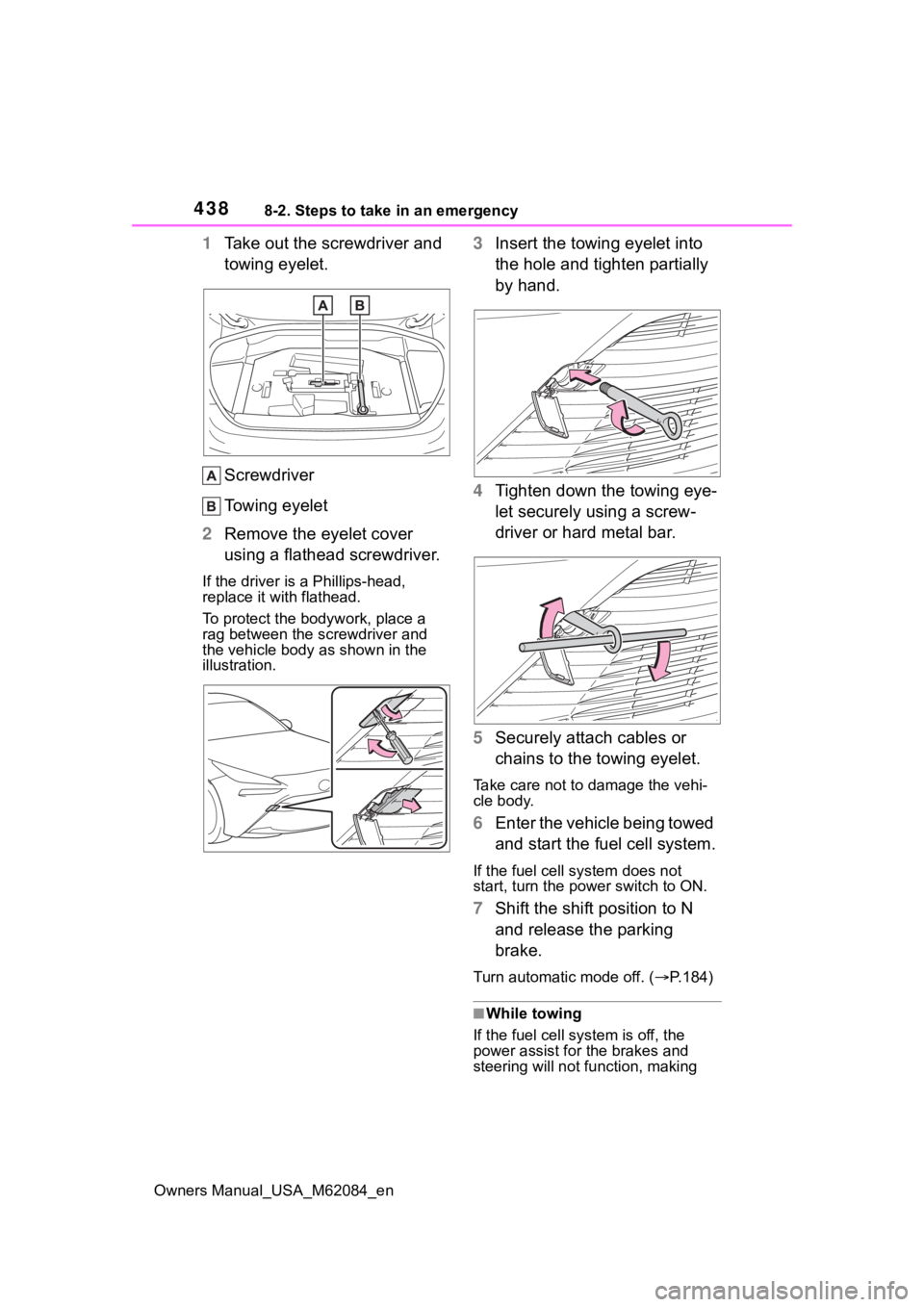
1Take out the screwdriver and
towing eyelet.
Screwdriver
Towing eyelet
2 Remove the eyelet cover
using a flathead screwdriver.
If the driver is a Phillips-head,
replace it with flathead.
To protect the bod ywork, place a
rag between the screwdriver and
the vehicle body as shown in the
illustration.
3 Insert the towing eyelet into
the hole and tighten partially
by hand.
4 Tighten down the towing eye-
let securely using a screw-
driver or hard metal bar.
5 Securely attach cables or
chains to the towing eyelet.
Take care not to damage the vehi-
cle body.
6Enter the vehicle being towed
and start the fuel cell system.
If the fuel cell system does not
start, turn the po wer switch to ON.
7Shift the shift position to N
and release the parking
brake.
Turn automatic mode off. ( P.184)
■While towing
If the fuel cell sys tem is off, the
power assist for the brakes and
steering will not function, making
Page 444 of 556
4448-2. Steps to take in an emergency
Owners Manual_USA_M62084_en
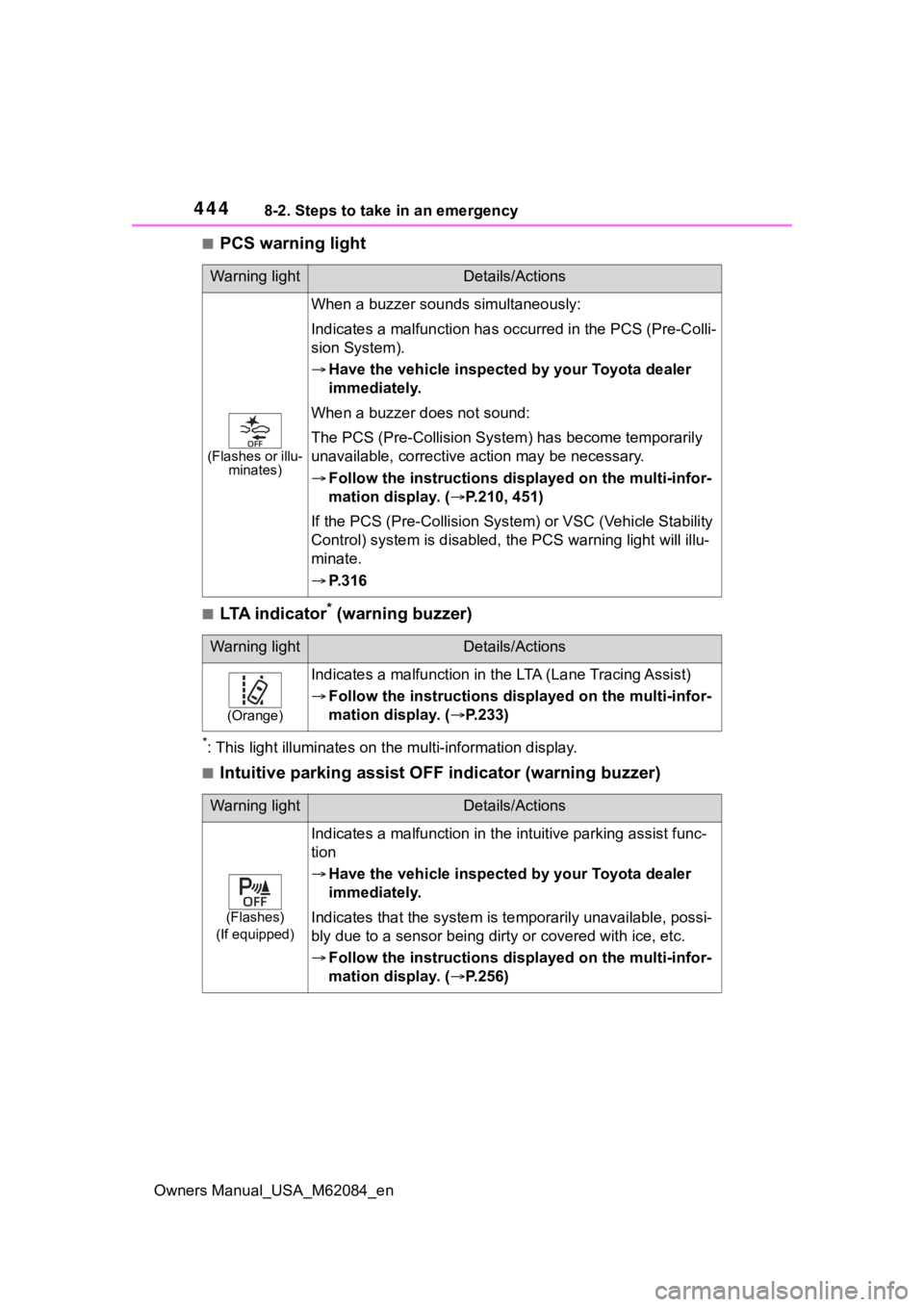
■PCS warning light
■LTA indicator* (warning buzzer)
*: This light illuminat es on the multi-information display.
■Intuitive parking assist OFF indicator (warning buzzer)
Warning lightDetails/Actions
(Flashes or illu-
minates)
When a buzzer sounds simultaneously:
Indicates a malfunct ion has occurred in the PCS (Pre-Colli-
sion System).
Have the vehicle inspecte d by your Toyota dealer
immediately.
When a buzzer does not sound:
The PCS (Pre-Collision Syst em) has become temporarily
unavailable, corrective ac tion may be necessary.
Follow the instructions dis played on the multi-infor-
mation display. ( P.210, 451)
If the PCS (Pre-Collision Syst em) or VSC (Vehicle Stability
Control) system is disabled, the PCS warning light will illu-
minate.
P.316
Warning lightDetails/Actions
(Orange)
Indicates a malfunction in t he LTA (Lane Tracing Assist)
Follow the instructions dis played on the multi-infor-
mation display. ( P.233)
Warning lightDetails/Actions
(Flashes)
(If equipped)
Indicates a malfunction in the i ntuitive parking assist func-
tion
Have the vehicle inspecte d by your Toyota dealer
immediately.
Indicates that the system is te mporarily unavailable, possi-
bly due to a sensor being dirt y or covered with ice, etc.
Follow the instructions dis played on the multi-infor-
mation display. ( P.256)
Page 453 of 556
4538-2. Steps to take in an emergency
Owners Manual_USA_M62084_en
8
When trouble arises
●LTA (Lane Tracing Assist)
●Automatic High Beam
●RSA (Road Sign Assist) (if
equipped)
●Dynamic radar cruise control with
full-speed range
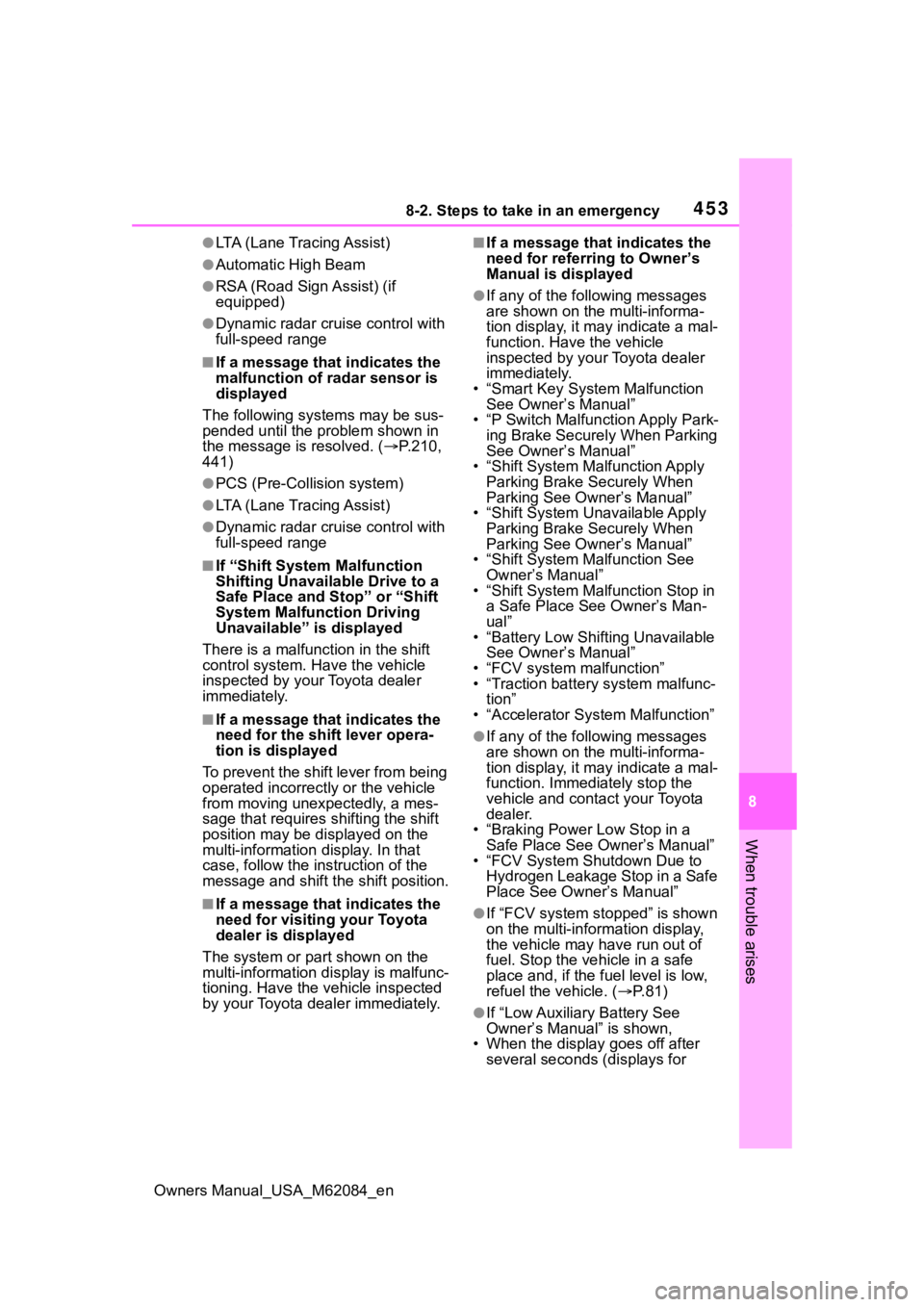
■If a message that indicates the
malfunction of radar sensor is
displayed
The following sys tems may be sus-
pended until the pr oblem shown in
the message is resolved. ( P.210,
441)
●PCS (Pre-Collision system)
●LTA (Lane Tracing Assist)
●Dynamic radar cruise control with
full-speed range
■If “Shift System Malfunction
Shifting Unavailable Drive to a
Safe Place and Stop” or “Shift
System Malfunction Driving
Unavailable” is displayed
There is a malfunction in the shift
control system. Have the vehicle
inspected by your Toyota dealer
immediately.
■If a message that indicates the
need for the shift lever opera-
tion is displayed
To prevent the shift lever from being
operated incorrectly or the vehicle
from moving unexpectedly, a mes-
sage that requires shifting the shift
position may be displayed on the
multi-information display. In that
case, follow the in struction of the
message and shift the shift position.
■If a message that indicates the
need for visiting your Toyota
dealer is displayed
The system or part shown on the
multi-information di splay is malfunc-
tioning. Have the vehicle inspected
by your Toyota dealer immediately.
■If a message that indicates the
need for referring to Owner’s
Manual is displayed
●If any of the following messages
are shown on the multi-informa-
tion display, it may indicate a mal-
function. Have the vehicle
inspected by your Toyota dealer
immediately.
• “Smart Key System Malfunction See Owner’s Manual”
• “P Switch Malfunction Apply Park- ing Brake Securely When Parking
See Owner’s Manual”
• “Shift System Mal function Apply
Parking Brake Securely When
Parking See Owner’s Manual”
• “Shift System Unavailable Apply Parking Brake Securely When
Parking See Owner’s Manual”
• “Shift System M alfunction See
Owner’s Manual”
• “Shift System Malfunction Stop in
a Safe Place See Owner’s Man-
ual”
• “Battery Low Shifting Unavailable
See Owner’s Manual”
• “FCV system malfunction”
• “Traction battery system malfunc- tion”
• “Accelerator System Malfunction”
●If any of the following messages
are shown on the multi-informa-
tion display, it may indicate a mal-
function. Immediately stop the
vehicle and contact your Toyota
dealer.
• “Braking Power Low Stop in a Safe Place See Owner’s Manual”
• “FCV System Shutdown Due to
Hydrogen Leakage Stop in a Safe
Place See Owner’s Manual”
●If “FCV system stopped” is shown
on the multi-information display,
the vehicle may have run out of
fuel. Stop the vehicle in a safe
place and, if the fuel level is low,
refuel the vehicle. ( P.81)
●If “Low Auxiliary Battery See
Owner’s Manual” is shown,
• When the display goes off after
several seconds (displays for