wheel TOYOTA MIRAI 2022 Owner's Guide
[x] Cancel search | Manufacturer: TOYOTA, Model Year: 2022, Model line: MIRAI, Model: TOYOTA MIRAI 2022Pages: 556, PDF Size: 17.34 MB
Page 155 of 556
1554-4. Adjusting the steering wheel and mirrors
Owners Manual_USA_M62084_en
4
Before driving
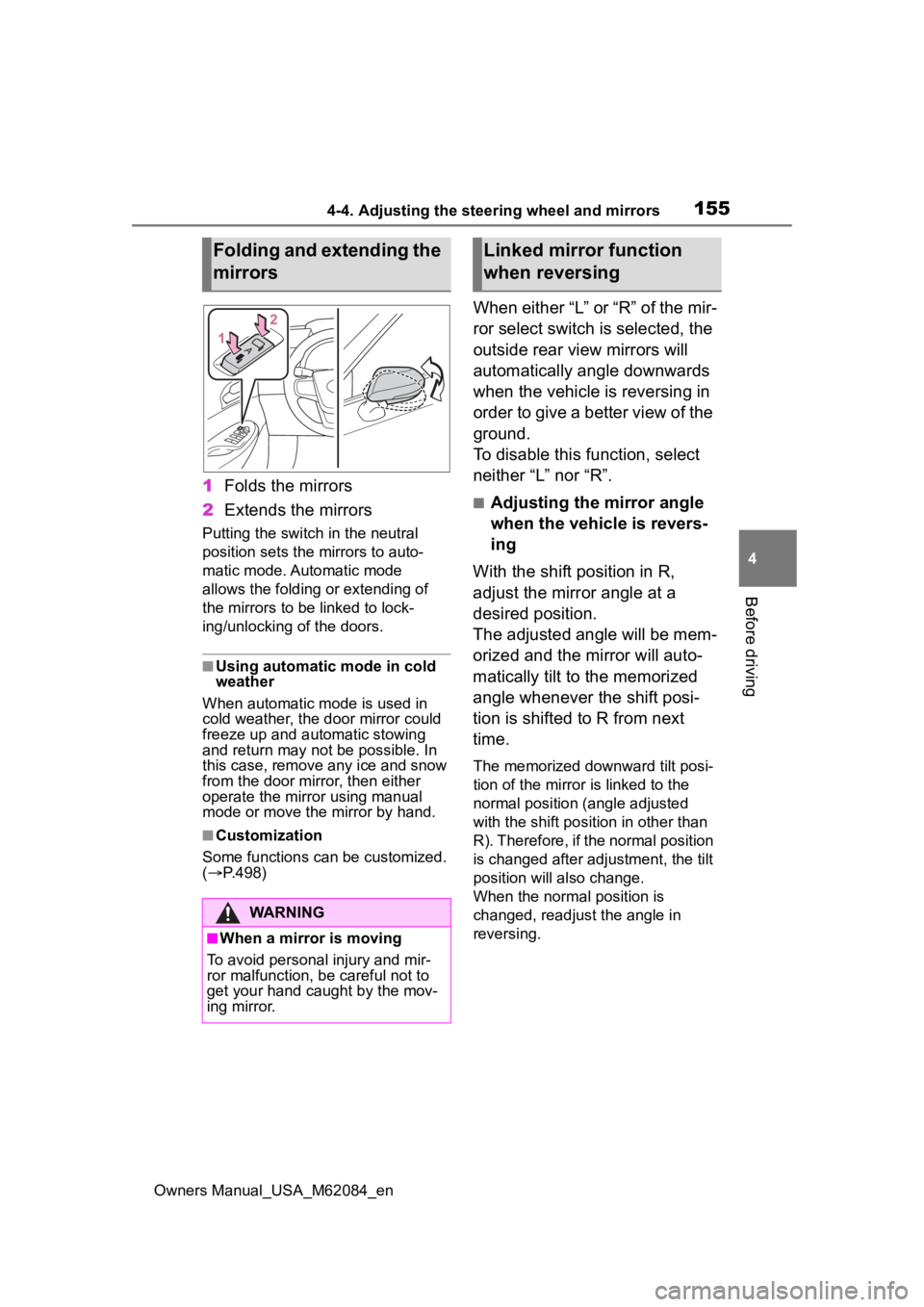
1 Folds the mirrors
2 Extends the mirrors
Putting the switch in the neutral
position sets the mirrors to auto-
matic mode. Automatic mode
allows the folding or extending of
the mirrors to be linked to lock-
ing/unlocking of the doors.
■Using automatic mode in cold
weather
When automatic mode is used in
cold weather, the door mirror could
freeze up and aut omatic stowing
and return may not be possible. In
this case, remove any ice and snow
from the door mirror, then either
operate the mirror using manual
mode or move the mirror by hand.
■Customization
Some functions can be customized.
( P.498)
When either “L” or “R” of the mir-
ror select switch is selected, the
outside rear view mirrors will
automatically angle downwards
when the vehicle is reversing in
order to give a better view of the
ground.
To disable this function, select
neither “L” nor “R”.
■Adjusting the mirror angle
when the vehicle is revers-
ing
With the shift position in R,
adjust the mirror angle at a
desired position.
The adjusted angle will be mem-
orized and the mirror will auto-
matically tilt to the memorized
angle whenever the shift posi-
tion is shifted to R from next
time.
The memorized downward tilt posi-
tion of the mirror is linked to the
normal position (angle adjusted
with the shift posit ion in other than
R). Therefore, if the normal position
is changed after adjustment, the tilt
position will also change.
When the normal position is
changed, readjust the angle in
reversing.
Folding and extending the
mirrors
WARNING
■When a mirror is moving
To avoid personal injury and mir-
ror malfunction, be careful not to
get your hand caught by the mov-
ing mirror.
Linked mirror function
when reversing
Page 161 of 556
1615-1. Before driving
Owners Manual_USA_M62084_en
5
Driving
5-1.Before driving
■Starting the fuel cell system
P. 1 7 2
■Driving
1 With the brake pedal
depressed, shift the shift
position to D.
Check that the shift position indica-
tor shows D.
2If the parking brake is set,
release the parking brake.
( P.183)
If the parking brake is in automatic
mode, the parking brake is release
automatically when shifting the shift
lever to any position other than P.
( P.184)
3 Gradually release the brake
pedal and gently depress the
accelerator pedal to acceler-
ate the vehicle.
■Stopping
1 Depress the brake pedal.
2 If necessary, set the parking
brake.
If the vehicle is to be stopped for an
extended period of time, shift the
shift position to P. ( P.178)
■Parking the vehicle
1 Depress the brake pedal to
stop the vehicle completely. 2
If the parking brake is
released, set the parking
brake. ( P.183)
3 Shift the shift position to P.
( P.178)
Check that the shif t position indica-
tor shows P and the parking brake
indicator is illuminated.
4 Press the power switch to
stop the fuel cell system.
5 Slowly release the brake
pedal.
6 Lock the door, making sure
that you have the electronic
key on your person.
If parking on a hill, block the wheels
as needed.
■Starting off on a steep
uphill
1 Firmly depress the brake
pedal and shift the shift posi-
tion to D.
The hill-start assist control will be
activated.
2Set the parking brake.
( P.183)
3 Release the brake pedal and
gently depress the accelera-
tor pedal to accelerate the
vehicle.
4 Release the parking brake.
( P.183)
■For fuel-efficient driving
Keep in mind that fuel cell vehicles
are similar to conventional vehicles,
and it is necessary to refrain from
activities such as sudden accelera-
tion. ( P. 8 9 )
Driving the vehicle
The following procedures
should be observed to
ensure safe driving:
Driving procedure
Page 163 of 556
1635-1. Before driving
Owners Manual_USA_M62084_en
5
Driving
WARNING
■When starting the vehicle
Always keep your foot on the
brake pedal while stopped with
the “READY” indicator is illumi-
nated. This prevents the vehicle
from creeping.
■When driving the vehicle
●Do not drive if y ou are unfamil-
iar with the location of the brake
and accelerator pedals to avoid
depressing the wrong pedal.
• Accidentally depressing the accelerator pedal instead of the
brake pedal will result in sudden
acceleration that may lead to an
accident.
• When backing up, you may twist your body around, leading to dif-
ficulty in operating the pedals.
Make sure to operate the pedals
properly.
• Make sure to keep a correct driving posture even when mov-
ing the vehicle only slightly. This
allows you to depress the brake
and accelerator pedals properly.
• Depress the brake pedal using your right foot. Depressing the
brake pedal using your left foot
may delay respon se in an emer-
gency, resulting in an accident.
●The driver should pay extra
attention to pedes trians as this
vehicle is powered only by an
electric motor (traction motor).
As there is no engine noise, the
pedestrians may misjudge the
vehicle’s movement. Even with
the acoustic vehicle alerting
system activate, d rive with care
as pedestrians in the vicinity
may still not notice the vehicle if
the surrounding area is noisy.
●During normal driving, do not
turn off the fuel cell system.
Turning the fuel cell system off
while driving will not cause loss
of steering or braking control,
however, power assist to the
steering will be lost. This will
make it more difficult to steer
smoothly, so you should pull
over and stop the vehicle as
soon as it is safe to do so.
In the event of a n emergency,
such as if it becomes impossible
to stop the vehicle in the normal
way: P. 4 3 2
●Using the brakes continuously
may cause the brakes to over-
heat and lose effectiveness
when driving down a steep hill.
●Do not adjust the positions of
the steering wheel, the seat, or
the inside or outside rear view
mirrors while driving.
Doing so may result in a loss of
vehicle control.
●Always check that all passen-
gers’ arms, heads or other parts
of their body are not outside the
vehicle.
●Do not drive in excess of the
speed limit. Even if the legal
speed limit permits it, do not
drive over 85 mph (140 km/h)
unless your vehicle has high-
speed capability tires. Driving
over 85 mph (140 km/h) may
result in tire fa ilure, loss of con-
trol and possible injury. Be sure
to consult a tire dealer to deter-
mine whether the tires on your
vehicle are high-speed capabil-
ity tires or not before driving at
such speeds.
■When driving on slippery
road surfaces
●Sudden braking, acceleration
and steering may cause tire
slippage and reduce your ability
to control the vehicle.
Page 166 of 556
1665-1. Before driving
Owners Manual_USA_M62084_en
WARNING
●The brake system consists of 2
or more individual hydraulic sys-
tems; if one of the systems fails,
the other(s) will still operate. In
this case, the brake pedal
should be depressed more
firmly than usual and the brak-
ing distance will increase. Have
your brakes fixed immediately.
NOTICE
■When driving the vehicle
●Do not depress t he accelerator
and brake pedals at the same
time during drivin g, as this may
restrain the fuel cell system out-
put.
●Do not use the accelerator
pedal or depress the accelera-
tor and brake pedals at the
same time to hold the vehicle on
a hill.
■When parking the vehicle
Always set the parking brake, and
shift the shift position to P. Failure
to do so may cause the vehicle to
move or the vehi cle may acceler-
ate suddenly if the accelerator
pedal is accidentally depressed.
■Avoiding damage to vehicle
parts
●Do not turn the steering wheel
fully in either direction and hold
it there for an extended period
of time.
Doing so may damage the
power steering motor.
●When driving over bumps in the
road, drive as slowly as possible
to avoid damagi ng the wheels,
underside of the vehicle, etc.
■If you get a flat tire while driv-
ing
A flat or damaged tire may cause
the following situations. Hold the
steering wheel firmly and gradu-
ally depress the brake pedal to
slow down the vehicle.
●It may be difficult to control your
vehicle.
●The vehicle will make abnormal
sounds or vibrations.
●The vehicle will lean abnor-
mally.
Information on what to do in case
of a flat tire ( P.455)
■When encountering flooded
roads
Do not drive on a road that has
flooded after heavy rain, etc.
Doing so may cause the following
serious damage to the vehicle:
●Fuel cell system stalling
●Short in electrical components
●Fuel cell system damage
caused by water immersion
In the event that you drive on a
flooded road and the vehicle is
flooded, be sure to have your Toy-
ota dealer check the following:
●Fuel cell system
●Brake function
●Changes in quantity and quality
of transmission fluid, etc.
●Lubricant condition for the bear-
ings and suspension joints
(where possible), and the func-
tion of all joints, bearings, etc.
Page 171 of 556
1715-1. Before driving
Owners Manual_USA_M62084_en
5
Driving
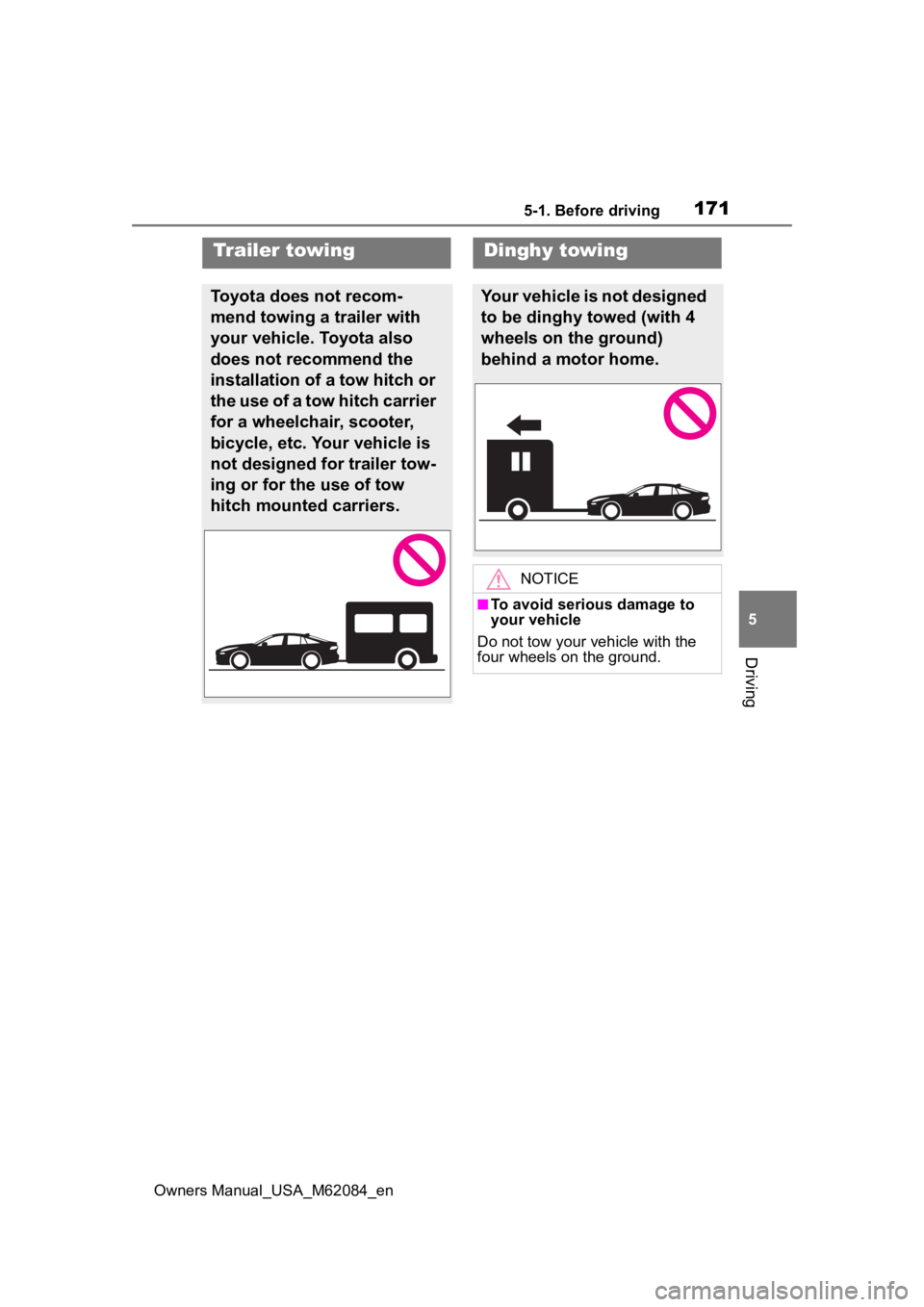
Trailer towing
Toyota does not recom-
mend towing a trailer with
your vehicle. Toyota also
does not recommend the
installation of a tow hitch or
the use of a tow hitch carrier
for a wheelchair, scooter,
bicycle, etc. Your vehicle is
not designed for trailer tow-
ing or for the use of tow
hitch mounted carriers.
Dinghy towing
Your vehicle is not designed
to be dinghy towed (with 4
wheels on the ground)
behind a motor home.
NOTICE
■To avoid serious damage to
your vehicle
Do not tow your vehicle with the
four wheels on the ground.
Page 173 of 556
1735-2. Driving procedures
Owners Manual_USA_M62084_en
5
Driving
Shutdown Due to Freezing Stop in
a Safe Place See Owner’s Man-
ual” may be displayed in the multi-
information display.
The fuel cell system is frozen and
cannot be started. Contact your Toy-
ota dealer.
●The power output will be tempo-
rarily limited until the fuel cell sys-
tem reaches full operating
temperature.
●When the traction battery is
extremely cold (below approxi-
mately -22˚F [-3 0˚C]) under the
influence of outsi de temperature,
it may not be poss ible to start the
fuel cell system. In this case, try to
start the fuel ce ll system again
after the temperat ure of the trac-
tion battery increases due to the
outside temperature increase etc.
■If the fuel cell system does not
start
●The immobilizer system may not
have been deactivated. ( P. 6 9 )
Contact your Toyota dealer.
●If a message related to start-up is
shown on the multi-information
display, read the message and fol-
low the instructions.
●Check that the fuel door is closed.
When the fuel doo r is open, the
fuel cell system cannot be started.
Close the fuel door before starting
the system. ( P.205)
■Sounds and vibrations specific
to a fuel cell vehicle
P. 7 5
■If the 12-volt battery is dis-
charged
The fuel cell system cannot be
started using the smart key system.
Refer to P.471to res tart the fuel cell
system.
■Electronic key battery depletion
P. 1 1 8
■Conditions affecting operation
P.132
■Notes for the entry function
P.132
■If “Smart Key System Malfunc-
tion See Owner’s Manual” is
displayed on the multi-informa-
tion display
The system may be malfunctioning.
Have the vehicle inspected by your
Toyota dealer immediately.
■Steering lock function
●After turning the power switch off
and opening and closing the
doors, the steeri ng wheel will be
locked due to the steering lock
function. Operating the power
switch again automatically can-
cels the steering lock.
●When the steering lock cannot be
released, “Push Power Switch
while Turning Steering Wheel in
Either Direction” will be displayed
on the multi-information display.
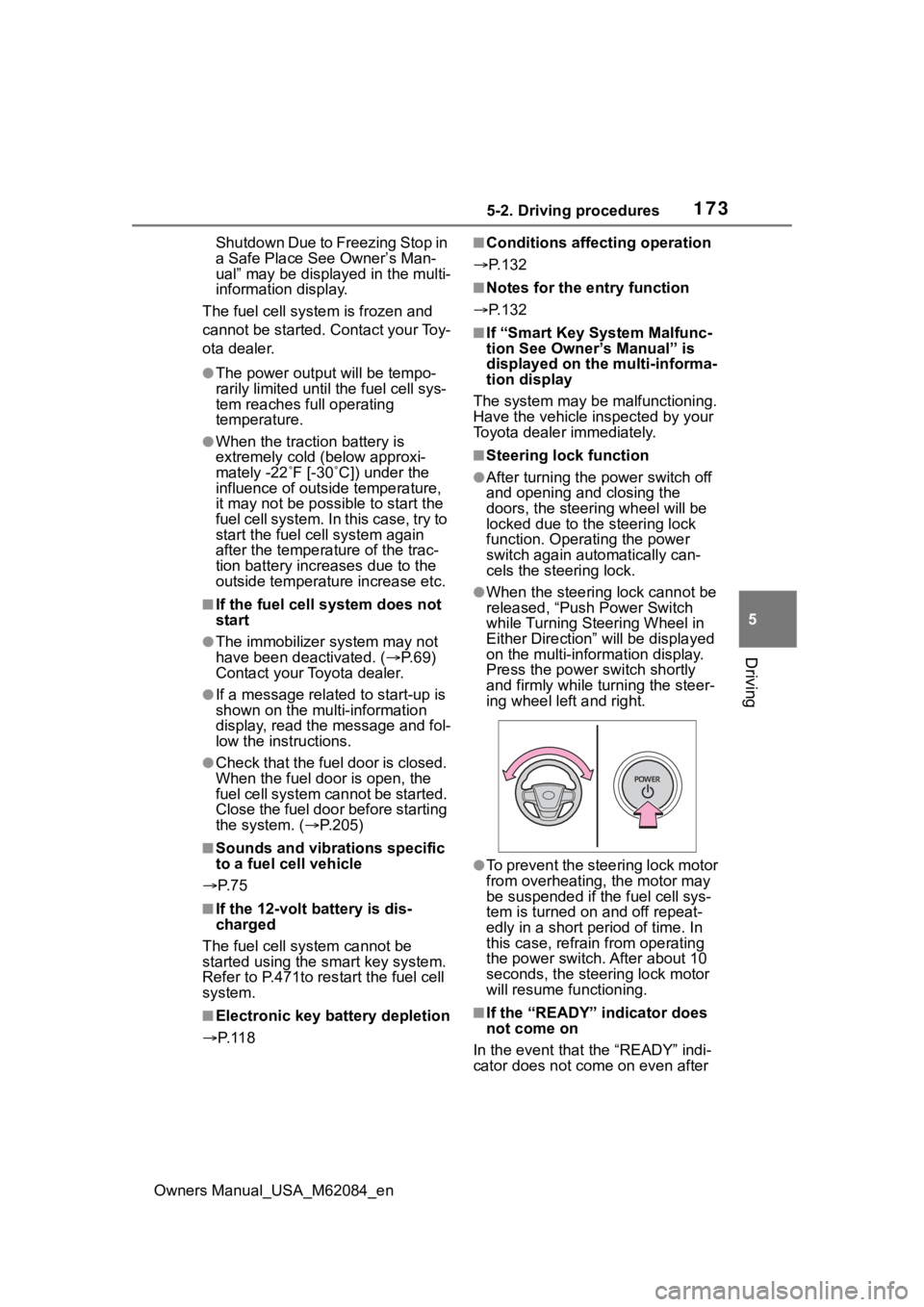
Press the power switch shortly
and firmly while turning the steer-
ing wheel left and right.
●To prevent the steering lock motor
from overheating , the motor may
be suspended if the fuel cell sys-
tem is turned on and off repeat-
edly in a short period of time. In
this case, refrain from operating
the power switch. After about 10
seconds, the steering lock motor
will resume functioning.
■If the “READY” indicator does
not come on
In the event that the “READY” indi-
cator does not come on even after
Page 194 of 556
1945-3. Operating the lights and wipers
Owners Manual_USA_M62084_en
2Turn the headlight switch to
the or position.
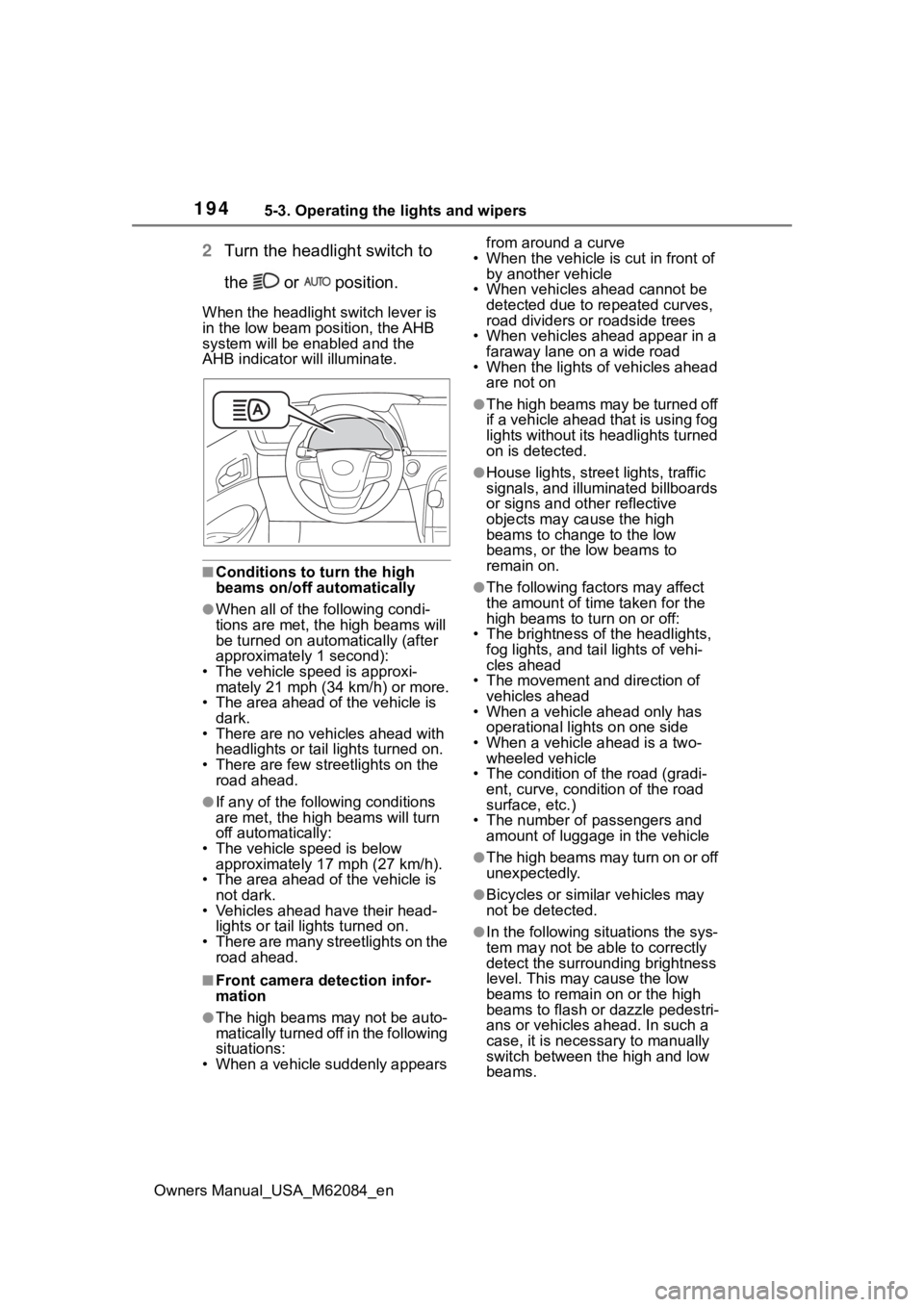
When the headlight switch lever is
in the low beam position, the AHB
system will be enabled and the
AHB indicator will illuminate.
■Conditions to t urn the high
beams on/off automatically
●When all of the following condi-
tions are met, the high beams will
be turned on automatically (after
approximately 1 second):
• The vehicle speed is approxi-
mately 21 mph (34 km/h) or more.
• The area ahead of the vehicle is dark.
• There are no vehicles ahead with headlights or tail lights turned on.
• There are few streetlights on the
road ahead.
●If any of the following conditions
are met, the high beams will turn
off automatically:
• The vehicle speed is below
approximately 17 mph (27 km/h).
• The area ahead of the vehicle is not dark.
• Vehicles ahead have their head- lights or tail lights turned on.
• There are many streetlights on the
road ahead.
■Front camera detection infor-
mation
●The high beams may not be auto-
matically turned off in the following
situations:
• When a vehicle suddenly appears from around a curve
• When the vehicle is cut in front of by another vehicle
• When vehicles ahead cannot be detected due to repeated curves,
road dividers or roadside trees
• When vehicles ahead appear in a faraway lane on a wide road
• When the lights of vehicles ahead
are not on
●The high beams may be turned off
if a vehicle ahead that is using fog
lights without its headlights turned
on is detected.
●House lights, street lights, traffic
signals, and illuminated billboards
or signs and other reflective
objects may cause the high
beams to change to the low
beams, or the low beams to
remain on.
●The following fact ors may affect
the amount of time taken for the
high beams to turn on or off:
• The brightness of the headlights, fog lights, and ta il lights of vehi-
cles ahead
• The movement and direction of vehicles ahead
• When a vehicle ahead only has
operational lights on one side
• When a vehicle ahead is a two- wheeled vehicle
• The condition of the road (gradi- ent, curve, condition of the road
surface, etc.)
• The number of passengers and amount of luggage in the vehicle
●The high beams may turn on or off
unexpectedly.
●Bicycles or similar vehicles may
not be detected.
●In the following situations the sys-
tem may not be able to correctly
detect the surrounding brightness
level. This may cause the low
beams to remain on or the high
beams to flash or dazzle pedestri-
ans or vehicles ahead. In such a
case, it is necessary to manually
switch between the high and low
beams.
Page 214 of 556
2145-5. Using the driving support systems
Owners Manual_USA_M62084_en
WARNING
●Although this system is
designed to help avoid a colli-
sion or help reduce the impact
of the collision, its effectiveness
may change according to vari-
ous conditions, therefore the
system may not always be able
to achieve the same level of
performance.
Read the following conditions
carefully. Do not overly rely on
this system and always drive
carefully.
• Conditions under which the sys- tem may operate even if there is
no possibility of a collision:
P. 2 1 9
• Conditions under which the sys- tem may not operate properly:
P. 2 2 0
●Do not attempt to test the oper-
ation of the pre-collision system
yourself.
Depending on the objects used
for testing (dummies, card-
board objects imitating detect-
able objects, etc.), the system
may not operate properly, possi-
bly leading to an accident.
■Pre-collision braking
●When the pre-collision braking
function is operating, a large
amount of braking force will be
applied.
●If the vehicle is stopped by the
operation of the pre-collision
braking function, the pre-colli-
sion braking function operation
will be canceled after approxi-
mately 2 second s. Depress the
brake pedal as necessary.
●The pre-collision braking func-
tion may not operate if certain
operations are performed by the
driver. If the accelerator pedal is
being depressed strongly or the
steering wheel is being turned,
the system may determine that
the driver is taking evasive
action and possibly prevent the
pre-collision braking function
from operating.
●In some situations, while the
pre-collision brak ing function is
operating, operation of the func-
tion may be canceled if the
accelerator pedal is depressed
strongly or the steering wheel is
turned and the system deter-
mines that the driver is taking
evasive action.
●If the brake pedal is being
depressed, the system may
determine that t he driver is tak-
ing evasive action and possibly
delay the operation timing of the
pre-collision braking function.
■Emergency steering assist
●As emergency steering assist
operation will be canceled when
the system determines that lane
departure prevention function
has been completed.
●Emergency steering assist may
not operate or may be cancel in
the following cases as the sys-
tem may determine the driver is
taking actions.
• If the accelerator pedal is being depressed strongly, the steering
wheel is being operated sharply,
the brake pedal is being
depressed or the turn signal
lever is being operated. In this
case, the syst em may deter-
mine that the driver is taking
evasive action and the emer-
gency steering assist may not
operate.
Page 217 of 556
2175-5. Using the driving support systems
Owners Manual_USA_M62084_en
5
Driving
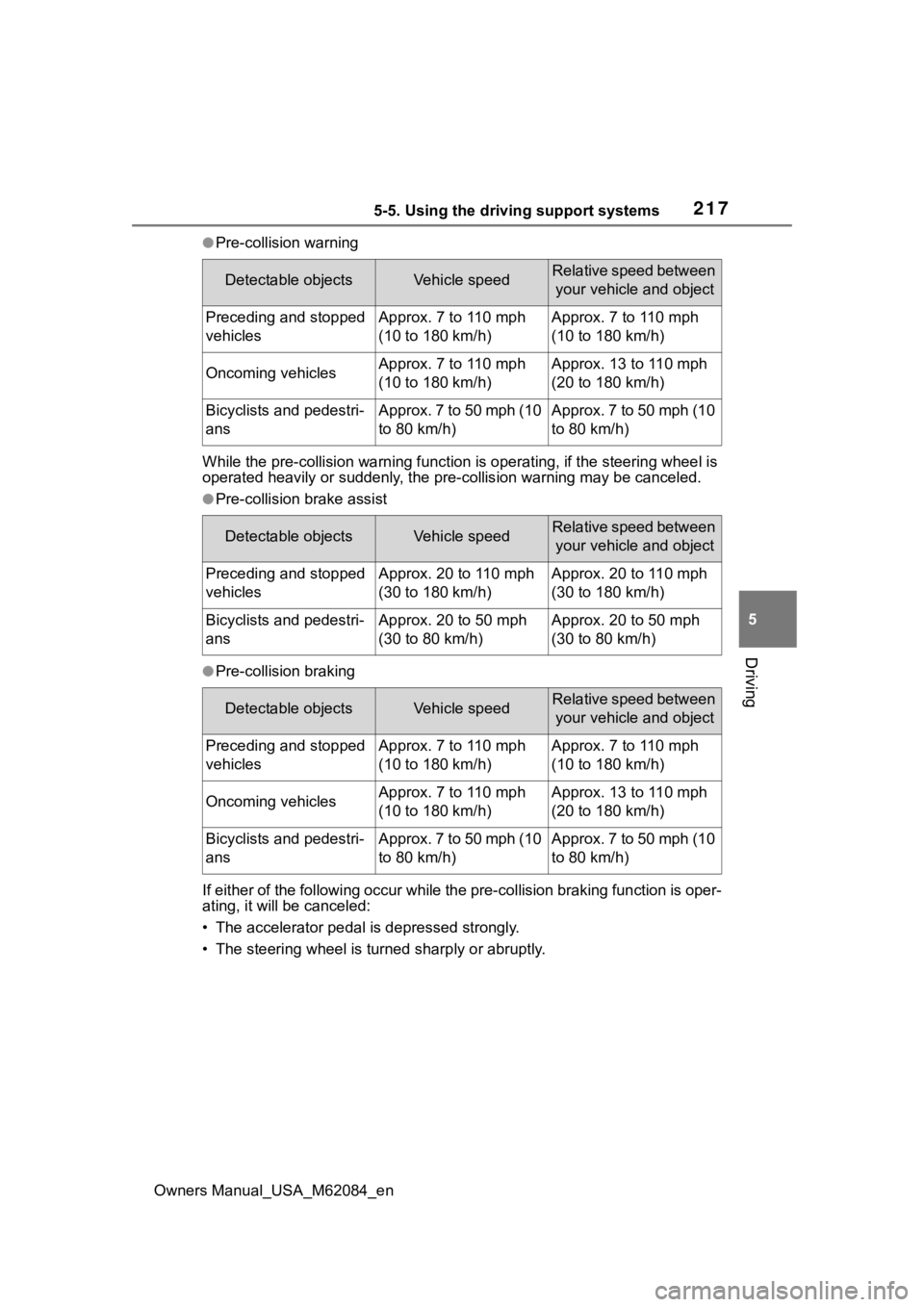
●Pre-collision warning
While the pre-collision warning function is operating, if the steering wheel is
operated heavily or suddenly, the pre-collis ion warning may be canceled.
●Pre-collision brake assist
●Pre-collision braking
If either of the following occur while the pre-collision braking function is oper-
ating, it will be canceled:
• The accelerator pedal is depressed strongly.
• The steering wheel is tur ned sharply or abruptly.
Detectable objectsVehicle speedRelative speed between
your vehicle and object
Preceding and stopped
vehiclesApprox. 7 to 110 mph
(10 to 180 km/h)Approx. 7 to 110 mph
(10 to 180 km/h)
Oncoming vehiclesApprox. 7 to 110 mph
(10 to 180 km/h)Approx. 13 to 110 mph
(20 to 180 km/h)
Bicyclists and pedestri-
ansApprox. 7 to 50 mph (10
to 80 km/h)Approx. 7 to 50 mph (10
to 80 km/h)
Detectable objectsVehicle speedRelative speed between your vehicle and object
Preceding and stopped
vehiclesApprox. 20 to 110 mph
(30 to 180 km/h)Approx. 20 to 110 mph
(30 to 180 km/h)
Bicyclists and pedestri-
ansApprox. 20 to 50 mph
(30 to 80 km/h)Approx. 20 to 50 mph
(30 to 80 km/h)
Detectable objectsVehicle speedRelative speed between your vehicle and object
Preceding and stopped
vehiclesApprox. 7 to 110 mph
(10 to 180 km/h)Approx. 7 to 110 mph
(10 to 180 km/h)
Oncoming vehiclesApprox. 7 to 110 mph
(10 to 180 km/h)Approx. 13 to 110 mph
(20 to 180 km/h)
Bicyclists and pedestri-
ansApprox. 7 to 50 mph (10
to 80 km/h)Approx. 7 to 50 mph (10
to 80 km/h)
Page 218 of 556
2185-5. Using the driving support systems
Owners Manual_USA_M62084_en
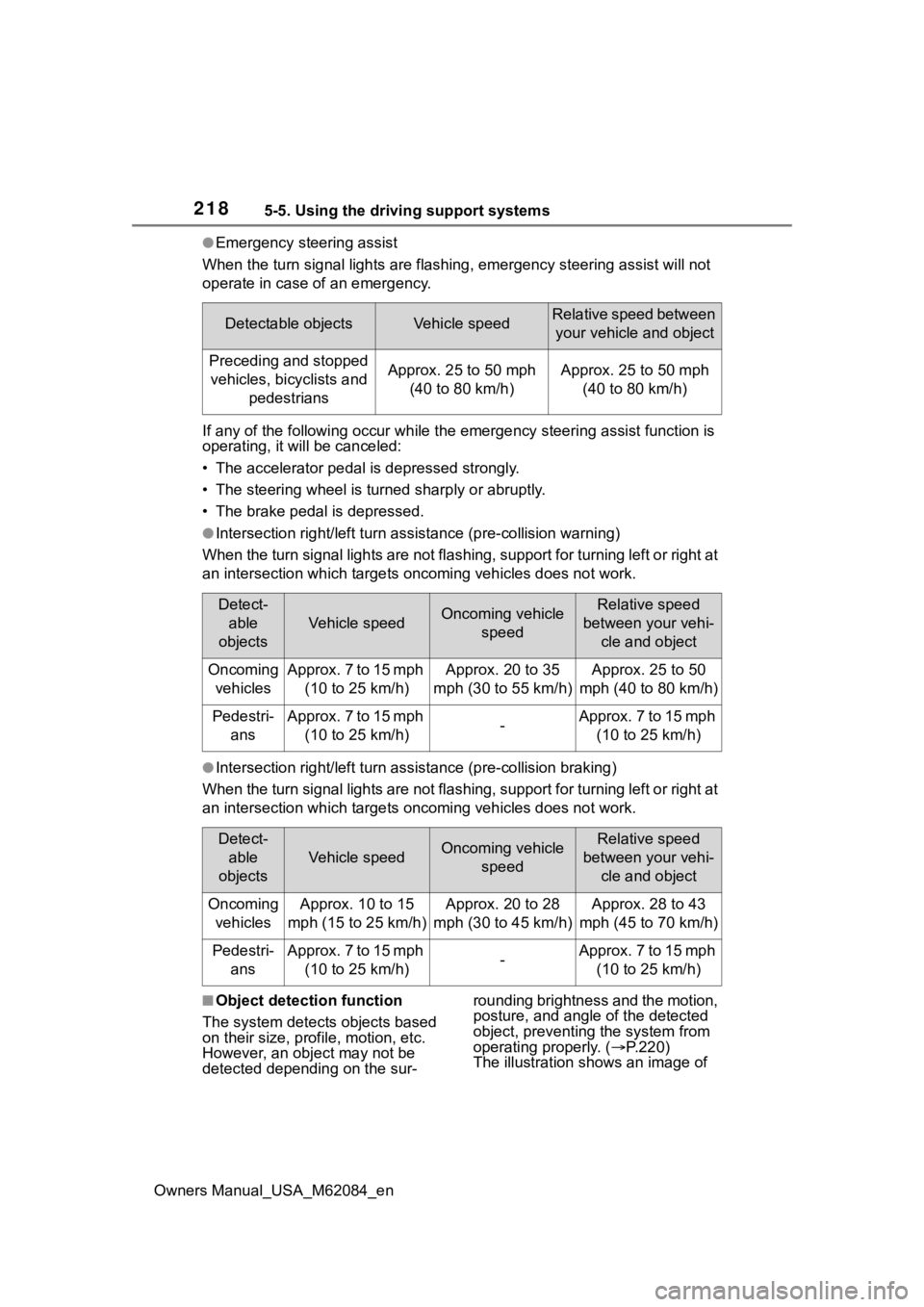
●Emergency steering assist
When the turn signal lights are flashing, emergency steering as sist will not
operate in case of an emergency.
If any of the following occur wh ile the emergency steering assi st function is
operating, it will be canceled:
• The accelerator pedal is depressed strongly.
• The steering wheel is tur ned sharply or abruptly.
• The brake pedal is depressed.
●Intersection right/left turn assistance (pre-collision warning)
When the turn signal lights are not flashing, support for turning left or right at
an intersection which targets on coming vehicles does not work.
●Intersection right/left turn assistance (pre-collision braking)
When the turn signal lights are not flashing, support for turning left or right at
an intersection which targets on coming vehicles does not work.
■Object detection function
The system detects objects based
on their size, profile, motion, etc.
However, an object may not be
detected depending on the sur- rounding brightness and the motion,
posture, and angle of the detected
object, preventing the system from
operating properly. (
P.220)
The illustration shows an image of
Detectable objectsVehicle speedRelative speed between
your vehicle and object
Preceding and stopped vehicles, bicyclists and pedestriansApprox. 25 to 50 mph (40 to 80 km/h)Approx. 25 to 50 mph (40 to 80 km/h)
Detect-able
objects
Vehicle speedOncoming vehicle speedRelative speed
between your vehi- cle and object
Oncoming vehiclesApprox. 7 to 15 mph (10 to 25 km/h)Approx. 20 to 35
mph (30 to 55 km/h)Approx. 25 to 50
mph (40 to 80 km/h)
Pedestri- ansApprox. 7 to 15 mph (10 to 25 km/h)-Approx. 7 to 15 mph (10 to 25 km/h)
Detect-able
objects
Vehicle speedOncoming vehicle speedRelative speed
between your vehi- cle and object
Oncoming vehiclesApprox. 10 to 15
mph (15 to 25 km/h)Approx. 20 to 28
mph (30 to 45 km/h)Approx. 28 to 43
mph (45 to 70 km/h)
Pedestri- ansApprox. 7 to 15 mph (10 to 25 km/h)-Approx. 7 to 15 mph (10 to 25 km/h)