child lock TOYOTA MIRAI 2023 User Guide
[x] Cancel search | Manufacturer: TOYOTA, Model Year: 2023, Model line: MIRAI, Model: TOYOTA MIRAI 2023Pages: 572, PDF Size: 17.71 MB
Page 129 of 572
1294-2. Opening, closing and locking the doors and trunk
Owners Manual_USA_M62064_en
4
Before driving
Replace the key battery with a new
one if it is depleted. ( P.436)
■If the 12-volt battery is dis-
charged
The doors cannot be locked and
unlocked using the smart key sys-
tem or wireless remote control. Lock
or unlock the doors using the
mechanical key. ( P.483)
■Rear seat reminder function
●In order to remind you not to for-
get luggage, etc., in the rear seat,
when the power switch is turned to
OFF after any of the following con-
ditions are met, a buzzer will
sound and a message will be dis-
played on the multi-information
display for approximately 6 sec-
onds.
• The fuel cell system is started within 10 minutes after opening
and closing a rear door.
• A rear door has been opened and closed after the fuel cell system
was started.
However, if a rear door is opened
and then closed within approxi-
mately 2 seconds , the rear seat
reminder function may not operate.
●The rear seat reminder function
determines that luggage, etc., has
been placed in a rear seat based
on opening and closing of a rear
door. Therefore, depending on the
situation, the rear seat reminder
function may not operate and you
may still forget luggage, etc., in
the rear seat, or it may operate
unnecessarily.
●The rear seat reminder function
can be enabled/disabled.
( P.512)
■Customization
Some functions can be customized.
( P.512)
WARNING
■To prevent an accident
Observe the following precautions
while driving the vehicle.
Failure to do so may result in a
door opening and an occupant
falling out of the vehi cle, resulting
in death or serious injury.
●Ensure that all doors are prop-
erly closed and locked.
●Do not pull the inside handle of
the doors while driving.
Be especially careful for the front
doors, as the doors may be
opened even if the inside lock but-
tons are in locked position.
●Set the rear door child-protector
locks when children are seated
in the rear seats.
■When opening or closing a
door
Check the surroundings of the
vehicle such as wh ether the vehi-
cle is on an incline, whether there
is enough space for a door to
open and whether a strong wind
is blowing. When opening or clos-
ing the door, hold the door handle
tightly to prepare for any unpre-
dictable movement.
Page 130 of 572
1304-2. Opening, closing and locking the doors and trunk
Owners Manual_USA_M62064_en
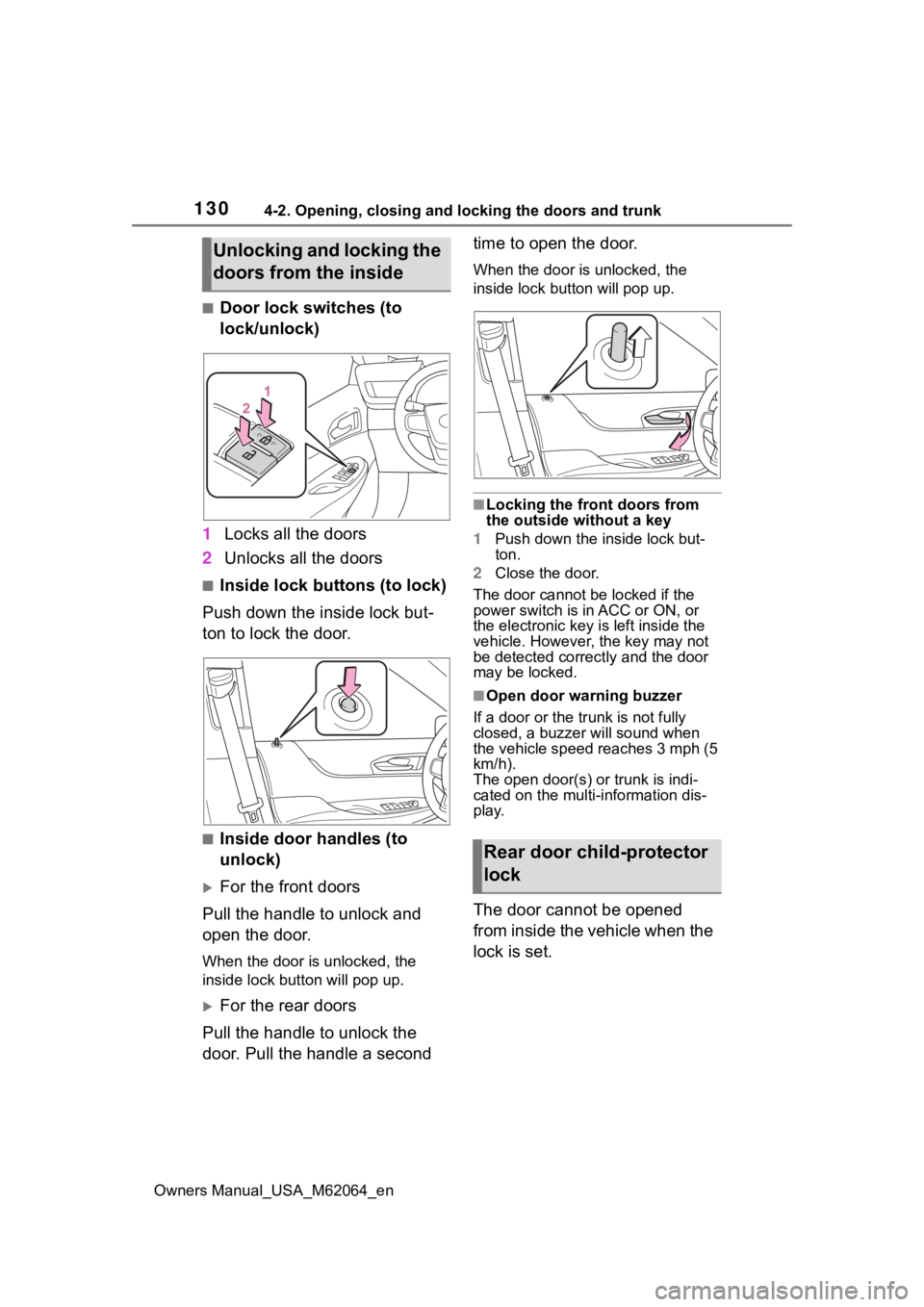
■Door lock switches (to
lock/unlock)
1 Locks all the doors
2 Unlocks all the doors
■Inside lock buttons (to lock)
Push down the inside lock but-
ton to lock the door.
■Inside door handles (to
unlock)
For the front doors
Pull the handle to unlock and
open the door.
When the door is unlocked, the
inside lock button will pop up.
For the rear doors
Pull the handle to unlock the
door. Pull the handle a second time to open the door.
When the door is unlocked, the
inside lock butt
on will pop up.
■Locking the front doors from
the outside without a key
1 Push down the inside lock but-
ton.
2 Close the door.
The door cannot be locked if the
power switch is in ACC or ON, or
the electronic key is left inside the
vehicle. However, the key may not
be detected correctly and the door
may be locked.
■Open door warning buzzer
If a door or the tr unk is not fully
closed, a buzzer will sound when
the vehicle speed reaches 3 mph (5
km/h).
The open door(s) or trunk is indi-
cated on the multi-information dis-
play.
The door cannot be opened
from inside the vehicle when the
lock is set.
Unlocking and locking the
doors from the inside
Rear door child-protector
lock
Page 131 of 572
1314-2. Opening, closing and locking the doors and trunk
Owners Manual_USA_M62064_en
4
Before driving
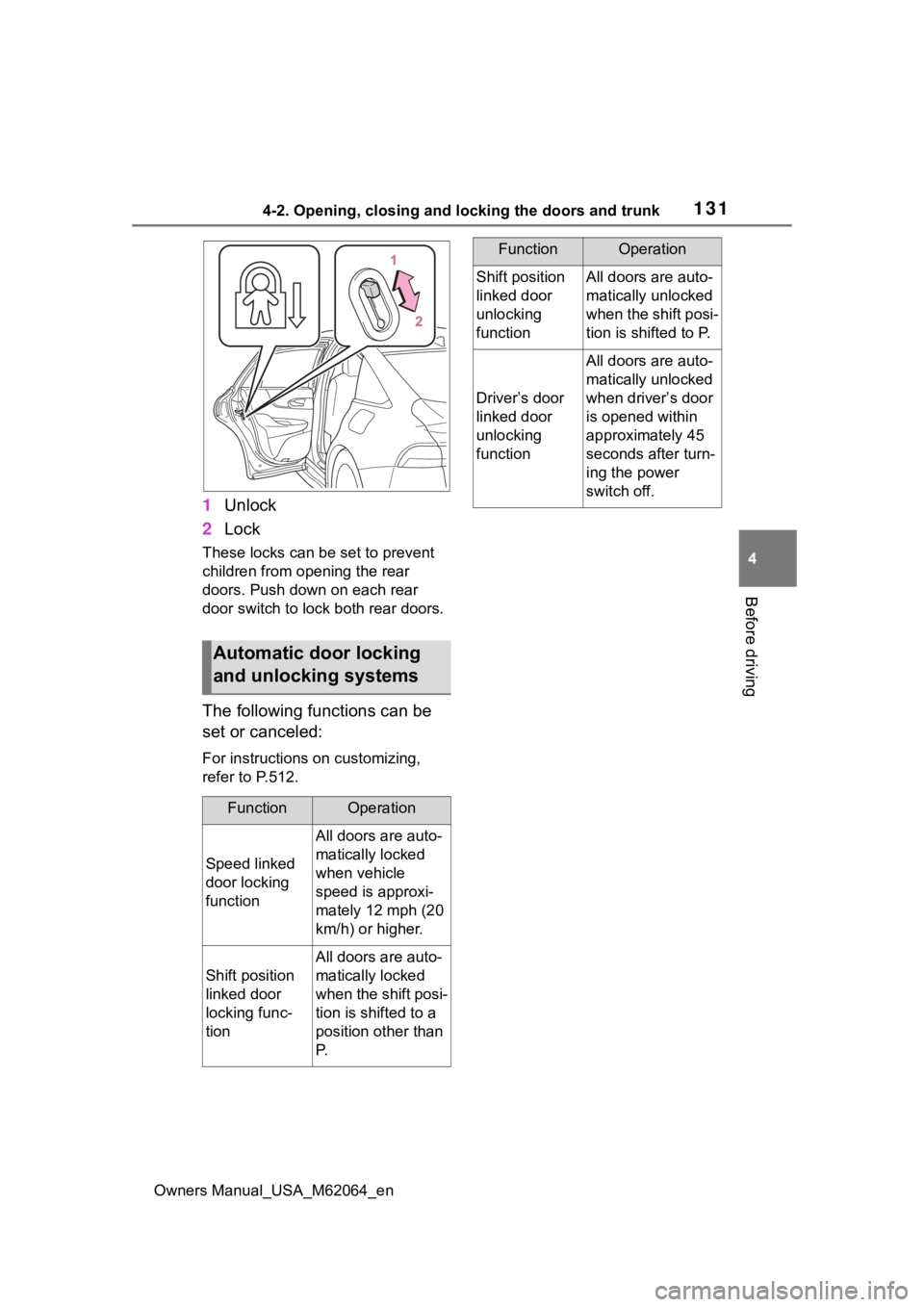
1 Unlock
2 Lock
These locks can be set to prevent
children from opening the rear
doors. Push down on each rear
door switch to lock both rear doors.
The following functions can be
set or canceled:
For instructions on customizing,
refer to P.512.
Automatic door locking
and unlocking systems
FunctionOperation
Speed linked
door locking
function
All doors are auto-
matically locked
when vehicle
speed is approxi-
mately 12 mph (20
km/h) or higher.
Shift position
linked door
locking func-
tion
All doors are auto-
matically locked
when the shift posi-
tion is shifted to a
position other than
P.
Shift position
linked door
unlocking
functionAll doors are auto-
matically unlocked
when the shift posi-
tion is shifted to P.
Driver’s door
linked door
unlocking
function
All doors are auto-
matically unlocked
when driver’s door
is opened within
approximately 45
seconds after turn-
ing the power
switch off.
FunctionOperation
Page 132 of 572
1324-2. Opening, closing and locking the doors and trunk
Owners Manual_USA_M62064_en
Tr unk
The trunk can be opened
using the trunk opener
switch, entry function or
wireless remote control.
WARNING
Observe the following precau-
tions.
Failure to do so may result in
death or serious injury.
■Before driving
●Make sure that the trunk lid is
fully closed. If the trunk lid is not
fully closed, it may open unex-
pectedly while driving and hit
near-by objects or luggage in
the trunk may be thrown out,
causing an accident.
●Do not allow child ren to play in
the trunk.
If a child is accidentally locked
in the trunk, they could suffer
from heat exhaustion, suffoca-
tion or other injuries.
●Do not allow a child to open or
close the trunk lid.
Doing so may cause the trunk
lid to open unexpectedly, or
cause the child’s hands, head,
or neck to be caught by the
closing trunk lid.
■Important points while driving
Never let anyone sit in the trunk.
In the event of sudden braking or
a collision, they are susceptible to
death or serious injury.
■Using the trunk
Observe the following precau-
tions.
Failure to do so may cause parts
of the body to be caught, resulting
in serious injury.
●Remove any heavy loads, such
as snow and ice, from the trunk
lid before openin g it. Failure to
do so may cause the trunk lid to
suddenly shut again after it is
opened.
●When opening or closing the
trunk lid, thoroughly check to
make sure the surrounding area
is safe.
●If anyone is in the vicinity, make
sure they are safe and let them
know that the trunk is about to
open or close.
●Use caution when opening or
closing the trunk lid in windy
weather as it may move
abruptly in strong wind.
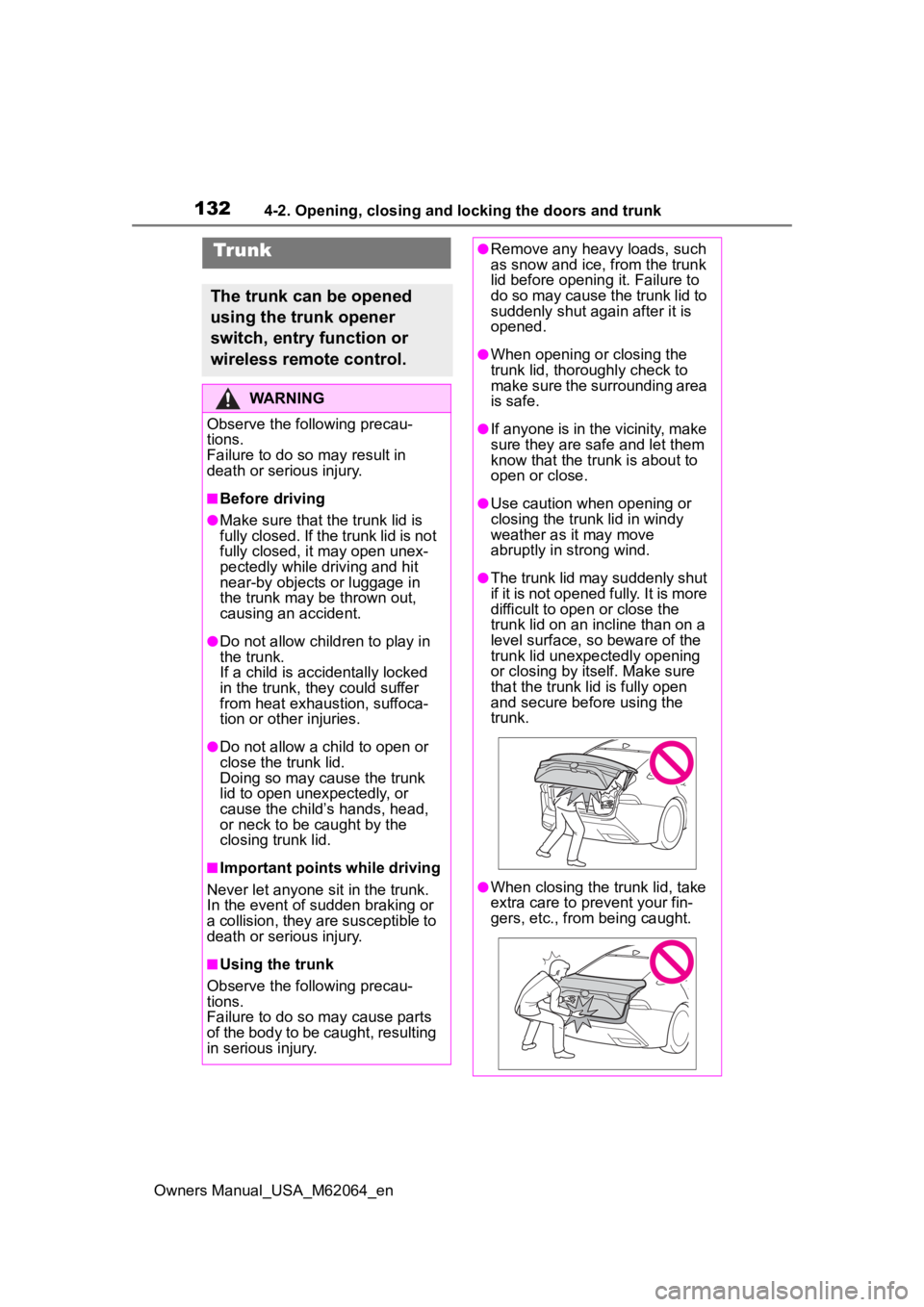
●The trunk lid may suddenly shut
if it is not opened fully. It is more
difficult to ope n or close the
trunk lid on an incline than on a
level surface, so beware of the
trunk lid unexpectedly opening
or closing by itself. Make sure
that the trunk lid is fully open
and secure before using the
trunk.
●When closing the trunk lid, take
extra care to pre vent your fin-
gers, etc., from being caught.
Page 163 of 572
1634-5. Opening, closing the windows
Owners Manual_USA_M62064_en
4
Before driving
5 Release the power window
switch for a m oment, resume
pushing the switch in the one-
touch opening direction, and
hold it there for a pproximately 4
seconds or more.
6 Pull and hold the power window
switch in the one-touch closing
direction again. After the side
window is completely closed,
continue holding the switch for a
further 1 second or more.
If you release the switch while the
window is moving, start again from
the beginning.
If the window reverses and cannot
be fully closed or opened, have the
vehicle inspected by your Toyota
dealer.
■Door lock linked window opera-
tion
●The power windows can be
opened and closed using the
mechanical key.
* ( P.483)
●The power windows can be
opened using the wireless remote
control.
* ( P.127)
*: These settings must be custom-
ized at your Toyota dealer.
■Power windows open warning
buzzer
A buzzer sounds and a message is
shown on the multi -information dis-
play in the instrument cluster when
the power switch is turned off and
the driver’s door is opened with the
power windows open.
■Customization
Some functions can be customized.
( P.512)
WARNING
Observe the following precau-
tions.
Failure to do so m ay result in
death or serious injury.
■Closing the windows
●The driver is responsible for all
the power window operations,
including the operation for the
passengers. In order to prevent
accidental operation, especially
by a child, do not let a child
operate the power windows. It is
possible for children and other
passengers to have body parts
caught in the power window.
Also, when ridin g with a child, it
is recommended to use the win-
dow lock switch. ( P.164)
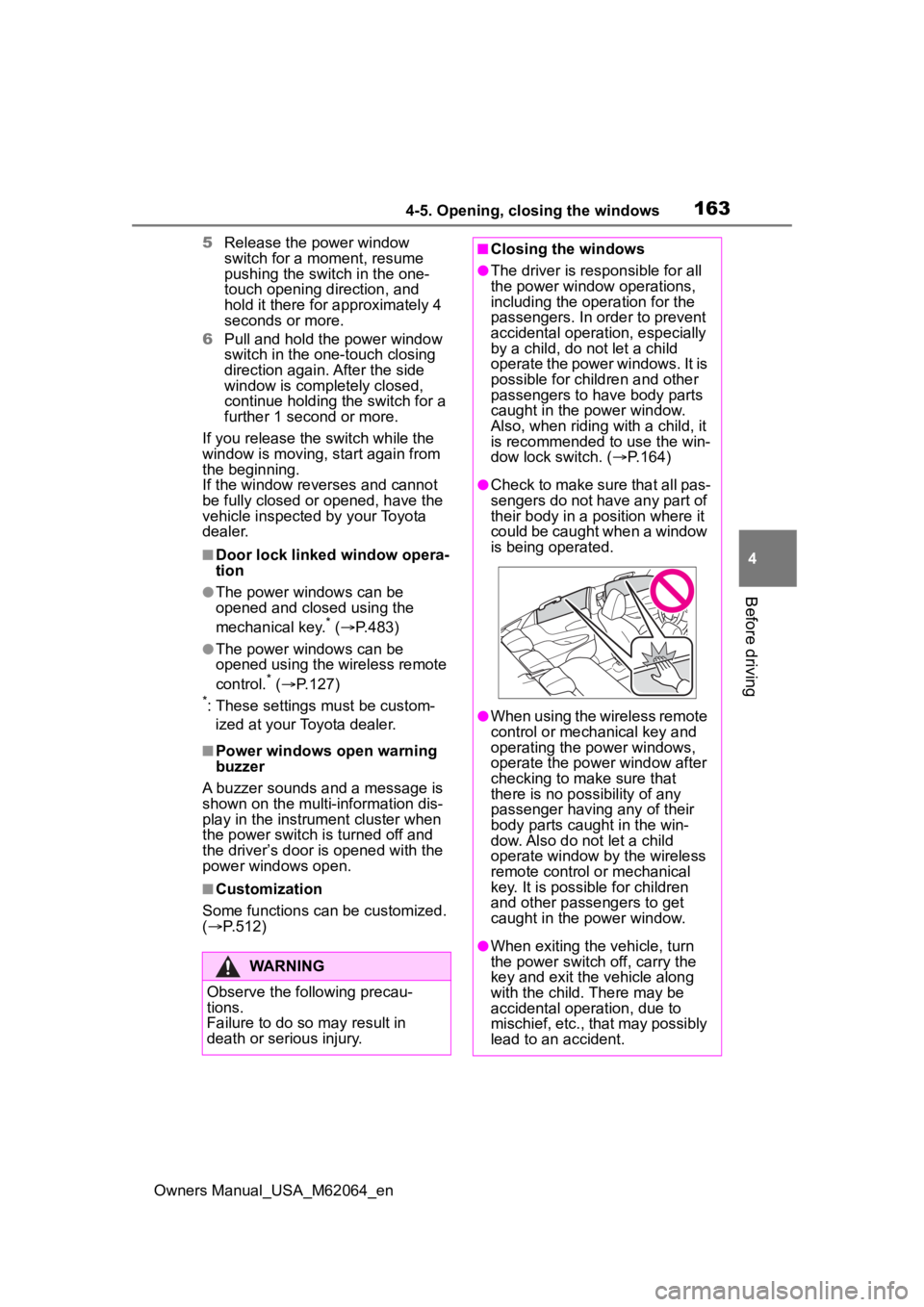
●Check to make sure that all pas-
sengers do not have any part of
their body in a position where it
could be caught when a window
is being operated.
●When using the wireless remote
control or mechanical key and
operating the power windows,
operate the power window after
checking to make sure that
there is no possibility of any
passenger having any of their
body parts caug ht in the win-
dow. Also do not let a child
operate window by the wireless
remote control or mechanical
key. It is possib le for children
and other passengers to get
caught in the power window.
●When exiting the vehicle, turn
the power switch off, carry the
key and exit the vehicle along
with the child. There may be
accidental operation, due to
mischief, etc., that may possibly
lead to an accident.
Page 164 of 572
1644-5. Opening, closing the windows
Owners Manual_USA_M62064_en
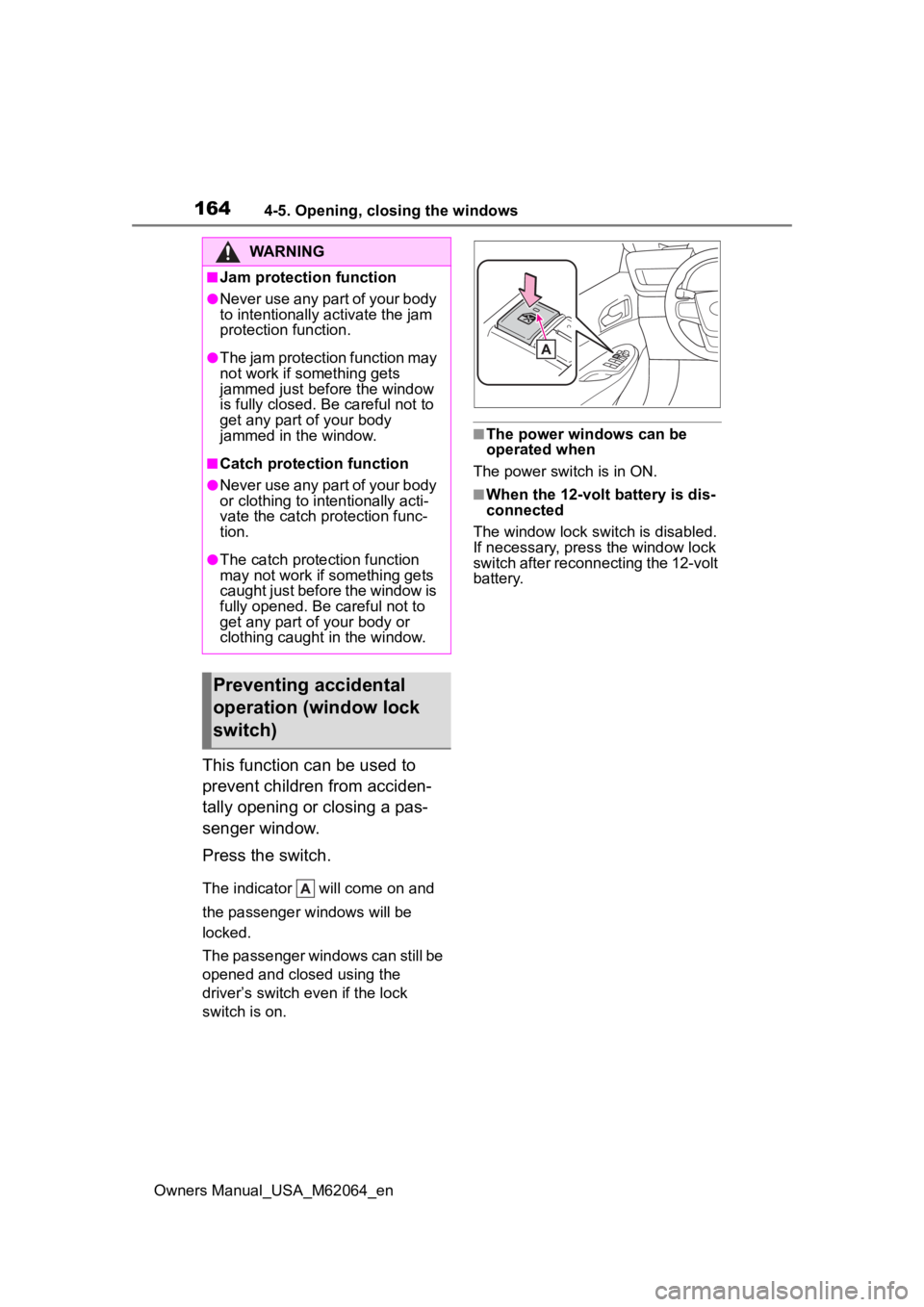
This function can be used to
prevent children from acciden-
tally opening or closing a pas-
senger window.
Press the switch.
The indicator will come on and
the passenger windows will be
locked.
The passenger windows can still be
opened and closed using the
driver’s switch even if the lock
switch is on.
■The power windows can be
operated when
The power switch is in ON.
■When the 12-volt battery is dis-
connected
The window lock switch is disabled.
If necessary, press the window lock
switch after reconnecting the 12-volt
battery.
WARNING
■Jam protection function
●Never use any part of your body
to intentionally a ctivate the jam
protection function.
●The jam protection function may
not work if something gets
jammed just before the window
is fully closed. Be careful not to
get any part of your body
jammed in the window.
■Catch protection function
●Never use any part of your body
or clothing to intentionally acti-
vate the catch p rotection func-
tion.
●The catch protection function
may not work if something gets
caught just before the window is
fully opened. Be careful not to
get any part of your body or
clothing caught in the window.
Preventing accidental
operation (window lock
switch)
Page 295 of 572
2955-5. Using the driving support systems
Owners Manual_USA_M62064_en
5
Driving
WARNING
●As following objects may not be
detected, make sure to check
the safety of the area around
your vehicle and depress the
brake pedal to stop the vehicle if
it may collide with an object.
• Wires, fences, ropes, etc.
• Cotton, snow and other materi- als that absorb sound waves
• Sharply-angled objects
• Low objects (curb stones, park- ing blocks, etc.)
• Tall objects with upper sections projecting outwards in the direc-
tion of your vehicle
●Even if there is an object in the
target parking space, it may not
be detected and assistance
may be performed.
●While the system is operating, if
it is likely that your vehicle will
collide with a nearby vehicle,
parking block, object, or person,
depress the brake pedal to stop
the vehicle and press the
Advanced Park main switch to
disable the system.
●Never use only the multimedia
display to view the area behind
the vehicle. The image dis-
played may differ than the
actual situation. Using only the
screen when backing up may
lead to an accident, such as a
collision with another vehicle.
When backing up, make sure to
look directly or use the mirrors
to check the safety of the area
around your vehicle, especially
behind the vehicle.
●When the ambient temperature
is extremely low, the screen
may appear dark or the dis-
played image may become
unclear. Also, as moving objects
may appear distorted or may
not be able to be seen on the
screen, make sure to directly
check the safety of the area
around your vehicle.
●In the following situations, while
the vehicle is stopped and held
by Advanced Park, it may be
canceled and th e vehicle may
start moving. Immediately
depress the brake pedal. Fail-
ure to do so may lead to an
accident.
• When the driver’s door is opened
• When operations instructed by the system are not performed
within a certain amount of time
• When the brake pedal is depressed and th e vehicle is
stopped for a certain amount of
time
• When the system malfunctions
●As the steering wheel will turn
while this system i s operating,
pay attention to the following.
• Be careful so that a necktie, scarf, or arm d oes not get
caught. Keep your upper body
away from the steering wheel.
Also, keep children away from
the steering wheel.
• Long fingernails may be caught and when the steering wheel is
rotating, leading to injury.
• In an emergency, depress the brake pedal to stop the vehicle,
and then press the Advanced
Park main switch to disable the
system.
Page 483 of 572
4838-2. Steps to take in an emergency
Owners Manual_USA_M62064_en
8
When trouble arises
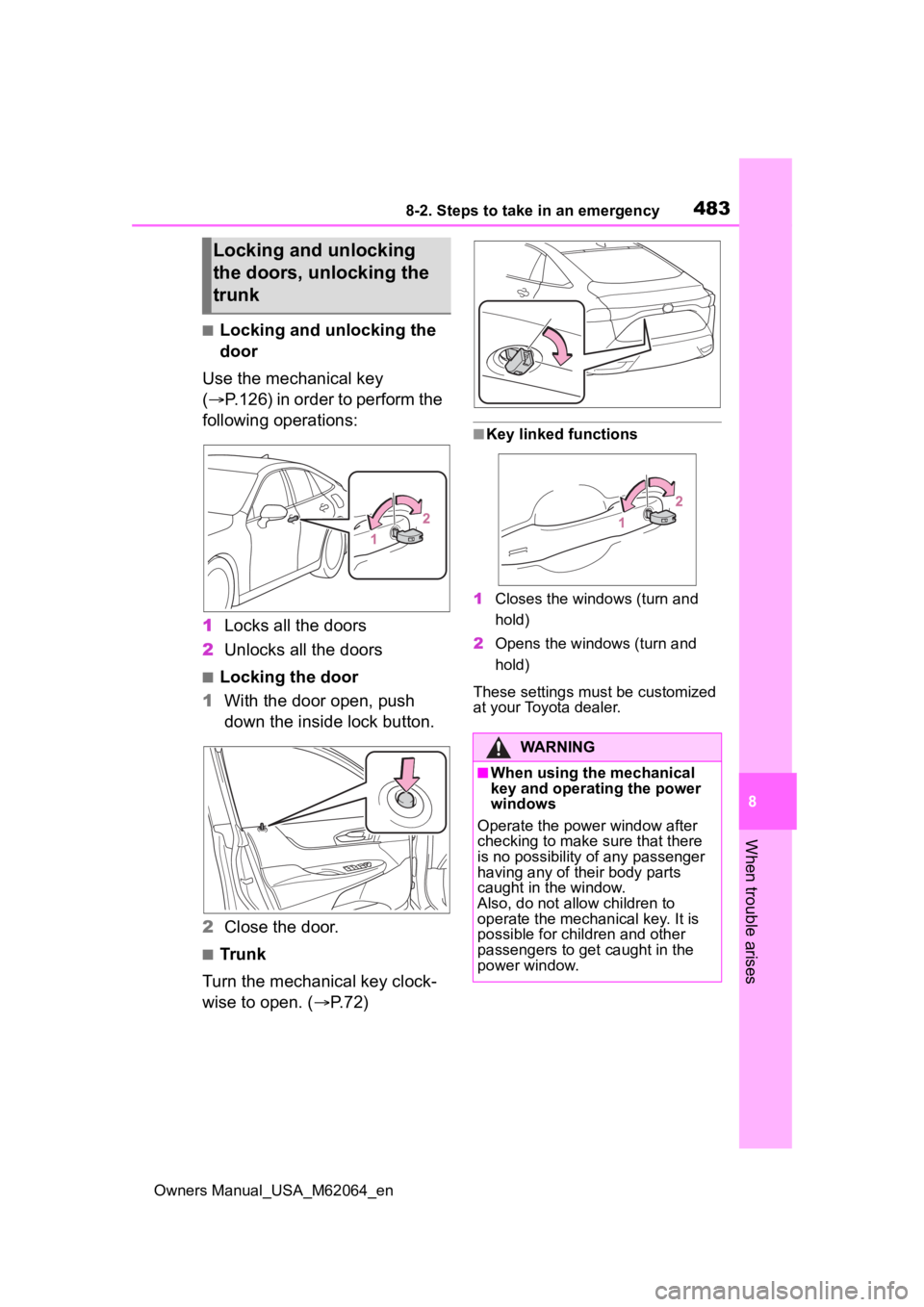
■Locking and unlocking the
door
Use the mechanical key
( P.126) in order to perform the
following operations:
1 Locks all the doors
2 Unlocks all the doors
■Locking the door
1 With the door open, push
down the inside lock button.
2 Close the door.
■Trunk
Turn the mechanical key clock-
wise to open. ( P.72)
■Key linked functions
1 Closes the windows (turn and
hold)
2 Opens the windows (turn and
hold)
These settings mus t be customized
at your Toyota dealer.
Locking and unlocking
the doors, unlocking the
trunk
WARNING
■When using the mechanical
key and operating the power
windows
Operate the power window after
checking to make sure that there
is no possibility of any passenger
having any of their body parts
caught in the window.
Also, do not allo w children to
operate the mechanical key. It is
possible for children and other
passengers to get caught in the
power window.
Page 540 of 572

540What to do if... (Troubleshooting)
Owners Manual_USA_M62064_en
1-1.What to do if... (Troubleshooting)What to do if... (Troubleshooting)
If you lose your mechanical
keys, new genuine mechani-
cal keys can be made by your
Toyota dealer. ( P.481)
If you lose your electronic
keys, the risk of vehicle theft
increases significantly. Con-
tact your Toyota dealer imme-
diately. ( P.481)
Is the electronic key battery
weak or depleted? ( P.436)
Is the power switch in ON?
When locking the doors, turn the
power switch off. ( P.183)
Is the electronic key left inside
the vehicle?
When locking the doors, make sure that you have the
electronic key on
your person.
The function may not operate
properly due to the condition
of the radio wave. ( P.138)
Is the child-protector lock set?
The rear door cannot be opened
from inside the vehicle when the
lock is set. Open the rear door from
outside and then unlock the child-
protector lock. ( P.130)
The function to prevent the
electronic key from being left
inside the trunk will operate
and you can open the trunk as
usual. Take the key out from
the trunk. ( P.134)
Did you press the power
switch while firmly depress-
ing the brake pedal?
( P.180)
If you have a problem,
check the following before
contacting your Toyota
dealer.
The doors cannot be
locked, unlocked, opened
or closed
You lose your keys
The electronic key does
not operate properly
The doors cannot be
locked or unlocked
The rear door cannot be
opened
The trunk lid is closed
with the electronic key
left inside
If you think something is
wrong
The fuel cell system does
not start
Page 543 of 572

Owners Manual_USA_M62064_en
543Alphabetical Index
Alphabetical Index
A
A/C ................................... 333, 340Air conditioning filter ............. 432
Automatic air conditioning sys-tem ............................. 333, 340
Eco air conditioning mode .. 334, 341
Front seat concentrated airflow mode (S-FLOW) ................. 345
ABS (Anti-lock Brake System) ............................................... 322Warning light ........................ 456
ACA (Active Cornering Assist) ............................................... 322
ACC ......................................... 183
Active Cornering Assist (ACA) ............................................... 322
Active Sound Control (ASC).. 196
AHB (Automatic High Beam) . 200
Air conditioning filter ............. 432
Air conditioning system 333, 340 Air conditioning filter ............. 432
Automatic air conditioning sys-tem ............................. 333, 340
Eco air conditioning mode .. 334, 341
Front seat concentrated airflow mode (S-FLOW) ................. 345
Air purification screen ........... 119
Airbags ...................................... 34 Airbag operating conditions.... 36
Airbag precautions for your child............................................. 39
Correct driving posture ........... 27
Curtain shield airbag operating conditions ............................. 37
Curtain shield airbag precautions ............................................. 39
Front passenger occupant clas- sification system ................... 46 General airbag precautions ....39
Locations of airbags ...............34
Modification and disposal of air-
bags......................................42
Side airbag operating conditions .............................................37
Side airbag precautions..........39
Side and curtain shield airbags operating conditions .............37
Side and curtain shield airbags precautions ...........................39
SRS airbags ...........................34
SRS warning light .................455
Alarm .........................................71 Warning buzzer ....................454
ALL AUTO control ..................332
Anchor brackets ... ..............54, 62
Antennas (smart key system)136
Anti-lock Brake System (ABS) ...............................................322Warning light.........................456
Approach warning ..................251
Armrest ......... ......................... ..371
ASC (Active Sound Control) ..196
Assist grips .............................371
Audio system-linked display . 111
Automatic air conditioning sys- tem .................................333, 340Eco air conditioning mode ..334, 341
Automatic air conditioning sys- tem (vehicles with 12.3-inch dis-
play) .......................................340
Automatic air conditioning sys- tem (vehicles with 8-inch dis-
play) .......................................333
Automatic headlight leveling system ...................................199
Automatic High Beam ............200
Automatic light control system ...............................................199