cooling TOYOTA MIRAI 2023 User Guide
[x] Cancel search | Manufacturer: TOYOTA, Model Year: 2023, Model line: MIRAI, Model: TOYOTA MIRAI 2023Pages: 572, PDF Size: 17.71 MB
Page 347 of 572
3476-1. Using the air conditioning system and defogger
Owners Manual_USA_M62064_en
6
Interior features
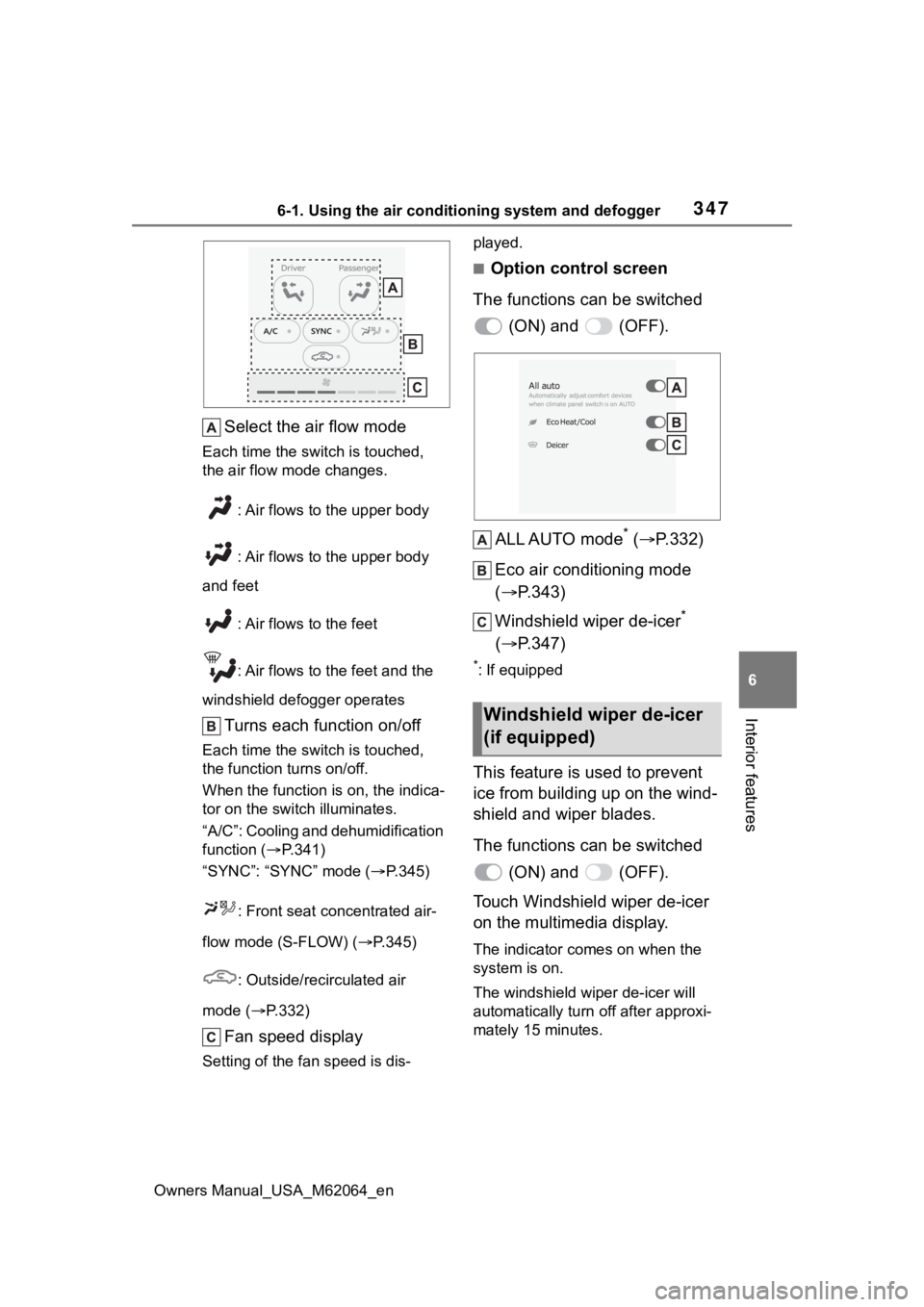
Select the air flow mode
Each time the switch is touched,
the air flow mode changes. : Air flows to the upper body
: Air flows to the upper body
and feet
: Air flows to the feet
: Air flows to the feet and the
windshield defogger operates
Turns each function on/off
Each time the switch is touched,
the function turns on/off.
When the function i s on, the indica-
tor on the swit ch illuminates.
“A/C”: Cooling and dehumidification
function ( P.341)
“SYNC”: “SYNC” mode ( P.345)
: Front seat concentrated air-
flow mode (S-FLOW) ( P.345)
: Outside/recirculated air
mode ( P.332)
Fan speed display
Setting of the fan speed is dis- played.
■Option control screen
The functions can be switched (ON) and (OFF).
ALL AUTO mode
* ( P.332)
Eco air conditioning mode
( P.343)
Windshield wiper de-icer
*
( P.347)
*: If equipped
This feature is used to prevent
ice from building up on the wind-
shield and wiper blades.
The functions can be switched
(ON) and (OFF).
Touch Windshield wiper de-icer
on the multimedia display.
The indicator comes on when the
system is on.
The windshield wiper de-icer will
automatically turn off after approxi-
mately 15 minutes.
Windshield wiper de-icer
(if equipped)
LV
Page 376 of 572
3766-4. Using the other interior features
Owners Manual_USA_M62064_ennot flat.
*: Depending on the weather, sea-
son, usage environment, etc., the
vehicle compartment may
undergo extreme high or low tem-
peratures.
■When using while the vehicle is
parked or stopped
●The door cannot be locked or
unlocked with the electronic key.
The door can be locked/unlocked
only with the mechanical key
( P.126).
●When the surroundings become
dark while power is being sup-
plied, the headlig hts will automati-
cally turn on.
Turn off the light ( P.198)
■Power outlet
●The power outlet is a device in
order to use electronic devices
within the vehicle.
●While a power outlet is being
used, a cooling fan sound may be
heard from near a rear seat. This
does not indicate a malfunction.
■Devices which may not operate
correctly
The following 120 VAC devices may
not operate properly even if their
power consumption is less than
1500 W:
●Devices with high initial peak watt-
age
●Measuring devices that process
precise data
●Devices that require an extremely
stable power supply
●Devices that require a constant
power supply from the power out-
let, such as a device with a timer.
■When the power supply func-
tion cannot be used
If the AC120V switch is pressed but
the switch indicator does not illumi-
nate, the protection circuit may have
operated. In this case, perform the appropriate
procedures as follows.
●Disconnect the plug of each
device from the power outlets,
check that the total power con-
sumption of all de
vices to be con-
nected to the power outlets is less
than 1500 W, reconnect the
devices and then press the
AC120V switch again.
●Disconnect the plug of each
device from the power outlets,
check that the devices are not
malfunctioning, reconnect the
devices and then press the
AC120V switch again.
●Check the charge of the traction
battery ( P.119). If the charge is
low, shift the shift position to P,
allow the fuel cell system to oper-
ate to charge the traction battery,
and then press the AC120V
switch again.
●If the temperature inside the vehi-
cle is high, such as after the vehi-
cle has been parked under the
sun, move the vehicle to a shaded
area, use the air conditioning sys-
tem to sufficiently cool the interior,
and then press the AC120V
switch again.
●When it is particularly cold, the
power outlets may not be able to
be used, to prote ct the traction
battery. In that c ase, drive the
vehicle and use the power outlets
after the traction battery has
warmed up.
●When the fuel door is open, close
the door and press the AC120V
switch again.
If the power outlets cannot be used
even after performing the appropri-
ate procedures above, have the
vehicle inspected by your Toyota
dealer.
●If any electrical device has mal-
functioned, park the vehicle in a
safe location and turn the AC
inverter off.
Page 378 of 572
3786-4. Using the other interior features
Owners Manual_USA_M62064_en
WARNING
■Using the power outlets while
parked or stopped
Observe the following precau-
tions.
Failure to do so may lead to an
accident, possibly resulting in
death or serious injury.
●Please note the following when
using the cord outside the vehi-
cle.
• Take care of rainwater entering the vehicle.
• If the power outlet is wet, dry it before using.
• Do not pinch the cord with the windows or doors.
• Provide enough slack and avoid unusual tension from occurring.
• Do not move the vehicle.
●Make sure to engage the park-
ing brake and shift the shift posi-
tion to P.
●Do not leave the vehicle unat-
tended while the READY indica-
tor is illuminated and a device is
connected to a power outlet.
●Do not get near or place lug-
gage near the vicinity of the tail-
pipe.
●Make sure that the hood is
closed. Do not put your head or
hands anywhere inside the fuel
cell unit room, a s the cooling
fans may operate suddenly. If
too close, hands and clothing
(especially a tie, scarf, etc.) may
get caught in a fan.
●Do not stop the vehicle near
objects which burn easily.
●Install and use appropriately
related devices to make air sup-
ply and exhaust ventilation pos-
sible in places where ventilation
is poor, such as within garages,
and places where the vehicle is
surrounded (places where snow
accumulates).
●Do not use in places where ven-
tilation is poor, such as within
garages where there are no air
supply and exhaust ventilation
devices, and places where the
vehicle is surrounded (places
where snow accumulates, etc.).
●Do not use the power outlets if
the vehicle has a vehicle cover
installed.
●Do not sleep in the vehicle while
using devices such as an elec-
tric heater.
■Devices to be connected
●Read the instruction manual
included with the electronic
device being used and observe
the precautions that are stated
regarding the product.
●Do not use when the power plug
or electronic device are dam-
aged.
●Malfunctions or poor operations
may occur when the outside
temperatures are particularly
high or low.
●Normal operati ons may not be
possible for electronic devices
that require level installation.
●Excluding electronic devices
with waterproof s pecifications,
do not use in places where it
can be covered by rain or water,
or places with lots of humidity.
Page 405 of 572
4057-3. Do-it-yourself maintenance
Owners Manual_USA_M62064_en
7
Maintenance and care
Tire inflation
pressure
( P.428)• Tire pressure
gauge
• Compressed air source
Washer fluid
( P.412)
• Water or washer
fluid containing
antifreeze (for
winter use)
• Funnel (used only for adding
water or washer
fluid)
WARNING
The fuel cell unit compartment
contains many mechanisms and
fluids that may move suddenly,
become hot, or become electri-
cally energized. To avoid death or
serious injury, observe the follow-
ing precautions.
■When working on the fuel cell
unit compartment
●Be careful not to touch the high-
voltage parts or hydrogen-
related parts.
●Make sure that the “READY”
indicator is off.
●Keep hands, clothing and tools
away from the moving fan.
●Be careful not to touch the
motor, inverter, radiator, etc.
right after driving as they may
be hot. Coolant and other fluids
may also be hot.
●Do not leave anything that may
burn easily, such as paper and
rags, in the fuel cell unit com-
partment.
ItemsParts and tools●Do not smoke, cause sparks or
expose an open flame to the 12-
volt battery. 12-volt battery
fumes are flammable.
●Be extremely cautious when
working on the 12-volt battery. It
contains poisonous and corro-
sive sulfuric acid.
●Take care because brake fluid
can harm your hands or eyes
and damage painted surfaces. If
fluid gets on your hands or in
your eyes, flush the affected
area with clean water immedi-
ately.
If you still experience discom-
fort, consult a doctor.
●Never touch, disassemble,
remove or replace the high-volt-
age parts, cables and their con-
nectors. It can cause severe
burns or electric shock that may
result in death or serious injury.
■When working near the elec-
tric cooling fan or radiator
grille
Be sure the power switch is off.
With the power switch in ON, the
electric cooling fa n may automati-
cally start to run if the air condi-
tioning is on and/or the coolant
temperature is high. ( P. 4 1 1 )
■Safety glasses
Wear safety glasses to prevent
flying or falling material, fluid
spray, etc. from getting in your
eyes.
NOTICE
■If you remove the air cleaner
filter
Driving with the air cleaner filter
removed may cause excessive
motor wear due to dirt in the air.
Page 408 of 572
4087-3. Do-it-yourself maintenance
Owners Manual_USA_M62064_en
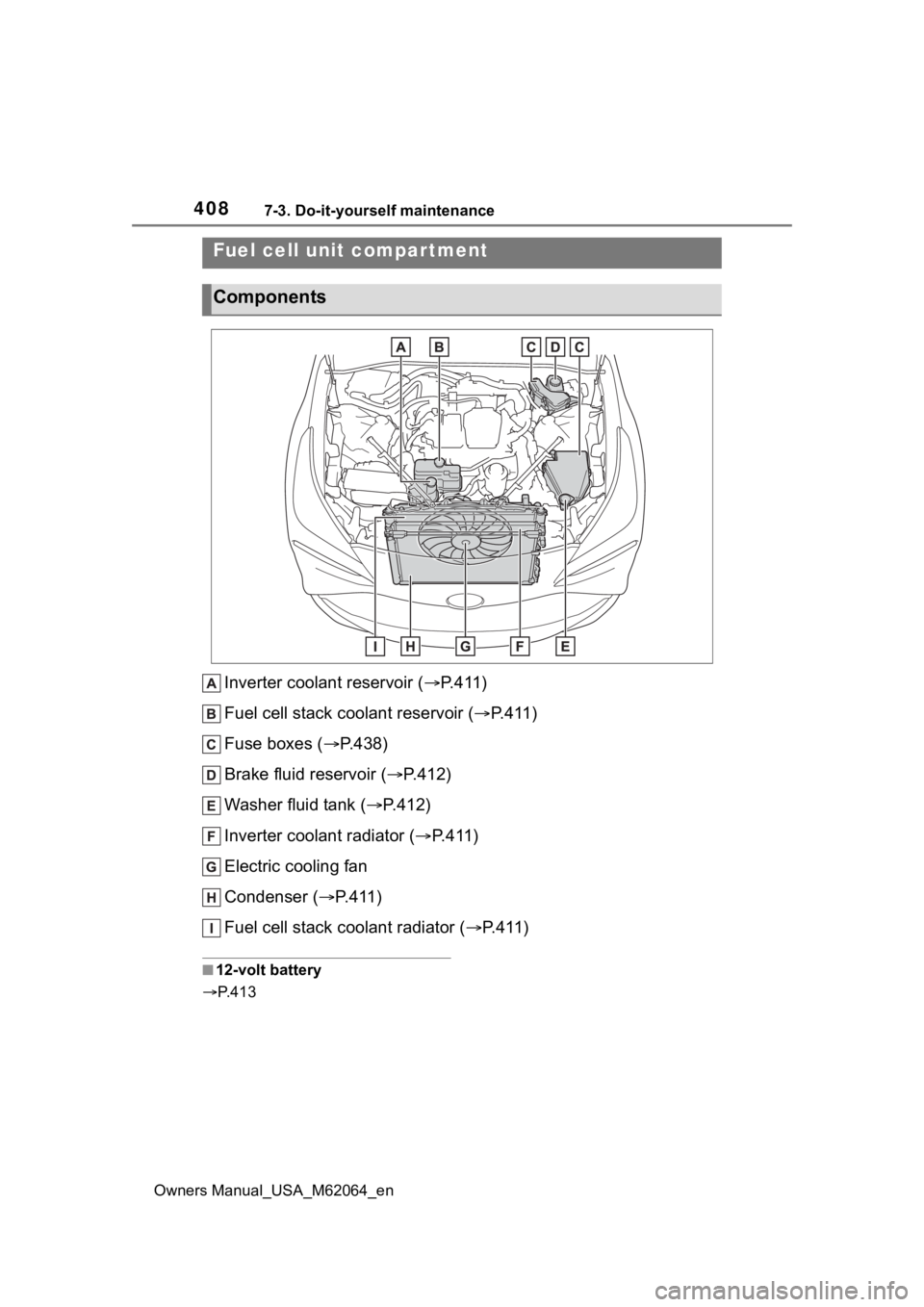
Inverter coolant reservoir ( P.411)
Fuel cell stack coolant reservoir ( P.411)
Fuse boxes ( P.438)
Brake fluid reservoir ( P.412)
Washer fluid tank ( P.412)
Inverter coolant radiator ( P.411)
Electric cooling fan
Condenser ( P.411)
Fuel cell stack coolant radiator ( P. 4 1 1 )
■12-volt battery
P. 4 1 3
Fuel cell unit compartment
Components
Page 411 of 572
4117-3. Do-it-yourself maintenance
Owners Manual_USA_M62064_en
7
Maintenance and care
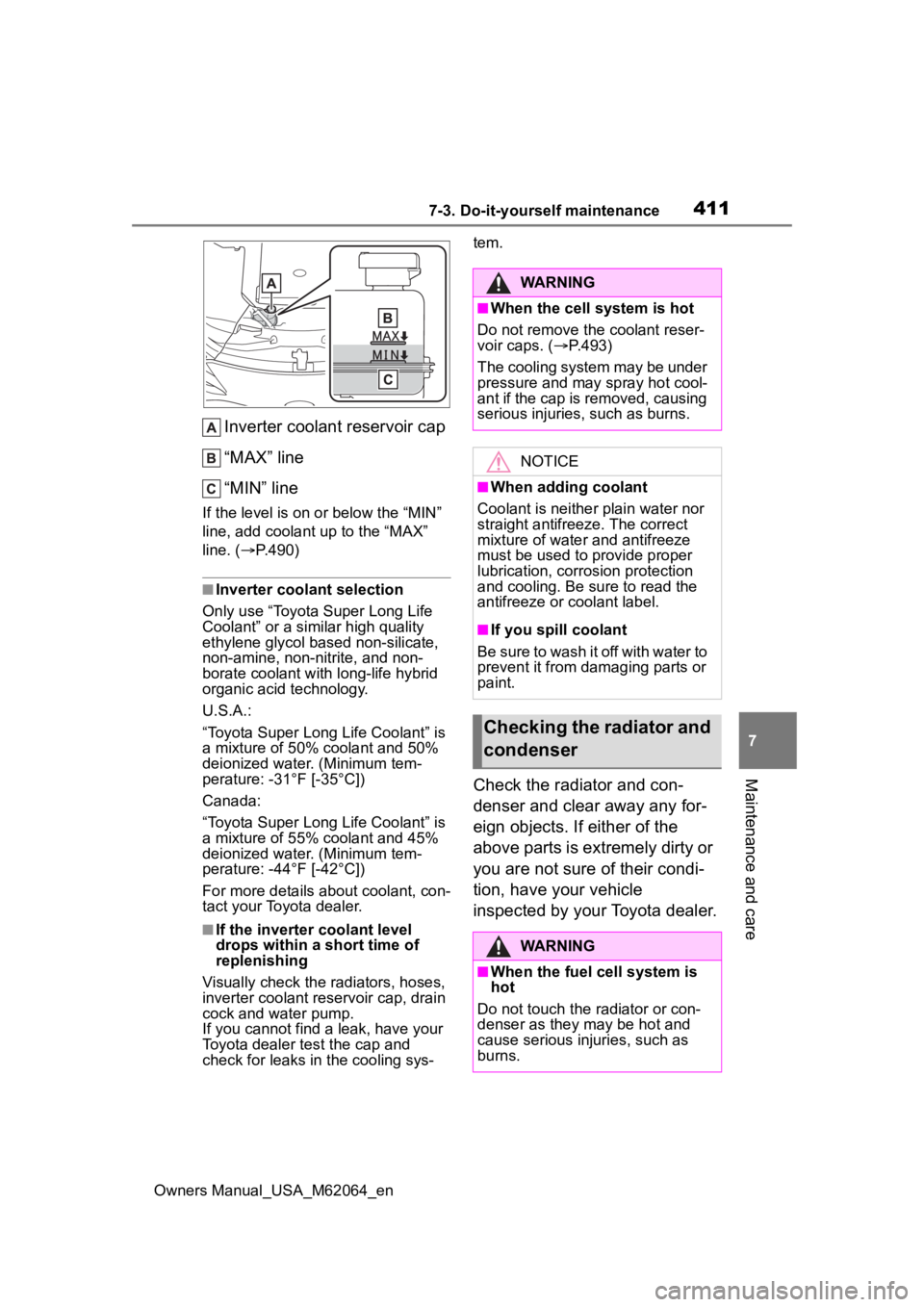
Inverter coolant reservoir cap
“MAX” line
“MIN” line
If the level is on or below the “MIN”
line, add coolant up to the “MAX”
line. ( P.490)
■Inverter coolant selection
Only use “Toyota Super Long Life
Coolant” or a similar high quality
ethylene glycol based non-silicate,
non-amine, non-nitrite, and non-
borate coolant with long-life hybrid
organic acid technology.
U.S.A.:
“Toyota Super Long Life Coolant” is
a mixture of 50% coolant and 50%
deionized water. (Minimum tem-
perature: -31°F [-35°C])
Canada:
“Toyota Super Long Life Coolant” is
a mixture of 55% coolant and 45%
deionized water. (Minimum tem-
perature: -44°F [-42°C])
For more details about coolant, con-
tact your Toyota dealer.
■If the inverter coolant level
drops within a short time of
replenishing
Visually check the radiators, hoses,
inverter coolant reservoir cap, drain
cock and water pump.
If you cannot find a leak, have your
Toyota dealer test the cap and
check for leaks in the cooling sys- tem.
Check the radiator and con-
denser and clear away any for-
eign objects. If either of the
above parts is extremely dirty or
you are not sure of their condi-
tion, have your vehicle
inspected by your Toyota dealer.
WARNING
■When the cell system is hot
Do not remove the coolant reser-
voir caps. ( P.493)
The cooling system may be under
pressure and may spray hot cool-
ant if the cap is removed, causing
serious injuries, such as burns.
NOTICE
■When adding coolant
Coolant is neither plain water nor
straight antifreeze. The correct
mixture of water and antifreeze
must be used to provide proper
lubrication, corrosion protection
and cooling. Be sure to read the
antifreeze or coolant label.
■If you spill coolant
Be sure to wash it off with water to
prevent it from damaging parts or
paint.
Checking the radiator and
condenser
WARNING
■When the fuel cell system is
hot
Do not touch the radiator or con-
denser as they may be hot and
cause serious injuries, such as
burns.
Page 433 of 572
4337-3. Do-it-yourself maintenance
Owners Manual_USA_M62064_en
7
Maintenance and care
areas with heavy traffic flow, early
replacement may be required. (For
scheduled maintenance information,
please refer to the “Scheduled
Maintenance Guide” or “Owner’s
Manual Supplement”.)
■If air flow from the vents
decreases dramatically
The filter may be clogged. Check
the filter and replace if necessary.
■Air conditioning filter with
deodorizing function
When fragrances are placed in your
vehicle, the deodorizing effect may
become significantly weakened in a
short period.
When an air conditioning odor
comes out continuously, replace the
air conditioning filter.
■Scheduled maintenance of the
air intake vents is necessary
when
In some situations such as when the
vehicle is used frequently or in
heavy traffic or dusty areas, the air
intake vents may need to be
cleaned more regularly.
For details, refer to the “Owner’s
Warranty Information Booklet” or
“Owner’s Manual Supplement”.
■Cleaning the air intake vents
Improper handling of the air intake
vent covers and filt ers may result in
damage to them. If you have any
concerns about cleaning the filter,
contact your Toyota dealer.
NOTICE
■When using the air condition-
ing system
Make sure that a filter is always
installed.
Using the air conditioning system
without a filter may cause damage
to the system.
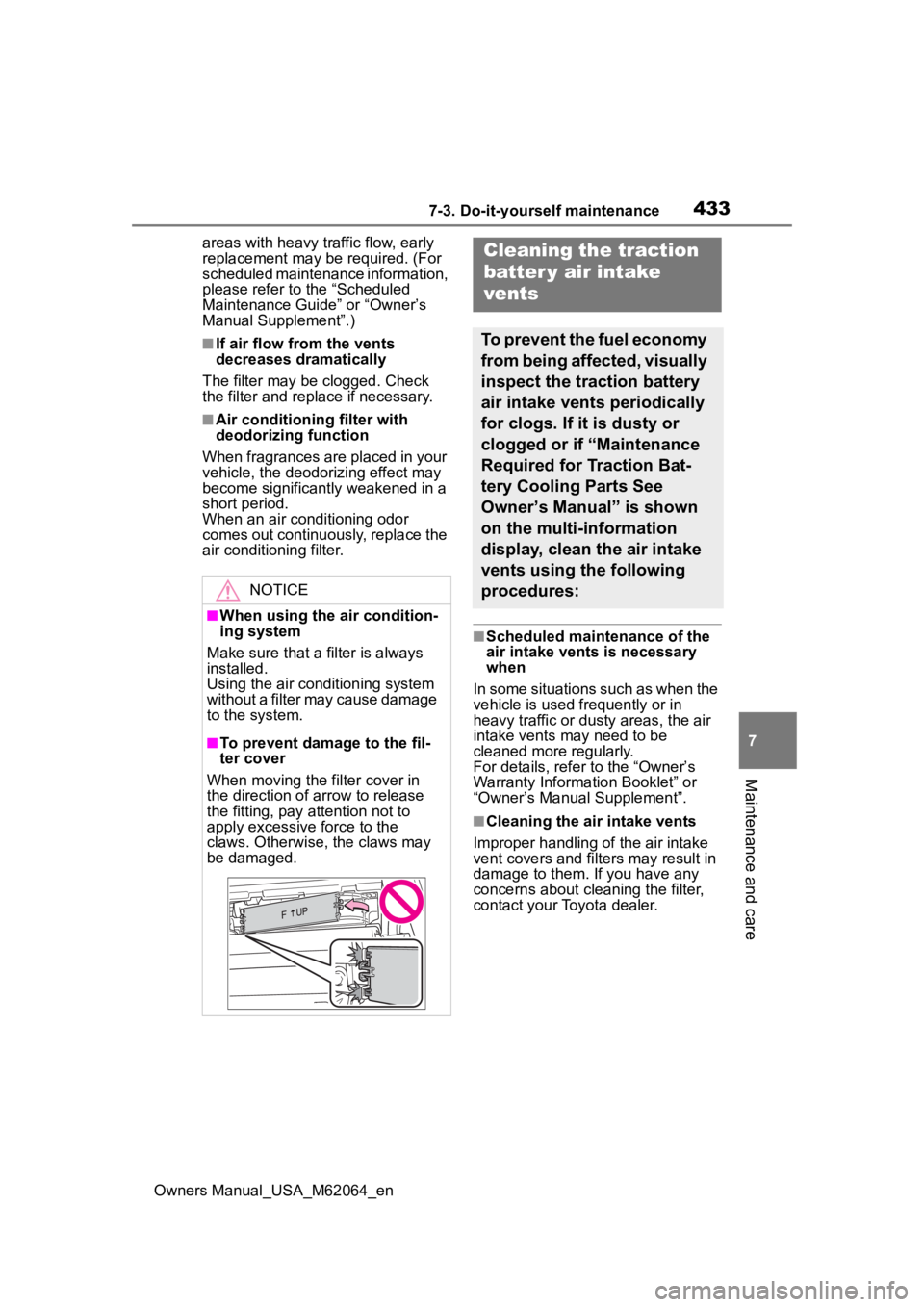
■To prevent damage to the fil-
ter cover
When moving the filter cover in
the direction of arrow to release
the fitting, pay attention not to
apply excessive force to the
claws. Otherwise, the claws may
be damaged.
Cleaning the traction
batter y air intake
vents
To prevent the fuel economy
from being affected, visually
inspect the traction battery
air intake vents periodically
for clogs. If it is dusty or
clogged or if “Maintenance
Required for Traction Bat-
tery Cooling Parts See
Owner’s Manual” is shown
on the multi-information
display, clean the air intake
vents using the following
procedures:
Page 434 of 572
4347-3. Do-it-yourself maintenance
Owners Manual_USA_M62064_en
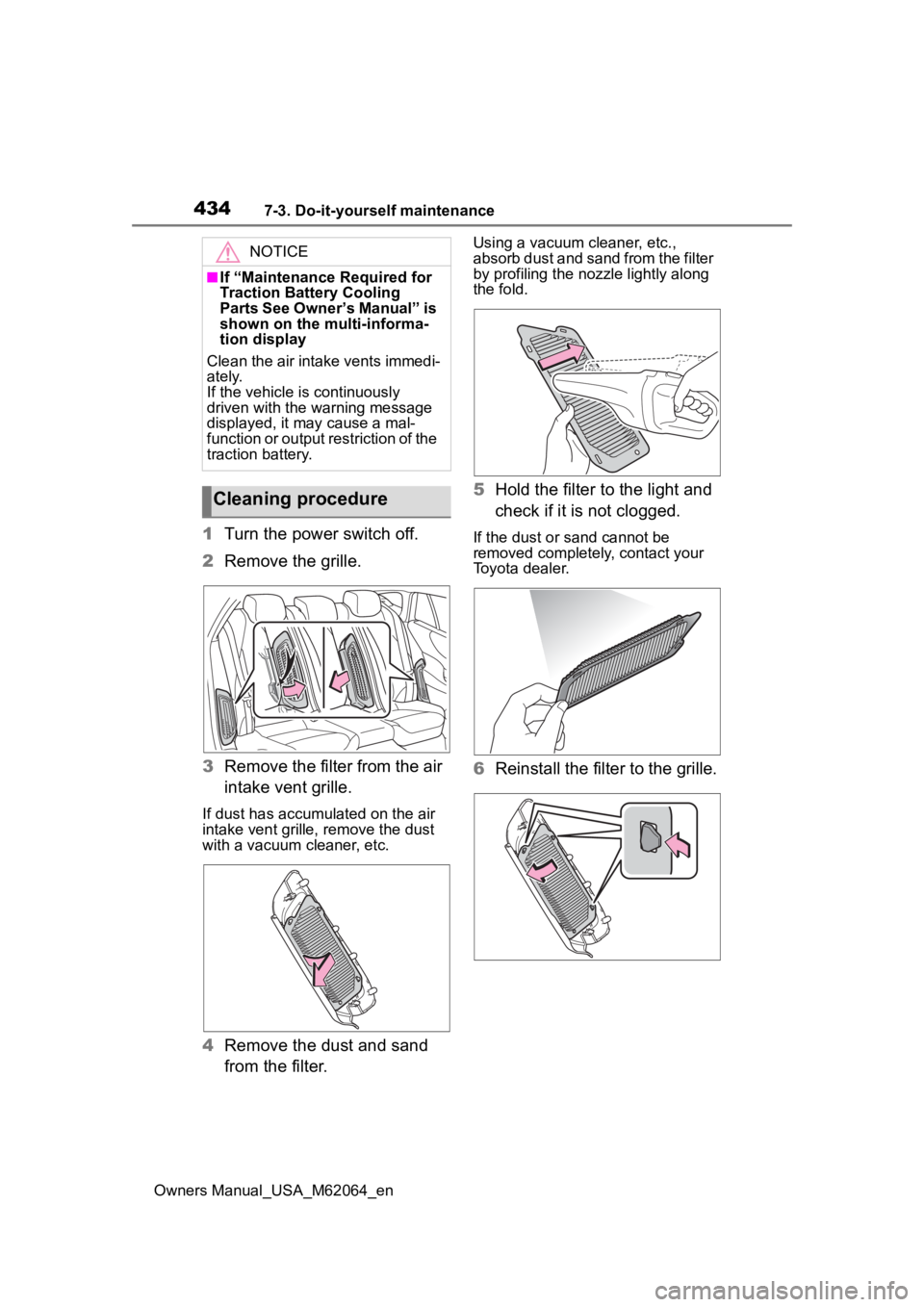
1Turn the power switch off.
2 Remove the grille.
3 Remove the filter from the air
intake vent grille.
If dust has accumu lated on the air
intake vent grille, remove t he dust
with a vacuum cleaner, etc.
4 Remove the dust and sand
from the filter.
Using a vacuum cleaner, etc.,
absorb dust and sand from the filter
by profiling the nozzle lightly along
the fold.
5Hold the filter to the light and
check if it is not clogged.
If the dust or sand cannot be
removed completely, contact your
Toyota dealer.
6Reinstall the filter to the grille.
NOTICE
■If “Maintenance Required for
Traction Battery Cooling
Parts See Owner’s Manual” is
shown on the multi-informa-
tion display
Clean the air intake vents immedi-
ately.
If the vehicle is continuously
driven with the warning message
displayed, it may cause a mal-
function or output restriction of the
traction battery.
Cleaning procedure
Page 435 of 572
4357-3. Do-it-yourself maintenance
Owners Manual_USA_M62064_en
7
Maintenance and care
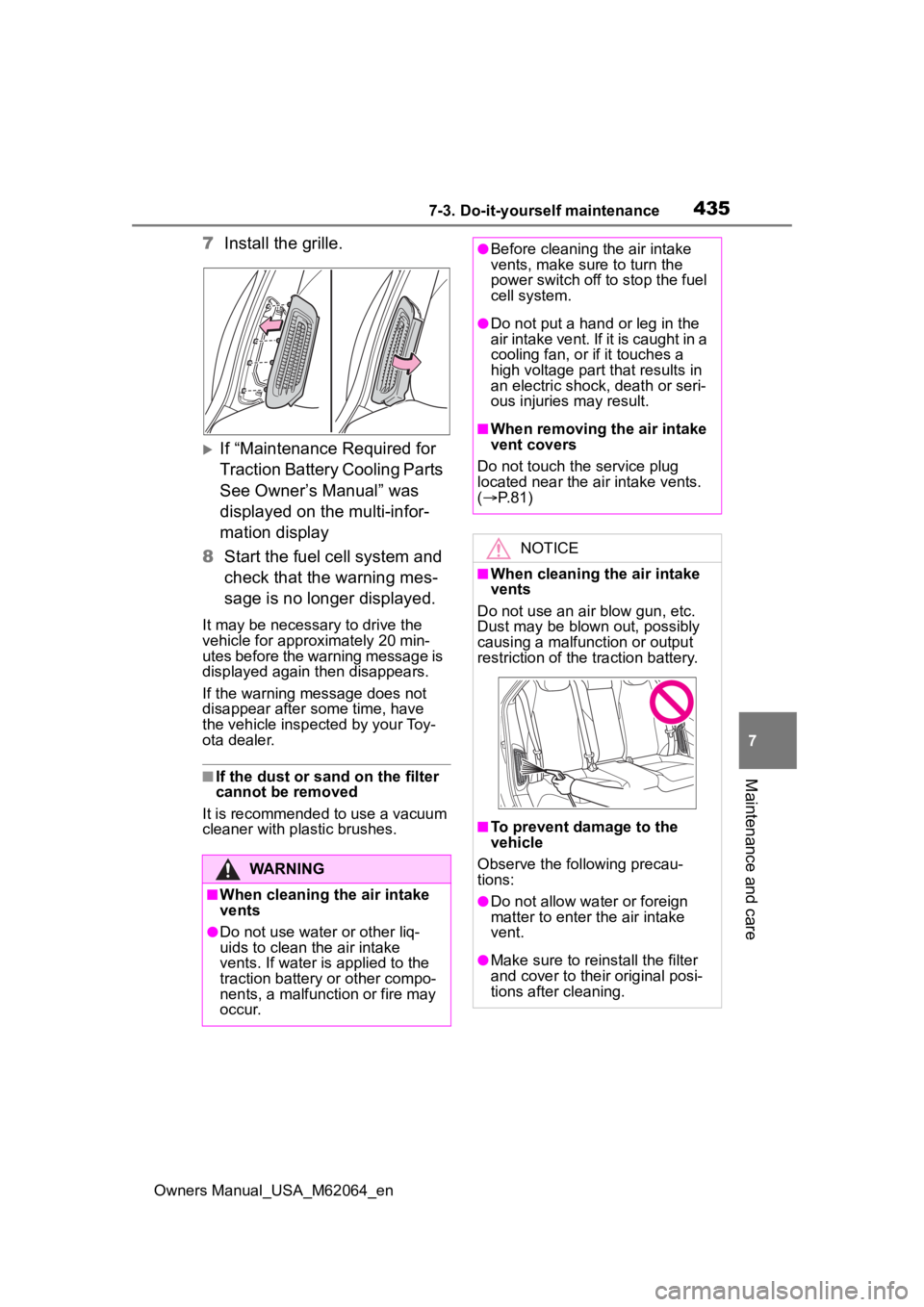
7 Install the grille.
If “Maintenance Required for
Traction Battery Cooling Parts
See Owner’s Manual” was
displayed on the multi-infor-
mation display
8 Start the fuel cell system and
check that the warning mes-
sage is no longer displayed.
It may be necessary to drive the
vehicle for approximately 20 min-
utes before the warning message is
displayed again then disappears.
If the warning message does not
disappear after some time, have
the vehicle inspected by your Toy-
ota dealer.
■If the dust or sand on the filter
cannot be removed
It is recommended to use a vacuum
cleaner with plastic brushes.
WARNING
■When cleaning the air intake
vents
●Do not use water or other liq-
uids to clean the air intake
vents. If water is applied to the
traction battery or other compo-
nents, a malfunction or fire may
occur.
●Before cleaning the air intake
vents, make sure to turn the
power switch off to stop the fuel
cell system.
●Do not put a han d or leg in the
air intake vent. If it is caught in a
cooling fan, or if it touches a
high voltage part that results in
an electric shock, death or seri-
ous injuries may result.
■When removing the air intake
vent covers
Do not touch the service plug
located near the air intake vents.
( P. 8 1 )
NOTICE
■When cleaning the air intake
vents
Do not use an ai r blow gun, etc.
Dust may be blown out, possibly
causing a malfunction or output
restriction of the traction battery.
■To prevent damage to the
vehicle
Observe the following precau-
tions:
●Do not allow wa ter or foreign
matter to enter the air intake
vent.
●Make sure to reinstall the filter
and cover to their original posi-
tions after cleaning.
Page 466 of 572
4668-2. Steps to take in an emergency
Owners Manual_USA_M62064_en
■If a message that indicates the
need for visiting your Toyota
dealer is displayed
The system or part shown on the
multi-information display is malfunc-
tioning. Have the vehicle inspected
by your Toyota dealer immediately.
■If a message that indicates the
need for referring to Owner’s
Manual is displayed
●If any of the following messages
are shown on the multi-informa-
tion display, it may indicate a mal-
function. Have the vehicle
inspected by you r Toyota dealer
immediately.
• “Smart Key System Malfunction
See Owner’s Manual”
• “P Switch Malfunction Apply Park- ing Brake Securely When Parking
See Owner’s Manual”
• “Shift System Malfunction Apply Parking Brake Securely When
Parking See Owner’s Manual”
• “Shift System Unavailable Apply Parking Brake Securely When
Parking See Owner’s Manual”
• “Shift System Malfunction See Owner’s Manual”
• “Shift System Malfunction Stop in a Safe Place See Owner’s Man-
ual”
• “Battery Low Shifting Unavailable See Owner’s Manual”
• “FCV system malfunction”
• “Traction battery system malfunc-
tion”
• “Accelerator System Malfunction”
●If any of the following messages
are shown on the multi-informa-
tion display, it may indicate a mal-
function. Immediat ely stop the
vehicle and contact your Toyota
dealer.
• “Braking Power Low Stop in a Safe Place See Owner’s Manual”
• “FCV System Shutdown Due to
Hydrogen Leakage Stop in a Safe
Place See Owner’s Manual”
●If “FCV system stopped” is shown
on the multi-information display,
the vehicle may have run out of fuel. Stop the vehicle in a safe
place and, if the fuel level is low,
refuel the vehicle. (
P.83)
●If “Low Auxiliary Battery See
Owner’s Manual” is shown,
• When the display goes off after several seconds (displays for
about 6 seconds): Maintain the
fuel cell system operation for more
than 15 minutes and charge the
12-volt battery.
• When the display does not go off: Start up the fuel cell system using
the procedures: P. 4 8 5
●If “Maintenance Required for Trac-
tion Battery Cooling Parts See
Owner’s Manual” is shown, the fil-
ters may be clogged, the air intake
vents may be blocked, or there
may be a gap in the duct. There-
fore, perform the following correc-
tion procedure.
• Cleaning the traction battery air intake vents ( P.433)
If the warning message is shown
even if the vents are cleaned,
have the vehicle inspected by
your Toyota dealer.
■If “Ion Filter Maintenance
Required Visit Your Dealer” is
displayed
Ion filter replacement is necessary.
Contact your Toyota dealer.
NOTICE
■If “Low Auxiliary Battery See
Owner’s Manual” is displayed
frequently
The 12-volt battery may have
deteriorated. As the battery may
discharge in this state when left
unattended, have the battery
inspected by you r Toyota dealer.