towing TOYOTA MIRAI 2023 User Guide
[x] Cancel search | Manufacturer: TOYOTA, Model Year: 2023, Model line: MIRAI, Model: TOYOTA MIRAI 2023Pages: 572, PDF Size: 17.71 MB
Page 247 of 572
2475-5. Using the driving support systems
Owners Manual_USA_M62064_en
5
Driving
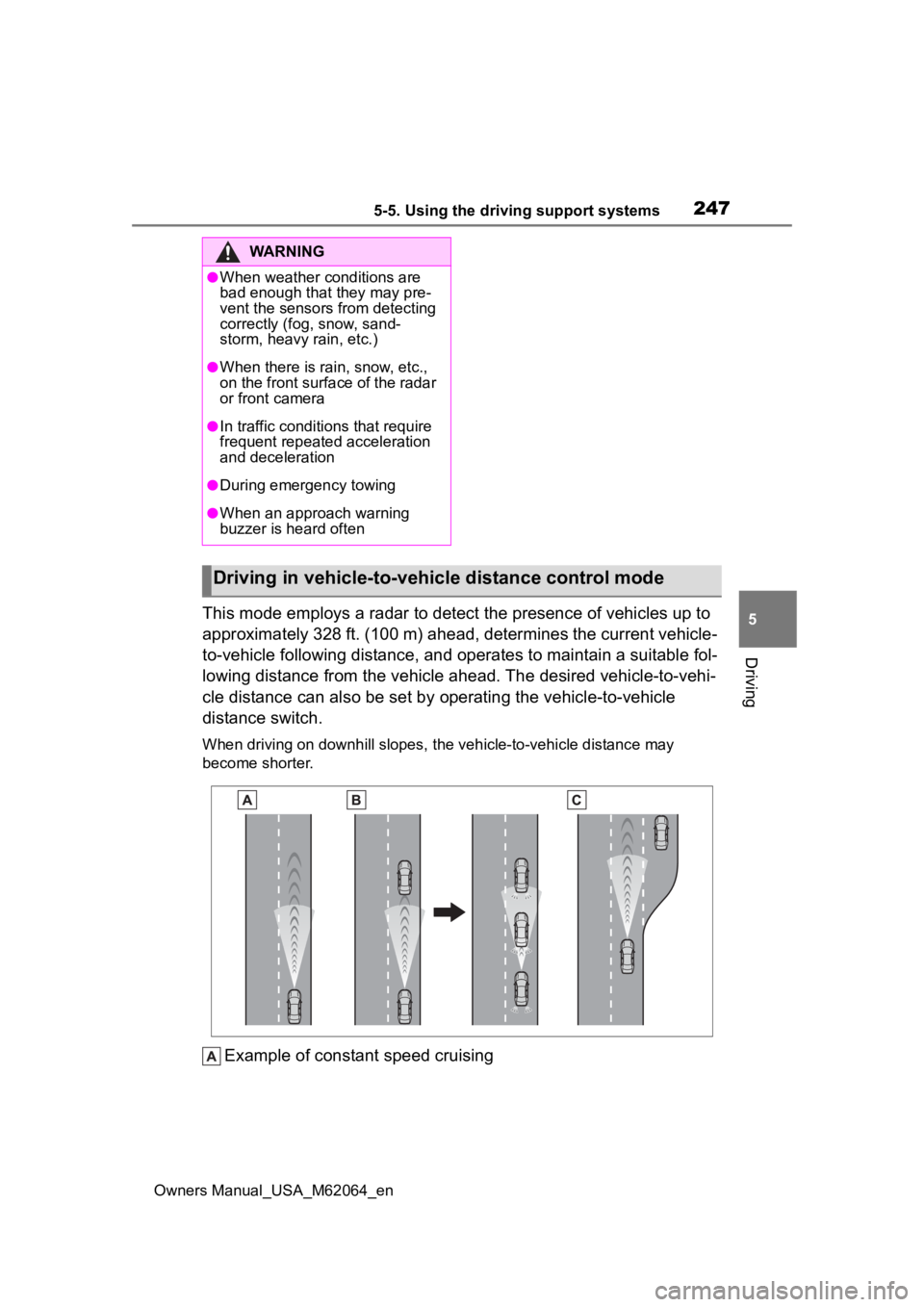
This mode employs a radar to detect the presence of vehicles up to
approximately 328 ft. (100 m) ahead, determines the current veh icle-
to-vehicle following distance, and operates to maintain a suitable fol-
lowing distance from the vehicle ahead. The desired vehicle-to- vehi-
cle distance can also be set by operating the vehicle-to-vehicle
distance switch.
When driving on downhill slopes, the vehicle-to-vehicle distanc e may
become shorter.
Example of constant speed cruising
WARNING
●When weather conditions are
bad enough that they may pre-
vent the sensors from detecting
correctly (fog, snow, sand-
storm, heavy rain, etc.)
●When there is rain, snow, etc.,
on the front surface of the radar
or front camera
●In traffic conditions that require
frequent repeated acceleration
and deceleration
●During emergency towing
●When an approach warning
buzzer is heard often
Driving in vehicle-to-vehicle distance control mode
Page 265 of 572
2655-5. Using the driving support systems
Owners Manual_USA_M62064_en
5
Driving
direction, uneven, or waving are in
the detection range.
●Strong wind is blowing
●When driving in inclement weather
such as fog, snow or a sandstorm
●When an object that cannot be
detected is betw een the vehicle
and a detected object
●If an object such as a vehicle,
motorcycle, bicycle or pedestrian
cuts in front of the vehicle or runs
out from the side of the vehicle
●If the orientation of a sensor has
been changed due t o a collision or
other impact
●When equipment that may
obstruct a sensor is installed, such
as a towing eyelet, bumper pro-
tector (an additi onal trim strip,
etc.), bicycle carrier, or snow plow
●If the front of the vehicle is raised
or lowered due to the carried load
●If the vehicle cannot be driven in a
stable manner, such as when the
vehicle has been in an accident or
is malfunctioning
●When a tire chains, compact
spare tire or an emergency tire
puncture repair kit is used
■Situations in which the system
may operate even if there is no
possibility of a collision
In some situations, such as the fol-
lowing, the system may operate
even though there is no possibility of
a collision.
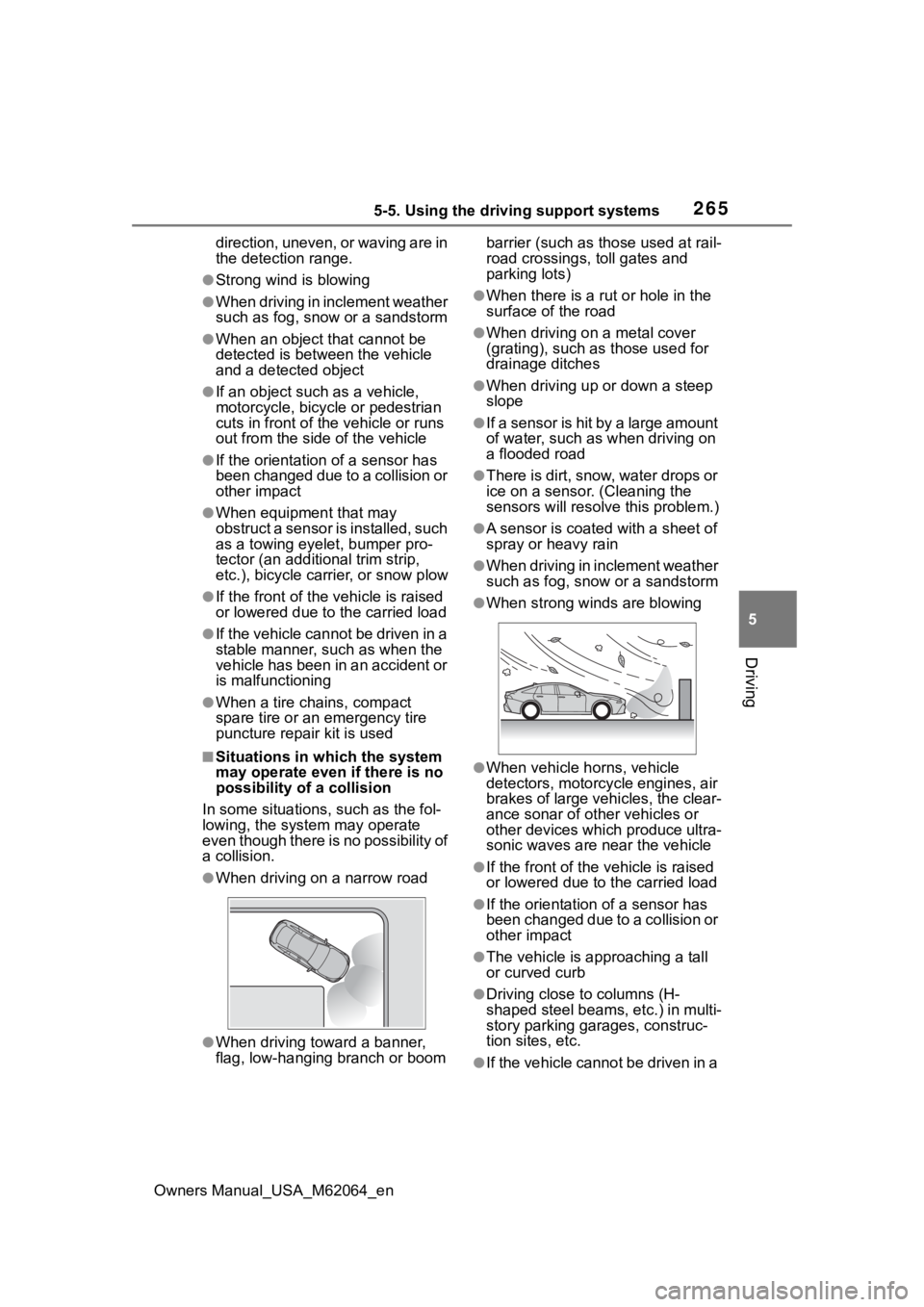
●When driving on a narrow road
●When driving toward a banner,
flag, low-hanging branch or boom barrier (such as those used at rail-
road crossings, toll gates and
parking lots)
●When there is a ru
t or hole in the
surface of the road
●When driving on a metal cover
(grating), such as those used for
drainage ditches
●When driving up or down a steep
slope
●If a sensor is hit by a large amount
of water, such as when driving on
a flooded road
●There is dirt, snow, water drops or
ice on a sensor. (Cleaning the
sensors will resolve this problem.)
●A sensor is coated with a sheet of
spray or heavy rain
●When driving in inclement weather
such as fog, snow or a sandstorm
●When strong winds are blowing
●When vehicle horns, vehicle
detectors, motorcycle engines, air
brakes of large vehicles, the clear-
ance sonar of ot her vehicles or
other devices which produce ultra-
sonic waves are near the vehicle
●If the front of the v ehicle is raised
or lowered due to the carried load
●If the orientation of a sensor has
been changed due to a collision or
other impact
●The vehicle is approaching a tall
or curved curb
●Driving close to columns (H-
shaped steel beams, etc.) in multi-
story parking garages, construc-
tion sites, etc.
●If the vehicle cannot be driven in a
Page 275 of 572
2755-5. Using the driving support systems
Owners Manual_USA_M62064_en
5
Driving
●When there is a malfunction in a
sensor or the system is temporar-
ily unavailable.
●When the operating function is
disabled manually.
●When the power switch is turned
off.
*: If equipped
■Conditions under which the
system will not detect a vehicle
The RCTA function is not designed
to detect the following types of vehi-
cles and/or objects:
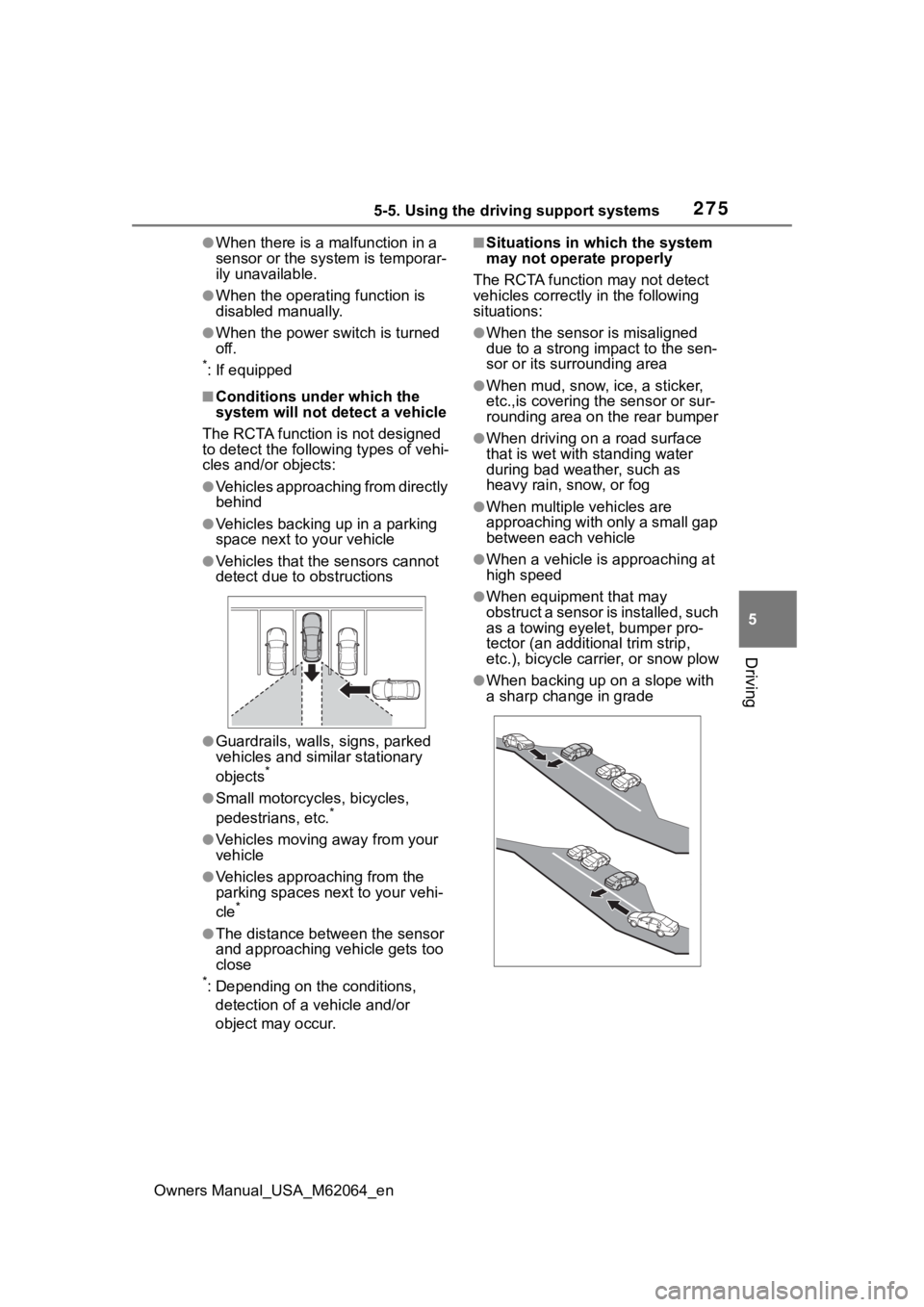
●Vehicles approaching from directly
behind
●Vehicles backing up in a parking
space next to your vehicle
●Vehicles that the sensors cannot
detect due to obstructions
●Guardrails, walls, signs, parked
vehicles and similar stationary
objects
*
●Small motorcycles, bicycles,
pedestrians, etc.*
●Vehicles moving away from your
vehicle
●Vehicles approaching from the
parking spaces next to your vehi-
cle
*
●The distance between the sensor
and approaching vehicle gets too
close
*: Depending on the conditions, detection of a vehicle and/or
object may occur.
■Situations in which the system
may not operate properly
The RCTA function may not detect
vehicles correctly in the following
situations:
●When the sensor is misaligned
due to a strong impact to the sen-
sor or its surrounding area
●When mud, snow, ice, a sticker,
etc.,is covering the sensor or sur-
rounding area on the rear bumper
●When driving on a road surface
that is wet with standing water
during bad weather, such as
heavy rain, snow, or fog
●When multiple vehicles are
approaching with only a small gap
between each vehicle
●When a vehicle is approaching at
high speed
●When equipment that may
obstruct a sensor is installed, such
as a towing eyelet, bumper pro-
tector (an additional trim strip,
etc.), bicycle car rier, or snow plow
●When backing up on a slope with
a sharp change in grade
Page 276 of 572
2765-5. Using the driving support systems
Owners Manual_USA_M62064_en
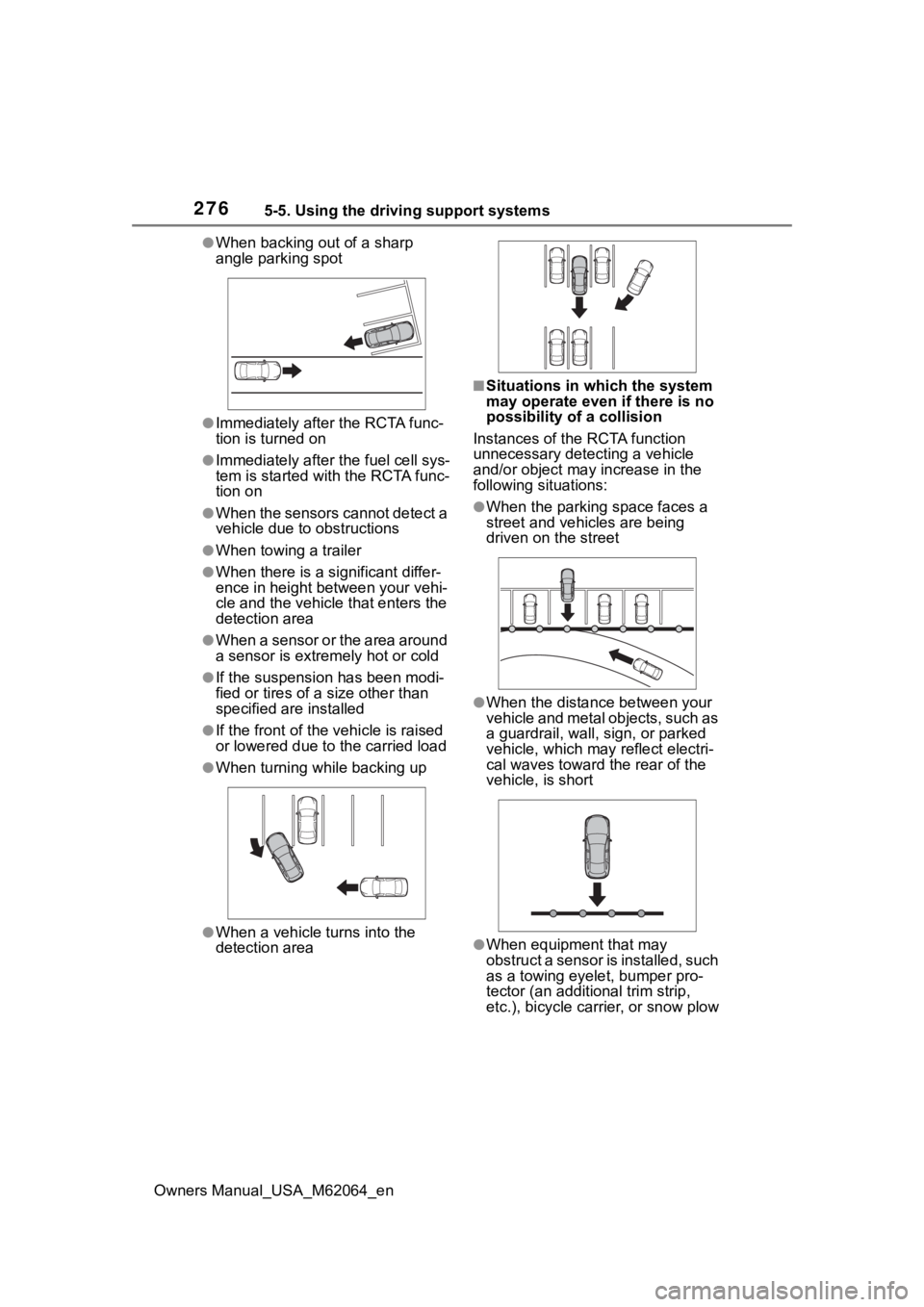
●When backing out of a sharp
angle parking spot
●Immediately after the RCTA func-
tion is turned on
●Immediately after the fuel cell sys-
tem is started with the RCTA func-
tion on
●When the sensors cannot detect a
vehicle due to obstructions
●When towing a trailer
●When there is a significant differ-
ence in height between your vehi-
cle and the vehicle that enters the
detection area
●When a sensor or the area around
a sensor is extremely hot or cold
●If the suspension has been modi-
fied or tires of a size other than
specified are installed
●If the front of the vehicle is raised
or lowered due to the carried load
●When turning while backing up
●When a vehicle turns into the
detection area
■Situations in which the system
may operate even if there is no
possibility of a collision
Instances of the RCTA function
unnecessary detec ting a vehicle
and/or object may increase in the
following situations:
●When the parking space faces a
street and vehicles are being
driven on the street
●When the distance between your
vehicle and metal objects, such as
a guardrail, wall, sign, or parked
vehicle, which may reflect electri-
cal waves toward the rear of the
vehicle, is short
●When equipment that may
obstruct a sensor is installed, such
as a towing eyelet, bumper pro-
tector (an additional trim strip,
etc.), bicycle car rier, or snow plow
Page 280 of 572
2805-5. Using the driving support systems
Owners Manual_USA_M62064_enwhen the R shift position is
selected, the rear camera lens
may be dirty. Clean the rear cam-
era lens.
■Situations in which the system
may not operate properly
●Some pedestrians, such as the
following, may not be detected by
the rear camera detection func-
tion, preventing the function from
operating properly:
• Pedestrians who are bending for-
ward or squatting
• Pedestrians who are lying down
• Pedestrians who are running
• Pedestrians who suddenly enter the detection area
• People riding a bicycle, skate-
board, or other light vehicle
• Pedestrians wearing oversized clothing such as a rain coat, long
skirt, etc., making their silhouette
obscure
• Pedestrians whose body is par-
tially hidden by an object, such as
a cart or umbrella
• Pedestrians which are obscured
by darkness, such as at night
●In some situations, such as the
following, pedestrians may not be
detected by the rear camera
detection function, preventing the
function from operating properly:
• When backing up in inclement weather (rain, snow, fog, etc.)
• When the rear camera is obscured (dirt, snow, ice, etc., are
attached) or scratched
• When a very bright light, such as the sun, or the headlights of
another vehicle, shines directly
into the rear camera
• When backing up in a place where the surrounding brightness
changes suddenly, such as at the
entrance or exit of a garage or
underground parking lot
• When backing up i n a dim envi-
ronment such as during dusk or in
an underground parking lot
• When the camera position and
direction are deviated
• When a towing hook is attached • When water droplets are flowing
on the camera lens
• When the vehicle height is
extremely changed (nose up,
nose down).
• When tire chains or an emergency
tire puncture repair kit is used
• If the suspension has been modi- fied or tires of a size other than
specified are installed
• If an electronic component, such as a backlit license plate or rear
fog light, is insta lled near the rear
camera
• If a bumper protector, such as an
additional trim strip, is installed to
the rear bumper
■Situations in which the system
may operate unexpectedly
●Even though there are no pedes-
trians in the detection area, some
objects, such as the following,
may be detected, possibly caus-
ing the rear cam era detection
function to operate.
• Three dimensional objects, such as a pole, traffic cone, fence, or
parked vehicle
• Moving objects, such as a car or motorcycle
• Objects moving to ward your vehi-
cle when backing up, such as
flags or puddles (or airborne mat-
ter, such as smoke, steam, rain, or
snow)
• Cobblestone or gravel roads, tram
rails, road repai rs, white lines,
pedestrian crossings or fallen
leaves on the road
• Metal covers (gratings), such as those used for drainage ditches
• Objects reflected in a puddle or on
a wet road surface
• Shadows on the road
●In some situations, such as the
following, the rea r camera detec-
tion function may operate even
though there are no pedestrians in
the detection area.
• When backing up toward the road- side or a bump on the road
• When backing up toward an incline/decline
Page 281 of 572
2815-5. Using the driving support systems
Owners Manual_USA_M62064_en
5
Driving
• If the rear of the vehicle is raised or lowered due to the carried load
• If a bumper protector, such as an
additional trim strip, is installed to
the rear bumper
• If the orientation of the rear cam-
era has been changed
• If a towing eyelet is installed to the rear of the vehicle
• When water is flowing over the rear camera lens
• When the rear camera is
obscured (dirt, snow, ice, etc., are
attached) or scratched
• If there is a flashing light in the
detection area, such as the emer-
gency flashers of another vehicle
• When a tire chains or an emer-
gency tire puncture repair kit is
used
●Situations in which the rear cam-
era detection function may be diffi-
cult to notice
• The buzzer may be difficult to hear if the surrounding area is noisy,
the volume of the audio system
volume is high, the air condition-
ing system is being used, etc.
• If the temperature in the cabin is
extremely high or low, the audio
system screen may not operate
correctly.
*: If equipped
■Parking Support Brake
function (static objects
front and rear of the vehi-
cle/static objects around
the vehicle
*)
P.286
PKSB (Parking Sup-
port Brake)*
The Parking Support Brake
system consists of the fol-
lowing functions that oper-
ate when driving at a low
speed or backing up, such
as when parking. When the
system determines that the
probability of a collision
with a detected object or
pedestrian is high, a warn-
ing operates to urge the
driver to take evasive
action. If the system deter-
mines that the possibility of
a collision with a detected
object or pedestrian is
extremely high, the brakes
are automatically applied to
help avoid the collision or
help reduce the impact of
the collision.
PKSB (Parking Support
Brake) system
Page 282 of 572
2825-5. Using the driving support systems
Owners Manual_USA_M62064_en
■Parking Support Brake
function (moving vehicles
rear of the vehicle)
P.290
■Parking Support Brake
function (pedestrians rear
of the vehicle)
P.291
*: If equipped
WARNING
■Cautions regarding the use of
the system
Do not overly rely on the system,
as doing so may lead to an acci-
dent.
Always drive while checking the
safety of the surroundings of the
vehicle.
Depending on the vehicle and
road conditions, weather, etc., the
system may not operate.
The detection capa bilities of sen-
sors and radars are limited.
Always drive while checking the
safety of the surroundings of the
vehicle.
●The driver is solely responsible
for safe driving. Always drive
carefully, taking care to observe
your surroundings. The Parking
Support Brake system is
designed to provide support to
lessen the severity of collisions.
However, it may not operate in
some situations.
●The Parking Support Brake sys-
tem is not designed to stop the
vehicle completely. Additionally,
even if the system has stopped
the vehicle, it is necessary to
depress the brake pedal imme-
diately as brake control will be
canceled after approximately 2
seconds.
●It is extremely dangerous to
check the system operations by
intentionally driving the vehicle
into the direction of a wall, etc.
Never attempt such actions.
■When to disable the Parking
Support Brake
In the following situations, disable
the Parking Suppor t Brake as the
system may opera te even though
there is no possibility of a colli-
sion.
●When inspecting the vehicle
using a chassis roller, chassis
dynamo or free roller
●When loading the vehicle onto a
boat, truck or other transport
vessel
●If the suspension has been
modified or tires of a size other
than specified are installed
●If the front of the vehicle is
raised or lowered due to the
carried load
●When equipment that may
obstruct a sensor is installed,
such as a towing eyelet, bumper
protector (an additional trim
strip, etc.), bicycle carrier, or
snow plow
●When using automatic car
washing devices
●If the vehicle cannot be driven in
a stable manner, such as when
the vehicle has been in an acci-
dent or is malfunctioning
●When the vehicle is driven in a
sporty manner or off-road
●When the tires are not properly
inflated
●When the tires are very worn
Page 283 of 572
2835-5. Using the driving support systems
Owners Manual_USA_M62064_en
5
Driving
The Parking Support Brake can
be enabled/disabled on the
multi-information display. All of
the Parking Support Brake func-
tions (static objects front and
rear of the vehicle, moving vehi-
cles rear of the vehicle, pedestri-
ans rear of the vehicle and static
objects around the vehicle) are
enabled/disabled simultane-
ously.
Use the meter control switches
to enable/disable the parking
support brake. ( P.106)
1 Press or to select .
2 Press or to select
“ PKSB” and then press
.
When the Parking Support Brake is
disabled, the PKSB OFF indicator
( P.97) illuminates. To re-enable the
system when it
was disabled, select on the
multi-information display, select
“ PKSB” and then On. If dis-
abled using this method, the sys-
tem will not be re-enabled by
turning the power switch off and
then to ON.
If the fuel cell system output restric-
tion control or brake control oper-
ates, a buzzer will sound and a
message will be displayed on the
multi-information display and head-
up display (if equipped), multimedia
display, to alert the driver.
Depending on the situation, fuel cell
system output restriction control will
operate to either limit acceleration
or restrict output as much as possi-
ble.
Fuel cell system output
restriction control is operating
(acceleration restriction)
Acceleration greater than a certain
amount is restric ted by the system.
Multimedia display: No warning dis-
played
Multi-information display: “Object
Detected Acceleration Reduced”
Head-up display (if equipped): No
warning displayed
PKSB OFF indicator: Not illumi-
nated
Buzzer: Does not sound
WARNING
●When a tire chains, compact
spare tire or an emergency tire
puncture repair kit is used
●When towing with the vehicle
■Precautions for the suspen-
sion
Do not modify the suspension of
the vehicle. If the height or tilt of
the vehicle is changed, the sen-
sors may not be able to detect
detectable objects and the system
may not operate correctly, possi-
bly leading to an accident.
Enabling/Disabling the
Parking Support Brake
Display and buzzer for
fuel cell system output
restriction control and
brake control
Page 449 of 572
4498-2. Steps to take in an emergency
Owners Manual_USA_M62064_en
8
When trouble arises
8-2.Steps to take in an emergency
If your vehicle needs
to be towed
If towing is necessary, we
recommend having your
vehicle towed by your Toy-
ota dealer or commercial
towing service, using a
wheel-lift type truck or flat-
bed truck.
Use a safety chain system
for all towing, and abide by
all state/provincial and local
laws.
WARNING
Observe the following precau-
tions.
Failure to do so m ay result in
death or serious injury.
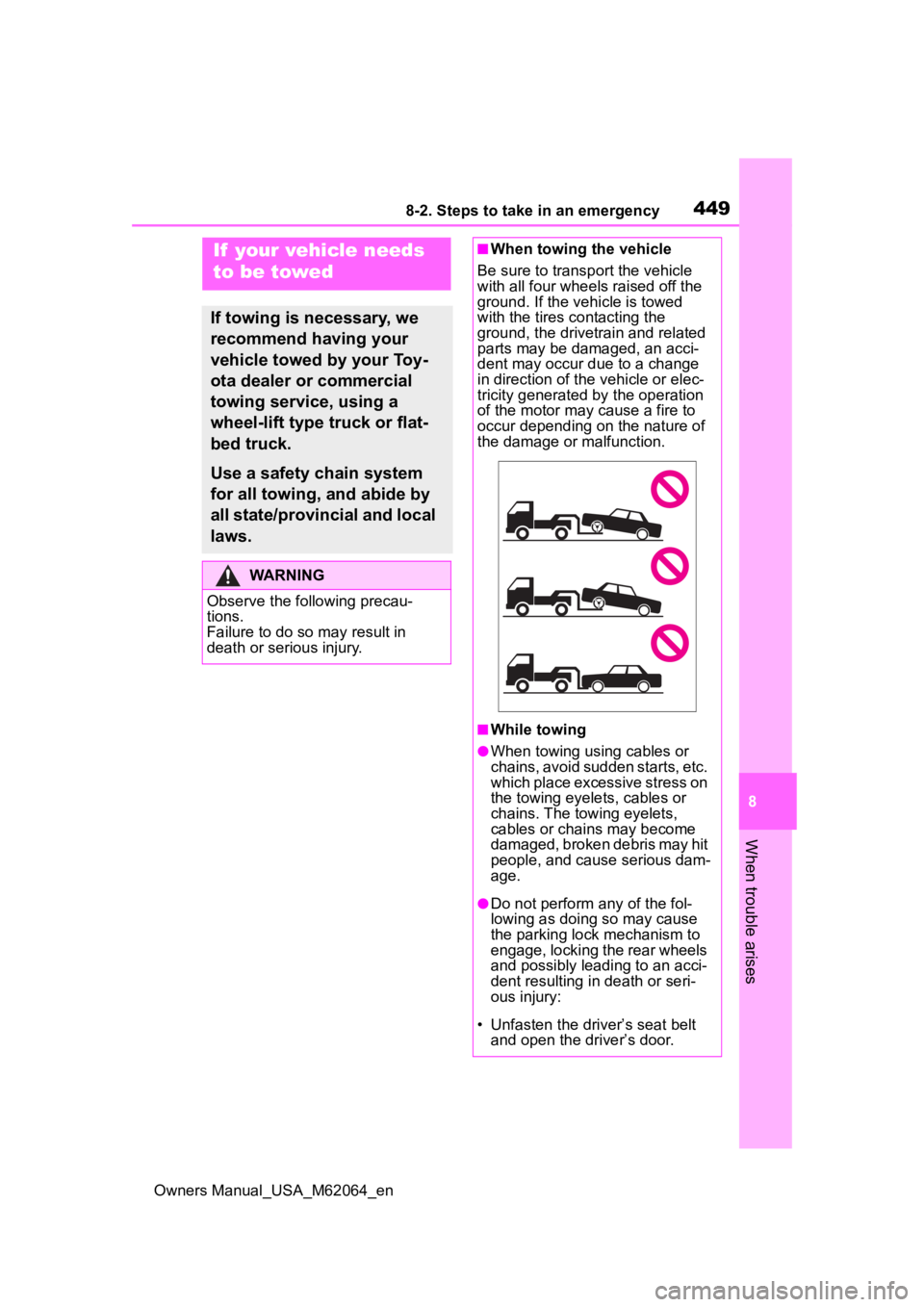
■When towing the vehicle
Be sure to transp ort the vehicle
with all four wheels raised off the
ground. If the vehicle is towed
with the tires co ntacting the
ground, the drivetrain and related
parts may be damaged, an acci-
dent may occur due to a change
in direction of the vehicle or elec-
tricity generated by the operation
of the motor may cause a fire to
occur depending o n the nature of
the damage or malfunction.
■While towing
●When towing using cables or
chains, avoid sudden starts, etc.
which place excessive stress on
the towing eyelets, cables or
chains. The towing eyelets,
cables or chains may become
damaged, broken debris may hit
people, and cause serious dam-
age.
●Do not perform any of the fol-
lowing as doing so may cause
the parking lock mechanism to
engage, locking the rear wheels
and possibly leading to an acci-
dent resulting in death or seri-
ous injury:
• Unfasten the driv er’s seat belt
and open the driver’s door.
Page 450 of 572
4508-2. Steps to take in an emergency
Owners Manual_USA_M62064_en
In the following situations, it is
not possible to be towed by
another vehicle using cables or
chains, as the rear wheels may
be locked due to the parking
lock. Contact your Toyota dealer
or commercial towing service.
There is a malfunction in the
shift control system. ( P.464)
There is a malfunction in the
immobilizer system. ( P.70)
There is a malfunction in the
smart key system. ( P.482)
The 12-volt battery is dis-
charged. ( P.485)
The following may indicate a
problem with your transmission.
Contact your Toyota dealer or
commercial towing service
before towing.
The fuel cell system warning
message is shown on the
multi-information display and
the vehicle does not move.
The vehicle makes an abnor-
mal sound.
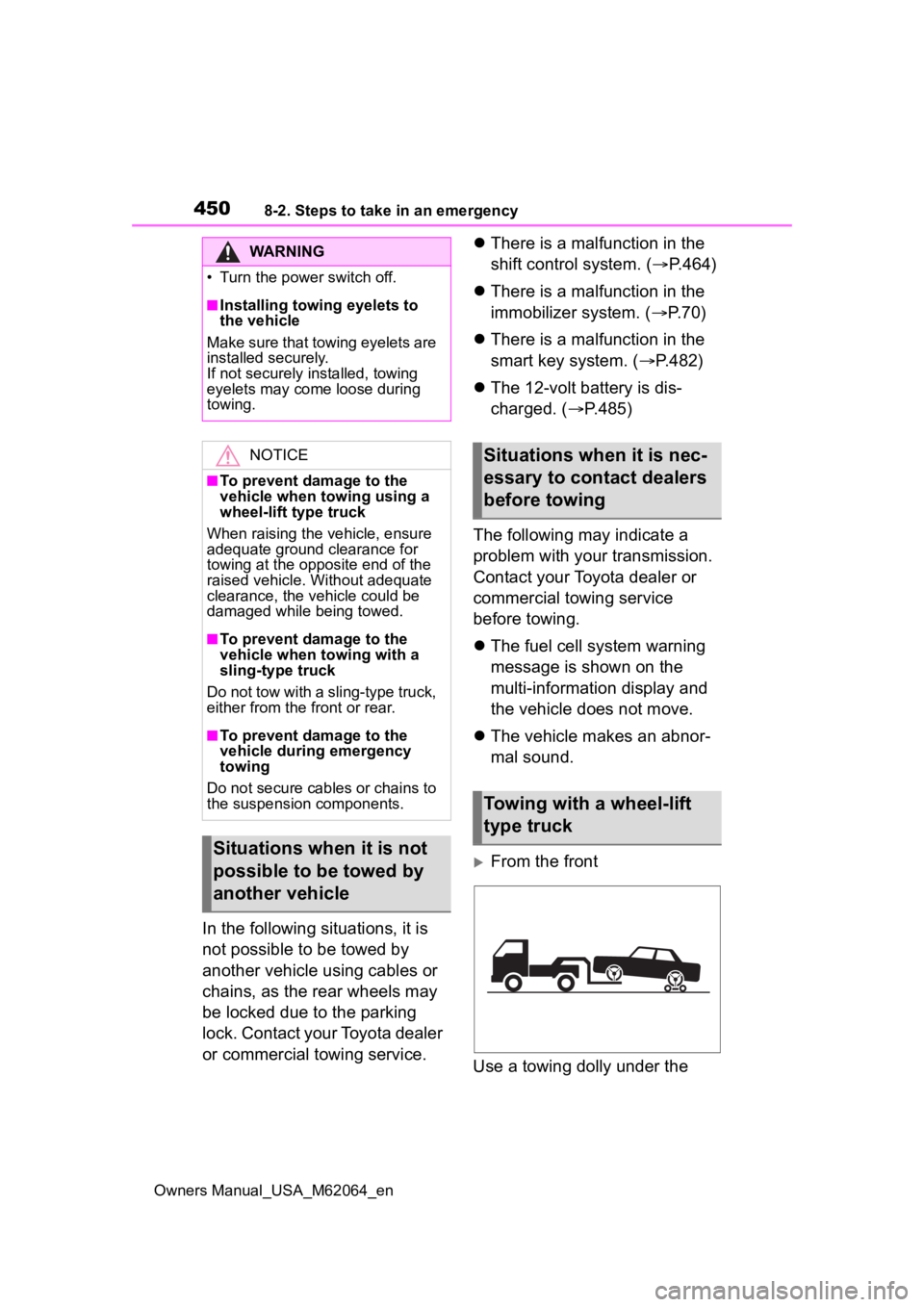
From the front
Use a towing dolly under the
WARNING