belt TOYOTA MIRAI 2023 Service Manual
[x] Cancel search | Manufacturer: TOYOTA, Model Year: 2023, Model line: MIRAI, Model: TOYOTA MIRAI 2023Pages: 572, PDF Size: 17.71 MB
Page 187 of 572

1875-2. Driving procedures
Owners Manual_USA_M62064_en
5
Driving
speed with the accelerator pedal
depressed
●When attempting to change the
shift position from P or N to Br
mode
●When the P position switch is
pressed while driving
When driving at an extremely low
speed, the shift position may
change to P.
■The shift position automatically
changes to N when
In the following situations, a buzzer
will sound to inform you that the shift
position has been changed to N.
Use the appropriate operation to
attempt to change the shift position
again.
●When attempting to change the
shift position to R while the vehicle
is moving forward
When driving at a low speed, the
shift position may change to R.
●When attempting to change the
shift position to D while the vehicle
is moving backward
When driving at a low speed, the
shift position may change to D.
●When attempting to change the
shift position from R to Br mode
■If the N shift position is selected
while driving
If the shift lever is moved to N while
driving above a certain speed, the
shift position will change to N with-
out holding the shi ft lever in the N
position. In this situation, a buzzer
will sound and a message will be
displayed on the multi-information
display to inform you that the shift
position has been changed to N.
■Automatic P position selection
function
In the following situations, the shift
position is automatically changed to
P.
●When pressing t he power switch
with the vehicle stopped while the
power switch is in ON and the shift
position is in a position other than
P (after the shift position has
changed to P, the power switch
will turn off)
*
●If the driver’s door is opened and
all of the following conditions are
met, while the shift position is in a
position other than P
• The power switch is in ON.
• The driver is not wearing the seat
belt.
• The brake pedal is not depressed.
To start off the vehicle after the shift
position is changed to P, operate the
shift lever again.
●When the vehicle is stopped after
the fuel cell system has been
stopped in an emergency while
driving
●When voltage of the 12-volt bat-
tery drops while the shift position
is in a position other than P
*: When the power switch is pressed
while driving at extremely slow
speeds, such as immediately
before stopping th e vehicle, the
shift position may automatically
change to P. Make sure that the
vehicle is completely stopped
before pressing the power switch.
■If the shift position cannot be
shifted from P
There is a possibility that the 12-volt
battery is dischar ged. Check the 12-
volt battery in this situation.
( P.485)
Page 192 of 572
1925-2. Driving procedures
Owners Manual_USA_M62064_en
When the shift position is
shifted to P, the parking brake
will be set, and the parking
brake indicator light will turn
on.
Operate the shift lever and P
position switch with the vehicle
stopped and the brake pedal
depressed.
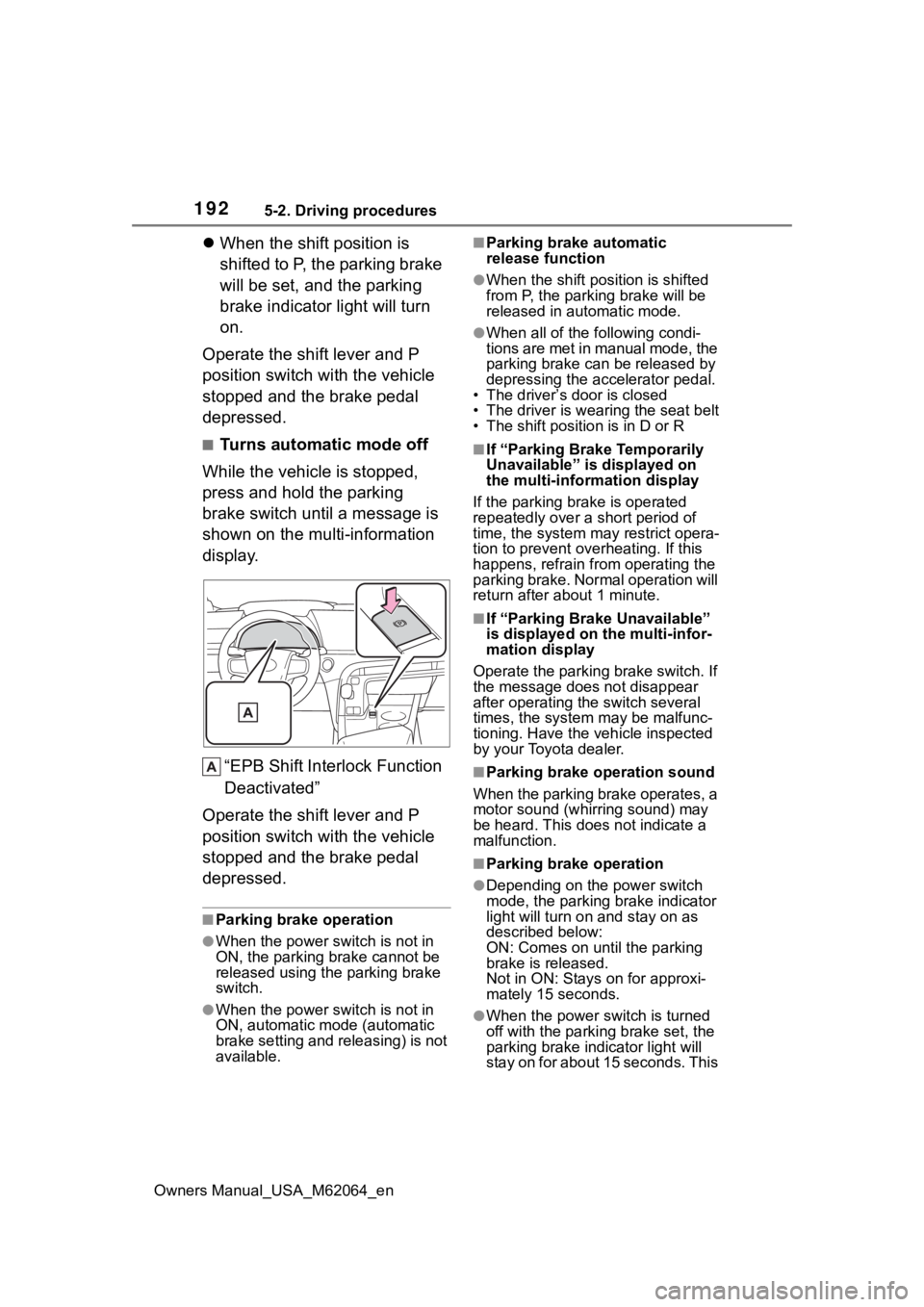
■Turns automatic mode off
While the vehicle is stopped,
press and hold the parking
brake switch until a message is
shown on the multi-information
display.
“EPB Shift Inte rlock Function
Deactivated”
Operate the shift lever and P
position switch with the vehicle
stopped and the brake pedal
depressed.
■Parking brake operation
●When the power s witch is not in
ON, the parking brake cannot be
released using the parking brake
switch.
●When the power s witch is not in
ON, automatic mode (automatic
brake setting and releasing) is not
available.
■Parking brake automatic
release function
●When the shift position is shifted
from P, the parking brake will be
released in automatic mode.
●When all of the f ollowing condi-
tions are met in manual mode, the
parking brake can be released by
depressing the accelerator pedal.
• The driver’s door is closed
• The driver is wearing the seat belt
• The shift position is in D or R
■If “Parking Brake Temporarily
Unavailable” is displayed on
the multi-info rmation display
If the parking brake is operated
repeatedly over a short period of
time, the system may restrict opera-
tion to prevent ove rheating. If this
happens, refrain from operating the
parking brake. Normal operation will
return after about 1 minute.
■If “Parking Brake Unavailable”
is displayed on the multi-infor-
mation display
Operate the parking brake switch. If
the message does not disappear
after operating the switch several
times, the system may be malfunc-
tioning. Have the vehicle inspected
by your Toyota dealer.
■Parking brake operation sound
When the parking brake operates, a
motor sound (whirr ing sound) may
be heard. This does not indicate a
malfunction.
■Parking brake operation
●Depending on the power switch
mode, the parking brake indicator
light will turn on and stay on as
described below:
ON: Comes on until the parking
brake is released.
Not in ON: Stays on for approxi-
mately 15 seconds.
●When the power switch is turned
off with the parking brake set, the
parking brake i ndicator light will
stay on for about 15 seconds. This
Page 194 of 572
1945-2. Driving procedures
Owners Manual_USA_M62064_en
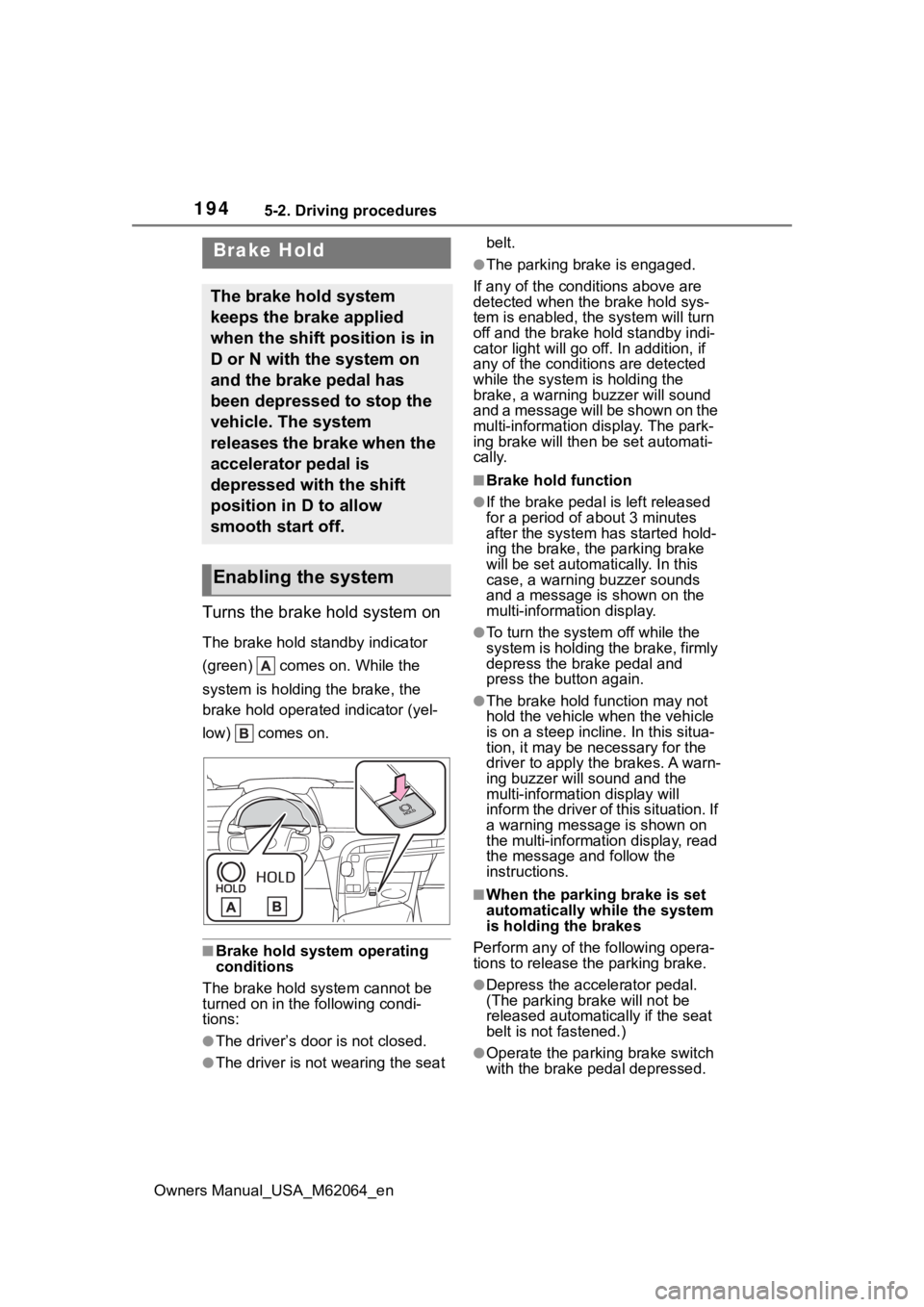
Turns the brake hold system on
The brake hold standby indicator
(green) comes on. While the
system is holding the brake, the
brake hold operated indicator (yel-
low) comes on.
■Brake hold system operating
conditions
The brake hold system cannot be
turned on in the following condi-
tions:
●The driver’s doo r is not closed.
●The driver is not wearing the seat belt.
●The parking brake is engaged.
If any of the cond itions above are
detected when the brake hold sys-
tem is enabled, the system will turn
off and the brake hold standby indi-
cator light will go off. In addition, if
any of the conditions are detected
while the system is holding the
brake, a warning buzzer will sound
and a message will be shown on the
multi-information display. The park-
ing brake will then be set automati-
cally.
■Brake hold function
●If the brake pedal is left released
for a period of about 3 minutes
after the system has started hold-
ing the brake, the parking brake
will be set automatically. In this
case, a warning buzzer sounds
and a message is shown on the
multi-information display.
●To turn the system off while the
system is holding the brake, firmly
depress the brake pedal and
press the button again.
●The brake hold function may not
hold the vehicle when the vehicle
is on a steep incline. In this situa-
tion, it may be ne cessary for the
driver to apply the brakes. A warn-
ing buzzer will sound and the
multi-information display will
inform the driver of this situation. If
a warning message is shown on
the multi-information display, read
the message and follow the
instructions.
■When the parking brake is set
automatically while the system
is holding the brakes
Perform any of the following opera-
tions to release the parking brake.
●Depress the accelerator pedal.
(The parking brake will not be
released automatically if the seat
belt is not fastened.)
●Operate the parkin g brake switch
with the brake pedal depressed.
Brake Hold
The brake hold system
keeps the brake applied
when the shift position is in
D or N with the system on
and the brake pedal has
been depressed to stop the
vehicle. The system
releases the brake when the
accelerator pedal is
depressed with the shift
position in D to allow
smooth start off.
Enabling the system
Page 254 of 572

2545-5. Using the driving support systems
Owners Manual_USA_M62064_enapproximately 3 seconds after the
switch is pressed.
●If the vehicle ahead starts off
within 3 seconds after your vehicle
stops, follow-up cruising will be
resumed.
■Automatic cancelation of vehi-
cle-to-vehicle d
istance control
mode
Vehicle-to-vehicle distance control
mode is automatically canceled in
the following situations.
●VSC is activated.
●TRAC is activated for a period of
time.
●When the VSC or TRAC system is
turned off.
●The sensor cannot detect cor-
rectly because i t is covered in
some way.
●When the brake control or output
restriction control of a driving sup-
port system operates. (For exam-
ple: Pre-Collision System, Drive-
Start Control)
●The parking brake is operated.
●The vehicle is stopped by system
control on a steep incline.
●The following are detected when
the vehicle has been stopped by
system control:
• The driver is not wearing a seat belt.
• The driver’s door is opened.
• The vehicle has been stopped for about 3 minutes.
●When the Br mode is selected.
If vehicle-to-vehicle distance control
mode is automatically canceled for
any reasons other than the above,
there may be a malfunction in the
system. Contact your Toyota dealer.
■Automatic cancelation of con-
stant speed control mode
Constant speed control mode is
automatically cance led in the follow-
ing situations:
●Actual vehicle speed is more than
approximately 10 mph (16 km/h)
below the set vehicle speed.
●Actual vehicle speed falls below
approximately 20 mph (30 km/h).
●VSC is activated.
●TRAC is activated for a period of
time.
●When the VSC or TRAC system is
turned off.
●When the brake control or output
restriction control of a driving sup-
port system operates. (For exam-
ple: Pre-Collision System, Drive-
Start Control)
●When the Br mode is selected.
If constant speed control mode is
automatically canceled for any rea-
sons other than the above, there
may be a malfunction in the system.
Contact your Toyota dealer.
■Situations in which the curve
speed reduction function may
not operate
In situations such as the following,
the curve speed reduction function
may not operate:
●When the vehicle is being driven
around a gentle curve
●When the accele rator pedal is
being depressed
●When the vehicle is being driven
around an extremely short curve
■Brake operation
A brake operation sound may be
heard and the brake pedal response
may change, but these are not mal-
functions.
■Warning messages and buzzers
for dynamic radar cruise con-
trol with full-speed range
Warning messages and buzzers are
used to indicate a system malfunc-
tion or to inform the driver of the
need for caution while driving. If a
warning message is shown on the
multi-information display, read the
Page 299 of 572
2995-5. Using the driving support systems
Owners Manual_USA_M62064_en
5
Driving
faded or dirty, making them
unclear
• When the appeara nce of the park-
ing space is affected by the
shadow of the vehicle or trees
■Sensor detection information
P. 2 6 4
■Objects which the sensor may
not be properly detected
P. 2 6 4
■Situations in which the sensor
may not operate properly
P. 2 6 4
■Situations in which parking
assistance may operate even if
there is no possibility of a colli-
sion
P. 2 6 5
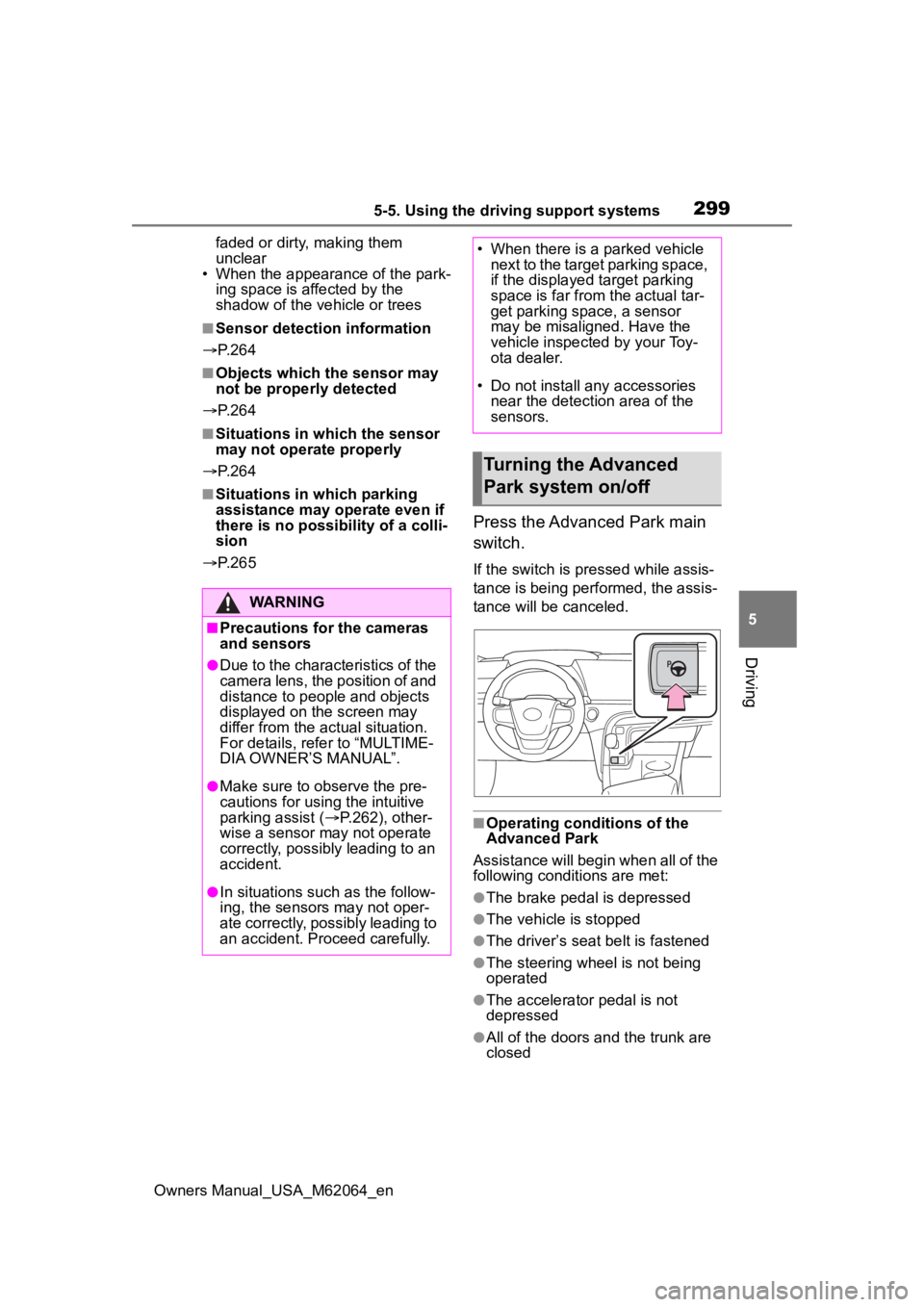
Press the Advanced Park main
switch.
If the switch is pressed while assis-
tance is being performed, the assis-
tance will be canceled.
■Operating conditions of the
Advanced Park
Assistance will begin when all of the
following conditi ons are met:
●The brake pedal is depressed
●The vehicle is stopped
●The driver’s seat belt is fastened
●The steering wheel is not being
operated
●The accelerator pedal is not
depressed
●All of the doors a nd the trunk are
closed
WARNING
■Precautions for the cameras
and sensors
●Due to the characteristics of the
camera lens, the position of and
distance to people and objects
displayed on the screen may
differ from the actual situation.
For details, refer to “MULTIME-
DIA OWNER’S MANUAL”.
●Make sure to observe the pre-
cautions for using the intuitive
parking assist ( P.262), other-
wise a sensor ma y not operate
correctly, possibly leading to an
accident.
●In situations such as the follow-
ing, the sensors may not oper-
ate correctly, possibly leading to
an accident. Proceed carefully.
• When there is a parked vehicle next to the target parking space,
if the displayed target parking
space is far from the actual tar-
get parking space, a sensor
may be misaligned. Have the
vehicle inspected by your Toy-
ota dealer.
• Do not install any accessories near the detection area of the
sensors.
Turning the Advanced
Park system on/off
Page 317 of 572
3175-5. Using the driving support systems
Owners Manual_USA_M62064_en
5
Driving
changed to P
The parking brake is engaged
A door or the trunk is opened
The driver’s seat belt is unfas-
tened
The outside rear view mirrors
are folded
The TRAC or VSC is turned
off
The TRAC, VSC or ABS oper-
ates
The power switch is pressed
The system determines assis-
tance cannot be continued in
the current parking environ-
ment
The system malfunctions
While the vehicle was
stopped, “Cancel” was
selected on the multimedia
display
■Assistance will be sus-
pended when
In situations such as the follow-
ing, Advanced Park operation
will be suspended.
Assistance can be started again by
following the directions displayed
on the multimedia display.
Also, when assistance is sus-
pended, if the shift position is
changed twice with the brake pedal
depressed, assistance will be can-
celed in that shift position. How-
ever, if assistance is suspended by
changing the shi ft position, assis-
tance will be cance led if the shift position is changed once.
The steering wheel is oper-
ated
The accelerator pedal is
depressed
The shift position has been
changed
A moving object or stationary
object that may collide with
your vehicle has been
detected, resulting in the
operation of the fuel cell sys-
tem output control/braking
control
Camera switch is pressed
Select on the multimedia dis-
play, and then select “Advanced
Park”.
■Speed Profile
The vehicle speed for when
assistance is performed can be
set.
This setting cann ot be changed
when registering a parking space to
the memory function.
■Obstacle detection range
The distance from which obsta-
cles will be avoided while assis-
tance is being performed can be
set.
■Preferred parking method
The preferred parking direction
Changing the Advanced
Park settings
Page 362 of 572
3626-3. Using the storage features
Owners Manual_USA_M62064_en
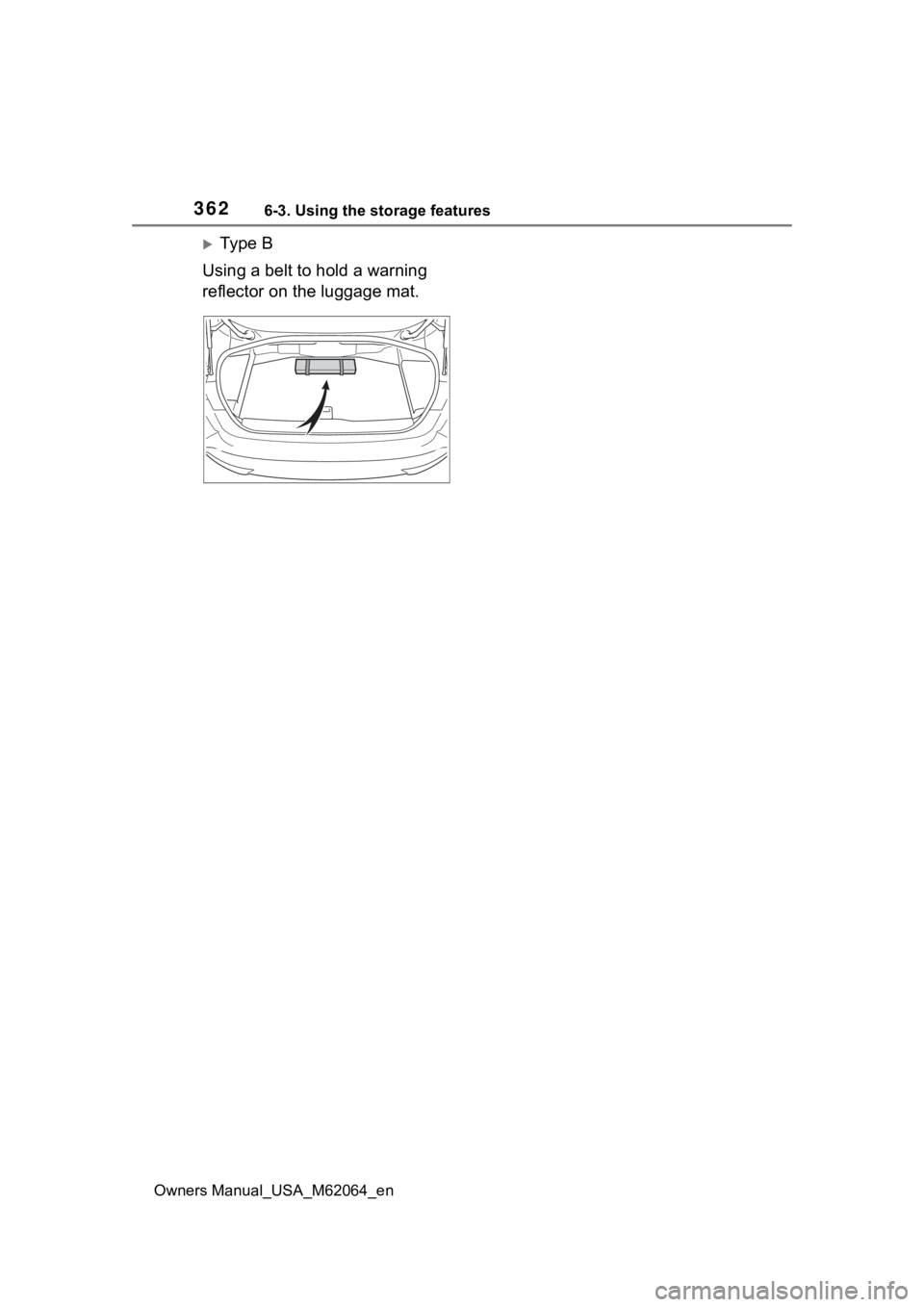
Ty p e B
Using a belt to hold a warning
reflector on the luggage mat.
Page 396 of 572
3967-1. Maintenance and care
Owners Manual_USA_M62064_en
Remove dirt and dust using a
vacuum cleaner. Wipe dirty
surfaces with a cloth damp-
ened with lukewarm water.
If dirt cannot be removed,
wipe it off with a soft cloth
dampened with neutral deter-
gent diluted to approximately
1%.
Wring out any excess water
from the cloth and thoroughly
wipe off remaining traces of
detergent and water.
■Shampooing the carpets
There are several commercial foam-
ing-type cleaners available. Use a
sponge or brush to apply the foam.
Rub in overlapping circles. Do not
use water. Wipe dirty surfaces and
let them dry. Excellent results are
obtained by keeping the carpet as
dry as possible.
■Handling the seat belts
Clean with mild soap and lukewarm
water using a cloth or sponge. Also
check the belts periodically for
excessive wear, fraying or cuts.
NOTICE
●Do not wash the underside of
the vehicle usin g a high pres-
sure car washer.
Cleaning and protect-
ing the vehicle interior
Perform cleaning in a man-
ner appropriate to each
component and its material.
Protecting the vehicle
interior
Page 403 of 572
4037-2. Maintenance
Owners Manual_USA_M62064_en
7
Maintenance and care
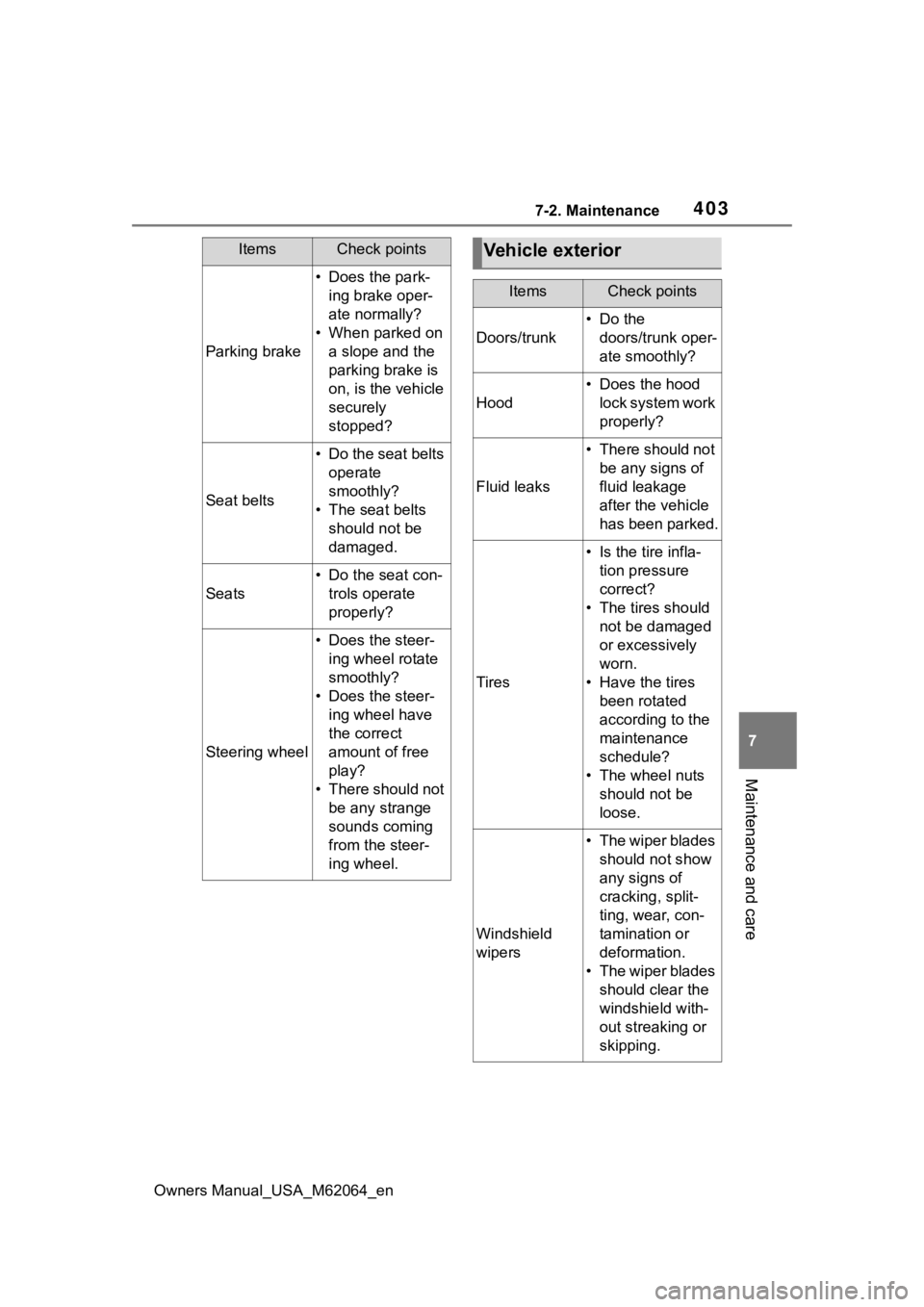
Parking brake
• Does the park- ing brake oper-
ate normally?
• When parked on a slope and the
parking brake is
on, is the vehicle
securely
stopped?
Seat belts
• Do the seat belts operate
smoothly?
• The seat belts should not be
damaged.
Seats
• Do the seat con-trols operate
properly?
Steering wheel
• Does the steer-ing wheel rotate
smoothly?
• Does the steer- ing wheel have
the correct
amount of free
play?
• There should not be any strange
sounds coming
from the steer-
ing wheel.
ItemsCheck pointsVehicle exterior
ItemsCheck points
Doors/trunk
• Do the doors/trunk oper-
ate smoothly?
Hood
• Does the hood lock system work
properly?
Fluid leaks
• There should not be any signs of
fluid leakage
after the vehicle
has been parked.
Tires
• Is the tire infla-tion pressure
correct?
• The tires should not be damaged
or excessively
worn.
• Have the tires been rotated
according to the
maintenance
schedule?
• The wheel nuts should not be
loose.
Windshield
wipers
• The wiper blades should not show
any signs of
cracking, split-
ting, wear, con-
tamination or
deformation.
• The wiper blades should clear the
windshield with-
out streaking or
skipping.
Page 417 of 572
4177-3. Do-it-yourself maintenance
Owners Manual_USA_M62064_en
7
Maintenance and care
mance tires best suited to highway
driving under dry conditions. Since
summer tires do not have the same
traction performanc e as snow tires,
summer tires are inadequate for
driving on snow-covered or icy
roads. For driving on snow-covered
roads or icy roads, the use of snow
tires is recommended. When install-
ing snow tires, be sure to replace all
four tires.
●All season tires
All season tires are designed to pro-
vide better traction in snow and to
be adequate for driving in most win-
ter conditions a s well as for use
year-round. All season tires, how-
ever, do not have adequate traction
performance compared with snow
tires in heavy or loose snow. Also,
all season tires fall short in accelera-
tion and handling performance com-
pared with summer tires in highway
driving.
●Snow tires
For driving on snow-covered roads
or icy roads, we recommend using
snow tires. If you need snow tires,
select tires of the same size, con-
struction and load capacity as the
originally installed tires. Since your
vehicle has radial tires as original
equipment, make sure your snow
tires also have radial construction.
Do not install stud ded tires without
first checking local regulations for
possible restrictions. Snow tires
should be installed on all wheels.
( P.327)
■If the tread on snow tires wears
down below 0.16 in. (4 mm)
The effectiveness of the tires as
snow tires is lost.
WARNING
■When inspecting or replacing
tires
Observe the following precautions
to prevent accidents.
Failure to do so may cause dam-
age to parts of the drive train as
well as dangerous handling char-
acteristics, which may lead to an
accident resulting in death or seri-
ous injury.
●Do not mix tires of different
makes, models or tread pat-
terns.
Also, do not mix tires of remark-
ably different treadwear.
●Do not use tire sizes other than
those recommended by Toyota.
●Do not mix differently con-
structed tires (radial, bias-belted
or bias-ply tires).
●Do not mix summer, all season
and snow tires.
●Do not use tires that have been
used on another vehicle.
Do not use tires if you do not
know how they were used previ-
ously.
NOTICE
■Driving on rough roads
Take particular care when driving
on roads with loose surfaces or
potholes.
These conditions may cause
losses in tire inflation pressure,
reducing the cushioning ability of
the tires. In addition, driving on
rough roads may cause damage
to the tires themselves, as well as
the vehicle’s wheels and body.