snow chains TOYOTA MIRAI 2023 Owners Manual
[x] Cancel search | Manufacturer: TOYOTA, Model Year: 2023, Model line: MIRAI, Model: TOYOTA MIRAI 2023Pages: 572, PDF Size: 17.71 MB
Page 231 of 572
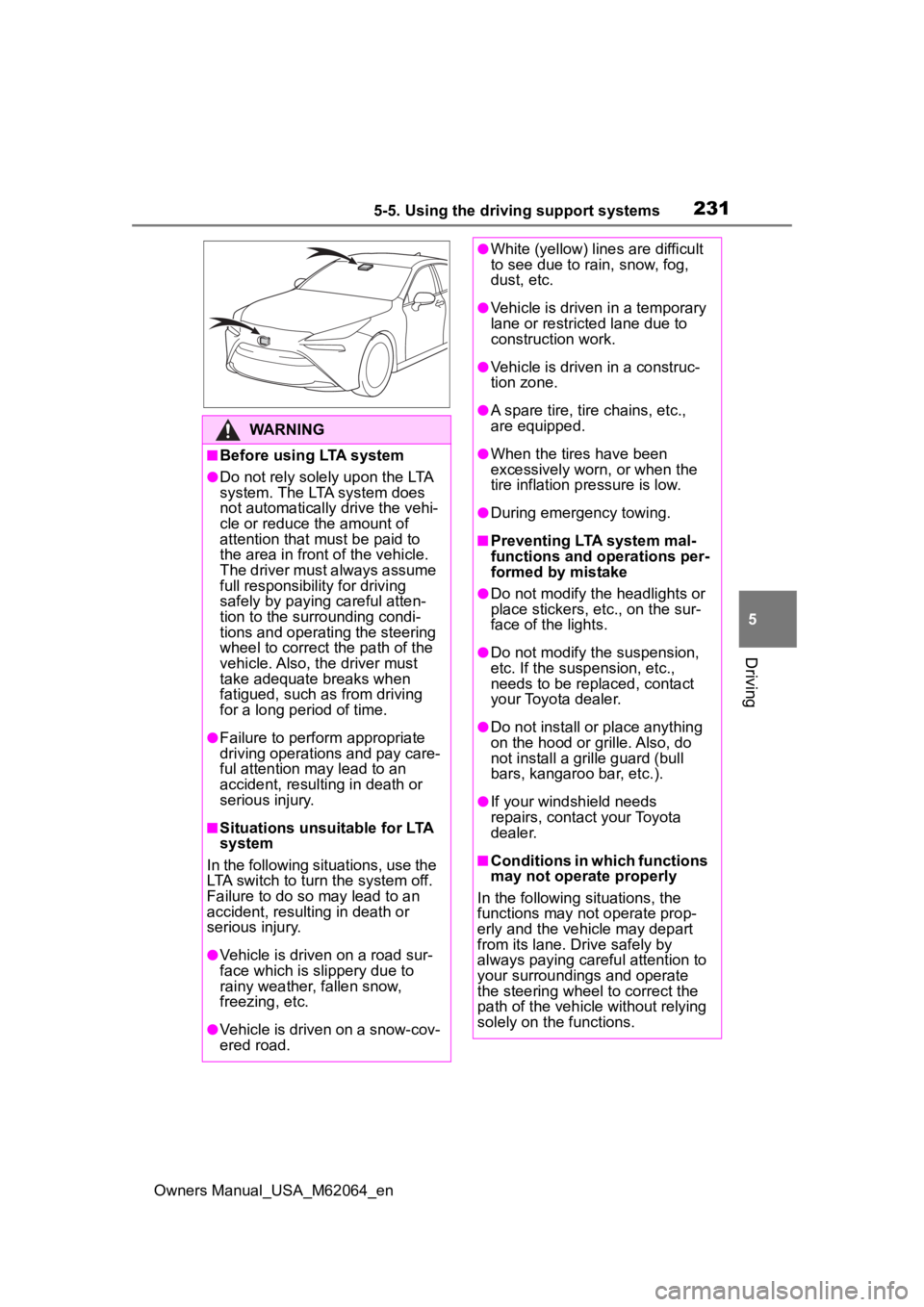
2315-5. Using the driving support systems
Owners Manual_USA_M62064_en
5
Driving
WARNING
■Before using LTA system
●Do not rely solely upon the LTA
system. The LTA system does
not automatically drive the vehi-
cle or reduce the amount of
attention that must be paid to
the area in front of the vehicle.
The driver must always assume
full responsibility for driving
safely by paying careful atten-
tion to the surrounding condi-
tions and operating the steering
wheel to correct the path of the
vehicle. Also, the driver must
take adequate breaks when
fatigued, such as from driving
for a long period of time.
●Failure to perform appropriate
driving operations and pay care-
ful attention may lead to an
accident, resulting in death or
serious injury.
■Situations unsuitable for LTA
system
In the following situations, use the
LTA switch to turn the system off.
Failure to do so may lead to an
accident, resulting in death or
serious injury.
●Vehicle is driven on a road sur-
face which is slippery due to
rainy weather, fallen snow,
freezing, etc.
●Vehicle is driven on a snow-cov-
ered road.
●White (yellow) lines are difficult
to see due to rain, snow, fog,
dust, etc.
●Vehicle is driven in a temporary
lane or restricted lane due to
construction work.
●Vehicle is driven in a construc-
tion zone.
●A spare tire, tire chains, etc.,
are equipped.
●When the tires have been
excessively worn, or when the
tire inflation p ressure is low.
●During emergency towing.
■Preventing LTA system mal-
functions and operations per-
formed by mistake
●Do not modify the headlights or
place stickers, etc., on the sur-
face of the lights.
●Do not modify the suspension,
etc. If the suspension, etc.,
needs to be replaced, contact
your Toyota dealer.
●Do not install or place anything
on the hood or grille. Also, do
not install a gr ille guard (bull
bars, kangaroo bar, etc.).
●If your windshield needs
repairs, contact your Toyota
dealer.
■Conditions in which functions
may not operate properly
In the following situations, the
functions may not operate prop-
erly and the vehicle may depart
from its lane. Drive safely by
always paying careful attention to
your surroundings and operate
the steering wheel to correct the
path of the vehicle without relying
solely on the functions.
Page 265 of 572
2655-5. Using the driving support systems
Owners Manual_USA_M62064_en
5
Driving
direction, uneven, or waving are in
the detection range.
●Strong wind is blowing
●When driving in inclement weather
such as fog, snow or a sandstorm
●When an object that cannot be
detected is betw een the vehicle
and a detected object
●If an object such as a vehicle,
motorcycle, bicycle or pedestrian
cuts in front of the vehicle or runs
out from the side of the vehicle
●If the orientation of a sensor has
been changed due t o a collision or
other impact
●When equipment that may
obstruct a sensor is installed, such
as a towing eyelet, bumper pro-
tector (an additi onal trim strip,
etc.), bicycle carrier, or snow plow
●If the front of the vehicle is raised
or lowered due to the carried load
●If the vehicle cannot be driven in a
stable manner, such as when the
vehicle has been in an accident or
is malfunctioning
●When a tire chains, compact
spare tire or an emergency tire
puncture repair kit is used
■Situations in which the system
may operate even if there is no
possibility of a collision
In some situations, such as the fol-
lowing, the system may operate
even though there is no possibility of
a collision.
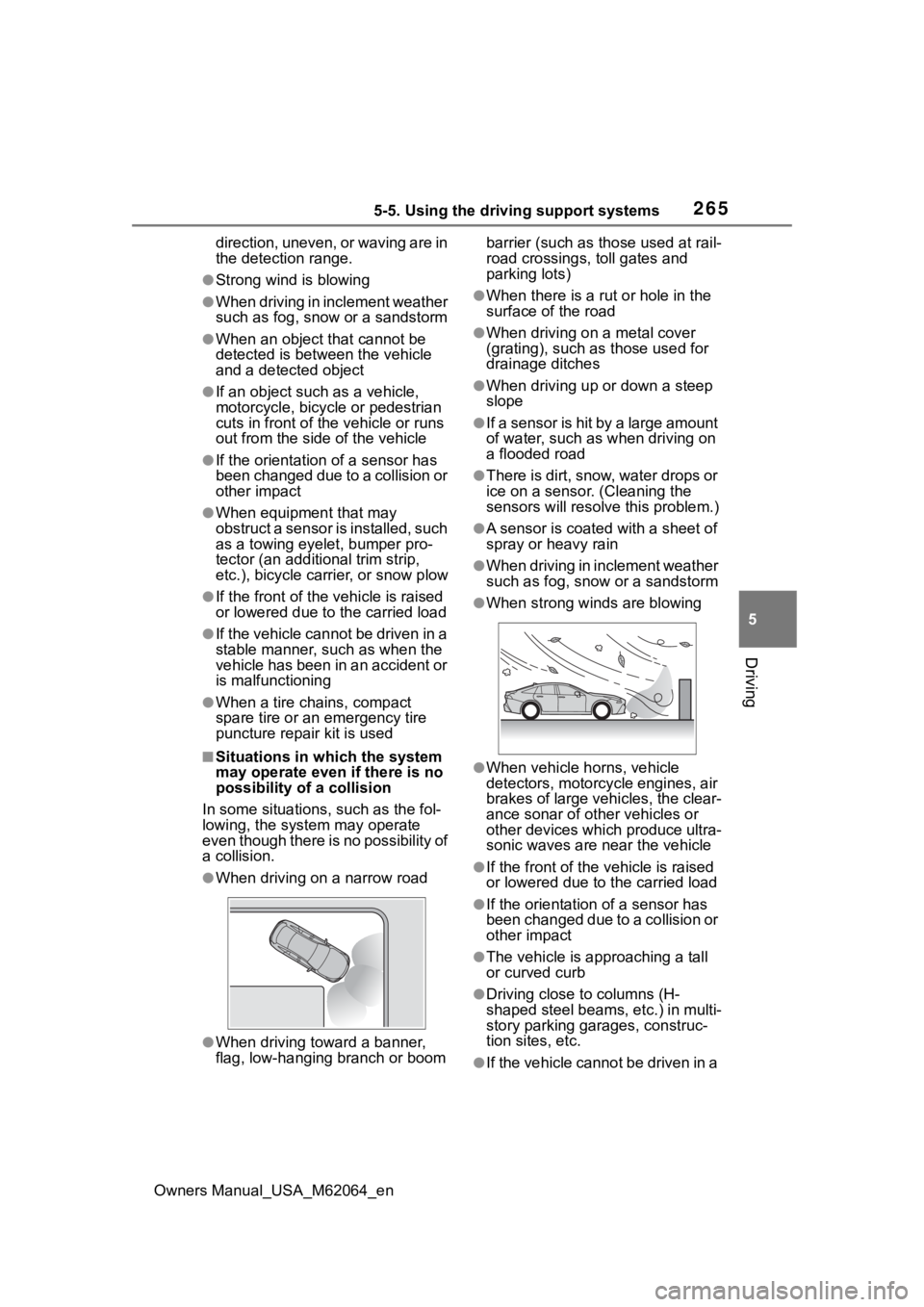
●When driving on a narrow road
●When driving toward a banner,
flag, low-hanging branch or boom barrier (such as those used at rail-
road crossings, toll gates and
parking lots)
●When there is a ru
t or hole in the
surface of the road
●When driving on a metal cover
(grating), such as those used for
drainage ditches
●When driving up or down a steep
slope
●If a sensor is hit by a large amount
of water, such as when driving on
a flooded road
●There is dirt, snow, water drops or
ice on a sensor. (Cleaning the
sensors will resolve this problem.)
●A sensor is coated with a sheet of
spray or heavy rain
●When driving in inclement weather
such as fog, snow or a sandstorm
●When strong winds are blowing
●When vehicle horns, vehicle
detectors, motorcycle engines, air
brakes of large vehicles, the clear-
ance sonar of ot her vehicles or
other devices which produce ultra-
sonic waves are near the vehicle
●If the front of the v ehicle is raised
or lowered due to the carried load
●If the orientation of a sensor has
been changed due to a collision or
other impact
●The vehicle is approaching a tall
or curved curb
●Driving close to columns (H-
shaped steel beams, etc.) in multi-
story parking garages, construc-
tion sites, etc.
●If the vehicle cannot be driven in a
Page 280 of 572

2805-5. Using the driving support systems
Owners Manual_USA_M62064_enwhen the R shift position is
selected, the rear camera lens
may be dirty. Clean the rear cam-
era lens.
■Situations in which the system
may not operate properly
●Some pedestrians, such as the
following, may not be detected by
the rear camera detection func-
tion, preventing the function from
operating properly:
• Pedestrians who are bending for-
ward or squatting
• Pedestrians who are lying down
• Pedestrians who are running
• Pedestrians who suddenly enter the detection area
• People riding a bicycle, skate-
board, or other light vehicle
• Pedestrians wearing oversized clothing such as a rain coat, long
skirt, etc., making their silhouette
obscure
• Pedestrians whose body is par-
tially hidden by an object, such as
a cart or umbrella
• Pedestrians which are obscured
by darkness, such as at night
●In some situations, such as the
following, pedestrians may not be
detected by the rear camera
detection function, preventing the
function from operating properly:
• When backing up in inclement weather (rain, snow, fog, etc.)
• When the rear camera is obscured (dirt, snow, ice, etc., are
attached) or scratched
• When a very bright light, such as the sun, or the headlights of
another vehicle, shines directly
into the rear camera
• When backing up in a place where the surrounding brightness
changes suddenly, such as at the
entrance or exit of a garage or
underground parking lot
• When backing up i n a dim envi-
ronment such as during dusk or in
an underground parking lot
• When the camera position and
direction are deviated
• When a towing hook is attached • When water droplets are flowing
on the camera lens
• When the vehicle height is
extremely changed (nose up,
nose down).
• When tire chains or an emergency
tire puncture repair kit is used
• If the suspension has been modi- fied or tires of a size other than
specified are installed
• If an electronic component, such as a backlit license plate or rear
fog light, is insta lled near the rear
camera
• If a bumper protector, such as an
additional trim strip, is installed to
the rear bumper
■Situations in which the system
may operate unexpectedly
●Even though there are no pedes-
trians in the detection area, some
objects, such as the following,
may be detected, possibly caus-
ing the rear cam era detection
function to operate.
• Three dimensional objects, such as a pole, traffic cone, fence, or
parked vehicle
• Moving objects, such as a car or motorcycle
• Objects moving to ward your vehi-
cle when backing up, such as
flags or puddles (or airborne mat-
ter, such as smoke, steam, rain, or
snow)
• Cobblestone or gravel roads, tram
rails, road repai rs, white lines,
pedestrian crossings or fallen
leaves on the road
• Metal covers (gratings), such as those used for drainage ditches
• Objects reflected in a puddle or on
a wet road surface
• Shadows on the road
●In some situations, such as the
following, the rea r camera detec-
tion function may operate even
though there are no pedestrians in
the detection area.
• When backing up toward the road- side or a bump on the road
• When backing up toward an incline/decline
Page 281 of 572
2815-5. Using the driving support systems
Owners Manual_USA_M62064_en
5
Driving
• If the rear of the vehicle is raised or lowered due to the carried load
• If a bumper protector, such as an
additional trim strip, is installed to
the rear bumper
• If the orientation of the rear cam-
era has been changed
• If a towing eyelet is installed to the rear of the vehicle
• When water is flowing over the rear camera lens
• When the rear camera is
obscured (dirt, snow, ice, etc., are
attached) or scratched
• If there is a flashing light in the
detection area, such as the emer-
gency flashers of another vehicle
• When a tire chains or an emer-
gency tire puncture repair kit is
used
●Situations in which the rear cam-
era detection function may be diffi-
cult to notice
• The buzzer may be difficult to hear if the surrounding area is noisy,
the volume of the audio system
volume is high, the air condition-
ing system is being used, etc.
• If the temperature in the cabin is
extremely high or low, the audio
system screen may not operate
correctly.
*: If equipped
■Parking Support Brake
function (static objects
front and rear of the vehi-
cle/static objects around
the vehicle
*)
P.286
PKSB (Parking Sup-
port Brake)*
The Parking Support Brake
system consists of the fol-
lowing functions that oper-
ate when driving at a low
speed or backing up, such
as when parking. When the
system determines that the
probability of a collision
with a detected object or
pedestrian is high, a warn-
ing operates to urge the
driver to take evasive
action. If the system deter-
mines that the possibility of
a collision with a detected
object or pedestrian is
extremely high, the brakes
are automatically applied to
help avoid the collision or
help reduce the impact of
the collision.
PKSB (Parking Support
Brake) system
Page 296 of 572
2965-5. Using the driving support systems
Owners Manual_USA_M62064_en
WARNING
●Do not allow anyone to put their
hands outside of a window while
this system is operating.
■To ensure correct operation
of the Advanced Park
Observe the following precau-
tions.
Failing to do so may result in the
vehicle being unable to be driven
safely and possibly cause an acci-
dent.
●Do not use this system in situa-
tions such as the following:
• When in areas other than com- mon parking spaces
• When the surface of the parking space is sand or gravel and is
not clearly defined with parking
space lines
• When the parking space is not level, such as when on a slope
or has differences in height
• Mechanical parking system
• Parking lot with a device which raises to contact the bottom of
the vehicle
• When the road s urface is fro-
zen, slick, or covered with snow
• When it is extremely hot and the asphalt is melting
• When there are objects around the vehicle
• When there is an object between your vehicle and the
target parking spot or within the
target parking spot (within the
displayed blue box)
• When there is a gutter between your vehicle and the target park-
ing space or within the target
parking spot (within the dis-
played blue box)
• When there is a hole or gutter in the exit direction
• When in high pedestrian or vehicle traffic areas
• When the parking space is in a location that is difficult to park in
(too narrow for your vehicle,
etc.)
• When images are unclear due to dirt or snow attached to the
camera lens, light being shined
into the camera or shadows
• When tire chains or a compact spare tire is installed to the vehi-
cle
• When the doors or trunk are not completely closed
• When an arm is h eld outside of
a window
• In inclement weather such as heavy rain or snow
●Make sure to use only standard
sized tires, such as those that
were installed to the vehicle
when it was shipped from the
factory. Otherwise, Advanced
Park may not operate properly.
Also, when the tires have been
replaced, the displayed position
of the lines or box displayed on
the screen may become incor-
rect. When replacing the tires,
contact your Toyota dealer.
●In situations such as the follow-
ing, it may not be possible for
the system to provide assis-
tance to a registered parking
spot:
Page 325 of 572
3255-5. Using the driving support systems
Owners Manual_USA_M62064_en
5
Driving
■Operating conditions of Active
Cornering Assist
The system operates when the fol-
lowing occurs.
●TRAC/VSC can operate
●The driver is at tempting to accel-
erate while turning
●The system detects that the vehi-
cle is drifting to the outer side
●The brake pedal is released
■Reduced effectiveness of the
EPS system
The effectiveness of the EPS sys-
tem is reduced to prevent the sys-
tem from overheating when there is
frequent steering input over an
extended period of time. The steer-
ing wheel may feel heavy as a
result. Should this occur, refrain
from excessive steering input or
stop the vehicle and turn the fuel
cell system off. The EPS system
should return to normal within 10
minutes.
■Secondary Collision Brake
operating conditions
The system operates when the SRS
airbag sensor detects a collision
while the vehicle is in motion. How-
ever, the system does not operate in
any of the following situations.
●When driving at a low speed
●Components are damaged
■Secondary Collision Brake
automatic cancelation
The system is automatically can-
celed in any of th e following situa-
tions.
●The vehicle speed has decreased
to a certain speed
●A certain amount o f time elapses
during operation
●The accelerator pedal is
depressed a large amount
WARNING
■The ABS does not operate
effectively when
●The limits of tire gripping perfor-
mance have been exceeded
(such as excessively worn tires
on a snow covered road).
●The vehicle hydroplanes while
driving at high speed on wet or
slick roads.
■Stopping distance when the
ABS is operating may exceed
that of normal conditions
The ABS is not designed to
shorten the vehicle’s stopping dis-
tance. Always maintain a safe dis-
tance from the veh icle in front of
you, especially in the following sit-
uations:
●When driving on dirt, gravel or
snow-covered roads
●When driving with tire chains
●When driving over bumps in the
road
●When driving over roads with
potholes or uneven surfaces
■TRAC/VSC may not operate
effectively when
Directional control and power may
not be achievable while driving on
slippery road surfaces, even if the
TRAC/VSC system is operating.
Drive the vehicle carefully in con-
ditions where stability and power
may be lost.
■Active Cornering Assist does
not operate effectively when
●Do not overly rely on Active
Cornering Assist. Active Corner-
ing Assist may not operate
effectively when accelerating
down slopes or driving on slip-
pery road surfaces.
Page 327 of 572
3275-6. Driving tips
Owners Manual_USA_M62064_en
5
Driving
5-6.Driving tips
Use washer fluid that is
appropriate to the prevailing
outside temperatures.
Have a service technician
inspect the condition of the
12-volt battery.
Have the vehicle fitted with
four snow tires or purchase a
set of tire chains for the rear
tires.
Ensure that all tires are the speci-
fied size and brand, and that chains
match the size of the tires.
Winter driving tips
Carry out the necessary
preparations and inspec-
tions before driving the
vehicle in winter. Always
drive the vehicle in a man-
ner appropriate to the pre-
vailing weather conditions.
Preparation for winter
WARNING
■Driving with snow tires
Observe the following precautions
to reduce the risk of accidents.
Failure to do so m ay result in a
loss of vehicle control and cause
death or serious injury.
●Use tires of the specified size.
●Maintain the recommended
level of air pressure.
●Do not drive in excess of 75
mph (120 km/h), regardless of
the type of snow tires being
used.
●Use snow tires on all, not just
some wheels.
■Driving with tire chains
Observe the following precautions
to reduce the risk of accidents.
Failure to do so may result in the
vehicle being unable to be driven
safely, and may cause death or
serious injury.
●Do not drive in excess of the
speed limit specifi ed for the tire
chains being used, or 30 mph
(50 km/h), whichever is lower.
●Avoid driving on bumpy road
surfaces or over potholes.
●Avoid sudden acceleration,
abrupt steering, sudden brak-
ing and shifting operations that
cause sudden regenerative
braking.
●Slow down sufficiently before
entering a curve to ensure that
vehicle control is maintained.
●Do not use LTA (Lane Tracing
Assist) system.
NOTICE
■Repairing or replacing snow
tires
Request repairs or replacement of
snow tires from Toyota dealers or
legitimate tire retailers.
This is because the removal and
attachment of snow tires affects
the operation of the tire pressure
warning valves and transmitters.
Page 329 of 572
![TOYOTA MIRAI 2023 Owners Manual 3295-6. Driving tips
Owners Manual_USA_M62064_en
5
Driving
Use the correct tire chain size
when mounting the tire chains.
Chain size is regulated for each
tire size. Side chain (0.12 in. [3 mm] in](/img/14/67081/w960_67081-328.png "TOYOTA MIRAI 2023 Owners Manual 3295-6. Driving tips
Owners Manual_USA_M62064_en
5
Driving
Use the correct tire chain size
when mounting the tire chains.
Chain size is regulated for each
tire size. Side chain (0.12 in. [3 mm] in")
3295-6. Driving tips
Owners Manual_USA_M62064_en
5
Driving
Use the correct tire chain size
when mounting the tire chains.
Chain size is regulated for each
tire size. Side chain (0.12 in. [3 mm] in
diameter)
Cross chain (0.16 in. [4 mm]
in diameter)
Regulations regarding the use
of tire chains vary depending on
location and type of road.
Always check local regulations
before installing chains.
■Tire chain installation
Observe the following precautions
when installing and removing
chains:
●Install and remove tire chains in a
safe location.
●Install tire chains on the rear tires.
Do not install tire chains on the
front tires.
●Install tire chains on the rear tires
as tightly as possible. Retighten
chains after driving 1/4 1/2 mile (0.5
1.0 km).
●Install tire chains following the
instructions provided with the tire
chains.
To enable the windshield wipers
to be lifted when heavy snow or
icy conditions are expected,
change the rest position of the
windshield wipers from the
retracted position below the
hood to the service position
using the wiper lever. ( P.208)
Selecting tire chains
Regulations on the use of
tire chains
NOTICE
■Fitting tire chains
The tire pressure warning valves
and transmitters may not function
correctly when tire chains are fit-
ted.
Windshield wipers
Page 419 of 572
4197-3. Do-it-yourself maintenance
Owners Manual_USA_M62064_en
7
Maintenance and care
■Situations in which the tire
pressure warning system may
not operate properly
●In the following cases, the tire
pressure warning system may not
operate properly.
• If non-genuine Toyota wheels are used.
• If a tire has been replaced with a tire that is not an OE (Original
Equipment) tire.
• If a tire has been replaced with a tire that is not of the specified size.
• If tire chains, etc. are installed.
• If a window tint that affects the
radio wave signals is installed.
• If there is a lot of snow or ice on
the vehicle, particularly around the
wheels or wheel housings.
• If the tire inflation pressure is
much higher than the specified
level.
• If wheels not equipped with tire
pressure warning valves and
transmitter are used.
• If the ID code on the tire pressure
warning valves and transmitters is
not registered in the tire pressure
warning computer.
●Performance may be affected in
the following situations.
• When driving near a TV tower, electric power plant, gas station,
radio station, large display, airport
or other facility that generates
strong radio waves or electrical
noise
• When carrying a portable radio, cellular phone, cordless phone or
other wireless communication
device
If tire position information is not cor-
rectly displayed due to the radio
wave conditions, the display may be
corrected by changing the location
of the vehicle as the radio wave
conditions may change.
●When the vehicle is stopped, the
time taken for the warning to start
or turn off may be longer.
●When the inflation pressure of a
tire drops rapidly, for example when a tire has burst, the warning
may not operate.
■Warning performance of the tire
pressure warning system
The warning of the tire pressure
warning system w ill change in
accordance the conditions under
which it was initia lized. For this rea-
son, the system may give a warning
even if the tire pressure does not
reach a low enough level, or if the
pressure is higher than the pressure
that was adjusted to when the sys-
tem was initialized.
■Tire pressure warning system
certification
P.569
When replacing the tires or
wheels, the tire pressure warn-
ing valves and transmitters must
be installed to the wheels which
will be installed to the vehicle.
When new tire pressure warning
valves and transmitters are
installed, new ID codes must be
registered in the tire pressure
warning computer and the tire
pressure warning system must
be initialized. ( P.422)
■Replacing tires and wheels
If the ID codes of the tire pressure
warning valves and transmitters are
not registered, the tire pressure
warning system will not work prop-
erly. In this case, after driving for
about 10 minutes, the tire pressure
warning light will blink for approxi-
mately 1 minute and then illuminate
to indicate a system malfunction.
Installing tire pressure
warning valves and trans-
mitters
Page 555 of 572

Owners Manual_USA_M62064_en
Alphabetical Index555
Theft deterrent systemAlarm ...................................... 71
Immobilizer system ................ 70
Tire inflation pre ssure............ 428
Maintenance data................. 501
Tire inflation pressure display function............................... 418
Warning light ........................ 460
Tire information ...................... 502 Glossary ............................... 506
Size ...................................... 504
Tire identification number ..... 503
Uniform Tire Quality Grading 504
Tire pressure display ............. 418
Tire pressure warning system ............................................... 418Function ............................... 418
Initializing ............................. 420
Installing tire pressure warning valves and transmitters ...... 419
Registering ID codes ............ 422
Warning light ........................ 460
Tires ......................................... 416 Chains .................................. 329
Checking .............................. 416
Emergency tire puncture repair kit........................................ 467
If you have a flat tire ............. 467
Inflation pressure.................. 428
Information ........................... 502
Replacing ............................. 424
Rotating tires ........................ 418
Size ...................................... 501
Snow tires ............................ 327
Tire inflation pressure display function............................... 418
Tire pressure warning system ........................................... 418
Warning light ........................ 460
Tools ........................................ 469
Top tether strap ........................ 62 Total load capacit
y .................496
To w i n g Dinghy towing .......................179
Emergency towing ................449
Towing eyelet........................451
Trailer towing ...... ..................179
Toyota Safety Sense 2.5 +......214 AHB (Automatic High Beam) 200
Dynamic radar cruise control with full-speed range ..........244
LTA (Lane Tracing Assist) .....230
PCS (Pre-Collisio n System) .219
RSA (Road Sign Assist) ........241
Toyota Teammate Advanced Park ........................................293Memory function ................... 311
Parallel exiting fu nction ........309
Parallel parking function .......306
Perpendicular ex iting (forward/
reverse) function.................304
Perpendicular parking (forward/ reverse) function.................301
TRAC (Traction Control) ........322
Traction battery.........................81 Charging .................................78
Location ..................................81
Specification .........................498
Traction battery air intake vents.............................................90
Traction battery air intake vents .........................................90, 433
Traction Control (TRAC) ........322
Traction motor (electric motor)76
Trailer towing ..........................179
Trip meters ......................100, 104
Trunk ........................................132 Internal trunk rele ase lever ...134
Smart key system .................133
Trunk easy closer .................134
Trunk features ......................361