phone TOYOTA PRIUS 2012 3.G Navigation Manual
[x] Cancel search | Manufacturer: TOYOTA, Model Year: 2012, Model line: PRIUS, Model: TOYOTA PRIUS 2012 3.GPages: 357, PDF Size: 5.71 MB
Page 295 of 357
295
3. XM FUNCTION OPERATION
7
INFORMATION
PRIUS (US) NAVI 47719U
11.10.26 15:37
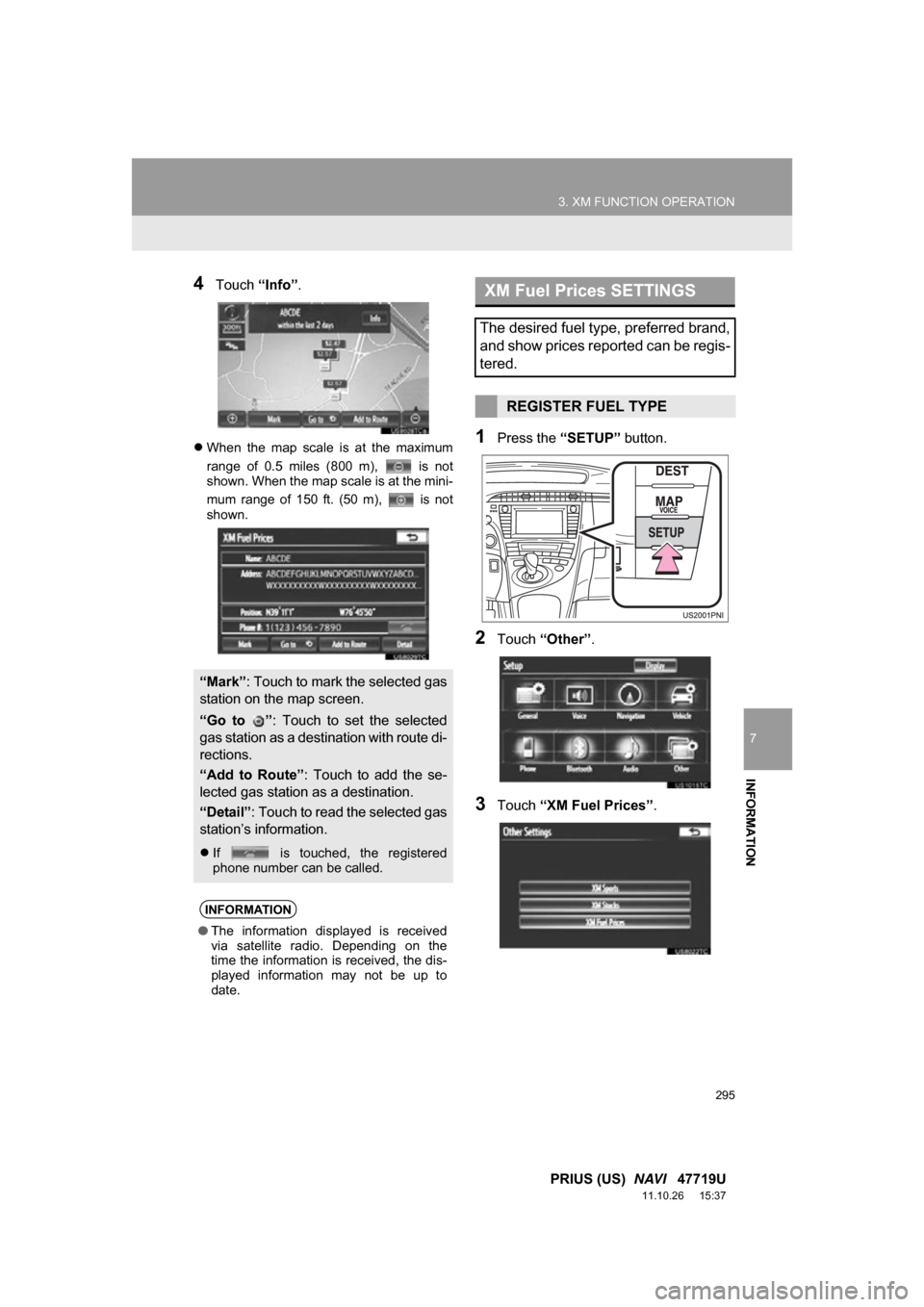
4Touch “Info”.
When the map scale is at the maximum
range of 0.5 miles (800 m), is not
shown. When the map scale is at the mini-
mum range of 150 ft. (50 m), is not
shown.1Press the “SETUP” button.
2Touch “Other” .
3Touch “XM Fuel Prices” .
“Mark”: Touch to mark the selected gas
station on the map screen.
“Go to ” : Touch to set the selected
gas station as a dest ination with route di-
rections.
“Add to Route” : Touch to add the se-
lected gas station as a destination.
“Detail” : Touch to read the selected gas
station’s information.
If is touched, the registered
phone number can be called.
INFORMATION
●The information displayed is received
via satellite radio. Depending on the
time the information is received, the dis-
played information may not be up to
date.
XM Fuel Prices SETTINGS
The desired fuel type, preferred brand,
and show prices reported can be regis-
tered.
REGISTER FUEL TYPE
Page 305 of 357
8
305
1
2
3
4
5
6
7
8
9
PRIUS (US) NAVI 47719U
11.10.26 15:37
1. ENTUNE SERVICE ...................... 306
SUBSCRIPTION.................................. 307
AVAILABILITY OF SERVICE .............. 307
INITIALIZING PERSONAL DATA........ 307
2. BEFORE USING ENTUNE .......... 308
SETTINGS REQUIRED
TO USE ENTUNE ............................. 308
USER REGISTRATION....................... 308
REGISTERING THE ENTUNE APPLICATION .................................. 309
1. ACTIVATING “APPS”.. ............... 310
ACTIVATING “APPS” .......................... 310
IF A MESSAGE
APPEARS ON THE SCREEN ........... 312
2. LINKING “APPS” AND NAVIGATION
LOCAL FUNCTION ................... 313
SETTING A DESTINATION
USING “APPS” .................................. 314
MAKING A PHONE CALL USING “APPS” .......... 314
3. INPUTTING KEYWORD OPERATION.......... 315
INPUTTING A KEYWORD USING
THE SOFTWARE KEYBOARD ......... 315
INPUTTING A KEYWORD USING THE VOICE
RECOGNITION FUNCTION.............. 315
1ENTUNE-OVERVIEW2ENTUNE OPERATION
APPS
Page 306 of 357
306
PRIUS (US) NAVI 47719U
11.10.26 15:37
1. ENTUNE-OVERVIEW
1. ENTUNE SERVICE*1
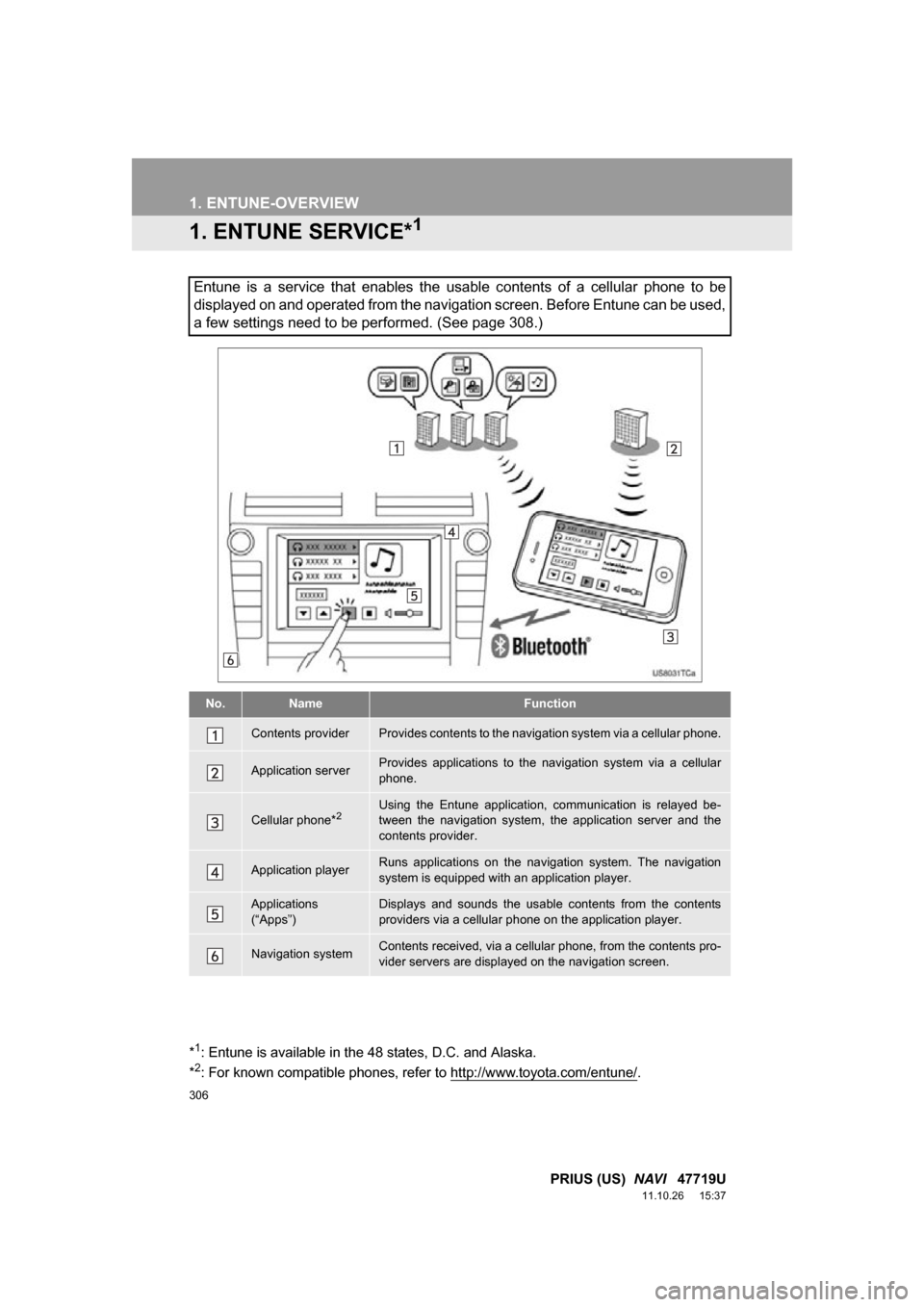
Entune is a service that enables the usable contents of a cellular phone to be
displayed on and operated from the navigation screen. Before Entune can be used,
a few settings need to be performed. (See page 308.)
No.NameFunction
Contents providerProvides contents to the navigation system via a cellular phone.
Application serverProvides applications to the nav igation system via a cellular
phone.
Cellular phone*2Using the Entune application, communication is relayed be-
tween the navigation system, the application server and the
contents provider.
Application playerRuns applications on the navigation system. The navigation
system is equipped with an application player.
Applications
(“Apps”)Displays and sounds the usabl e contents from the contents
providers via a cellular p hone on the application player.
Navigation systemContents received, via a cellular phone, from the contents pro-
vider servers are display ed on the navigation screen.
*1: Entune is available in the 48 states, D.C. and Alaska.
*2: For known compatible phones, refer to http://www.toyota.com/entune/.
Page 307 of 357
8
APPS
307
1. ENTUNE-OVERVIEW
PRIUS (US) NAVI 47719U
11.10.26 15:37
Entune will be available on a 3 year trial
period included upon purchase of a new
vehicle. User registration is required to
start using the service. (See page 309.)
When 3 years have elapsed after purchas-
ing a new vehicle, a fee will be charged to
renew the contract.*
Services requiring a separate contract can
also be used.*
*: For details, refer to http://
www.toyota.com/entune/ or call 1-800-
331-4331.
Entune is available in the 48 states, D.C.
and Alaska.
The following personal data can be
deleted and returned to their default set-
tings:
• Downloaded contents
• Radio stations that were listened to
• Input history
SUBSCRIPTION
AVAILABILITY OF SERVICE
INFORMATION
●When using Entune, depending on the
details of your cellular phone contract,
data usage fees may apply. Confirm
data usage fees before using this ser-
vice.
● In this section, the required operations
to activate “Apps”, connect a cellular
phone to the navigation system and reg-
istration steps for Entune are explained.
For details regarding Entune operations
and each of the “Apps”, refer to http://
www.toyota.com/entune/.
INITIALIZING PERSONAL
DATA
The personal data used in “Apps” can
be reset. (See “DELETING PERSON-
AL DATA” on page 52.)
INFORMATION
● Once initialized, data will be erased. Pay
close attention when initializing the data.
Page 308 of 357
308
1. ENTUNE-OVERVIEW
PRIUS (US) NAVI 47719U
11.10.26 15:37
2. BEFORE USING ENTUNE
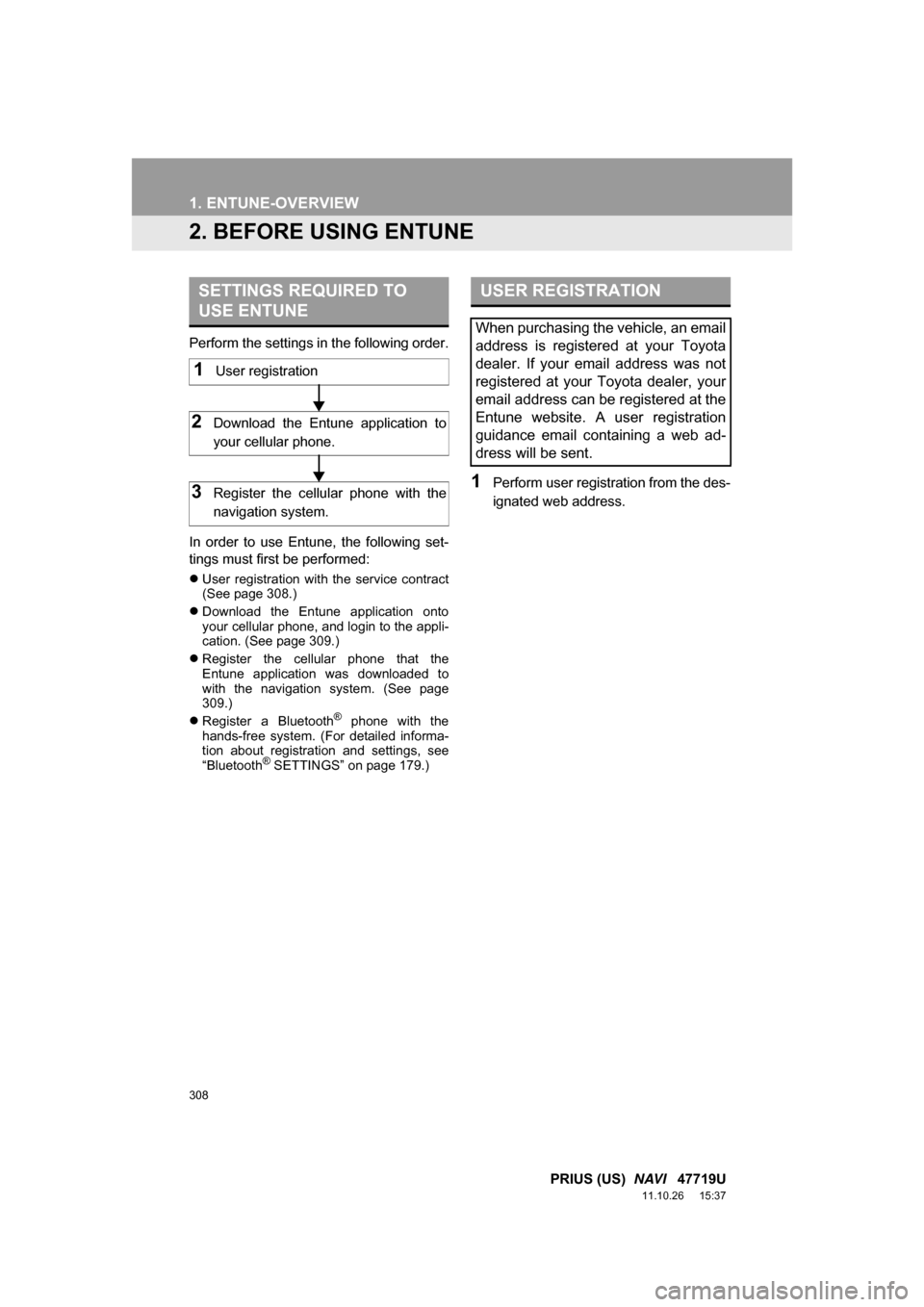
Perform the settings in the following order.
In order to use Entune, the following set-
tings must first be performed:
User registration with the service contract
(See page 308.)
Download the Entune application onto
your cellular phone, and login to the appli-
cation. (See page 309.)
Register the cellular phone that the
Entune application was downloaded to
with the navigation system. (See page
309.)
Register a Bluetooth
® phone with the
hands-free system. (For detailed informa-
tion about registration and settings, see
“Bluetooth
® SETTINGS” on page 179.)
1Perform user registration from the des-
ignated web address.
SETTINGS REQUIRED TO
USE ENTUNE
1User registration
2Download the Entune application to
your cellular phone.
3Register the cellular phone with the
navigation system.
USER REGISTRATION
When purchasing the vehicle, an email
address is registered at your Toyota
dealer. If your email address was not
registered at your Toyota dealer, your
email address can be registered at the
Entune website. A user registration
guidance email containing a web ad-
dress will be sent.
Page 309 of 357
8
APPS
309
1. ENTUNE-OVERVIEW
PRIUS (US) NAVI 47719U
11.10.26 15:37
1Download the Entune application using
your cellular phone.
2Run the Entune application on your
cellular phone.
3Enter a user name and password into
the Entune application. Login to the ap-
plication.
REGISTERING THE ENTUNE
APPLICATION
INFORMATION
●“Apps” can only be used when the
Entune application has been down-
loaded to your cellular phone and the
application is running.
● If your email address was not registered
at your Toyota dealer when the vehicle
was purchased, an email address can
be registered at http://www.toyota.com/
entune/.
● Entune operational procedures can also
be confirmed by visiting http://
www.toyota.com/entune/.
● In order to use “Apps”, it is necessary to
run the Entune application, enter your
user name and password and display
the main menu on the cellular phone.
● An iPhone cannot be connected via
Bluetooth
® and USB connection at the
same time. However, it is possible to
recharge an iPhone while using Entune
by connecting via USB. The system
uses the connection method that was
used last. Therefore, if connected via
USB after Bluetooth
® connection, it is
necessary to reconnect the iPhone via
Bluetooth
®.
Page 312 of 357
312
2. ENTUNE OPERATION
PRIUS (US) NAVI 47719U
11.10.26 15:37
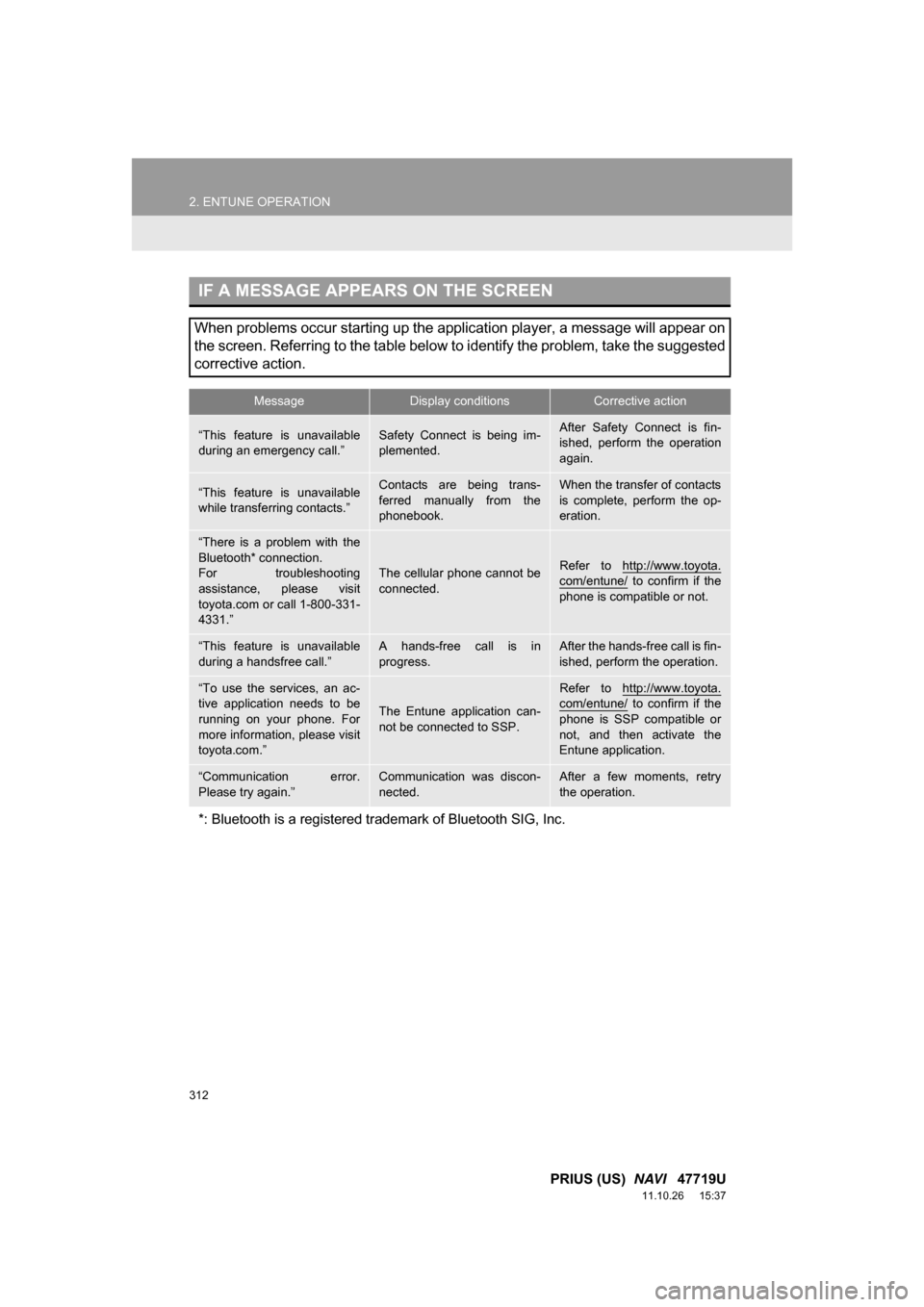
IF A MESSAGE APPEARS ON THE SCREEN
When problems occur starting up the application player, a message will appear on
the screen. Referring to the table below to identify the problem, take the suggested
corrective action.
MessageDisplay conditionsCorrective action
“This feature is unavailable
during an emergency call.”Safety Connect is being im-
plemented.After Safety Connect is fin-
ished, perform the operation
again.
“This feature is unavailable
while transferring contacts.”Contacts are being trans-
ferred manually from the
phonebook.When the transfer of contacts
is complete, perform the op-
eration.
“There is a problem with the
Bluetooth* connection.
For troubleshooting
assistance, please visit
toyota.com or call 1-800-331-
4331.”
The cellular phone cannot be
connected.Refer to http://www.toyota.
com/entune/ to confirm if the
phone is compatible or not.
“This feature is unavailable
during a handsfree call.”A hands-free call is in
progress.After the hands-free call is fin-
ished, perform the operation.
“To use the services, an ac-
tive application needs to be
running on your phone. For
more information, please visit
toyota.com.”
The Entune application can-
not be connected to SSP.
Refer to http://www.toyota.com/entune/ to confirm if the
phone is SSP compatible or
not, and then activate the
Entune application.
“Communication error.
Please try again.”Communication was discon-
nected.After a few moments, retry
the operation.
*: Bluetooth is a registered tr ademark of Bluetooth SIG, Inc.
Page 314 of 357
314
2. ENTUNE OPERATION
PRIUS (US) NAVI 47719U
11.10.26 15:37
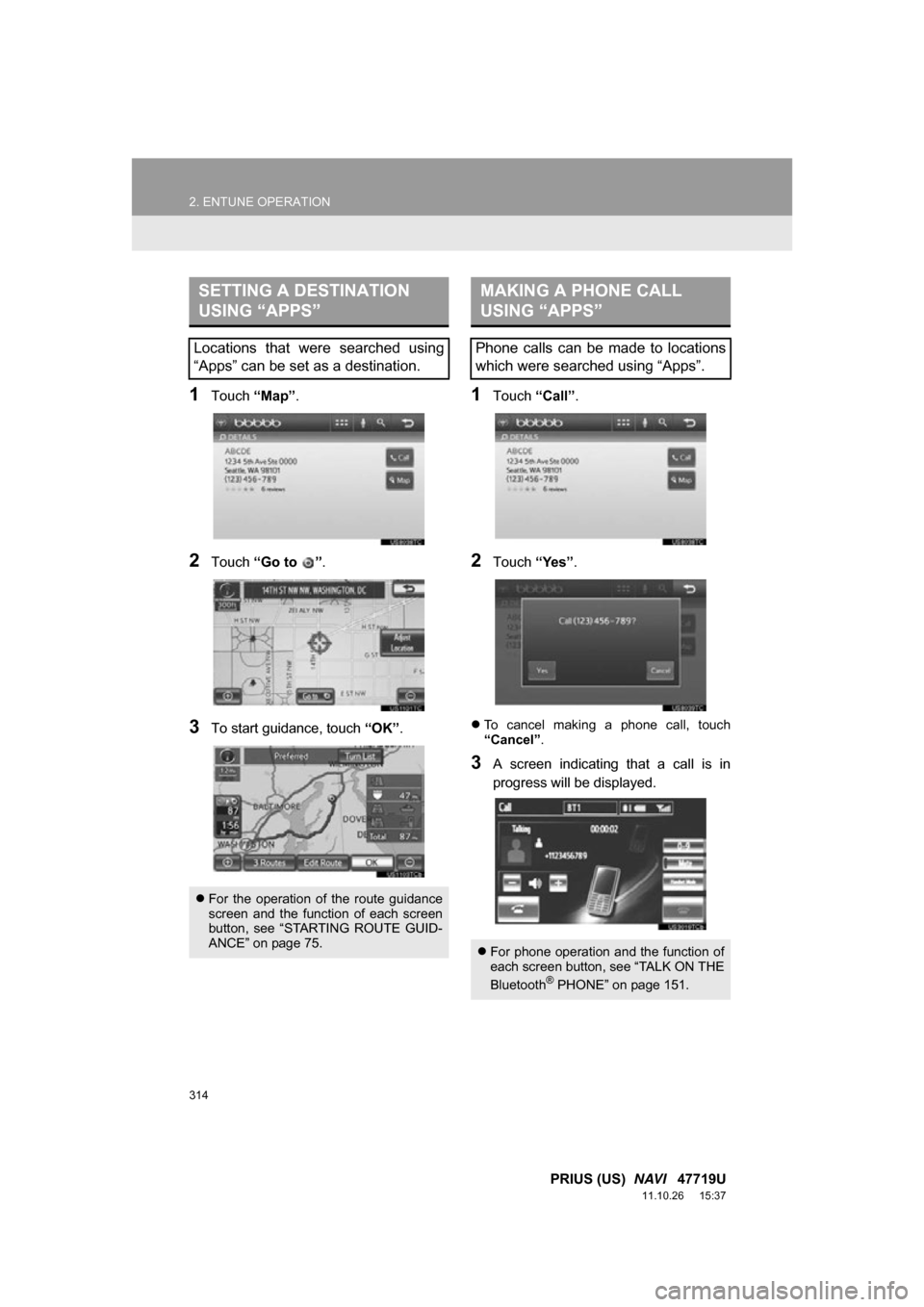
1Touch “Map”.
2Touch “Go to ” .
3To start guidance, touch “OK”.
1Touch “Call”.
2Touch “Yes”.
To cancel making a phone call, touch
“Cancel” .
3A screen indicating that a call is in
progress will be displayed.
SETTING A DESTINATION
USING “APPS”
Locations that were searched using
“Apps” can be set as a destination.
For the operation of the route guidance
screen and the function of each screen
button, see “STARTING ROUTE GUID-
ANCE” on page 75.
MAKING A PHONE CALL
USING “APPS”
Phone calls can be made to locations
which were searched using “Apps”.
For phone operation and the function of
each screen button, see “TALK ON THE
Bluetooth
® PHONE” on page 151.
Page 315 of 357
315
2. ENTUNE OPERATION
8
APPS
PRIUS (US) NAVI 47719U
11.10.26 15:37
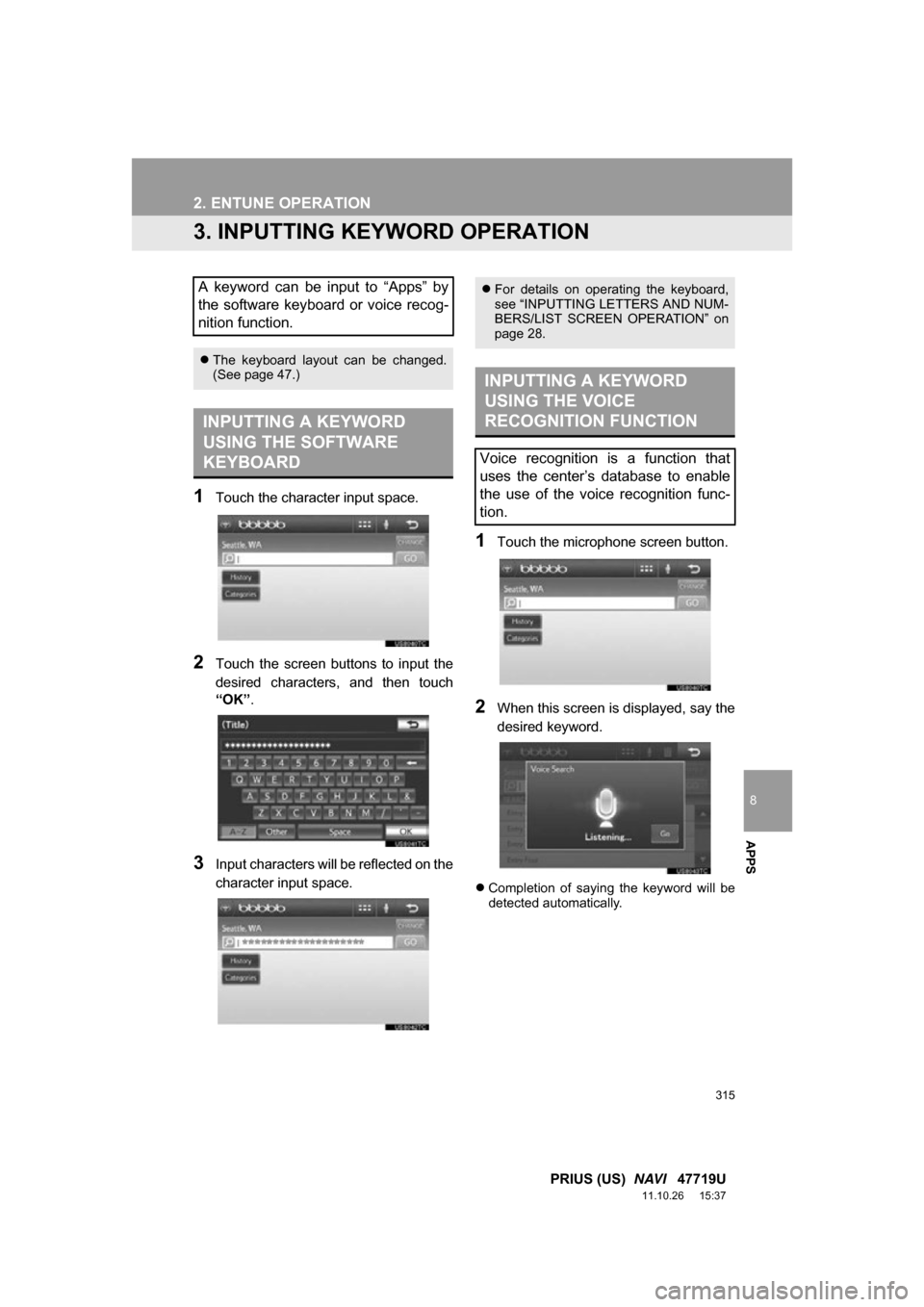
3. INPUTTING KEYWORD OPERATION
1Touch the character input space.
2Touch the screen buttons to input the
desired characters, and then touch
“OK”.
3Input characters will be reflected on the
character input space.
1Touch the microphone screen button.
2When this screen is displayed, say the
desired keyword.
Completion of saying the keyword will be
detected automatically.
A keyword can be input to “Apps” by
the software keyboard or voice recog-
nition function.
The keyboard layout can be changed.
(See page 47.)
INPUTTING A KEYWORD
USING THE SOFTWARE
KEYBOARD
For details on operating the keyboard,
see “INPUTTING LETTERS AND NUM-
BERS/LIST SCREEN OPERATION” on
page 28.
INPUTTING A KEYWORD
USING THE VOICE
RECOGNITION FUNCTION
Voice recognition is a function that
uses the center’s database to enable
the use of the voice recognition func-
tion.
Page 324 of 357

324
ALPHABETICAL INDEX
PRIUS (US) NAVI 47719U
11.10.26 15:37
A
Adding destinations................................... 86
Address book .......................................... 102
Address book entries .............................. 102
AM........................................................... 200
AM button................................................ 192
Apps ........................................................ 306
Audio ....................................................... 192
AUDIO button.......................................... 192
Audio language code .............................. 230
Audio settings ......................................... 267
HD Radio™ system sett ings ............... 267
iPod settings ........................................ 268
Audio/video remote controls (Steering switches) .............................. 255
Audio/video system ......... ..................... ... 192
Audio/video system operating hints ........ 257
Caring for your DVD player and disc ... 259
CD-R and CD-RW discs ...................... 263
iPod ..................................................... 258
MP3/WMA files .................................... 261
Radio reception ................................... 257
Terms .................................................. 263
USB memory ....................................... 259
Automatic Sound Levelizer (ASL) ........... 197
AUX port ................................................. 199
B
Basic function ............................................26
Bluetooth®...............................................132
Bluetooth® audio .....................................245
Connecting a Bluetooth
® audio player ...................248
Playing Bluetooth® audio.....................249
Bluetooth® phone ....................................139
Bluetooth® phone message function.......154
Checking messages ............................154
New message notification....................156
Replying (Quick reply) .........................155
Bluetooth
® settings .................................179
Detailed Bluetooth® settings................186
Registered devices ..............................179
Selecting a Bluetooth
® phone .............183
Selecting portable player .....................185
Brightness .........................................31, 226
C
Call on the Bluetooth® phone..................143
By call history ......................................145
By dial ..................................................143
By phonebook......................................143
By POI call ...........................................149
By speed dial .......................................145
By voice recognition ............................147
Calling using an SMS/MMS message ........................149
CD ...........................................................215
CLOSE button .........................................192
Color..................................................47, 226
Command list ..........................................279
Contrast.............................................31, 226
Current position calibration .....................118
Current position display.............................33
ALPHABETICAL INDEX