radio TOYOTA PRIUS 2012 3.G Navigation Manual
[x] Cancel search | Manufacturer: TOYOTA, Model Year: 2012, Model line: PRIUS, Model: TOYOTA PRIUS 2012 3.GPages: 357, PDF Size: 5.71 MB
Page 209 of 357
209
1. AUDIO/VIDEO SYSTEM OPERATION
5
AUDIO/VIDEO SYSTEM
PRIUS (US) NAVI 47719U
11.10.26 15:37
If “CH 000” is selected using the
“TUNE SCROLL” knob, the ID code,
which is 8 alphanumeric characters, will
be displayed. If another channel is
selected, the ID code will no longer be dis-
played. The channel (000) alternates
between displaying the radio ID and the
specific radio code.
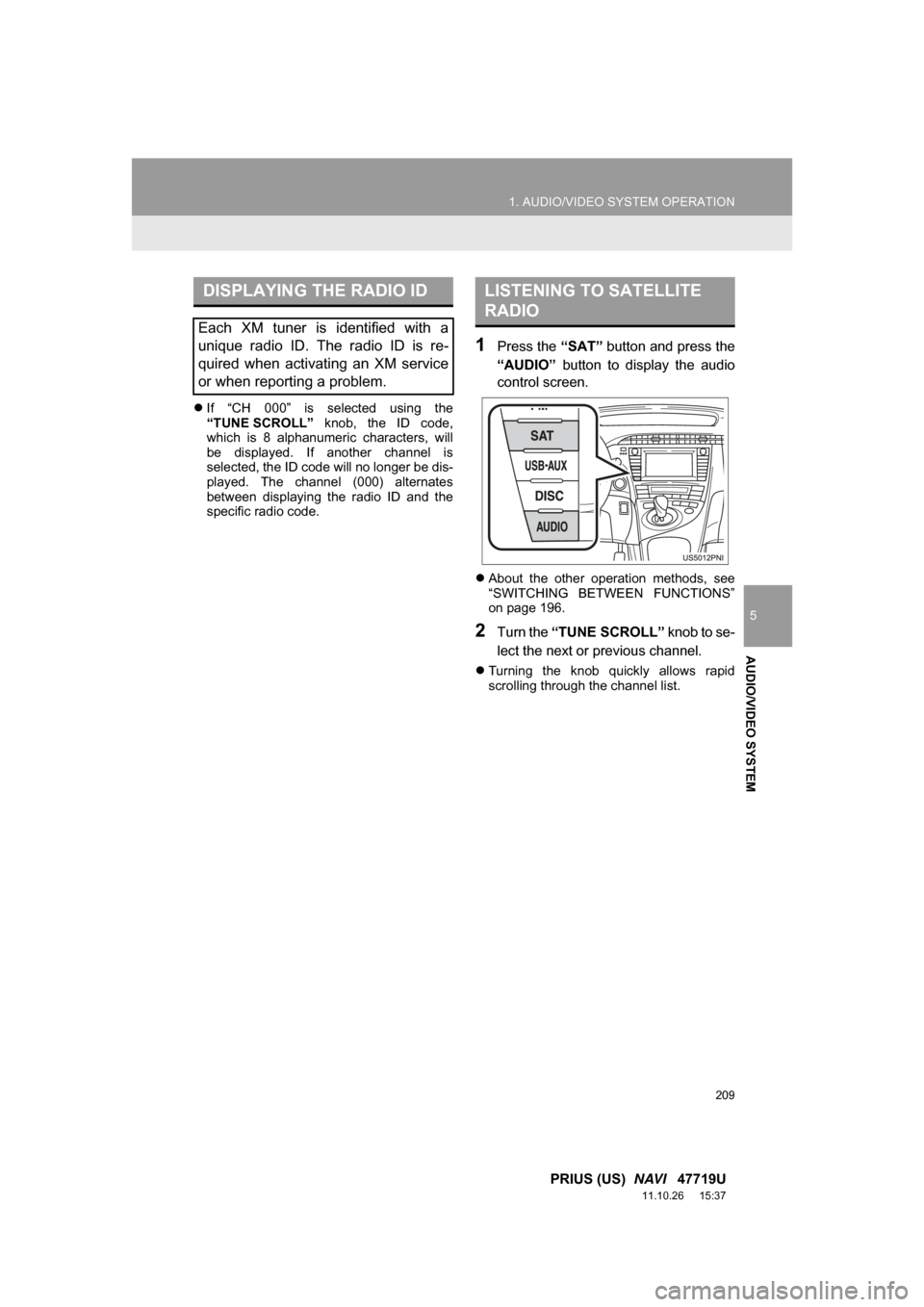
1Press the “SAT” button and press the
“AUDIO” button to display the audio
control screen.
About the other operation methods, see
“SWITCHING BETWEEN FUNCTIONS”
on page 196.
2Turn the “TUNE SCROLL” knob to se-
lect the next or previous channel.
Turning the knob quickly allows rapid
scrolling through the channel list.
DISPLAYING THE RADIO ID
Each XM tuner is identified with a
unique radio ID. The radio ID is re-
quired when activating an XM service
or when reporting a problem.
LISTENING TO SATELLITE
RADIO
Page 210 of 357
210
1. AUDIO/VIDEO SYSTEM OPERATION
PRIUS (US) NAVI 47719U
11.10.26 15:37
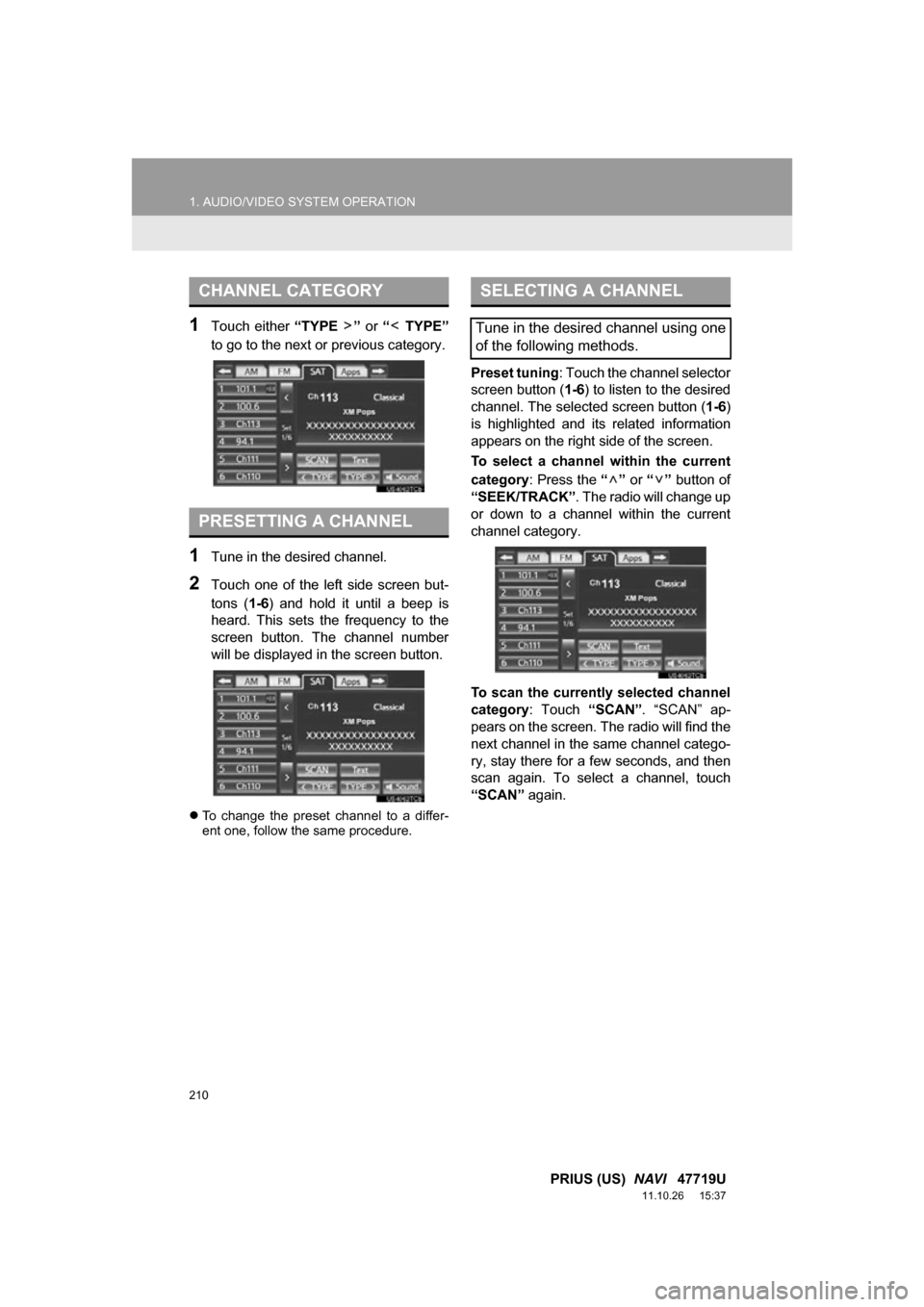
1Touch either “TYPE ” or “ TYPE”
to go to the next or previous category.
1Tune in the desired channel.
2Touch one of the left side screen but-
tons ( 1-6) and hold it until a beep is
heard. This sets the frequency to the
screen button. The channel number
will be displayed in the screen button.
To change the preset channel to a differ-
ent one, follow the same procedure.
Preset tuning : Touch the channel selector
screen button (1-6 ) to listen to the desired
channel. The selected screen button ( 1-6)
is highlighted and its related information
appears on the right side of the screen.
To select a channel within the current
category : Press the “” or “” button of
“SEEK/TRACK” . The radio will change up
or down to a channel within the current
channel category.
To scan the currently selected channel
category : Touch “SCAN”. “SCAN” ap-
pears on the screen. The radio will find the
next channel in the same channel catego-
ry, stay there for a few seconds, and then
scan again. To select a channel, touch
“SCAN” again.
CHANNEL CATEGORY
PRESETTING A CHANNEL
SELECTING A CHANNEL
Tune in the desired channel using one
of the following methods.
Page 212 of 357
212
1. AUDIO/VIDEO SYSTEM OPERATION
PRIUS (US) NAVI 47719U
11.10.26 15:37
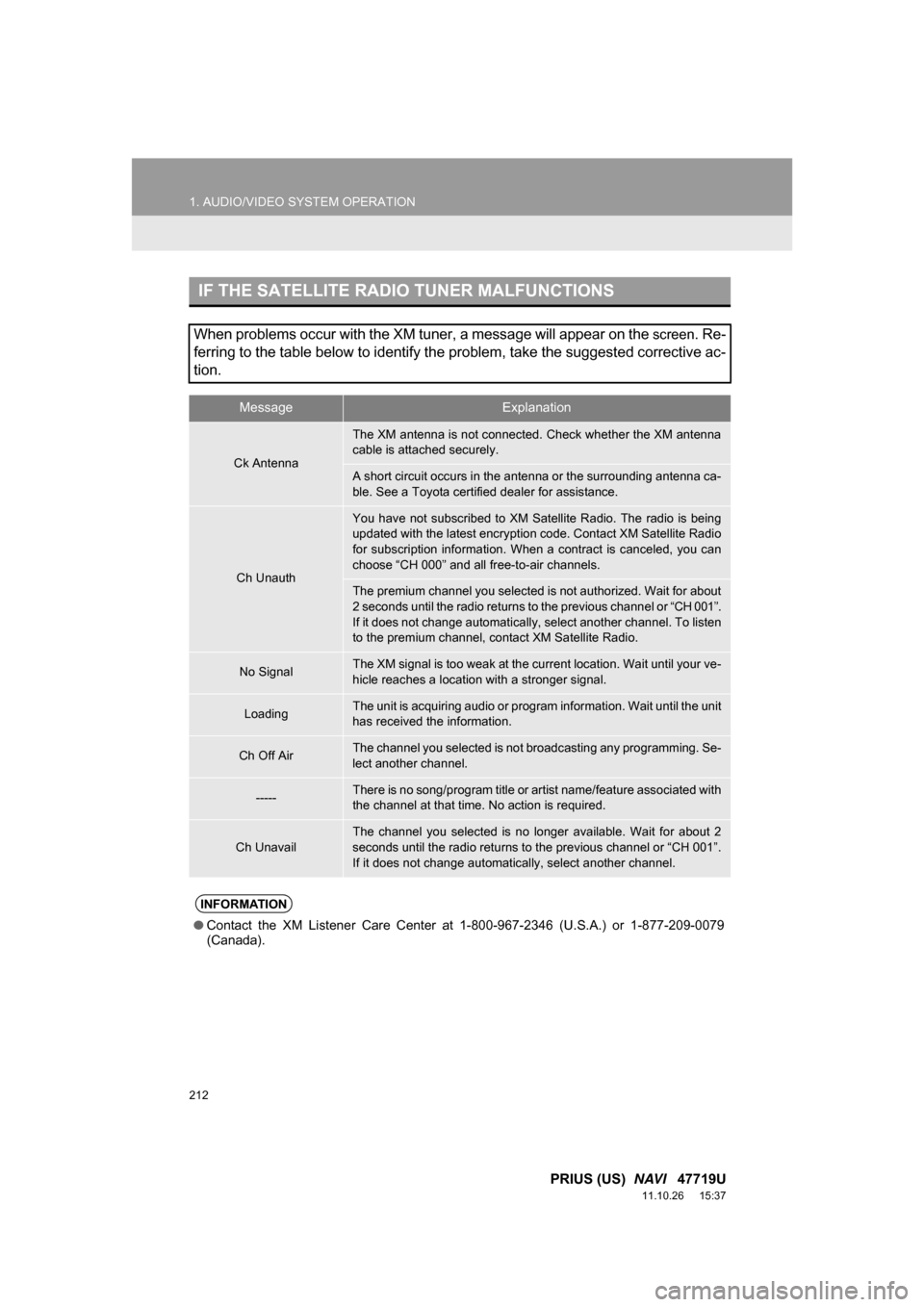
IF THE SATELLITE RADIO TUNER MALFUNCTIONS
When problems occur with the XM tuner, a message will appear on the screen. Re-
ferring to the table below to identify the problem, take the suggested corrective ac-
tion.
MessageExplanation
Ck Antenna
The XM antenna is not connected. Check whether the XM antenna
cable is attached securely.
A short circuit occurs in the antenna or the surrounding antenna ca-
ble. See a Toyota certified dealer for assistance.
Ch Unauth
You have not subscribed to XM Satellite Radio. The radio is being
updated with the latest encryption code. Contact XM Satellite Radio
for subscription information. When a contract is canceled, you can
choose “CH 000” and all free-to-air channels.
The premium channel you selected is not authorized. Wait for about
2 seconds until the radio returns to the previous channel or “CH 001”.
If it does not change automatically, select another channel. To listen
to the premium channel, contact XM Satellite Radio.
No SignalThe XM signal is too weak at the current location. Wait until your ve-
hicle reaches a location with a stronger signal.
LoadingThe unit is acquiring audio or program information. Wait until the unit
has received the information.
Ch Off AirThe channel you selected is not br oadcasting any programming. Se-
lect another channel.
-----There is no song/program title or artist name/feature associated with
the channel at that time. No action is required.
Ch Unavail
The channel you selected is no longer available. Wait for about 2
seconds until the radio returns to the previous channel or “CH 001”.
If it does not change automatically, select another channel.
INFORMATION
● Contact the XM Listener Care Center at 1-800-967-2346 (U.S.A.) or 1-877-209-0079
(Canada).
Page 213 of 357

213
1. AUDIO/VIDEO SYSTEM OPERATION
5
AUDIO/VIDEO SYSTEM
PRIUS (US) NAVI 47719U
11.10.26 15:37
NOTICE
●This equipment has been tested and
found to comply with the limits for a
class B digital device, pursuant to Part
15 of the FCC Rules. These limits are
designed to provide reasonable protec-
tion against harmful interference in a
residential installation. This equipment
generates, uses and can radiate radio
frequency energy and, if not installed
and used in accordance with the instruc-
tions, may cause harmful interference to
radio communications. However, there
is no guarantee that interference will not
occur in a particular installation.
● If this equipment does cause harmful
interference to radio or television recep-
tion, which can be determined by turning
the equipment off and on, the user is
encouraged to try to correct the interfer-
ence by one or more of the following
measures:
• Reorient or relocate the receiving
antenna.
• Increase the separation between the equipment and receiver.
• Connect the equipment into an outlet on a circuit different from that to
which the receiver is connected.
• Consult the dealer or an experienced radio/TV technician for help.
● Information to user
• Alternation or modifications carried
out without appropriate authorization
may invalidate the user’s right to
operate the equipment.
INFORMATION
● This XM tuner supports “Audio Services”
(Music and Talk) of only XM Satellite
Radio and “Text Information*” linked to
the respective “Audio Services”.
*: Text Information includes, Station
Name, (Artist) Name, (Song) Title and
Category Name.
Page 214 of 357
214
1. AUDIO/VIDEO SYSTEM OPERATION
PRIUS (US) NAVI 47719U
11.10.26 15:37
6. RADIO OPERATION (INTERNET RADIO BROADCAST)
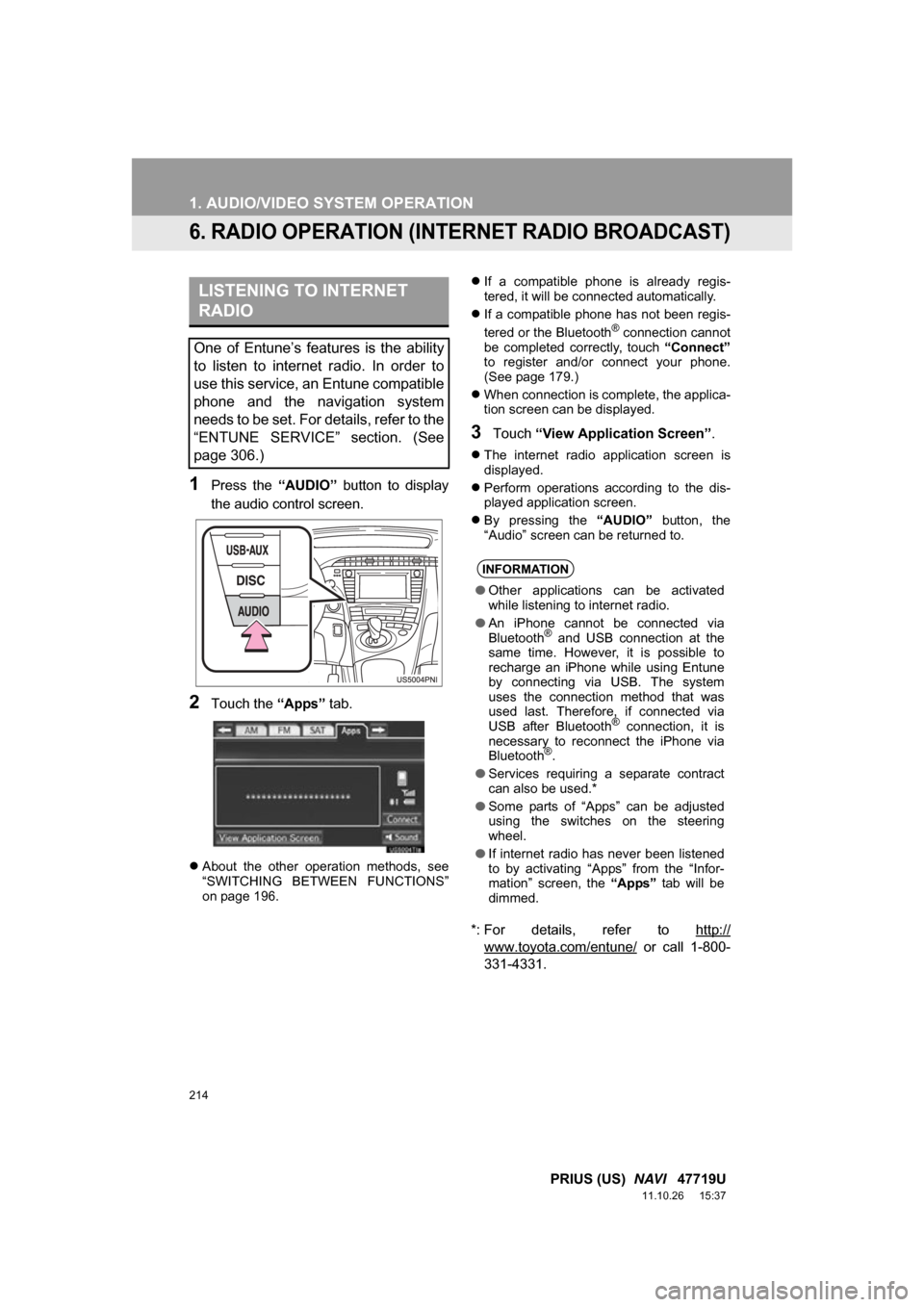
1Press the “AUDIO” button to display
the audio control screen.
2Touch the “Apps” tab.
About the other operation methods, see
“SWITCHING BETWEEN FUNCTIONS”
on page 196.
If a compatible phone is already regis-
tered, it will be connected automatically.
If a compatible phone has not been regis-
tered or the Bluetooth
® connection cannot
be completed correctly, touch “Connect”
to register and/or connect your phone.
(See page 179.)
When connection is complete, the applica-
tion screen can be displayed.
3Touch “View Application Screen” .
The internet radio application screen is
displayed.
Perform operations according to the dis-
played application screen.
By pressing the “AUDIO” button, the
“Audio” screen can be returned to.
*: For details, refer to http://
www.toyota.com/entune/ or call 1-800-
331-4331.
LISTENING TO INTERNET
RADIO
One of Entune’s features is the ability
to listen to internet radio. In order to
use this service, an Entune compatible
phone and the navigation system
needs to be set. For details, refer to the
“ENTUNE SERVICE” section. (See
page 306.)
INFORMATION
● Other applications can be activated
while listening to internet radio.
● An iPhone cannot be connected via
Bluetooth
® and USB connection at the
same time. However, it is possible to
recharge an iPhone while using Entune
by connecting via USB. The system
uses the connection method that was
used last. Therefore, if connected via
USB after Bluetooth
® connection, it is
necessary to reconnect the iPhone via
Bluetooth
®.
● Services requiring a separate contract
can also be used.*
● Some parts of “Apps” can be adjusted
using the switches on the steering
wheel.
● If internet radio has never been listened
to by activating “Apps” from the “Infor-
mation” screen, the “Apps” tab will be
dimmed.
Page 247 of 357
247
1. AUDIO/VIDEO SYSTEM OPERATION
5
AUDIO/VIDEO SYSTEM
PRIUS (US) NAVI 47719U
11.10.26 15:37
U.S.A. Canada
FCC ID : HYQDNNS059
Type : DNNS059
IC : 1551A-DNNS059 Canada 310
This device complies with part 15 of the
FCC Rules. Operation is subject to the
following two conditions: (1) This device
may not cause harmful interference,
and (2) this device must accept any
interference received, including
interference that may cause undesired
operation.
CAUTION
●FCC WARNING: Changes or
modifications not expressly approved by
the party responsible for compliance
could void the user’s authority to operate
the equipment.
● CAUTION: Radio Frequency Radiation
Exposure
This equipment complies with FCC
radiation exposure limits set forth for
uncontrolled environment and meets the
FCC radio frequency (RF) Exposure
Guidelines in Supplement C to OET65.
This equipment has very low levels of
RF energy that it deemed to comply
without maximum permissive exposure
evaluation (MPE). But it is desirable that
it should be installed and operated with
at least 20 cm and more between the
radiator and person’s body (excluding
extremities: hands, wrists, feet and
ankles).
● Co-location: This transmitter must not be
co-located or operated in conjunction
with any other antenna or transmitter.
CAUTION
● NOTE
Operation is subject to the following two
conditions; (1) this device may not
cause interference, and (2) this device
must accept any interference, including
interference that may cause undesired
operation of the device.
L’utilisation de ce dispositif est autorisée
seulement aux deux conditions
suivantes : (1) il ne doit pas produire de
brouillage, et (2) l’utilisateur du dispositif
doit être prêt à accepter tout brouillage
radioélectrique reçu, même si ce
brouillage est susceptible de
compromettre le fonctionnement du
dispositif.
● This equipment complies with IC
radiation exposure limits set forth for
uncontrolled environment and meets
RSS-102 of the IC radio frequency (RF)
Exposure rules. This equipment has
very low levels of RF energy that it
deemed to comply without maximum
permissive exposure evaluation (MPE).
But it is desirable that it should be
installed and operated with at least 20
cm and more between the radiator and
person’s body (excluding extremities:
hands,wrists, feet and ankles).
Cet équipement se conforme aux limites
d’exposition aux radiations établies par
Industrie Canada pour un
environnement non contrôlé ainsi qu’aux
directives d’exposition aux fréquences
radioélectriques (RF) émises par
Industrie Canada dans la norme
CNR-102. Cet équipement émet un
niveau d’énergie RF faible à un point tel
qu’il se conforme sans devoir effectuer
d’évaluation d’exposition maximum
admissible (MPE). Lorsque l’équipement
est utilisé, il est toutefois souhaitable de
laisser au moins 20 cm entre l’antenne
et le corps (à l’exception des
extrémités : mains, poignets, pieds et
chevilles).
Page 255 of 357
255
1. AUDIO/VIDEO SYSTEM OPERATION
5
AUDIO/VIDEO SYSTEM
PRIUS (US) NAVI 47719U
11.10.26 15:37
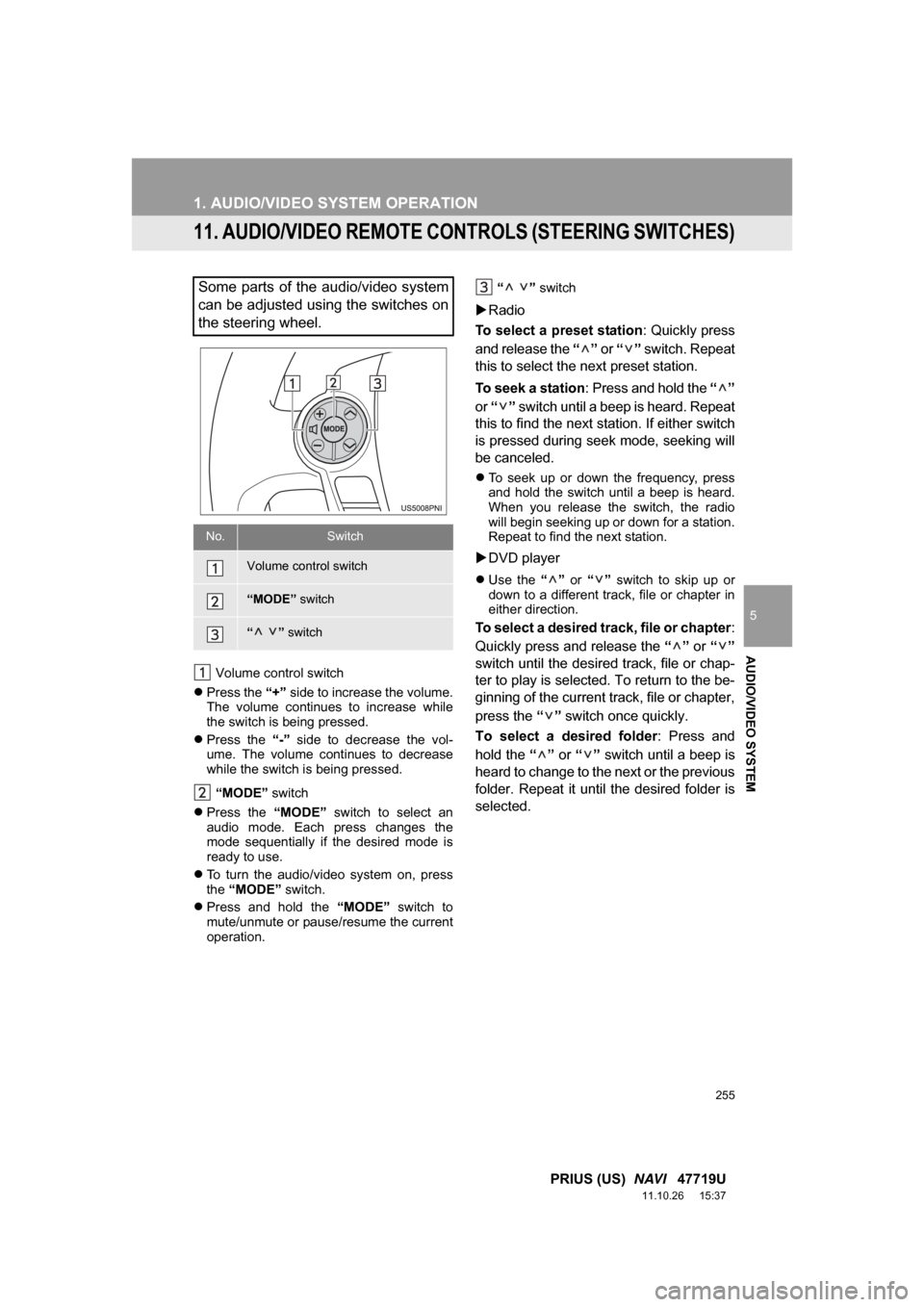
11. AUDIO/VIDEO REMOTE CONTROLS (STEERING SWITCHES)
Volume control switch
Press the “+” side to increase the volume.
The volume continues to increase while
the switch is being pressed.
Press the “-” side to decrease the vol-
ume. The volume continues to decrease
while the switch is being pressed.
“MODE” switch
Press the “MODE” switch to select an
audio mode. Each press changes the
mode sequentially if the desired mode is
ready to use.
To turn the audio/video system on, press
the “MODE” switch.
Press and hold the “MODE” switch to
mute/unmute or pause/resume the current
operation. “ ”
switch
Radio
To select a preset station : Quickly press
and release the “” or “” switch. Repeat
this to select the next preset station.
To seek a station : Press and hold the “”
or “” switch until a beep is heard. Repeat
this to find the next station. If either switch
is pressed during seek mode, seeking will
be canceled.
To seek up or down the frequency, press
and hold the switch until a beep is heard.
When you release the switch, the radio
will begin seeking up or down for a station.
Repeat to find the next station.
DVD player
Use the “” or “” switch to skip up or
down to a different track, file or chapter in
either direction.
To select a desired track, file or chapter :
Quickly press and release the “” or “”
switch until the desir ed track, file or chap-
ter to play is selected. To return to the be-
ginning of the current track, file or chapter,
press the “” switch once quickly.
To select a desired folder : Press and
hold the “” or “” switch until a beep is
heard to change to the next or the previous
folder. Repeat it until the desired folder is
selected.
Some parts of the audio/video system
can be adjusted using the switches on
the steering wheel.
No.Switch
Volume control switch
“MODE” switch
“” switch
Page 257 of 357
257
1. AUDIO/VIDEO SYSTEM OPERATION
5
AUDIO/VIDEO SYSTEM
PRIUS (US) NAVI 47719U
11.10.26 15:37
12. AUDIO/VIDEO SYSTEM OPERATING HINTS
Fading and drifting stations: Generally, the
effective range of FM is about 25 miles (40
km). Once outside this range, you may no-
tice fading and drifting, which increase with
the distance from the radio transmitter.
They are often accompanied by distortion.
Multi-path: FM signals are reflective, mak-
ing it possible for 2 signals to reach the ve-
hicle’s antenna at the same time. If this
happens, the signals will cancel each other
out, causing a momentary flutter or loss of
reception.
Static and fluttering: These occur when
signals are blocked by buildings, trees or
other large objects. Increasing the bass
level may reduce static and fluttering.
Station swapping: If the FM signal being
listened to is interrupted or weakened, and
there is another st rong station nearby on
the FM band, the radio may tune in the
second station until the original signal can
be picked up again.
NOTICE
● To ensure correct audio/video system
operations:
• Be careful not to spill beverages over
the audio/video system.
• Do not put anything other than an appropriate disc into the disc slot.
• The use of a cellular phone inside or near the vehicle may cause a noise
from the speakers of the audio/video
system which you are listening to.
However, this does not indicate a
malfunction.
RADIO RECEPTION
Usually, a problem with radio reception
does not mean there is a problem with
the radio — it is just the normal result
of conditions outside the vehicle.
For example, nearby buildings and ter-
rain can interfere with FM reception.
Power lines or phone wires can inter-
fere with AM signals. And of course, ra-
dio signals have a limited range. The
farther the vehicle is from a station, the
weaker its signal will be. In addition, re-
ception conditions change constantly
as the vehicle moves.
Here, some common reception prob-
lems that probably do not indicate a
problem with the radio are described.
FM
Page 258 of 357

258
1. AUDIO/VIDEO SYSTEM OPERATION
PRIUS (US) NAVI 47719U
11.10.26 15:37
Fading: AM broadcasts are reflected by
the upper atmosphere — especially at
night. These reflected signals can interfere
with those received directly from the radio
station, causing the radio station to sound
alternately strong and weak.
Station interference: When a reflected sig-
nal and a signal received directly from a ra-
dio station are very nearly the same
frequency, they can interfere with each
other, making it difficult to hear the broad-
cast.
Static: AM is easily affected by external
sources of electrical noise, such as high
tension power lines, lightening or electrical
motors. This results in static.
Cargo loaded on the roof luggage carrier,
especially metal objects, may adversely
affect the reception of XM Satellite Radio.
Alternation or modifications carried out
without appropriate authorization may
invalidate the user’s right to operate the
equipment.
“Made for iPod” and “Made for iPhone”
mean that an electronic accessory has
been designed to connect specifically to
iPod, or iPhone, respectively, and has
been certified by the developer to meet
Apple performance standards.
Apple is not responsible for the operation
of this device or its compliance with safety
and regulatory standards. Please note
that the use of this accessory with iPod or
iPhone may affect wireless performance.
iPhone, iPod, iPod classic, iPod nano and
iPod touch are trademarks of Apple Inc.,
registered in the U.S. and other countries.
AM
XM
iPod
Page 267 of 357
267
5
AUDIO/VIDEO SYSTEM
PRIUS (US) NAVI 47719U
11.10.26 15:37
2. SETUP
1. AUDIO SETTINGS
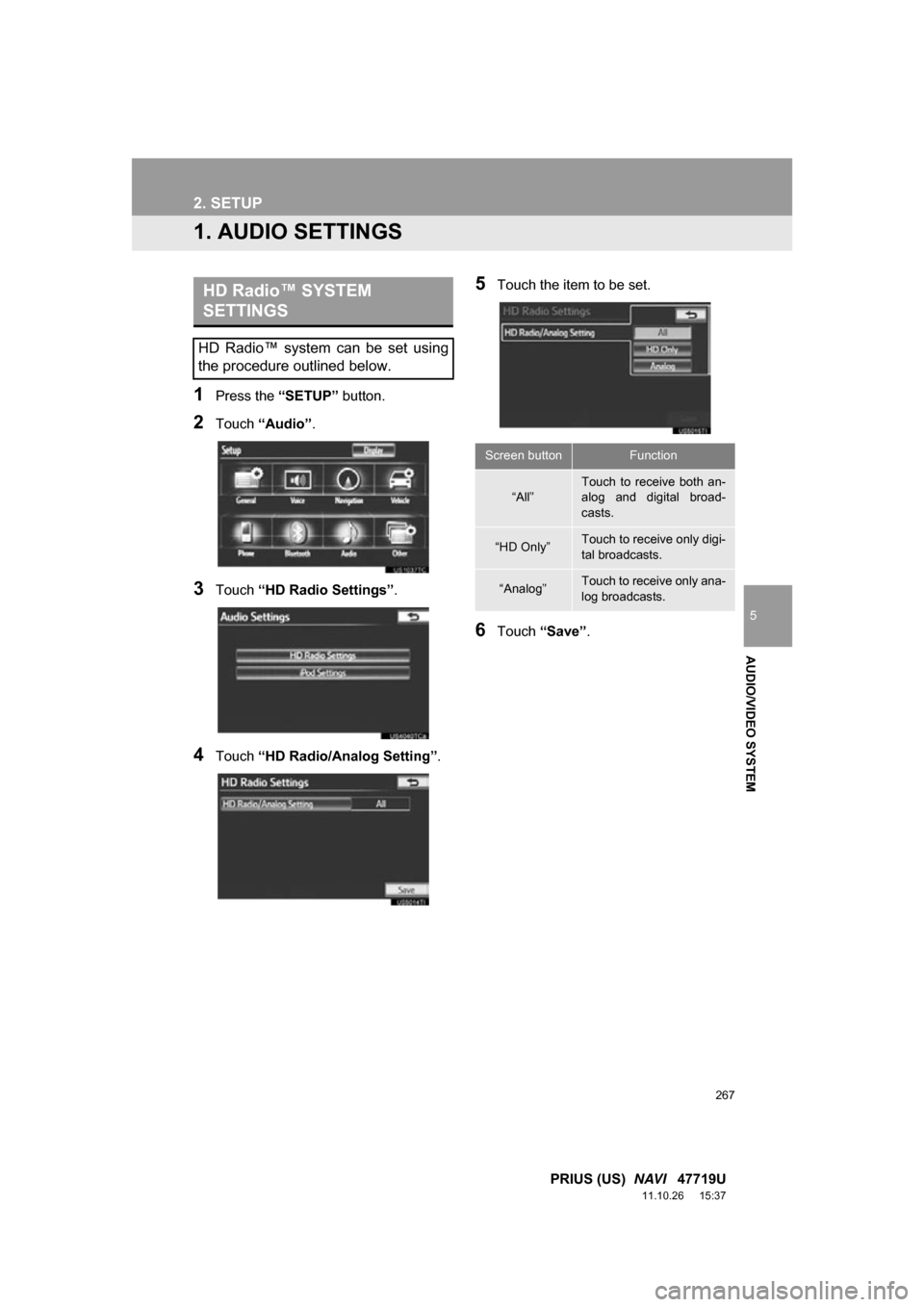
1Press the “SETUP” button.
2Touch “Audio” .
3Touch “HD Radio Settings” .
4Touch “HD Radio/Analog Setting” .
5Touch the item to be set.
6Touch “Save” .
HD Radio™ SYSTEM
SETTINGS
HD Radio™ system can be set using
the procedure outlined below.
Screen buttonFunction
“All”Touch to receive both an-
alog and digital broad-
casts.
“HD Only”Touch to receive only digi-
tal broadcasts.
“Analog”Touch to receive only ana-
log broadcasts.