lock TOYOTA PRIUS 2012 3.G Owners Manual
[x] Cancel search | Manufacturer: TOYOTA, Model Year: 2012, Model line: PRIUS, Model: TOYOTA PRIUS 2012 3.GPages: 636, PDF Size: 11.02 MB
Page 397 of 636
397
4-1. Maintenance and care
4
Maintenance and care
■
When using a car wash
If the door handle becomes wet while the electronic key is within the effec-
tive range, the door may lock and unlock repeatedly. Place the key in a posi-
tion 6 ft. (2 m) or more separate from the vehicle while the vehicle is being
washed. (Take care to ensure that the key is not stolen.)
■ Aluminum wheels
●Remove any dirt immediately by using a neutral detergent. Do not use
hard brushes or abrasive cleaners. Do not use strong or harsh chemical
cleaners.
Use the same mild detergent and wax as used on the paint.
● Do not use detergent on the wheels when they are hot, for example after
driving for long distance in the hot weather.
● Wash detergent from the wheels immediately after use.
■ Bumpers
Do not scrub with abrasive cleaners.
CAUTION
■When washing the vehicle
Do not apply water to the inside of the engine compartment. Doing so may
cause the electrical components etc. to catch fire.
■ Precautions regardin g the exhaust pipe
Exhaust gasses cause the exhaust pipe to become quite hot.
When washing the vehicle, be careful not to touch the pipe until it has cooled
sufficiently, as touching a hot exhaust pipe can cause burns.
Page 407 of 636
407
4-2. Maintenance
4
Maintenance and care
Head restraints
• Do the head restraints move
smoothly and lock securely?
Indicators/buzzers • Do the indicators and buzzers
function properly?
Lights • Do all the lights come on?
Parking brake • Does the parking brake pedal
move smoothly?
• When parked on a slope and the parking brake is on, is the vehicle
securely stopped?
Seat belts • Do the seat belts operate
smoothly?
• The seat belts should not be dam- aged.
Seats • Do the seat controls operate
properly?
Steering wheel • Does the steering wheel rotate
smoothly?
• Does the steering wheel have the correct amount of free play?
• There should not be any strange sounds coming from the steering
wheel.
ItemsCheck points
Page 408 of 636
408 4-2. Maintenance
Vehicle exterior
ItemsCheck points
Doors • Do the doors operate smoothly?
Engine hood • Does the engine hood lock sys-
tem work properly?
Fluid leaks • There should not be any signs of
fluid leakage after the vehicle has
been parked.
Tires • Is the tire inflation pressure cor-
rect?
• The tires should not be dam- aged or excessively worn.
• Have the tires been rotated according to the maintenance
schedule?
• The wheel nuts should not be loose.
CAUTION
■ If the hybrid system is operating
Turn the hybrid system off and ensure that there is adequate ventilation
before performing maintenance checks.
Page 413 of 636
413
4-3. Do-it-yourself maintenance
4
Maintenance and care
Hood
Release the lock from the inside of the vehicle to open the hood.
Pull the hood lock release
lever.
The hood will pop up slightly.
Pull up the auxiliary catch
lever and lift the hood.
STEP 1
STEP 2
Page 414 of 636
414 4-3. Do-it-yourself maintenance
CAUTION
■Pre-driving check
Check that the hood is fully closed and locked.
If the hood is not locked properly, it may open while the vehicle is in motion
and cause an accident, which may result in death or serious injury.
■ After installing the support rod into the slot
Make sure the rod supports the hood securely from falling down on to your
head or body.
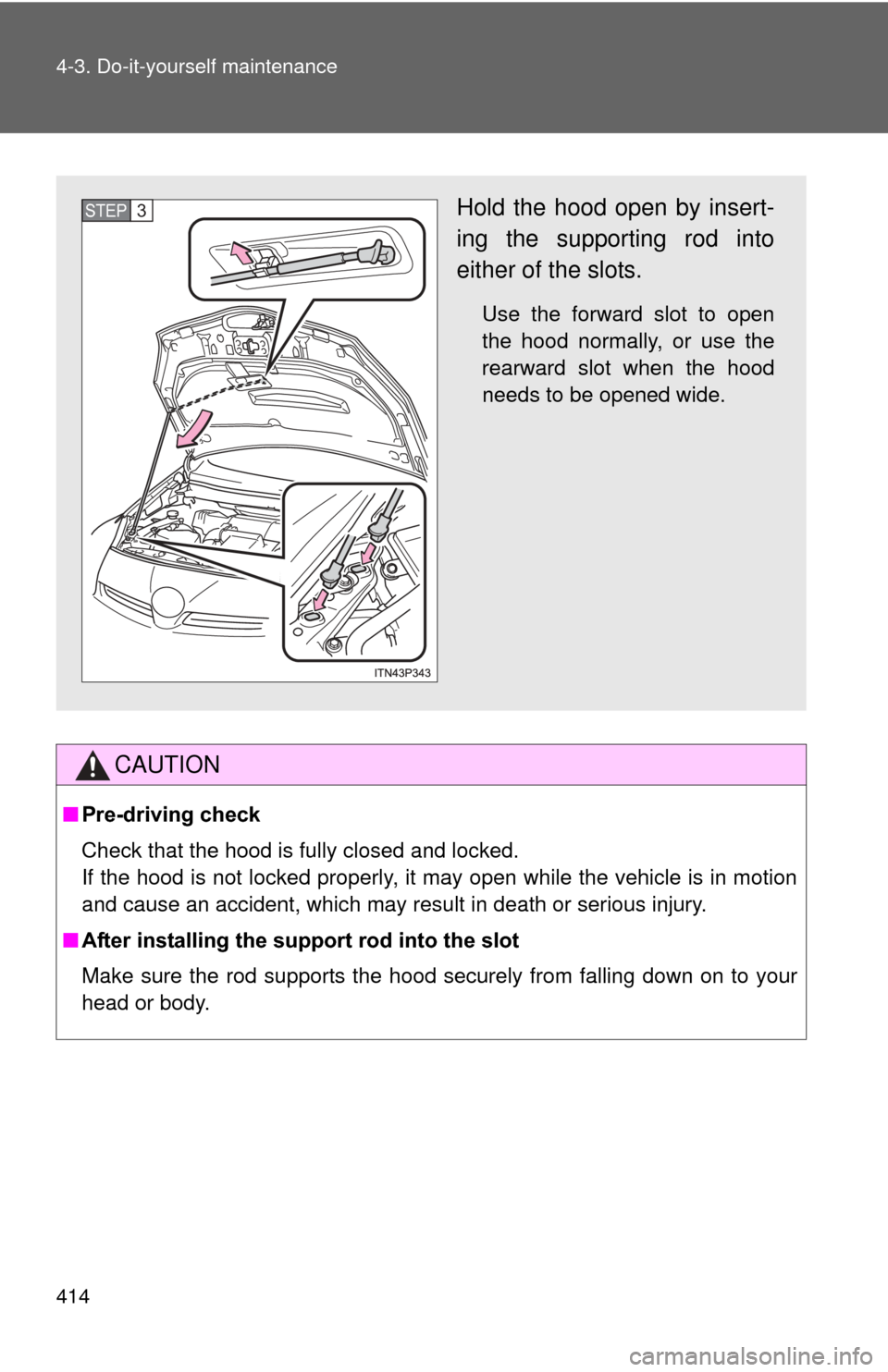
Hold the hood open by insert-
ing the supporting rod into
either of the slots.
Use the forward slot to open
the hood normally, or use the
rearward slot when the hood
needs to be opened wide.
STEP 3
Page 421 of 636
421
4-3. Do-it-yourself maintenance
4
Maintenance and care
■
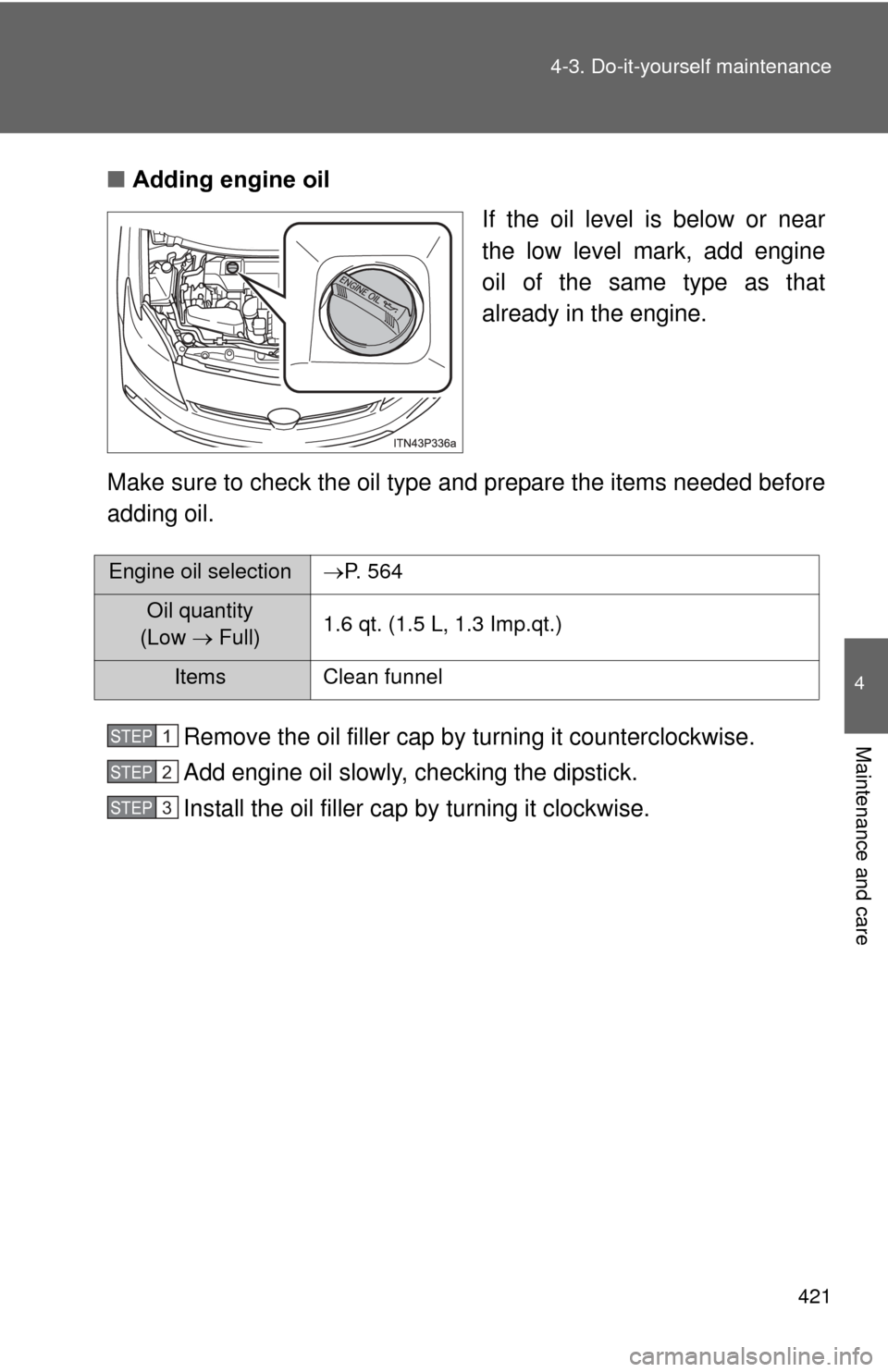
Adding engine oil
If the oil level is below or near
the low level mark, add engine
oil of the same type as that
already in the engine.
Make sure to check the oil type and prepare the items needed before
adding oil.
Remove the oil filler cap by turning it counterclockwise.
Add engine oil slowly, checking the dipstick.
Install the oil filler cap by turning it clockwise.
Engine oil selectionP. 564
Oil quantity
(Low Full) 1.6 qt. (1.5 L, 1.3 Imp.qt.)
Items Clean funnel
STEP 1
STEP 2
STEP 3
Page 433 of 636
433
4-3. Do-it-yourself maintenance
4
Maintenance and care
■
After recharging/reconnecting the 12-volt battery
●Unlocking the doors using the smart key system may not be possible
immediately after reconnecting the 12-volt battery. If this happens, use
the wireless remote control or the mechanical key to lock/unlock the
doors.
● Start the hybrid system with the “POWER” switch in ACCESSORY mode.
The hybrid system may not start with the “POWER” switch turned off.
However, the hybrid system will operate normally from the second
attempt.
● The “POWER” switch mode is recorded by the vehicle. If the 12-volt bat-
tery is reconnected, the vehicle will return the “POWER” switch mode to
the status it was in before the 12-volt battery was disconnected. Make
sure to turn off the power before disconnect the 12-volt battery. Take
extra care when connecting the 12-volt battery if the “POWER” switch
mode prior to discharge is unknown.
● Restart the hybrid system, depress the brake pedal, and confirm that it is
possible to shift into each shift position.
If the system will not start even after multiple attempts at all methods above,
contact your Toyota dealer.
Page 459 of 636
459
4-3. Do-it-yourself maintenance
4
Maintenance and care
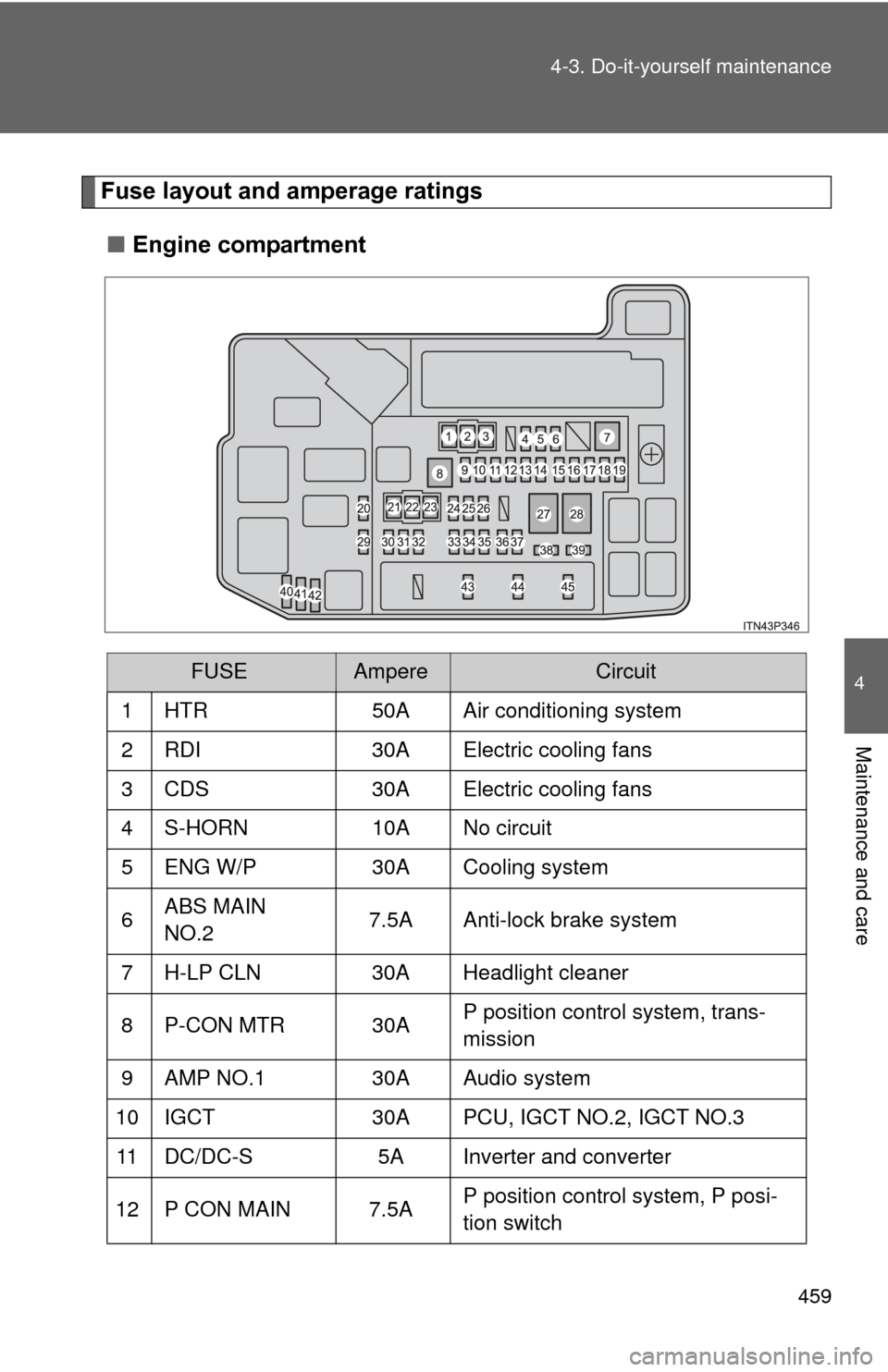
Fuse layout and amperage ratings
■ Engine compartment
FUSEAmpereCircuit
1 HTR 50A Air conditioning system
2 RDI 30A Electric cooling fans
3 CDS 30A Electric cooling fans
4 S-HORN 10A No circuit
5 ENG W/P 30A Cooling system
6 ABS MAIN
NO.2 7.5A Anti-lock brake system
7 H-LP CLN 30A Headlight cleaner
8 P-CON MTR 30A P position control system, trans-
mission
9 AMP NO.1 30A Audio system
10 IGCT 30A PCU, IGCT NO.2, IGCT NO.3
11 DC/DC-S 5A Inverter and converter
12 P CON MAIN 7.5A P position control system, P posi-
tion switch
Page 460 of 636

460 4-3. Do-it-yourself maintenance
FUSEAmpereCircuit
13 AM2 7.5A Power management system
14 ECU-B2 7.5A Smart key system, hybrid system
15 MAYDAY 10A MAYDAY
16 ECU-B3 10A Air conditioning system
17 TURN & HAZ 10A Turn signal lights
18 ETCS 10AMultiport fuel injection system/
sequential multiport fuel injection
system
19 ABS MAIN
NO.1 20A Anti-lock brake system
20 H-LP LH LO 15A Left-hand headlight (low beam)
21 P/I 2 40AP position control system, horn,
headlight low beams, back-up
lights
22 ABS MTR 1 30A Anti-lock brake system
23 ABS MTR 2 30A Anti-lock brake system
24 H-LP HI MAIN 20A Headlight high beams, daytime
running lights
25 DRL 7.5A Daytime running lights
26 AMP NO.2 30A Audio system, navigation system
27 P/I 1 60A IG2, EFI MAIN, BATT FAN
28 EPS 60A Electric power steering
29 H-LP RH LO 15A Right-hand headlight (low beam)
30 PCU 10A Inverter and converter
31 IGCT NO.2 10A Hybrid system, P position control
system, power management sys-
tem, multiport fuel injection sys-
tem/sequential multiport fuel
injection system
Page 462 of 636
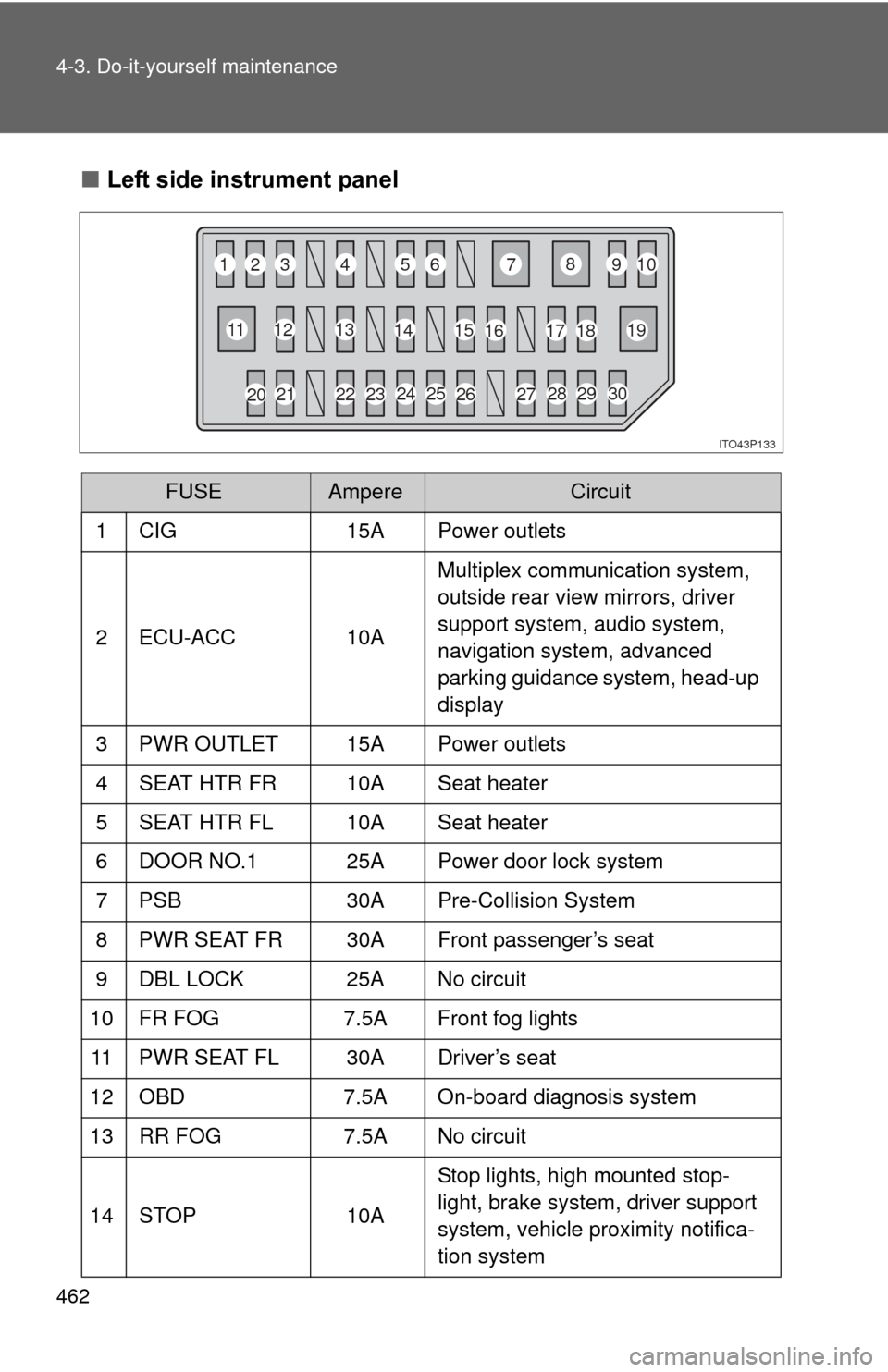
462 4-3. Do-it-yourself maintenance
■Left side instrument panel
FUSEAmpereCircuit
1 CIG 15A Power outlets
2 ECU-ACC 10AMultiplex communication system,
outside rear view mirrors, driver
support system, audio system,
navigation system, advanced
parking guidance system, head-up
display
3 PWR OUTLET 15A Power outlets
4 SEAT HTR FR 10A Seat heater
5 SEAT HTR FL 10A Seat heater
6 DOOR NO.1 25A Power door lock system
7 PSB 30A Pre-Collision System
8 PWR SEAT FR 30A Front passenger’s seat
9 DBL LOCK 25A No circuit
10 FR FOG 7.5A Front fog lights
11 PWR SEAT FL 30A Driver’s seat
12 OBD 7.5A On-board diagnosis system
13 RR FOG 7.5A No circuit
14 STOP 10AStop lights, high mounted stop-
light, brake system, driver support
system, vehicle proximity notifica-
tion system
ITO43P133
1
2
3 4
56 7
8
910
11 12
13
14 15
16 17
18 19
23 24 25
26
2728
29
30
20 21 22