ECU TOYOTA PRIUS 2012 3.G Owner's Manual
[x] Cancel search | Manufacturer: TOYOTA, Model Year: 2012, Model line: PRIUS, Model: TOYOTA PRIUS 2012 3.GPages: 636, PDF Size: 11.02 MB
Page 176 of 636
176 1-8. Safety information
CAUTION
■When installing a child restraint system
●When a booster seat is installed, always ensure that the shoulder belt is
positioned across the center of the child’s shoulder. The belt should be
kept away from the child’s neck, but not so that it could fall off the child’s
shoulder. Failing to do so may result in death or serious injury in the event
of sudden braking, sudden swerving or an accident.
● Ensure that the belt and plate are securely locked and the seat belt is not
twisted.
● Shake the child restraint system left and right, and forward and backward
to ensure that it has been securely installed.
● After securing a child restraint system, never adjust the seat.
● Follow all installation instructions provided by the child restraint system
manufacturer.
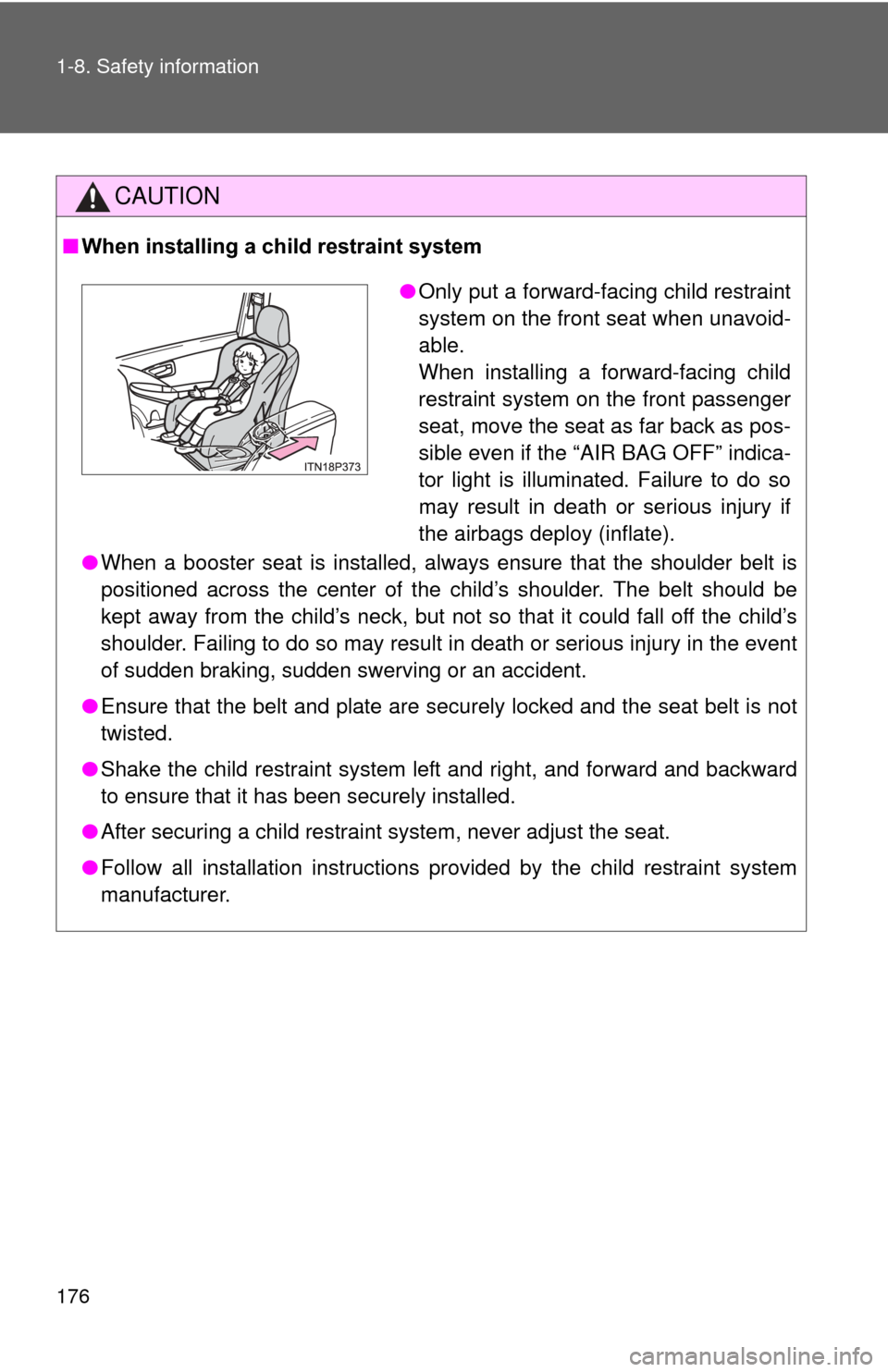
●Only put a forward-facing child restraint
system on the front seat when unavoid-
able.
When installing a forward-facing child
restraint system on the front passenger
seat, move the seat as far back as pos-
sible even if the “AIR BAG OFF” indica-
tor light is illuminated. Failure to do so
may result in death or serious injury if
the airbags deploy (inflate).
Page 177 of 636

177
1-8. Safety information
1
Before driving
CAUTION
■
Do not use a seat belt extender
If a seat belt extender is used when installing a child restraint system, the
seat belt will not securely hold the child restraint system, which could cause
death or serious injury to the child or other passengers in the event of sud-
den braking, sudden swerving or an accident.
■ To correctly attach a child r estraint system to the anchors
When using the LATCH anchors, be sure that there are no foreign objects
around the anchors and that the seat belt is not caught behind the child
restraint system. Make sure the child restraint system is securely attached,
or it may cause death or serious injury to the child or other passengers in the
event of a sudden braking, sudden swerve or accident.
Page 187 of 636

187
2-1. Driving procedures
2
When driving
CAUTION
●
If the vehicle is stopped on an incline, in order to prevent accidents caused
by the vehicle rolling forward or ba ckward, always depress the brake pedal
and securely apply the parking brake as needed.
● Avoid revving or racing the engine.
Running the engine at high speed while the vehicle is stopped may cause
the exhaust system to overheat, which could result in a fire if combustible
material is nearby.
■ When the vehicle is parked
●Make sure to firmly apply the parking brake and shift the shift position to P.
Failure to do so may cause the vehicle to move, or the vehicle to acceler-
ate suddenly if the accelerator pedal is accidentally depressed. Also, when
leaving the vehicle, make sure to turn off the hybrid system and lock the
vehicle.
Sound or shuddering may not be noticed even when the hybrid vehicle is
ready to drive (when the “READY ” indicator is illuminated).
● Do not leave glasses, cigarette lighters, spray cans, or soft drink cans in
the vehicle when it is in the sun.
Doing so may result in the following:
• Gas may leak from a cigarette lighter or spray can, and may lead to a
fire.
• The temperature inside the vehicle may cause the plastic lenses and plastic material of glasses to deform or crack.
• Soft drink cans may fracture, causing the contents to spray over the interior of the vehicle, and may also cause a short circuit in the vehi-
cle’s electrical components.
Page 189 of 636

189
2-1. Driving procedures
2
When driving
CAUTION
■
When taking a nap in the vehicle
Always turn the hybrid system off. Otherwise, if you accidentally move the
shift lever or depress the accelerator pedal, this could cause an accident or
fire due to hybrid system overheating. Additionally, if the vehicle is parked in
a poorly ventilated area, exhaust gases may collect and enter the vehicle,
leading to death or a serious health hazard.
■ When braking
●When the brakes are wet, drive more cautiously.
Braking distance increases when the brakes are wet, and this may cause
one side of the vehicle to brake differently than the other side. Also, the
parking brake may not securely hold the vehicle.
● If the electronically controlled assist function does not operate, do not fol-
low other vehicles closely and avoid downhill or sharp turns that require
braking.
In this case, braking is still possible, but the brake pedal should be
depressed more firmly than usual. Also, the braking distance will increase.
● The brake system consists of 2 individual hydraulic systems; if one of the
systems fails, the others will still operate. In this case, the brake pedal
should be depressed more firmly than usual and the braking distance will
increase. If this happens, do not continue to drive the vehicle. If the brake
system warning light (red indicator) comes on while driving, immediately
stop the vehicle in a safe place and contact your Toyota dealer.
Page 213 of 636
213
2-1. Driving procedures
2
When driving
Hor n
■After adjusting the steering wheel
Make sure that the steering wheel is securely locked.
The horn may not sound if the steering wheel is not securely locked.
(P. 117)
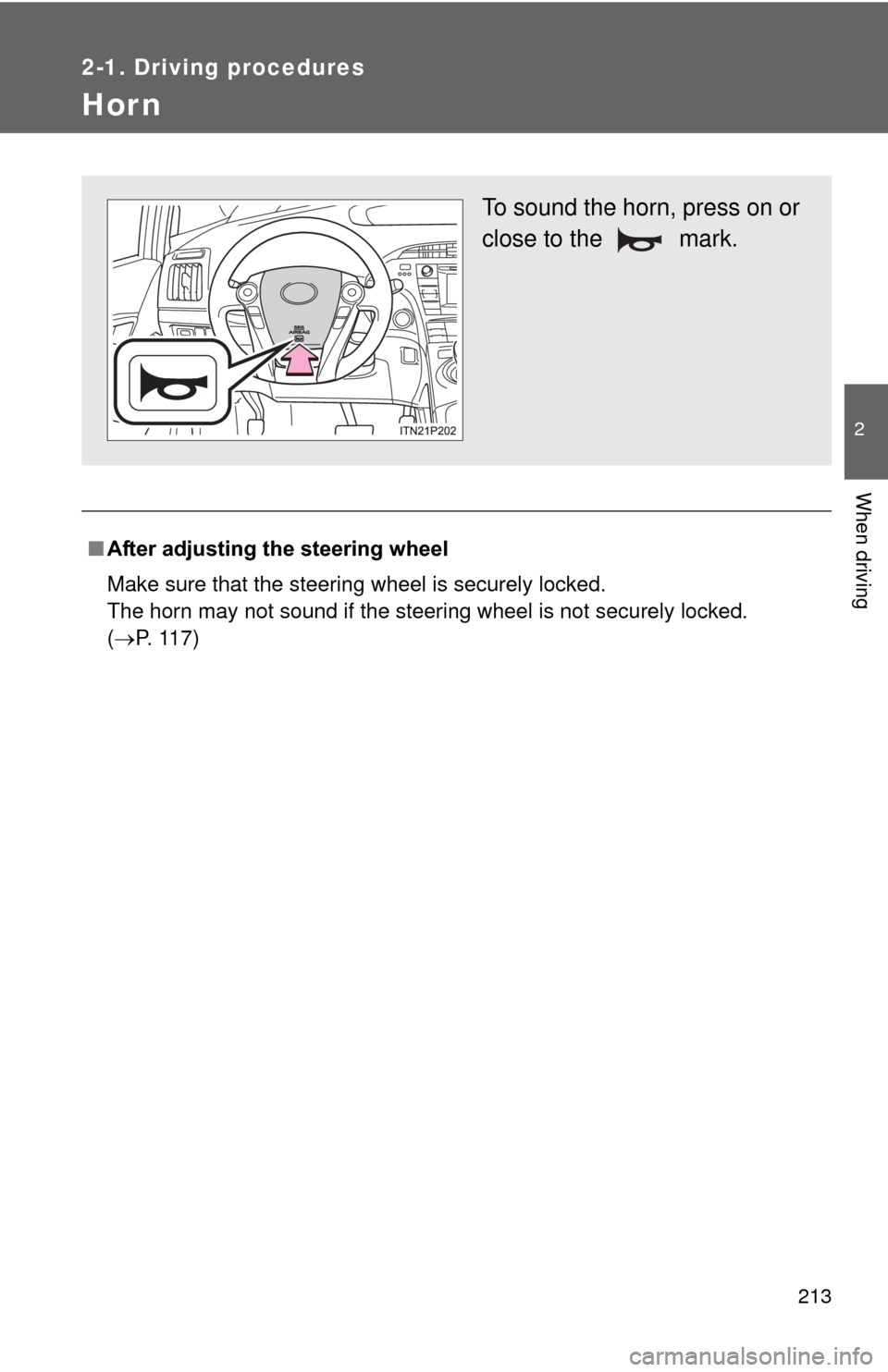
To sound the horn, press on or
close to the mark.
Page 220 of 636
220 2-2. Instrument cluster
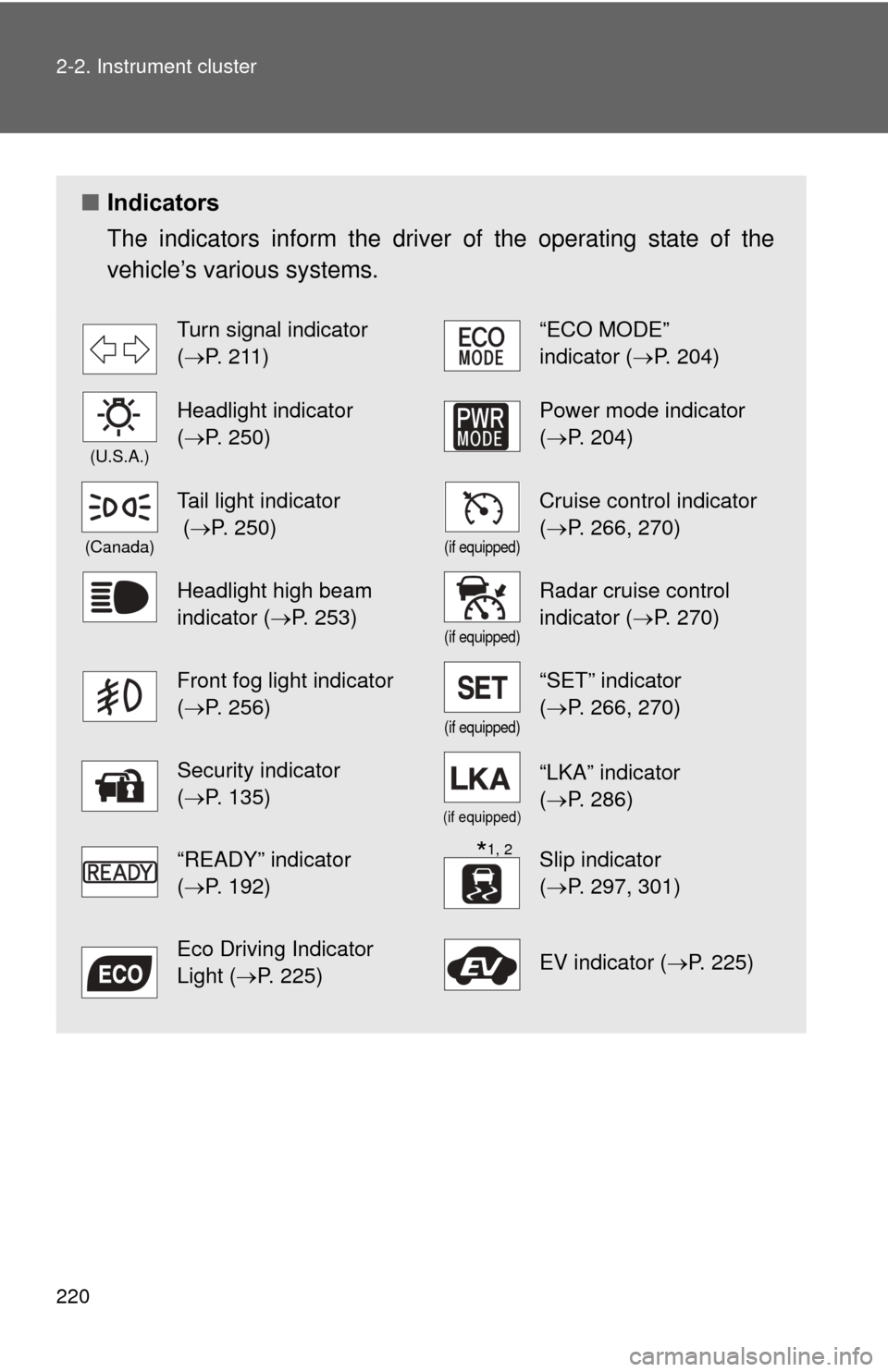
■Indicators
The indicators inform the driver of the operating state of the
vehicle’s various systems.
Turn signal indicator
(P. 211)“ECO MODE”
indicator (P. 204)
(U.S.A.)
Headlight indicator
(P. 250)Power mode indicator
(P. 204)
(Canada)
Tail light indicator
( P. 250)
(if equipped)
Cruise control indicator
(P. 266, 270)
Headlight high beam
indicator ( P. 253)
(if equipped)
Radar cruise control
indicator (P. 270)
Front fog light indicator
(P. 256)
(if equipped)
“SET” indicator
(P. 266, 270)
Security indicator
(P. 135)
(if equipped)
“LKA” indicator
(P. 286)
“READY” indicator
(P. 192)Slip indicator
(P. 297, 301)
Eco Driving Indicator
Light ( P. 225)EV indicator ( P. 225)
*1, 2
Page 256 of 636
256
2-3. Operating the lights and windshield wipers
Fog light switch
: If equipped
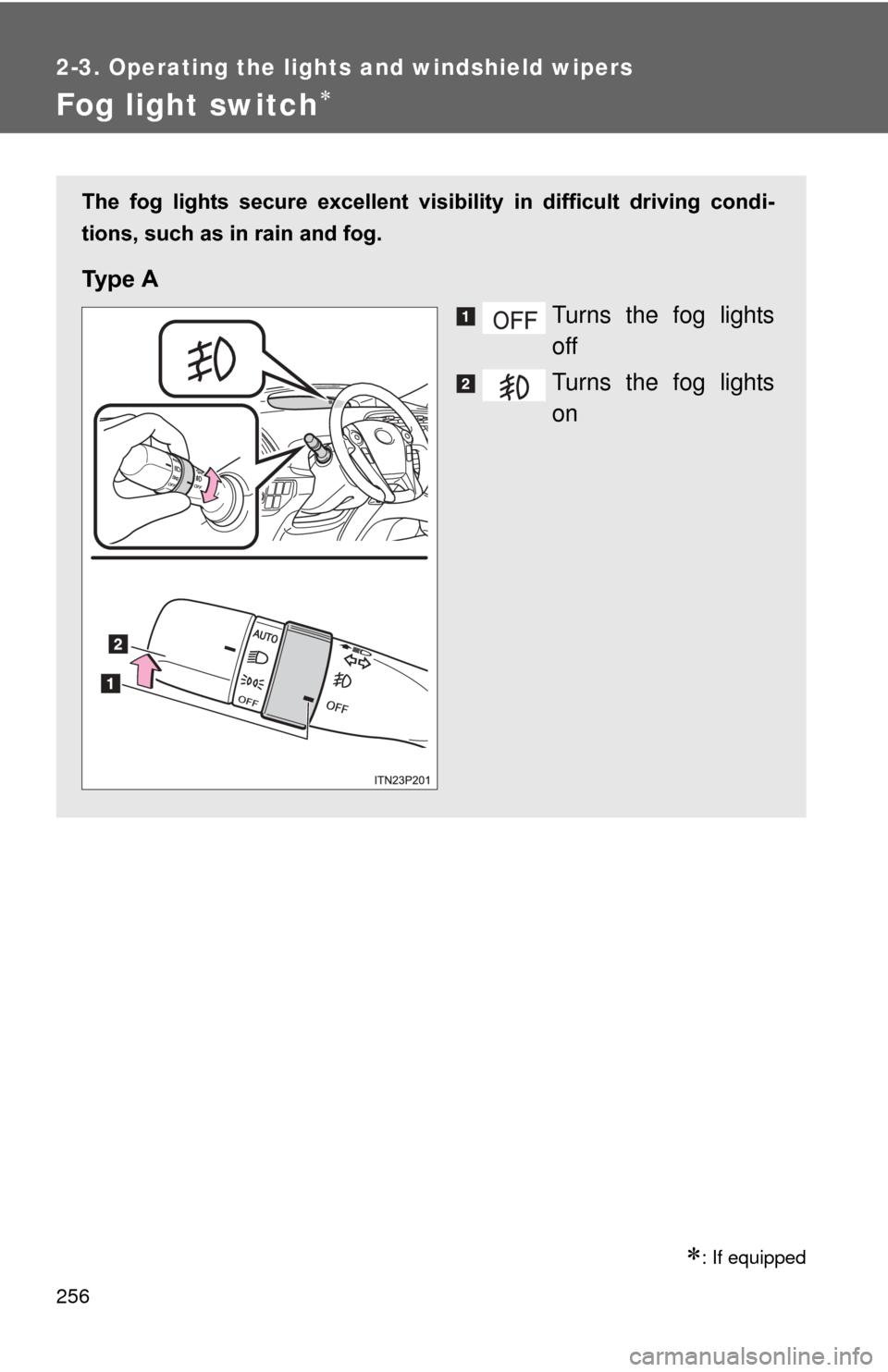
The fog lights secure excellent visibility in difficult driving condi-
tions, such as in rain and fog.
Ty p e A
Turns the fog lights
off
Turns the fog lights
on
Page 311 of 636
311
2
When driving
2-5. Driving information
Cargo and luggage
Take notice of the following information about storage precau-
tions, cargo capacity and load:
●Stow cargo and luggage in the luggage compartment whenever
possible.
● Be sure all items are secured in place.
● To maintain vehicle balance while driving, position luggage
evenly within the luggage compartment.
● For better fuel economy, do no t carry unnecessary weight.
Page 315 of 636

315
2-5. Driving information
2
When driving
CAUTION
●Secure all items in the occupant compartment, as they may shift and
injure someone in the event of an accident or sudden braking.
●When you fold down the rear seats, long items should not be place
directly behind the front seats.
●Never allow anyone to ride in the luggage compartment. It is not
designed for passengers. They should ride in their seats with their seat
belts properly fastened. Otherwise,
they are much more likely to suffer
death or serious bodily injury, in the event of sudden braking or an
accident.
■Capacity and distribution
●Do not exceed the maximum axle weight rating or the total vehicle
weight rating.
●Even if the total load of occupant’s weight and the cargo load is less
than the total load capacity, do no t apply the load unevenly. Improper
loading may cause deterioration of st eering or braking control which
may cause death or serious injury.
Page 344 of 636

344 3-1. Using the air conditioning system and defogger
■Security feature
Any unlocked doors will be automatically locked when the system is operat-
ing. The buzzer will beep and the emergency flashers flash when the doors
have been locked or the system has been turned off.
(The doors locked: Once; The system turned off: Twice)
■ Conditions affecting operation
P. 7 2
■ Electronic key battery depletion
P. 7 6
■ When the electronic key battery is fully depleted
P. 7 6
■ Customization
Setting (e.g. Operation using the on the wireless remote control) can
be changed.
(Customizable features P. 596)