warning light TOYOTA PRIUS 2012 3.G Owner's Manual
[x] Cancel search | Manufacturer: TOYOTA, Model Year: 2012, Model line: PRIUS, Model: TOYOTA PRIUS 2012 3.GPages: 636, PDF Size: 11.02 MB
Page 291 of 636
291
2-4. Using other
driving systems
2
When driving
■No-handed driving warning
If the steering wheel is not operated for about 15 seconds on a straight road
or about 5 seconds on a curve, the buzzer will beep twice, indicators on the
multi-information display will flash, and the lane keeping assist function will
be temporarily canceled. If you drive the vehicle with your hands lightly
touching the steering wheel, this may also be detected as no-handed driv-
ing.
■ When the vehicle has been parked in the sun
The LKA system functions may not be available for a while after driving has
started. In such cases, turn the LKA system off and turn it on again after nor-
mal temperature returns. When the temperature in the cabin decreases and
the temperature around the camera sensor becomes suitable for its opera-
tion, the functions will begin to operate.
■ Warning lights and warning messages for LKA
Warning lights and messages are used to indicate a system malfunction or
to inform the driver of the need for caution while driving. ( P. 496, 510)
CAUTION
■Before using the LKA system
Do not rely on the LKA system to remain within a selected lane. The LKA
system is not designed to enable inattentive driving. The steering wheel
should be operated by the driver to mainta in the vehicle in a suitable position
within its lane. Always drive carefully.
Page 298 of 636

298 2-4. Using other driving systems
■Sounds and vibrations caused by the ABS, brake assist, VSC and
TRAC
● A sound may be heard from the engine compartment when the hybrid
system is started, just after the vehicle begins to move, if the brake pedal
is depressed forcefully or repeatedly, or 1-2 minutes after the hybrid sys-
tem is stopped. This sound does not indicate that a malfunction has
occurred in any of these systems.
● Any of the following conditions may occur when the above systems are
operating. None of these indicates that a malfunction has occurred.
• Vibrations may be felt through the vehicle body and steering.
• A motor sound may be heard after the vehicle comes to a stop.
• The brake pedal may pulsate slightly after the ABS is activated.
• The brake pedal may move down slightly after the ABS is activated.
■ EPS operation sound
When the steering wheel is operated, a motor sound (whirring sound) may
be heard. This does not indicate a malfunction.
■ Reduced effectiveness of the EPS system
The effectiveness of the EPS system is reduced to prevent the system from
overheating when there is frequent steering input over an extended period of
time. The steering wheel may feel heavy as a result. Should this occur,
refrain from excessive steering input or stop the vehicle and turn the hybrid
system off. The EPS system should return to normal within 10 minutes.
■ Electric power steering system warning light (warning buzzer)
P. 501
Page 303 of 636
303
2-4. Using other driving systems
2
When driving
PCS (Pre-Collision System)
: If equipped
When the radar sensor detects possibility of a frontal collision, the
pre-collision systems such as the brakes and seat belts are automat-
ically engaged to lessen impact as well as vehicle damage.
■ Pre-collision seat belts (front seat belts only)
If the pre-collision sensor detects t hat a collision is unavoidable, the
pre-collision system will retract the seat belt before the collision occurs.
The same will happen if the driver makes an emergency braking or
loses control of the vehicle. ( P. 1 11 )
However, when the VSC system is disabled, the system will not oper-
ate in the event of skidding.
■ Pre-collision brake assist
When there is a high possibility of a frontal collision, the system applies
greater braking force in relation to how strongly the brake pedal is
depressed.
■Pre-collision braking
When there is a high possibility of a frontal collision, the system warns
the driver using a warning light, warning display and buzzer. If the sys-
tem determines that a collision is unavoidable, the brakes are automat-
ically applied to reduce the collision speed. Pre-collision braking can be
disabled using the pre-collision braking off switch.
Page 304 of 636
304 2-4. Using other driving systems
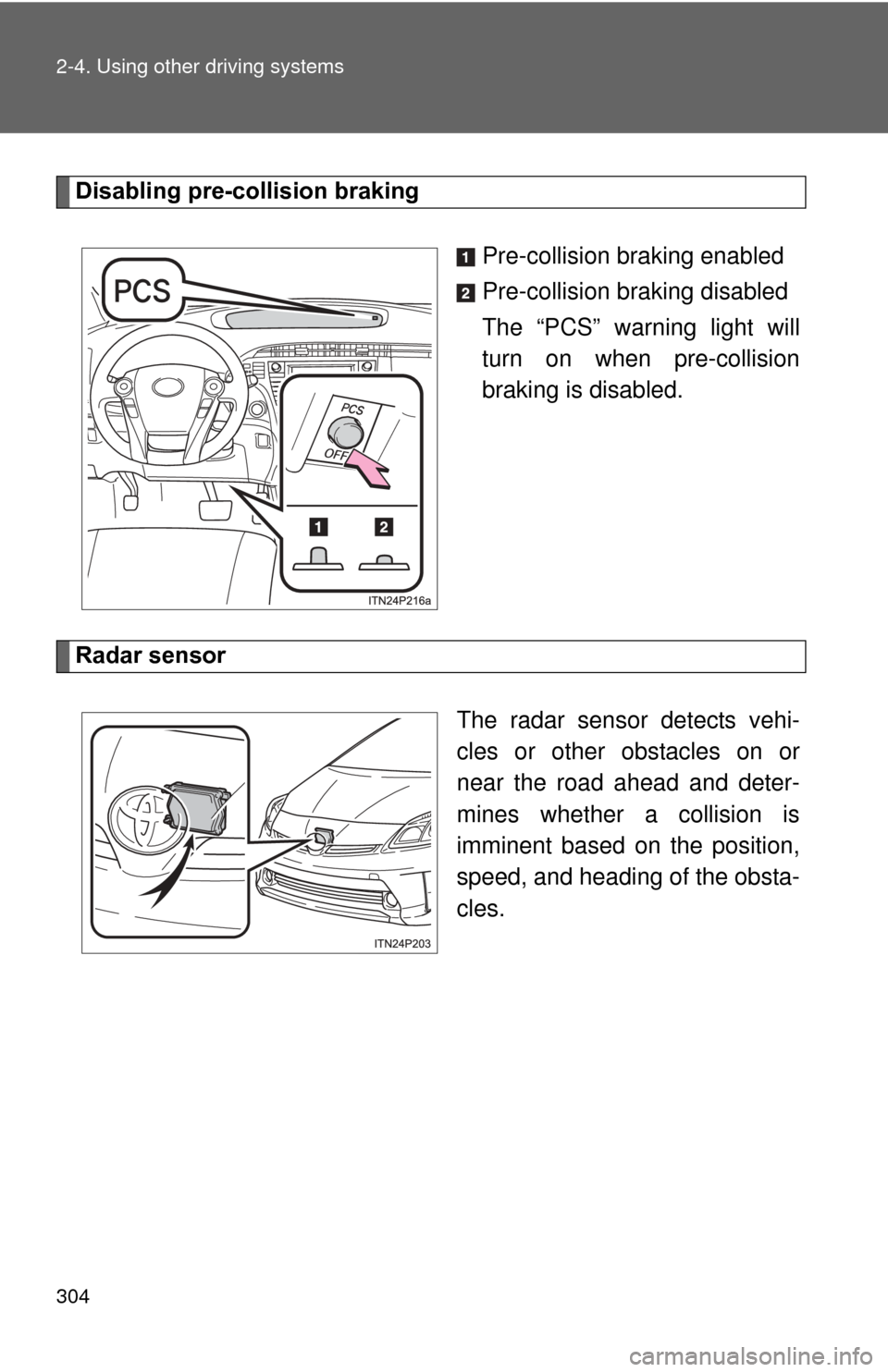
Disabling pre-collision brakingPre-collision braking enabled
Pre-collision braking disabled
The “PCS” warning light will
turn on when pre-collision
braking is disabled.
Radar sensor
The radar sensor detects vehi-
cles or other obstacles on or
near the road ahead and deter-
mines whether a collision is
imminent based on the position,
speed, and heading of the obsta-
cles.
Page 307 of 636

307
2-4. Using other
driving systems
2
When driving
■Obstacles not detected
The sensor cannot detect plastic obstacles such as traffic cones. There may
also be occasions when the sensor cannot detect pedestrians, animals,
bicycles, motorcycles, trees, or snowdrifts.
■ Situations in which the pre-collis ion system does not function properly
The system may not function effectively in situations such as the following:
● On roads with sharp bends or uneven surfaces
● If a vehicle suddenly moves in front of vehicle, such as at an intersection
● If a vehicle suddenly cuts in front of vehicle, such as when overtaking
● In inclement weather such as heavy rain, fog, snow or sand storms
● When your vehicle is skidding with the VSC system off
● When an extreme change in vehicle height occurs
● When the axis of the radar is out of adjustment
■ Automatic cancelation of the pre-collision system
When a malfunction occurs due to sensor contamination, etc. that results in
the sensors being unable to detect obstacles, the pre-collision system will be
automatically disabled. In this case, the system will not activate even if there
is a collision possibility.
■ When there is a malfunction in the system
Warning lights and/or warning messages will turn on or flash. ( P. 496, 509)
Page 440 of 636
440 4-3. Do-it-yourself maintenance
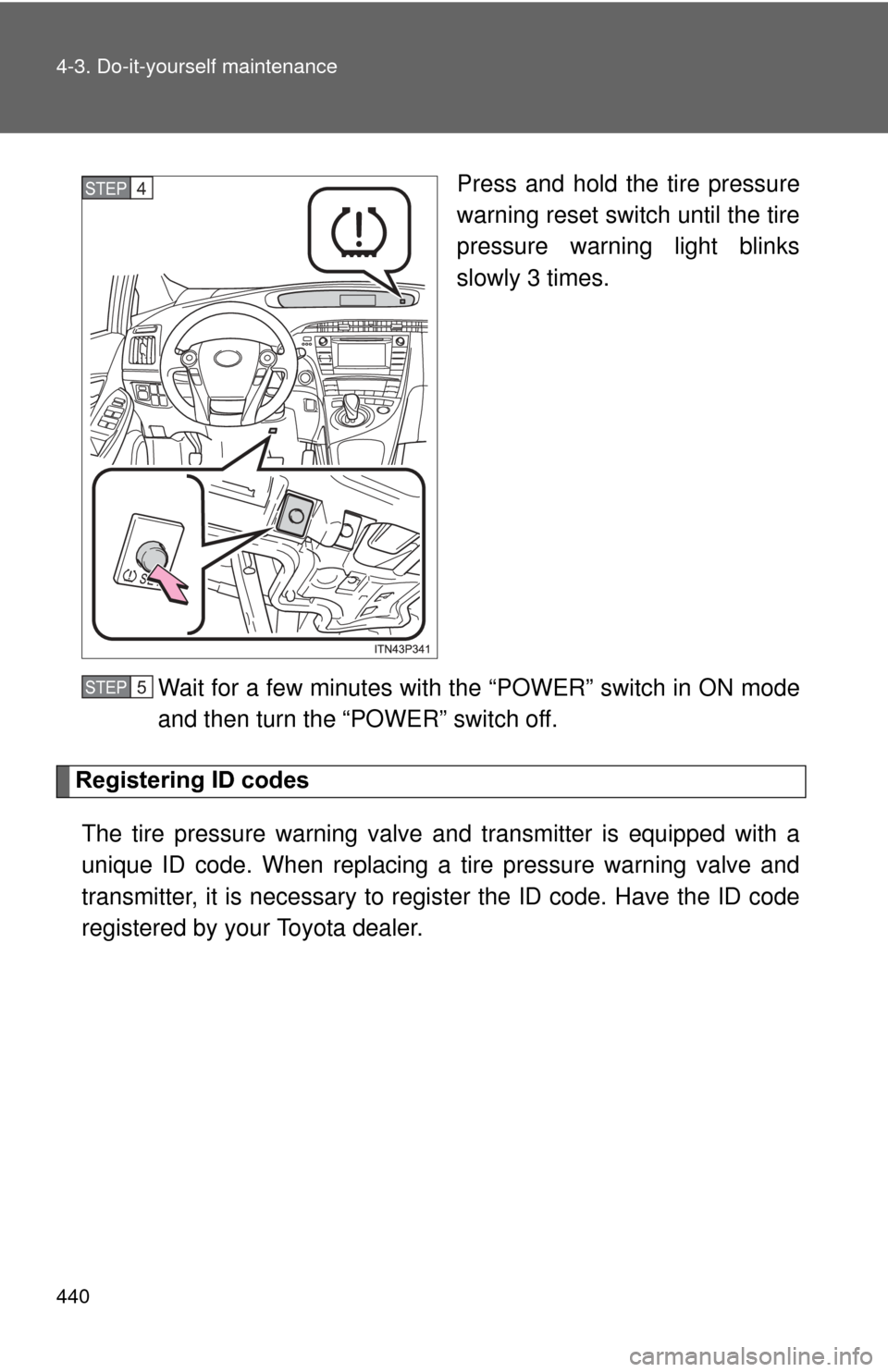
Press and hold the tire pressure
warning reset switch until the tire
pressure warning light blinks
slowly 3 times.
Wait for a few minutes with th e “POWER” switch in ON mode
and then turn the “POWER” switch off.
Registering ID codes
The tire pressure warning valve and transmitter is equipped with a
unique ID code. When replacing a tire pressure warning valve and
transmitter, it is necessary to regi ster the ID code. Have the ID code
registered by your Toyota dealer.
STEP 4
STEP 5
Page 441 of 636

441
4-3. Do-it-yourself maintenance
4
Maintenance and care
■When to replace your vehicle’s tires
Tires should be replaced if:
●You have tire damage such as cuts, splits, cracks deep enough to
expose the fabric, and bulges indicating internal damage.
●A tire goes flat repeatedly or c
annot be properly repaired due to the
size or location of a cut or other damage.
If you are not sure, consult with your Toyota dealer.
■Replacing tires and wheels
If the ID code of the tire pressure warning valve and transmitter is not
registered, the tire pre ssure warning system will not work properly. After
driving for about 20 minutes, the tire pressure warning light blinks for
1 minute and stays on to indicate a system malfunction.
■Tire life
Any tire over 6 years old must be checked by a qualified technician even
if it has seldom or never been used or damage is not obvious.
■Routine tire inflation pressure checks
The tire pressure warning system doe s not replace routine tire inflation
pressure checks. Make su re to check tire inflation pressure as part of
your routine of daily vehicle checks.
■Low profile tires (vehicles with 17-inch tires)
Generally, low profile tire s will wear more rapidly and tire grip perfor-
mance will be reduced on snowy and/or icy roads when compared to
standard tires. Be sure to use snow tires or tire chains on snowy and/or
icy roads and drive carefully at a speed appropriate for road and weather
conditions.
Page 443 of 636

443
4-3. Do-it-yourself maintenance
4
Maintenance and care
■Initializing the tire pressure warning system
Initialize the system with the tire infl
ation pressure adjusted to the speci-
fied level.
■If the tread on snow tires wears down below 0.16 in. (4 mm)
The effectiveness of the tires as snow tires is lost.
■If you press the tire pressure warning reset switch accidentally
If initialization is performed, adjust t he tire inflation pressure to the speci-
fied level and initialize the tire pressure warning system again.
■When initialization of the tire pressure warning system has failed
Initialization can be completed in a few minutes. However, in the follow-
ing cases, the settings have not been recorded and the system will not
operate properly. If repeated attempts to record tire inflation pressure
settings are unsuccessful, have the vehicle inspected by your Toyota
dealer.
●When operating the tire pressure warning reset switch, the tire pres-
sure warning light doe s not blink 3 times.
●After carrying out the initialization procedure, the tire pressure warn-
ing light blinks for 1 minute then stays on after driving for 20 minutes.
Page 445 of 636
445
4-3. Do-it-yourself maintenance
4
Maintenance and care
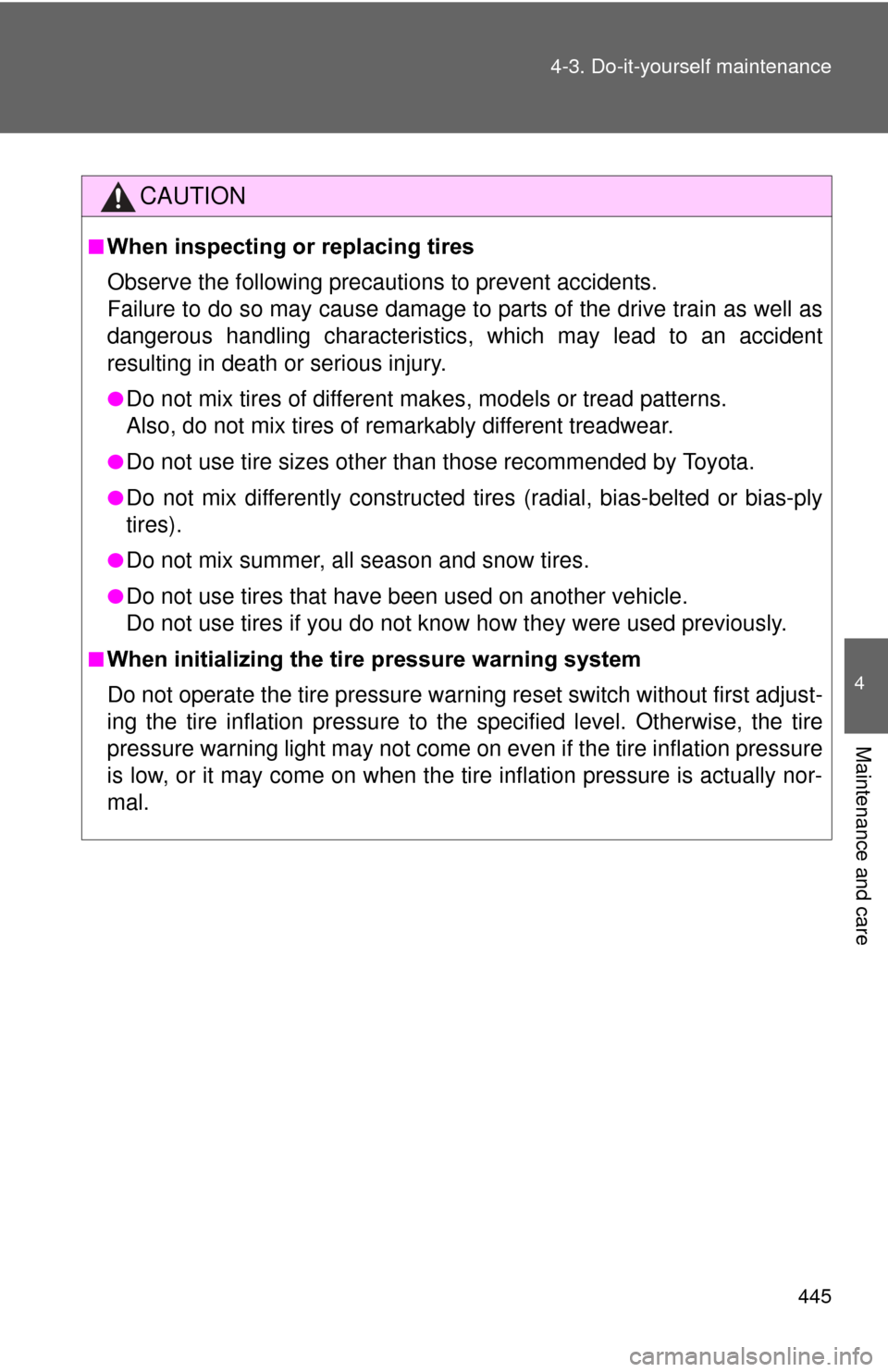
CAUTION
■When inspecting or replacing tires
Observe the following precautions to prevent accidents.
Failure to do so may cause damage to parts of the drive train as well as
dangerous handling characteristics, which may lead to an accident
resulting in death
or serious injury.
●Do not mix tires of different ma kes, models or tread patterns.
Also, do not mix tires of remarkably different treadwear.
●Do not use tire sizes other than those recommended by Toyota.
●Do not mix differently constructed ti res (radial, bias-belted or bias-ply
tires).
●Do not mix summer, all season and snow tires.
●Do not use tires that have been used on another vehicle.
Do not use tires if you do not know how they were used previously.
■When initializing the tire pressure warning system
Do not operate the tire pressure wa rning reset switch without first adjust-
ing the tire inflation pr essure to the specified level. Otherwise, the tire
pressure warning light may not come on even if the tire inflation pressure
is low, or it may come on when the ti re inflation pressure is actually nor-
mal.
Page 463 of 636
463
4-3. Do-it-yourself maintenance
4
Maintenance and care
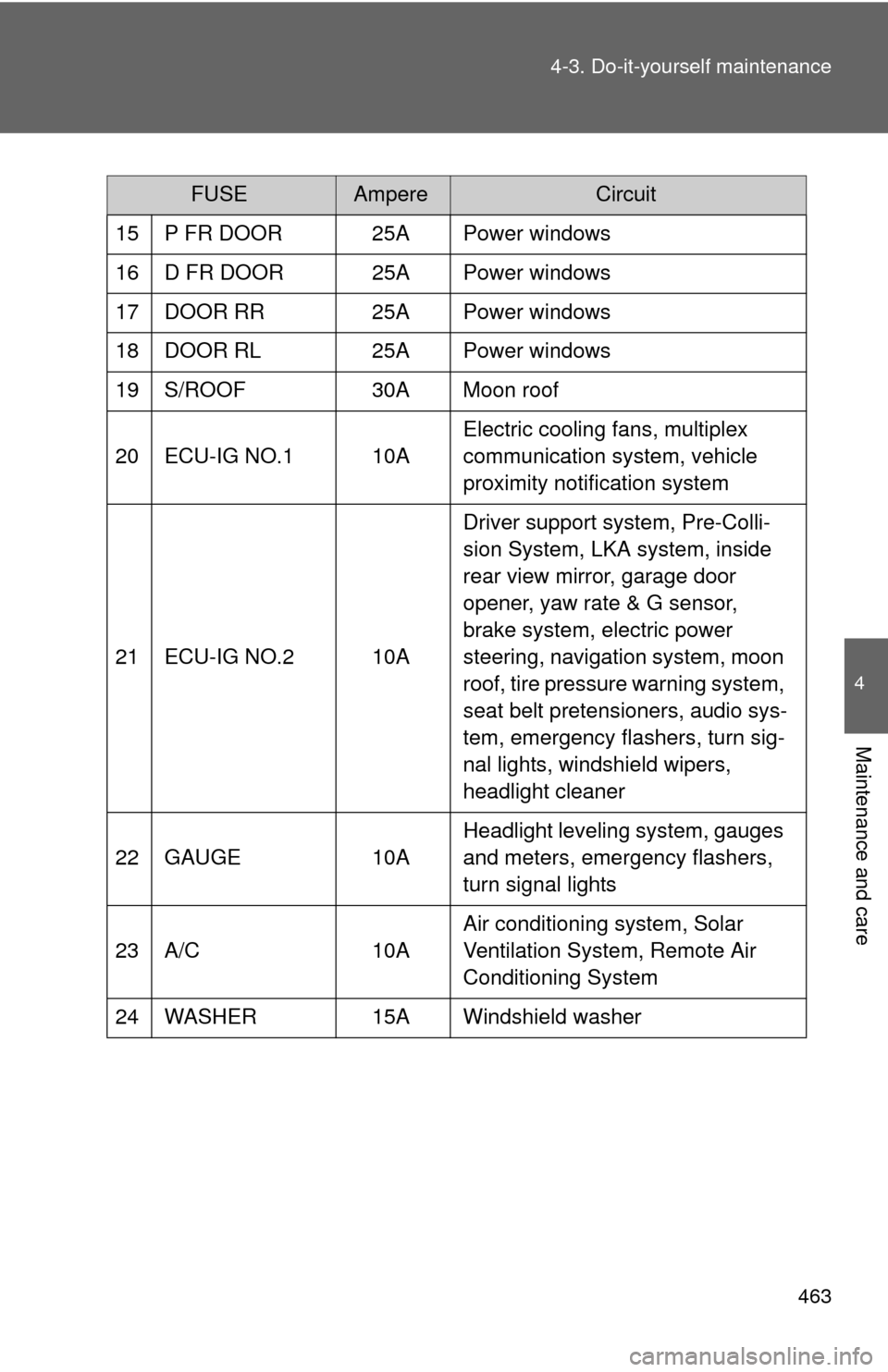
FUSEAmpereCircuit
15 P FR DOOR 25A Power windows
16 D FR DOOR 25A Power windows
17 DOOR RR 25A Power windows
18 DOOR RL 25A Power windows
19 S/ROOF 30A Moon roof
20 ECU-IG NO.1 10A Electric cooling fans, multiplex
communication system, vehicle
proximity notification system
21 ECU-IG NO.2 10A Driver support system, Pre-Colli-
sion System, LKA system, inside
rear view mirror, garage door
opener, yaw rate & G sensor,
brake system, electric power
steering, navigation system, moon
roof, tire pressure warning system,
seat belt pretensioners, audio sys-
tem, emergency flashers, turn sig-
nal lights, windshield wipers,
headlight cleaner
22 GAUGE 10A Headlight leveling system, gauges
and meters, emergency flashers,
turn signal lights
23 A/C 10A Air conditioning system, Solar
Ventilation System, Remote Air
Conditioning System
24 WASHER 15A Windshield washer