Setting TOYOTA PRIUS 2016 4.G Owners Manual
[x] Cancel search | Manufacturer: TOYOTA, Model Year: 2016, Model line: PRIUS, Model: TOYOTA PRIUS 2016 4.GPages: 800, PDF Size: 16.69 MB
Page 710 of 800
7108-2. Steps to take in an emergency
PRIUS_OM_OM47A29U_(U)
■Stopping the hybrid system
Set the parking brake, shift the shift position to P and press the power switch
as you normally do when stopping the hybrid system.
■ Replacing the key battery
As the above procedure is a temporary measure, it is recommended that the
electronic key battery be replaced immediately when the battery is depleted.
( P. 628)
■ Changing power switch modes
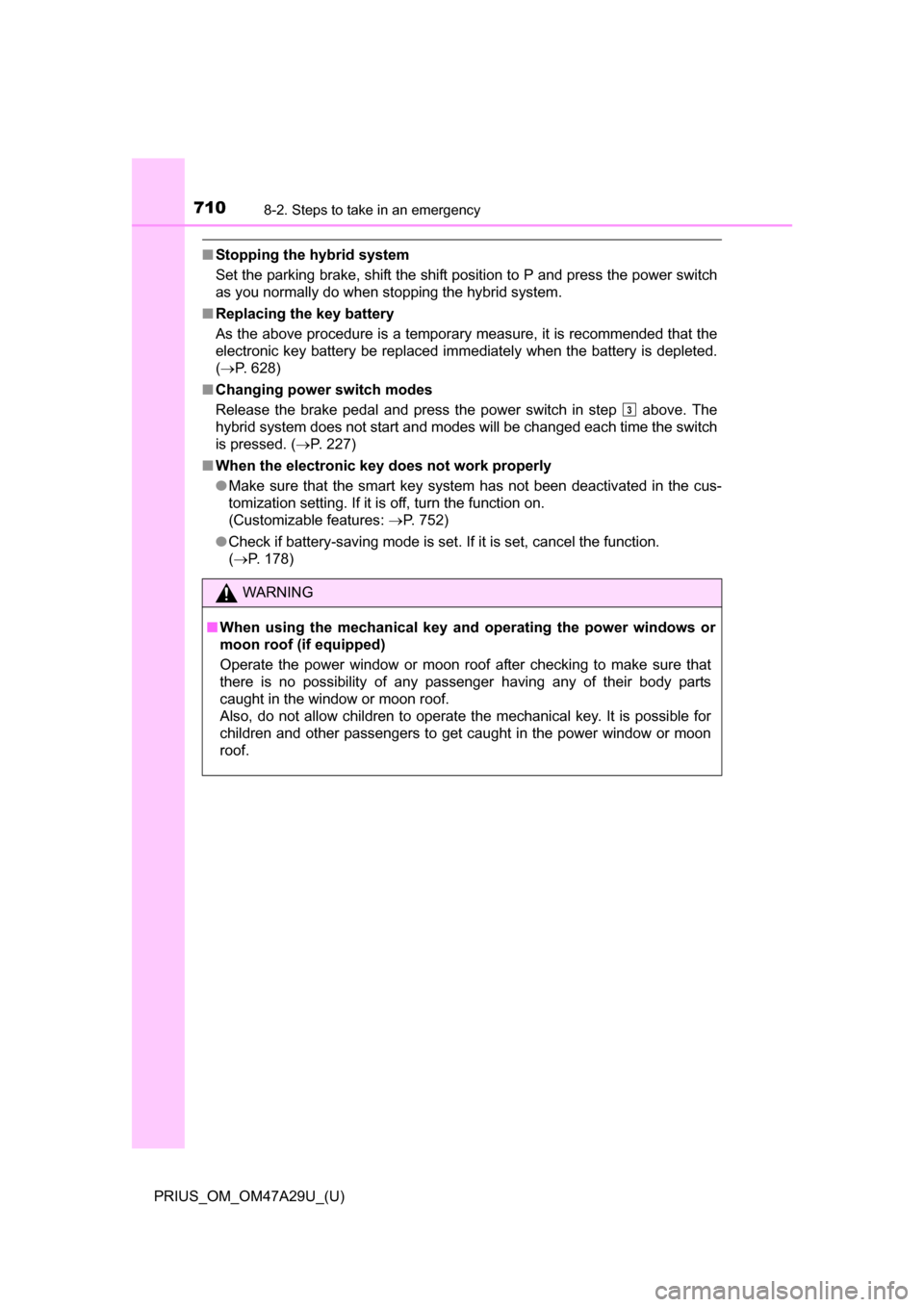
Release the brake pedal and press the power switch in step above. The
hybrid system does not start and modes will be changed each time the switch
is pressed. ( P. 227)
■ When the electronic key does not work properly
●Make sure that the smart key system has not been deactivated in the cus-
tomization setting. If it is off, turn the function on.
(Customizable features: P. 752)
● Check if battery-saving mode is set. If it is set, cancel the function.
(P. 178)
WARNING
■ When using the mechanical key an d operating the power windows or
moon roof (if equipped)
Operate the power window or moon roof after checking to make sure that
there is no possibility of any passenger having any of their body parts
caught in the window or moon roof.
Also, do not allow children to operate the mechanical key. It is possible for
children and other passengers to get caught in the power window or moon
roof.
3
Page 752 of 800
752
PRIUS_OM_OM47A29U_(U)
9-2. Customization
Customizable features
When customizing vehicle features, ensure that the vehicle is parked
in a safe place with the parking brake set and the shift position in P.
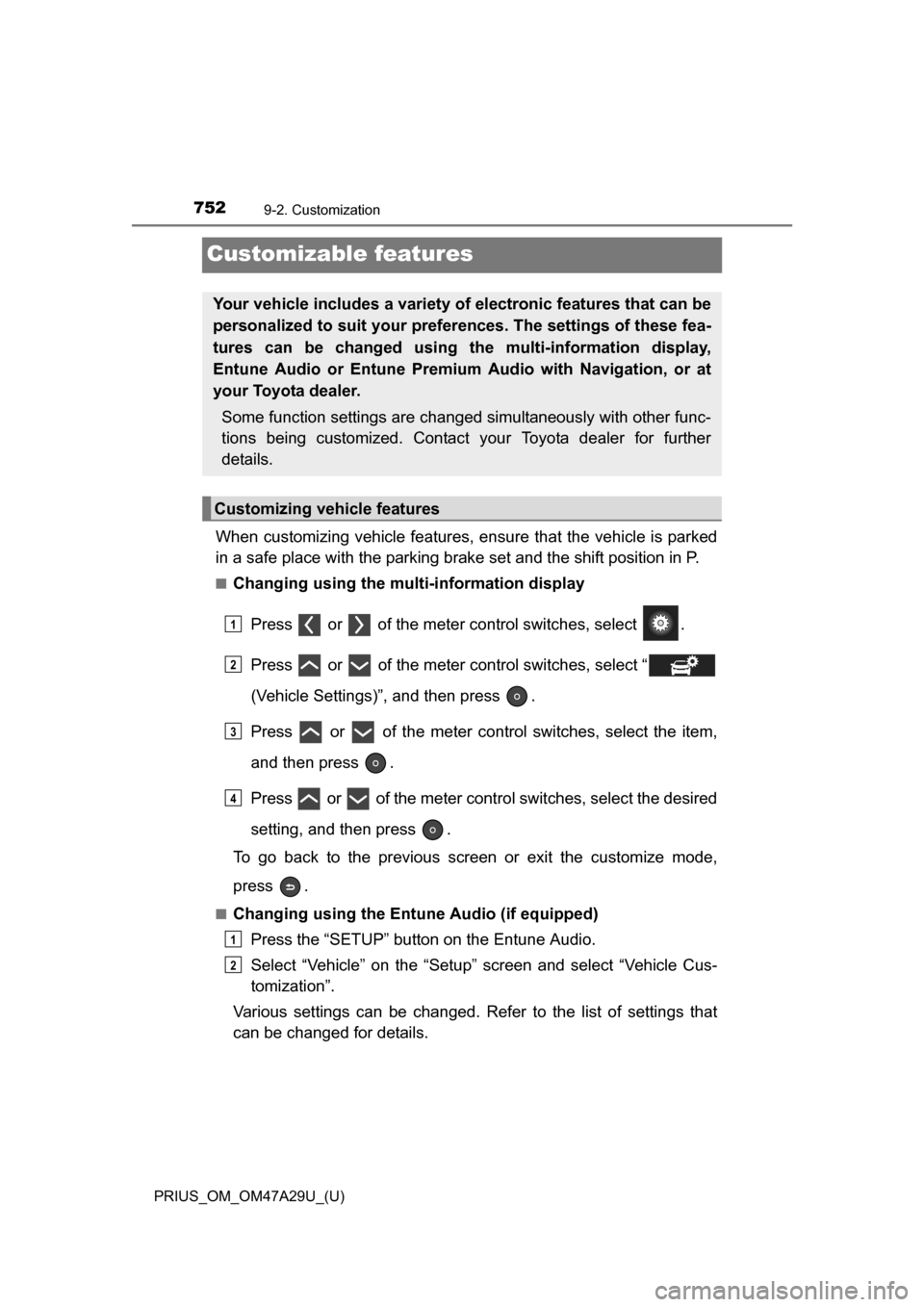
■Changing using the multi-information display
Press or of the meter control switches, select .
Press or of the meter control switches, select “
(Vehicle Settings)”, and then press .
Press or of the meter control switches, select the item,
and then press .
Press or of the meter control switches, select the desired
setting, and then press .
To go back to the previous screen or exit the customize mode,
press .
■Changing using the Entune Audio (if equipped)
Press the “SETUP” button on the Entune Audio.
Select “Vehicle” on the “Setup” screen and select “Vehicle Cus-
tomization”.
Various settings can be changed. Refer to the list of settings that
can be changed for details.
Your vehicle includes a variety of electronic features that can be
personalized to suit your prefer ences. The settings of these fea-
tures can be changed using th e multi-information display,
Entune Audio or Entune Premiu m Audio with Navigation, or at
your Toyota dealer.
Some function settings are change d simultaneously with other func-
tions being customized. Contact your Toyota dealer for further
details.
Customizing vehicle features
1
2
3
4
1
2
Page 753 of 800
PRIUS_OM_OM47A29U_(U)
7539-2. Customization
9
Vehicle specifications
■Changing using the Entune Premium Audio with Navigation (if
equipped)
Press the “APPS” button on th e Entune Premium Audio with
Navigation.
Select “Setup” on the “Apps” screen.
Select “Vehicle” on the “Setup” screen and select “Vehicle Cus-
tomization”.
Various settings can be changed. Refer to the list of settings that
can be changed for details.
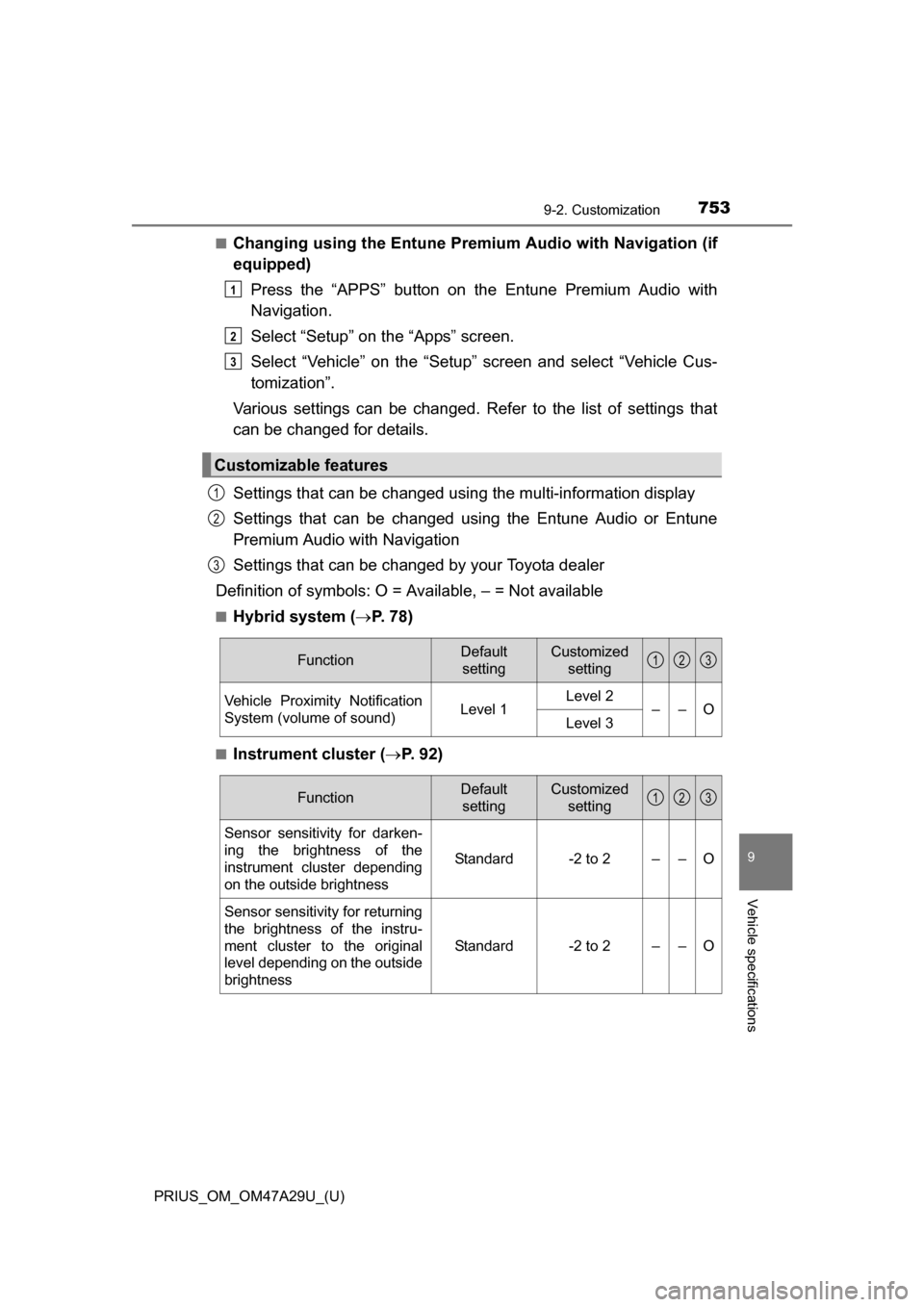
Settings that can be changed using the multi-information display
Settings that can be changed using the Entune Audio or Entune
Premium Audio with Navigation
Settings that can be changed by your Toyota dealer
Definition of symbols: O = Av ailable, – = Not available
■Hybrid system (P. 7 8 )
■Instrument cluster ( P. 92)
Customizable features
1
2
3
1
2
3
FunctionDefault
settingCustomized setting
Vehicle Proximity Notification
System (volume of sound)Level 1Level 2––OLevel 3
123
FunctionDefault settingCustomized setting
Sensor sensitivity for darken-
ing the brightness of the
instrument cluster depending
on the outside brightness
Standard-2 to 2––O
Sensor sensitivity for returning
the brightness of the instru-
ment cluster to the original
level depending on the outside
brightness
Standard-2 to 2––O
123
Page 754 of 800
754
PRIUS_OM_OM47A29U_(U)
9-2. Customization
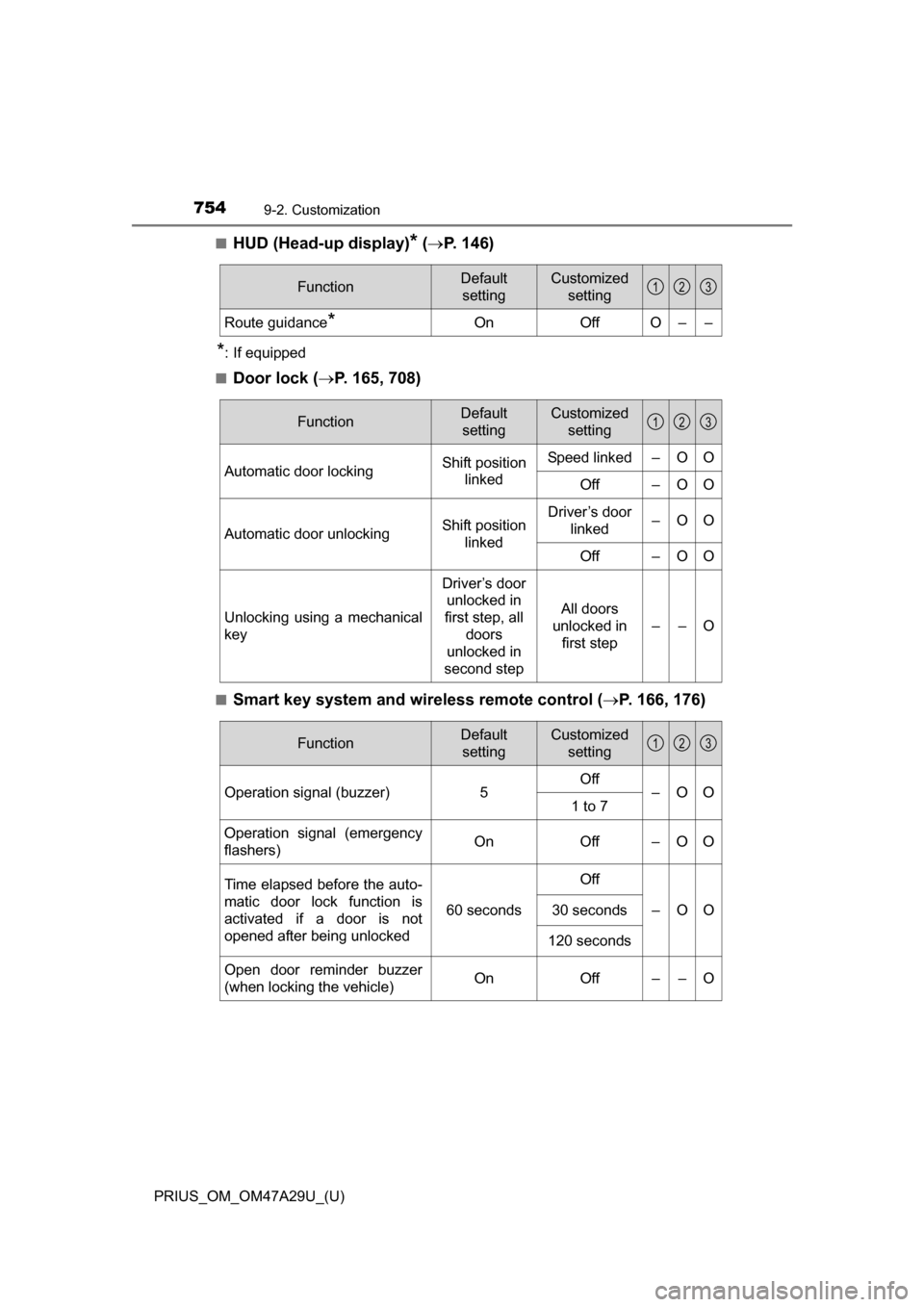
■HUD (Head-up display)* ( P. 146)
*: If equipped
■
Door lock ( P. 165, 708)
■Smart key system and wireless remote control ( P. 166, 176)
FunctionDefault
settingCustomized setting
Route guidance*OnOffO––
123
FunctionDefault settingCustomized setting
Automatic door lockingShift position linkedSpeed linked–OO
Off–OO
Automatic door unlockingShift position linkedDriver’s door linked–OO
Off–OO
Unlocking using a mechanical
key
Driver’s door unlocked in
first step, all
doors
unlocked in
second step
All doors
unlocked in first step
––O
123
FunctionDefault settingCustomized setting
Operation signal (buzzer) 5Off
–OO
1 to 7
Operation signal (emergency
flashers) On
Off – O O
Time elapsed before the auto-
matic door lock function is
activated if a door is not
opened after being unlocked
60 seconds
Off
–OO30 seconds
120 seconds
Open door reminder buzzer
(when locking the vehicle)OnOff––O
123
Page 755 of 800
PRIUS_OM_OM47A29U_(U)
7559-2. Customization
9
Vehicle specifications
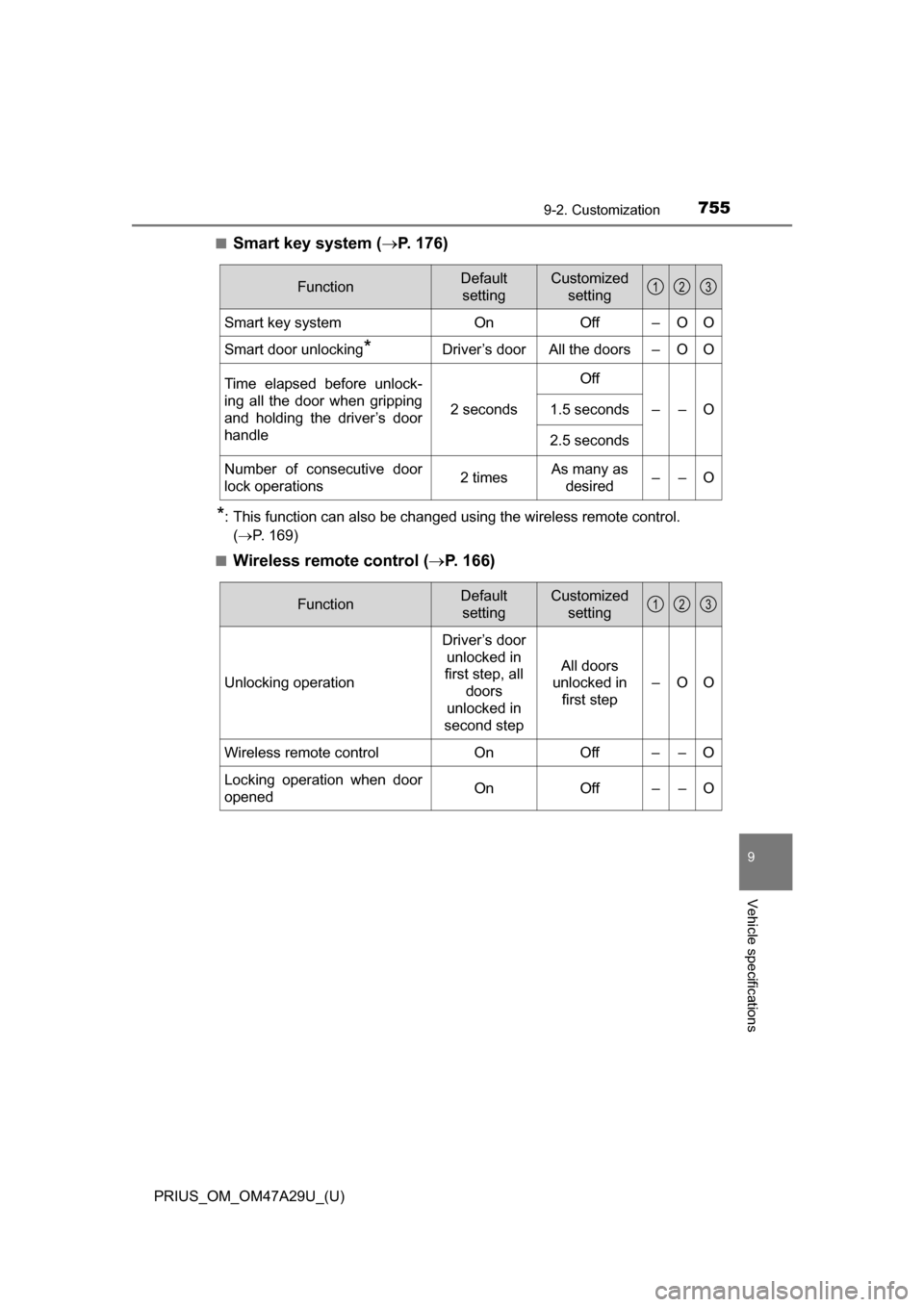
■Smart key system (P. 176)
*: This function can also be changed using the wireless remote control.
( P. 169)
■
Wireless remote control ( P. 166)
FunctionDefault
settingCustomized setting
Smart key systemOnOff–OO
Smart door unlocking*Driver’s doorAll the doors–OO
Time elapsed before unlock-
ing all the door when gripping
and holding the driver’s door
handle
2 seconds
Off
––O1.5 seconds
2.5 seconds
Number of consecutive door
lock operations2 timesAs many as
desired––O
123
FunctionDefault settingCustomized setting
Unlocking operation
Driver’s door unlocked in
first step, all
doors
unlocked in
second step
All doors
unlocked in first step
–OO
Wireless remote control On Off – – O
Locking operation when door
opened On Off – – O
123
Page 756 of 800
756
PRIUS_OM_OM47A29U_(U)
9-2. Customization
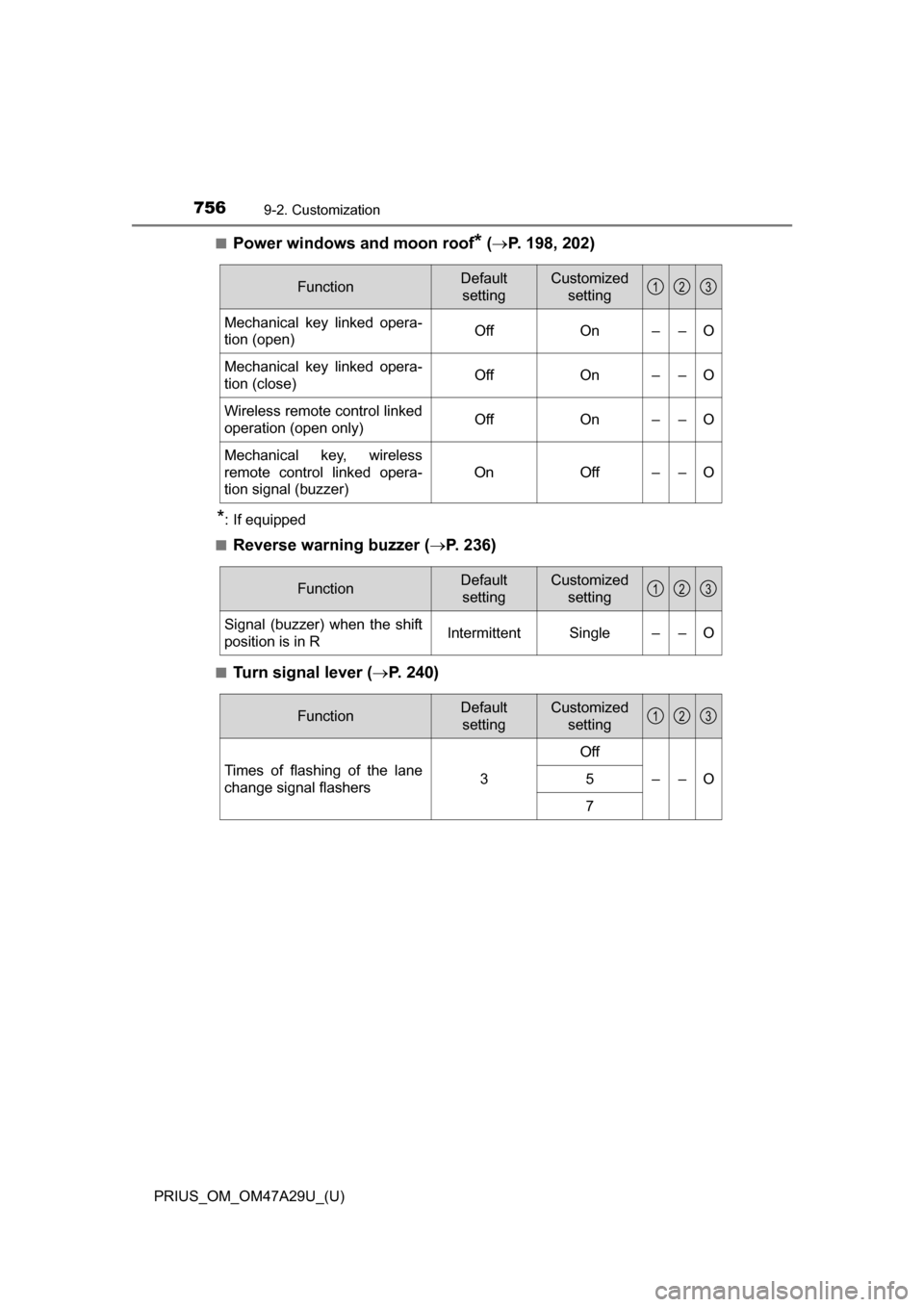
■Power windows and moon roof* ( P. 198, 202)
*: If equipped
■
Reverse warning buzzer ( P. 236)
■Turn signal lever (P. 240)
FunctionDefault
settingCustomized setting
Mechanical key linked opera-
tion (open)OffOn––O
Mechanical key linked opera-
tion (close)OffOn––O
Wireless remote control linked
operation (open only)OffOn––O
Mechanical key, wireless
remote control linked opera-
tion signal (buzzer)
OnOff––O
123
FunctionDefault
settingCustomized setting
Signal (buzzer) when the shift
position is in RIntermittentSingle––O
123
FunctionDefault settingCustomized setting
Times of flashing of the lane
change signal flashers3
Off
––O5
7
123
Page 757 of 800
PRIUS_OM_OM47A29U_(U)
7579-2. Customization
9
Vehicle specifications
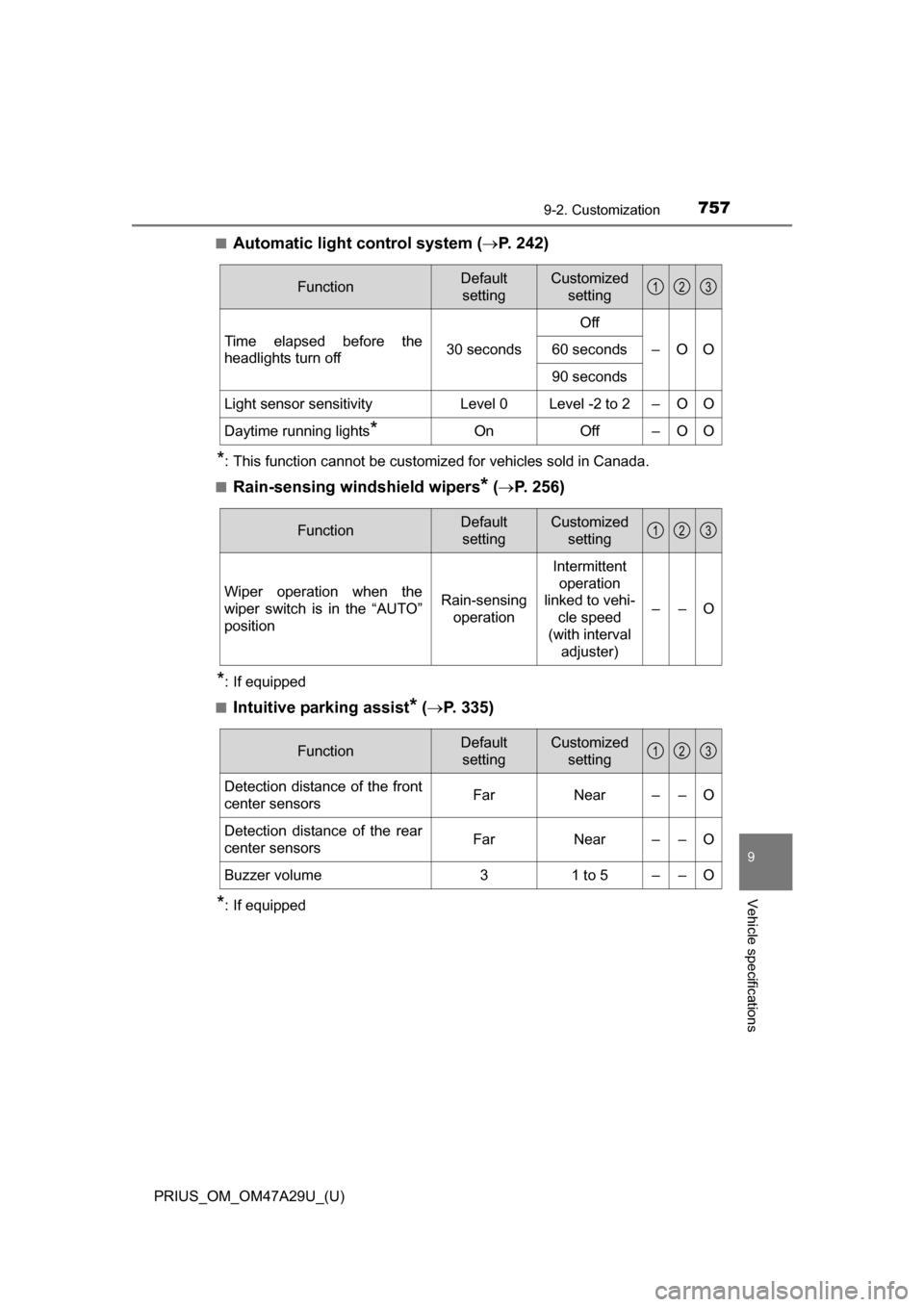
■Automatic light control system (P. 242)
*: This function cannot be customized for vehicles sold in Canada.
■
Rain-sensing windshield wipers* ( P. 256)
*: If equipped
■
Intuitive parking assist* ( P. 335)
*: If equipped
FunctionDefault
settingCustomized setting
Time elapsed before the
headlights turn off 30 secondsOff
–OO
60 seconds
90 seconds
Light sensor sensitivityLevel 0Level -2 to 2–OO
Daytime running lights*OnOff–OO
123
FunctionDefault
settingCustomized setting
Wiper operation when the
wiper switch is in the “AUTO”
positionRain-sensing operation
Intermittent
operation
linked to vehi- cle speed
(with interval adjuster)
––O
123
FunctionDefault
settingCustomized setting
Detection distance of the front
center sensorsFarNear––O
Detection distance of the rear
center sensorsFarNear––O
Buzzer volume31 to 5––O
123
Page 758 of 800
758
PRIUS_OM_OM47A29U_(U)
9-2. Customization
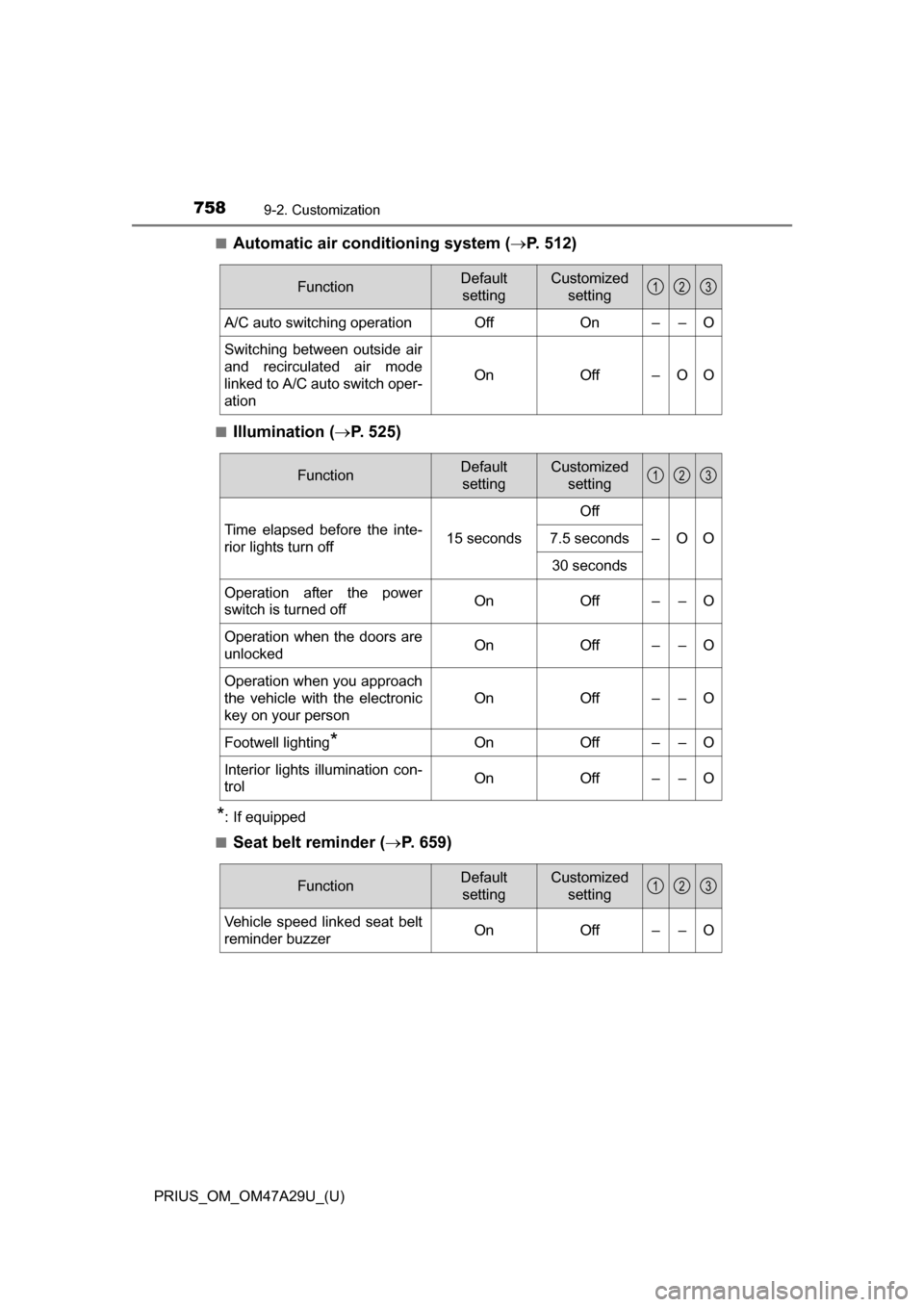
■Automatic air conditioning system (P. 512)
■Illumination ( P. 525)
*: If equipped
■
Seat belt reminder ( P. 659)
FunctionDefault
settingCustomized setting
A/C auto switching operationOffOn––O
Switching between outside air
and recirculated air mode
linked to A/C auto switch oper-
ation
OnOff–OO
123
FunctionDefault settingCustomized setting
Time elapsed before the inte-
rior lights turn off 15 secondsOff
–OO
7.5 seconds
30 seconds
Operation after the power
switch is turned offOnOff––O
Operation when the doors are
unlockedOnOff––O
Operation when you approach
the vehicle with the electronic
key on your person
OnOff––O
Footwell lighting*OnOff––O
Interior lights illumination con-
trolOnOff––O
123
FunctionDefault settingCustomized setting
Vehicle speed linked seat belt
reminder buzzerOnOff––O
123
Page 759 of 800
PRIUS_OM_OM47A29U_(U)
7599-2. Customization
9
Vehicle specifications
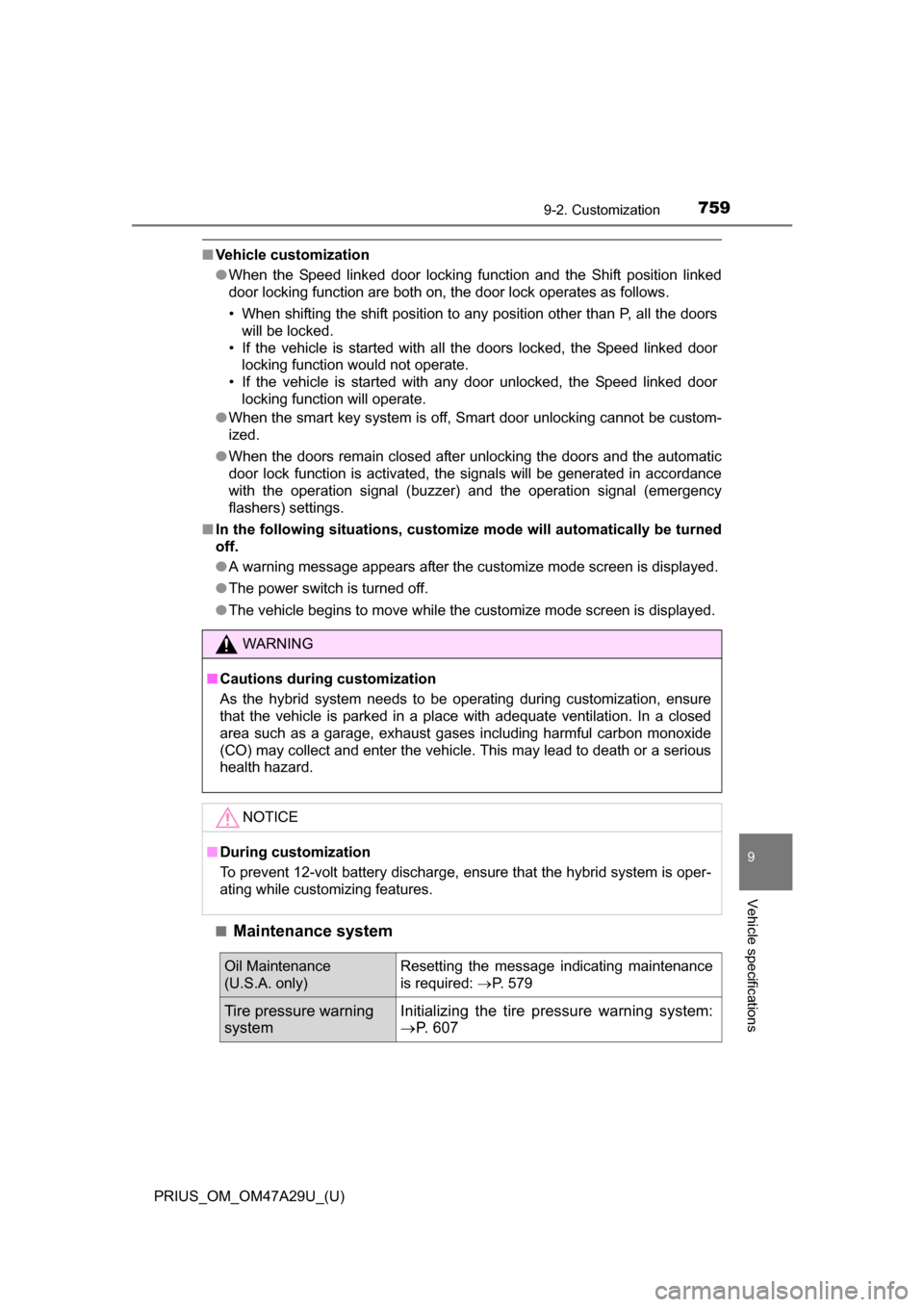
■Vehicle customization
●When the Speed linked door locking function and the Shift position linked
door locking function are both on, the door lock operates as follows.
• When shifting the shift position to any position other than P, all the doors
will be locked.
• If the vehicle is started with all the doors locked, the Speed linked door locking function would not operate.
• If the vehicle is started with any door unlocked, the Speed linked door locking function will operate.
● When the smart key system is off, Smart door unlocking cannot be custom-
ized.
● When the doors remain closed after unlocking the doors and the automatic
door lock function is activated, the signals will be generated in accordance
with the operation signal (buzzer) and the operation signal (emergency
flashers) settings.
■ In the following situations, customiz e mode will automatically be turned
off.
● A warning message appears after the customize mode screen is displayed.
● The power switch is turned off.
● The vehicle begins to move while the customize mode screen is displayed.
■
Maintenance system
WARNING
■ Cautions during customization
As the hybrid system needs to be oper ating during customization, ensure
that the vehicle is parked in a place with adequate ventilation. In a closed
area such as a garage, exhaust gases including harmful carbon monoxide
(CO) may collect and enter the vehicle. This may lead to death or a serious
health hazard.
NOTICE
■ During customization
To prevent 12-volt battery discharge, ensure that the hybrid system is oper-
ating while customizing features.
Oil Maintenance
(U.S.A. only)Resetting the message indicating maintenance
is required: P. 579
Tire pressure warning
systemInitializing the tire pr essure warning system:
P. 6 0 7
Page 782 of 800
782Alphabetical index
PRIUS_OM_OM47A29U_(U)
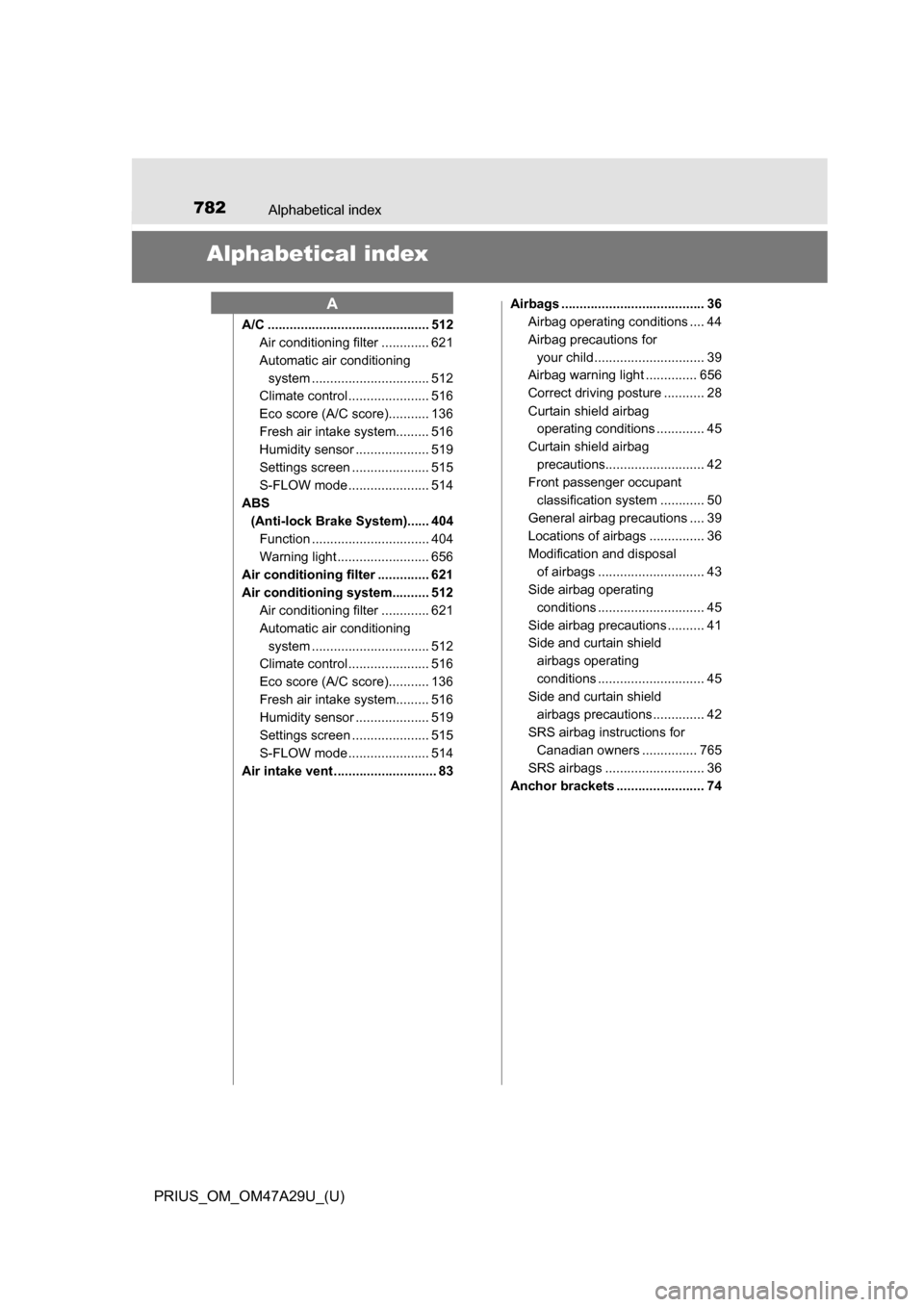
Alphabetical index
A/C ............................................ 512Air conditioning filter ............. 621
Automatic air conditioning
system ......... ....................... 512
Climate control ...................... 516
Eco score (A/C score)........... 136
Fresh air intake system......... 516
Humidity sensor .................... 519
Settings screen ..................... 515
S-FLOW mode ...................... 514
ABS
(Anti-lock Brake System)...... 404Function ................................ 404
Warning light ......................... 656
Air conditioning filter .............. 621
Air conditioning system.......... 512 Air conditioning filter ............. 621
Automatic air conditioning
system ......... ....................... 512
Climate control ...................... 516
Eco score (A/C score)........... 136
Fresh air intake system......... 516
Humidity sensor .................... 519
Settings screen ..................... 515
S-FLOW mode ...................... 514
Air intake vent ............................ 83 Airbags ....................................... 36
Airbag operating conditions .... 44
Airbag precautions for
your child .............................. 39
Airbag warning light .............. 656
Correct driving posture ........... 28
Curtain shield airbag operating conditions ............. 45
Curtain shield airbag precautions........................... 42
Front passenger occupant
classification syst em ............ 50
General airbag precautions .... 39
Locations of airbags ............... 36
Modification and disposal of airbags ............................. 43
Side airbag operating
conditions ............................. 45
Side airbag precautions .......... 41
Side and curtain shield airbags operating
conditions ............................. 45
Side and curtain shield
airbags precautions .............. 42
SRS airbag instructions for Canadian owners ............... 765
SRS airbags ........................... 36
Anchor brackets ........................ 74
A