Setting TOYOTA PRIUS 2016 4.G Manual Online
[x] Cancel search | Manufacturer: TOYOTA, Model Year: 2016, Model line: PRIUS, Model: TOYOTA PRIUS 2016 4.GPages: 800, PDF Size: 16.69 MB
Page 459 of 800
PRIUS_OM_OM47A29U_(U)
4595-7. Connecting Bluetooth®
5
Audio system
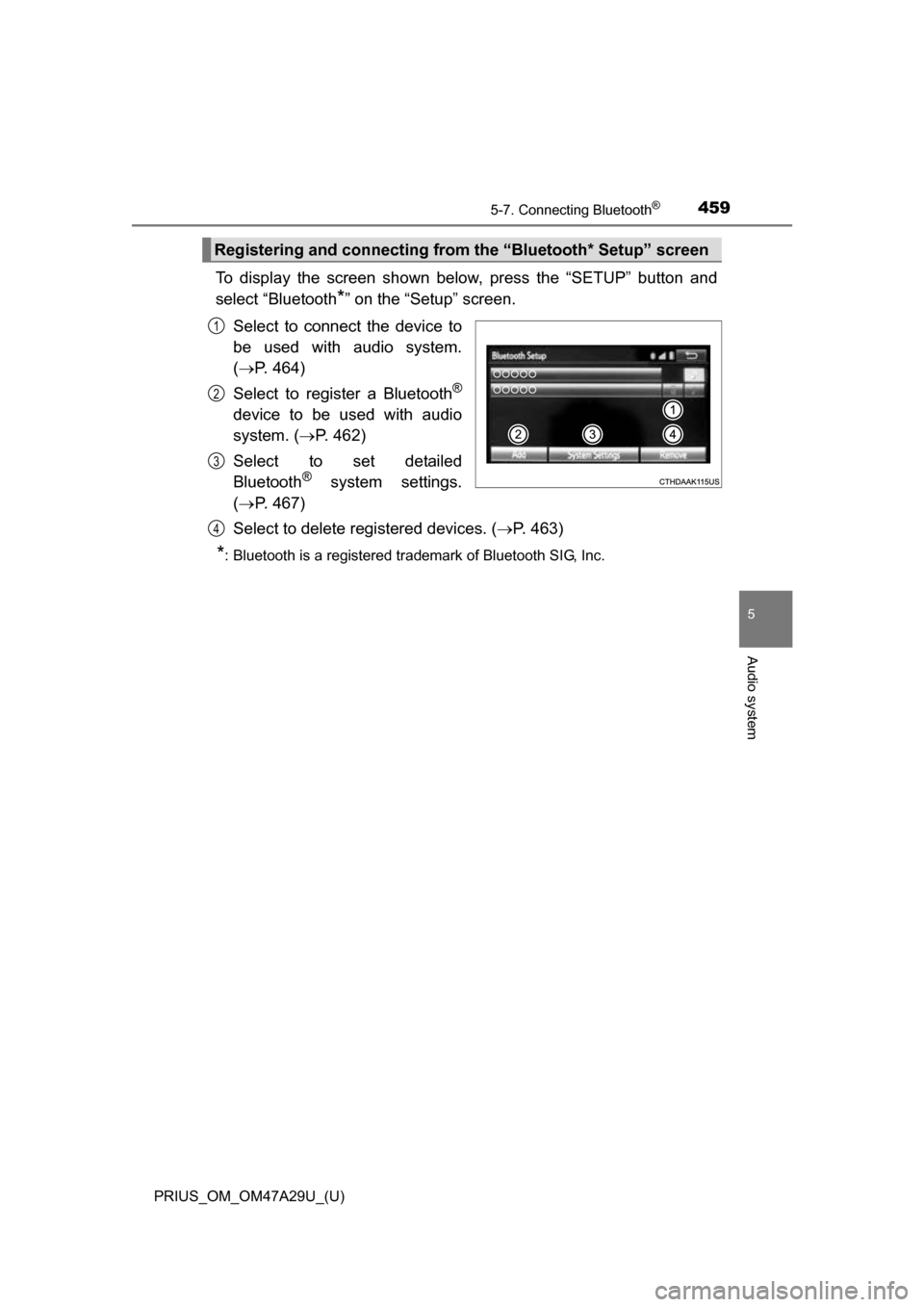
To display the screen shown below, press the “SETUP” button and
select “Bluetooth
*” on the “Setup” screen.
Select to connect the device to
be used with audio system.
( P. 464)
Select to register a Bluetooth
®
device to be used with audio
system. ( P. 462)
Select to set detailed
Bluetooth
® system settings.
( P. 467)
Select to delete registered devices. ( P. 463)
*: Bluetooth is a registered trademark of Bluetooth SIG, Inc.
Registering and connecting from the “Bluetooth* Setup” screen
1
2
3
4
Page 460 of 800
460
PRIUS_OM_OM47A29U_(U)
5-7. Connecting Bluetooth®
Registering a Bluetooth® audio player for
the first time
Turn the Bluetooth® connection setting of your audio player on.
Press the “AUDIO” button.
Select “ Audio”.
Follow the steps in “How to register a Bluetooth
® device” from .
( P. 462)
To use the Bluetooth® Audio, it is necessary to register an audio
player with the system.
Once the player has been registered, it is possible to use the
Bluetooth
® Audio.
For details about registering a Bluetooth
® device ( P. 462)
1
2
3
42
Page 461 of 800
461
PRIUS_OM_OM47A29U_(U)
5-7. Connecting Bluetooth®
5
Audio system
Registering a Bluetooth® phone for the first
time
Turn the Bluetooth® connection setting of your cellular phone on.
Press the “ ” button.
Select “Yes” to register a phone.
Follow the steps in “How to register a Bluetooth
® device” from .
( P. 462)
To use the hands-free system, it is necessary to register a
Bluetooth® phone with the system.
Once the phone has been registered, it is possible to use the
hands-free system.
For details about registering a Bluetooth
® device ( P. 462)
1
2
3
43
Page 466 of 800
466
PRIUS_OM_OM47A29U_(U)
5-7. Connecting Bluetooth®
Displaying a Bluetooth® device details
Display the “Bluetooth* Setup” screen. (P. 459)
*: Bluetooth is a registered trademark of Bluetooth SIG, Inc.
Select the device.
Select “Device Info”.
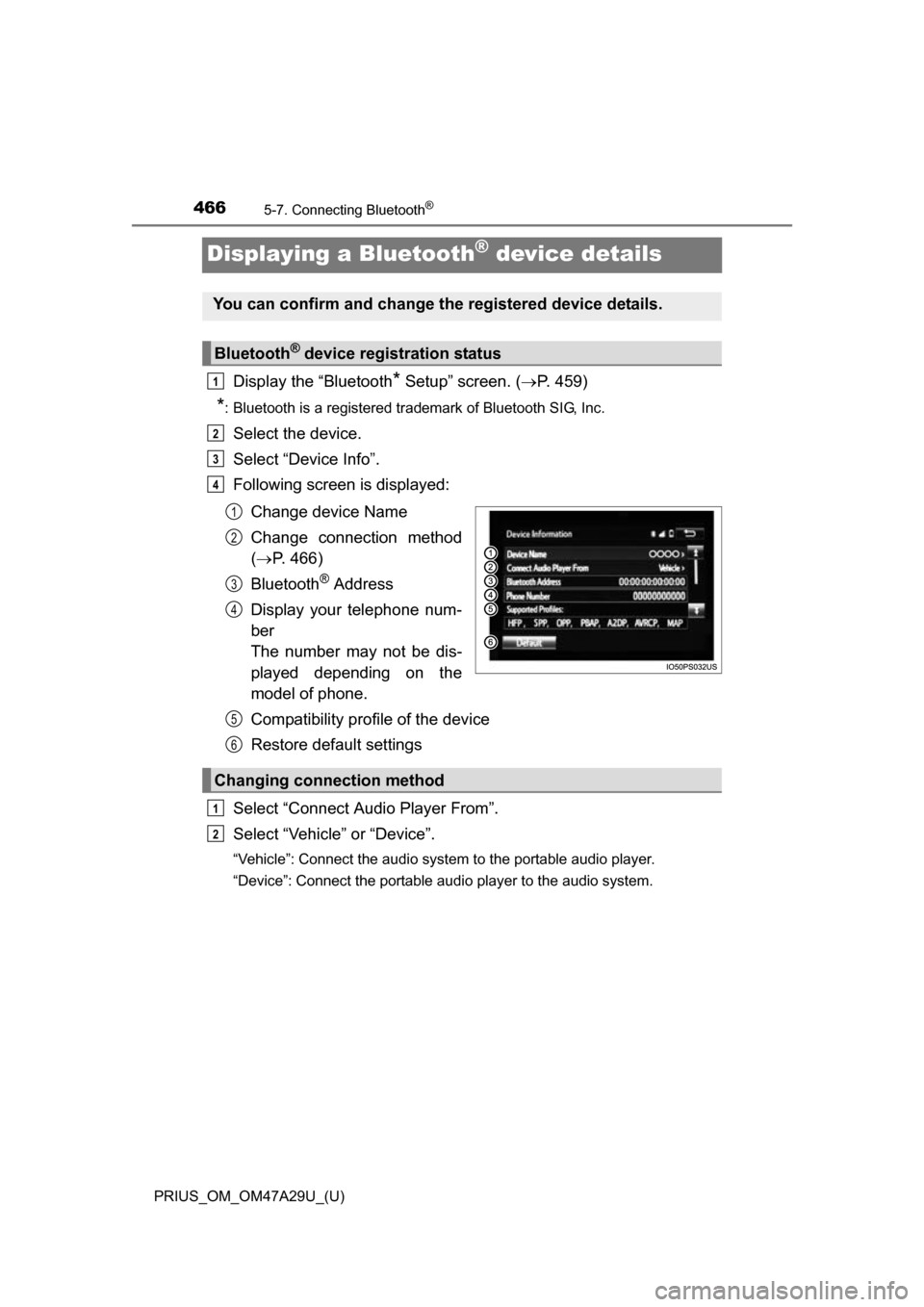
Following screen is displayed:
Change device Name
Change connection method
( P. 466)
Bluetooth
® Address
Display your telephone num-
ber
The number may not be dis-
played depending on the
model of phone.
Compatibility profile of the device
Restore default settings
Select “Connect Audio Player From”.
Select “Vehicle ” or “Device”.
“Vehicle”: Connect the audio system to the portable audio player.
“Device”: Connect the portable audio player to the audio system.
You can confirm and change the registered device details.
Bluetooth® device registration status
1
2
3
4
1
2
3
4
Changing connection method
5
6
1
2
Page 467 of 800
467
PRIUS_OM_OM47A29U_(U)
5-7. Connecting Bluetooth®
5
Audio system
Detailed Bluetooth® settings
Display the “Bluetooth* Setup” screen. (P. 459)
Select “System Settings”.
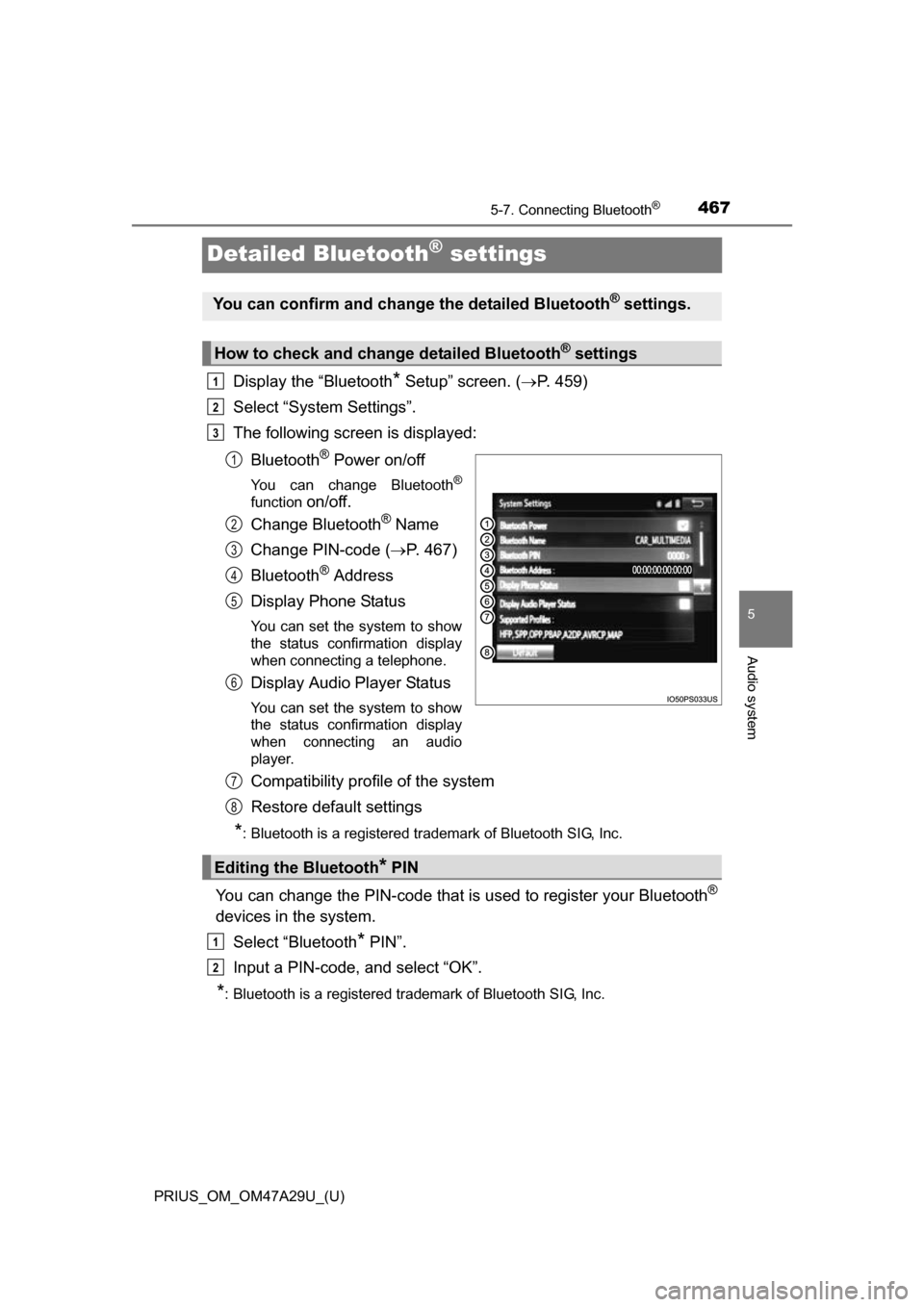
The following screen is displayed:
Bluetooth
® Power on/off
You can change Bluetooth®
function on/off.
Change Bluetooth
® Name
Change PIN-code ( P. 467)
Bluetooth
® Address
Display Phone Status
You can set the system to show
the status confirmation display
when connecting a telephone.
Display Audio Player Status
You can set the system to show
the status confirmation display
when connecting an audio
player.
Compatibility profile of the system
Restore default settings
*: Bluetooth is a registered trademark of Bluetooth SIG, Inc.
You can change the PIN-code that is used to register your Bluetooth®
devices in the system.
Select “Bluetooth
* PIN”.
Input a PIN-code, and select “OK”.
*: Bluetooth is a registered trademark of Bluetooth SIG, Inc.
You can confirm and change the detailed Bluetooth® settings.
How to check and change detailed Bluetooth® settings
1
2
3
1
2
3
4
5
6
Editing the Bluetooth* PIN
7
8
1
2
Page 479 of 800
PRIUS_OM_OM47A29U_(U)
4795-9. Bluetooth® phone
5
Audio system
Select “Handset Mode” to on from a hands-free call to a cellular
phone call.
Select “Handset Mode” to off from a cellular phone call to a hands-free
call.Select “Transmit Volume”.
Select the desired level for the transmit volume.
Select “OK”.
Press the switch on the steering wheel or select .
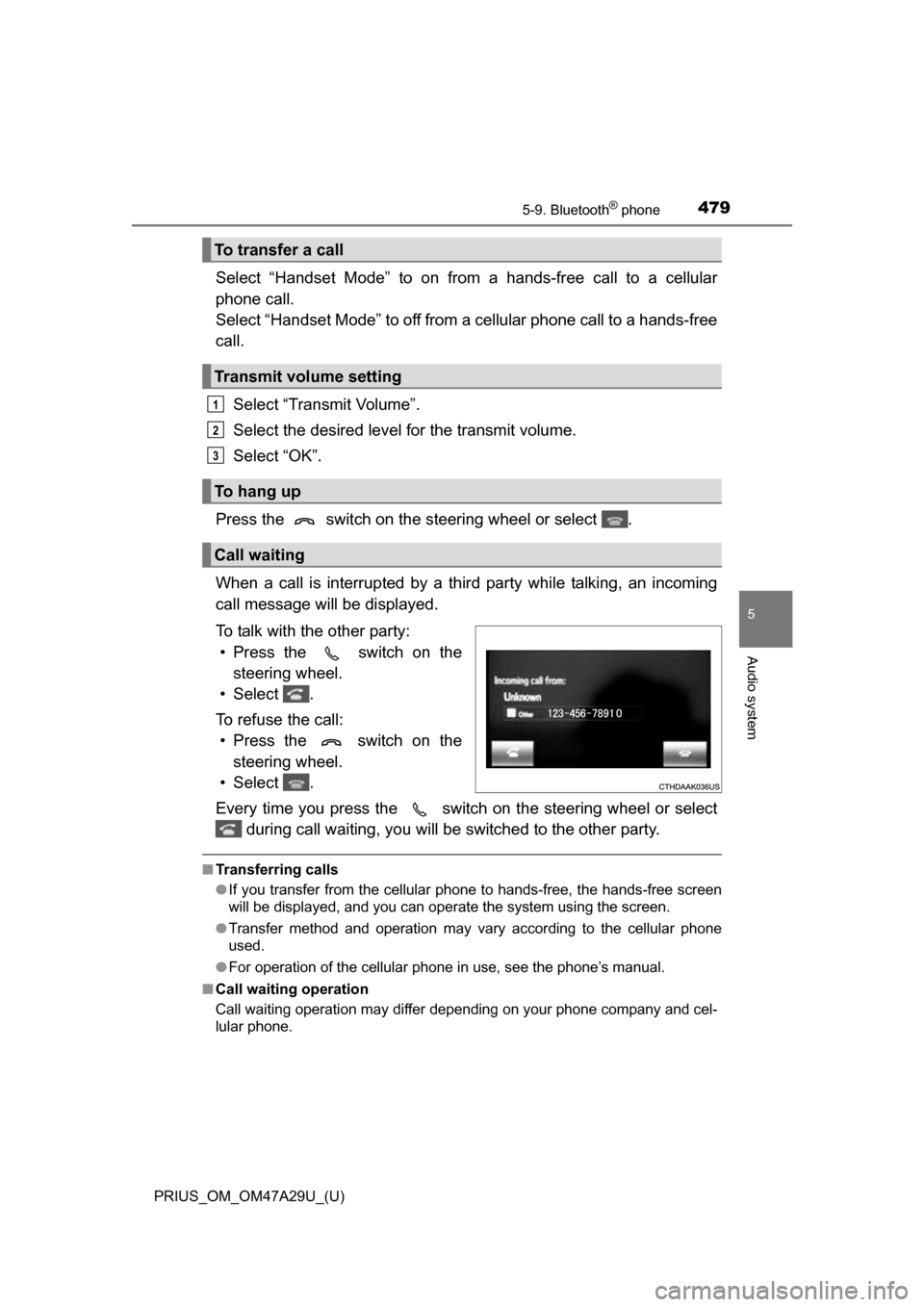
When a call is interrupted by a third party while talking, an incoming
call message will be displayed.
To talk with the other party: • Press the switch on the steering wheel.
• Select .
To refuse the call: • Press the switch on the steering wheel.
• Select .
Every time you press the switch on the steering wheel or select during call waiting, you will be switched to the other party.
■Transferring calls
●If you transfer from the cellular phone to hands-free, the hands-free screen
will be displayed, and you can operate the system using the screen.
● Transfer method and operation may vary according to the cellular phone
used.
● For operation of the cellular phone in use, see the phone’s manual.
■ Call waiting operation
Call waiting operation may differ depending on your phone company and cel-
lular phone.
To transfer a call
Transmit volume setting
To hang up
Call waiting
1
2
3
Page 485 of 800
485
PRIUS_OM_OM47A29U_(U)
5-9. Bluetooth® phone
5
Audio system
Bluetooth® phone settings
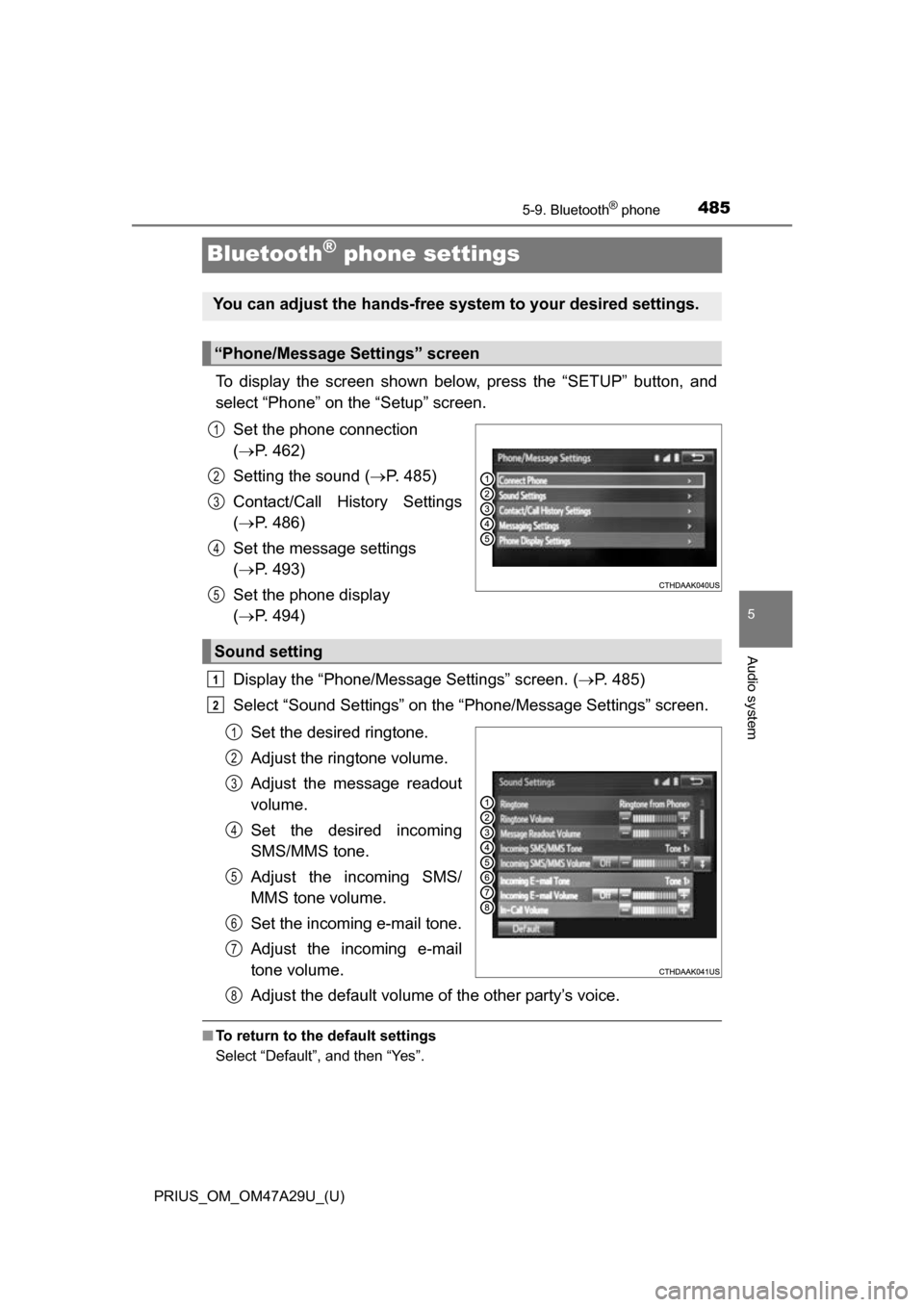
To display the screen shown below, press the “SETUP” button, and
select “Phone” on the “Setup” screen.Set the phone connection
( P. 462)
Setting the sound ( P. 485)
Contact/Call History Settings
( P. 486)
Set the message settings
( P. 493)
Set the phone display
( P. 494)
Display the “Phone/Message Settings” screen. ( P. 485)
Select “Sound Settings” on the “Phone/Message Settings” screen.
Set the desired ringtone.
Adjust the ringtone volume.
Adjust the message readout
volume.
Set the desired incoming
SMS/MMS tone.
Adjust the incoming SMS/
MMS tone volume.
Set the incoming e-mail tone.
Adjust the incoming e-mail
tone volume.
Adjust the default volume of the other party’s voice.
■To return to the default settings
Select “Default”, and then “Yes”.
You can adjust the hands-free system to your desired settings.
“Phone/Message Settings” screen
1
2
3
4
5
Sound setting
1
2
1
2
3
4
5
6
7
8
Page 486 of 800
486
PRIUS_OM_OM47A29U_(U)
5-9. Bluetooth® phone
Contact/Call Histor y Settings
Display the “Phone/Message Settings” screen. (P. 485)
Select “Contact/Call History Settings”.
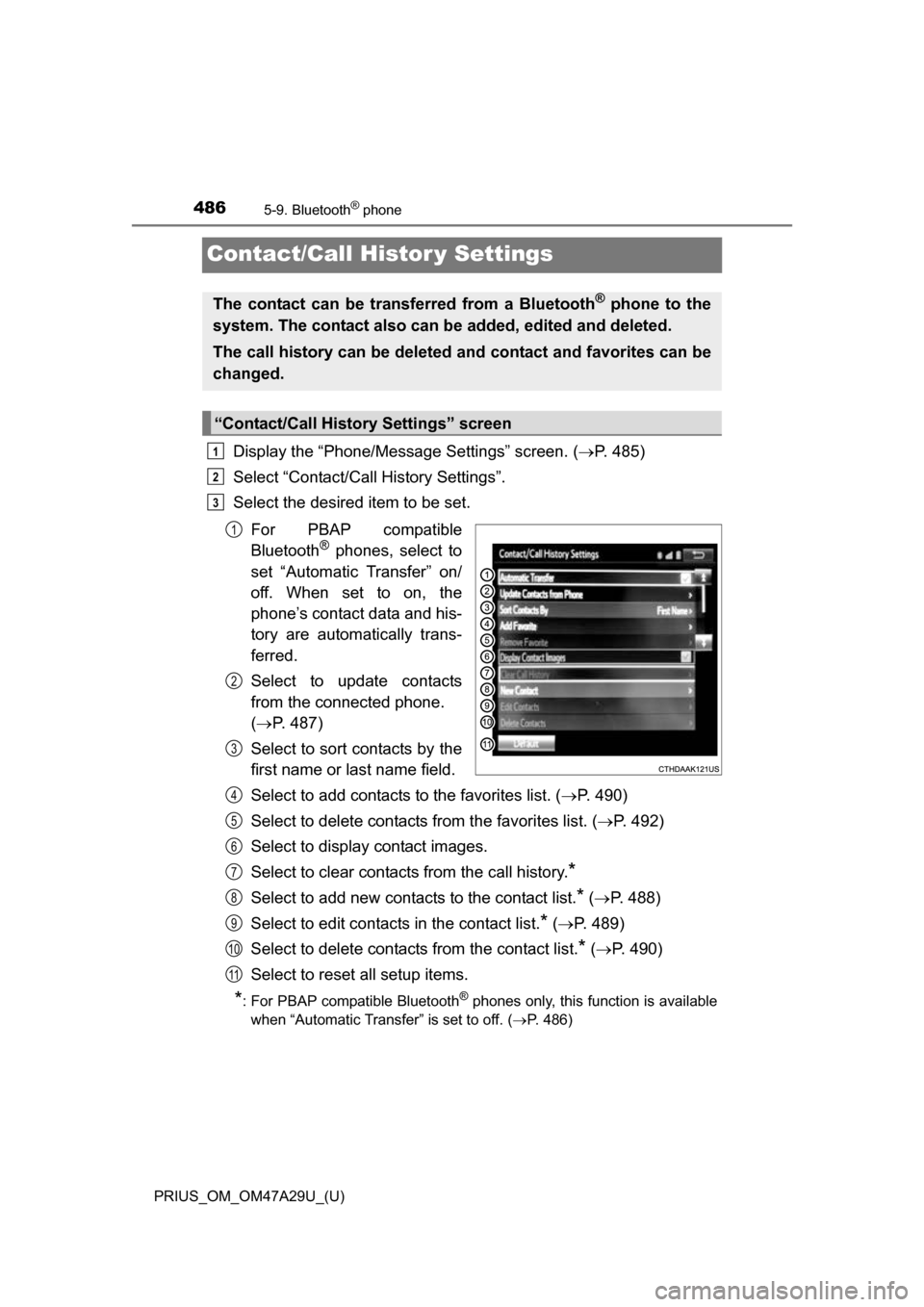
Select the desired item to be set.
For PBAP compatible
Bluetooth
® phones, select to
set “Automatic Transfer” on/
off. When set to on, the
phone’s contact data and his-
tory are automatically trans-
ferred.
Select to update contacts
from the connected phone.
( P. 487)
Select to sort contacts by the
first name or last name field.
Select to add contacts to the favorites list. ( P. 490)
Select to delete contacts from the favorites list. ( P. 492)
Select to display contact images.
Select to clear contacts from the call history.
*
Select to add new contacts to the contact list.* ( P. 488)
Select to edit contacts in the contact list.
* ( P. 489)
Select to delete contacts from the contact list.
* ( P. 490)
Select to reset all setup items.
*: For PBAP compatible Bluetooth® phones only, this function is available
when “Automatic Transfer” is set to off.
( P. 486)
The contact can be transferred from a Bluetooth® phone to the
system. The contact also can be added, edited and deleted.
The call history can be deleted and contact and favorites can be
changed.
“Contact/Call History Settings” screen
1
2
3
1
2
3
4
5
6
7
8
9
10
11
Page 490 of 800
4905-9. Bluetooth® phone
PRIUS_OM_OM47A29U_(U)
For PBAP compatible Bluetooth® phones, this function is available
when “Automatic Transfer” is set to off. ( P. 486)
Select “Delete Contacts”.
Select the desired contact and select “Delete”.
Select “Yes” when the confirmation screen appears.
■Deleting the contact in a different way (From the “Contact
Details” screen) Display the phone screen. ( P. 470)
Select the “Contacts”, “Call History” tab or the “Favorites” tab and
select the desired contact.
Select “Delete Contacts”.
Select “Yes” when the confirmation screen appears.
Up to 15 contacts (maximum of 4 numbers per contact) can be regis-
tered in the favorites list.
■Registering the contacts in the favorites list
Select “Add Favorite”.
Select the desired contact to add to the favorites list.
Dimmed contacts are already stored as a favorite.
Check that a confirmation scr een is displayed when the opera-
tion is complete.
Deleting the contact data
Favorites list setting
1
2
3
1
2
3
4
1
2
3
Page 493 of 800
PRIUS_OM_OM47A29U_(U)
4935-9. Bluetooth® phone
5
Audio system
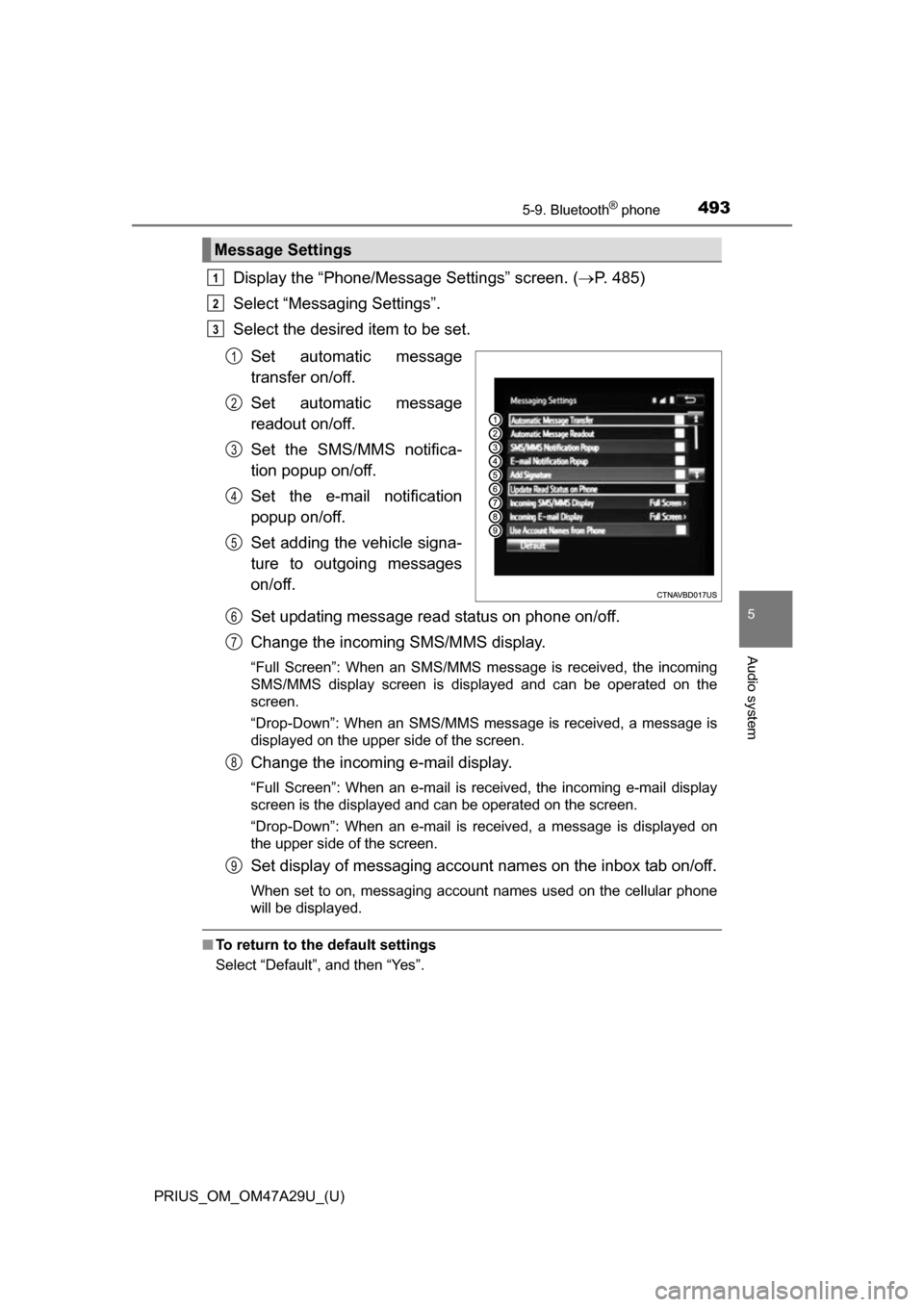
Display the “Phone/Message Settings” screen. (P. 485)
Select “Messaging Settings”.
Select the desired item to be set.
Set automatic message
transfer on/off.
Set automatic message
readout on/off.
Set the SMS/MMS notifica-
tion popup on/off.
Set the e-mail notification
popup on/off.
Set adding the vehicle signa-
ture to outgoing messages
on/off.
Set updating message read status on phone on/off.
Change the incoming SMS/MMS display.
“Full Screen”: When an SMS/MMS message is received, the incoming
SMS/MMS display screen is displayed and can be operated on the
screen.
“Drop-Down”: When an SMS/MMS message is received, a message is
displayed on the upper side of the screen.
Change the incoming e-mail display.
“Full Screen”: When an e-mail is received, the incoming e-mail display
screen is the displayed and can be operated on the screen.
“Drop-Down”: When an e-mail is received, a message is displayed on
the upper side of the screen.
Set display of messaging account names on the inbox tab on/off.
When set to on, messaging account names used on the cellular phone
will be displayed.
■To return to the default settings
Select “Default”, and then “Yes”.
Message Settings
1
2
3
1
2
3
4
5
6
7
8
9