MOUNT TOYOTA PRIUS 2016 4.G Owner's Manual
[x] Cancel search | Manufacturer: TOYOTA, Model Year: 2016, Model line: PRIUS, Model: TOYOTA PRIUS 2016 4.GPages: 800, PDF Size: 16.69 MB
Page 277 of 800
PRIUS_OM_OM47A29U_(U)
2774-5. Using the driving support systems
4
Driving
WARNING
■Limitations of the pre-collision system
●The driver is solely responsible for safe driving. Always drive safely, taking
care to observe your surroundings.
Do not use the pre-collision system instead of normal braking operations
under any circumstances. This system will not prevent collisions or lessen
collision damage or injury in every situation. Do not overly rely on this sys-
tem. Failure to do so may lead to an accident, resulting in death or serious
injury.
● Although this system is designed to help avoid a collision or help reduce
the impact of the collision, its effectiveness may change according to vari-
ous conditions, therefore the system may not always be able to achieve
the same level of performance.
Read the following conditions carefully. Do not overly rely on this system
and always drive carefully.
• Conditions under which the system may operate even if there is no pos-
sibility of a collision: P. 283
• Conditions under which the system may not operate properly: P. 285
● Do not attempt to test the operation of the pre-collision system yourself, as
the system may not operate properly, possibly leading to an accident.
■ Pre-collision braking
●The pre-collision braking function may not operate if certain operations are
performed by the driver. If the accelerator pedal is being depressed
strongly or the steering wheel is being turned, the system may determine
that the driver is taking evasive action and possibly prevent the pre-colli-
sion braking function from operating.
● In some situations, while the pre-collision braking function is operating,
operation of the function may be canceled if the accelerator pedal is
depressed strongly or the steering wheel is turned and the system deter-
mines that the driver is taking evasive action.
● A large amount of braking force is applied while the pre-collision braking
function is operating. As the pre-collision braking function will be canceled
after the vehicle has been stopped for approximately 2 seconds, the driver
should depress the brake pedal as necessary.
● If the brake pedal is being depressed, the system may determine that the
driver is taking evasive action and possibly delay the operation timing of
the pre-collision braking function.
Page 280 of 800

4-5. Using the driving support systems
■Operational conditions
Availability of the pedestrian detection function depends on the region i\
n
which the vehicle was sold.
Read")
280
PRIUS_OM_OM47A29U_(U)
4-5. Using the driving support systems
■Operational conditions
Availability of the pedestrian detection function depends on the region i\
n
which the vehicle was sold.
Read the following for details:
Region A
(The pedestrian detection function is available)
The pre-collision system is enabled and the system determines that the pos-
sibility of a frontal collision with a vehicle or pedestrian is high.
Each function is operational at the following speeds:
● Pre-collision warning:
• Vehicle speed is between approximately 7 and 110 mph (10 and 180 km/h).
(For detecting a pedestrian, vehicle speed is between approximately 7 and
50 mph [10 and 80 km/h].)
• The relative speed between your vehicle and the vehicle or pedestrian
ahead is approximately 7 mph (10 km/h) or more.
● Pre-collision brake assist:
• Vehicle speed is between approximately 19 and 110 mph (30 and 180 km/h).
(For detecting a pedestrian, vehicle speed is between approximately 19 and
50 mph [30 and 80 km/h].)
• The relative speed between your vehicle and the vehicle or pedestrian ahead is approximately 19 mph (30 km/h) or more.
● Pre-collision braking:
• Vehicle speed is between approximately 7 and 110 mph (10 and 180 km/h).
(For detecting a pedestrian, vehicle speed is between approximately 7 and
50 mph [10 and 80 km/h].)
• The relative speed between your vehicle and the vehicle or pedestrian ahead is approximately 7 mph (10 km/h) or more.
The system may not operate in the following situations:
● If a 12-volt battery terminal has been disconnected and reconnected and
then the vehicle has not been driven for a certain amount of time
● If the shift position is in R
● If VSC is disabled (only the pre-collision warning function will be opera-
tional)
● If the PCS warning light is flashing or illuminated
RegionsFunction availability
Region AThe pedestrian detection function is available
Region BThe pedestrian detection function is not available
Page 281 of 800
PRIUS_OM_OM47A29U_(U)
2814-5. Using the driving support systems
4
Driving
Region B
(The pedestrian detection function is not available)
The pre-collision system is enabled and the system determines that the pos-
sibility of a frontal collision with a vehicle is high.
Each function is operational at the following speeds:
● Pre-collision warning:
• Vehicle speed is between approximately 10 and 110 mph (15 and 180 km/h).
• The relative speed between your vehicle and the vehicle ahead is
approximately 7 mph (10 km/h) or more.
● Pre-collision brake assist:
• Vehicle speed is between approximately 19 and 110 mph (30 and 180 km/h).
• The relative speed between your vehicle and the vehicle ahead is
approximately 19 mph (30 km/h) or more.
● Pre-collision braking:
• Vehicle speed is between approximately 10 and 110 mph (15 and 180 km/h).
• The relative speed between your vehicle and the vehicle ahead is
approximately 7 mph (10 km/h) or more.
The system may not operate in the following situations:
● If a 12-volt battery terminal has been disconnected and reconnected and
then the vehicle has not been driven for a certain amount of time
● If the shift position is in R
● If VSC is disabled (only the pre-collision warning function will be opera-
tional)
● If the PCS warning light is flashing or illuminated
Page 286 of 800
286
PRIUS_OM_OM47A29U_(U)
4-5. Using the driving support systems
• When driving in inclement weather such as heavy rain, fog, snow or a
sandstorm
• When the vehicle is hit by water, snow, dust, etc. from a vehicle ahead
• When driving through steam or smoke
• When driving in a place where the surrounding brightness changes sud- denly, such as at the entrance or exit of a tunnel
• When a very bright light, such as the sun or the headlights of oncoming
traffic, shines directly into the camera sensor
• When the surrounding area is dim, such as at dawn or dusk, or while at night or in a tunnel
• After the hybrid system has started the vehicle has not been driven for a certain amount of time
• While making a left/right turn and for a few seconds after making a left/
right turn
• While driving on a curve and for a few seconds after driving on a curve
• If your vehicle is skidding
• If the wheels are misaligned
• If a wiper blade is blocking the camera sensor
• The vehicle is wobbling.
• The vehicle is being driven at extremely high speeds.
• When driving on a hill
• If the radar sensor or camera sensor is misaligned
● In some situations such as the following, sufficient braking force may not be
obtained, preventing the system from performing properly:
• If the braking functions cannot operate to their full extent, such as when
the brake parts are extremely cold, extremely hot, or wet
• If the vehicle is not properly maintained (brakes or tires are excessively worn, improper tire inflation pressure, etc.)
• When the vehicle is being driven on a gravel road or other slippery sur- face
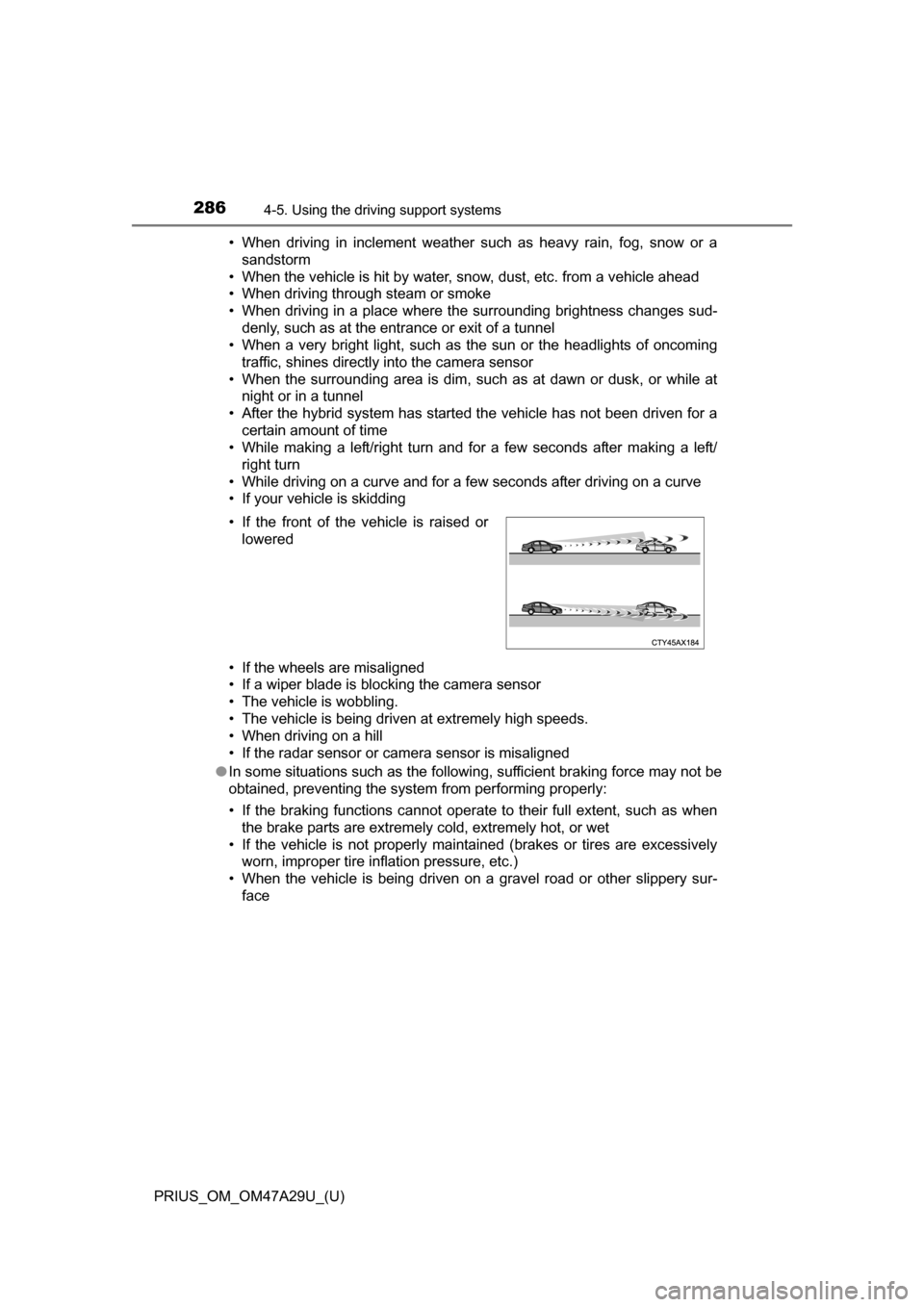
• If the front of the vehicle is raised or
lowered
Page 290 of 800
290
PRIUS_OM_OM47A29U_(U)
4-5. Using the driving support systems
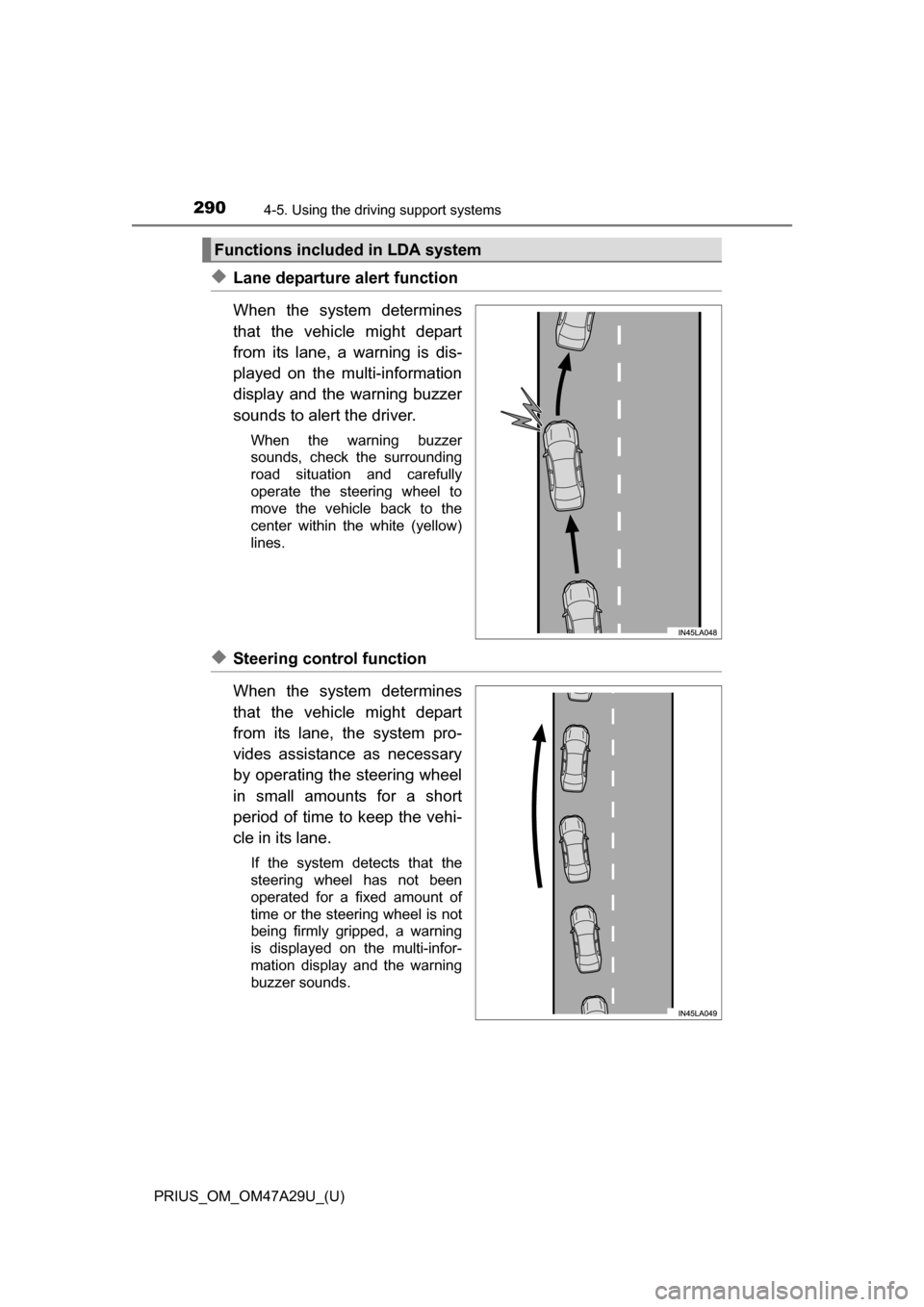
◆Lane departure alert function
When the system determines
that the vehicle might depart
from its lane, a warning is dis-
played on the multi-information
display and the warning buzzer
sounds to alert the driver.
When the warning buzzer
sounds, check the surrounding
road situation and carefully
operate the steering wheel to
move the vehicle back to the
center within the white (yellow)
lines.
◆Steering control function
When the system determines
that the vehicle might depart
from its lane, the system pro-
vides assistance as necessary
by operating the steering wheel
in small amounts for a short
period of time to keep the vehi-
cle in its lane.
If the system detects that the
steering wheel has not been
operated for a fixed amount of
time or the steering wheel is not
being firmly gripped, a warning
is displayed on the multi-infor-
mation display and the warning
buzzer sounds.
Functions included in LDA system
Page 292 of 800
292
PRIUS_OM_OM47A29U_(U)
4-5. Using the driving support systems
WARNING
■Before using LDA system
Do not rely solely upon the LDA system. LDA is not a system which auto-
matically drives the vehicle or reduces the amount of attention that must be
paid to the area in front of the vehicle. The driver must always assume full
responsibility for driving safely by always paying careful attention to the sur-
rounding conditions and operate the steering wheel to correct the path of
the vehicle. Also, make sure to take adequate breaks when fatigued, such
as from driving for a long period of time.
Failure to perform appropriate driving operations and pay careful attention
may lead to an accident, resulting in death or serious injury.
■ To avoid operating LDA by mistake
When not using the LDA system, use the LDA switch to turn the system off.
■ Situations unsuitable for LDA
Do not use the LDA system in the following situations.
The system may not operate properly and lead to an accident, resulting in
death or serious injury.
●A spare tire, tire chains, etc., are equipped.
● When the tires have been excessively worn, or when the tire inflation pres-
sure is low.
● Tires which differ by structure, manufacturer, brand or tread pattern are
used.
● Objects or patterns that could be mistaken for white (yellow) lines are
present on the side of the road (guardrails, curbs, reflective poles etc.).
● Vehicle is driven on a snow-covered road.
● White (yellow) lines are difficult to see due to rain, snow, fog, dust, etc.
● Asphalt repair marks, white (yellow) line marks, etc., are present due to
road repair.
● Vehicle is driven in a temporary lane or restricted lane due to construction
work.
● Vehicle is driven on a road surface which is slippery due to rainy weather,
fallen snow, freezing, etc.
● Vehicle is driven in traffic lanes other than on highways and freeways.
● Vehicle is driven in a construction zone.
● Vehicle is towing a trailer or another vehicle.
Page 295 of 800
PRIUS_OM_OM47A29U_(U)
2954-5. Using the driving support systems
4
Driving
■Operation conditions of each function
●Lane departure alert function
This function operates when all of the following conditions are met.
• LDA is turned on.
• Vehicle speed is approximately 32 mph (50 km/h) or more.
• System recognizes white (yellow) lines.
• Width of traffic lane is approximately 9.8 ft. (3 m) or more.
• Turn signal lever is not operated.
• Vehicle is driven on a straight road or around a gentle curve with a radius
of more than approximately 492 ft. (150 m).
• No system malfunctions are detected. ( P. 298)
● Steering control function
This function operates when all of the following conditions are met in addi-
tion to the operation conditions for the lane departure alert function.
• Setting for “LDA Steering Assist Mode” in screen of the multi-infor-
mation display is set to “On”. ( P. 139)
• Vehicle is not accelerated or decelerated by a fixed amount or more.
• Steering wheel is not operated with a steering force level suitable for
changing lanes.
• ABS, VSC, TRAC and PCS are not operating.
• TRAC or VSC is not turned off.
● Vehicle sway warning
This function operates when all of the following conditions are met.
• Setting for “Lane Sway Warning Status” in screen of the multi-infor-
mation display is set to “On”. ( P. 139)
• Vehicle speed is approximately 32 mph (50 km/h) or more.
• Width of traffic lane is approximately 9.8 ft. (3 m) or more.
• No system malfunctions are detected. ( P. 298)
Page 297 of 800
PRIUS_OM_OM47A29U_(U)
2974-5. Using the driving support systems
4
Driving
■Conditions in which functions may not operate properly
In the following situations, the camera sensor may not detect white (yellow)
lines and various functions may not operate normally.
●There are shadows on the road that run parallel with, or cover, the white
(yellow) lines.
● The vehicle is driven in an area without white (yellow) lines, such as in front
of a tollgate or checkpoint, or at an intersection, etc.
● The white (yellow) lines are cracked, “Botts’ dots”, “Raised pavement
marker” or stones are present.
● The white (yellow) lines cannot be seen or are difficult to see due to sand,
etc.
● The vehicle is driven on a road surface that is wet due to rain, puddles, etc.
● The traffic lines are yellow (which may be more difficult to recognize than
lines that are white).
● The white (yellow) lines cross over a curb, etc.
● The vehicle is driven on a bright surface, such as concrete.
● The vehicle is driven on a surface that is bright due to reflected light, etc.
● The vehicle is driven in an area where the brightness changes suddenly,
such as at the entrances and exits of tunnels, etc.
● Light from the headlights of an oncoming vehicle, the sun, etc., enters the
camera.
● The vehicle is driven where the road diverges, merges, etc.
● The vehicle is driven on a slope.
● The vehicle is driven on a road which tilts left or right, or a winding road.
● The vehicle is driven on an unpaved or rough road.
● The vehicle is driven around a sharp curve.
● The traffic lane is excessively narrow or wide.
● The vehicle is extremely tilted due to carrying heavy luggage or having
improper tire pressure.
● The distance to the preceding vehicle is extremely short.
● The vehicle is moving up and down a large amount due to road conditions
during driving (poor roads or road seams).
● The headlight lenses are dirty and emit a faint amount of light at night, or the
beam axis has deviated.
● The vehicle is struck by a crosswind.
● The vehicle has just changed lanes or crossed an intersection.
● Snow tires, etc., are equipped.
Page 321 of 800
PRIUS_OM_OM47A29U_(U)
3214-5. Using the driving support systems
4
Driving
Normal mode
Suitable for normal driving.
When normal mode is selected, the “ECO MODE” and “PWR MODE”
indicators turn off.
Power mode
Suitable for when crisp handling and enhanced accelerator
response are desired, such as when driving on mountainous roads.
When power mode is selected, the “PWR MODE” indicator will illuminate
on the main display.
Eco drive mode
Suitable for driving that improves fuel economy by generating
torque in response to accelerator pedal operations more smoothly
than in normal mode.
When Eco drive mode is selected, the “ECO MODE” indicator will illumi-
nate on the main display.
While the air conditioning is being used, the system automatically
switches to air conditioning eco mode ( P. 516), allowing for driving
that leads to even better fuel economy.
■ When canceling Eco drive mode/power mode
●Press the switch again. Also, power mode will be canceled automatically
when the power switch is turned off.
● However, Normal mode and Eco drive mode will not be canceled automati-
cally until the switch is pressed, even if the power switch is turned off.
■ Switching the drive mode when in EV drive mode
P. 232
1
2
3
Page 355 of 800
PRIUS_OM_OM47A29U_(U)
3554-5. Using the driving support systems
4
Driving
●Changes in the vehicle
• The vehicle is tilted a large amount
• The height of the vehicle has drastically changed due to the carried load
(the nose tilts up or down)
• The direction of the sensor has deviated due to a collision or other impact
■ In the unlikely event that the Intell igent Clearance Sonar function mistak-
enly operates at a crossing or elsewhere
Even in the unlikely event that the Intelligent Clearance Sonar function mis-
takenly operates at a crossing or elsewhere, brake control is canceled after
approximately 2 seconds, allowing you to proceed forward and leave the
area. Furthermore, brake control is also canceled when the brake pedal is
depressed. Depressing the accelerator pedal again allows you to proceed
forward and leave the area.
■ Situations in which the system may not operate normally
In the following situations, the system may not operate normally.
●Environmental influence
• There is an obstacle that cannot be detected between the vehicle and
another obstacle that can be detected
• An obstacle such as another vehicle, a motorcycle, a bicycle or a pedes-
trian cuts in front of the vehicle or jumps out from the side.
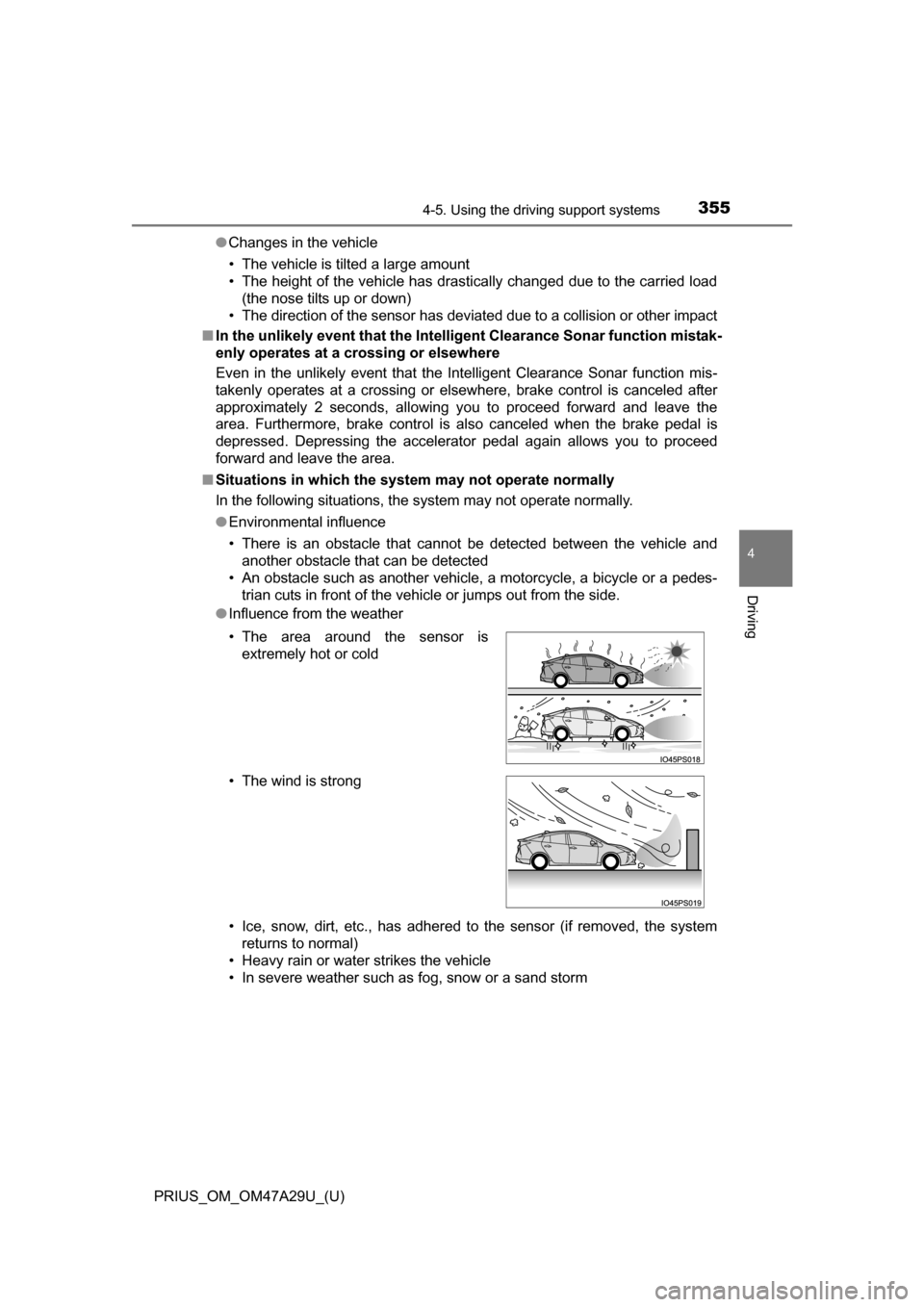
● Influence from the weather
• Ice, snow, dirt, etc., has adhered to the sensor (if removed, the system
returns to normal)
• Heavy rain or water strikes the vehicle
• In severe weather such as fog, snow or a sand storm • The area around the sensor is extremely hot or cold
• The wind is strong