engine TOYOTA PRIUS 2016 4.G Owner's Manual
[x] Cancel search | Manufacturer: TOYOTA, Model Year: 2016, Model line: PRIUS, Model: TOYOTA PRIUS 2016 4.GPages: 800, PDF Size: 16.69 MB
Page 225 of 800
225
PRIUS_OM_OM47A29U_(U)
4-2. Driving procedures
4
Driving
Power (ignition) switch
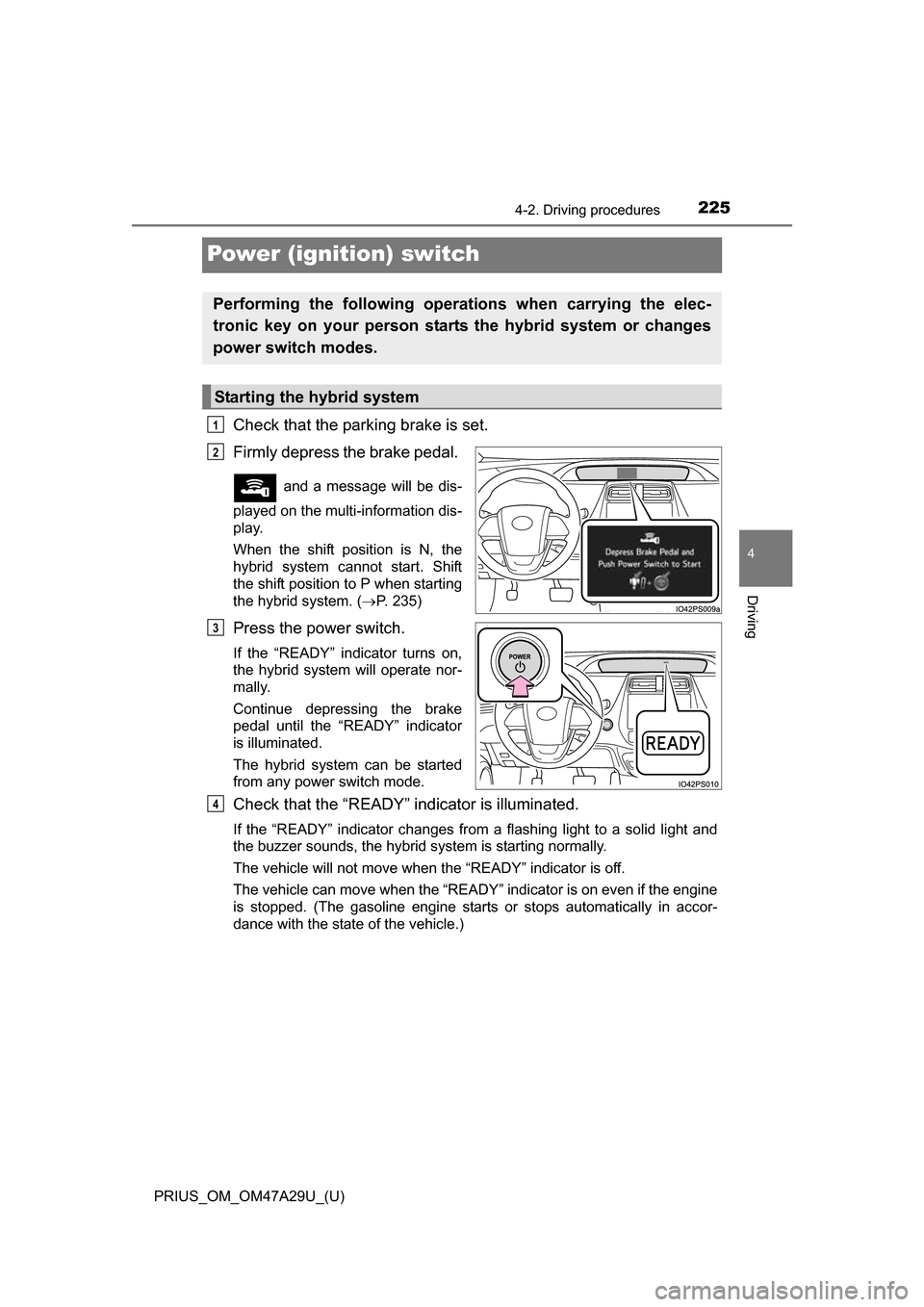
Check that the parking brake is set.
Firmly depress the brake pedal.
and a message will be dis-
played on the multi-information dis-
play.
When the shift position is N, the
hybrid system cannot start. Shift
the shift position to P when starting
the hybrid system. ( P. 235)
Press the power switch.
If the “READY” indicator turns on,
the hybrid system will operate nor-
mally.
Continue depressing the brake
pedal until the “READY” indicator
is illuminated.
The hybrid system can be started
from any power switch mode.
Check that the “READY” indicator is illuminated.
If the “READY” indicator changes from a flashing light to a solid light and
the buzzer sounds, the hybrid system is starting normally.
The vehicle will not move when the “READY” indicator is off.
The vehicle can move when the “READY” indicator is on even if the engine
is stopped. (The gasoline engine starts or stops automatically in accor-
dance with the state of the vehicle.)
Performing the following operati ons when carrying the elec-
tronic key on your person starts the hybrid system or changes
power switch modes.
Starting the hybrid system
1
2
3
4
Page 231 of 800
231
PRIUS_OM_OM47A29U_(U)
4-2. Driving procedures
4
Driving
EV drive mode
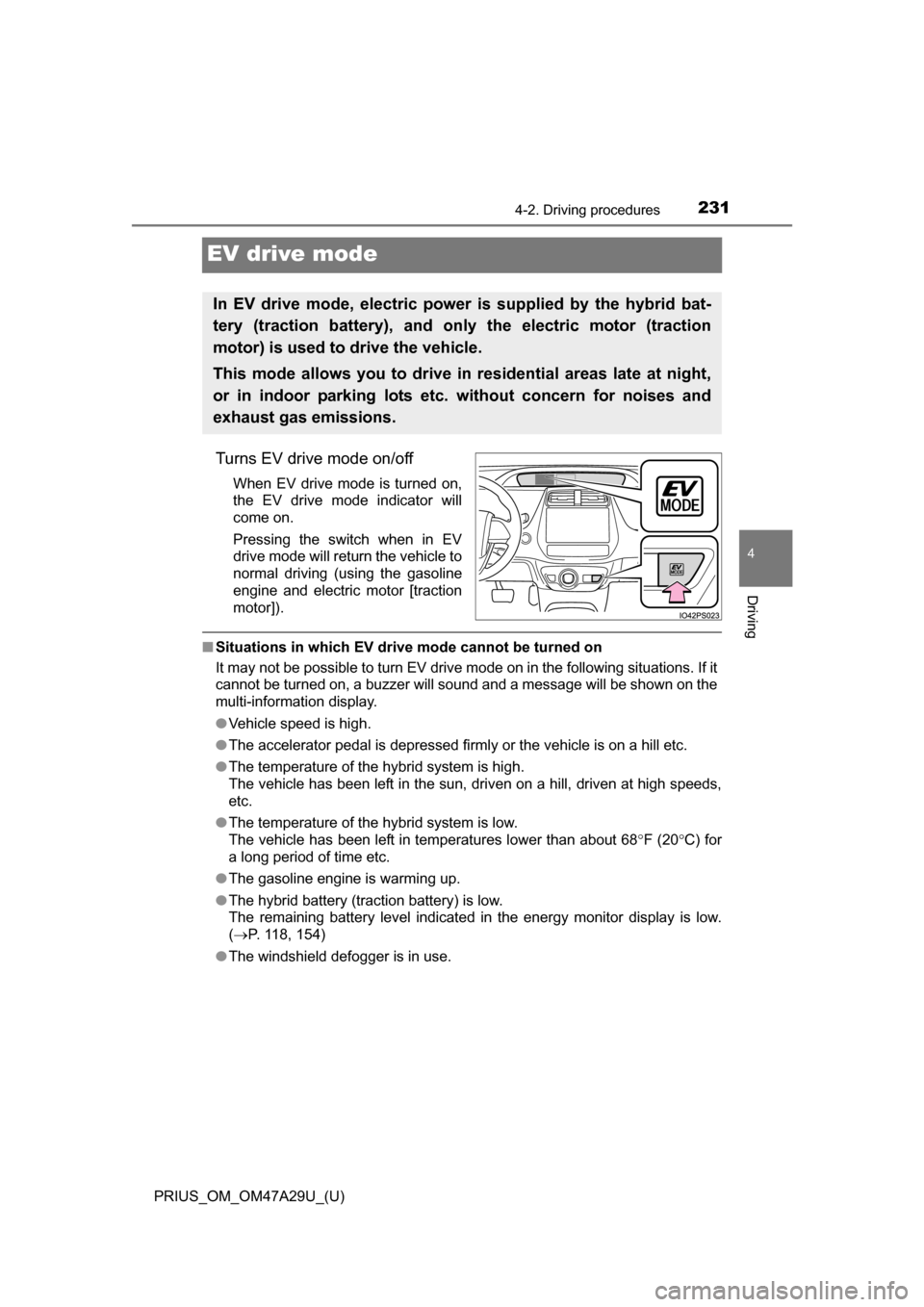
Turns EV drive mode on/off
When EV drive mode is turned on,
the EV drive mode indicator will
come on.
Pressing the switch when in EV
drive mode will return the vehicle to
normal driving (using the gasoline
engine and electric motor [traction
motor]).
■Situations in which EV dri ve mode cannot be turned on
It may not be possible to turn EV drive mode on in the following situati\
ons. If it
cannot be turned on, a buzzer will sound and a message will be shown on the
multi-information display.
● Vehicle speed is high.
● The accelerator pedal is depressed firmly or the vehicle is on a hill etc.
● The temperature of the hybrid system is high.
The vehicle has been left in the sun, driven on a hill, driven at high speeds,
etc.
● The temperature of the hybrid system is low.
The vehicle has been left in temperatures lower than about 68 F (20C) for
a long period of time etc.
● The gasoline engine is warming up.
● The hybrid battery (traction battery) is low.
The remaining battery level indicated in the energy monitor display is low.
(P. 118, 154)
● The windshield defogger is in use.
In EV drive mode, electric power is supplied by the hybrid bat-
tery (traction battery), and only the electric motor (traction
motor) is used to drive the vehicle.
This mode allows you to drive in residential areas late at night,
or in indoor parking lots etc. without concern for noises and
exhaust gas emissions.
Page 232 of 800
232
PRIUS_OM_OM47A29U_(U)
4-2. Driving procedures
■Switching to EV drive mode when the gasoline engine is cold
If the hybrid system is started while the gasoline engine is cold, the gasoline
engine will start automatically after a short period of time in order to warm up.
In this case, you will become unable to switch to EV drive mode.
After the hybrid system has started and the “READY” indicator has illumi-
nated, press the EV drive mode switch before the gasoline engine starts to
switch to EV drive mode.
■ Automatic cancelatio n of EV drive mode
When driving in EV drive mode, the gas oline engine may automatically restart
in the following situations. When EV drive mode is canceled, a buzzer will
sound and the EV drive mode indicator will flash and go off.
● The hybrid battery (traction battery) becomes low.
The remaining battery level indicated in the energy monitor display is low.
(P. 118, 154)
● Vehicle speed is high.
● The accelerator pedal is depressed firmly or the vehicle is on a hill etc.
When it is possible to inform the driver of automatic cancelation in advance, a
prior notice screen will appear on the multi-information display.
■ Possible driving distance when driving in EV drive mode
EV drive mode’s possible driving distance ranges from a few hundred meters
to approximately 0.6 mile (1 km). However, depending on vehicle conditions,
there are situations when EV drive mode cannot be used. (The distance that
is possible depends on the hybrid battery [traction battery] level and driv\
ing
conditions.)
■ Changing a driving mode when in EV drive mode
EV drive mode can be used in conjunction with Eco drive mode and power
mode.
However, EV drive mode may be automatically canceled when used in con-
junction with power mode.
■ Fuel economy
The hybrid system is designed to achieve the best possible fuel economy
during normal driving (using the gasoline engine and electric motor [traction
motor]). Driving in EV drive mode more than necessary may lower fuel econ-
omy.
Page 233 of 800
PRIUS_OM_OM47A29U_(U)
2334-2. Driving procedures
4
Driving
WARNING
■Caution while driving
When driving in EV drive mode, pay special attention to the area around the
vehicle. Because there is no engine noise, pedestrians, people riding bicy-
cles or other people and vehicles in the area may not be aware of the vehi-
cle starting off or approaching them, so take extra care while driving.
Page 235 of 800
PRIUS_OM_OM47A29U_(U)
2354-2. Driving procedures
4
Driving
*: For good fuel economy and noise reduction, the D position should usuallybe used.
P. 3 2 0
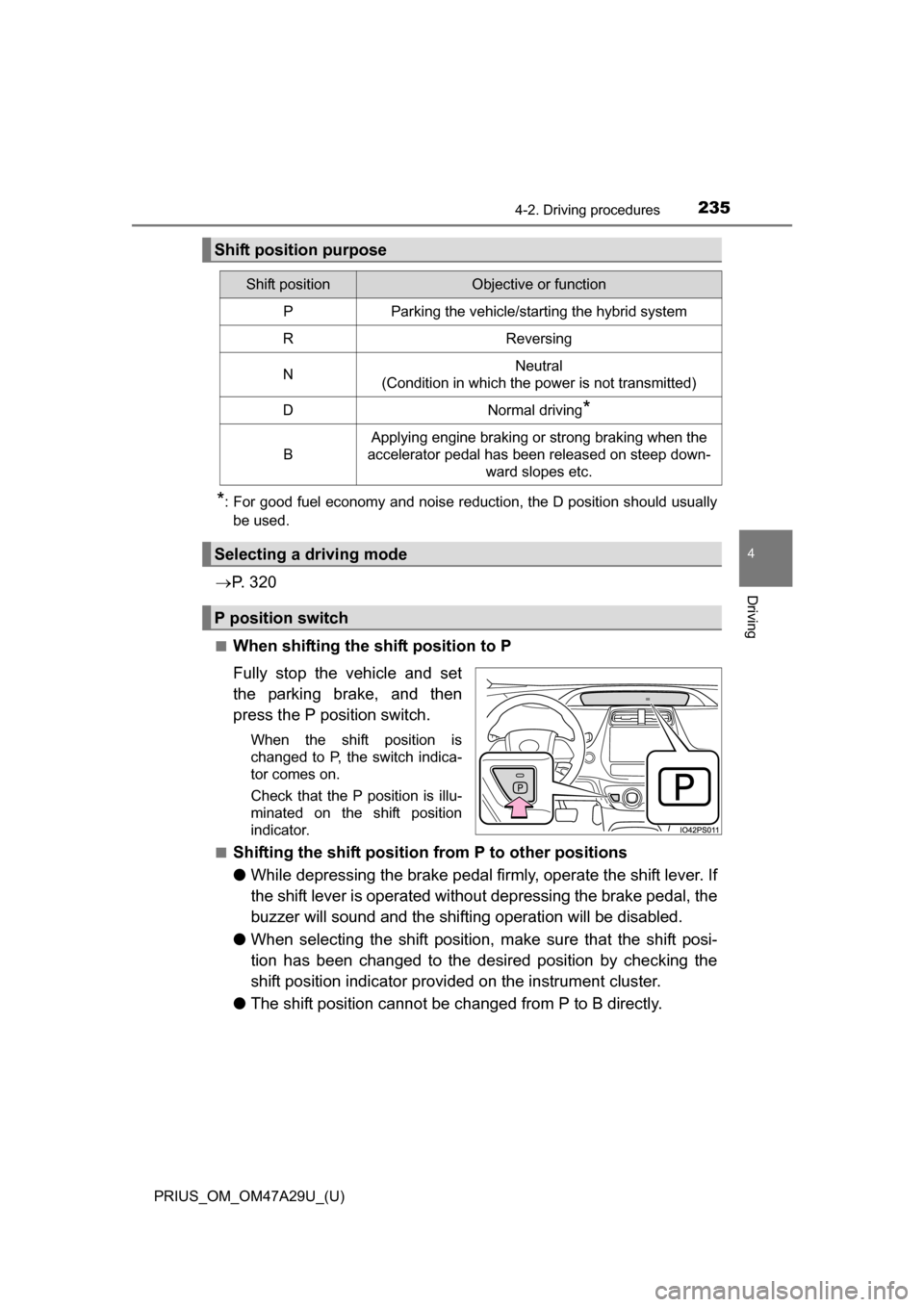
■When shifting the shift position to P
Fully stop the vehicle and set
the parking brake, and then
press the P position switch.
When the shift position is
changed to P, the switch indica-
tor comes on.
Check that the P position is illu-
minated on the shift position
indicator.
■
Shifting the shift position from P to other positions
● While depressing the brake pedal firmly, operate the shift lever. If
the shift lever is operated without depressing the brake pedal, the
buzzer will sound and the shifting operation will be disabled.
● When selecting the shift position, make sure that the shift posi-
tion has been changed to the desired position by checking the
shift position indicator provided on the instrument cluster.
● The shift position cannot be changed from P to B directly.
Shift position purpose
Shift positionObjective or function
PParking the vehicle/starting the hybrid system
RReversing
NNeutral
(Condition in which the power is not transmitted)
DNormal driving*
B
Applying engine braking or strong braking when the
accelerator pedal has been released on steep down-
ward slopes etc.
Selecting a driving mode
P position switch
Page 237 of 800
PRIUS_OM_OM47A29U_(U)
2374-2. Driving procedures
4
Driving
■Restraining sudden start (Drive-Start Control)
When the following unusual operation is performed, the hybrid system output
may be restrained.
●When the shift position is shifted from R to D, D/B to R, N to R, P to D, P to
R with the accelerator pedal depressed, a warning message appears on the
multi-information display. If a warning message is shown on the multi-infor-
mation display, read the message and follow the instructions.
● When the accelerator pedal is depressed too while the vehicle is in reverse.
■ Automatic P position selection function
●If the power switch is on and the shift position is not already P, completely
stopping the vehicle and pressing the power switch causes the shift position
to automatically switch to P and the power switch to turn off.
● The shift position may also automatically switch to P if one of the following
conditions is detected while the vehicle is stopped by dynamic radar cruise
control with full-speed range.
• Driver’s seat belt is not fastened
• Driver’s door is opened
• Approximately 3 minutes elapse after the vehicle stopped
■ If the shift position cannot be shifted from P
There is a possibility that the 12-volt battery is discharged. Check the 12-volt
battery in this situation. ( P. 711)
■ About engine braking
When shift position B is selected, releasing the accelerator pedal will apply
engine braking.
●When the vehicle is driven at high speeds, compared to ordinary gasoline-
fueled vehicles, the engine braking deceleration is felt less than that of other
vehicles.
● The vehicle can be accelerated even when shift position B is selected.
If the vehicle is driven continuously in the B position, fuel efficiency will
become low. Usually, select the D position.
■ After recharging/reconnecting the 12-volt battery
P. 598
Page 238 of 800
238
PRIUS_OM_OM47A29U_(U)
4-2. Driving procedures
■When a message related to shift oper ations is displayed on the multi-
information display
When the shift position does not switch due to a mistaken operation, system
conditions, etc., or when the attempted shift operation is invalid, a message
indicating the correct operation or the reason why switching cannot be per-
formed is shown on the multi-information display. In these cases, follow the
instructions and retry the operation.
■ Customization
Settings (e.g. Reverse warning buzzer) can be changed.
(Customizable features: P. 752)
WARNING
■When driving on slippery road surfaces
Do not accelerate or shift the shift position suddenly.
Sudden changes in engine braking may cause the vehicle to spin or skid,
resulting in an accident.
■ Shift lever and P position switch
●Do not remove the shift lever knob or use anything but a genuine Toyota
shift lever knob. Also, do not hang anything on the shift lever.
Doing so could prevent the shift lever from returning to position, causing
unexpected accidents to occur when the vehicle is in motion.
● Do not press the P position switch while the vehicle is moving.
If the P position switch is pressed when driving at very low speeds (for
example, directly before stopping the vehicle), the vehicle may stop sud-
denly when the shift position switches to P, which could lead to an acci-
dent.
● In order to prevent the shift position from accidentally being changed, do
not touch the P position switch or shift lever when not using them.
Page 343 of 800
PRIUS_OM_OM47A29U_(U)
3434-5. Using the driving support systems
4
Driving
WARNING
■Sensors
Certain vehicle conditions and the surrounding environment may affect the
ability of the sensor to correctly detect obstacles. Particular instances where
this may occur are listed below.
●There is dirt, snow or ice on the sensor. (Wiping the sensors will resolve
this problem.)
● The sensor is frozen. (Thawing the area will resolve this problem.)
In especially cold weather, if a sensor is frozen, the screen may show an
abnormal display, or obstacles may not be detected.
● The sensor is covered in any way.
● In harsh sunlight or intense cold weather
● On an extremely bumpy road, on an incline, on gravel, or on grass
● The vicinity of the vehicle is noisy due to vehicle horns, motorcycle
engines, air brakes of large vehicles , or other loud noises producing ultra-
sonic waves.
● The sensor is splashed with water or drenched with heavy rain.
● The sensor is drenched with water on a flooded road.
● The vehicle is leaning considerably to one side.
● The vehicle is equipped with a fender pole or wireless antenna.
● The vehicle is approaching a tall or curved curb.
● The detection range is reduced due to an object such as a sign.
● The area directly under the bumpers is not detected.
● If obstacles draw too close to the sensor.
● The bumper or sensor receives a strong impact.
● A non-genuine Toyota suspension (lowered suspension etc.) is installed.
● There is another vehicle equipped with parking assist sensors in the vicin-
ity.
● Towing eyelets are installed.
● A backlit license plate is installed.
In addition to the examples above, depending on the shape and condition of
obstacles, detection may not be possible, or the detection range may be
shortened.
Page 354 of 800
354
PRIUS_OM_OM47A29U_(U)
4-5. Using the driving support systems
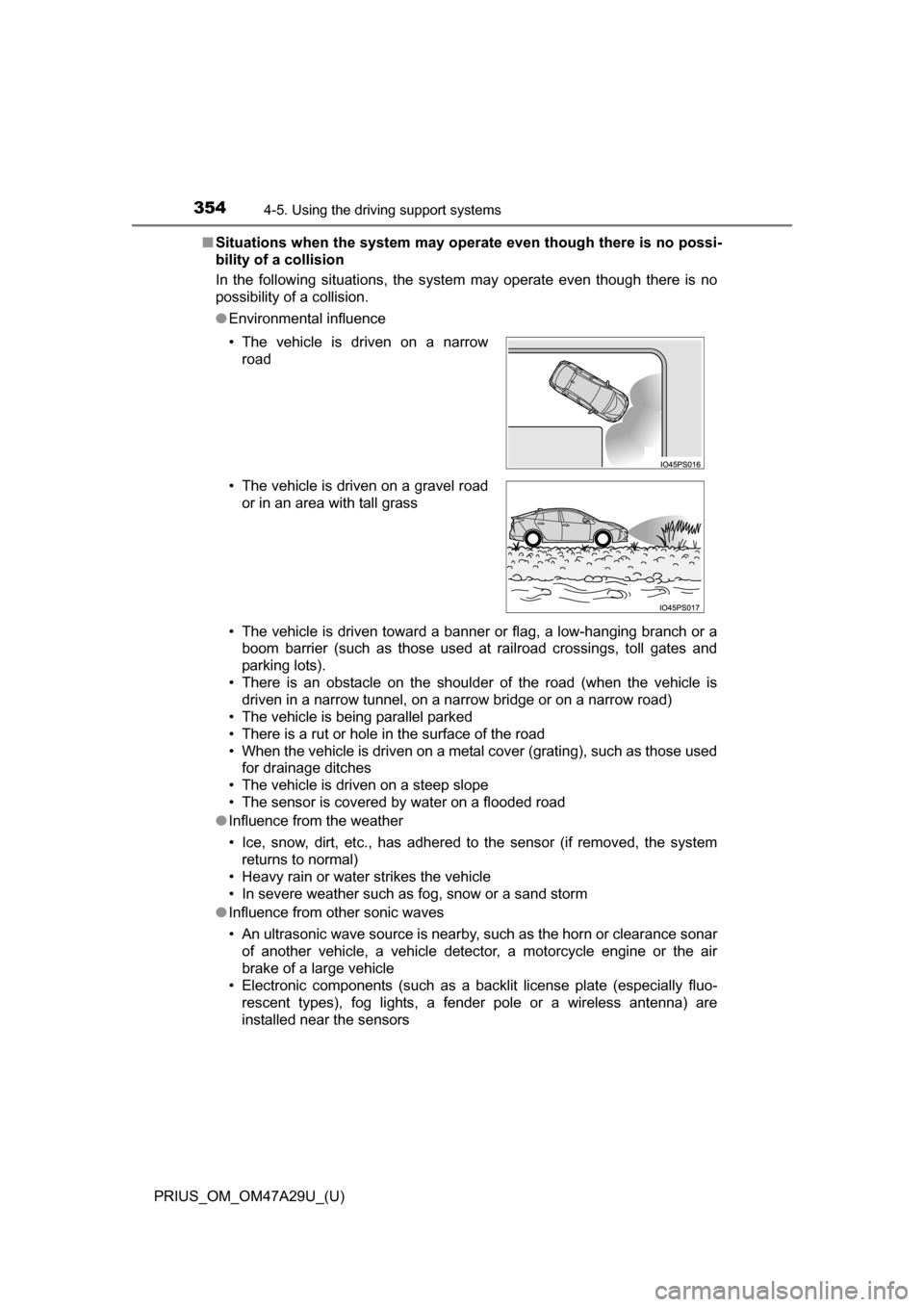
■Situations when the system may opera te even though there is no possi-
bility of a collision
In the following situations, the system may operate even though there is no
possibility of a collision.
● Environmental influence
• The vehicle is driven toward a banner or flag, a low-hanging branch or a
boom barrier (such as those used at railroad crossings, toll gates and
parking lots).
• There is an obstacle on the shoulder of the road (when the vehicle is driven in a narrow tunnel, on a narrow bridge or on a narrow road)
• The vehicle is being parallel parked
• There is a rut or hole in the surface of the road
• When the vehicle is driven on a metal cover (grating), such as those used for drainage ditches
• The vehicle is driven on a steep slope
• The sensor is covered by water on a flooded road
● Influence from the weather
• Ice, snow, dirt, etc., has adhered to the sensor (if removed, the system
returns to normal)
• Heavy rain or water strikes the vehicle
• In severe weather such as fog, snow or a sand storm
● Influence from other sonic waves
• An ultrasonic wave source is nearby, such as the horn or clearance sonar
of another vehicle, a vehicle detector, a motorcycle engine or the air
brake of a large vehicle
• Electronic components (such as a backlit license plate (especially fluo-
rescent types), fog lights, a fender pole or a wireless antenna) are
installed near the sensors
• The vehicle is driven on a narrow
road
• The vehicle is driven on a gravel road or in an area with tall grass
Page 356 of 800
356
PRIUS_OM_OM47A29U_(U)
4-5. Using the driving support systems
●Influence from other sonic waves
• An ultrasonic wave source is nearby, such as the horn or clearance sonar
of another vehicle, a vehicle detector, a motorcycle engine or the air
brake of a large vehicle
• Electronic components (such as a backlit license plate (especially fluo- rescent types), fog lights, a fender pole or a wireless antenna) are
installed near the sensors
● Changes in the vehicle
• The vehicle is tilted a large amount
• The height of the vehicle has drastically changed due to the carried load
(the nose tilts up or down)
• The direction of the sensor has deviated due to a collision or other impact
■ Intelligent Clearance Sonar function while the Simple Advanced Parking
Guidance System is operating
P. 361
■ When removing and installing the 12-volt battery
The system needs to be initialized.
The system can be initialized by driving the vehicle straight ahead for 5 sec-
onds or more at a speed of approximately 22 mph (35 km/h) or higher.
■ When “ICS Unavailable” is displayed on the multi-information display
and the ICS OFF indicator flashes
● Ice, snow, dirt, etc., may have adhered to the sensor. If this occurs, remove
the ice, snow, dirt, etc., from the sensor to return the system to normal.
Also, a warning message may be displayed at low temperatures due to ice
forming on the sensor, and the sensor may not detect obstacles. Once the
ice melts, the system will return to normal.
● If this message is shown even after removing dirt from the sensor, or shown
when the sensor was not dirty to begin with, have the vehicle inspected at
your Toyota dealer.
● System initialization may not have been performed after removal and instal-
lation of the 12-volt battery. Perform system initialization.
■ When “ICS Malfunction Visit Your Deal er” is displayed on the multi-infor-
mation display, the ICS OFF indi cator flashes and the buzzer sounds
The system may not be operating properly. Have the vehicle inspected at
your Toyota dealer.