display TOYOTA PRIUS 2017 4.G Owners Manual
[x] Cancel search | Manufacturer: TOYOTA, Model Year: 2017, Model line: PRIUS, Model: TOYOTA PRIUS 2017 4.GPages: 796, PDF Size: 20.13 MB
Page 293 of 796
PRIUS_OM_OM47B54U_(U)
2934-5. Using the driving support systems
4
Driving
■Operation conditions of each function
●Lane departure alert function
This function operates when all of the following conditions are met.
• LDA is turned on.
• Vehicle speed is approximately 32 mph (50 km/h) or more.
• System recognizes white (yellow) lines.
• Width of traffic lane is approximately 9.8 ft. (3 m) or more.
• Turn signal lever is not operated.
• Vehicle is driven on a straight road or around a gentle curve with a radius
of more than approximately 492 ft. (150 m).
• No system malfunctions are detected. (→P. 296)
● Steering control function
This function operates when all of the following conditions are met in addi-
tion to the operation conditions for the lane departure alert function.
• Setting for in the screen of the multi-information display is
set to “On”. ( →P. 139)
• Vehicle is not accelerated or decelerated by a fixed amount or more.
• Steering wheel is not operated with a steering force level suitable for
changing lanes.
• ABS, VSC, TRAC and PCS are not operating.
• TRAC or VSC is not turned off.
• Hands off steering wheel alert is not displayed. ( →P. 294)
● Vehicle sway warning
This function operates when all of the following conditions are met.
• Setting for in the screen of the multi-information display is
set to “On”. ( →P. 139)
• Vehicle speed is approximately 32 mph (50 km/h) or more.
• Width of traffic lane is approximately 9.8 ft. (3 m) or more.
• No system malfunctions are detected. (→P. 296)
Page 294 of 796

4-5. Using the driving support systems
■Temporary cancellation of functions
When operation conditions are no longer met, a function may be temporarily\
canceled. However,")
294
PRIUS_OM_OM47B54U_(U)
4-5. Using the driving support systems
■Temporary cancellation of functions
When operation conditions are no longer met, a function may be temporarily\
canceled. However, when the operation conditions are met again, operation
of the function is automatically restored. (→P. 293)
■ Steering control function
Depending on the vehicle speed, lane departure situation, road conditions,
etc., the operation of the functions may not be recognized or the functions
may not operate.
■ Lane departure alert function
The warning buzzer may be difficult to hear due to external noise, audio play-
back, etc.
■ Hands off steering wheel alert
When the system determines that the driver has removed their hands from
the steering wheel while the steering control function is operating, a warning
message is displayed on the multi-information display and the buzzer
sounds.
■ White (yellow) lines are only on one side of road
The LDA system will not operate for the side on which white (yellow) lines
could not be recognized.
Page 296 of 796
296
PRIUS_OM_OM47B54U_(U)
4-5. Using the driving support systems
■Warning message
If the following warning message is displayed on the multi-information dis-
play, follow the appropriate troubleshooting procedure.
If a different warning message is displayed, follow the instructions displayed
on the screen.
Warning messageDetails/Actions
“Lane Departure
Alert
Malfunction
Visit Your Dealer”The system may not be operating
properly.
→ Have the vehicle inspected at your
Toyota dealer.
“Forward Camera
System
Unavailable
Clean Windshield”
Dirt, rain, condensation, ice, snow,
etc., are present on the windshield in
front of the camera sensor.
→ Turn the LDA system off, remove
any dirt, rain, condensation, ice,
snow, etc., from the windshield, and
then turn the LDA system back on.
“Forward Camera
System
Unavailable”
The operation conditions of the cam-
era sensor (temperature, etc.) are not
met.
→ When the operation conditions of
the camera sensor (temperature,
etc.) are met, the LDA system will
become available. Turn the LDA
system off, wait for a little while,
and then turn the LDA system back
on.
“Lane Departure Alert Unavail-
able”
The LDA system is temporarily can-
celed due to a malfunction in a sensor
other than the camera sensor.
→Turn the LDA system off and follow
the appropriate troubleshooting
procedures for warning messages.
Afterward, drive the vehicle for a
short time, and then turn the LDA
system back on.
“Lane Departure Alert
System is Unavailable
Below Approx.32 MPH.”The LDA system cannot be used as
the vehicle speed is approximately 32
mph (50 km/h) or less.
→ Drive the vehicle at approximately
32 mph (50 km/h) or more.
Page 298 of 796
298
PRIUS_OM_OM47B54U_(U)
4-5. Using the driving support systems
Dynamic radar cruise control with full-speed
range
∗
In vehicle-to-vehicle distance co ntrol mode, the vehicle automatically
accelerates, decelerates and stops to match the speed changes of the
preceding vehicle even if the acce lerator pedal is not depressed. In
constant speed control mode, t he vehicle runs at a fixed speed.
Use the dynamic radar cruise control with full-speed range on free-
ways and highways.
● Vehicle-to-vehicle distance control mode ( →P. 301)
● Constant speed control mode ( →P. 308)
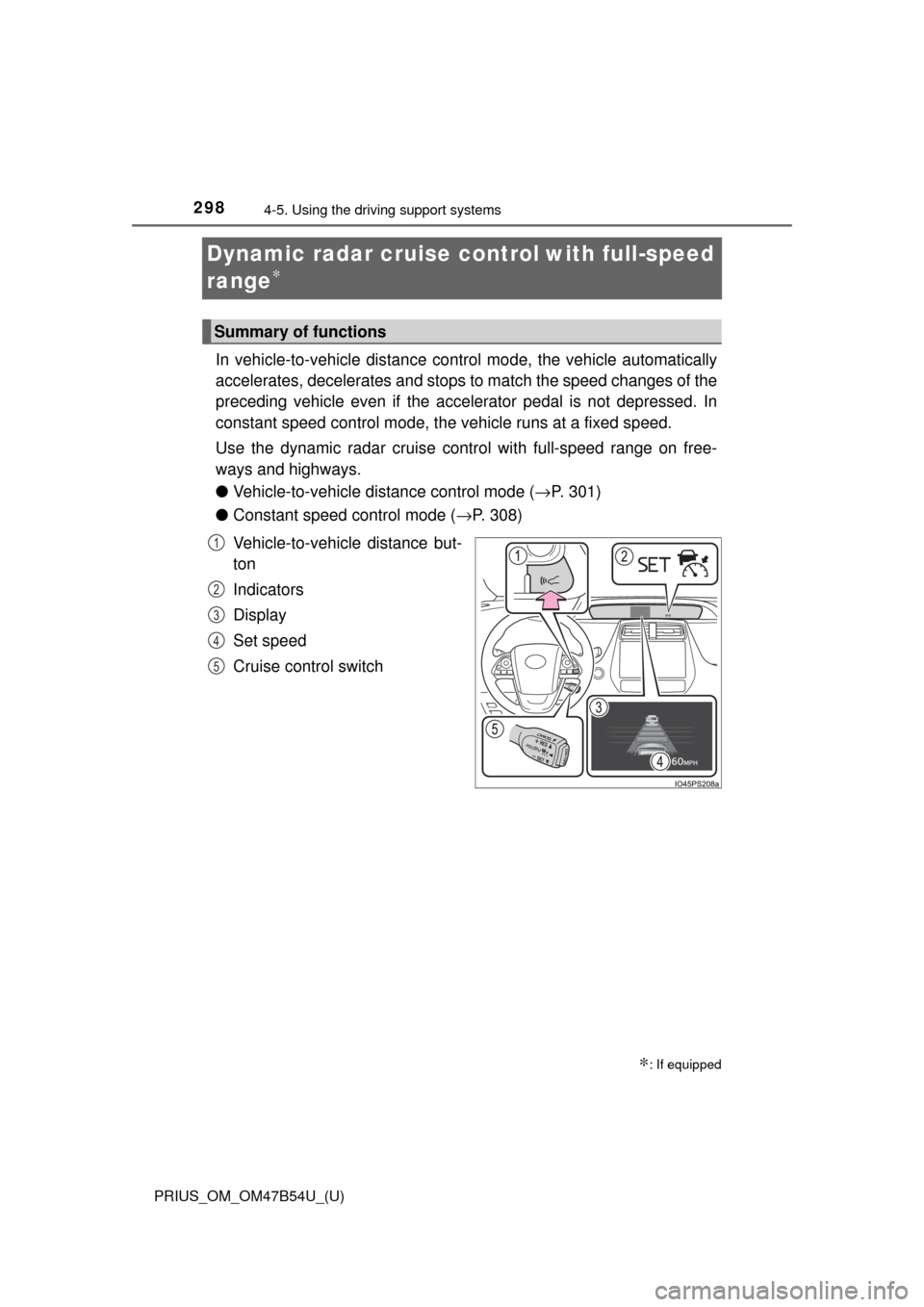
Vehicle-to-vehicle distance but-
ton
Indicators
Display
Set speed
Cruise control switch
∗: If equipped
Summary of functions
1
2
3
4
5
Page 303 of 796
PRIUS_OM_OM47B54U_(U)
3034-5. Using the driving support systems
4
Driving
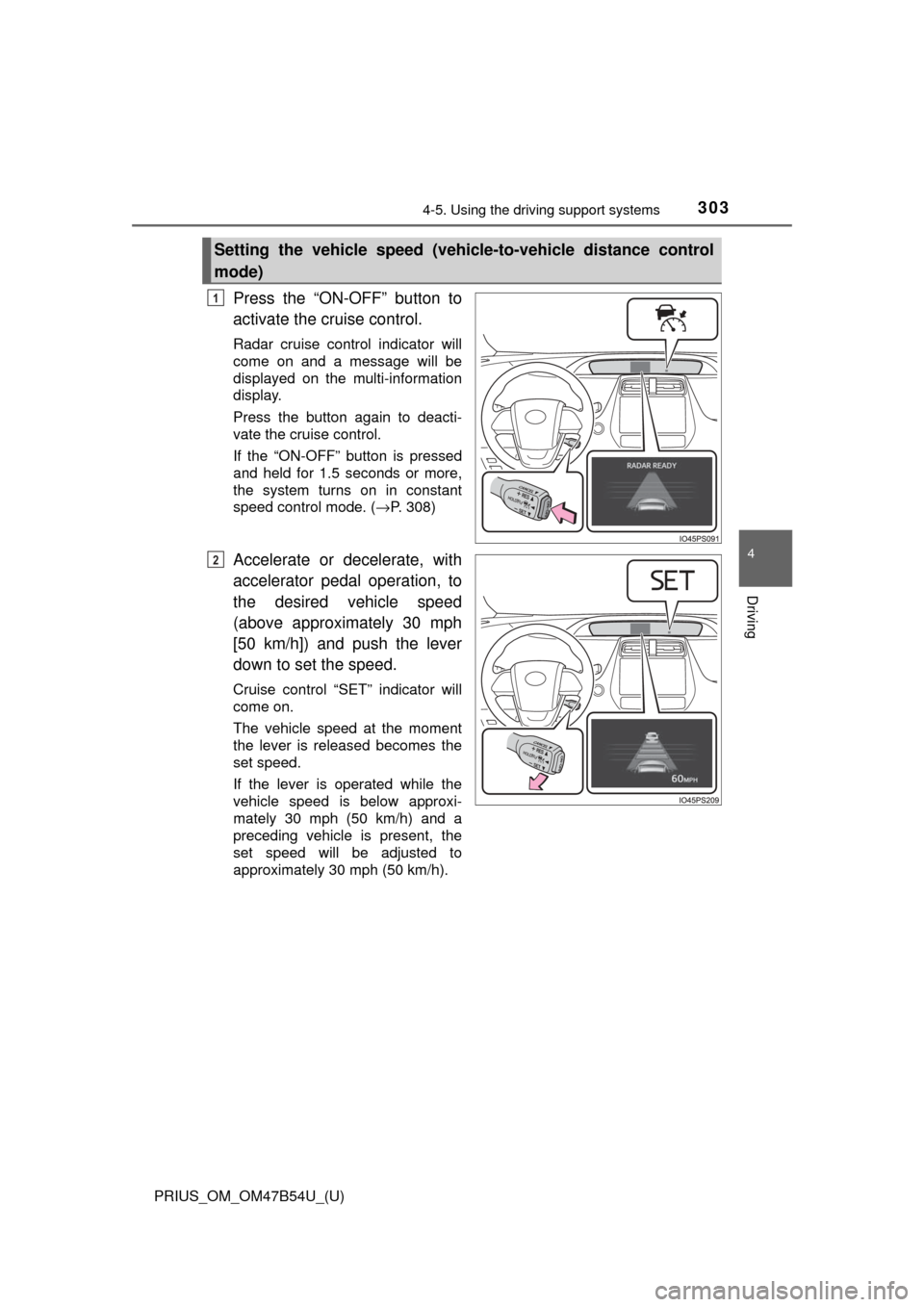
Press the “ON-OFF” button to
activate the cruise control.
Radar cruise control indicator will
come on and a message will be
displayed on the multi-information
display.
Press the button again to deacti-
vate the cruise control.
If the “ON-OFF” button is pressed
and held for 1.5 seconds or more,
the system turns on in constant
speed control mode. ( →P. 308)
Accelerate or decelerate, with
accelerator pedal operation, to
the desired vehicle speed
(above approximately 30 mph
[50 km/h]) and push the lever
down to set the speed.
Cruise control “SET” indicator will
come on.
The vehicle speed at the moment
the lever is released becomes the
set speed.
If the lever is operated while the
vehicle speed is below approxi-
mately 30 mph (50 km/h) and a
preceding vehicle is present, the
set speed will be adjusted to
approximately 30 mph (50 km/h).
Setting the vehicle speed (vehicle-to-vehicle distance control
mode)
1
2
Page 304 of 796
304
PRIUS_OM_OM47B54U_(U)
4-5. Using the driving support systems
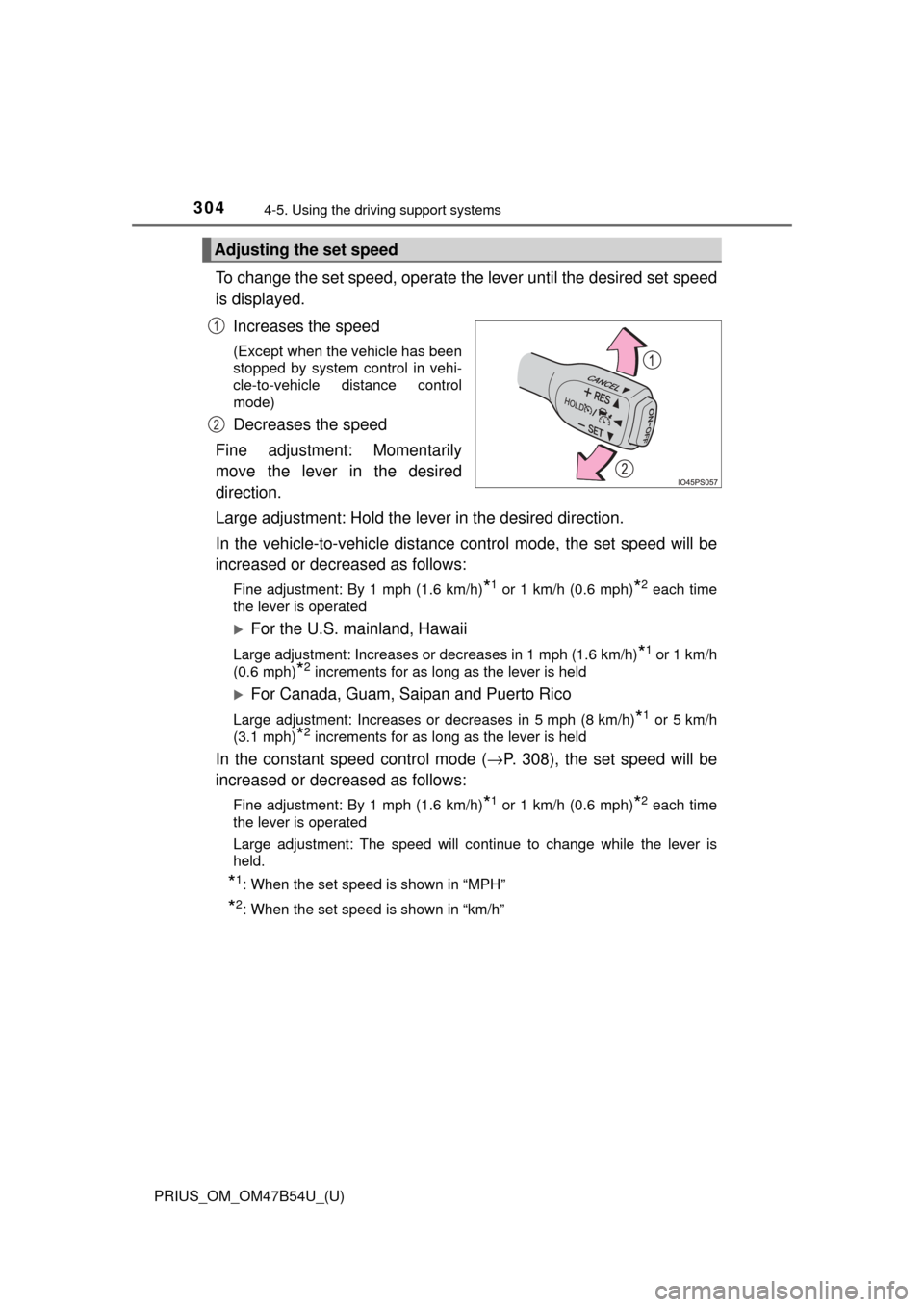
To change the set speed, operate the lever until the desired set speed
is displayed.
Increases the speed
(Except when the vehicle has been
stopped by system control in vehi-
cle-to-vehicle distance control
mode)
Decreases the speed
Fine adjustment: Momentarily
move the lever in the desired
direction.
Large adjustment: Hold the lever in the desired direction.
In the vehicle-to-vehicle distance control mode, the set speed will be
increased or decreased as follows:
Fine adjustment: By 1 mph (1.6 km/h)*1 or 1 km/h (0.6 mph)*2 each time
the lever is operated
For the U.S. mainland, Hawaii
Large adjustment: Increases or decreases in 1 mph (1.6 km/h)*1 or 1 km/h
(0.6 mph)
*2 increments for as long as the lever is held
For Canada, Guam, Saipan and Puerto Rico
Large adjustment: Increases or decreases in 5 mph (8 km/h)*1 or 5 km/h
(3.1 mph)
*2 increments for as long as the lever is held
In the constant speed control mode ( →P. 308), the set speed will be
increased or decreased as follows:
Fine adjustment: By 1 mph (1.6 km/h)*1 or 1 km/h (0.6 mph)*2 each time
the lever is operated
Large adjustment: The speed will continue to change while the lever is
held.
*1: When the set speed is shown in “MPH”
*2: When the set speed is shown in “km/h”
Adjusting the set speed
1
2
Page 305 of 796
PRIUS_OM_OM47B54U_(U)
3054-5. Using the driving support systems
4
Driving
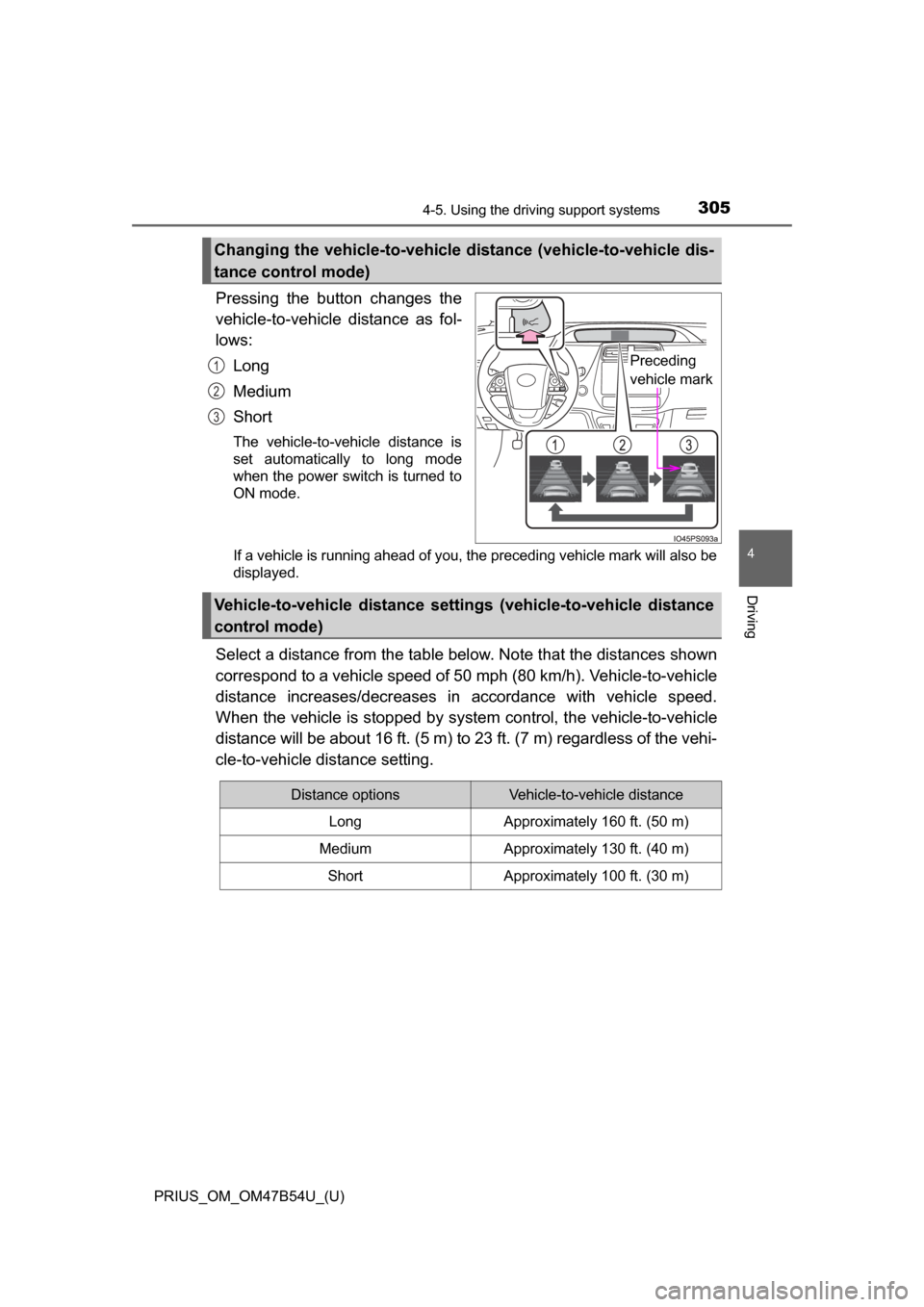
Pressing the button changes the
vehicle-to-vehicle distance as fol-
lows:Long
Medium
Short
The vehicle-to-vehicle distance is
set automatically to long mode
when the power switch is turned to
ON mode.
If a vehicle is running ahead of you, the preceding vehicle mark will also be
displayed.
Select a distance from the table bel ow. Note that the distances shown
correspond to a vehicle speed of 50 mph (80 km/h). Vehicle-to-vehicle
distance increases/decreases in accordance with vehicle speed.
When the vehicle is stopped by system control, the vehicle-to-vehicle
distance will be about 16 ft. (5 m) to 23 ft. (7 m) regardless of the vehi-
cle-to-vehicle distance setting.
Changing the vehicle-to-vehicle di stance (vehicle-to-vehicle dis-
tance control mode)
Preceding
vehicle mark1
2
3
Vehicle-to-vehicle distance settings (vehicle-to-vehicle distance
control mode)
Distance optionsVehicle-to-vehicle distance
LongApproximately 160 ft. (50 m)
MediumApproximately 130 ft. (40 m)
ShortApproximately 100 ft. (30 m)
Page 307 of 796
PRIUS_OM_OM47B54U_(U)
3074-5. Using the driving support systems
4
Driving
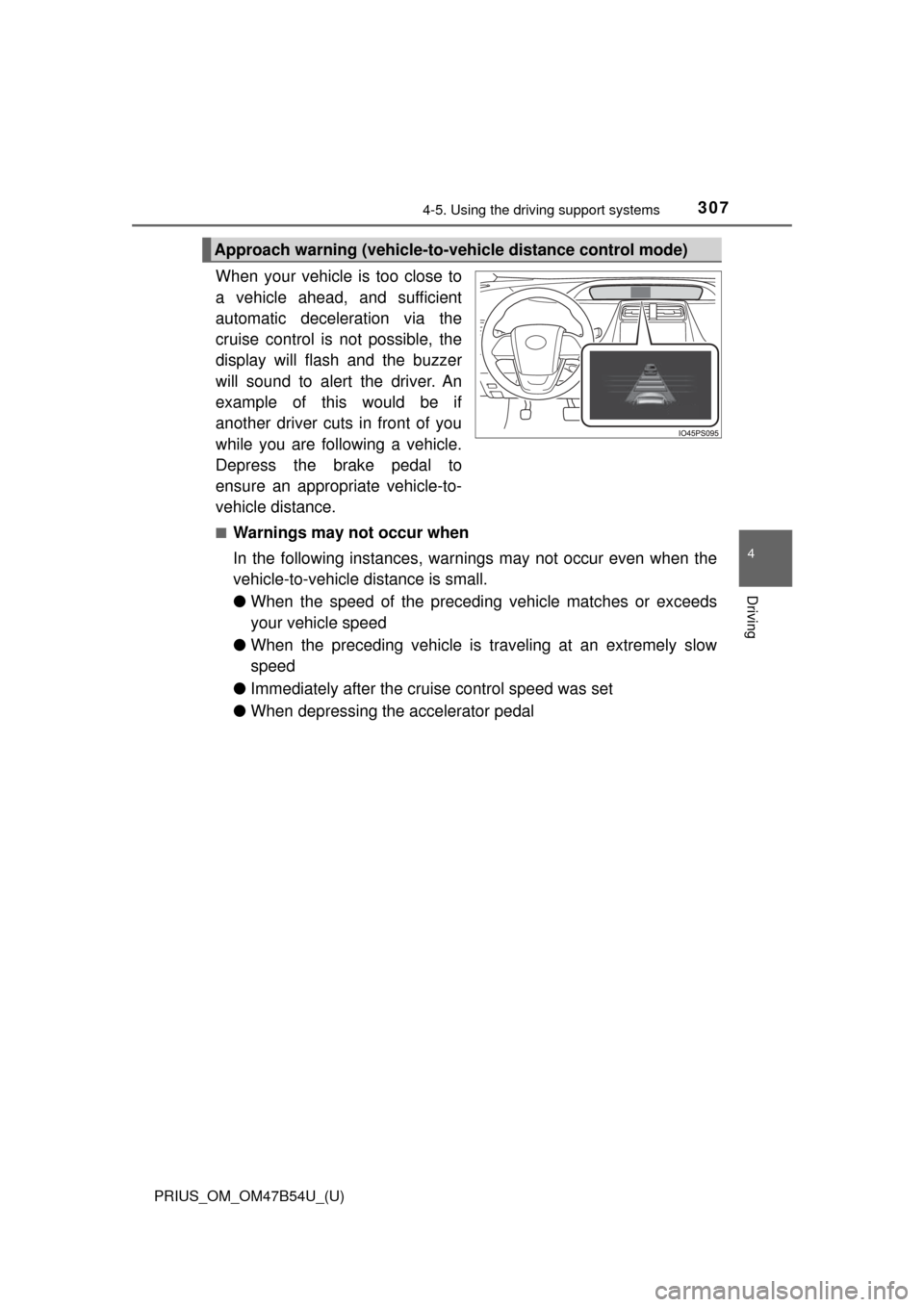
When your vehicle is too close to
a vehicle ahead, and sufficient
automatic deceleration via the
cruise control is not possible, the
display will flash and the buzzer
will sound to alert the driver. An
example of this would be if
another driver cuts in front of you
while you are following a vehicle.
Depress the brake pedal to
ensure an appropriate vehicle-to-
vehicle distance.
■Warnings may not occur when
In the following instances, warnings may not occur even when the
vehicle-to-vehicle distance is small.
●When the speed of the preceding vehicle matches or exceeds
your vehicle speed
● When the preceding vehicle is traveling at an extremely slow
speed
● Immediately after the cruise control speed was set
● When depressing the accelerator pedal
Approach warning (vehicle-to-vehicle distance control mode)
Page 310 of 796
310
PRIUS_OM_OM47B54U_(U)
4-5. Using the driving support systems
■Automatic cancelation of co nstant speed control mode
Constant speed control mode is automatically canceled in the following situa-
tions:
● Actual vehicle speed is more than approximately 10 mph (16 km/h) below
the set vehicle speed.
● Actual vehicle speed falls below approximately 25 mph (40 km/h).
● VSC is activated.
● TRAC is activated for a period of time.
● When the VSC or TRAC system is turned off by pressing the VSC OFF
switch.
● Pre-collision braking is activated.
● Intelligent Clearance Sonar is operated. (if equipped)
If constant speed control mode is automatically canceled for any other rea-
son, there may be a malfunction in the system. Contact your Toyota dealer.
■ Warning messages and buzzers for dy namic radar cruise control with
full-speed range
Warning messages and buzzers are used to indicate a system malfunction or
to inform the driver of the need for caution while driving. If a warning message
is shown on the multi-information display, read the message and follow the
instructions.
■ When the sensor may not be correctly detecting the vehicle ahead
In the case of the following and depending on the conditions, operate the
brake pedal when deceleration of the system is insufficient or operate the
accelerator pedal when acceleration is required.
As the sensor may not be able to correctly detect these types of vehicles, the
approach warning ( →P. 307) may not be activated.
● Vehicles that cut in suddenly
● Vehicles traveling at low speeds
● Vehicles that are not moving in the same lane
Page 316 of 796
316
PRIUS_OM_OM47B54U_(U)
4-5. Using the driving support systems
■Cruise control can be set when
●The shift position is in D.
● Vehicle speed is above approximately 25 mph (40 km/h).
■ Accelerating after setting the vehicle speed
●The vehicle can be accelerated by operating accelerator pedal. After accel-
erating, the set speed resumes.
● Even without canceling the cruise control, the set speed can be increased
by first accelerating the vehicle to the desired speed and then pushing the
lever down to set the new speed.
■ Automatic cancelation of cruise control
Cruise control is automatically canceled in any of the following situati\
ons.
●Actual vehicle speed falls more than approximately 10 mph (16 km/h) below
the set speed.
At this time, the memorized set speed is not retained.
● Actual vehicle speed is below approximately 25 mph (40km/h).
● VSC is activated.
● TRAC is activated for a period of time.
● When the VSC or TRAC system is turned off by pressing the VSC OFF
switch.
● Intelligent Clearance Sonar is operated. (if equipped)
■ If “Check Cruise Control System Visi t Your Dealer” is displayed on the
multi-information display
Press the “ON-OFF” button once to deactivate the system, and then press
the button again to reactivate the system.
If the cruise control speed cannot be set or if the cruise control cancels imme-
diately after being activated, there may be a malfunction in the cruise control
system. Have the vehicle inspected by your Toyota dealer.