display TOYOTA PRIUS 2017 4.G Owners Manual
[x] Cancel search | Manufacturer: TOYOTA, Model Year: 2017, Model line: PRIUS, Model: TOYOTA PRIUS 2017 4.GPages: 796, PDF Size: 20.13 MB
Page 365 of 796
PRIUS_OM_OM47B54U_(U)
3654-5. Using the driving support systems
4
Driving
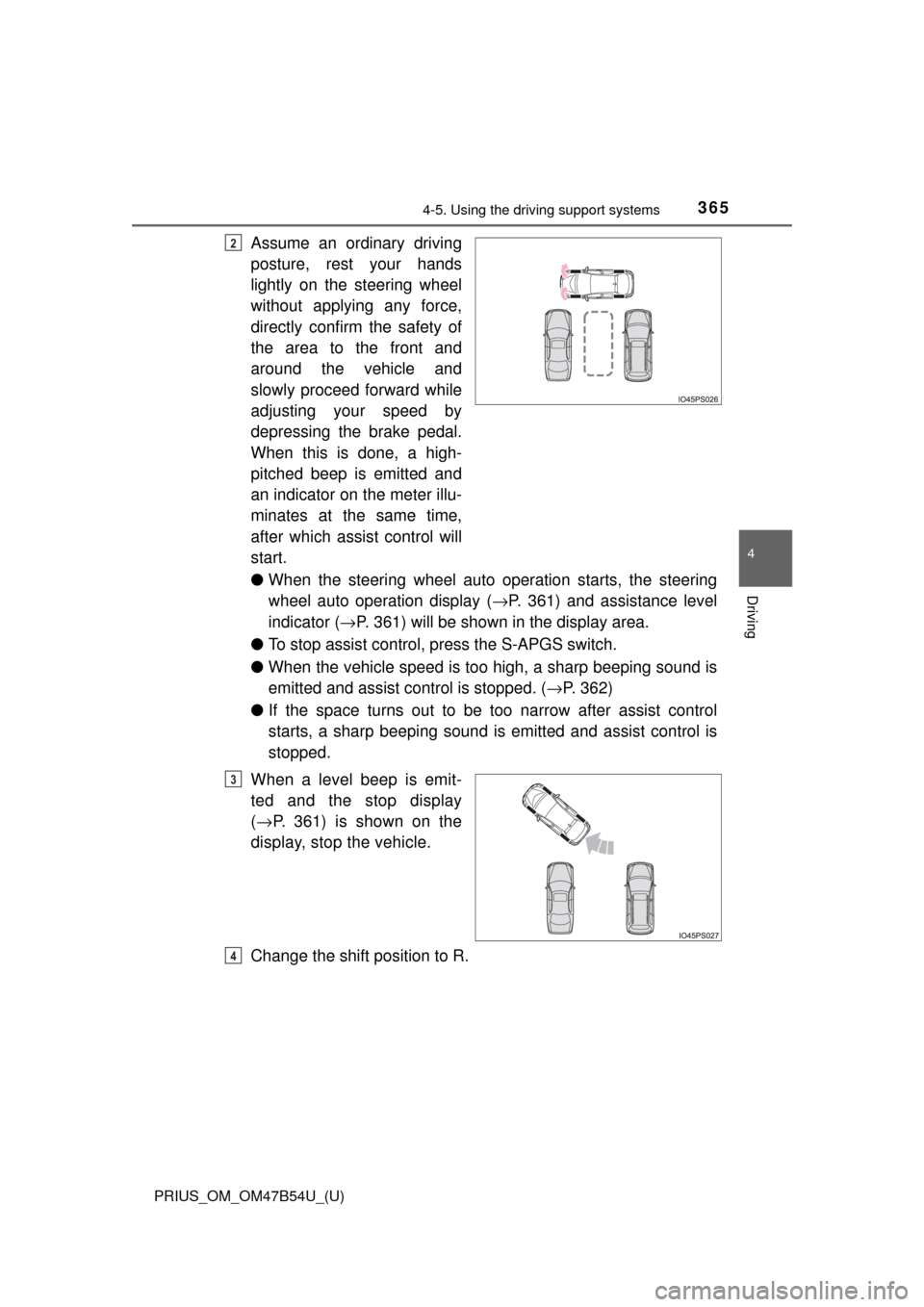
Assume an ordinary driving
posture, rest your hands
lightly on the steering wheel
without applying any force,
directly confirm the safety of
the area to the front and
around the vehicle and
slowly proceed forward while
adjusting your speed by
depressing the brake pedal.
When this is done, a high-
pitched beep is emitted and
an indicator on the meter illu-
minates at the same time,
after which assist control will
start.
●When the steering wheel auto operation starts, the steering
wheel auto operation display ( →P. 361) and assistance level
indicator ( →P. 361) will be shown in the display area.
● To stop assist control, press the S-APGS switch.
● When the vehicle speed is to o high, a sharp beeping sound is
emitted and assist co ntrol is stopped. (→P. 362)
● If the space turns out to be to o narrow after assist control
starts, a sharp beeping sound is emitted and assist control is
stopped.
When a level beep is emit-
ted and the stop display
( → P. 361) is shown on the
display, stop the vehicle.
Change the shift position to R.2
3
4
Page 366 of 796
366
PRIUS_OM_OM47B54U_(U)
4-5. Using the driving support systems
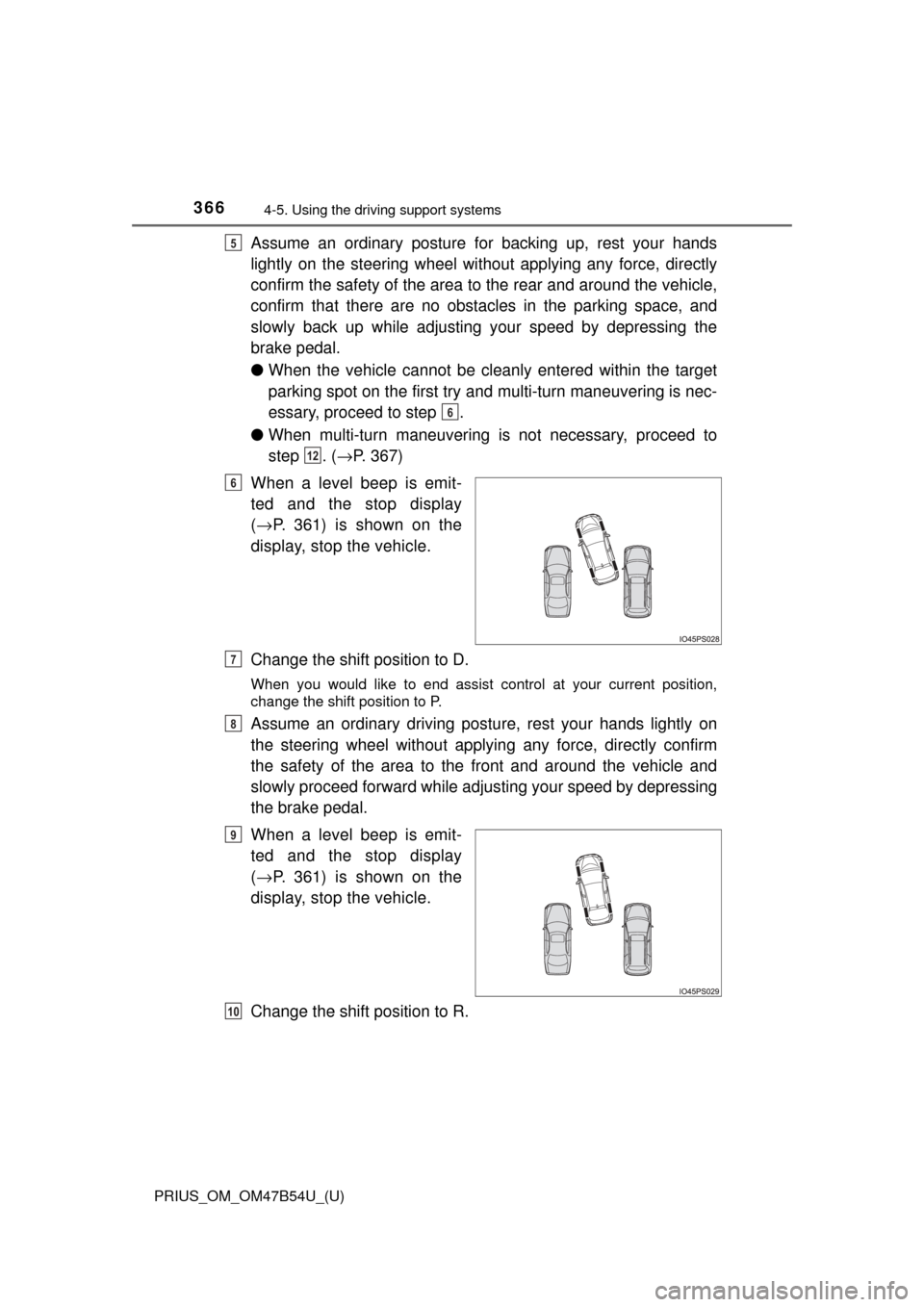
Assume an ordinary posture for backing up, rest your hands
lightly on the steering wheel wi thout applying any force, directly
confirm the safety of the area to the rear and around the vehicle,
confirm that there are no obst acles in the parking space, and
slowly back up while adjusting your speed by depressing the
brake pedal.
● When the vehicle cannot be cleanly entered within the target
parking spot on the first try and multi-turn maneuvering is nec-
essary, proceed to step .
● When multi-turn maneuvering is not necessary, proceed to
step . (→ P. 367)
When a level beep is emit-
ted and the stop display
( → P. 361) is shown on the
display, stop the vehicle.
Change the shift position to D.
When you would like to end assist control at your current position,
change the shift position to P.
Assume an ordinary driving postu re, rest your hands lightly on
the steering wheel without applying any force, directly confirm
the safety of the area to the front and around the vehicle and
slowly proceed forward while adjus ting your speed by depressing
the brake pedal.
When a level beep is emit-
ted and the stop display
( → P. 361) is shown on the
display, stop the vehicle.
Change the shift position to R.
5
6
12
6
7
8
9
10
Page 367 of 796
PRIUS_OM_OM47B54U_(U)
3674-5. Using the driving support systems
4
Driving
Assume an ordinary posture for backing up, rest your hands
lightly on the steering wheel wi thout applying any force, directly
confirm the safety of the area to the rear and around the vehicle
slowly back up while adjusting your speed by depressing the
brake pedal.
Depending on the condition of the parking space, steps to may
need to be repeated.
When the vehicle is almost entirely within the target parking spot,
a high-pitched beep is emitted and the stop display is shown on
the display ( →P. 361), stop the vehicle.
This completes the back-in parking assist mode.
● For safety, the buzzer sounds slightly before the vehicle is
completely entered within the target parking spot. Further-
more, at that point, system o peration will also finish. Firmly
hold the steering wheel and slowly back up while adjusting
your speed by depressing the brake pedal to reach the desired
parking spot.
● Be sure to back up while checking the area to the front and
rear of the vehicle directly and by using the mirrors.
■Back-in parking assist mode operating conditions
●In order to operate the function correctly, drive slowly (at a speed at which
the vehicle can be quickly stopped).
● In order to operate the function correctly, drive slowly (at a speed at which
the vehicle can be quickly stopped). Come to a full stop so that the center of
the parking space is nearly perpendicular to the vehicle, and then operate
the S-APGS switch.
● The function cannot be used when the vehicle speed is approximately
19 mph (30 km/h) or higher.
● The front side sensors and rear side sensors are used to detect parked
vehicles and determine the parking spot. Therefore, when detection is not
possible ( →P. 391), guidance is not issued.
● If there are no parked vehicles, the parking spot cannot be determined.
Therefore, the back-in parking assist mode cannot be operated.
● If unable to detect the environment surrounding the parking space, the
back-in parking assist mode may not be able to operate.
11
611
12
Page 370 of 796
370
PRIUS_OM_OM47B54U_(U)
4-5. Using the driving support systems
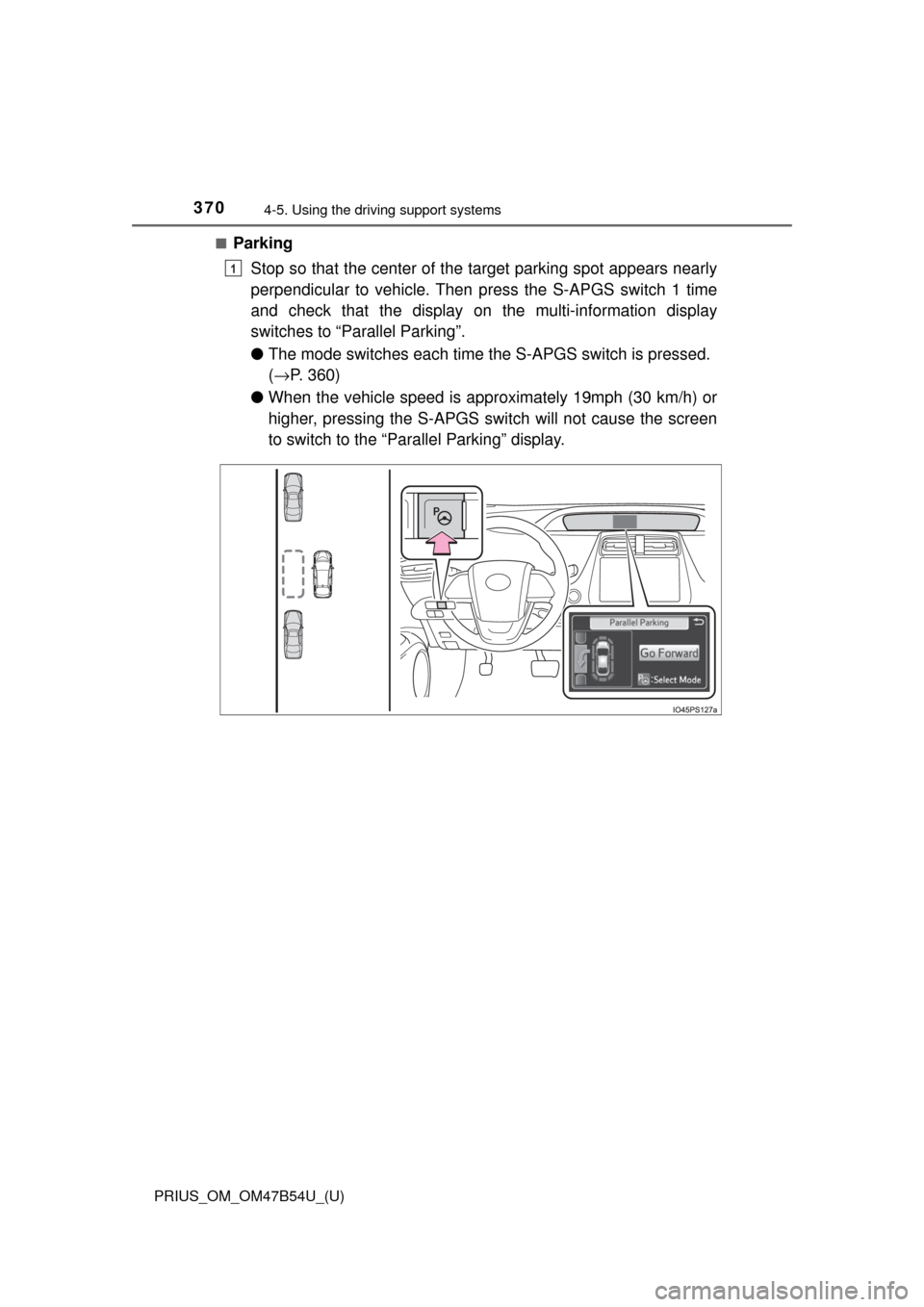
■Parking
Stop so that the center of the target parking spot appears nearly
perpendicular to vehicle. Then press the S-APGS switch 1 time
and check that the display on the multi-information display
switches to “Par allel Parking”.
● The mode switches each time t he S-APGS switch is pressed.
( → P. 360)
● When the vehicle speed is appr oximately 19mph (30 km/h) or
higher, pressing the S-APGS swit ch will not cause the screen
to switch to the “Parallel Parking” display.
1
Page 372 of 796
372
PRIUS_OM_OM47B54U_(U)
4-5. Using the driving support systems
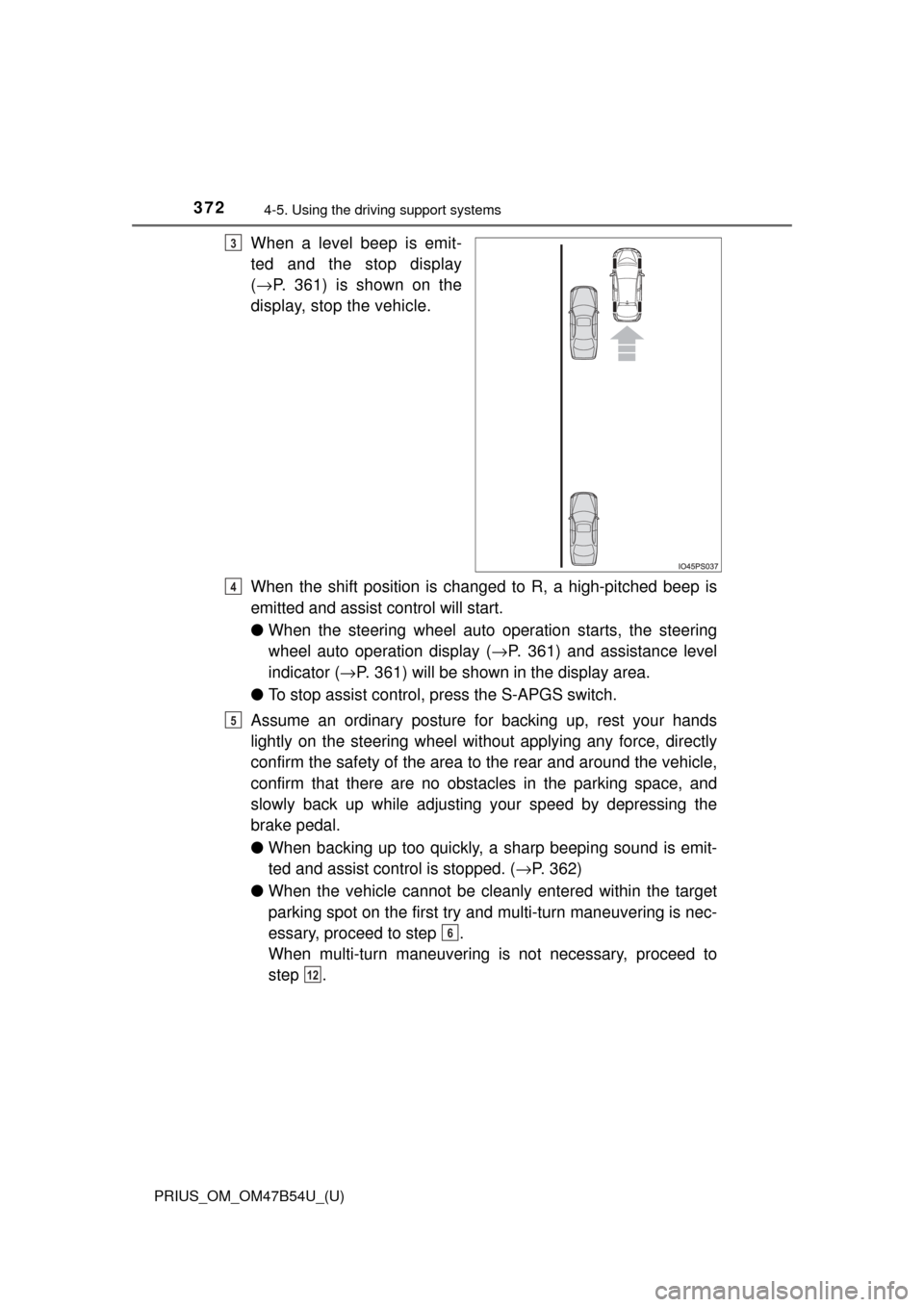
When a level beep is emit-
ted and the stop display
(→ P. 361) is shown on the
display, stop the vehicle.
When the shift position is changed to R, a high-pitched beep is
emitted and assist control will start.
● When the steering wheel auto operation starts, the steering
wheel auto operation display ( →P. 361) and assistance level
indicator ( →P. 361) will be shown in the display area.
● To stop assist control, press the S-APGS switch.
Assume an ordinary posture for backing up, rest your hands
lightly on the steering wheel wi thout applying any force, directly
confirm the safety of the area to the rear and around the vehicle,
confirm that there are no obst acles in the parking space, and
slowly back up while adjusting your speed by depressing the
brake pedal.
● When backing up too quickly, a sharp beeping sound is emit-
ted and assist control is stopped. ( →P. 362)
● When the vehicle cannot be cleanly entered within the target
parking spot on the first try and multi-turn maneuvering is nec-
essary, proceed to step .
When multi-turn maneuvering is not necessary, proceed to
step .3
4
5
6
12
Page 373 of 796
PRIUS_OM_OM47B54U_(U)
3734-5. Using the driving support systems
4
Driving
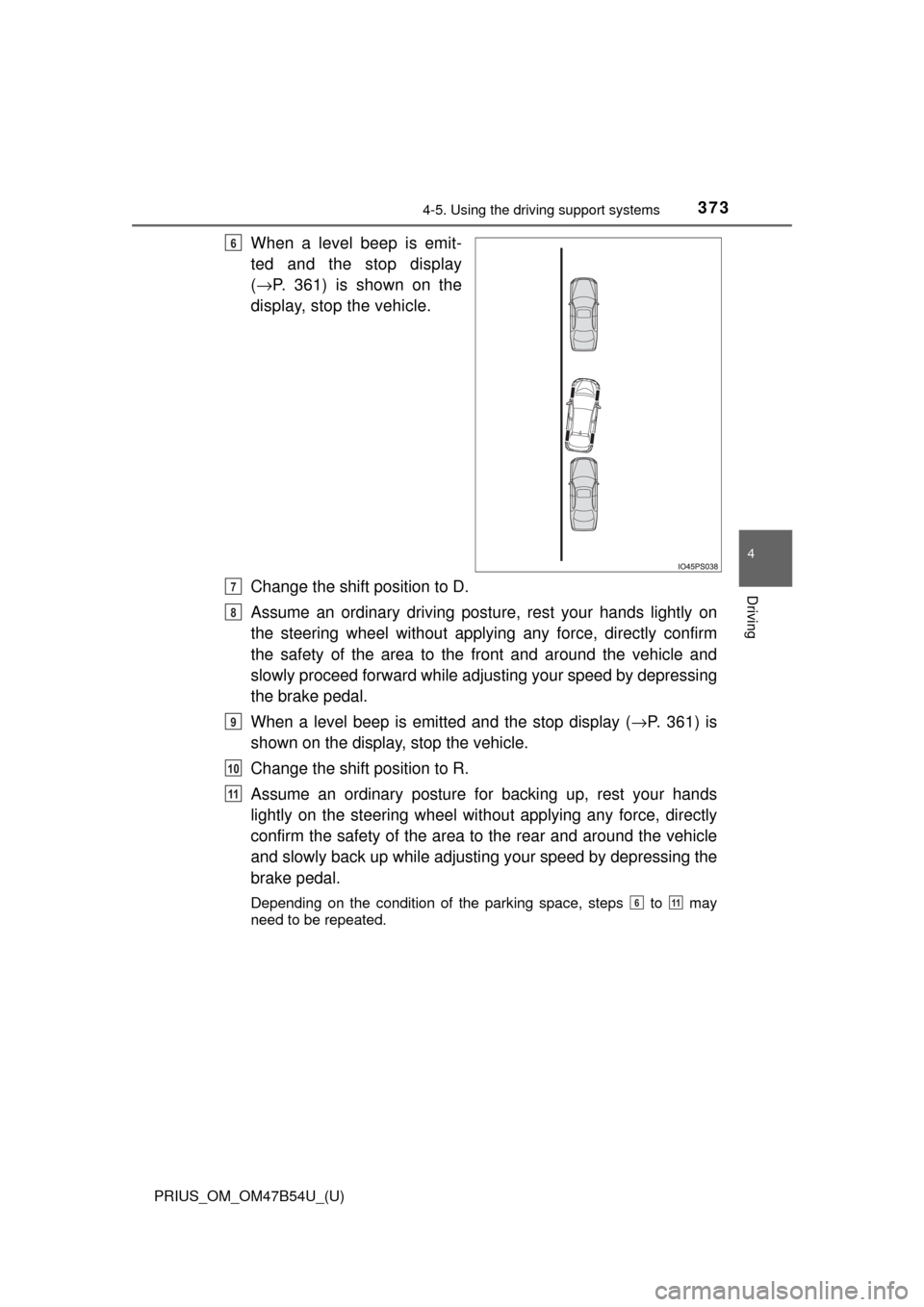
When a level beep is emit-
ted and the stop display
(→ P. 361) is shown on the
display, stop the vehicle.
Change the shift position to D.
Assume an ordinary driving postu re, rest your hands lightly on
the steering wheel without applying any force, directly confirm
the safety of the area to the front and around the vehicle and
slowly proceed forward while adjus ting your speed by depressing
the brake pedal.
When a level beep is emitted and the stop display ( →P. 361) is
shown on the display, stop the vehicle.
Change the shift position to R.
Assume an ordinary posture for backing up, rest your hands
lightly on the steering wheel wi thout applying any force, directly
confirm the safety of the area to the rear and around the vehicle
and slowly back up while adjusti ng your speed by depressing the
brake pedal.
Depending on the condition of the parking space, steps to may
need to be repeated.
6
7
8
9
10
11
611
Page 374 of 796
374
PRIUS_OM_OM47B54U_(U)
4-5. Using the driving support systems
When the vehicle is almost entirely within the target parking spot,
a high-pitched beep is emitted and the stop display is shown on
the display, stop the vehicle.
This completes the parallel parking assist mode.
● After stopping, feel free to maneuver the vehicle to reach the
desired parking spot.
● Be sure to back up while checking the area to the front and
rear of the vehicle directly and by using the mirrors.
■Parallel parking assist mode operating conditions
●In order to operate the parallel parking assist mode correctly, drive slowly (at
a speed at which the vehicle can be quickly stopped) parallel to the road (or
shoulder) while maintaining a distance of approximately 3 ft. (1 m) to any
parked vehicles.
● The function cannot be used when the vehicle speed is approximately
19 mph (30 km/h) or higher.
● The front side sensors and rear side sensors are used to detect parked
vehicles and determine the parking spot. Therefore, when detection is not
possible ( →P. 391), guidance is not issued.
● If there are no parked vehicles, the parking spot cannot be determined.
Therefore, the parallel parking assist mode cannot be operated.
● If unable to detect the environment surrounding the parking space, the par-
allel parking assist mode may not be able to operate.
● Guidance will continue until the vehicle speed meets or exceeds approxi-
mately 19 mph (30 km/h) or the function is turned off using the S-APGS
switch.
■ Timing for pressing the S-APGS switch
In the following cases, the assist mode may also operate during the steps
taken to park using the parallel parking assist mode. However, in these
cases, conduct parking procedures according to the information on the multi-
information display.
●In step the S-APGS switch is pressed after already passing over the tar-
get parking spot.
If the vehicle is not stopped in step , pressing the S-APGS switch 1 time
while the vehicle is in motion allows you to select “Parallel Parking” and
proceed directly to step .
● The vehicle is moved up to the position in step without the S-APGS
switch being pressed. Then the S-APGS switch is pressed after having
changed the shift position to R.
12
1
1
2
3
Page 377 of 796
PRIUS_OM_OM47B54U_(U)
3774-5. Using the driving support systems
4
Driving
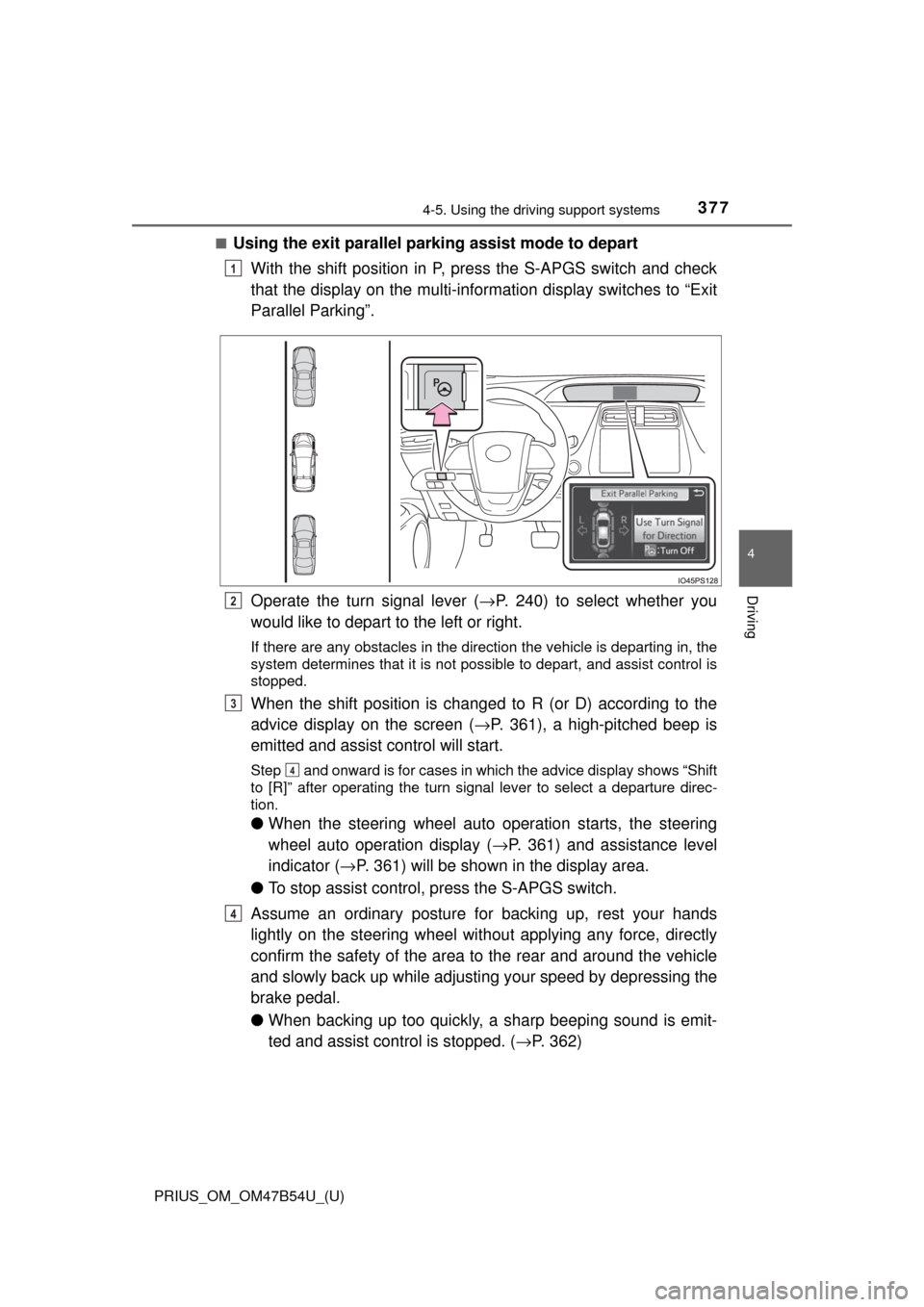
■Using the exit parallel park ing assist mode to depart
With the shift position in P, press the S-APGS switch and check
that the display on the multi-information display switches to “Exit
Parallel Parking”.
Operate the turn signal lever ( →P. 240) to select whether you
would like to depart to the left or right.
If there are any obstacles in the direction the vehicle is departing in, the
system determines that it is not possible to depart, and assist control is
stopped.
When the shift position is changed to R (or D) according to the
advice display on the screen ( →P. 361), a high-pitched beep is
emitted and assist control will start.
Step and onward is for cases in which the advice display shows “Shift
to [R]” after operating the turn signal lever to select a departure direc-
tion.
● When the steering wheel auto operation starts, the steering
wheel auto operation display ( →P. 361) and assistance level
indicator ( →P. 361) will be shown in the display area.
● To stop assist control, press the S-APGS switch.
Assume an ordinary posture for backing up, rest your hands
lightly on the steering wheel wi thout applying any force, directly
confirm the safety of the area to the rear and around the vehicle
and slowly back up while adjusti ng your speed by depressing the
brake pedal.
● When backing up too quickly, a sharp beeping sound is emit-
ted and assist control is stopped. ( →P. 362)
1
2
3
4
4
Page 378 of 796
378
PRIUS_OM_OM47B54U_(U)
4-5. Using the driving support systems
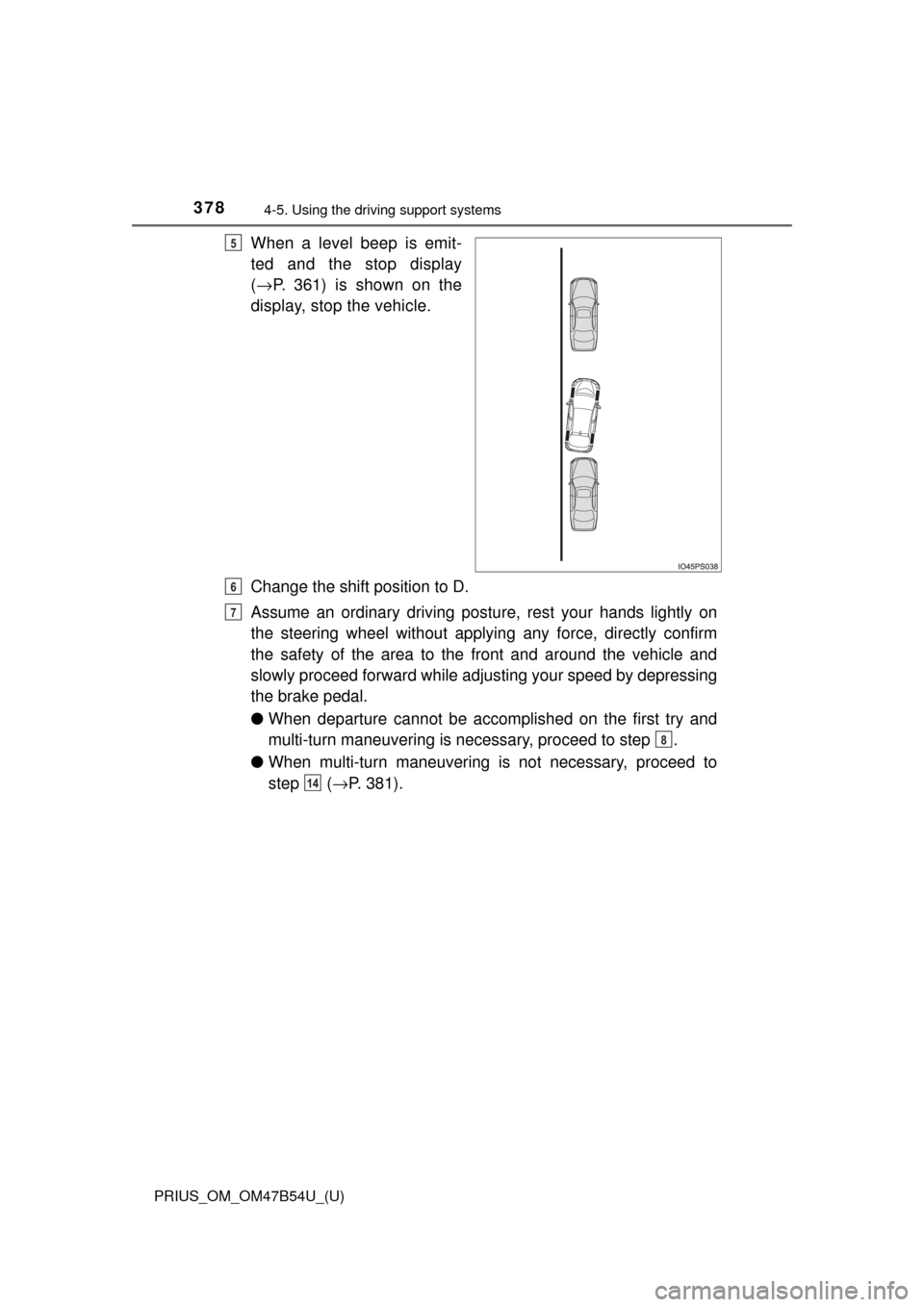
When a level beep is emit-
ted and the stop display
(→ P. 361) is shown on the
display, stop the vehicle.
Change the shift position to D.
Assume an ordinary driving postu re, rest your hands lightly on
the steering wheel without applying any force, directly confirm
the safety of the area to the front and around the vehicle and
slowly proceed forward while adjus ting your speed by depressing
the brake pedal.
● When departure cannot be accomplished on the first try and
multi-turn maneuvering is necessary, proceed to step .
● When multi-turn maneuvering is not necessary, proceed to
step ( →P. 381).5
6
7
8
14
Page 379 of 796
PRIUS_OM_OM47B54U_(U)
3794-5. Using the driving support systems
4
Driving
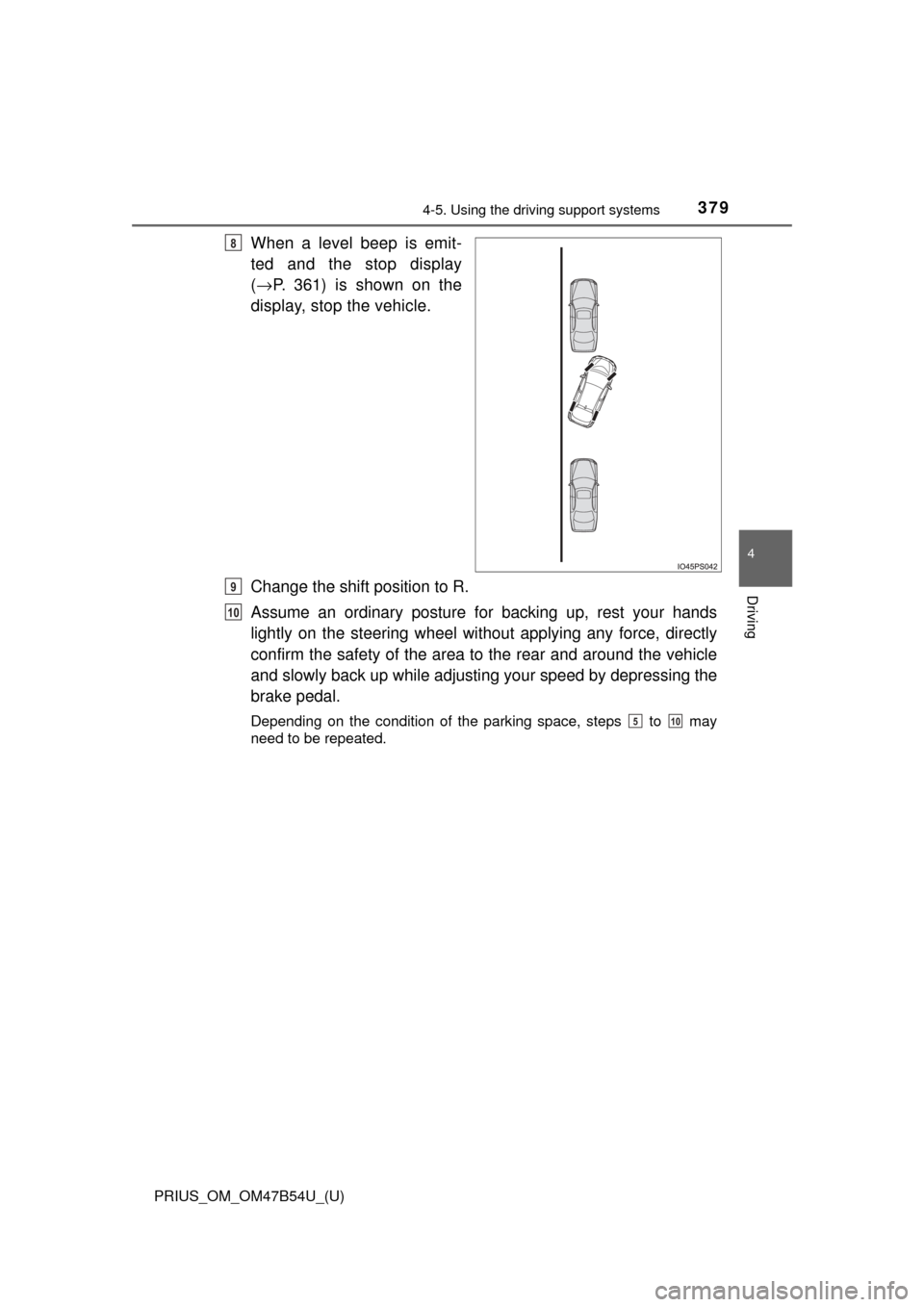
When a level beep is emit-
ted and the stop display
(→ P. 361) is shown on the
display, stop the vehicle.
Change the shift position to R.
Assume an ordinary posture for backing up, rest your hands
lightly on the steering wheel wi thout applying any force, directly
confirm the safety of the area to the rear and around the vehicle
and slowly back up while adjusti ng your speed by depressing the
brake pedal.
Depending on the condition of the parking space, steps to may
need to be repeated.
8
9
10
510