phone TOYOTA PRIUS 2019 Accessories, Audio & Navigation (in English)
[x] Cancel search | Manufacturer: TOYOTA, Model Year: 2019, Model line: PRIUS, Model: TOYOTA PRIUS 2019Pages: 40, PDF Size: 3.97 MB
Page 2 of 40
1
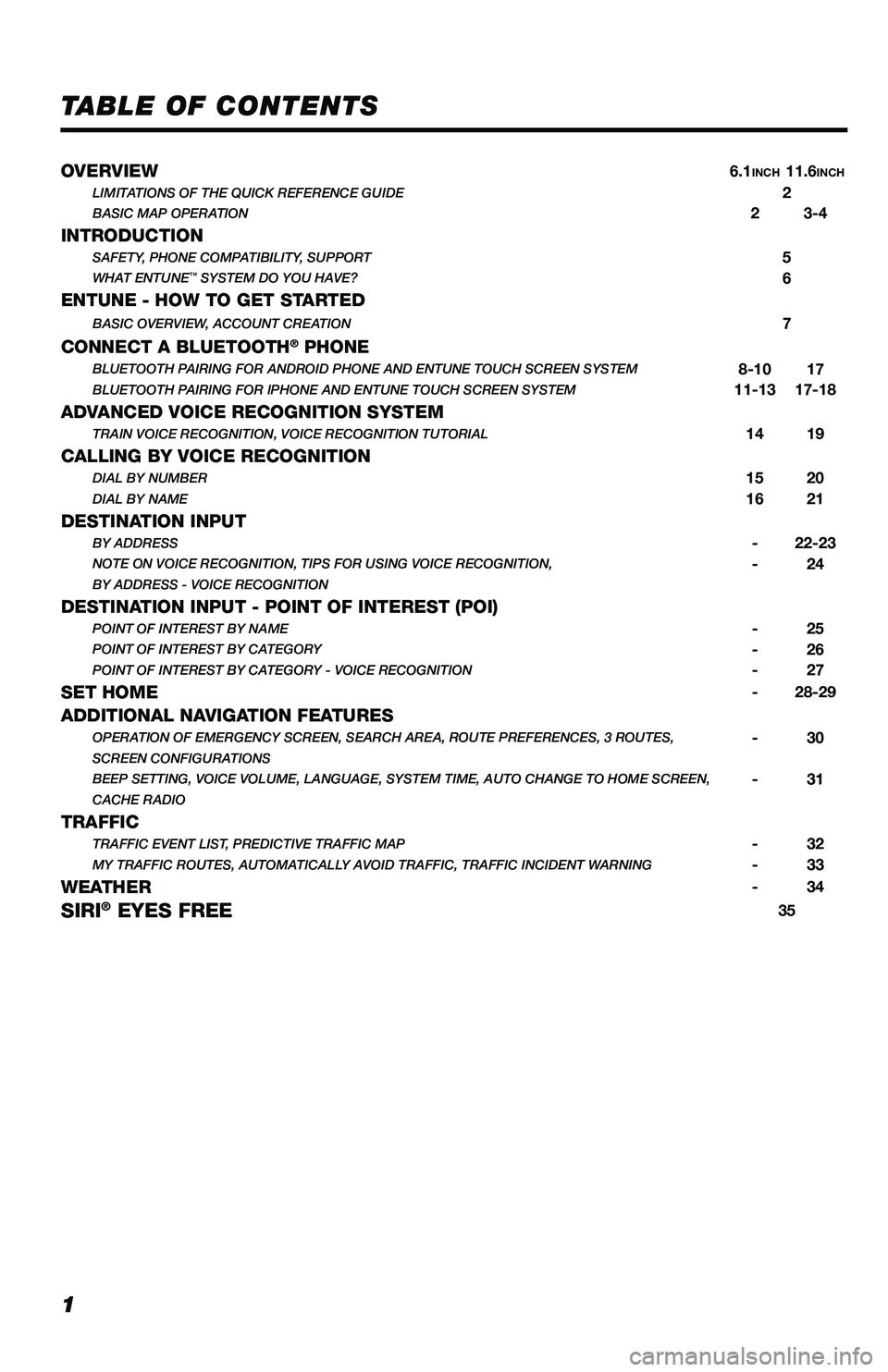
TABLE OF CONTENTS
OVERVIEW6.1INCH11.6INCHLIMITATIONS OF THE QUICK REFERENCE GUIDE2BASIC MAP OPERATION23-4
INTRODUCTIONSAFETY, PHONE COMPATIBILITY, SUPPORT5WHAT ENTUNE™ SYSTEM DO YOU HAVE?6
ENTUNE - HOW TO GET STARTEDBASIC OVERVIEW, ACCOUNT CREATION7
CONNECT A BLUETOOTH® PHONEBLUETOOTH PAIRING FOR ANDROID PHONE AND ENTUNE TOUCH SCREEN SYSTEM8-1017BLUETOOTH PAIRING FOR IPHONE AND ENTUNE TOUCH SCREEN SYSTEM11-1317-18
ADVANCED VOICE RECOGNITION SYSTEMTRAIN VOICE RECOGNITION, VOICE RECOGNITION TUTORIAL1419
CALLING BY VOICE RECOGNITIONDIAL BY NUMBER1520DIAL BY NAME1621
DESTINATION INPUTBY ADDRESS-22-23NOTE ON VOICE RECOGNITION, TIPS FOR USING VOICE RECOGNITION,-24BY ADDRESS - VOICE RECOGNITION
DESTINATION INPUT - POINT OF INTEREST (POI)POINT OF INTEREST BY NAME-25POINT OF INTEREST BY CATEGORY-26POINT OF INTEREST BY CATEGORY - VOICE RECOGNITION-27
SET HOME-28-29
ADDITIONAL NAVIGATION FEATURESOPERATION OF EMERGENCY SCREEN, SEARCH AREA, ROUTE PREFERENCES, 3 ROUTES,-30SCREEN CONFIGURATIONS BEEP SETTING, VOICE VOLUME, LANGUAGE, SYSTEM TIME, AUTO CHANGE TO HOME SCREEN,-31CACHE RADIO
TRAFFICTRAFFIC EVENT LIST, PREDICTIVE TRAFFIC MAP-32MY TRAFFIC ROUTES, AUTOMATICALLY AVOID TRAFFIC, TRAFFIC INCIDENT WARNING-33
WEATHER-34
SIRI® EYES FREE35
116673_MY19_Prius_NavAud_QRG_D6_ML_1031_R1.indd 111/29/18 8:49 PM
Page 4 of 40
3
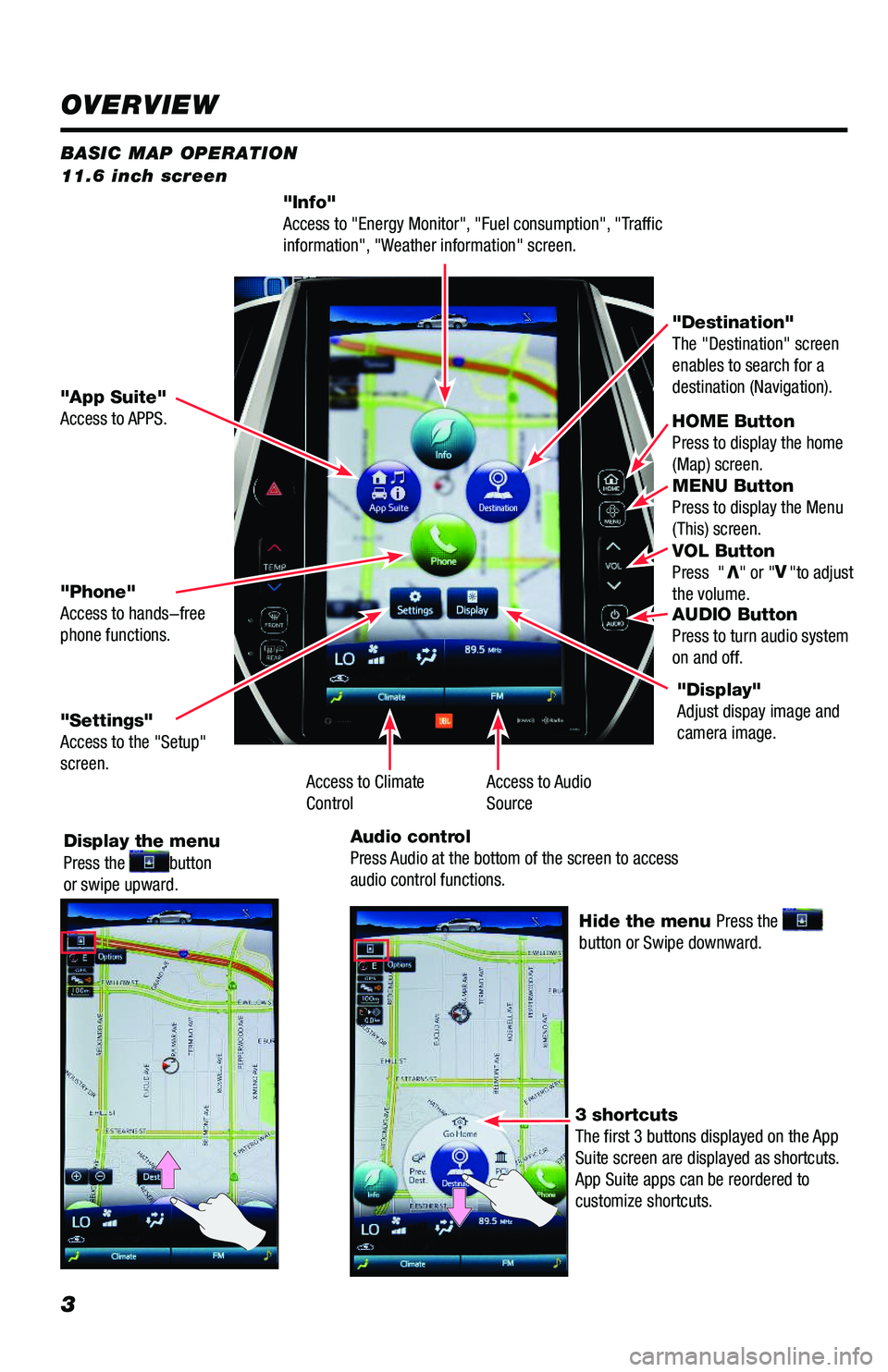
BASIC MAP OPERATION 11.6 inch screen
"Info" Access to "Energy Monitor", "Fuel consumption", "Traffic information", "Weather information" screen.
HOME ButtonPress to display the home (Map) screen. MENU Button Press to display the Menu (This) screen. VOL Button Press "V" or "V"to adjust the volume. AUDIO Button Press to turn audio system on and off.
"App Suite"Access to APPS.
"Destination"The "Destination" screen enables to search for a destination (Navigation).
"Phone"Access to hands-free phone functions.
"Settings" Access to the "Setup" screen.
Display the menu Press the button or swipe upward.
Hide the menu Press the button or Swipe downward.
3 shortcuts The first 3 buttons displayed on the App Suite screen are displayed as shortcuts. App Suite apps can be reordered to customize shortcuts.
"Display"Adjust dispay image and camera image.
Access to Audio SourceAccess to ClimateControl
Audio controlPress Audio at the bottom of the screen to access audio control functions.
OVERVIEW
116673_MY19_Prius_NavAud_QRG_D6_ML_1031_R1.indd 311/29/18 8:49 PM
Page 5 of 40
4
BASIC MAP OPERATION 11.6 inch screen
HOME Button Press to display the home (Map) screen. MENU Button Press to display the Menu (This) screen. VOL Button Press "V" or "V"to adjust the volume. AUDIO Button Press to turn audio system on and off.
"Destination" The "Destination" screen enables to search for a destination (Navigation).
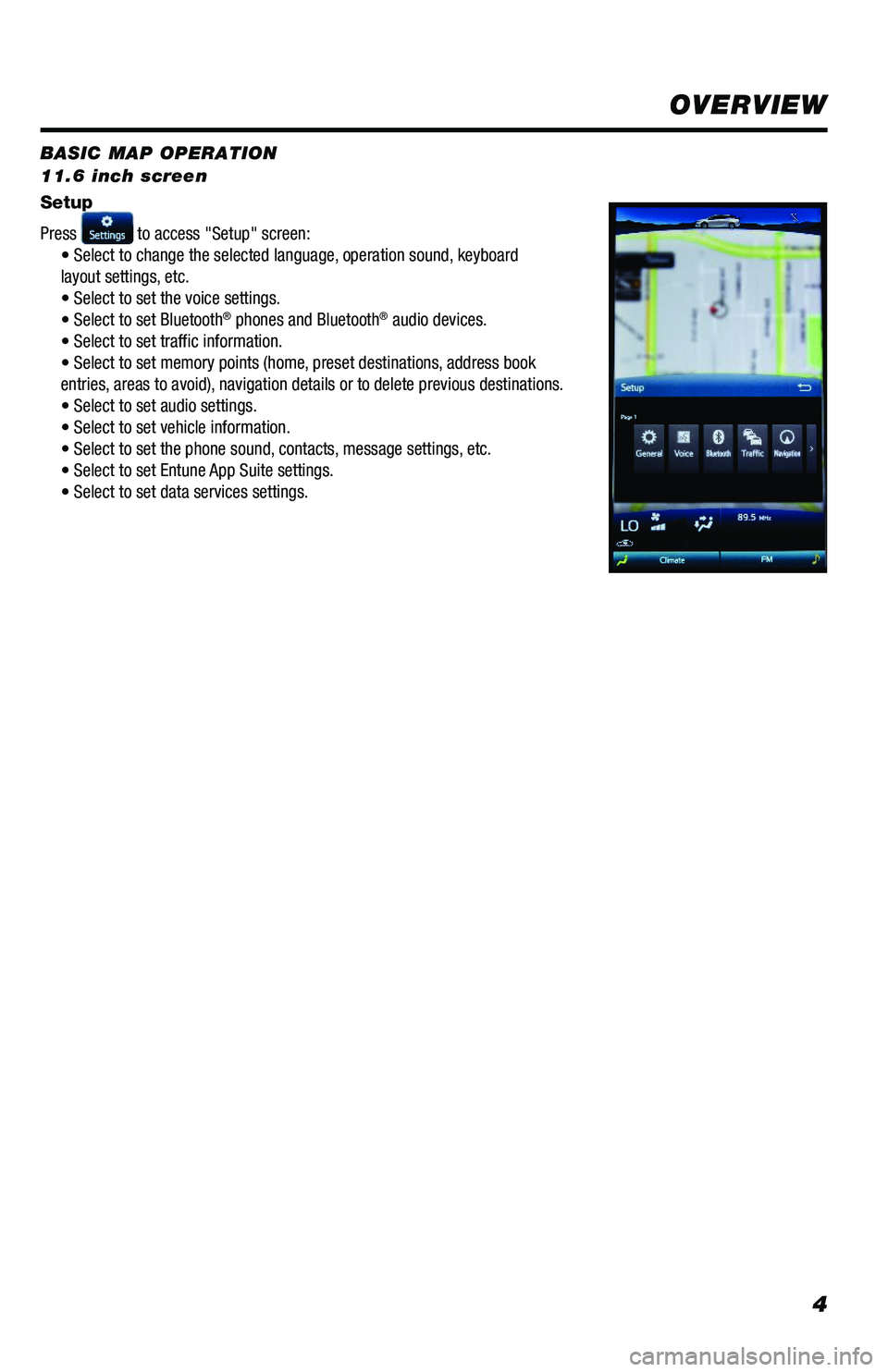
Setup
Press to access "Setup" screen:• Select to change the selected language, operation sound, keyboard layout settings, etc. • Select to set the voice settings.• Select to set Bluetooth® phones and Bluetooth® audio devices. • Select to set traffic information.• Select to set memory points (home, preset destinations, address bookentries, areas to avoid), navigation details or to delete previous destinations.• Select to set audio settings.• Select to set vehicle information.• Select to set the phone sound, contacts, message settings, etc.• Select to set Entune App Suite settings.• Select to set data services settings.
"Display"Adjust dispay image and camera image.
OVERVIEW
116673_MY19_Prius_NavAud_QRG_D6_ML_1031_R1.indd 411/29/18 8:49 PM
Page 6 of 40
5
Check phone compatibility using one of the following methods:
• Visit: www.toyota.com/connect
• Call the Toyota Customer Experience
Center at 1-800-331-4331
Note: You do not need an Entune App Suite compatible phone to use Bluetooth® hands-free,
Bluetooth audio or the navigation system. To connect a Bluetooth Phone, refer to page 9.
PHONE COMPATIBILITY
- INTRODUCTION
STOPPLEASE READ
SAFETY
SUPPORT
Concentrating on the road should always be your first priority while driving. Do not use the
Entune system if it will distract you.
You can find additional support at:
www.toyota.com/entune
or
Call
1-800-331-4331.
Monday – Friday 7:00 AM to 7:00 PM CT
and Saturday 7:00 AM to 4:30 PM CT.
or
See Entune™ Audio tutorials on
https://www.youtube.com/user/ToyotaUSA and search Entune.
116673_MY19_Prius_NavAud_QRG_D6_ML_1031_R1.indd 511/30/18 11:35 AM
Page 7 of 40
6
*Be sure to obey traffic regulations and maintain awareness of road and traffic conditions. Select Entune® App Suite use a large amount of data and you are responsible for all data charges. Apps and services vary by phone and carrier. Not all apps and data services are available at all times and all locations. Apps identified by "™" or "®" are trademarks or registered trademarks of their respective companies and cannot be used without permission. See toyota.com/entune for the latest information regarding apps and services.
- INTRODUCTION
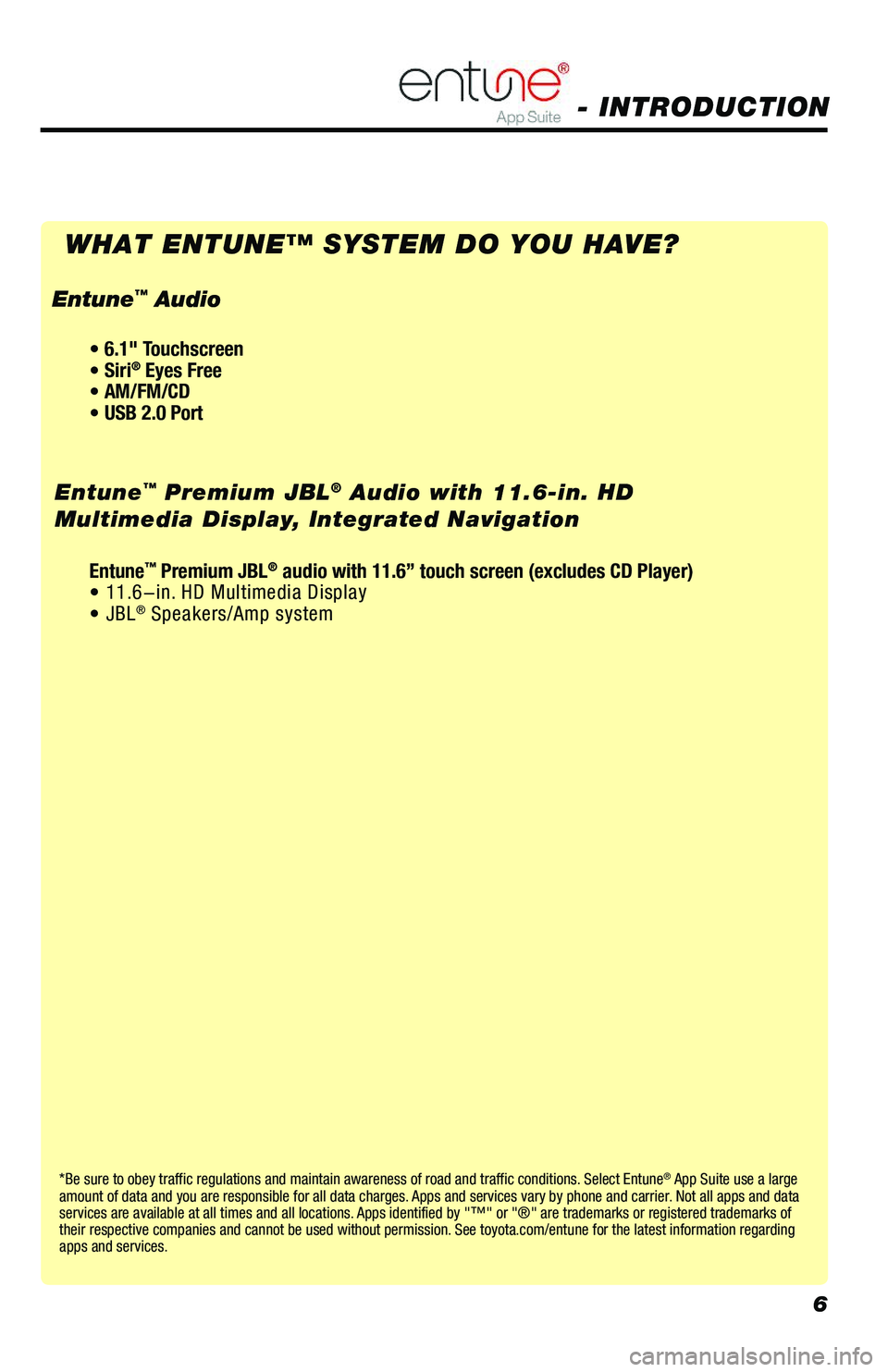
WHAT ENTUNE™ SYSTEM DO YOU HAVE?
Entune™ Premium JBL® Audio with 11.6-in. HD
Multimedia Display, Integrated Navigation
• 6.1" Touchscreen • Siri® Eyes Free• AM/FM/CD• USB 2.0 Port
Entune™ Audio
Entune™ Premium JBL® audio with 11.6” touch screen (excludes CD Player)• 11.6-in. HD Multimedia Display• JBL® Speakers/Amp system
116673_MY19_Prius_NavAud_QRG_D6_ML_1031_R1.indd 611/30/18 11:35 AM
Page 9 of 40
8
CONNECT A BLUETOOTH PHONE (6.1 INCH DISPLAY)
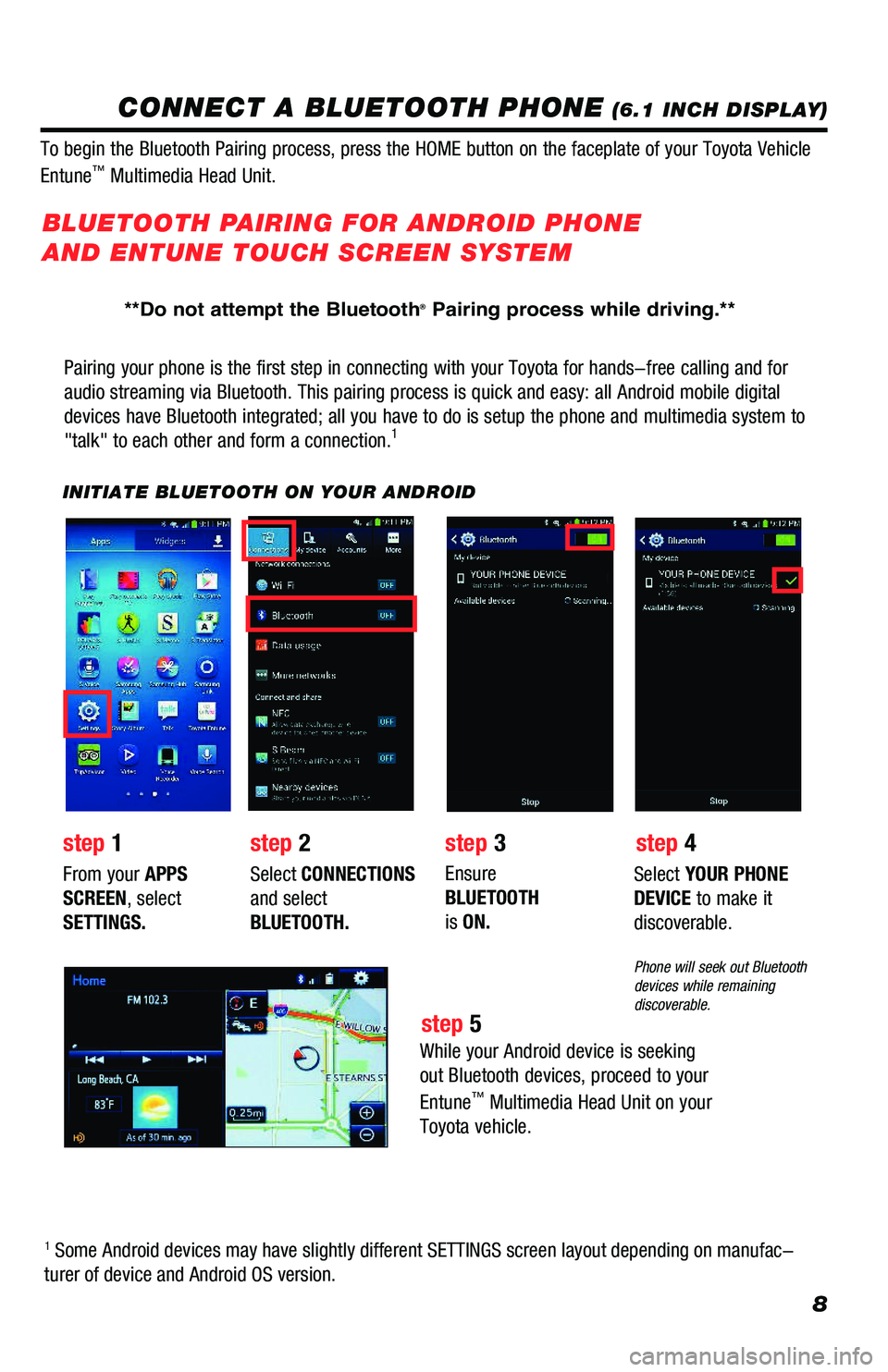
Pairing your phone is the first step in connecting with your Toyota for hands-free calling and for
audio streaming via Bluetooth. This pairing process is quick and easy: all Android mobile digital
devices have Bluetooth integrated; all you have to do is setup the phone and multimedia system to
"talk" to each other and form a connection.1
INITIATE BLUETOOTH ON YOUR ANDROID
step 2step 1step 3
step 5
step 4
From your APPS
SCREEN, select
SETTINGS.
Select CONNECTIONS
and select
BLUETOOTH.
Ensure
BLUETOOTH
is ON.
Select YOUR PHONE
DEVICE to make it
discoverable.
Phone will seek out Bluetooth devices while remaining discoverable.
While your Android device is seeking
out Bluetooth devices, proceed to your
Entune™ Multimedia Head Unit on your
Toyota vehicle.
BLUETOOTH PAIRING FOR ANDROID PHONE
AND ENTUNE TOUCH SCREEN SYSTEM
1 Some Android devices may have slightly different SETTINGS screen layout depending on manufac-
turer of device and Android OS version.
To begin the Bluetooth Pairing process, press the HOME button on the faceplate of your Toyota Vehicle
Entune™ Multimedia Head Unit.
**Do not attempt the Bluetooth® Pairing process while driving.**
116673_MY19_Prius_NavAud_QRG_D6_ML_1031_R1.indd 811/29/18 8:49 PM
Page 10 of 40
9
INITIATE BLUETOOTH ON YOUR ENTUNE MULTIMEDIA HEAD UNIT
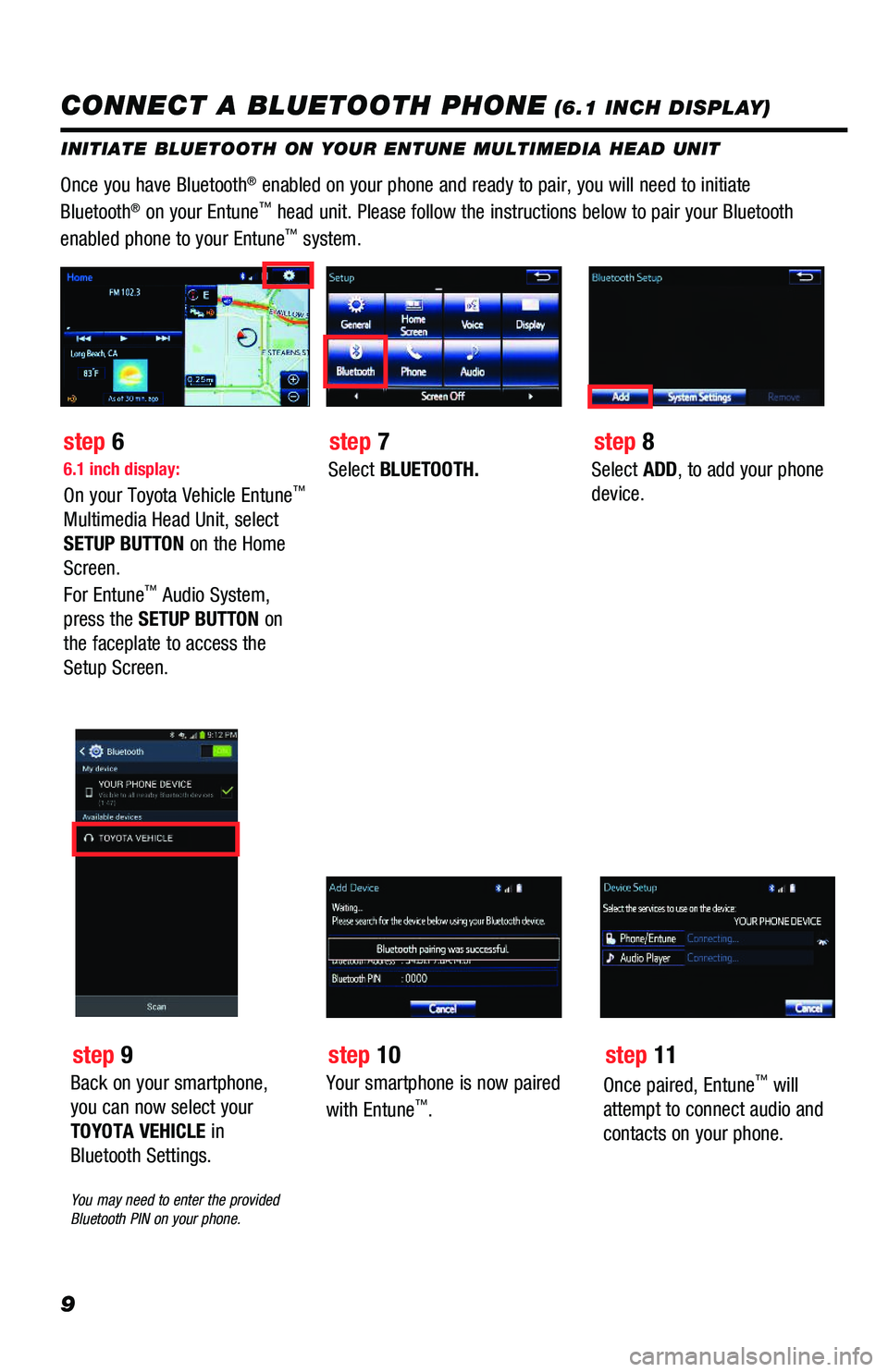
Once you have Bluetooth® enabled on your phone and ready to pair, you will need to initiate
Bluetooth® on your Entune™ head unit. Please follow the instructions below to pair your Bluetooth
enabled phone to your Entune™ system.
6.1 inch display:
On your Toyota Vehicle Entune™
Multimedia Head Unit, select
SETUP BUTTON on the Home
Screen.
For Entune™ Audio System,
press the SETUP BUTTON on
the faceplate to access the
Setup Screen.
Select BLUETOOTH.Select ADD, to add your phone
device.
step 6step 7step 8
CONNECT A BLUETOOTH PHONE (6.1 INCH DISPLAY)
Back on your smartphone,
you can now select your
TOYOTA VEHICLE in
Bluetooth Settings.
You may need to enter the provided Bluetooth PIN on your phone.
step 9
Your smartphone is now paired
with Entune™.
step 10
Once paired, Entune™ will
attempt to connect audio and
contacts on your phone.
step 11
116673_MY19_Prius_NavAud_QRG_D6_ML_1031_R1.indd 911/29/18 8:49 PM
Page 11 of 40
10
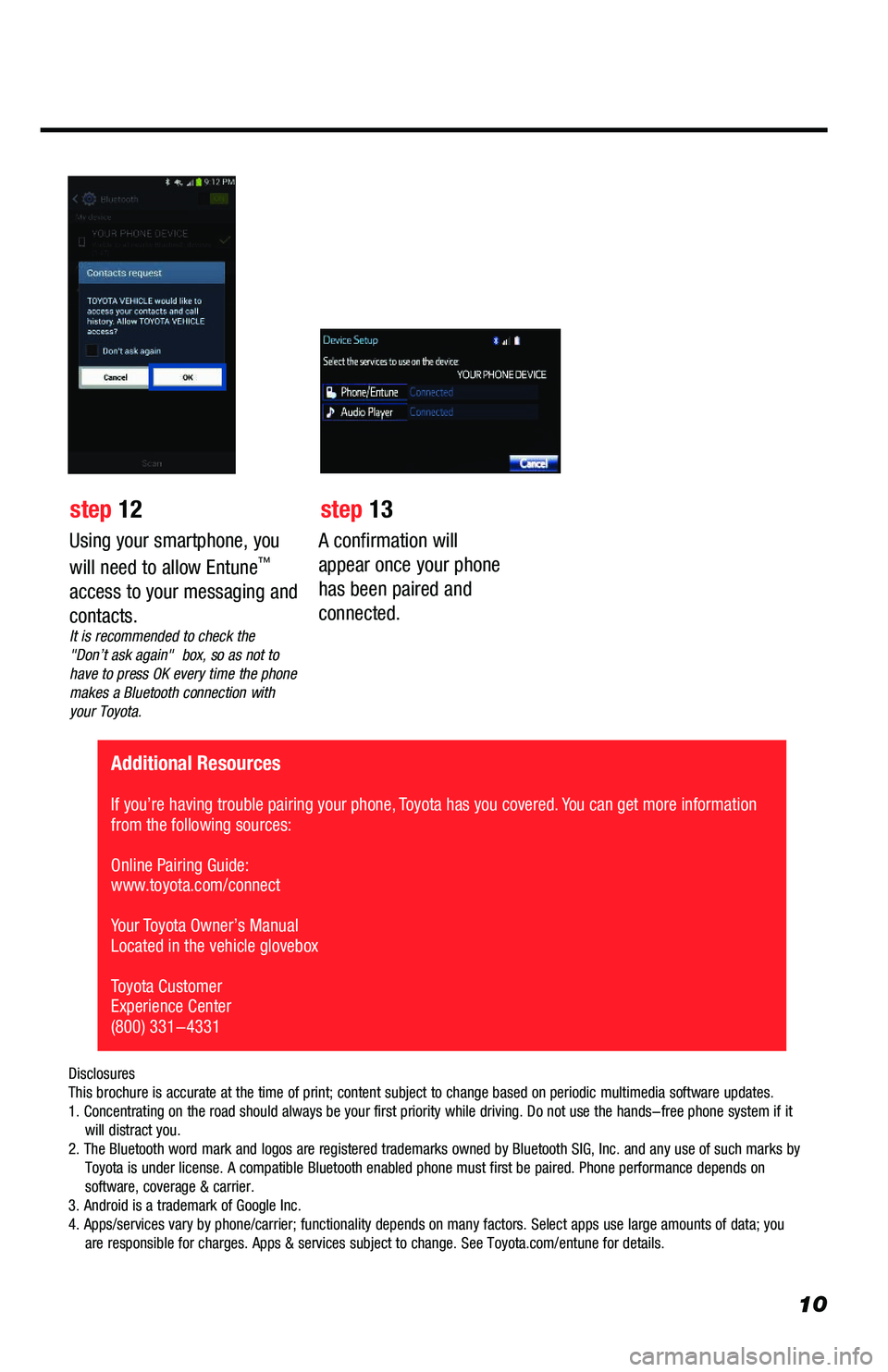
A confirmation will
appear once your phone
has been paired and
connected.
Additional Resources
If you’re having trouble pairing your phone, Toyota has you covered. You can get more information from the following sources:
Online Pairing Guide: www.toyota.com/connect
Your Toyota Owner’s Manual Located in the vehicle glovebox
Toyota Customer Experience Center(800) 331-4331
Disclosures This brochure is accurate at the time of print; content subject to change based on periodic multimedia software updates.1. Concentrating on the road should always be your first priority while driving. Do not use the hands-free phone system if it will distract you.2. The Bluetooth word mark and logos are registered trademarks owned by Bluetooth SIG, Inc. and any use of such marks by Toyota is under license. A compatible Bluetooth enabled phone must first be paired. Phone performance depends on software, coverage & carrier.3. Android is a trademark of Google Inc.4. Apps/services vary by phone/carrier; functionality depends on many factors. Select apps use large amounts of data; you are responsible for charges. Apps & services subject to change. See Toyota.com/entune for details.
Using your smartphone, you
will need to allow Entune™
access to your messaging and
contacts.It is recommended to check the "Don’t ask again" box, so as not to have to press OK every time the phone makes a Bluetooth connection with your Toyota.
step 12 step 13
116673_MY19_Prius_NavAud_QRG_D6_ML_1031_R1.indd 1011/29/18 8:49 PM
Page 12 of 40
11
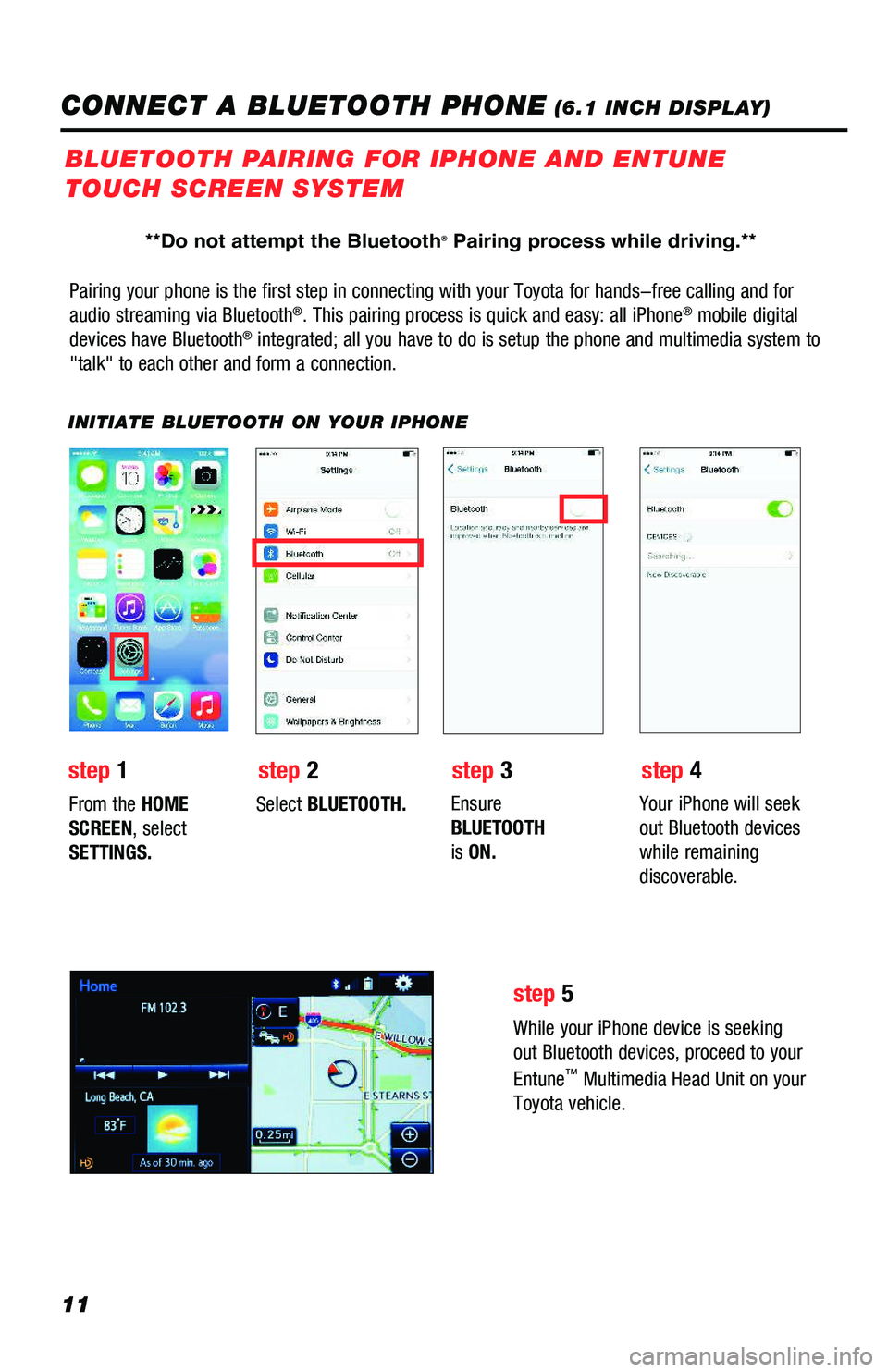
Pairing your phone is the first step in connecting with your Toyota for hands-free calling and for
audio streaming via Bluetooth®. This pairing process is quick and easy: all iPhone® mobile digital
devices have Bluetooth® integrated; all you have to do is setup the phone and multimedia system to
"talk" to each other and form a connection.
INITIATE BLUETOOTH ON YOUR IPHONE
From the HOME
SCREEN, select
SETTINGS.
Select BLUETOOTH.Ensure
BLUETOOTH
is ON.
Your iPhone will seek
out Bluetooth devices
while remaining
discoverable.
While your iPhone device is seeking
out Bluetooth devices, proceed to your
Entune™ Multimedia Head Unit on your
Toyota vehicle.
BLUETOOTH PAIRING FOR IPHONE AND ENTUNE
TOUCH SCREEN SYSTEM
step 1step 2step 3step 4
step 5
CONNECT A BLUETOOTH PHONE (6.1 INCH DISPLAY)
**Do not attempt the Bluetooth® Pairing process while driving.**
116673_MY19_Prius_NavAud_QRG_D6_ML_1031_R1.indd 1111/29/18 8:49 PM
Page 13 of 40
12
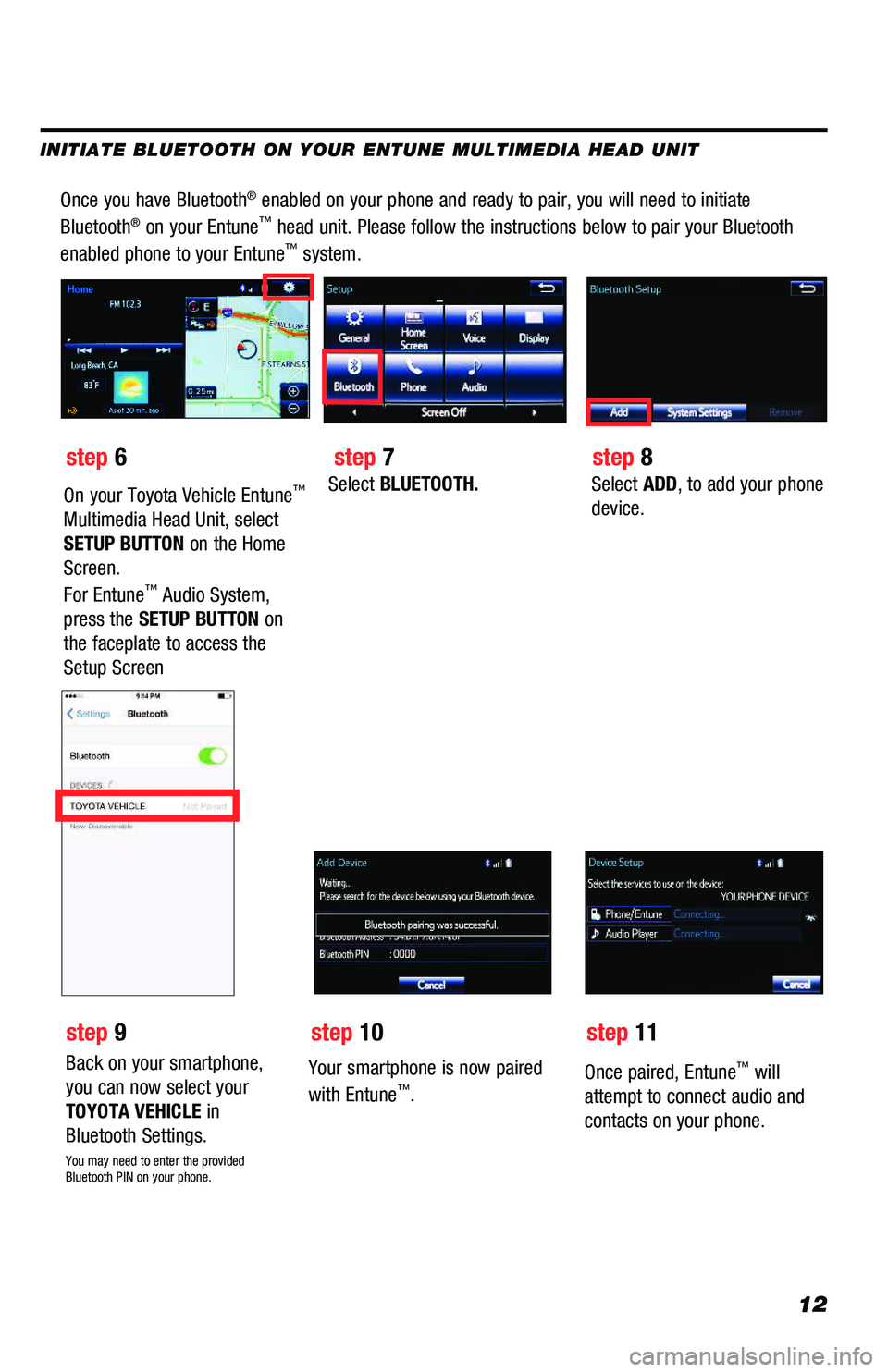
Once you have Bluetooth® enabled on your phone and ready to pair, you will need to initiate
Bluetooth® on your Entune™ head unit. Please follow the instructions below to pair your Bluetooth
enabled phone to your Entune™ system.
Select BLUETOOTH.Select ADD, to add your phone
device.
Back on your smartphone,
you can now select your
TOYOTA VEHICLE in
Bluetooth Settings.
You may need to enter the provided Bluetooth PIN on your phone.
Your smartphone is now paired
with Entune™.
Once paired, Entune™ will
attempt to connect audio and
contacts on your phone.
step 6
step 9
step 7
step 10
step 8
step 11
INITIATE BLUETOOTH ON YOUR ENTUNE MULTIMEDIA HEAD UNIT
On your Toyota Vehicle Entune™
Multimedia Head Unit, select
SETUP BUTTON on the Home
Screen.
For Entune™ Audio System,
press the SETUP BUTTON on
the faceplate to access the
Setup Screen
116673_MY19_Prius_NavAud_QRG_D6_ML_1031_R1.indd 1211/29/18 8:49 PM