lock TOYOTA PRIUS 2022 User Guide
[x] Cancel search | Manufacturer: TOYOTA, Model Year: 2022, Model line: PRIUS, Model: TOYOTA PRIUS 2022Pages: 744, PDF Size: 14.35 MB
Page 55 of 744
551-2. Child safety
PRIUS_OM_OM47F01U_(U)
1
For safety and security
Riding with children
●It is recommended that children sit in the rear seats to avoid acci-
dental contact wit h the shift lever, wiper switch etc.
● Use the rear door child-protector lock or the window lock switc h to
avoid children opening the door while driving or operating the
power window accidentally. ( P. 184, 212)
● Do not let small children operate equipment which may catch or
pinch body parts, such as the power window, hood, back door,
seats etc.
Observe the following precautions when children are in the vehi -
cle.
Use a child restraint system appropriate for the child, until the
child becomes large enough to properly wear the vehicle’s seat
belt.
WARNING
Never leave children unattended in the vehicle, and never allow children to
have or use the key.
Children may be able to start the vehicle or shift the vehicle into neutral.
There is also a danger that children may injure themselves by playing with
the side windows, the moon roof (if equipped) or other features of the vehi-
cle. In addition, heat build-up or extremely cold temperatures inside the
vehicle can be fatal to children.
Page 63 of 744
631-2. Child safety
PRIUS_OM_OM47F01U_(U)
1
For safety and security
A child restraint system for a small child or baby must itself be prop-
erly restrained on the seat with the lap portion of the lap/shoulder belt.
◆Installing child restraint system using a seat belt (child
restraint lock function belt)
Install the child restraint system in accordance to the operati on
manual enclosed with the child restraint system.
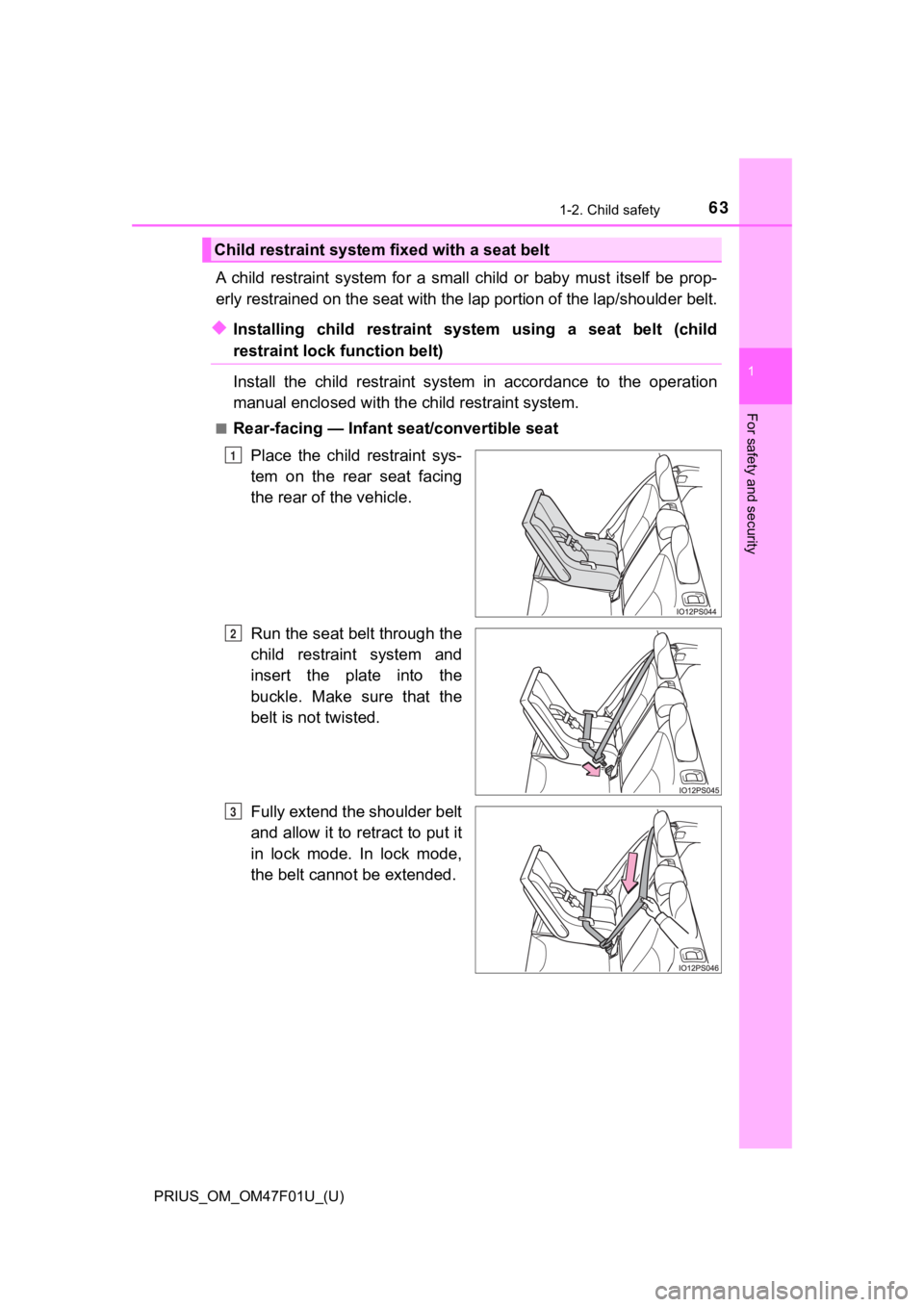
■Rear-facing — Infant seat/convertible seat
Place the child restraint sys-
tem on the rear seat facing
the rear of the vehicle.
Run the seat belt through the
child restraint system and
insert the plate into the
buckle. Make sure that the
belt is not twisted.
Fully extend the shoulder belt
and allow it to retract to put it
in lock mode. In lock mode,
the belt cannot be extended.
Child restraint system fixed with a seat belt
1
2
3
Page 65 of 744
651-2. Child safety
PRIUS_OM_OM47F01U_(U)
1
For safety and security
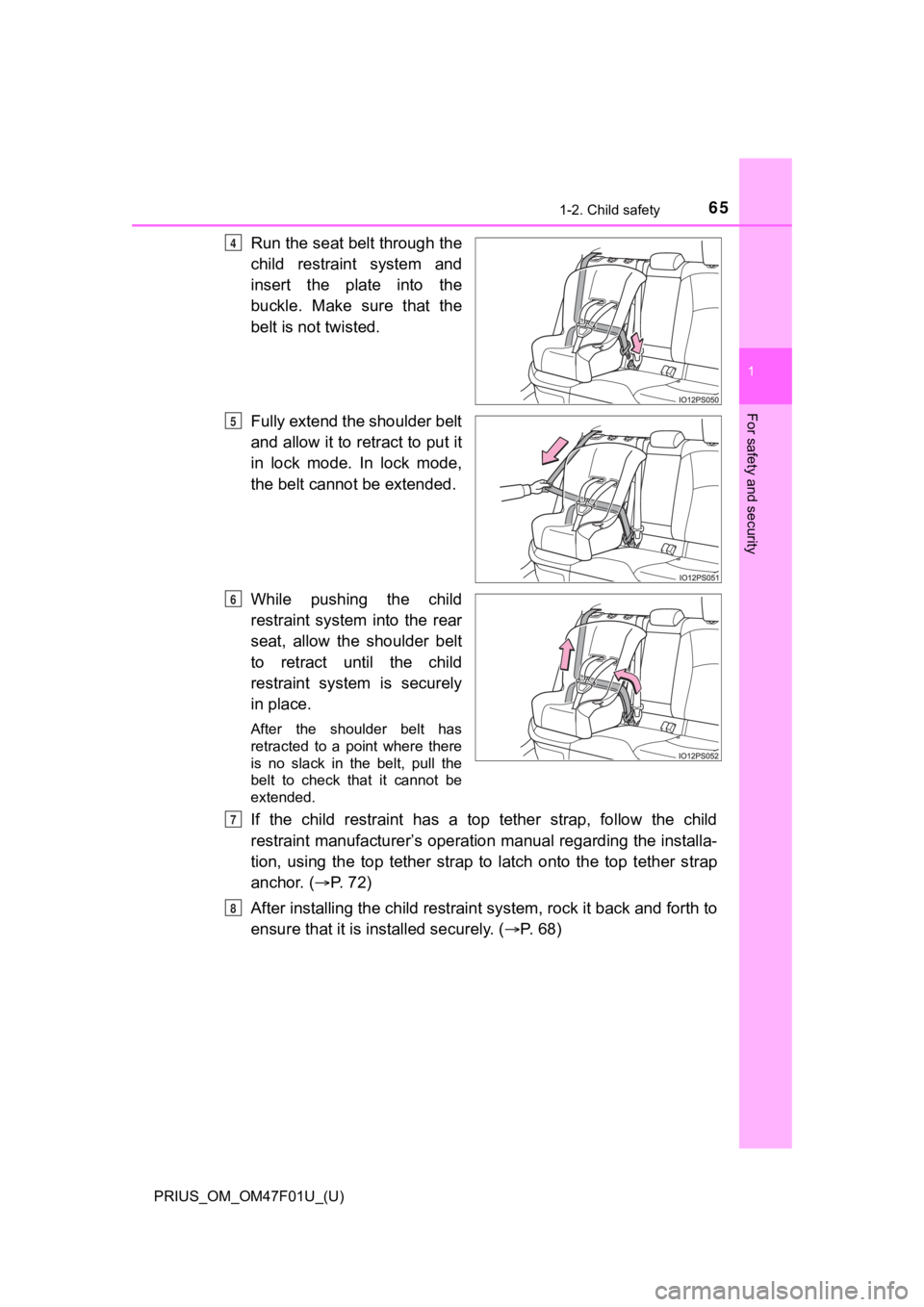
Run the seat belt through the
child restraint system and
insert the plate into the
buckle. Make sure that the
belt is not twisted.
Fully extend the shoulder belt
and allow it to retract to put it
in lock mode. In lock mode,
the belt cannot be extended.
While pushing the child
restraint system into the rear
seat, allow the shoulder belt
to retract until the child
restraint system is securely
in place.
After the shoulder belt has
retracted to a point where there
is no slack in the belt, pull the
belt to check that it cannot be
extended.
If the child restraint has a top tether strap, follow the child
restraint manufacturer’s operation manual regarding the installa-
tion, using the top tether strap to latch onto the top tether s trap
anchor. ( P. 7 2 )
After installing the child restrai nt system, rock it back and forth to
ensure that it is in stalled securely. ( P. 68)
4
5
6
7
8
Page 68 of 744
681-2. Child safety
PRIUS_OM_OM47F01U_(U)
WARNING
■When installing a child restraint system
Observe the following precautions.
Failure to do so may result in death or serious injury.
● Do not allow children to play with the seat belt. If the seat b elt becomes
twisted around a child’s neck, it may lead to choking or other serious inju-
ries that could result in death.
If this occurs and the buckle cannot be unfastened, scissors should be
used to cut the belt.
● Ensure that the belt and plate are securely locked and the seat belt is not
twisted.
● Shake the child restraint system left and right, and forward and backward
to ensure that it has been securely installed.
● After securing a child restraint system, never adjust the seat.
● When a booster seat is installed, always ensure that the should er belt is
positioned across the center of the child’s shoulder. The belt should be
kept away from the child’s neck, but not so that it could fall off the child’s
shoulder.
● Follow all installation instructions provided by the child restraint system
manufacturer.
● When securing some types of child restraint systems in rear seats, it may
not be possible to properly use the seat belts in positions next to the child
restraint without interfering with it or affecting seat belt ef fectiveness. Be
sure your seat belt fits snugly across your shoulder and low on your hips. If
it does not, or if it interferes with the child restraint, move to a different
position. Failure to do so may result in death or serious injur y.
■ When installing a booster seat
To prevent the belt from going into ALR lock mode, do not fully extend the
shoulder belt. ALR mode causes the belt to tighten only. This c ould cause
injury or discomfort to the child. ( P. 31)
■ Do not use a seat belt extender
If a seat belt extender is used when installing a child restraint system, the
seat belt will not securely hold the child restraint system, which could cause
death or serious injury to the child or other passengers in the event of sud-
den braking, sudden swerving or an accident.
Page 90 of 744
901-4. Hybrid system
PRIUS_OM_OM47F01U_(U)
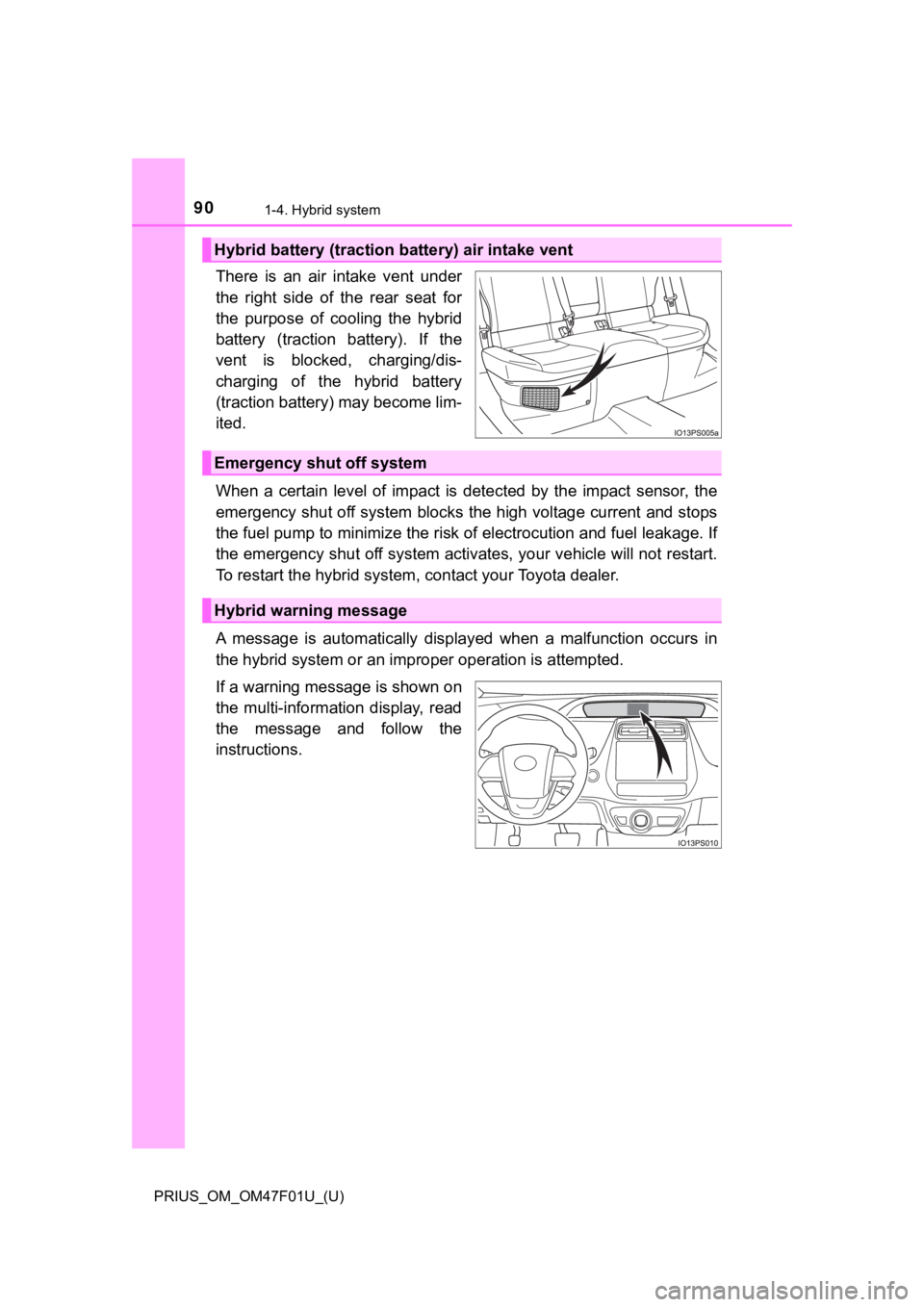
There is an air intake vent under
the right side of the rear seat for
the purpose of cooling the hybrid
battery (traction battery). If the
vent is blocked, charging/dis-
charging of the hybrid battery
(traction battery) may become lim-
ited.
When a certain level of impact is detected by the impact sensor , the
emergency shut off system blocks the high voltage current and stops
the fuel pump to minimize the ri sk of electrocution and fuel leakage. If
the emergency shut off system activates, your vehicle will not restart.
To restart the hybrid system , contact your Toyota dealer.
A message is automatically displ ayed when a malfunction occurs in
the hybrid system or an improper operation is attempted.
If a warning message is shown on
the multi-information display, read
the message and follow the
instructions.
Hybrid battery (traction battery) air intake vent
Emergency shut off system
Hybrid warning message
Page 95 of 744
951-4. Hybrid system
PRIUS_OM_OM47F01U_(U)
1
For safety and security
NOTICE
■Hybrid battery (traction battery) air intake vent
● Make sure not to block the air intake vent with anything, such as a seat
cover, plastic cover, or luggage. If the vent is blocked, the charging/dis-
charging of the hybrid battery (traction battery) may become limited.
● When dust etc. has accumulated in the air intake vent, clean it with a vac-
uum cleaner to prevent the vent from clogging.
● Do not get water or foreign materials in the air intake vent as this may
cause a short circuit and damage the hybrid battery (traction battery).
● Do not carry large amounts of water such as water cooler bottle s in the
vehicle. If water spills onto the hybrid battery (traction batt ery), the battery
may be damaged. Have the vehicle inspected by your Toyota deale r.
● There is a filter installed to the air intake vent. When the fi lter remains
noticeably dirty even after cleaning the air intake vent, filte r cleaning or
replacement is recommended. For information regarding filter cl eaning or
replacement, refer to P. 546.
● If “Maintenance Required for Traction Battery Cooling Parts See Owner’s
Manual” is shown on the multi-information display, the air intake vent and
filter may be clogged. Refer to P. 546 for information on how to clean the
air intake vent.
Page 98 of 744
98
PRIUS_OM_OM47F01U_(U)
2. Instrument cluster
Combination meter
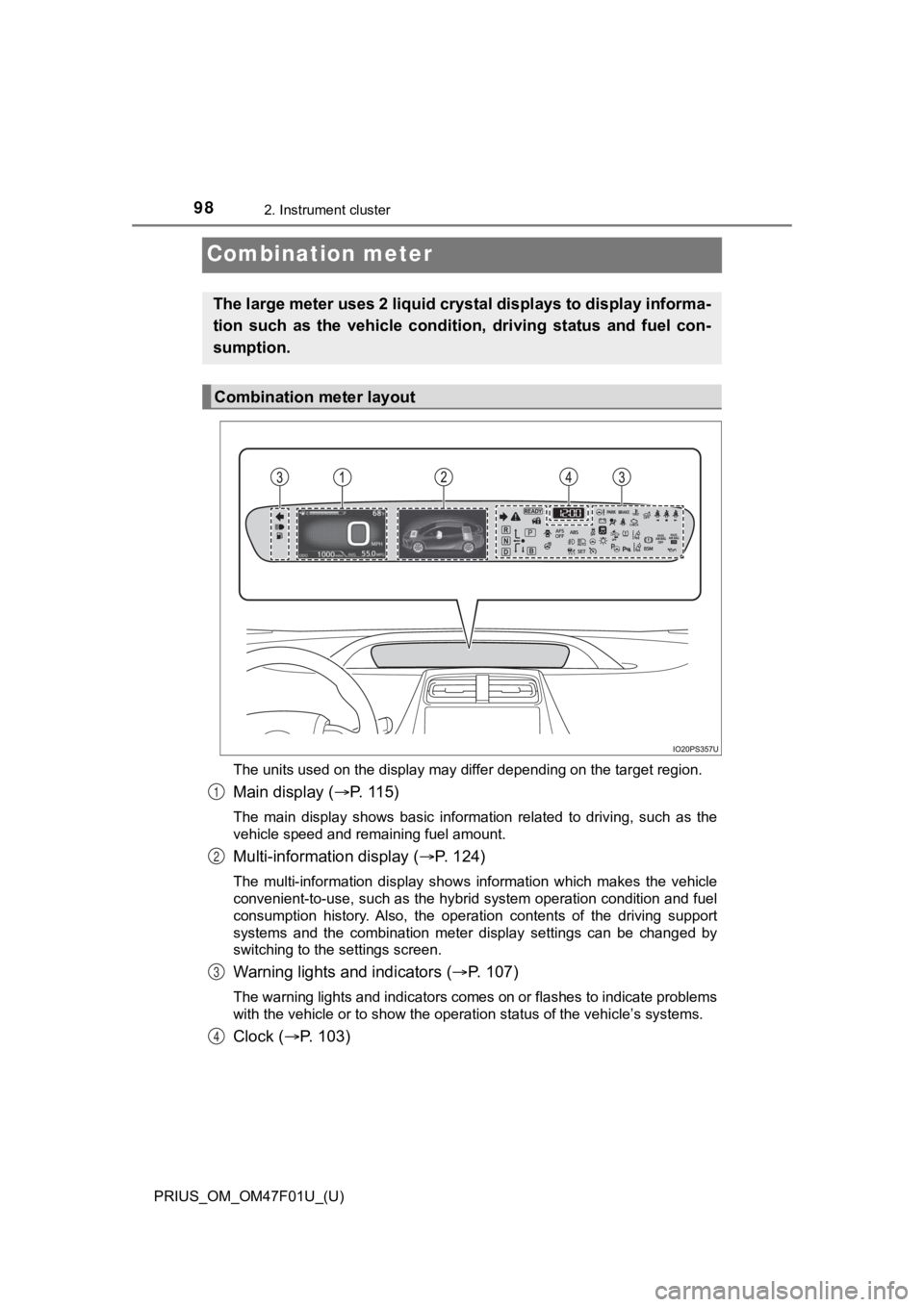
The units used on the display may differ depending on the target region.
Main display (P. 115)
The main display shows basic information related to driving, su ch as the
vehicle speed and remaining fuel amount.
Multi-information display ( P. 124)
The multi-information display shows information which makes the vehicle
convenient-to-use, such as the hybrid system operation conditio n and fuel
consumption history. Also, the operation contents of the drivin g support
systems and the combination meter display settings can be chang ed by
switching to the settings screen.
Warning lights and indicators ( P. 1 0 7 )
The warning lights and indicators comes on or flashes to indicate problems
with the vehicle or to show the operation status of the vehicle ’s systems.
Clock (P. 103)
The large meter uses 2 liquid crystal displays to display infor ma-
tion such as the vehicle conditi on, driving status and fuel con-
sumption.
Combination meter layout
1
2
3
4
Page 103 of 744
PRIUS_OM_OM47F01U_(U)
1032. Instrument cluster
2
Instrument cluster
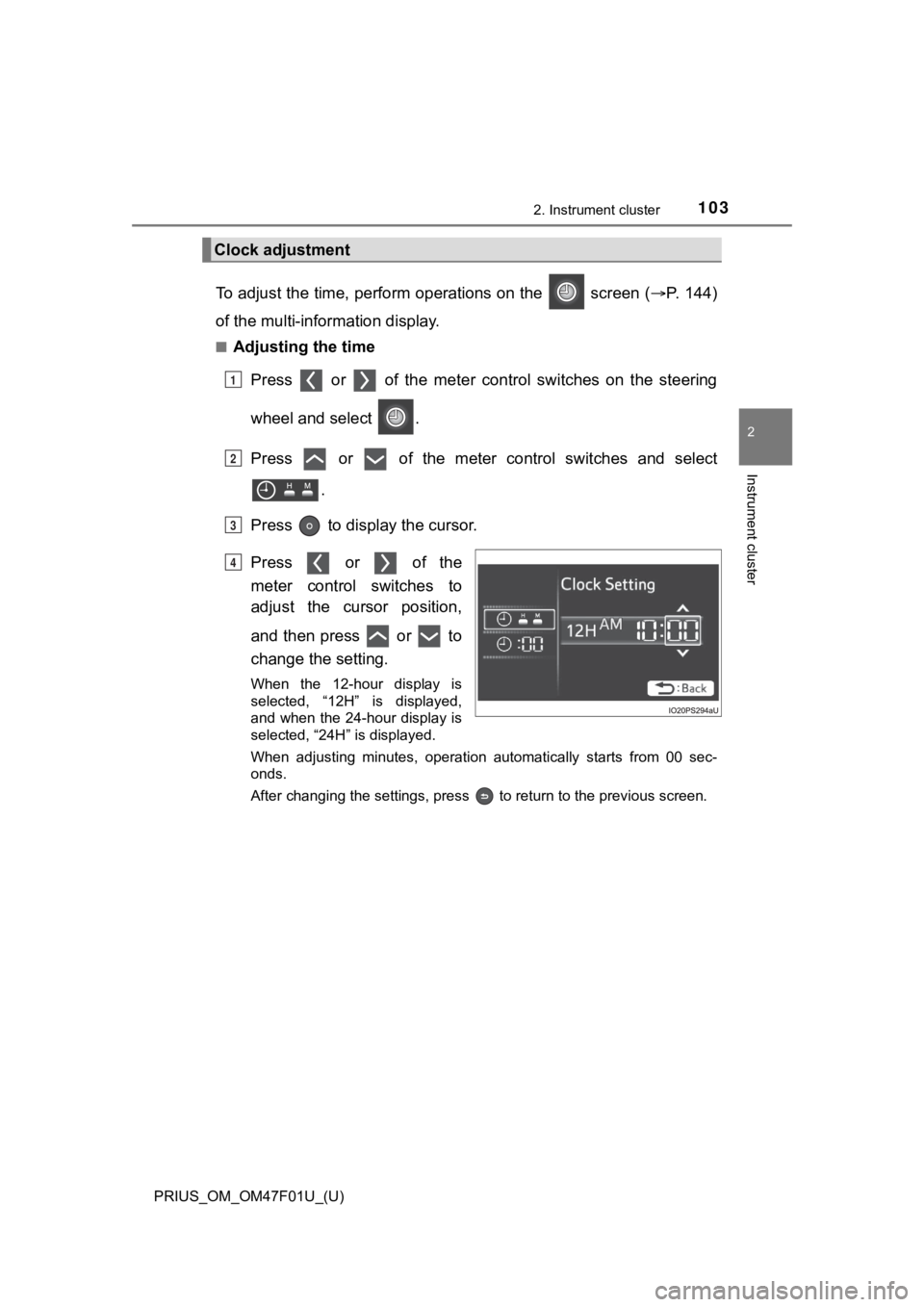
To adjust the time, perform operations on the screen (P. 1 4 4 )
of the multi-information display.
■Adjusting the time
Press or of the meter cont rol switches on the steering
wheel and select .
Press or of the meter control switches and select .
Press to display the cursor.
Press or of the
meter control switches to
adjust the cursor position,
and then press or to
change the setting.
When the 12-hour display is
selected, “12H” is displayed,
and when the 24-hour display is
selected, “24H” is displayed.
When adjusting minutes, operation automatically starts from 00 sec-
onds.
After changing the settings, press to return to the previous s creen.
Clock adjustment
1
2
3
4
Page 105 of 744
PRIUS_OM_OM47F01U_(U)
1052. Instrument cluster
2
Instrument cluster
■When disconnecting and reconnecting 12-volt battery terminals
The settings of the clock will be reset.
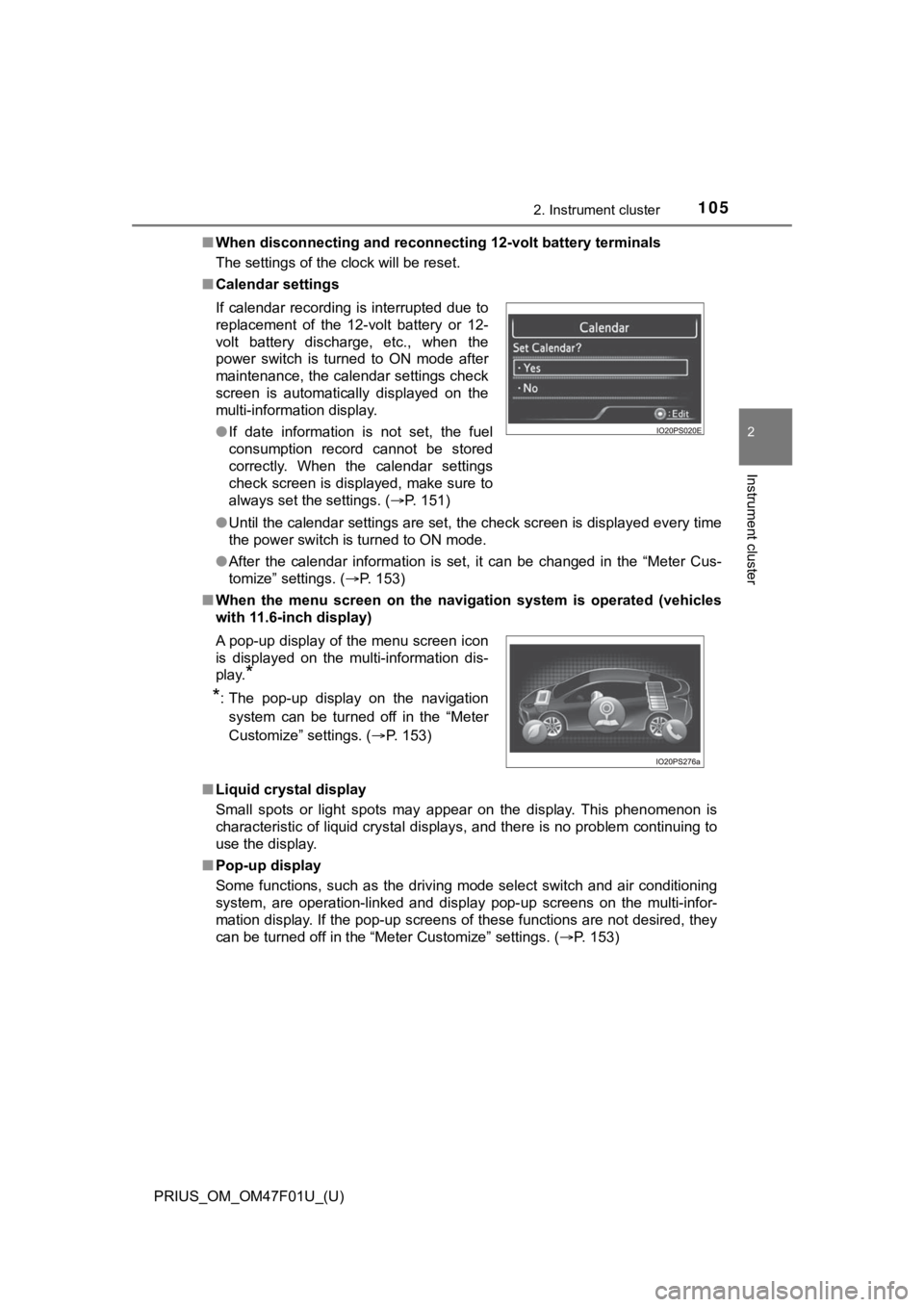
■ Calendar settings
●Until the calendar settings are set, the check screen is displa yed every time
the power switch is turned to ON mode.
● After the calendar information is set, it can be changed in the “Meter Cus-
tomize” settings. ( P. 153)
■ When the menu screen on the navi gation system is operated (vehicles
with 11.6-inch display)
■ Liquid crystal display
Small spots or light spots may appear on the display. This phen omenon is
characteristic of liquid crystal displays, and there is no prob lem continuing to
use the display.
■ Pop-up display
Some functions, such as the driving mode select switch and air conditioning
system, are operation-linked and display pop-up screens on the multi-infor-
mation display. If the pop-up screens of these functions are not desired, they
can be turned off in the “Meter Customize” settings. ( P. 153)
If calendar recording is interrupted due to
replacement of the 12-volt battery or 12-
volt battery discharge, etc., when the
power switch is turned to ON mode after
maintenance, the calendar settings check
screen is automatically displayed on the
multi-information display.
●
If date information is not set, the fuel
consumption record cannot be stored
correctly. When the calendar settings
check screen is displayed, make sure to
always set the settings. ( P. 151)
A pop-up display of the menu screen icon
is displayed on the multi-information dis-
play.
*
*
: The pop-up display on the navigation
system can be turned off in the “Meter
Customize” settings. ( P. 153)
Page 125 of 744
PRIUS_OM_OM47F01U_(U)
1252. Instrument cluster
2
Instrument cluster
*1: If equipped
*2: When there is a warning message that can be displayed, the color of
changes to amber.
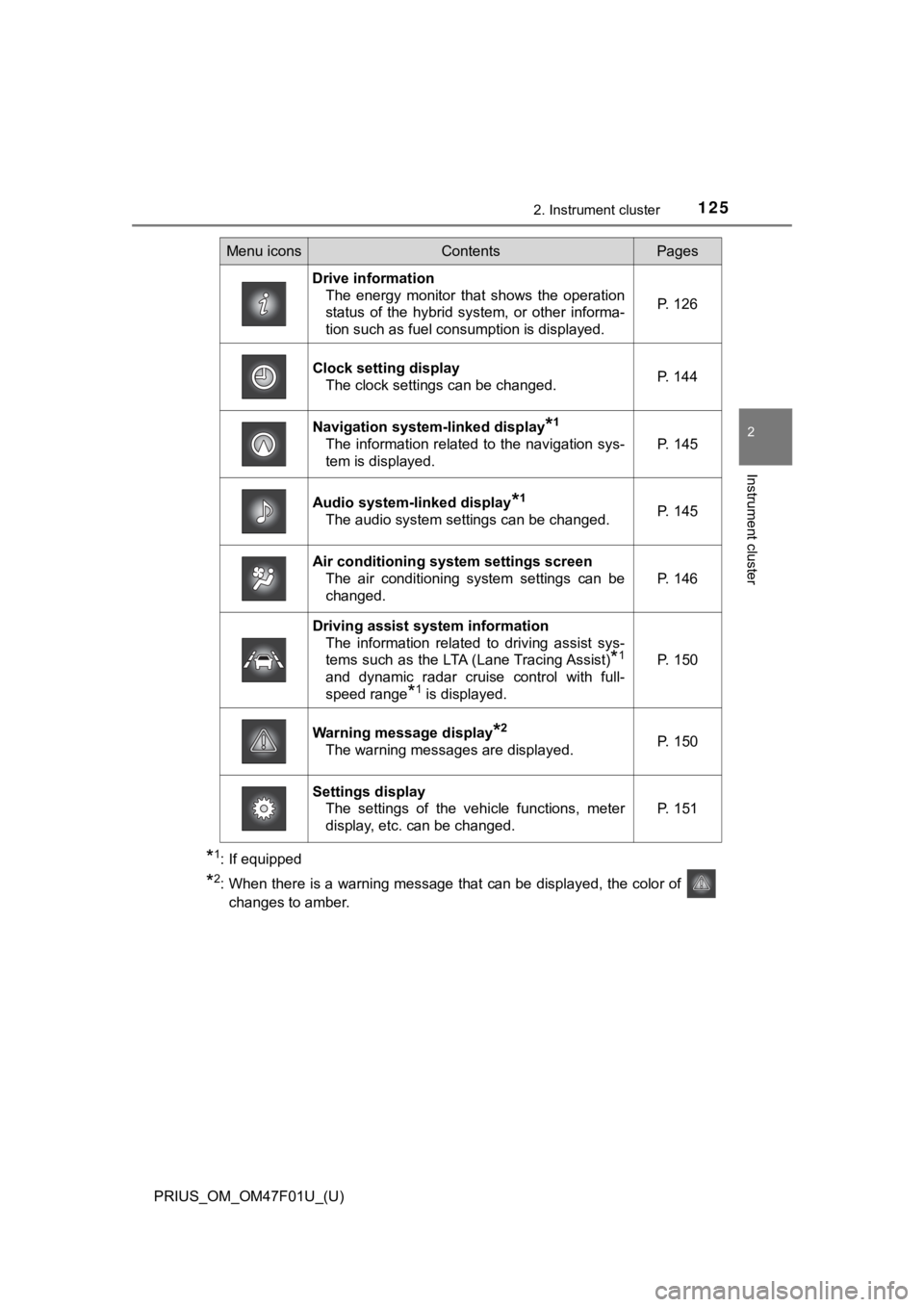
Menu iconsContentsPages
Drive information The energy monitor that shows the operation
status of the hybrid system, or other informa-
tion such as fuel consumption is displayed. P. 126
Clock setting display
The clock settings can be changed. P. 144
Navigation system-linked display*1
The information related to the navigation sys-
tem is displayed.P. 145
Audio system-linked display*1
The audio system settings can be changed.P. 145
Air conditioning system settings screen
The air conditioning system settings can be
changed.
P. 146
Driving assist system information
The information related to driving assist sys-
tems such as the LTA (Lane Tracing Assist)
*1
and dynamic radar cruise control with full-
speed range
*1 is displayed.
P. 150
Warning message display*2
The warning messages are displayed.P. 150
Settings displayThe settings of the vehicle functions, meter
display, etc. can be changed.
P. 151