lock TOYOTA PRIUS 2022 Owner's Manual
[x] Cancel search | Manufacturer: TOYOTA, Model Year: 2022, Model line: PRIUS, Model: TOYOTA PRIUS 2022Pages: 744, PDF Size: 14.35 MB
Page 144 of 744
144
PRIUS_OM_OM47F01U_(U)
2. Instrument cluster
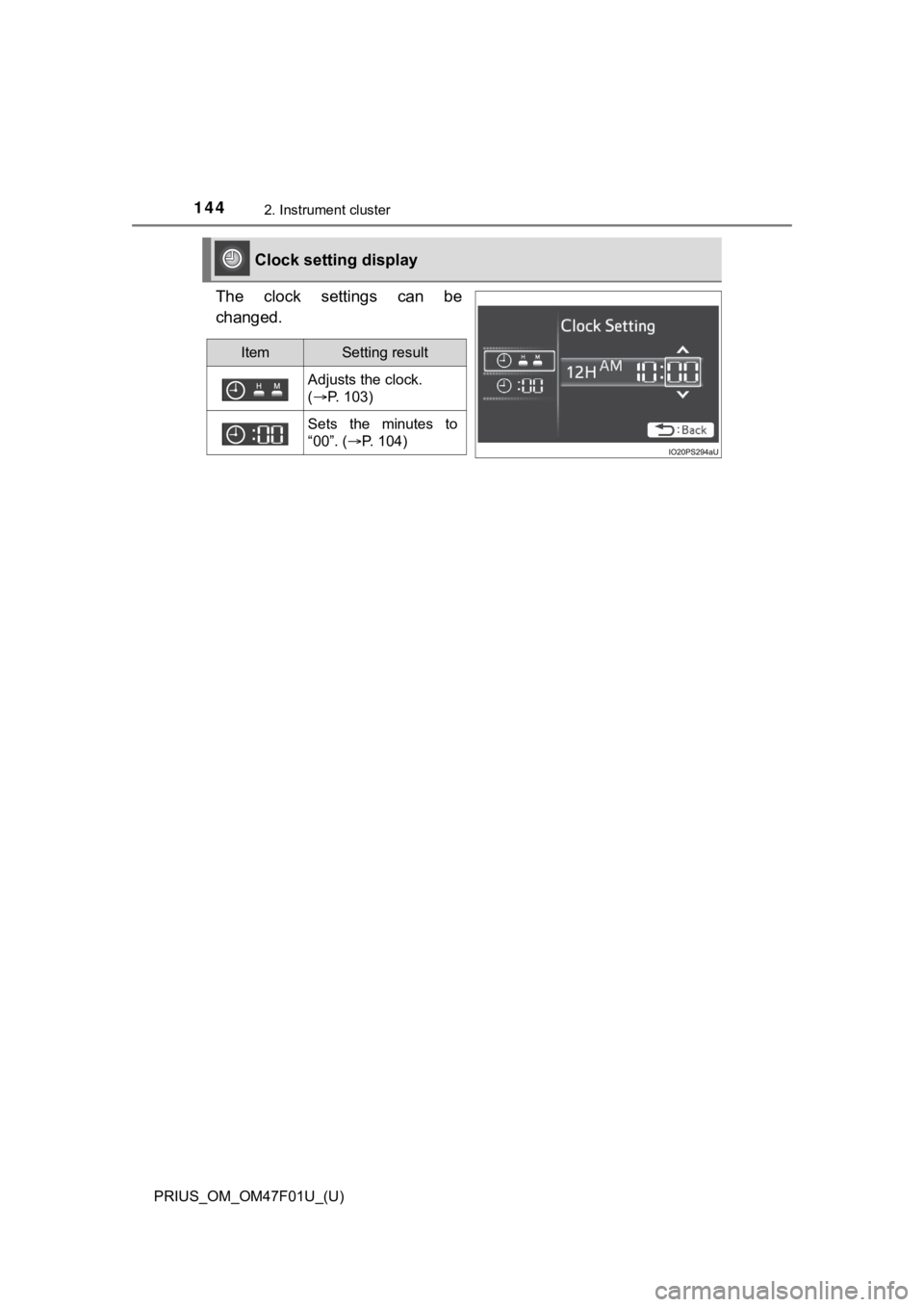
The clock settings can be
changed.
Clock setting display
ItemSetting result
Adjusts the clock.
( P. 103)
Sets the minutes to
“00”. ( P. 104)
Page 175 of 744
175
PRIUS_OM_OM47F01U_(U)
3
Operation of
each component
3-1. Key information
Keys .................................. 176
3-2. Opening, closing and locking the doors
Side doors ......................... 181
Back door .......................... 187
Smart key system ............. 192
3-3. Adjusting the seats Front seats ........................ 198
Rear seats......................... 200
Head restraints.................. 203
3-4. Adjusting the steering wheel and mirrors
Steering wheel .................. 206
Inside rear view mirror ...... 208
Outside rear view mirrors ............................. 210
3-5. Opening and closing the windows and moon roof
Power windows ................. 212
Moon roof .......................... 217
Page 176 of 744
176
PRIUS_OM_OM47F01U_(U)
3-1. Key information
Keys
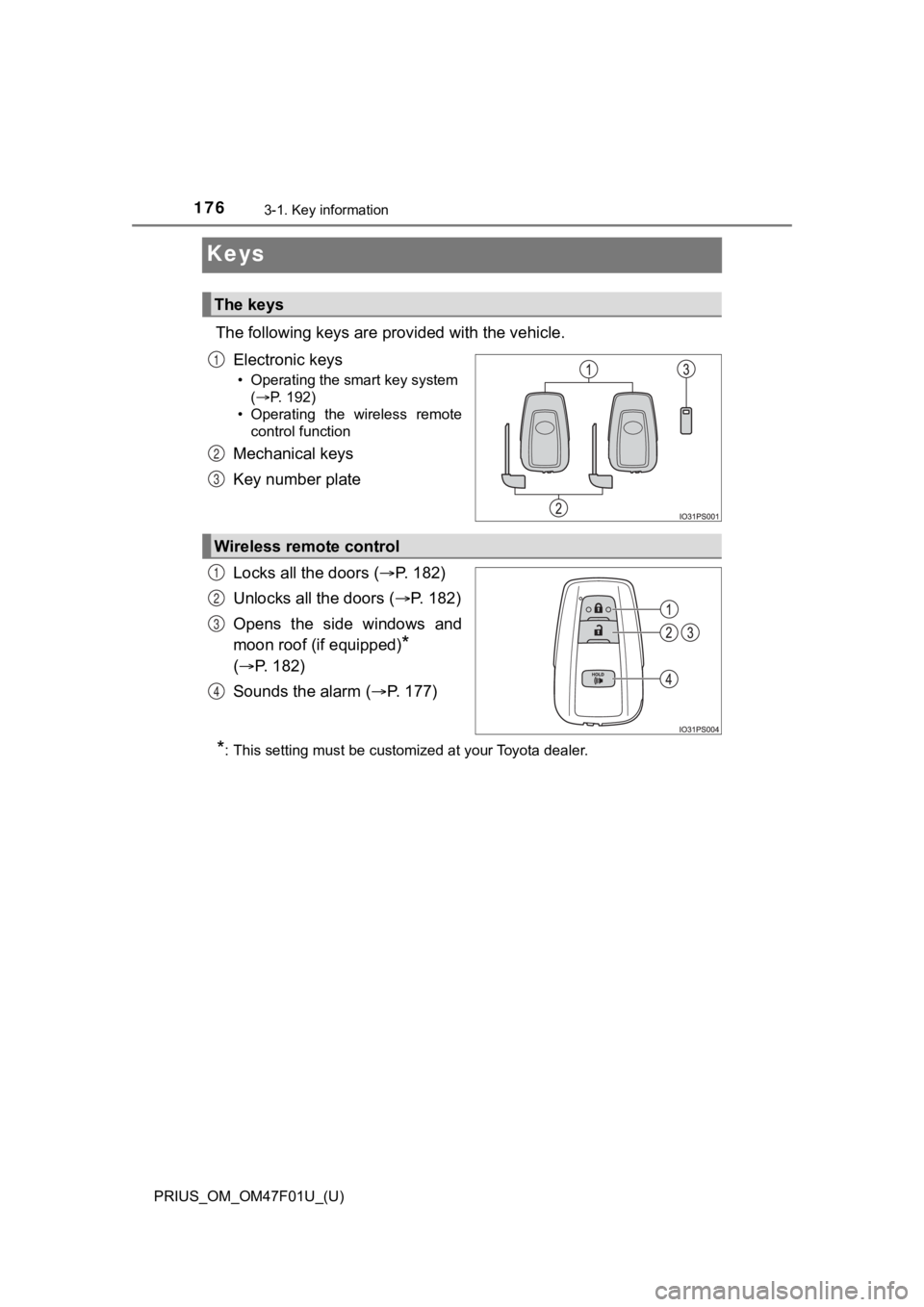
The following keys are provided with the vehicle.
Electronic keys
• Operating the smart key system (P. 192)
• Operating the wireless remote control function
Mechanical keys
Key number plate
Locks all the doors ( P. 1 8 2 )
Unlocks all the doors ( P. 1 8 2 )
Opens the side windows and
moon roof (if equipped)
*
( P. 182)
Sounds the alarm ( P. 177)
*: This setting must be customized at your Toyota dealer.
The keys
1
2
3
Wireless remote control
1
2
3
4
Page 177 of 744
PRIUS_OM_OM47F01U_(U)
1773-1. Key information
3
Operation of each component
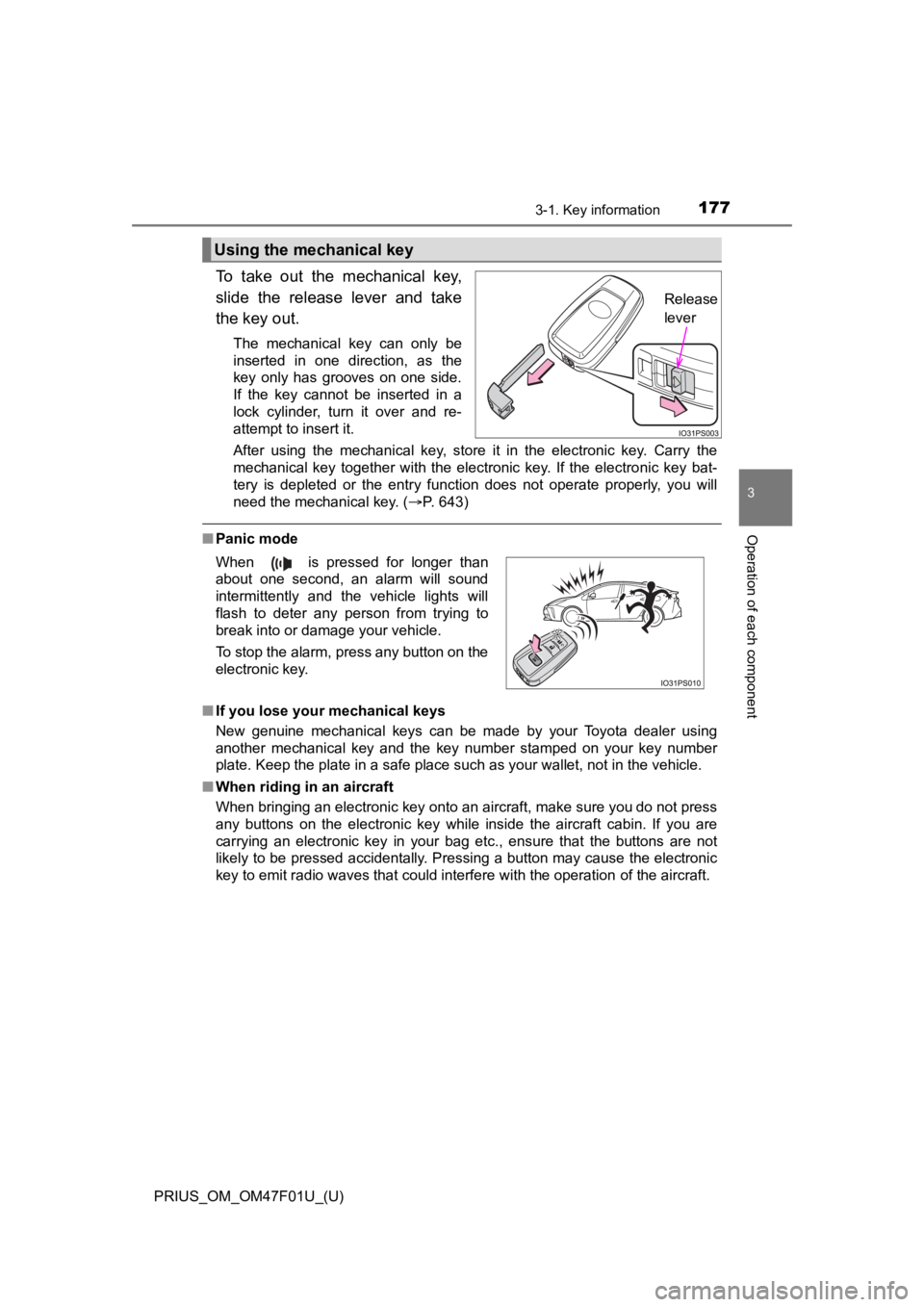
To take out the mechanical key,
slide the release lever and take
the key out.
The mechanical key can only be
inserted in one direction, as the
key only has grooves on one side.
If the key cannot be inserted in a
lock cylinder, turn it over and re-
attempt to insert it.
After using the mechanical key, store it in the electronic key. Carry the
mechanical key together with the electronic key. If the electronic key bat-
tery is depleted or the entry function does not operate properl y, you will
need the mechanical key. ( P. 643)
■Panic mode
■ If you lose your mechanical keys
New genuine mechanical keys can be made by your Toyota dealer using
another mechanical key and the key number stamped on your key n umber
plate. Keep the plate in a safe place such as your wallet, not in the vehicle.
■ When riding in an aircraft
When bringing an electronic key onto an aircraft, make sure you do not press
any buttons on the electronic key while inside the aircraft cabin. If you are
carrying an electronic key in your bag etc., ensure that the buttons are not
likely to be pressed accidentally. Pressing a button may cause the electronic
key to emit radio waves that could interfere with the operation of the aircraft.
Using the mechanical key
Release
lever
When is pressed for longer than
about one second, an alarm will sound
intermittently and the vehicle lights will
flash to deter any person from trying to
break into or damage your vehicle.
To stop the alarm, press any button on the
electronic key.
Page 179 of 744
PRIUS_OM_OM47F01U_(U)
1793-1. Key information
3
Operation of each component
■If a message regarding the state of the electronic key or power switch
mode, etc. is shown
To prevent trapping the electronic key inside the vehicle, leav ing the vehicle
without turning off the power switch or other passengers from u nintentionally
taking the key out of the vehicle, etc., a message that prompts the user to
confirm the state of the electronic key or power switch mode ma y be shown
on the multi-information display. In those cases, follow the in structions on the
display immediately.
■ If “Key Battery Low Replace Key Battery” is displayed on the multi-infor-
mation display
The electronic key has a low battery. Replace the electronic ke y battery.
( P. 555)
■ Replacing the battery
P. 555
■ Confirmation of the registered key number
The number of keys already registered to the vehicle can be confirmed. Ask
your Toyota dealer.
■ If “A New Key has been Registered Contact Your Dealer for Detai ls” is
displayed on the multi-information display
This message will be displayed each time the driver’s door is opened when
the doors are unlocked from the outside for approximately 10 da ys after a
new electronic key has been registered.
If this message is displayed but you have not had a new electro nic key regis-
tered, ask your Toyota dealer to check if an unknown electronic key (other
than those in your possession) has been registered.
■ If a wrong key is used
The key cylinder rotates freely to isolate inside mechanism.
Page 181 of 744
181
PRIUS_OM_OM47F01U_(U)
3-2. Opening, closing and locking the doors
3
Operation of each component
Side doors
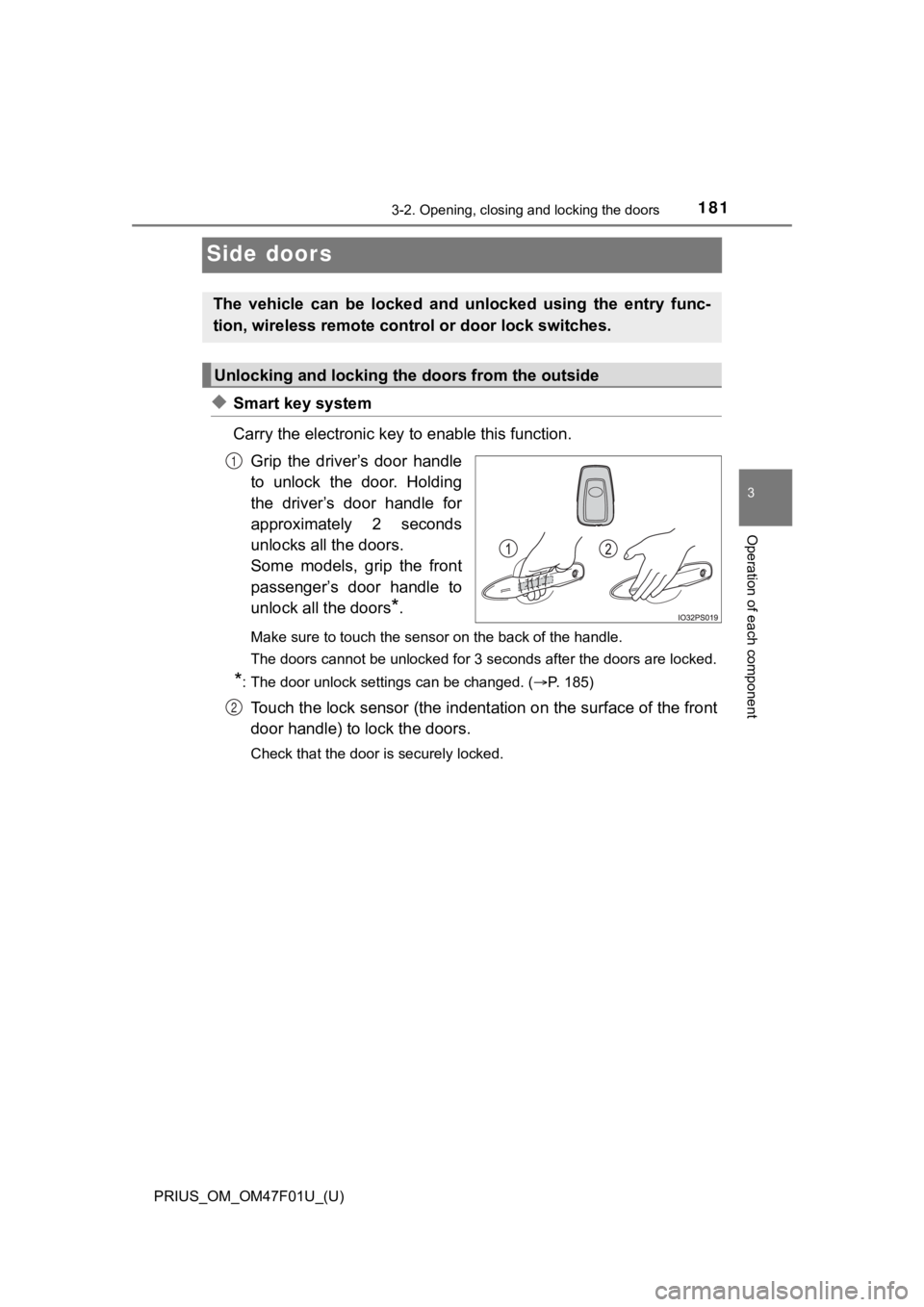
◆Smart key system
Carry the electronic key to enable this function.
Grip the driver’s door handle
to unlock the door. Holding
the driver’s door handle for
approximately 2 seconds
unlocks all the doors.
Some models, grip the front
passenger’s door handle to
unlock all the doors
*.
Make sure to touch the sensor on the back of the handle.
The doors cannot be unlocked for 3 seconds after the doors are locked.
*: The door unlock settings can be changed. ( P. 185)
Touch the lock sensor (the indentation on the surface of the front
door handle) to lock the doors.
Check that the door is securely locked.
The vehicle can be locked and unlocked using the entry func-
tion, wireless remote control or door lock switches.
Unlocking and locking the doors from the outside
1
2
Page 182 of 744
182
PRIUS_OM_OM47F01U_(U)
3-2. Opening, closing and locking the doors
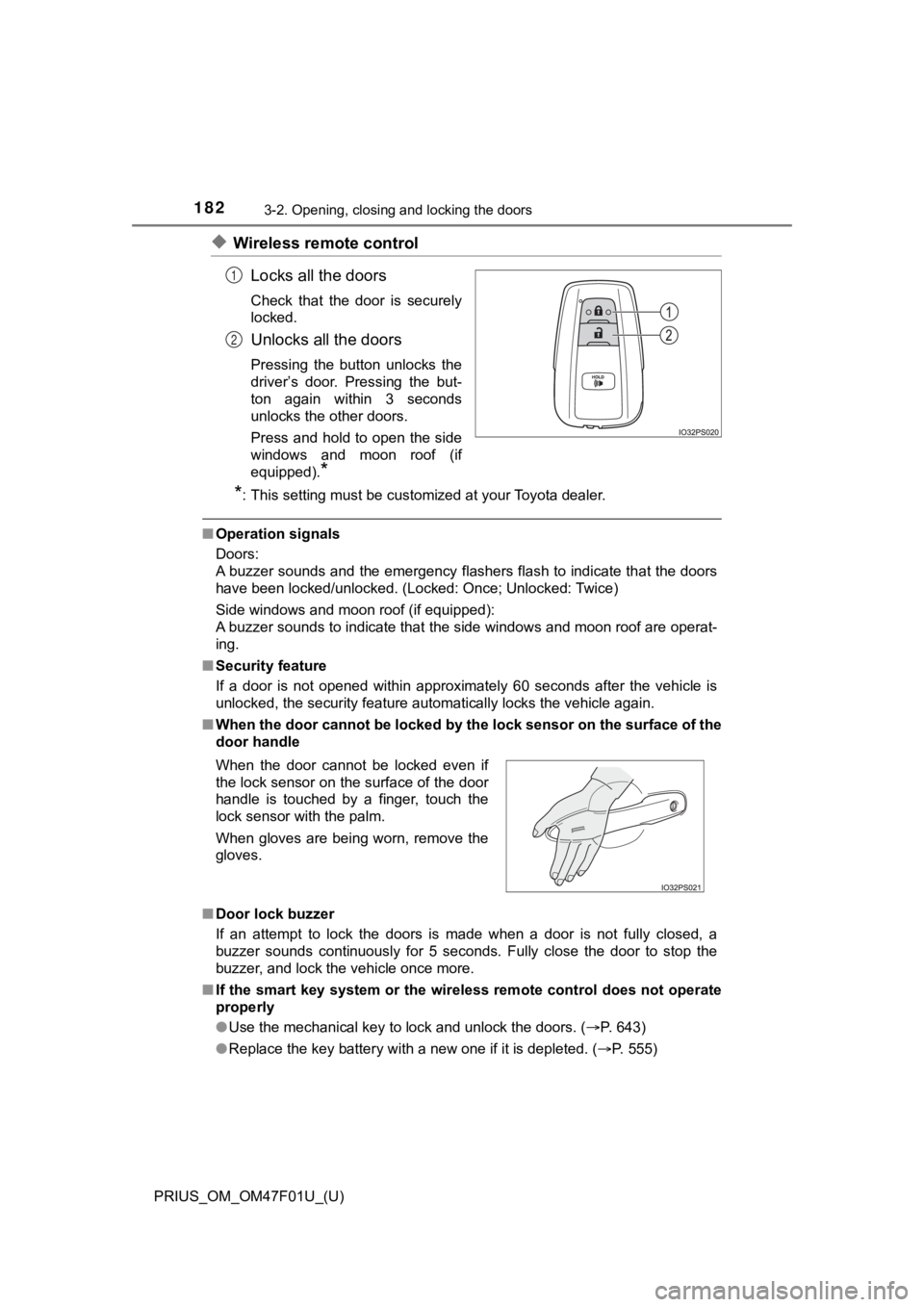
◆Wireless remote controlLocks all the doors
Check that the door is securely
locked.
Unlocks all the doors
Pressing the button unlocks the
driver’s door. Pressing the but-
ton again within 3 seconds
unlocks the other doors.
Press and hold to open the side
windows and moon roof (if
equipped).
*
*
: This setting must be customized at your Toyota dealer.
■ Operation signals
Doors:
A buzzer sounds and the emergency flashers flash to indicate th at the doors
have been locked/unlocked. (Locked: Once; Unlocked: Twice)
Side windows and moon roof (if equipped):
A buzzer sounds to indicate that the side windows and moon roof are operat-
ing.
■ Security feature
If a door is not opened within approximately 60 seconds after t he vehicle is
unlocked, the security feature automatically locks the vehicle again.
■ When the door cannot be locked by the lock sensor on the surface of the
door handle
■ Door lock buzzer
If an attempt to lock the doors is made when a door is not full y closed, a
buzzer sounds continuously for 5 seconds. Fully close the door to stop the
buzzer, and lock the vehicle once more.
■ If the smart key system or the wireless remote control does not operate
properly
●Use the mechanical key to lock and unlock the doors. ( P. 643)
● Replace the key battery with a new one if it is depleted. ( P. 555)
1
2
When the door cannot be locked even if
the lock sensor on the surface of the door
handle is touched by a finger, touch the
lock sensor with the palm.
When gloves are being worn, remove the
gloves.
Page 183 of 744
PRIUS_OM_OM47F01U_(U)
1833-2. Opening, closing and locking the doors
3
Operation of each component
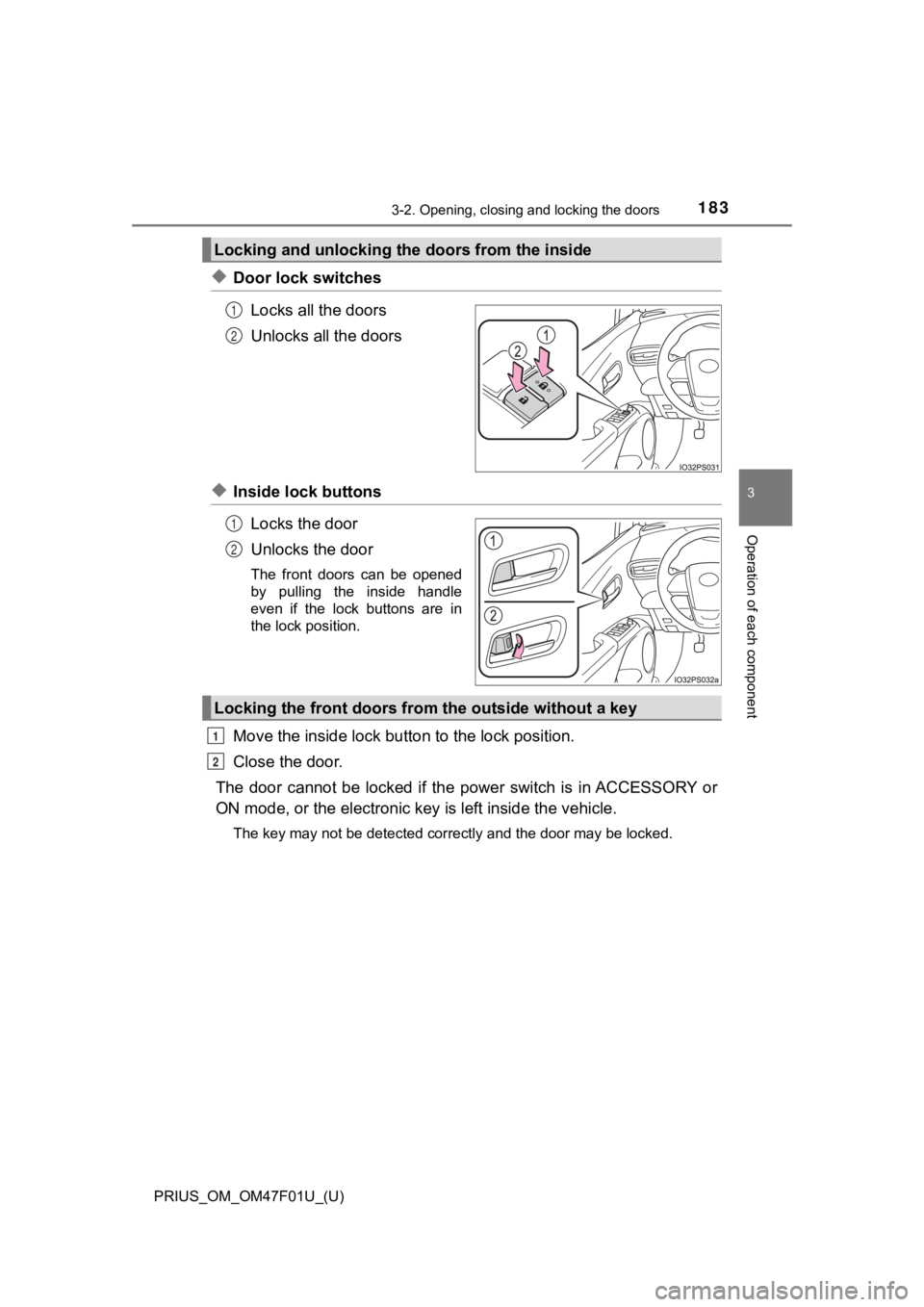
◆Door lock switchesLocks all the doors
Unlocks all the doors
◆Inside lock buttonsLocks the door
Unlocks the door
The front doors can be opened
by pulling the inside handle
even if the lock buttons are in
the lock position.
Move the inside lock bu tton to the lock position.
Close the door.
The door cannot be locked if the p ower switch is in ACCESSORY or
ON mode, or the electronic key is left inside the vehicle.
The key may not be detected correctly and the door may be locke d.
Locking and unlocking the doors from the inside
1
2
1
2
Locking the front doors from the outside without a key
1
2
Page 184 of 744
184
PRIUS_OM_OM47F01U_(U)
3-2. Opening, closing and locking the doors
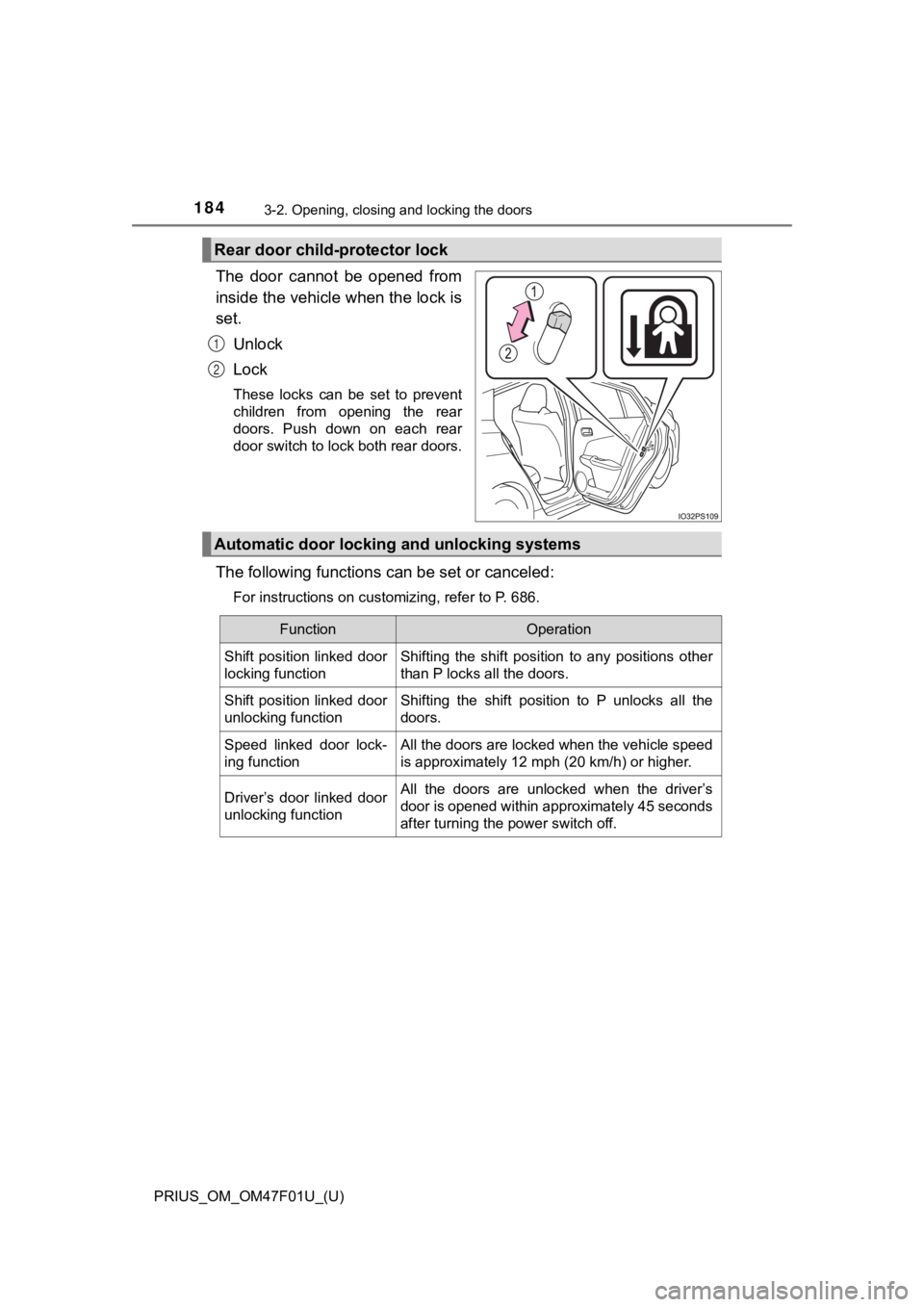
The door cannot be opened from
inside the vehicle when the lock is
set.Unlock
Lock
These locks can be set to prevent
children from opening the rear
doors. Push down on each rear
door switch to lock both rear doors.
The following functions can be set or canceled:
For instructions on customizing, refer to P. 686.
Rear door child-protector lock
1
2
Automatic door locking and unlocking systems
FunctionOperation
Shift position linked door
locking functionShifting the shift position to any positions other
than P locks all the doors.
Shift position linked door
unlocking functionShifting the shift position to P unlocks all the
doors.
Speed linked door lock-
ing functionAll the doors are locked when the vehicle speed
is approximately 12 mph (20 km/h) or higher.
Driver’s door linked door
unlocking functionAll the doors are unlocked when the driver’s
door is opened within approximately 45 seconds
after turning the power switch off.
Page 185 of 744
PRIUS_OM_OM47F01U_(U)
1853-2. Opening, closing and locking the doors
3
Operation of each component
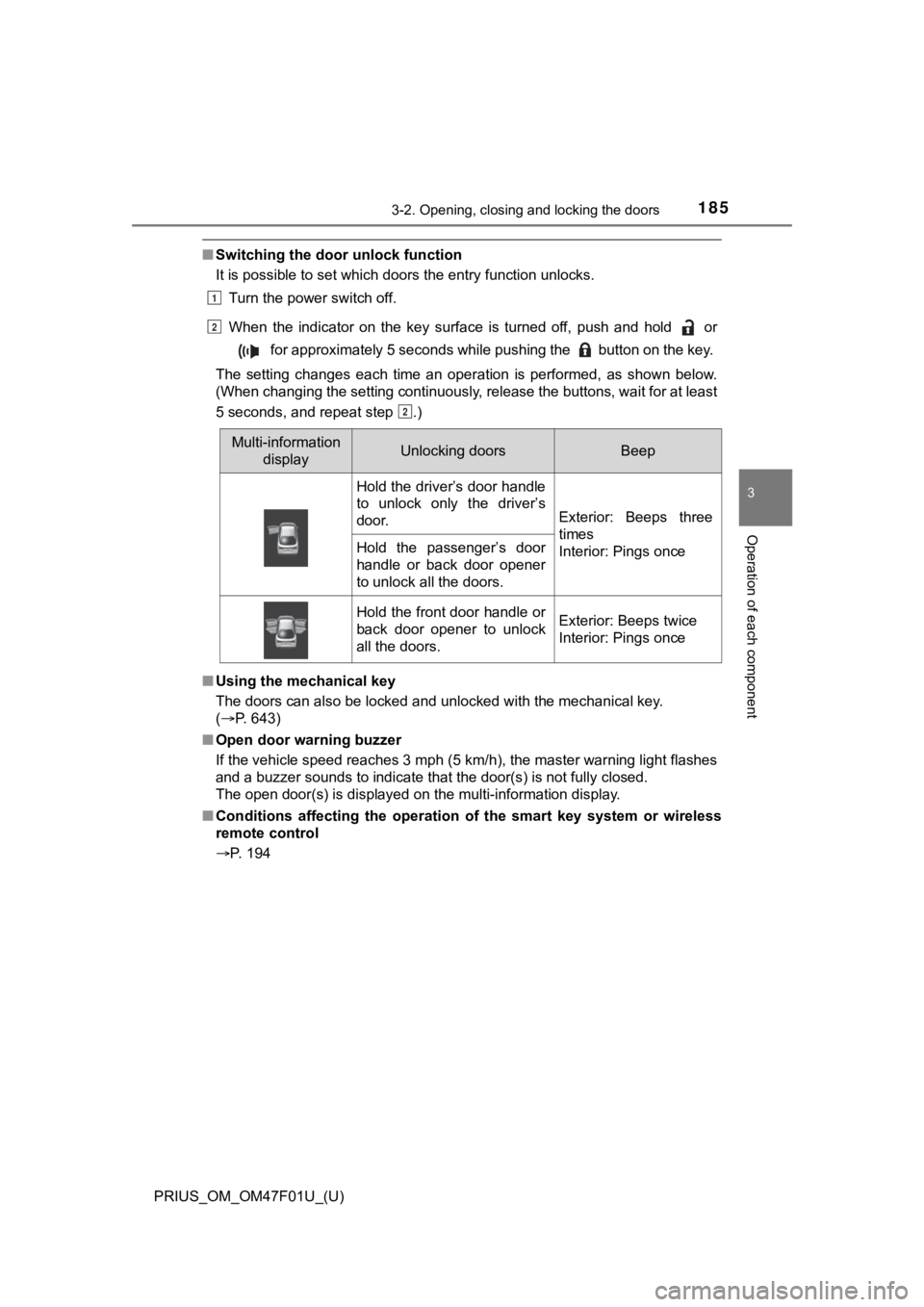
■Switching the door unlock function
It is possible to set which doors the entry function unlocks.
Turn the power switch off.
When the indicator on the key surface is turned off, push and h old or
for approximately 5 seconds while pushing the button on the k ey.
The setting changes each time an operation is performed, as sho wn below.
(When changing the setting continuously, release the buttons, w ait for at least
5 seconds, and repeat step .)
■ Using the mechanical key
The doors can also be locked and unlocked with the mechanical k ey.
( P. 643)
■ Open door warning buzzer
If the vehicle speed reaches 3 mph (5 km/h), the master warning light flashes
and a buzzer sounds to indicate that the door(s) is not fully c losed.
The open door(s) is displayed on the multi-information display.
■ Conditions affecting the operation of the smart key system or w ireless
remote control
P. 194
Multi-information displayUnlocking doorsBeep
Hold the driver’s door handle
to unlock only the driver’s
door.
Exterior: Beeps three
times
Interior: Pings once
Hold the passenger’s door
handle or back door opener
to unlock all the doors.
Hold the front door handle or
back door opener to unlock
all the doors.Exterior: Beeps twice
Interior: Pings once
1
2
2