ECO mode TOYOTA PRIUS 2022 Owner's Manual
[x] Cancel search | Manufacturer: TOYOTA, Model Year: 2022, Model line: PRIUS, Model: TOYOTA PRIUS 2022Pages: 744, PDF Size: 14.35 MB
Page 193 of 744
PRIUS_OM_OM47F01U_(U)
1933-2. Opening, closing and locking the doors
3
Operation of each component
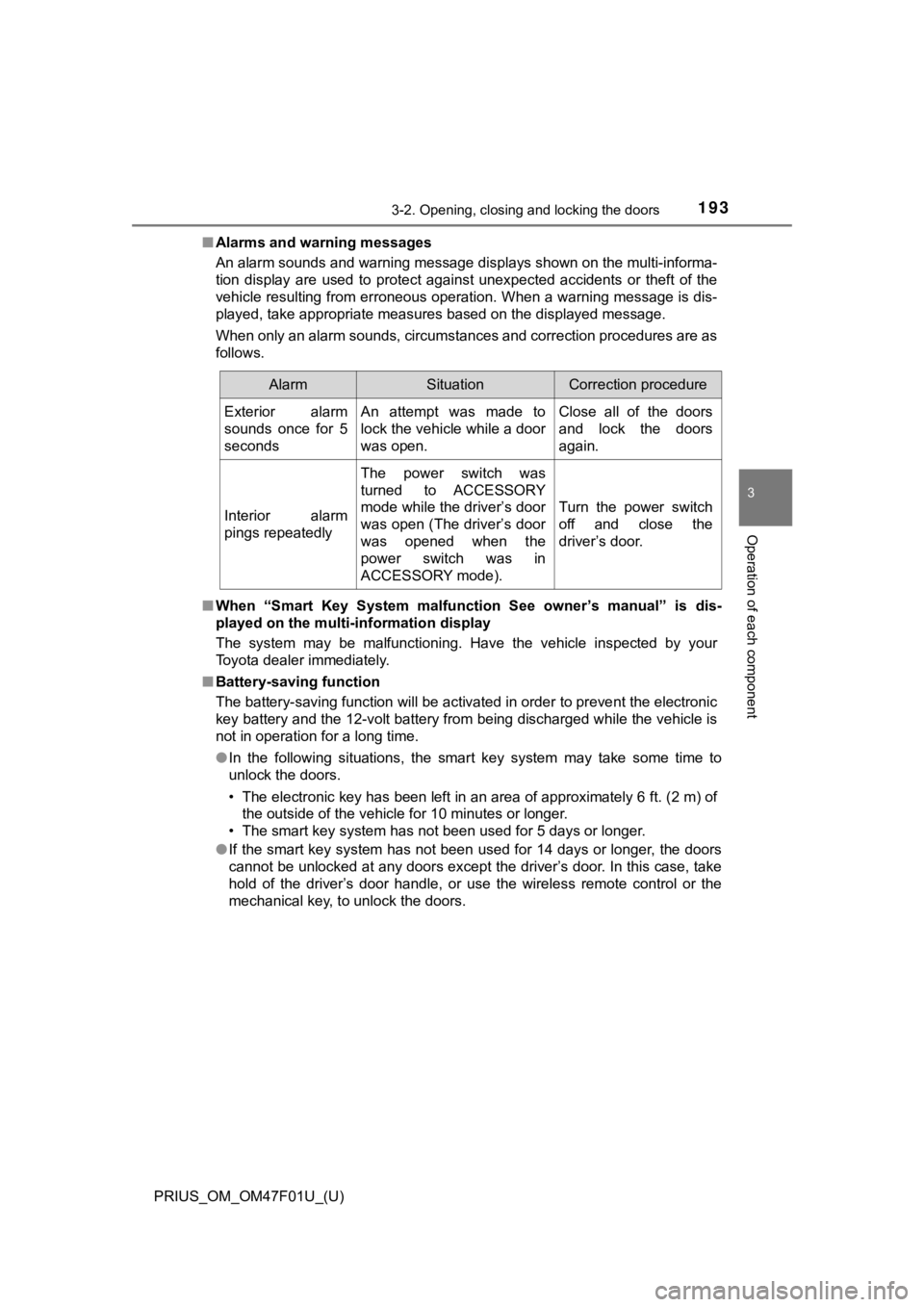
■Alarms and warning messages
An alarm sounds and warning message displays shown on the multi -informa-
tion display are used to protect against unexpected accidents o r theft of the
vehicle resulting from erroneous operation. When a warning mess age is dis-
played, take appropriate measures based on the displayed message.
When only an alarm sounds, circumstances and correction procedu res are as
follows.
■ When “Smart Key System malfuncti on See owner’s manual” is dis-
played on the multi-information display
The system may be malfunctioning. Have the vehicle inspected by your
Toyota dealer immediately.
■ Battery-saving function
The battery-saving function will be activated in order to preve nt the electronic
key battery and the 12-volt battery from being discharged while the vehicle is
not in operation for a long time.
● In the following situations, the smart key system may take some time to
unlock the doors.
• The electronic key has been left in an area of approximately 6 ft. (2 m) of
the outside of the vehicle for 10 minutes or longer.
• The smart key system has not been used for 5 days or longer.
● If the smart key system has not been used for 14 days or longer , the doors
cannot be unlocked at any doors except the driver’s door. In th is case, take
hold of the driver’s door handle, or use the wireless remote co ntrol or the
mechanical key, to unlock the doors.
AlarmSituationCorrection procedure
Exterior alarm
sounds once for 5
secondsAn attempt was made to
lock the vehicle while a door
was open.Close all of the doors
and lock the doors
again.
Interior alarm
pings repeatedly
The power switch was
turned to ACCESSORY
mode while the driver’s door
was open (The driver’s door
was opened when the
power switch was in
ACCESSORY mode).
Turn the power switch
off and close the
driver’s door.
Page 195 of 744

PRIUS_OM_OM47F01U_(U)
1953-2. Opening, closing and locking the doors
3
Operation of each component
■Note for the entry function
●Even when the electronic key is within the effective range (det ection areas),
the system may not operate properly in the following cases:
• The electronic key is too close to the window or outside door handle, near
the ground, or in a high place when the doors are locked or unl ocked.
• The electronic key is on the instrument panel, floor, or in th e door pockets
or glove box when the hybrid system is started or power switch modes
are changed.
● Do not leave the electronic key on top of the instrument panel or near the
door pockets when exiting the vehicle. Depending on the radio w ave recep-
tion conditions, it may be detected by the antenna outside the cabin and the
door will become lockable from the outside, possibly trapping the electronic
key inside the vehicle.
● As long as the electronic key is within the effective range, th e doors may be
unlocked or locked by anyone.
● Even if the electronic key is not inside the vehicle, it may be possible to start
the hybrid system if the electronic key is near the window.
● The doors may unlock if a large amount of water splashes on the door han-
dle, such as in the rain or in a car wash when the electronic k ey is within the
effective range. (The door will automatically be locked after a pproximately
60 seconds if the doors are not opened and closed.)
● If the wireless remote control is used to lock the doors when t he electronic
key is near the vehicle, there is a possibility that the door m ay not be
unlocked by the entry function. (Use the wireless remote contro l to unlock
the doors.)
● Touching the door lock sensor while wearing gloves may delay or prevent
lock operation. Remove the gloves and touch the lock sensor aga in.
● When the lock operation is performed using the lock sensor, rec ognition sig-
nals will be shown up to two consecutive times. After this, no recognition
signals will be given.
● If the door handle becomes wet while the electronic key is with in the effec-
tive range, the door may lock and unlock repeatedly. In this ca se, follow the
following correction procedures to wash the vehicle.
• Place the electronic key in a location 6 ft. (2 m) or more awa y from the
vehicle. (Take care to ensure that the key is not stolen.)
• Set electronic key to battery-saving mode to disable the smart key sys-
tem. ( P. 194)
● If the electronic key is inside the vehicle and a door handle b ecomes wet
during a car wash, a message may be shown on the multi-informat ion dis-
play and a buzzer will sound outside the vehicle. To turn off t he alarm, lock
all the doors.
Page 211 of 744

2113-4. Adjusting the steering wheel and mirrors
3
Operation of each component
PRIUS_OM_OM47F01U_(U)
■Mirror angle can be adjusted when
The power switch is in ACCESSORY or ON mode.
■ When the mirrors are fogged up
The outside rear view mirrors can be cleared using the mirror d efoggers. Turn
on the rear window defogger to turn on the outside rear view mirror defog-
gers. ( P. 434, 444)
WARNING
■Important points while driving
Observe the following precautions while driving.
Failing to do so may result in loss of control of the vehicle a nd cause an
accident, resulting in death or serious injury.
● Do not adjust the mirrors while driving.
● Do not drive with the mirrors folded.
● Both the driver and passenger side mirrors must be extended and properly
adjusted before driving.
■ When a mirror is moving
To avoid personal injury and mirror malfunction, be careful not to get your
hand caught by the moving mirror.
■ When the mirror defoggers are operating
Do not touch the rear view mirror surfaces, as they can become very hot
and burn you.
Page 212 of 744
212
PRIUS_OM_OM47F01U_(U)
3-5. Opening and closing the windows and moon roof
Power windows
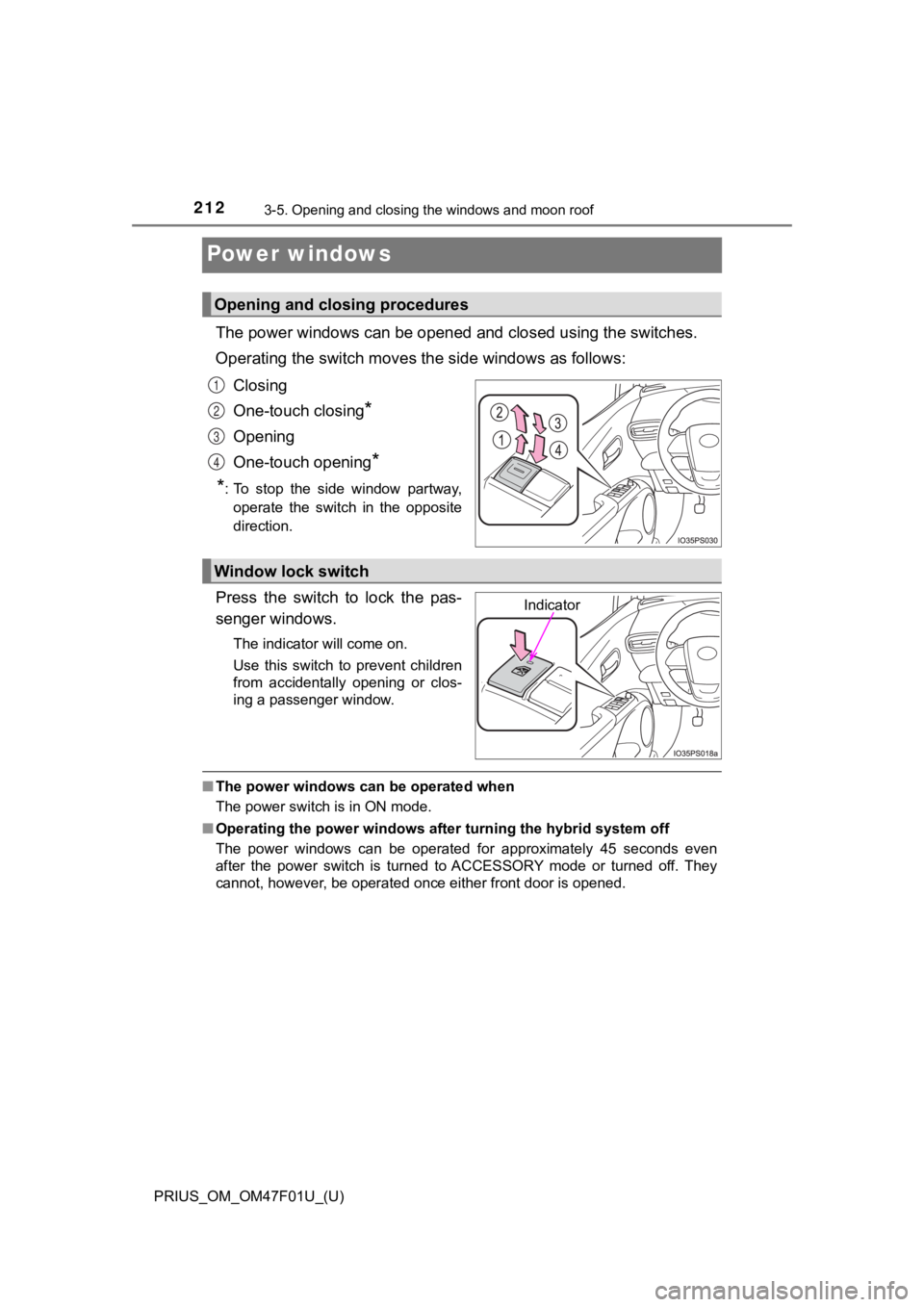
The power windows can be opened and closed using the switches.
Operating the switch moves t he side windows as follows:
Closing
One-touch closing
*
Opening
One-touch opening
*
*
: To stop the side window partway, operate the switch in the opposite
direction.
Press the switch to lock the pas-
senger windows.
The indicator will come on.
Use this switch to prevent children
from accidentally opening or clos-
ing a passenger window.
■ The power windows can be operated when
The power switch is in ON mode.
■ Operating the power windows after turning the hybrid system off
The power windows can be operated for approximately 45 seconds even
after the power switch is turned to ACCESSORY mode or turned of f. They
cannot, however, be operated once either front door is opened.
Opening and closing procedures
1
2
3
4
Window lock switch
Indicator
Page 213 of 744

PRIUS_OM_OM47F01U_(U)
2133-5. Opening and closing the windows and moon roof
3
Operation of each component
■Jam protection function
If an object becomes jammed between the side window and the win dow
frame while the side window is closing, side window movement is stopped
and the side window is opened slightly.
■ Catch protection function
If an object becomes caught between the door and side window wh ile the
side window is opening, side window movement is stopped.
■ When the window cannot be opened or closed
When the jam protection function or catch protection function o perates
unusually and the side window cannot be opened and closed, perf orm the fol-
lowing operations with the power window switch of that door.
● Stop the vehicle. With the power switch in ON mode, within 4 se conds of the
jam protection function or catch protection function activating , continuously
operate the power window switch in the one-touch closing direct ion or one-
touch opening direction so that the side window can be opened a nd closed.
● If the side window cannot be opened and closed even when perfor ming the
above operations, perform the following procedure for function initialization.
Turn the power switch to ON mode.
Pull and hold the power window switch in the one-touch closing direction
and completely close the side window.
Release the power window switch for a moment, resume pulling the
switch in the one-touch closing direction, and hold it there for approxi-
mately 6 seconds or more.
Press and hold the power window switch in the one-touch opening direc-
tion. After the side window is completely opened, continue holding the
switch for an additional 1 second or more.
Release the power window switch for a moment, resume pressing t he
switch in the one-touch opening direction, and hold it there fo r approxi-
mately 4 seconds or more.
Pull and hold the power window switch in the one-touch closing direction
again. After the side window is completely closed, continue hol ding the
switch for a further 1 second or more.
If you release the switch while the side window is moving, star t again from
the beginning.
If the side window reverses and cannot be fully closed or opene d, have the
vehicle inspected by your Toyota dealer.
1
2
3
4
5
6
Page 218 of 744

218
PRIUS_OM_OM47F01U_(U)
3-5. Opening and closing the windows and moon roof
■The moon roof can be operated when
The power switch is in ON mode.
■ Operating the moon roof after turning th e hybrid system off
The moon roof can be operated for approximately 45 seconds even after the
power switch is turned to ACCESSORY mode or turned off. It cann ot, how-
ever, be operated once either front door is opened.
■ Jam protection function
If an object is detected between the moon roof and the frame wh ile the moon
roof is closing or tilting down, travel is stopped and the moon roof opens
slightly.
■ Sunshade
The sunshade can be opened and closed manually. However, the su nshade
will open automatically to slightly before the fully open posit ion when the
moon roof is opened.
■ Door lock linked moon roof operation
●The moon roof can be opened and closed using the mechanical key .
*
( P. 643)
● The moon roof can be opened using the wireless remote control.
*
( P. 182)
*: These settings must be customized at your Toyota dealer.
Page 226 of 744

226
PRIUS_OM_OM47F01U_(U)
4-1. Before driving
WARNING
Observe the following precautions.
Failure to do so may result in death or serious injury.
■When driving the vehicle
● Use engine braking (shift position B instead of shift position D) to maintain
a safe speed when driving down a steep hill.
Using the brakes continuously may cause the brakes to overheat and lose
effectiveness. ( P. 250)
● Do not adjust the positions of the steering wheel, the seat, or the inside or
outside rear view mirrors while driving.
Doing so may result in a loss of vehicle control.
● Always check that all passengers’ arms, head or other parts of their body
are not outside the vehicle.
● AWD models: Do not drive the vehicle off-road.
This is not an AWD vehicle designed for off-road driving. Proceed with all
due caution if it becomes unavoidable to drive off-road.
● Do not drive across river crossings or through other bodies of water.
This may cause electric/electronic components to short circuit, damage
the hybrid system or cause other serious damage to the vehicle.
● Do not drive in excess of the speed limit. Even if the legal sp eed limit per-
mits it, do not drive over 85 mph (140 km/h) unless your vehicl e has high-
speed capability tires. Driving over 85 mph (140 km/h) may resu lt in tire
failure, loss of control and possible injury. Be sure to consult a tire dealer
to determine whether the tires on your vehicle are high-speed capability
tires or not before driving at such speeds.
■ When driving on slippery road surfaces
● Sudden braking, acceleration and steering may cause tire slippa ge and
reduce your ability to control the vehicle.
● Sudden acceleration, engine braking due to shifting, or changes in engine
speed could cause the vehicle to skid, resulting in an accident.
● After driving through a puddle, depress the brake pedal to make sure that
the brakes are functioning properly. Wet brake pads may prevent the
brakes from functioning properly. If the brakes on only one sid e are wet
and not functioning properly, steering control may be affected.
Page 230 of 744

230
PRIUS_OM_OM47F01U_(U)
4-1. Before driving
WARNING
Observe the following precautions.
Failure to do so may result in death or serious injury.
■When taking a nap in the vehicle
Always turn the hybrid system off. Otherwise, if you accidentally move the
shift lever or depress the accelerator pedal, this could cause an accident or
fire due to hybrid system overheating. Additionally, if the veh icle is parked in
a poorly ventilated area, exhaust gases may collect and enter the vehicle,
leading to death or a serious health hazard.
■ When braking
● When the brakes are wet, drive more cautiously.
Braking distance increases when the brakes are wet, and this may cause
one side of the vehicle to brake differently than the other side. Also, the
parking brake may not securely hold the vehicle.
● If the electronically controlled assist function does not operate, do not fol-
low other vehicles closely and avoid downhill or sharp turns th at require
braking.
In this case, braking is still possible, but the brake pedal should be
depressed more firmly than usual. Also, the braking distance will increase.
Have your brakes fixed immediately.
● The brake system consists of 2 or more individual hydraulic systems; if
one of the systems fails, the other(s) will still operate. In this case, the
brake pedal should be depressed more firmly than usual and the braking
distance will increase. Have your brakes fixed immediately.
■ If the vehicle becomes stuck (AWD models)
Do not spin the wheels excessively when any of the tires is up in the air, or
the vehicle is stuck in sand, mud, etc. This may damage the driveline com-
ponents or propel the vehicle forward or backward, causing an accident.
Page 242 of 744

242
PRIUS_OM_OM47F01U_(U)
4-2. Driving procedures
■When the ambient temperature is low, such as during winter driv ing con-
ditions
● When starting the hybrid system, the flashing time of the “READY” indicator
may be long. Leave the vehicle as it is until the “READY” indic ator is steady
on, as steady means the vehicle is able to move.
● When the hybrid battery (traction battery) is extremely cold (b elow approxi-
mately -22°F [-30°C]) under the influence of the outside temper ature, it may
not be possible to start the hybrid system. In this case, try t o start the hybrid
system again after the temperature of the hybrid battery increa ses due to
the outside temperature increase etc.
■ Conditions affecting operation
P. 194
■ Note for the entry function
P. 195
■ If the hybrid system does not start
●The immobilizer system may not have been deactivated. ( P. 96)
Contact your Toyota dealer.
● If a message related to start-up is shown on the multi-informat ion display,
read the message and follow the instructions.
■ If the “READY” indicator does not come on
In the event that the “READY” indicator does not come on even a fter perform-
ing the proper procedures for starting the vehicle, contact you r Toyota dealer
immediately.
■ If the hybrid system is malfunctioning
P. 90
■ If the electronic key battery is depleted
P. 555
■ Operation of the power switch
●If the switch is not pressed shortly and firmly, the power switch mode may
not change or the hybrid system may not start.
● If attempting to restart the hybrid system immediately after tu rning the power
switch off, the hybrid system may not start in some cases. After turning the
power switch off, please wait a few seconds before restarting t he hybrid sys-
tem.
Page 243 of 744

PRIUS_OM_OM47F01U_(U)
2434-2. Driving procedures
4
Driving
■Automatic hybrid system shut off feature
●The vehicle is equipped with a feature that automatically shuts off the hybrid
system when the shift position is in P with the hybrid system operating for an
extended period.
● The hybrid system will automatically shut off after approximately 1 hour if it
has been left running while the shift position is in P.
● The timer for the automatic hybrid system shut off feature will reset if the
brake pedal is depressed or if the shift position is in a posit ion other than P.
● After the vehicle is parked, if the door is locked with the door lock switch
(P. 183) from the inside or the mechanical key ( P. 643) from the outside,
the automatic hybrid system shut off feature will be disabled. The timer for
the automatic hybrid system shut off feature will be re-enabled if the driver’s
door is opened.
■ Automatic P position selection function
P. 252
■ When the shift contr ol system malfunctions
When attempting to turn the power switch off while there is a m alfunction in
the shift control system, the power switch mode may change to A CCES-
SORY mode. In this case, ACCESSORY mode may be turned off by ap plying
the parking brake and pressing the power switch again. If there is a malfunc-
tion in the system, have the vehicle inspected by your Toyota d ealer immedi-
ately.
■ Meter display
When the power switch is turned off, each display will turn off as follows.
● The shift position indicator will turn off after approximately 2 seconds.
● The multi-information display, clock, etc. will turn off after approximately 30
seconds. (Each display will also turn off immediately if a door is locked
before 30 seconds has elapsed.)
■ If the smart key system has been d eactivated in a customized setting
P. 644