stop start TOYOTA PRIUS 2022 Owner's Manual
[x] Cancel search | Manufacturer: TOYOTA, Model Year: 2022, Model line: PRIUS, Model: TOYOTA PRIUS 2022Pages: 744, PDF Size: 14.35 MB
Page 229 of 744
PRIUS_OM_OM47F01U_(U)
2294-1. Before driving
4
Driving
WARNING
Observe the following precautions.
Failure to do so may result in death or serious injury.
■When the vehicle is parked
● Do not leave glasses, cigarette lighters, spray cans, or soft drink cans in
the vehicle when it is in the sun.
Doing so may result in the following:
• Gas may leak from a cigarette lighter or spray can, and may le ad to a fire.
• The temperature inside the vehicle may cause the plastic lenses and plastic material of glasses to deform or crack.
• Soft drink cans may fracture, causing the contents to spray ov er the
interior of the vehicle, and may also cause a short circuit in the vehicle’s
electrical components.
● Do not leave cigarette lighters in the vehicle. If a cigarette lighter is in a
place such as the glove box or on the floor, it may be lit accidentally when
luggage is loaded or the seat is adjusted, causing a fire.
● Do not attach adhesive discs to the windshield or windows. Do n ot place con-
tainers such as air fresheners on the instrument panel or dashboard. Adhe-
sive discs or containers may act as lenses, causing a fire in the vehicle.
● Do not leave a door or window open if the curved glass is coated with a
metallized film such as a silver-colored one. Reflected sunligh t may cause
the glass to act as a lens, causing a fire.
● Always apply the parking brake, shift the shift position to P, stop the hybrid
system and lock the vehicle.
Do not leave the vehicle unattended while the “READY” indicator is illumi-
nated.
If the vehicle is parked with the shift position in P but the parking brake is
not set, the vehicle may start to move, possibly leading to an accident.
● Do not touch the exhaust pipe while the “READY” indicator is illuminated
or immediately after turning the hybrid system off.
Doing so may cause burns.
Page 239 of 744
239
PRIUS_OM_OM47F01U_(U)
4-2. Driving procedures
4
Driving
Power (ignition) switch
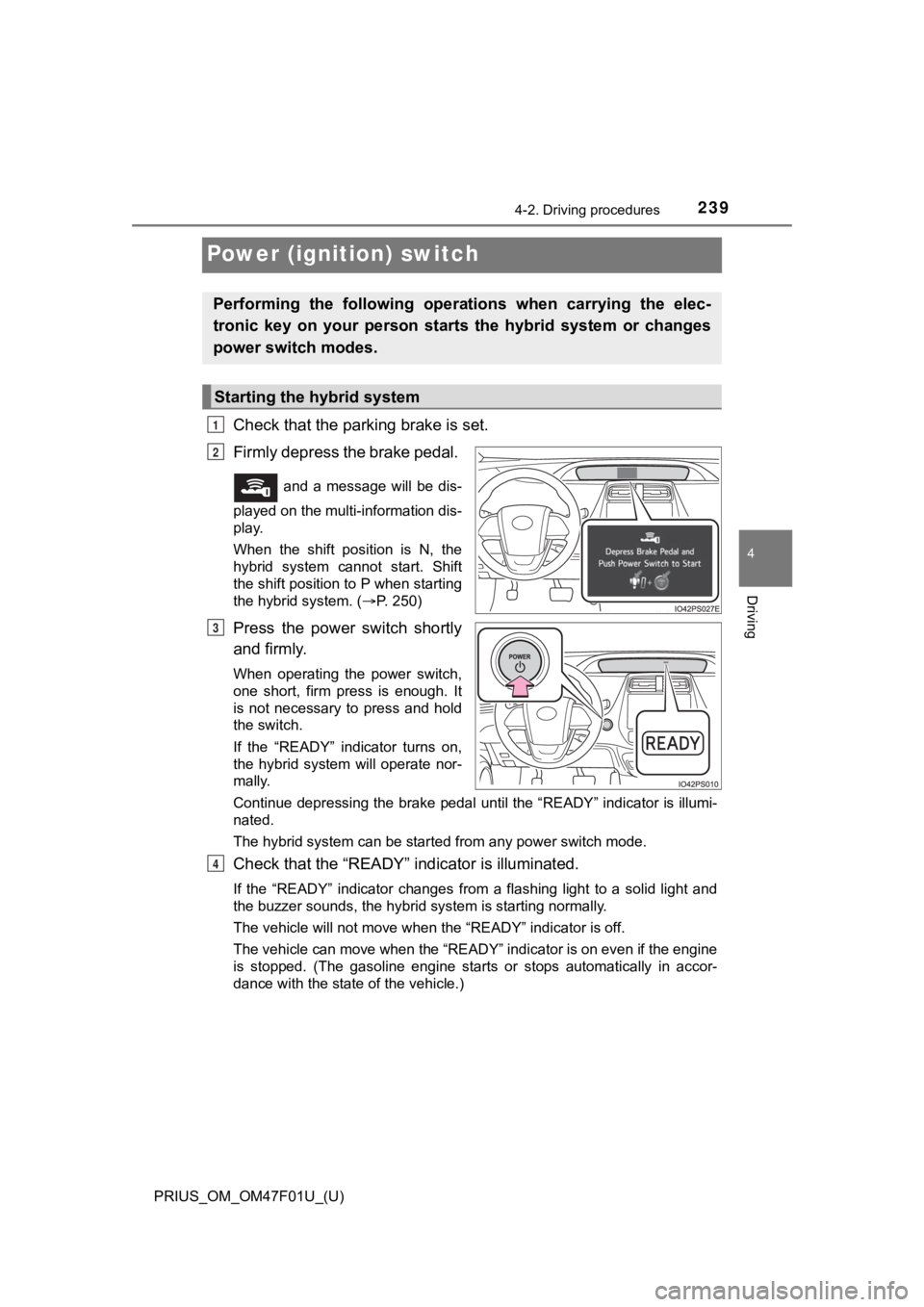
Check that the parking brake is set.
Firmly depress the brake pedal.
and a message will be dis-
played on the multi-information dis-
play.
When the shift position is N, the
hybrid system cannot start. Shift
the shift position to P when starting
the hybrid system. ( P. 2 5 0 )
Press the power switch shortly
and firmly.
When operating the power switch,
one short, firm press is enough. It
is not necessary to press and hold
the switch.
If the “READY” indicator turns on,
the hybrid system will operate nor-
mally.
Continue depressing the brake pedal until the “READY” indicator is illumi-
nated.
The hybrid system can be started from any power switch mode.
Check that the “R EADY” indicator is illuminated.
If the “READY” indicator changes from a flashing light to a sol id light and
the buzzer sounds, the hybrid system is starting normally.
The vehicle will not move when the “READY” indicator is off.
The vehicle can move when the “READY” indicator is on even if t he engine
is stopped. (The gasoline engine starts or stops automatically in accor-
dance with the state of the vehicle.)
Performing the following opera tions when carrying the elec-
tronic key on your person starts the hybrid system or changes
power switch modes.
Starting the hybrid system
1
2
3
4
Page 244 of 744

244
PRIUS_OM_OM47F01U_(U)
4-2. Driving procedures
WARNING
■When starting the hybrid system
Always start the hybrid system while sitting in the driver’s seat. Do not
depress the accelerator pedal while starting the hybrid system under any
circumstances.
Doing so may cause an accident resulting in death or serious in jury.
■ Stopping the hybrid system in an emergency
● If you want to stop the hybrid system in an emergency while driving the
vehicle, press and hold the power switch for more than 2 second s, or
press it briefly 3 times or more in succession. ( P. 577)
However, do not touch the power switch while driving except in an emer-
gency. Turning the hybrid system off while driving will not cause loss of
steering or braking control, however, power assist to the steer ing will be
lost. This will make it more difficult to steer smoothly, so you should pull
over and stop the vehicle as soon as it is safe to do so.
● If the power switch is operated while the vehicle is running, a warning
message will be shown on the multi-information display and a buzzer
sounds.
● When restarting the hybrid system after an emergency shutdown w hile
driving, press the power switch. When restarting the hybrid sys tem after
stopping the vehicle, change the shift position to P and then press the
power switch.
■ When parking
Exhaust gases include harmful carbon monoxide (CO), which is co lorless
and odorless. Observe the following precautions.
Failure to do so may cause exhaust gases to enter the vehicle a nd may
lead to an accident caused by light-headedness, or may lead to death or a
serious health hazard.
● If the vehicle is in a poorly ventilated area or a closed area, such as a
garage, stop the hybrid system.
● Do not leave the vehicle with the hybrid system operating for a long time. If
such a situation cannot be avoided, park the vehicle in an open space and
ensure that exhaust fumes do not enter the vehicle interior.
● Do not leave the hybrid system operating in an area with snow build-up, or
where it is snowing. If snowbanks build up around the vehicle w hile the
hybrid system is operating, exhaust gases may collect and enter the vehi-
cle.
Page 250 of 744
250
PRIUS_OM_OM47F01U_(U)
4-2. Driving procedures
*: For good fuel economy and noise reduction, the D position should usually
be used.
P. 3 4 2
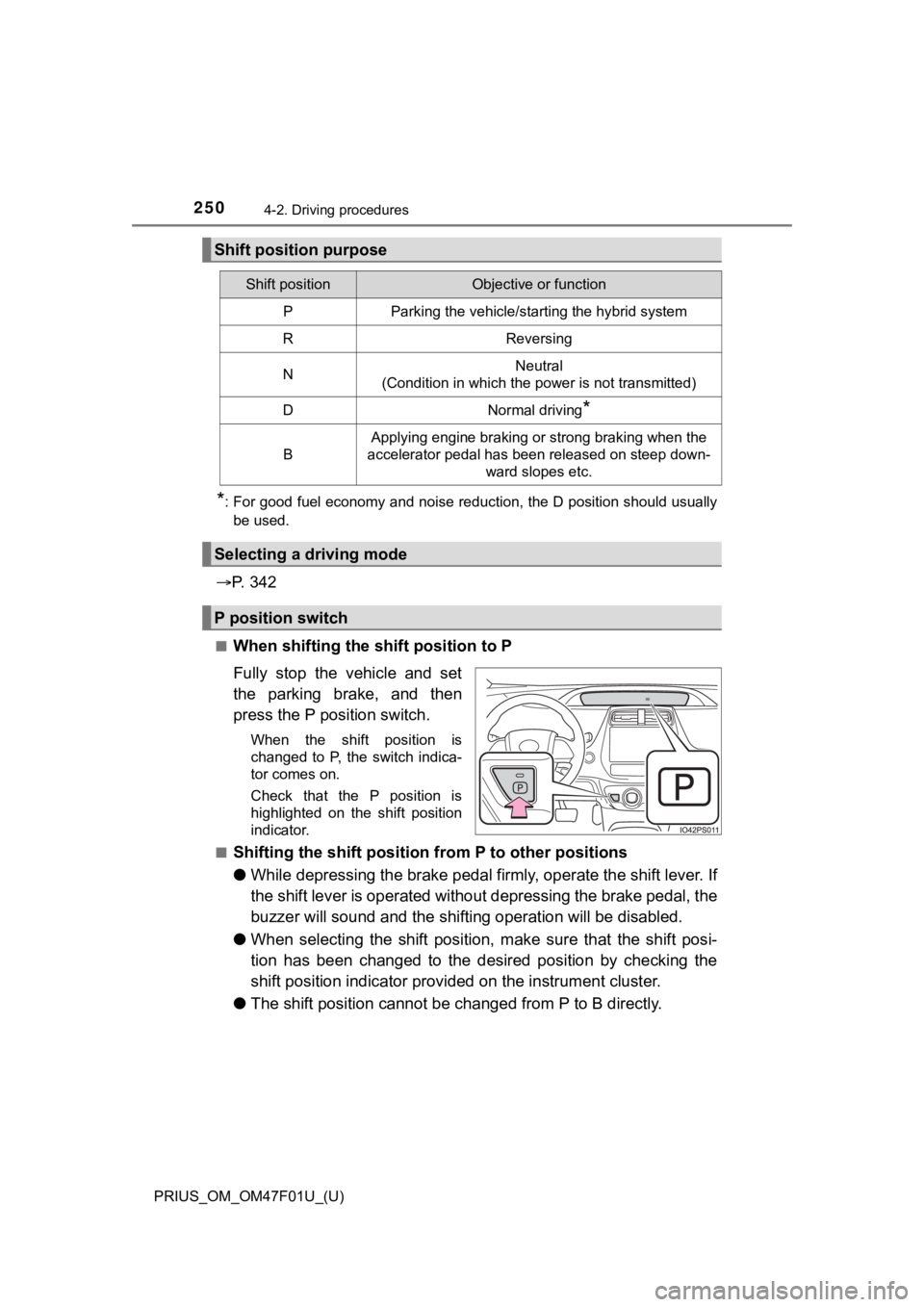
■When shifting the shift position to P
Fully stop the vehicle and set
the parking brake, and then
press the P position switch.
When the shift position is
changed to P, the switch indica-
tor comes on.
Check that the P position is
highlighted on the shift position
indicator.
■
Shifting the shift position from P to other positions
● While depressing the brake pedal f irmly, operate the shift lever. I f
the shift lever is operated withou t depressing the brake pedal, the
buzzer will sound and the shifting operation will be disabled.
● When selecting the shift position, make sure that the shift pos i-
tion has been changed to the desired position by checking the
shift position indica tor provided on the in strument cluster.
● The shift position cannot be changed from P to B directly.
Shift position purpose
Shift positionObjective or function
PParking the vehicle/starting the hybrid system
RReversing
NNeutral
(Condition in which the power is not transmitted)
DNormal driving*
B
Applying engine braking or strong braking when the
accelerator pedal has been released on steep down-
ward slopes etc.
Selecting a driving mode
P position switch
Page 252 of 744

252
PRIUS_OM_OM47F01U_(U)
4-2. Driving procedures
■Restraining sudden start (Drive-Start Control)
P. 224
■ Automatic P position selection function
In the following situations, the shift position is automaticall y changed to P.
● When pressing the power switch with the vehicle stopped while the power
switch is in ON mode and the shift position is in a position other than P (after
the shift position has changed to P, the power switch will turn off)
*
●If the driver’s door is opened and all of the following conditi ons are met,
while the shift position is in a position other than P
• The power switch is in ON mode.
• The driver is not wearing the seat belt.
• The brake pedal is not depressed.
To start off the vehicle after the shift position is changed to P, operate the
shift lever again.
*: When the power switch is pressed while driving at extremely slow speeds,
such as immediately before stopping the vehicle, the shift posi tion may
automatically change to P. Make sure that the vehicle is completely stopped
before pressing the power switch.
The shift position may also automatically switch to P if one of the following
conditions is detected while the vehicle is stopped by dynamic radar cruise
control with full-speed range (if equipped).
● Driver’s seat belt is not fastened
● Driver’s door is opened
● Approximately 3 minutes elapse after the vehicle stopped
■ If the shift position cannot be shifted from P
There is a possibility that the 12-volt battery is discharged. Check the 12-volt
battery in this situation. ( P. 646)
■ About engine braking
When shift position B is selected, releasing the accelerator pe dal will apply
engine braking.
● When the vehicle is driven at high speeds, compared to ordinary gasoline-
fueled vehicles, the engine braking deceleration is felt less t han that of other
vehicles.
● The vehicle can be accelerated even when shift position B is se lected.
If the vehicle is driven continuously in the B position, fuel e fficiency will
become low. Usually, select the D position.
■ After recharging/reconnecting the 12-volt battery
P. 521
Page 326 of 744

326
PRIUS_OM_OM47F01U_(U)
4-5. Using the driving support systems
Example of constant speed cruising
When there are no vehicles ahead
The vehicle travels at the speed set by the driver.
Example of deceleration crui sing and follow-up cruising
When a preceding vehicle driving slower than the set speed
appears
When a vehicle is detected running ahead of you, the system automatically
decelerates your vehicle. When a greater reduction in vehicle s peed is
necessary, the system applies the brakes (the stop lights will come on at
this time). The system will respond to changes in the speed of the vehicle
ahead in order to maintain the vehicle-to-vehicle distance set by the driver.
Approach warning warns you when the system cannot decelerate su ffi-
ciently to prevent your vehicle fr om closing in on the vehicle ahead.
When the vehicle ahead of you stops, your vehicle will also stop (vehicle is
stopped by system control). After the vehicle ahead starts off, pushing the
cruise control lever up or depressing the accelerator pedal (st art-off opera-
tion) will resume follow-up cruising. If the start-off operatio n is not per-
formed, system control continues to keep your vehicle stopped.
When the turn signal lever is operated and your vehicle moves to an over-
taking lane while driving at 50 mph (80 km/h) or more, the vehi cle will
accelerate to help to overtake a passing vehicle.
The system’s identification of what is an overtaking lane may b e deter-
mined solely based on the location of the steering wheel in the vehicle (left
side driver position versus right side driver position.) If the vehicle is driven
to a region where the overtaking lane is on a different side fr om where the
vehicle is normally driven, the vehicle may accelerate when the turn signal
lever is operated in the opposite direction to the overtaking l ane (e.g., if the
driver normally operates the vehicle in a region where the overtaking lane
is to the right but then drives to a region where the overtaking lane is to the
left, the vehicle may accelerate when the right turn signal is activated).
Example of acceleration
When there are no longer any preceding vehicles driving slower
than the set speed
The system accelerates until the set speed is reached. The syst em then
returns to constant speed cruising.
1
2
3
Page 330 of 744
330
PRIUS_OM_OM47F01U_(U)
4-5. Using the driving support systems
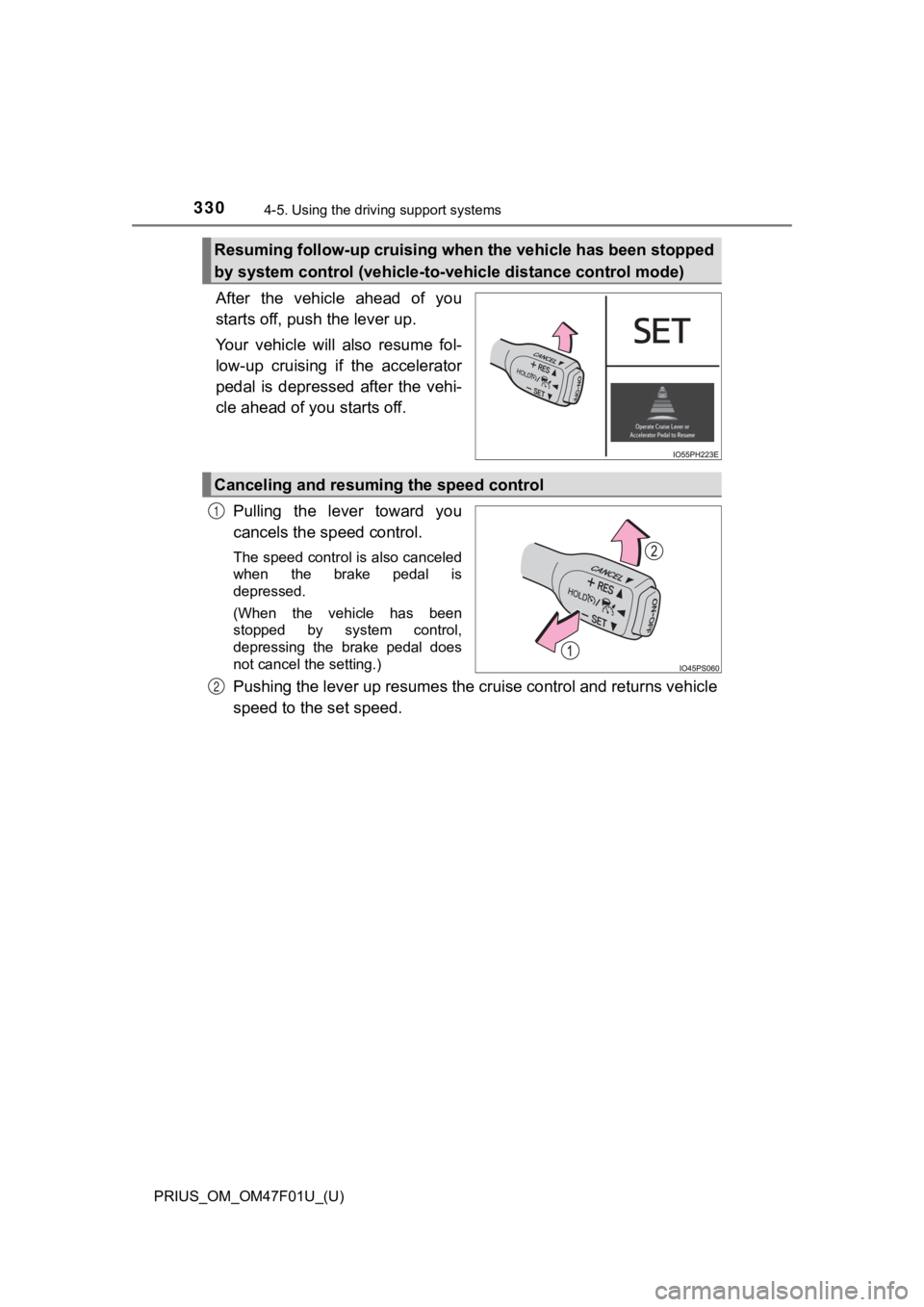
After the vehicle ahead of you
starts off, push the lever up.
Your vehicle will also resume fol-
low-up cruising if the accelerator
pedal is depressed after the vehi-
cle ahead of you starts off.
Pulling the lever toward you
cancels the speed control.
The speed control is also canceled
when the brake pedal is
depressed.
(When the vehicle has been
stopped by system control,
depressing the brake pedal does
not cancel the setting.)
Pushing the lever up resumes the cruise control and returns veh icle
speed to the set speed.
Resuming follow-up cruising when the vehicle has been stopped
by system control (vehicle-to- vehicle distance control mode)
Canceling and resuming the speed control
1
2
Page 333 of 744
PRIUS_OM_OM47F01U_(U)
3334-5. Using the driving support systems
4
Driving
■Dynamic radar cruise control wi th full-speed range can be set when
● The shift position is in D.
● The desired set speed can be set when the vehicle speed is approximately
20 mph (30 km/h) or more.
(However, when the vehicle speed is set while driving at below approxi-
mately 20 mph [30 km/h], the set speed will be set to approxima tely 20 mph
[30 km/h].)
■ Accelerating after setting the vehicle speed
The vehicle can accelerate by operating the accelerator pedal. After acceler-
ating, the set speed resumes. However, during vehicle-to-vehicl e distance
control mode, the vehicle speed may decrease below the set spee d in order
to maintain the distance to the preceding vehicle.
■ When the vehicle stops while follow-up cruising
●Pushing the lever up while the vehicle ahead stops will resume follow-up
cruising if the vehicle ahead starts off within approximately 3 seconds after
the lever is pushed up.
● If the vehicle ahead starts off within 3 seconds after your veh icle stops, fol-
low-up cruising will be resumed.
■ Automatic cancelation of vehicle-to-vehicle distance control mode
Vehicle-to-vehicle distance control mode is automatically cance led in the fol-
lowing situations.
● VSC is activated.
● TRAC is activated for a period of time.
● When the VSC or TRAC system is turned off.
● The sensor cannot detect correctly because it is covered in some way.
● When the brake control or output restriction control of a driving support sys-
tem operates. (For example: Pre-Collision System, Drive-Start C ontrol)
● The parking brake is operated.
● The vehicle is stopped by system control on a steep incline.
● The following are detected when the vehicle has been stopped by system
control:
• The driver is not wearing a seat belt.
• The driver’s door is opened.
• The vehicle has been stopped for about 3 minutes.
The shift position may automatically change to P. ( P. 252)
If vehicle-to-vehicle distance control mode is automatically ca nceled for any
reasons other than the above, there may be a malfunction in the system.
Contact your Toyota dealer.
Page 351 of 744

PRIUS_OM_OM47F01U_(U)
3514-5. Using the driving support systems
4
Driving
■Conditions under which the system may not function correctly
●The Blind Spot Monitor function may not detect vehicles correct ly in the fol-
lowing situations:
• When the sensor is misaligned due to a strong impact to the se nsor or its
surrounding area
• When mud, snow, ice, a sticker, etc. is covering the sensor or surround-
ing area on the rear bumper
• When driving on a road surface that is wet with standing water during bad
weather, such as heavy rain, snow, or fog
• When multiple vehicles are approaching with only a small gap b etween
each vehicle
• When the distance between your vehicle and a following vehicle is short
• When there is a significant difference in speed between your v ehicle and
the vehicle that enters the detection area
• When the difference in speed between your vehicle and another vehicle
is changing
• When a vehicle enters a detection area traveling at about the same
speed as your vehicle
• As your vehicle starts from a stop, a vehicle remains in the d etection area
• When driving up and down consecutive steep inclines, such as hills, dips in the road, etc.
• When driving on roads with sharp bends, consecutive curves, or uneven
surfaces
• When vehicle lanes are wide, or when driving on the edge of a lane, and
the vehicle in an adjacent lane is far away from your vehicle
• When a bicycle carrier or other accessory is installed to the rear of the
vehicle
• When there is a significant difference in height between your vehicle and
the vehicle that enters the detection area
• Immediately after the Blind Spot Monitor function is turned on
● Instances of the Blind Spot Monitor function unnecessarily dete cting a vehi-
cle and/or object may increase in the following situations:
• When the sensor is misaligned due to a strong impact to the se nsor or its
surrounding area
• When the distance between your vehicle and a guardrail, wall, etc. that
enters the detection area is short
• When driving up and down consecutive steep inclines, such as h ills, dips
in the road, etc.
• When vehicle lanes are narrow, or when driving on the edge of a lane,
and a vehicle traveling in a lane other than the adjacent lanes enters the
detection area
• When driving on roads with sharp bends, consecutive curves, or uneven
surfaces
• When the tires are slipping or spinning
• When the distance between your vehicle and a following vehicle is short
• When a bicycle carrier or other accessory is installed to the rear of the vehicle
Page 375 of 744

PRIUS_OM_OM47F01U_(U)
3754-5. Using the driving support systems
4
Driving
■Operation starting conditions
When the PKSB OFF indicator is not illuminated or flashing ( P. 3 7 8 ,
599) and all of the following conditions are met, the system op erates.
Hybrid system output restriction control
● The Parking Support Brake function is on.
● The vehicle speed is approxima tely 10 mph (15 km/h) or less.
● There is an obstacle in the traveling direction of the vehicle
(approximately 6 to 13 ft. [2 to 4 m] ahead).
● The system determined that a stronger-than-normal brake opera-
tion was necessary to avoid a collision.
Brake control
● Hybrid system output restricti on control is being performed.
● The system determined that a n emergency brake operation was
necessary to av oid a collision.
■Operation ending conditions
In any of the following situatio ns, the system stops operating.
Hybrid system output restriction control
● The Parking Support Brake function has been turned off
(stopped).
● The collision became a voidable with normal brake operation.
● The obstacle is no longer in the traveling direction of the veh icle
(approximately 6 to 13 ft. [2 to 4 m] ahead).
Brake control
● The Parking Support Brake function has been turned off
(stopped).
● Approximately 2 seconds elapsed after the vehicle was stopped
by brake control.
● The brake pedal was depressed after the vehicle was stopped by
brake control.
● The obstacle is no longer in the traveling direction of the veh icle
(approximately 6 to 13 ft. [2 to 4 m] ahead).
Operation conditions