stop start TOYOTA PRIUS 2022 User Guide
[x] Cancel search | Manufacturer: TOYOTA, Model Year: 2022, Model line: PRIUS, Model: TOYOTA PRIUS 2022Pages: 744, PDF Size: 14.35 MB
Page 114 of 744
114
PRIUS_OM_OM47F01U_(U)
2. Instrument cluster
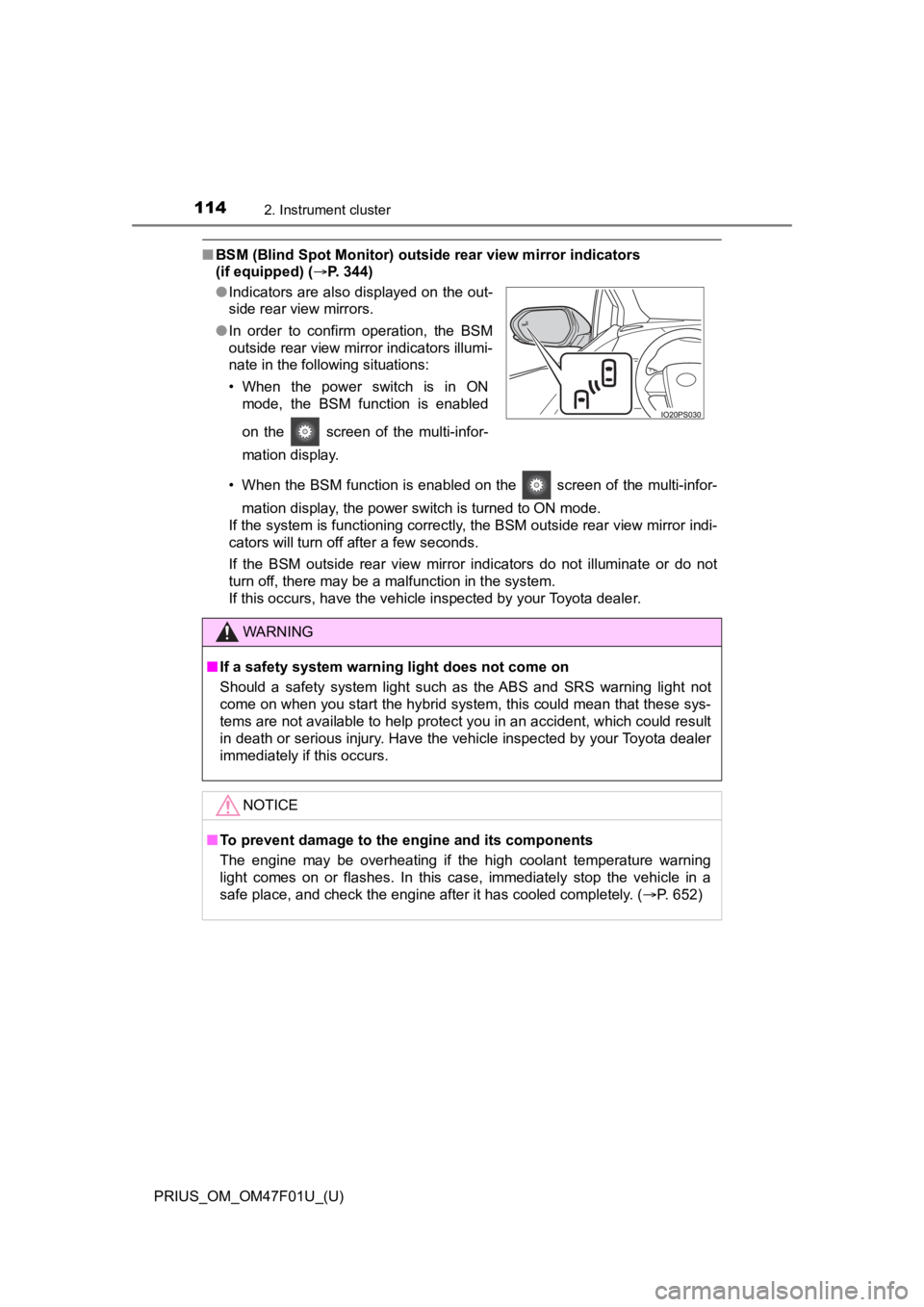
■BSM (Blind Spot Monitor) outsid e rear view mirror indicators
(if equipped) ( P. 344)
• When the BSM function is enabled on the screen of the multi-infor- mation display, the power switch is turned to ON mode.
If the system is functioning correctly, the BSM outside rear vi ew mirror indi-
cators will turn off after a few seconds.
If the BSM outside rear view mirror indicators do not illuminat e or do not
turn off, there may be a malfunction in the system.
If this occurs, have the vehicle inspected by your Toyota deale r.
●
Indicators are also displayed on the out-
side rear view mirrors.
● In order to confirm operation, the BSM
outside rear view mirror indicators illumi-
nate in the following situations:
• When the power switch is in ON
mode, the BSM function is enabled
on the screen of the multi-infor-
mation display.
WARNING
■If a safety system warning light does not come on
Should a safety system light such as the ABS and SRS warning li ght not
come on when you start the hybrid system, this could mean that these sys-
tems are not available to help protect you in an accident, which could result
in death or serious injury. Have the vehicle inspected by your Toyota dealer
immediately if this occurs.
NOTICE
■To prevent damage to the engine and its components
The engine may be overheating if the high coolant temperature warning
light comes on or flashes. In this case, immediately stop the v ehicle in a
safe place, and check the engine after it has cooled completely. (P. 652)
Page 129 of 744
PRIUS_OM_OM47F01U_(U)
1292. Instrument cluster
2
Instrument cluster
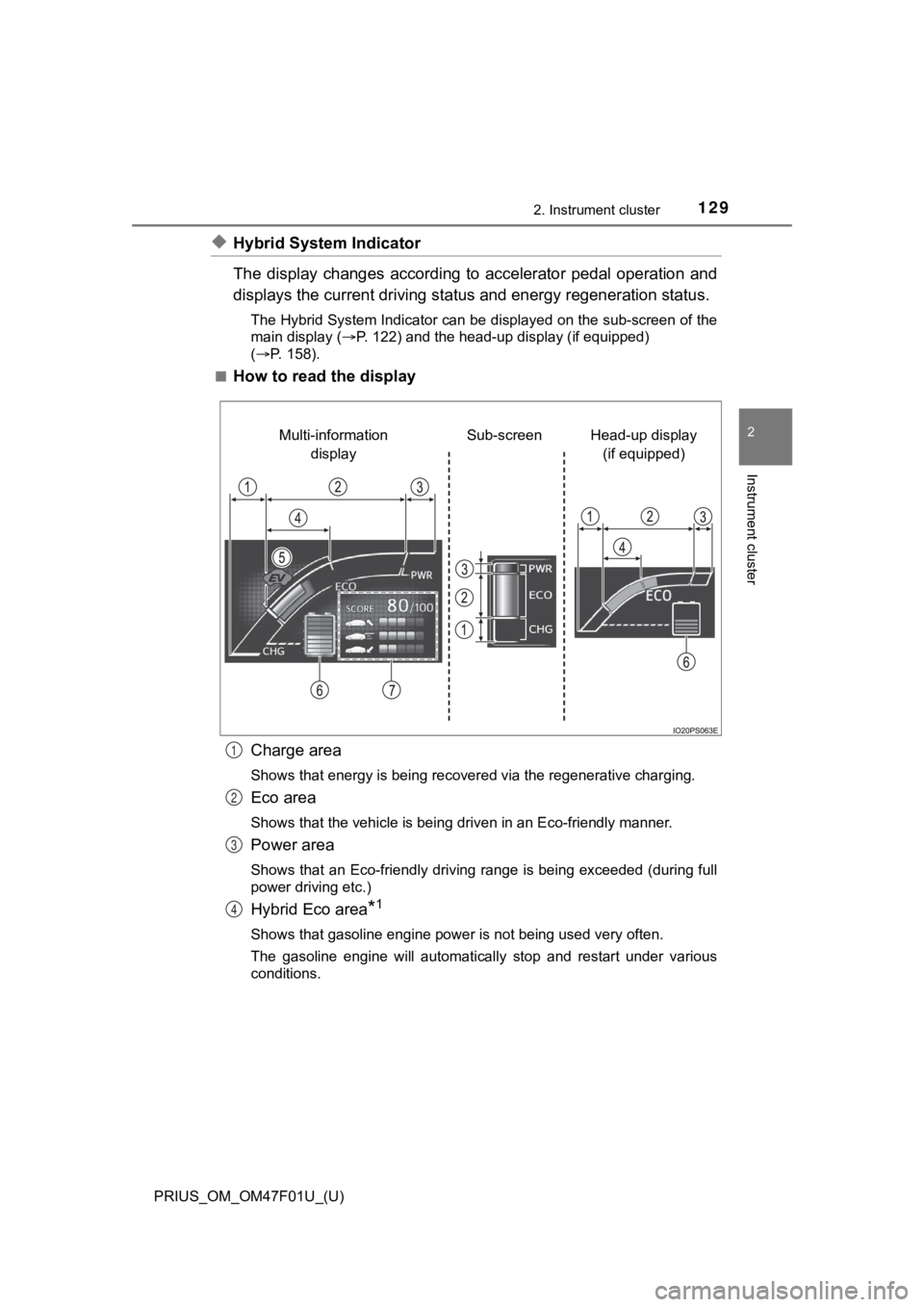
◆Hybrid System Indicator
The display changes according to accelerator pedal operation and
displays the current driving st atus and energy regeneration sta tus.
The Hybrid System Indicator can be displayed on the sub-screen of the
main display ( P. 122) and the head-up display (if equipped)
( P. 158).
■
How to read the display
Charge area
Shows that energy is being recovered via the regenerative charging.
Eco area
Shows that the vehicle is being driven in an Eco-friendly manne r.
Power area
Shows that an Eco-friendly driving range is being exceeded (dur ing full
power driving etc.)
Hybrid Eco area*1
Shows that gasoline engine power is not being used very often.
The gasoline engine will automatically stop and restart under v arious
conditions.
Head-up display
(if equipped)
Sub-screen
Multi-information
display
1
2
3
4
Page 130 of 744
130
PRIUS_OM_OM47F01U_(U)
2. Instrument cluster
EV indicator*2, 3
The EV indicator comes on when the vehicle is driven using only the
electric motor (traction motor) or the gasoline engine is stopped.
Hybrid battery (traction battery) status
P. 128
Eco score
P. 131
● By keeping the indicator within Eco area, more Eco-friendly dri v-
ing can be achieved.
● Charge area indicates regeneration
*4 status. Regenerated
energy will be used to charge the hybrid battery (traction battery).
*1: Not displayed on the sub-screen.
*2: Not displayed on the sub-screen or head-up display.
*3: The EV indicator function can be turned off in the “Meter Cust omize”
settings. ( P. 153)
*4: When used in this manual, “regeneration” refers to the conversion of
energy created by the movement of the vehicle into electrical e nergy.
■
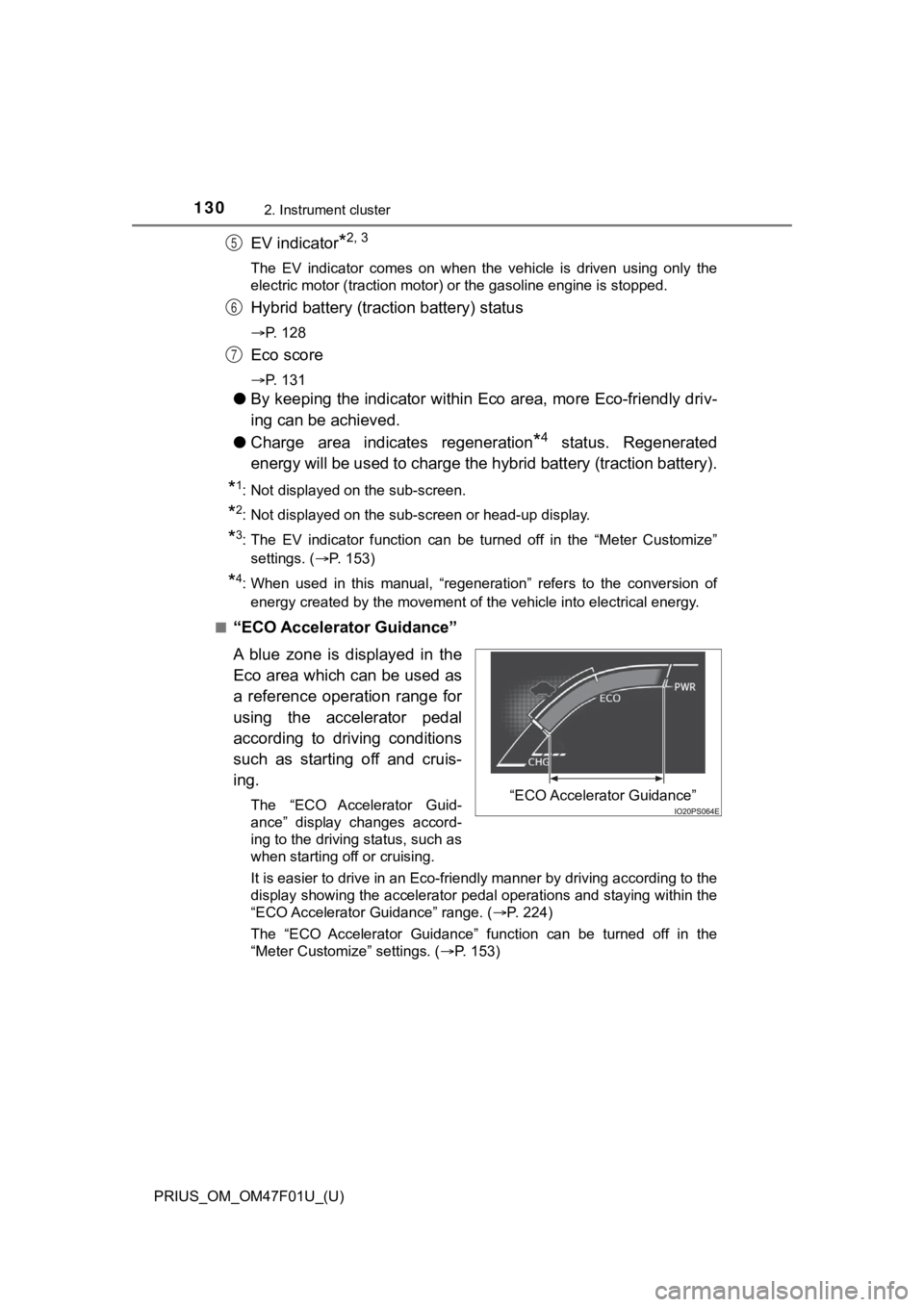
“ECO Accelerator Guidance”
A blue zone is displayed in the
Eco area which can be used as
a reference operation range for
using the accelerator pedal
according to driving conditions
such as starting off and cruis-
ing.
The “ECO Accelerator Guid-
ance” display changes accord-
ing to the driving status, such as
when starting off or cruising.
It is easier to drive in an Eco-friendly manner by driving according to the
display showing the accelerator pedal operations and staying wi thin the
“ECO Accelerator Guidance” range. ( P. 224)
The “ECO Accelerator Guidance” function can be turned off in the
“Meter Customize” settings. ( P. 153)
5
6
7
“ECO Accelerator Guidance”
Page 131 of 744
PRIUS_OM_OM47F01U_(U)
1312. Instrument cluster
2
Instrument cluster
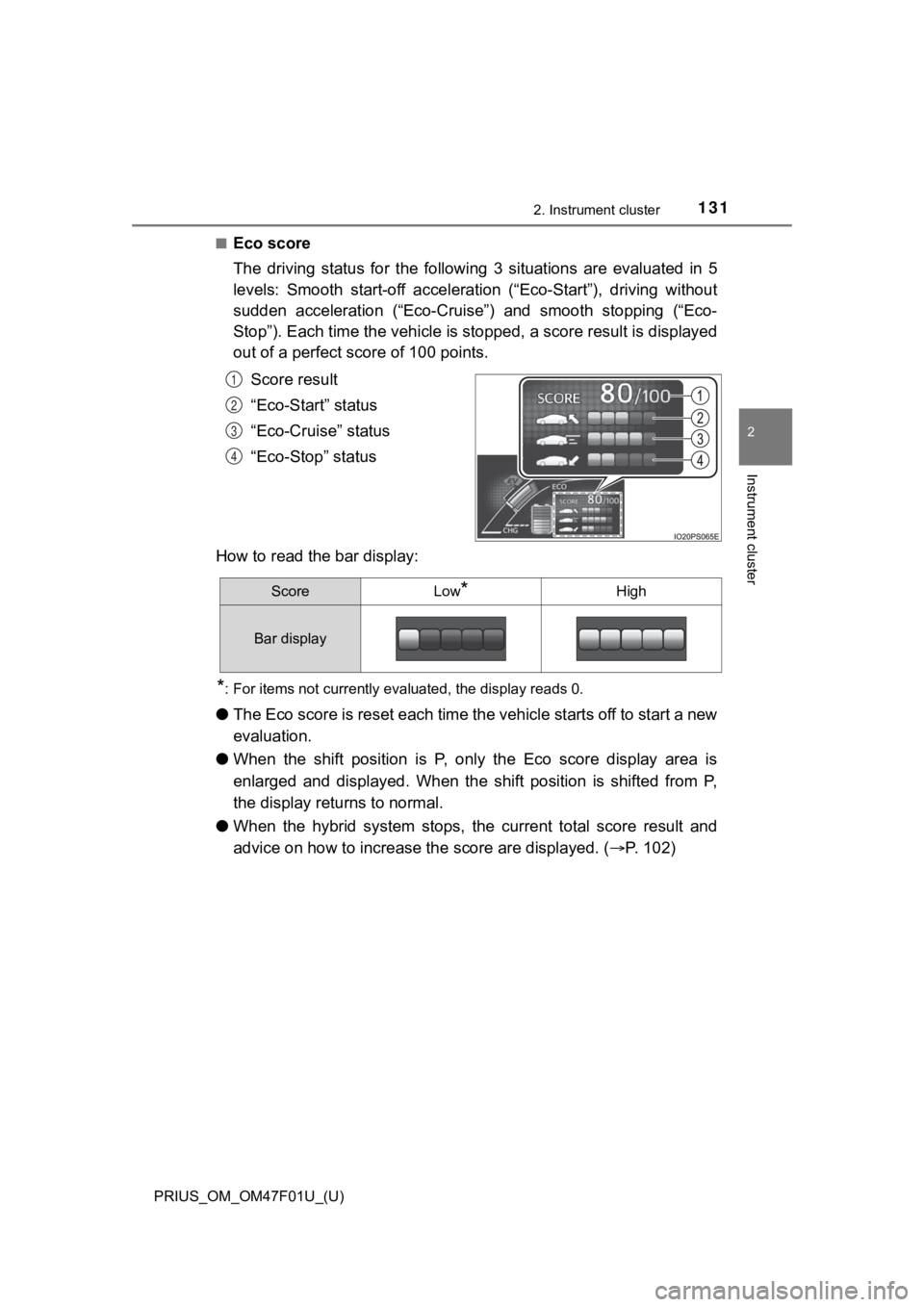
■Eco score
The driving status for the following 3 situations are evaluated in 5
levels: Smooth start-off acceleration (“Eco-Start”), driving wi thout
sudden acceleration (“Eco-Cruise”) and smooth stopping (“Eco-
Stop”). Each time the vehicle i s stopped, a score result is displayed
out of a perfect score of 100 points.
Score result
“Eco-Start” status
“Eco-Cruise” status
“Eco-Stop” status
How to read the bar display:
*: For items not currently evaluated, the display reads 0.
● The Eco score is reset each time the vehicle starts off to star t a new
evaluation.
● When the shift position is P, only the Eco score display area i s
enlarged and displayed. When the shift position is shifted from P,
the display returns to normal.
● When the hybrid system stops, the current total score result an d
advice on how to increase th e score are displayed. (P. 102)
1
2
3
4
ScoreLow*High
Bar display
Page 132 of 744

132
PRIUS_OM_OM47F01U_(U)
2. Instrument cluster
■When operation of each function stops
● The Hybrid System Indicator stops operating in the following si tuations.
• The “READY” indicator is not illuminated.
• The shift position is not D or B.
● The Eco score and “ECO Accelerator Guidance” stop operating in the fol-
lowing situations.
• The Hybrid System Indicator is not operating.
• Cruise control (if equipped) or dynamic radar cruise control w ith full-
speed range (if equipped) is being used.
■ About the Eco score
●After starting off, Eco score display does not start until the vehicle speed
exceeds approximately 19 mph (30 km/h).
● In addition to the vehicle driving status, the Eco score also e valuates the air
conditioning system usage condition ( P. 148). The score displayed when
the hybrid system stops is the total result of the driving stat us after the
hybrid system starts and the air conditioning usage condition.
Page 163 of 744

PRIUS_OM_OM47F01U_(U)
1632. Instrument cluster
2
Instrument cluster
■Enabling/disabling of the head-up display
When the head-up display is turned off with the “HUD” switch, it is not dis-
played until the “HUD” switch is used to turn the head-up displ ay on again.
(Operation of the head-up display is not linked with the power switch.)
■ Display brightness
●The brightness of the head-up display is automatically adjusted according to
the operation status of the headlights (on/off) and the brightn ess of the sur-
roundings.
● When the brightness of the head-up display is adjusted to a cer tain level or
higher, the display automatically dims when the vehicle is stopped. Once the
vehicle starts off and the vehicle speed reaches approximately 3.1 mph
(5 km/h) or more, the display automatically returns to its previous bright-
ness.
■ Vehicle speed display
In extremely cold environments, the display of the speedometer and the vehi-
cle speed of the head-up display may slightly differ.
■ Head-up display
The head-up display may seem dark and hard to see when viewed t hrough
sunglasses, especially polarized sunglasses.
■ When the 12-volt battery is disconnected
The customize settings of the head-up display will be reset.
■ Route guidance display (vehicles with navigation system)
The route guidance is not displayed on both the head-up display and multi-
information display simultaneously. When the route guidance is displayed on
the head-up display, the multi-information display does not dis play the route
guidance even if the navigation system-linked display ( P. 145) is selected
on the multi-information display.
Page 196 of 744

196
PRIUS_OM_OM47F01U_(U)
3-2. Opening, closing and locking the doors
●The lock sensor may not work properly if it comes into contact with ice,
snow, mud, etc. Clean the lock sensor and attempt to operate it again.
● A sudden approach to the effective range or door handle may prevent the
doors from being unlocked. In this case, return the door handle to the origi-
nal position and check that the doors unlock before pulling the door handle
again.
● If there is another electronic key in the detection area, it ma y take slightly
longer to unlock the doors after the door handle is gripped.
■ When the vehicle is not driven for extended periods
●To prevent theft of the vehicle, do not leave the electronic ke y within 6 ft.
(2 m) of the vehicle.
● The smart key system can be deactivated in advance. ( P. 686)
■ To operate the system properly
Make sure to carry the electronic key when operating the system. Do not get
the electronic key too close to the vehicle when operating the system from the
outside of the vehicle.
Depending on the position and holding condition of the electron ic key, the key
may not be detected correctly and the system may not operate pr operly. (The
alarm may go off accidentally, or the door lock prevention may not operate.)
■ If the smart key system does not operate properly
●Locking and unlocking the doors: Use the mechanical key. ( P. 643)
● Starting the hybrid system: P. 644
■ Customization
Settings (e.g. smart key system) can be changed.
(Customizable features: P. 686)
■ If the smart key system has been d eactivated in a customized setting
● Unlocking and locking the doors:
Use the wireless remote control or mechanical key. ( P. 182, 643)
● Starting the hybrid system and changing power switch modes: P. 644
● Stopping the hybrid system: P. 240
Page 222 of 744
222
PRIUS_OM_OM47F01U_(U)
4-1. Before driving
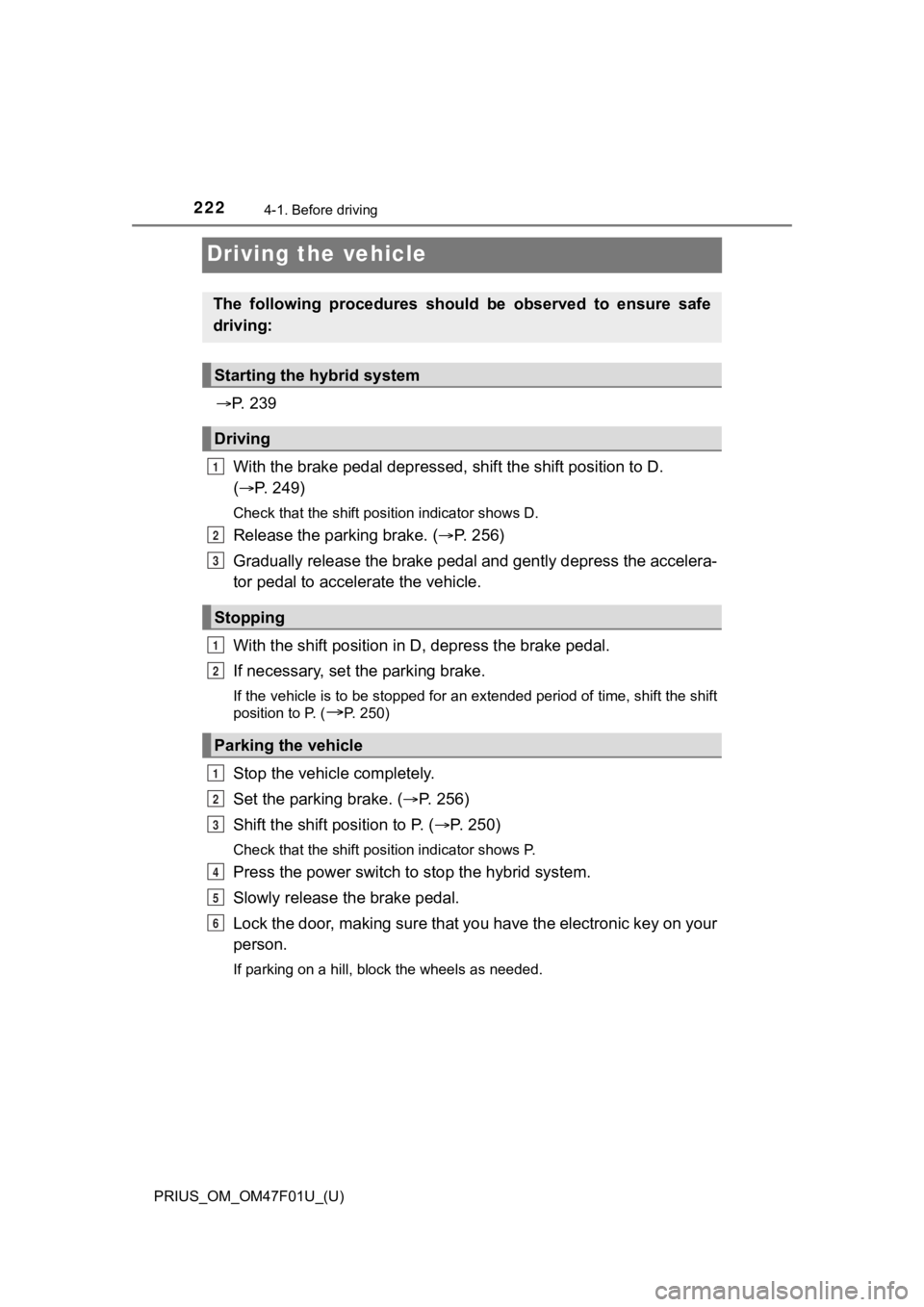
Driving the vehicle
P. 2 3 9
With the brake pedal depressed , shift the shift position to D.
( P. 249)
Check that the shift position indicator shows D.
Release the parking brake. ( P. 2 5 6 )
Gradually release the brake pedal and gently depress the accele ra-
tor pedal to accelerate the vehicle.
With the shift position in D , depress the brake pedal.
If necessary, set the parking brake.
If the vehicle is to be stopped for an extended period of time, shift the shift
position to P. (
P. 250)
Stop the vehicl e completely.
Set the parking brake. ( P. 2 5 6 )
Shift the shift position to P. ( P. 250)
Check that the shift position indicator shows P.
Press the power switch to stop the hybrid system.
Slowly release th e brake pedal.
Lock the door, making sure that you have the electronic key on your
person.
If parking on a hill, block the wheels as needed.
The following procedures should be observed to ensure safe
driving:
Starting the hybrid system
Driving
Stopping
Parking the vehicle
1
2
3
1
2
1
2
3
4
5
6
Page 224 of 744

224
PRIUS_OM_OM47F01U_(U)
4-1. Before driving
■“ECO Accelerator Guidance” (P. 130)
It is easier to drive in an Eco-friendly manner by driving whil e referring to the
“ECO Accelerator Guidance” display. Also, by using the “ECO Accelerator
Guidance”, it is easier to increase the Eco score evaluation.
● When starting off:
While staying within the “ECO Accelerator Guidance” range, gradually
depress the accelerator pedal and accelerate to the desired spe ed. If exces-
sive acceleration is avoided, the “Eco-Start” score will increa se.
● When driving:
After accelerating to the desired speed, release the accelerato r pedal and
drive at a stable speed within the “ECO Accelerator Guidance” range. By
keeping the vehicle within the “ECO Accelerator Guidance” range, the “Eco-
Cruise” score will increase.
● When stopping:
When stopping the vehicle, early releasing the accelerator peda l will cause
the “Eco-Stop” score to increase.
■ Drive-Start Control (DSC)
When the TRAC is turned off ( P. 417), sudden start restraint control also
does not operate. If your vehicle have trouble escaping from th e mud or fresh
snow due to sudden start restraint control operation, deactivat e TRAC
( P. 417) so that the vehicle may become able to escape from the mud or
fresh snow.
■ Breaking in your new Toyota
To extend the life of the vehicle, observing the following prec autions is recom-
mended:
● For the first 200 miles (300 km):
Avoid sudden stops.
● For the first 1000 miles (1600 km):
• Do not drive at extremely high speeds.
• Avoid sudden acceleration.
• Do not drive at a constant speed for extended periods.
■ Operating your vehicle in a foreign country
Comply with the relevant vehicle registration laws and confirm the availability
of the correct fuel. ( P. 663)
Page 225 of 744

PRIUS_OM_OM47F01U_(U)
2254-1. Before driving
4
Driving
WARNING
Observe the following precautions.
Failure to do so may result in death or serious injury.
■When starting the vehicle
Always keep your foot on the brake pedal while stopped with the “READY”
indicator is illuminated. This prevents the vehicle from creepi ng.
■ When driving the vehicle
● Do not drive if you are unfamiliar with the location of the brake and accel-
erator pedals to avoid depressing the wrong pedal.
• Accidentally depressing the accelerator pedal instead of the b rake
pedal will result in sudden acceleration that may lead to an accident.
• When backing up, you may twist your body around, leading to a diffi- culty in operating the pedals. Make sure to operate the pedals properly.
• Make sure to keep a correct driving posture even when moving t he
vehicle only slightly. This allows you to depress the brake and accelera-
tor pedals properly.
• Depress the brake pedal using your right foot. Depressing the brake
pedal using your left foot may delay response in an emergency, result-
ing in an accident.
● The driver should pay extra attention to pedestrians when the v ehicle is
powered only by the electric motor (traction motor). As there i s no engine
noise, the pedestrians may misjudge the vehicle’s movement. Even
though the vehicle is equipped with the vehicle proximity notif ication sys-
tem, drive with care as pedestrians in the vicinity may still not notice the
vehicle if the surrounding area is noisy.
● Do not drive the vehicle over or stop the vehicle near flammabl e materials
such as leaves, paper or rags.
The exhaust system and exhaust gases can be extremely hot. Thes e hot
parts may cause a fire if there is any flammable material nearby.
● During normal driving, do not turn off the hybrid system. Turning the hybrid
system off while driving will not cause loss of steering or braking control,
however, power assist to the steering will be lost. This will m ake it more
difficult to steer smoothly, so you should pull over and stop t he vehicle as
soon as it is safe to do so.
In the event of an emergency, such as if it becomes impossible to stop the
vehicle in the normal way: P. 577