lights TOYOTA PRIUS 2022 Workshop Manual
[x] Cancel search | Manufacturer: TOYOTA, Model Year: 2022, Model line: PRIUS, Model: TOYOTA PRIUS 2022Pages: 744, PDF Size: 14.35 MB
Page 326 of 744

326
PRIUS_OM_OM47F01U_(U)
4-5. Using the driving support systems
Example of constant speed cruising
When there are no vehicles ahead
The vehicle travels at the speed set by the driver.
Example of deceleration crui sing and follow-up cruising
When a preceding vehicle driving slower than the set speed
appears
When a vehicle is detected running ahead of you, the system automatically
decelerates your vehicle. When a greater reduction in vehicle s peed is
necessary, the system applies the brakes (the stop lights will come on at
this time). The system will respond to changes in the speed of the vehicle
ahead in order to maintain the vehicle-to-vehicle distance set by the driver.
Approach warning warns you when the system cannot decelerate su ffi-
ciently to prevent your vehicle fr om closing in on the vehicle ahead.
When the vehicle ahead of you stops, your vehicle will also stop (vehicle is
stopped by system control). After the vehicle ahead starts off, pushing the
cruise control lever up or depressing the accelerator pedal (st art-off opera-
tion) will resume follow-up cruising. If the start-off operatio n is not per-
formed, system control continues to keep your vehicle stopped.
When the turn signal lever is operated and your vehicle moves to an over-
taking lane while driving at 50 mph (80 km/h) or more, the vehi cle will
accelerate to help to overtake a passing vehicle.
The system’s identification of what is an overtaking lane may b e deter-
mined solely based on the location of the steering wheel in the vehicle (left
side driver position versus right side driver position.) If the vehicle is driven
to a region where the overtaking lane is on a different side fr om where the
vehicle is normally driven, the vehicle may accelerate when the turn signal
lever is operated in the opposite direction to the overtaking l ane (e.g., if the
driver normally operates the vehicle in a region where the overtaking lane
is to the right but then drives to a region where the overtaking lane is to the
left, the vehicle may accelerate when the right turn signal is activated).
Example of acceleration
When there are no longer any preceding vehicles driving slower
than the set speed
The system accelerates until the set speed is reached. The syst em then
returns to constant speed cruising.
1
2
3
Page 368 of 744
368
PRIUS_OM_OM47F01U_(U)
4-5. Using the driving support systems
WARNING
■Cautions regarding the use of the system
There is a limit to the degree of recognition accuracy and cont rol perfor-
mance that this system can provide, do not overly rely on this system. The
driver is always responsible for paying attention to the vehicl e’s surround-
ings and driving safely.
■ To ensure the system can operate properly
Observe the following precautions to avoid an unexpected accident.
● Do not damage the sensors, and always keep them clean.
● Do not attach a sticker or install an electronic component, such as a backlit
license plate (especially fluorescent type), fog lights, fender pole or wire-
less antenna near a radar sensor.
● Do not subject the surrounding area of the sensor to a strong impact. If
subjected to an impact, have the vehicle inspected by your Toyota dealer.
If the front or rear bumper needs to be removed/installed or replaced, con-
tact your Toyota dealer.
● Do not modify, disassemble or paint the sensors.
● Do not attach a license plate cover.
● Keep your tires properly inflated.
■ When to disable the function
In the following situations, disable the function as it may operate even
though there is no possibility of a collision.
● Failing to observe the warnings above.
● A non-genuine Toyota suspension (lowered suspension, etc.) is installed.
■ Side sensors
In the following situations, the intuitive parking assist may n ot operate nor-
mally and may result in an unexpected accident. Drive carefully.
● Obstacles may not be detected in the side areas until the vehicle is driven
for a short time and a scan of the side areas is completed. ( P. 364)
● Even after the scan of the side areas is completed, obstacles s uch as
other vehicles, people or animals that approach from the sides cannot be
detected.
● Even after the scan of the side areas is completed, obstacles may not be
detected depending on the surrounding situation of the vehicle.
At that time, the side sensor operation displays ( P. 359) temporary turn
off.
■ Notes when washing the vehicle
● Do not apply intensive bursts of water or steam to the sensor area.
Doing so may result in the sensor malfunctioning.
● When using steam to wash the vehicle, do not direct steam too c lose to
the sensors. The sensors may not function properly if subjected to steam.
Page 423 of 744

PRIUS_OM_OM47F01U_(U)
4234-6. Driving tips
4
Driving
◆When braking
Make sure to operate the brakes gently and in a timely manner. A
greater amount of electrical energy can be regenerated when slow-
ing down.
◆Delays
Repeated acceleration and deceleration, as well as long waits a t
traffic lights, will lead to bad fuel economy. Check traffic re ports
before leaving and avoid delays as much as possible. When drivi ng
in a traffic jam, gently release the brake pedal to allow the v ehicle to
move forward slightly while avoiding overuse of the accelerator
pedal. Doing so can help control excessive gasoline consumption.
◆Highway driving
Control and maintain the vehicle at a constant speed. Before st op-
ping at a toll booth or similar, allow plenty of time to releas e the
accelerator and gently apply the brakes. A greater amount of el ec-
trical energy can be regenerated when slowing down.
◆Air conditioning
Use the air conditioning only when necessary. Doing so can help
reduce excessive gasoline consumption.
In summer: When the ambient tempe rature is high, use the recircu-
lated air mode. Doing so will help to reduce the burden on the air
conditioning system and reduce fuel consumption as well.
In winter: Because the gasolin e engine will not automatically cut out
until it and the interior of the vehicle are warm, it will cons ume fuel.
Also, fuel consumption can be improved by avoiding overuse of t he
heater.
Page 425 of 744
425
PRIUS_OM_OM47F01U_(U)
4-6. Driving tips
4
Driving
Winter driving tips
●Use fluids that are appropriate t o the prevailing outside tempera-
tures. • Engine oil
• Engine/power control unit coolant
• Washer fluid
● Have a service technician inspect the condition of the 12-volt bat-
tery.
● Have the vehicle fitted with four snow tires or purchase a set of tire
chains for the front tires.
Ensure that all tires are the same size and brand, and that cha ins match
the size of the tires.
Perform the following accordi ng to the driving conditions:
● Do not try to forcibly open a window or move a wiper that is fr ozen.
Pour warm water over the frozen area to melt the ice. Wipe away
the water immediately to p revent it from freezing.
● To ensure proper operation of the climate control system fan,
remove any snow that has accumulated on the air inlet vents in
front of the windshield.
● Check for and remove any excess ic e or snow that may have accu-
mulated on the exterior lights, vehicle’s roof, chassis, around the
tires or on the brakes.
● Remove any snow or mud from the bottom of your shoes before
getting in the vehicle.
Carry out the necessary preparations and inspections before
driving the vehicle in winter. Always drive the vehicle in a ma n-
ner appropriate to the prevailing weather conditions.
Preparation for winter
Before driving the vehicle
Page 429 of 744
429
PRIUS_OM_OM47F01U_(U)
5Interior features
5-1. Using the air conditioning system and defogger
Automatic air conditioning system (vehicles with
7-inch display) ................. 430
Automatic air conditioning system (vehicles with
11.6-inch display) ............ 440
Heated steering wheel/ seat heaters .................... 450 5-2. Using the interior lights
Interior lights list ................ 452• Front interior light .......... 453
• Front personal lights ..... 453
• Rear interior light .......... 454
5-3. Using the storage features
List of storage features ..... 455 • Glove box...................... 456
• Console box .................. 456
• Cup holders .................. 457
• Bottle holders/
door pockets ................. 458
• Auxiliary boxes.............. 459
• Seat back pockets ........ 460
Luggage compartment features ........................... 461
5-4. Using the other interior features
Other interior features ....... 467 • Sun visors ..................... 467
• Vanity mirrors................ 467
• Power outlets ................ 468
• USB charging ports....... 469
• Wireless charger ........... 471
• Armrest ......................... 480
• Coat hooks.................... 480
• Assist grips ................... 481
Garage door opener.......... 482
Page 452 of 744
452
PRIUS_OM_OM47F01U_(U)
5-2. Using the interior lights
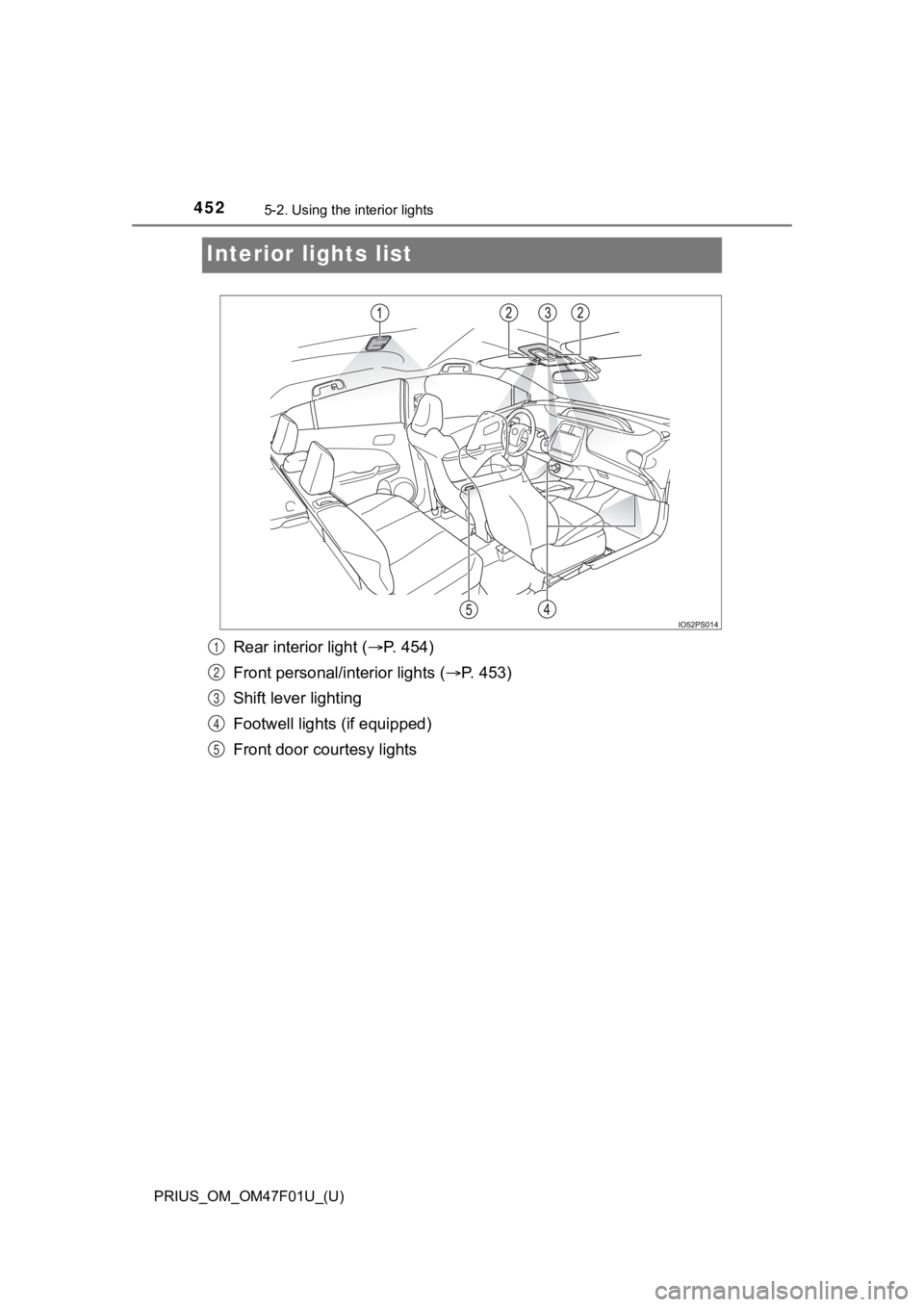
Interior lights list
Rear interior light ( P. 454)
Front personal/interior lights ( P. 453)
Shift lever lighting
Footwell lights (if equipped)
Front door courtesy lights1
2
3
4
5
Page 453 of 744
PRIUS_OM_OM47F01U_(U)
4535-2. Using the interior lights
5
Interior features
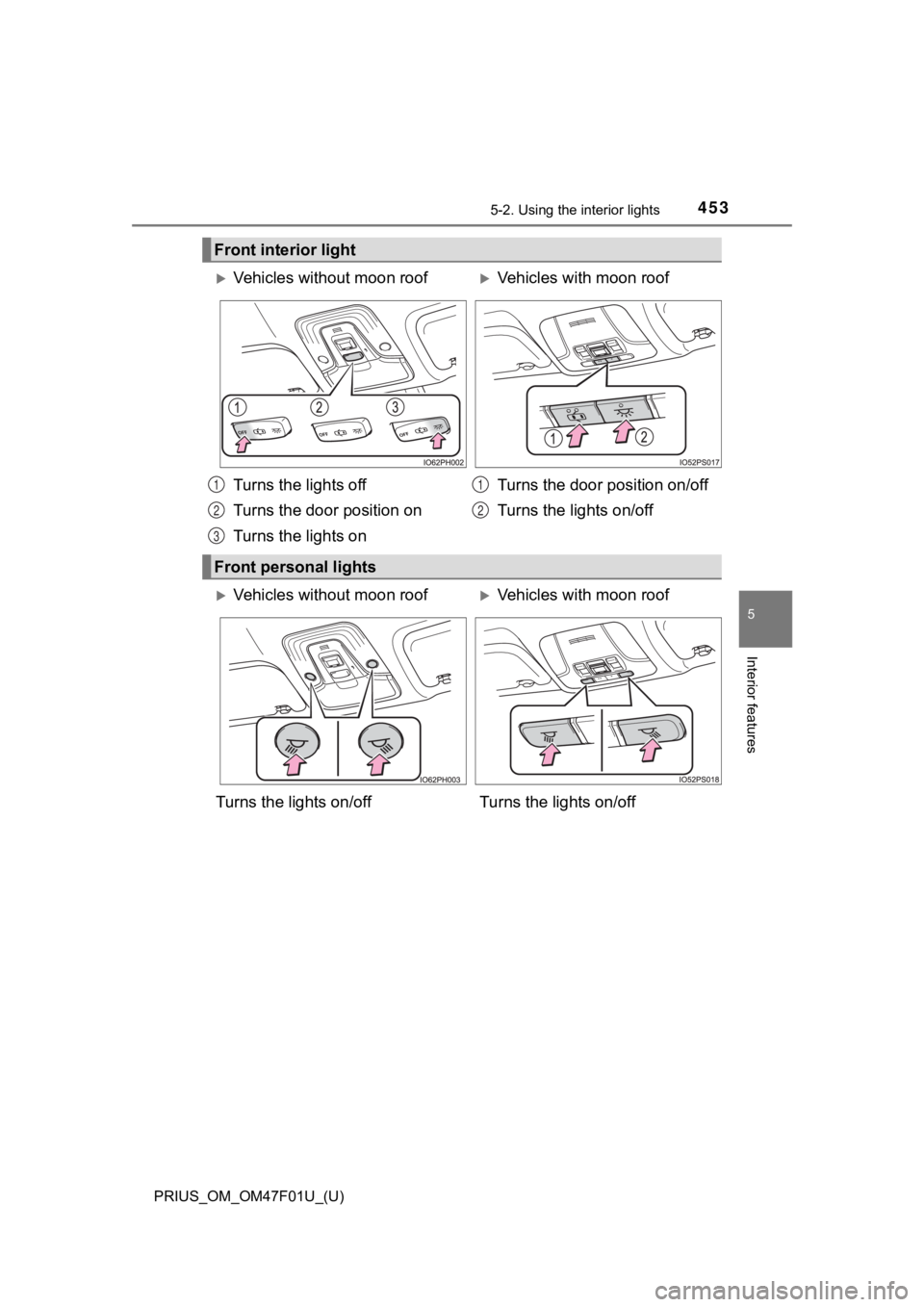
Front interior light
Vehicles without moon roofVehicles with moon roof
Turns the lights off
Turns the door position on
Turns the lights on Turns the door position on/off
Turns the lights on/off
Front personal lights
1
2
3
1
2
Vehicles without moon roofVehicles with moon roof
Turns the lights on/off Turns the lights on/off
Page 454 of 744
454
PRIUS_OM_OM47F01U_(U)
5-2. Using the interior lights
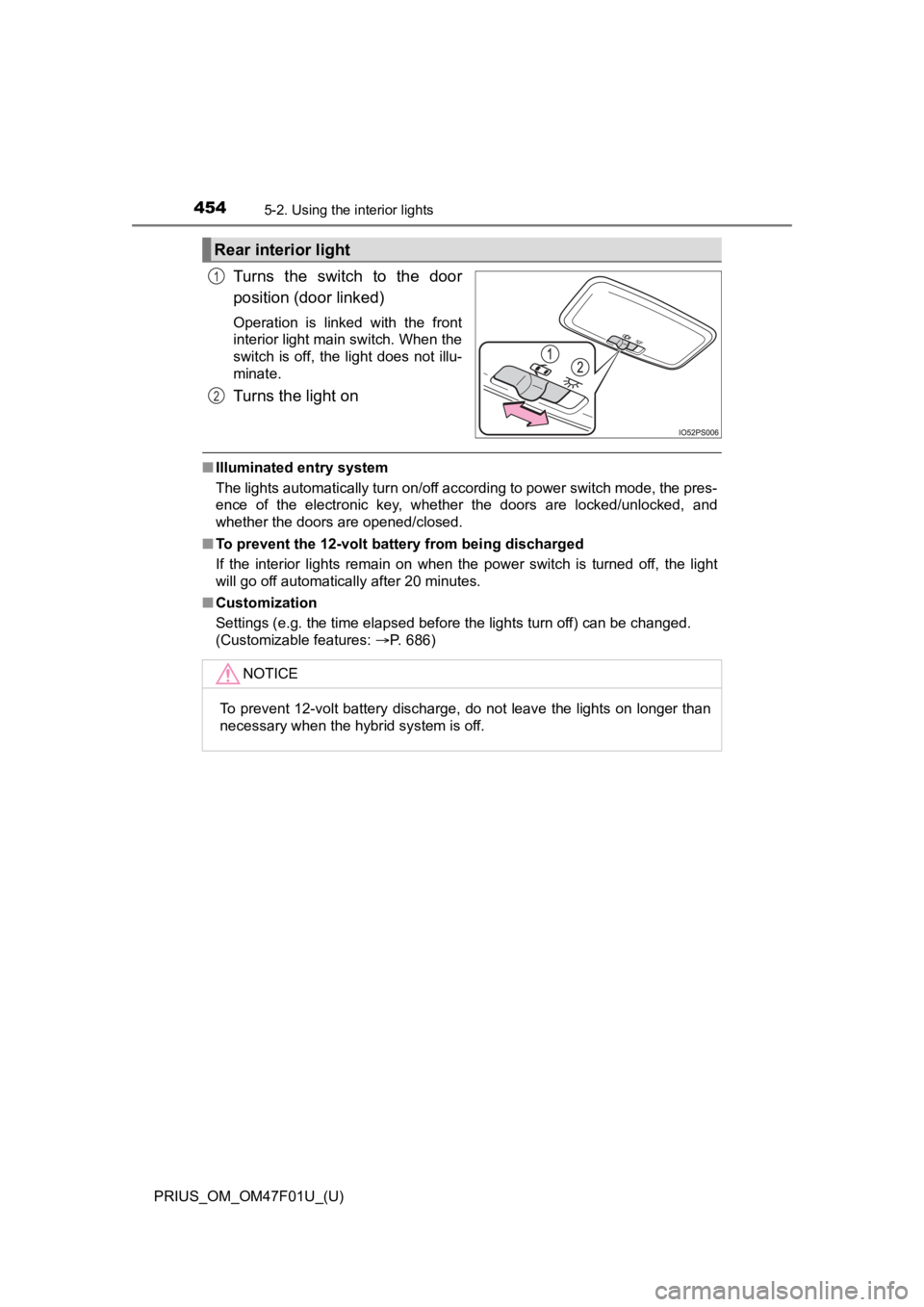
Turns the switch to the door
position (door linked)
Operation is linked with the front
interior light main switch. When the
switch is off, the light does not illu-
minate.
Turns the light on
■Illuminated entry system
The lights automatically turn on/off according to power switch mode, the pres-
ence of the electronic key, whether the doors are locked/unlocked, and
whether the doors are opened/closed.
■ To prevent the 12-volt battery from being discharged
If the interior lights remain on when the power switch is turned off, the light
will go off automatically after 20 minutes.
■ Customization
Settings (e.g. the time elapsed before the lights turn off) can be changed.
(Customizable features: P. 686)
Rear interior light
1
2
NOTICE
To prevent 12-volt battery discharge, do not leave the lights on longer than
necessary when the hybrid system is off.
Page 456 of 744
456
PRIUS_OM_OM47F01U_(U)
5-3. Using the storage features
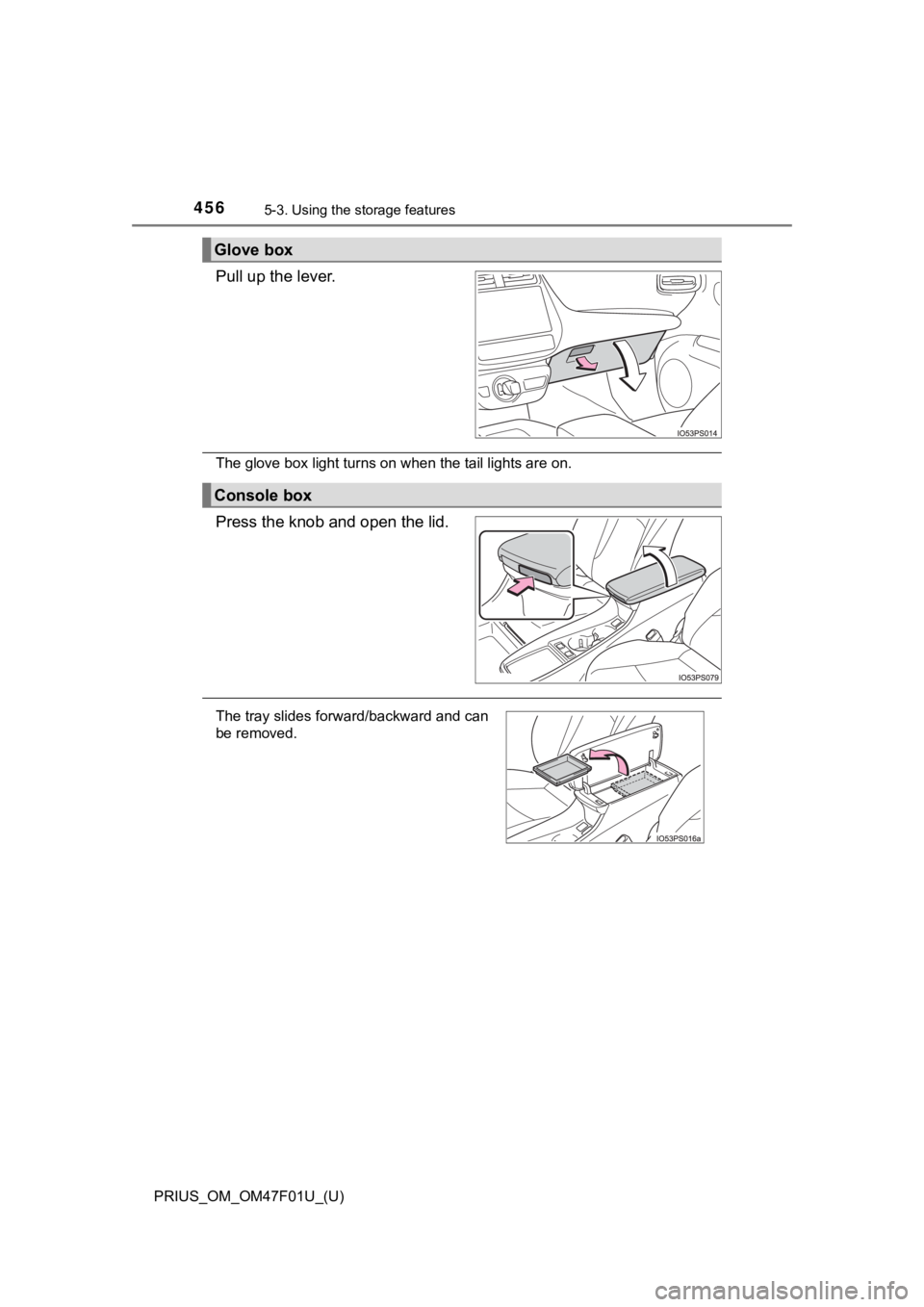
Pull up the lever.
The glove box light turns on when the tail lights are on.
Press the knob and open the lid.
Glove box
Console box
The tray slides forward/backward and can
be removed.
Page 473 of 744
PRIUS_OM_OM47F01U_(U)
4735-4. Using the other interior features
5
Interior features
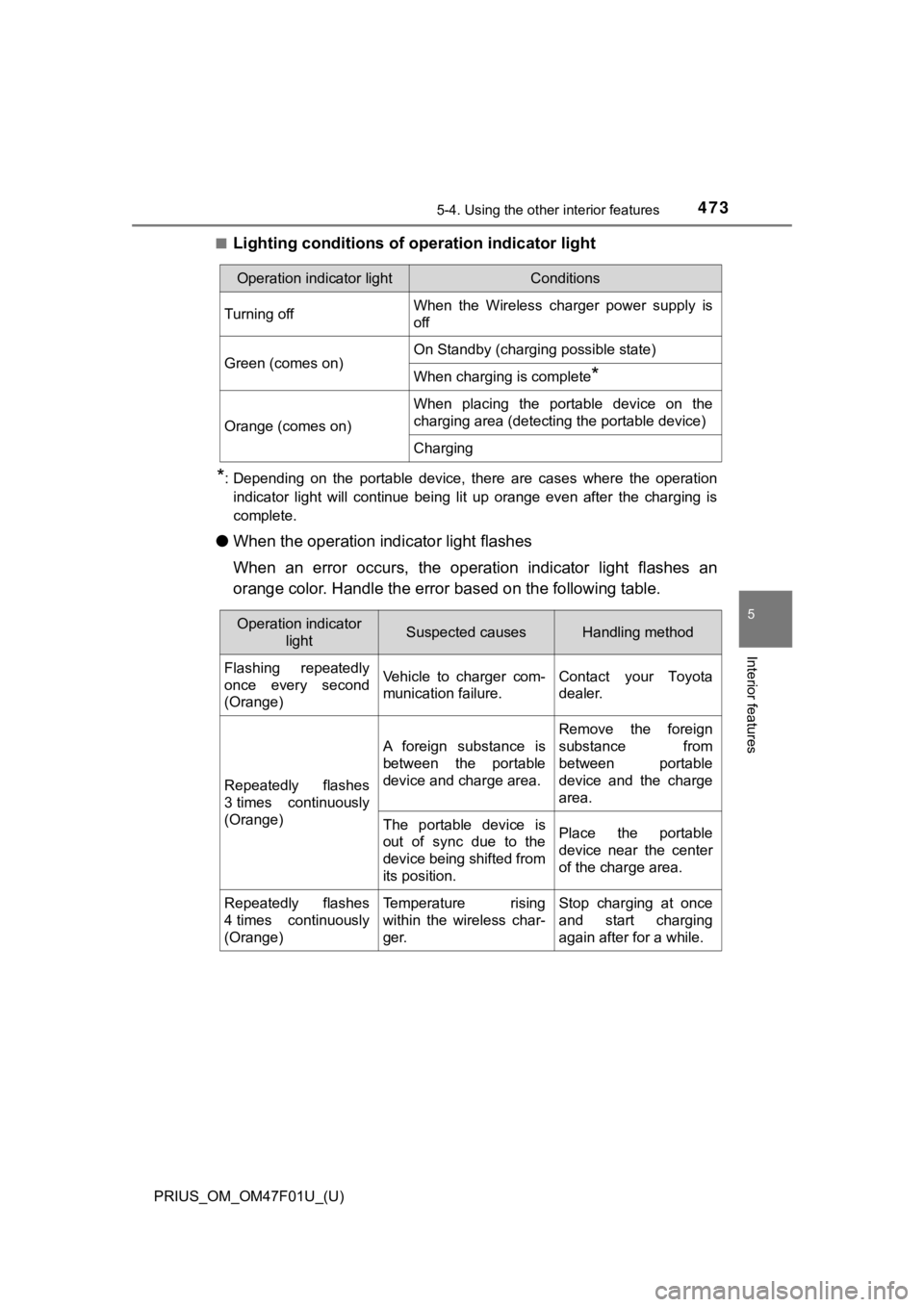
■Lighting conditions of operation indicator light
*: Depending on the portable device, there are cases where the op eration
indicator light will continue being lit up orange even after the charging is
complete.
● When the operation indi cator light flashes
When an error occurs, the operat ion indicator light flashes an
orange color. Handle the error based on the following table.
Operation indicator lightConditions
Turning offWhen the Wireless charger power supply is
off
Green (comes on)On Standby (charging possible state)
When charging is complete*
Orange (comes on)
When placing the portable device on the
charging area (detecting the portable device)
Charging
Operation indicator
lightSuspected causesHandling method
Flashing repeatedly
once every second
(Orange)Vehicle to charger com-
munication failure.Contact your Toyota
dealer.
Repeatedly flashes
3 times continuously
(Orange)
A foreign substance is
between the portable
device and charge area.
Remove the foreign
substance from
between portable
device and the charge
area.
The portable device is
out of sync due to the
device being shifted from
its position.Place the portable
device near the center
of the charge area.
Repeatedly flashes
4 times continuously
(Orange)Temperature rising
within the wireless char-
ger.Stop charging at once
and start charging
again after for a while.