lights TOYOTA PRIUS 2022 Owner's Manual
[x] Cancel search | Manufacturer: TOYOTA, Model Year: 2022, Model line: PRIUS, Model: TOYOTA PRIUS 2022Pages: 744, PDF Size: 14.35 MB
Page 163 of 744

PRIUS_OM_OM47F01U_(U)
1632. Instrument cluster
2
Instrument cluster
■Enabling/disabling of the head-up display
When the head-up display is turned off with the “HUD” switch, it is not dis-
played until the “HUD” switch is used to turn the head-up displ ay on again.
(Operation of the head-up display is not linked with the power switch.)
■ Display brightness
●The brightness of the head-up display is automatically adjusted according to
the operation status of the headlights (on/off) and the brightn ess of the sur-
roundings.
● When the brightness of the head-up display is adjusted to a cer tain level or
higher, the display automatically dims when the vehicle is stopped. Once the
vehicle starts off and the vehicle speed reaches approximately 3.1 mph
(5 km/h) or more, the display automatically returns to its previous bright-
ness.
■ Vehicle speed display
In extremely cold environments, the display of the speedometer and the vehi-
cle speed of the head-up display may slightly differ.
■ Head-up display
The head-up display may seem dark and hard to see when viewed t hrough
sunglasses, especially polarized sunglasses.
■ When the 12-volt battery is disconnected
The customize settings of the head-up display will be reset.
■ Route guidance display (vehicles with navigation system)
The route guidance is not displayed on both the head-up display and multi-
information display simultaneously. When the route guidance is displayed on
the head-up display, the multi-information display does not dis play the route
guidance even if the navigation system-linked display ( P. 145) is selected
on the multi-information display.
Page 177 of 744
PRIUS_OM_OM47F01U_(U)
1773-1. Key information
3
Operation of each component
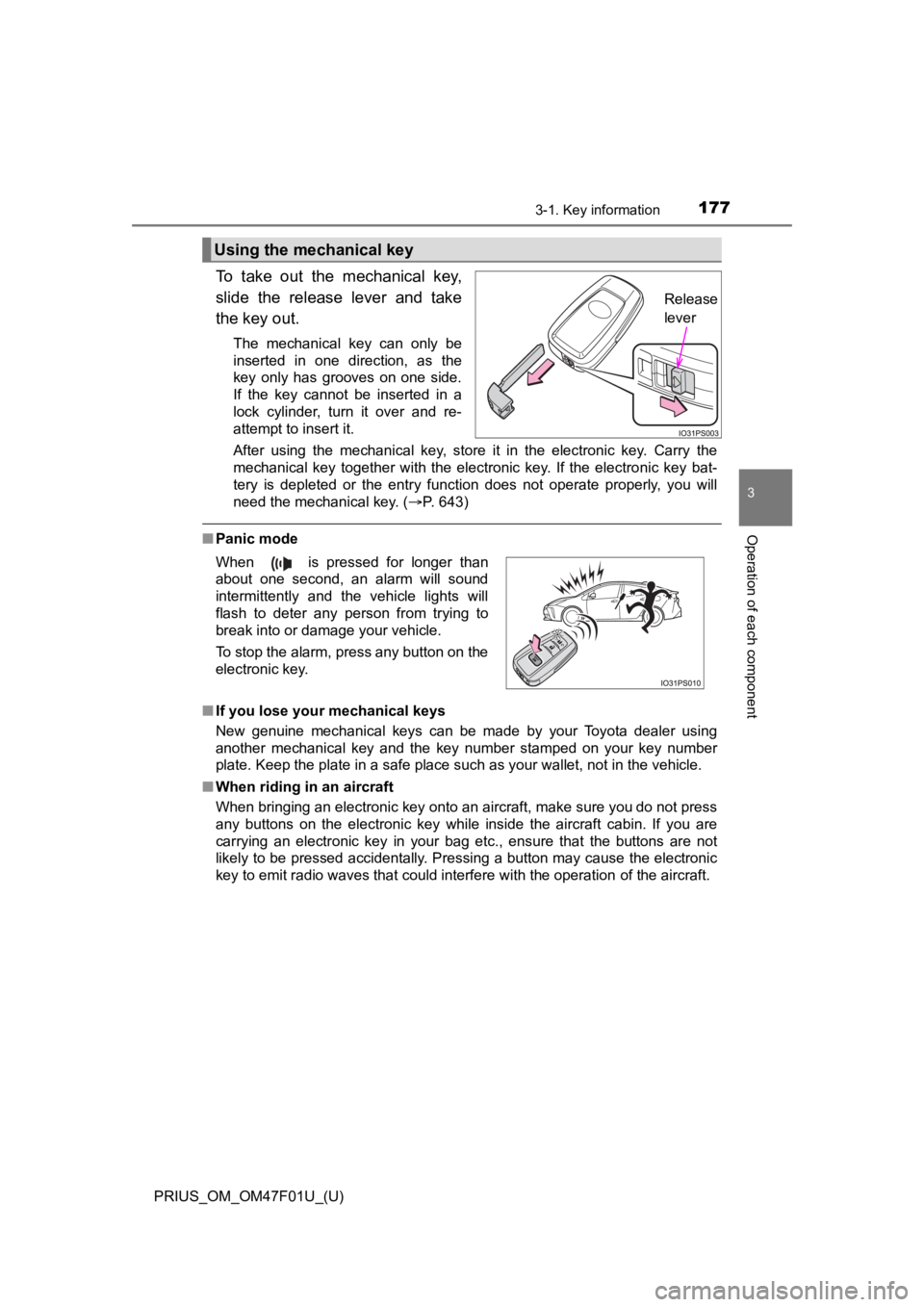
To take out the mechanical key,
slide the release lever and take
the key out.
The mechanical key can only be
inserted in one direction, as the
key only has grooves on one side.
If the key cannot be inserted in a
lock cylinder, turn it over and re-
attempt to insert it.
After using the mechanical key, store it in the electronic key. Carry the
mechanical key together with the electronic key. If the electronic key bat-
tery is depleted or the entry function does not operate properl y, you will
need the mechanical key. ( P. 643)
■Panic mode
■ If you lose your mechanical keys
New genuine mechanical keys can be made by your Toyota dealer using
another mechanical key and the key number stamped on your key n umber
plate. Keep the plate in a safe place such as your wallet, not in the vehicle.
■ When riding in an aircraft
When bringing an electronic key onto an aircraft, make sure you do not press
any buttons on the electronic key while inside the aircraft cabin. If you are
carrying an electronic key in your bag etc., ensure that the buttons are not
likely to be pressed accidentally. Pressing a button may cause the electronic
key to emit radio waves that could interfere with the operation of the aircraft.
Using the mechanical key
Release
lever
When is pressed for longer than
about one second, an alarm will sound
intermittently and the vehicle lights will
flash to deter any person from trying to
break into or damage your vehicle.
To stop the alarm, press any button on the
electronic key.
Page 208 of 744
2083-4. Adjusting the steering wheel and mirrors
PRIUS_OM_OM47F01U_(U)
Inside rear view mirror
The height of the rear view mirror can be adjusted to suit your driving
posture.
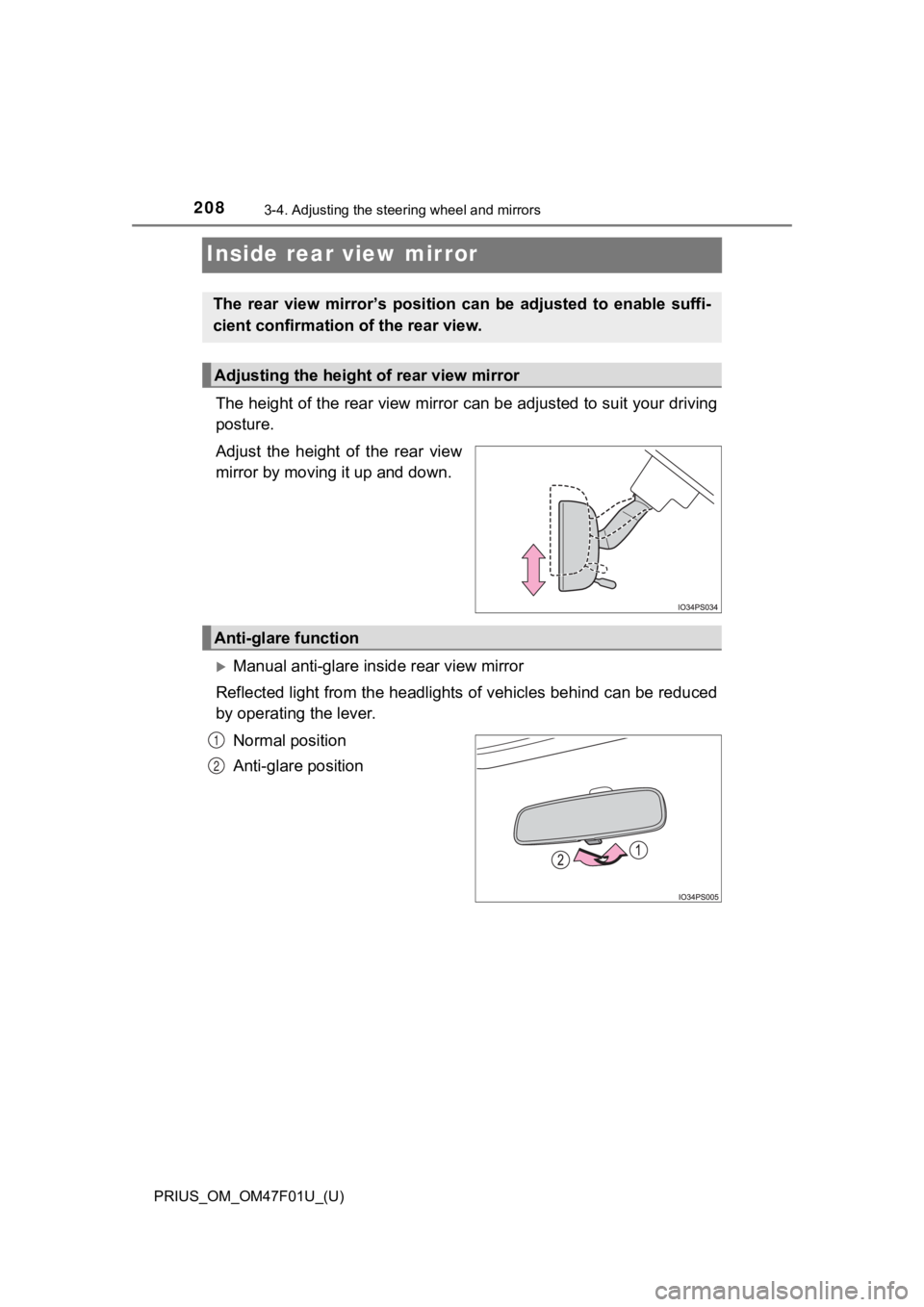
Adjust the height of the rear view
mirror by moving it up and down.
Manual anti-glare inside rear view mirror
Reflected light from the headlights of vehicles behind can be r educed
by operating the lever.
Normal position
Anti-glare position
The rear view mirror’s position ca n be adjusted to enable suffi-
cient confirmation of the rear view.
Adjusting the height of rear view mirror
Anti-glare function
1
2
Page 209 of 744
2093-4. Adjusting the steering wheel and mirrors
3
Operation of each component
PRIUS_OM_OM47F01U_(U)
Auto anti-glare inside rear view mirror
Responding to the level of brightness of the headlights of vehi cles
behind, the reflected light is automatically reduced.
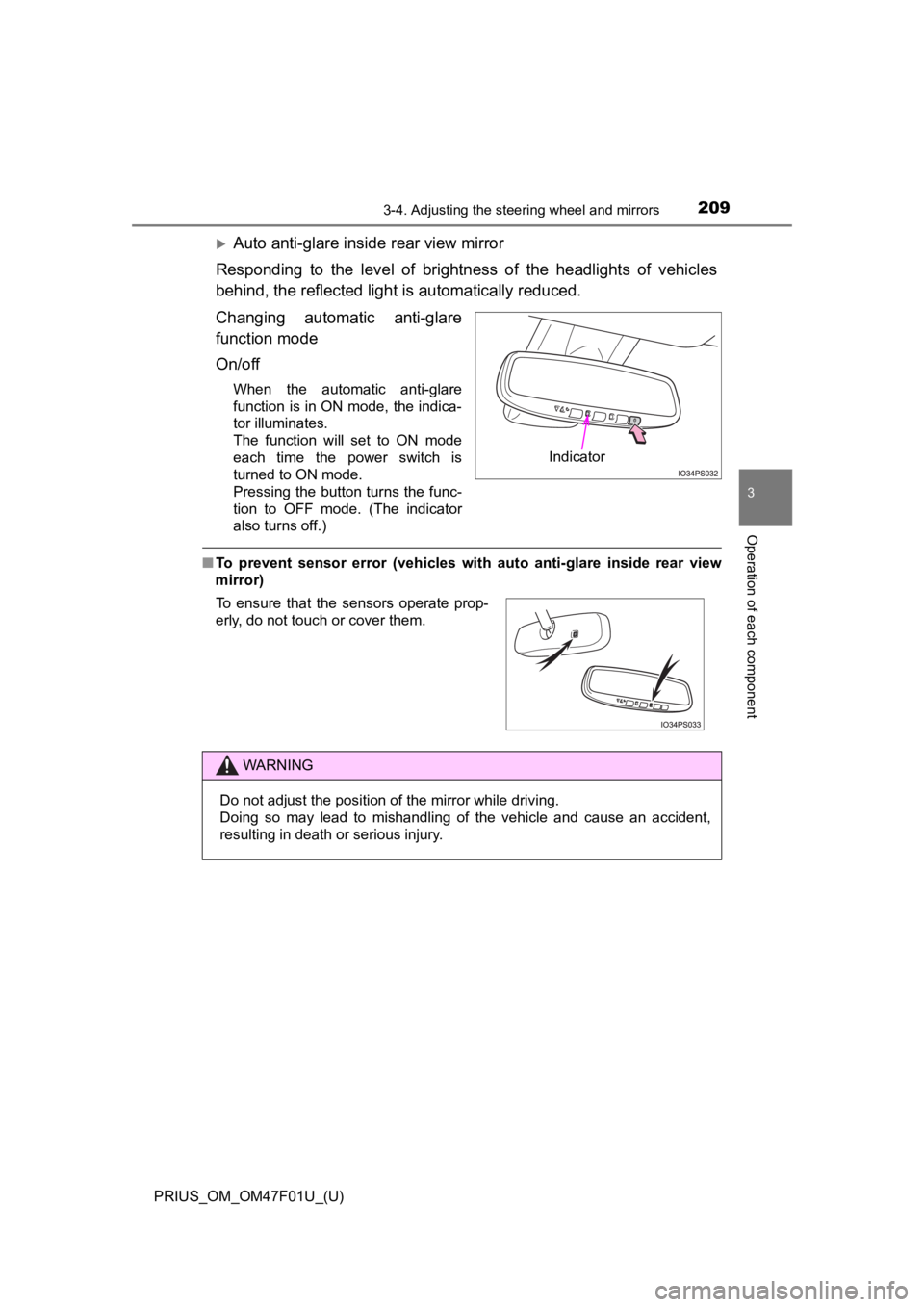
Changing automatic anti-glare
function mode
On/off
When the automatic anti-glare
function is in ON mode, the indica-
tor illuminates.
The function will set to ON mode
each time the power switch is
turned to ON mode.
Pressing the button turns the func-
tion to OFF mode. (The indicator
also turns off.)
■ To prevent sensor error (vehicles with auto anti-glare inside r ear view
mirror)
Indicator
To ensure that the sensors operate prop-
erly, do not touch or cover them.
WARNING
Do not adjust the position of the mirror while driving.
Doing so may lead to mishandling of the vehicle and cause an accident,
resulting in death or serious injury.
Page 221 of 744
221
PRIUS_OM_OM47F01U_(U)
4Driving
4-1. Before drivingDriving the vehicle ............. 222
Cargo and luggage ........... 233
Vehicle load limits ............. 236
Trailer towing..................... 237
Dinghy towing ................... 238
4-2. Driving procedures Power (ignition) switch ...... 239
EV drive mode .................. 246
Hybrid transmission........... 249
Turn signal lever................ 255
Parking brake .................... 256
4-3. Operating the lights and wipers
Headlight switch ................ 257
AHB (Automatic High Beam) ............................. 262
Fog light switch ................. 267
Windshield wipers and washer ............................ 269
Rear window wiper and washer ............................ 275 4-4. Refueling
Opening the fuel tank cap .................................. 277
4-5. Using the driving support systems
Toyota Safety Sense 2.0... 282
PCS (Pre-Collision System)........................... 291
LTA (Lane Tracing Assist) ............................. 302
RSA (Road Sign Assist) .... 317
Dynamic radar cruise control with full-speed
range............................... 321
Cruise control .................... 337
Driving mode select switch .............................. 342
BSM (Blind Spot Monitor) ........ 344
• The Blind Spot Monitor function ......................... 349
• The Rear Cross Traffic Alert function ................. 352
Intuitive parking assist....... 358
Parking Support Brake function ........................... 370
S-APGS (Simple Advanced Parking
Guidance System) .......... 381
Driving assist systems ...... 415
4-6. Driving tips Hybrid vehicle driving tips .................................. 422
Winter driving tips ............. 425
Page 257 of 744
257
PRIUS_OM_OM47F01U_(U)
4-3. Operating the lights and wipers
4
Driving
Headlight switch
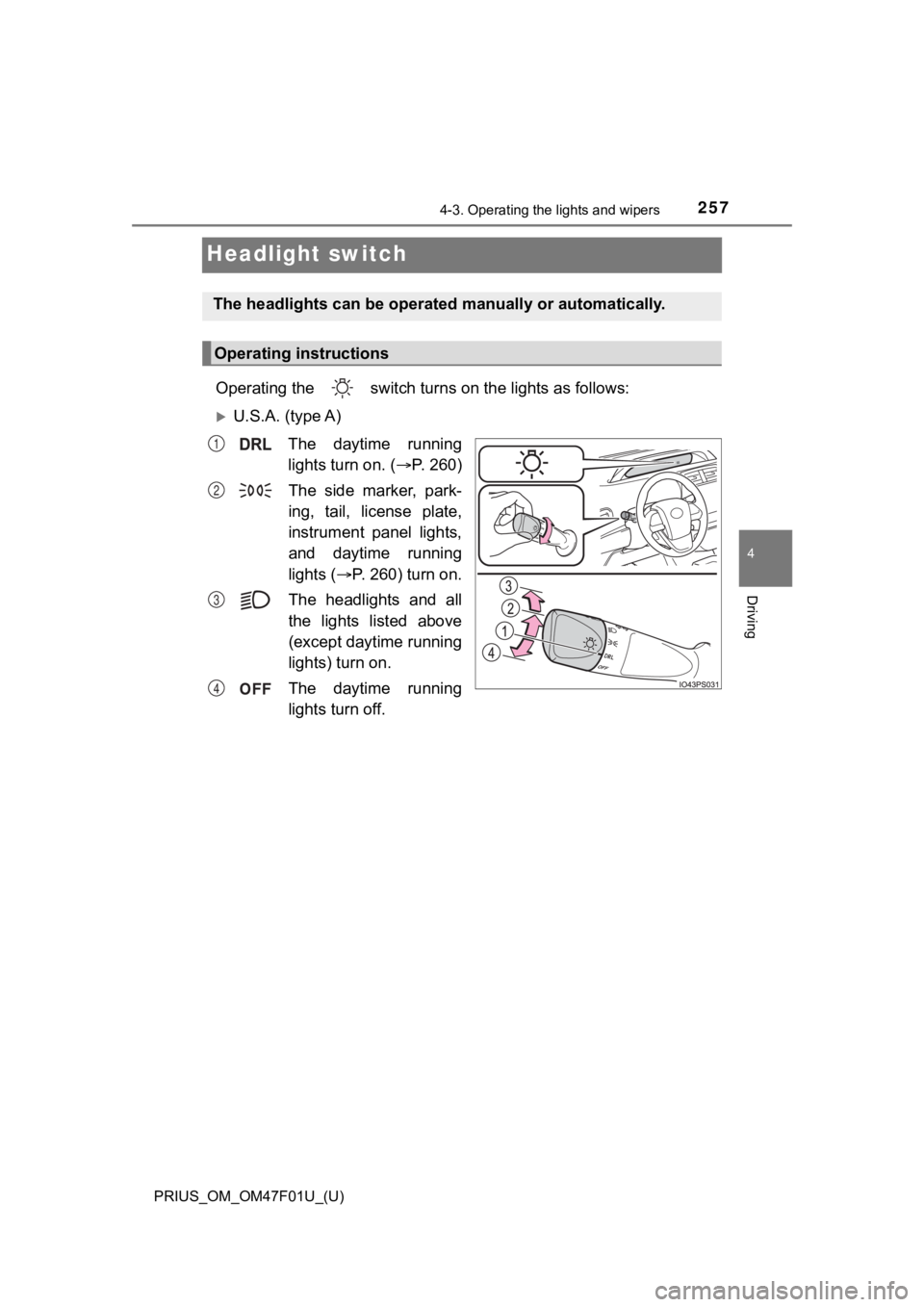
Operating the switch turns on the lights as follows:
U.S.A. (type A)
The daytime running
lights turn on. ( P. 260)
The side marker, park-
ing, tail, license plate,
instrument panel lights,
and daytime running
lights ( P. 260) turn on.
The headlights and all
the lights listed above
(except daytime running
lights) turn on.
The daytime running
lights turn off.
The headlights can be operated manually or automatically.
Operating instructions
1
2
3
4
Page 258 of 744
258
PRIUS_OM_OM47F01U_(U)
4-3. Operating the lights and wipers
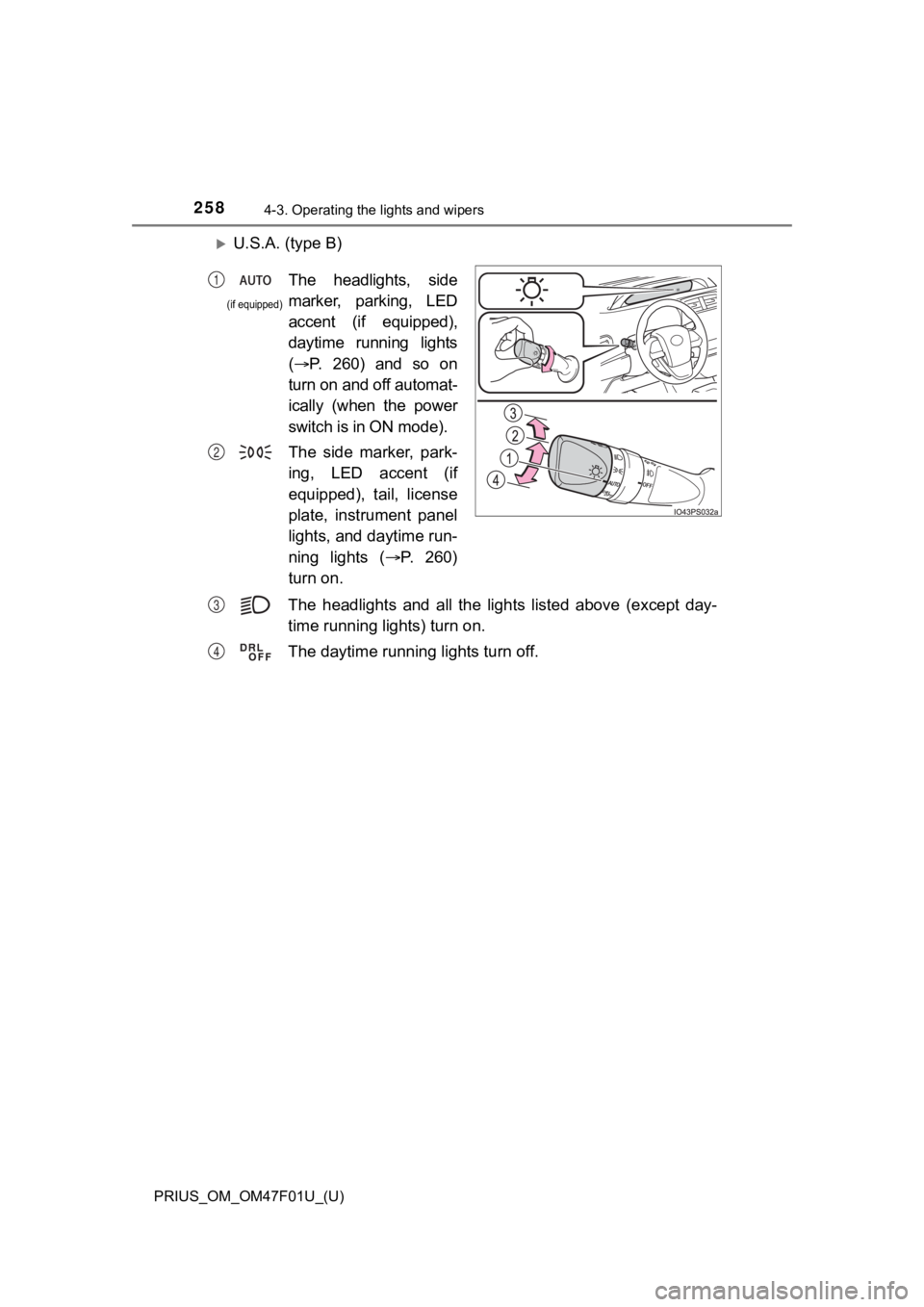
U.S.A. (type B)The headlights and all the lig hts listed above (except day-
time running lights) turn on.
The daytime running lights turn off.
The headlights, side
marker, parking, LED
accent (if equipped),
daytime running lights
( P. 260) and so on
turn on and off automat-
ically (when the power
switch is in ON mode).
The side marker, park-
ing, LED accent (if
equipped), tail, license
plate, instrument panel
lights, and daytime run-
ning lights ( P. 260)
turn on.1
2
(if equipped)
P
Q
Page 259 of 744
PRIUS_OM_OM47F01U_(U)
2594-3. Operating the lights and wipers
4
Driving
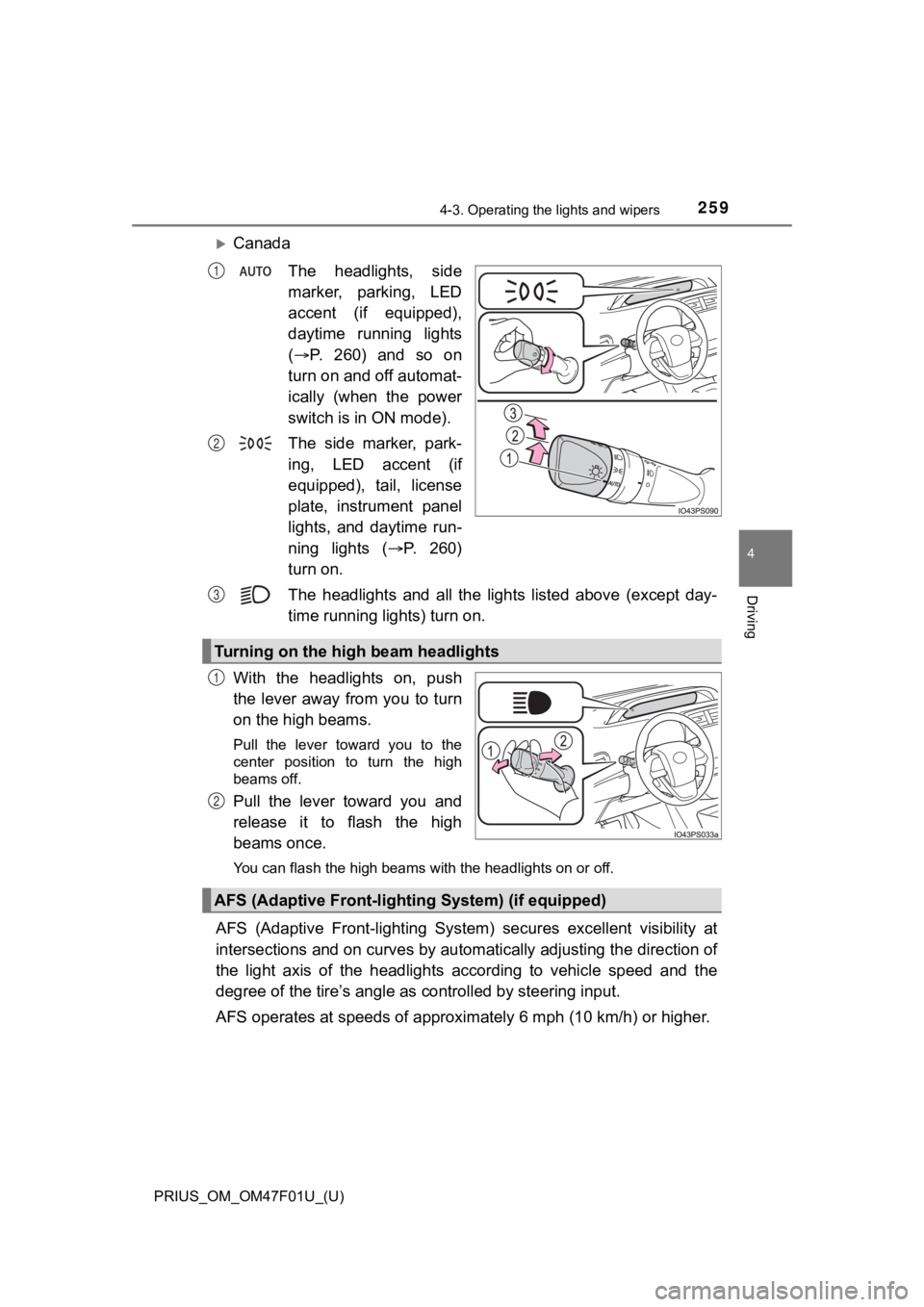
CanadaThe headlights, side
marker, parking, LED
accent (if equipped),
daytime running lights
( P. 260) and so on
turn on and off automat-
ically (when the power
switch is in ON mode).
The side marker, park-
ing, LED accent (if
equipped), tail, license
plate, instrument panel
lights, and daytime run-
ning lights ( P. 260)
turn on.
The headlights and all the lig hts listed above (except day-
time running lights) turn on.
With the headlights on, push
the lever away from you to turn
on the high beams.
Pull the lever toward you to the
center position to turn the high
beams off.
Pull the lever toward you and
release it to flash the high
beams once.
You can flash the high beams with the headlights on or off.
AFS (Adaptive Front-lighting System) secures excellent visibili ty at
intersections and on curves by automatically adjusting the dire ction of
the light axis of the headlights according to vehicle speed and the
degree of the tire’s angle as controlled by steering input.
AFS operates at speeds of approximately 6 mph (10 km/h) or high er.
1
2
Turning on the high beam headlights
3
1
2
AFS (Adaptive Front-lighting System) (if equipped)
Page 260 of 744
260
PRIUS_OM_OM47F01U_(U)
4-3. Operating the lights and wipers
■Daytime running light system
●The daytime running lights illuminate using the same lights as the head-
lights, and illuminate dimmer than the headlights.
● To make your vehicle more visible to other drivers during dayti me driving,
the daytime running lights turn on automatically when all of the following
conditions are met. (The daytime running lights are not designe d for use at
night.)
• The hybrid system is operating
• The parking brake is released
• The headlight switch is in the , or
* position
*: When the surroundings are bright
The daytime running lights remain on after they illuminate, eve n if the park-
ing brake is set again.
● For the U.S.A.: Daytime running lights can be turned off by ope rating the
switch.
● Compared to turning on the headlights, the daytime running ligh t system
offers greater durability and consumes less electricity, so it can help improve
fuel economy.
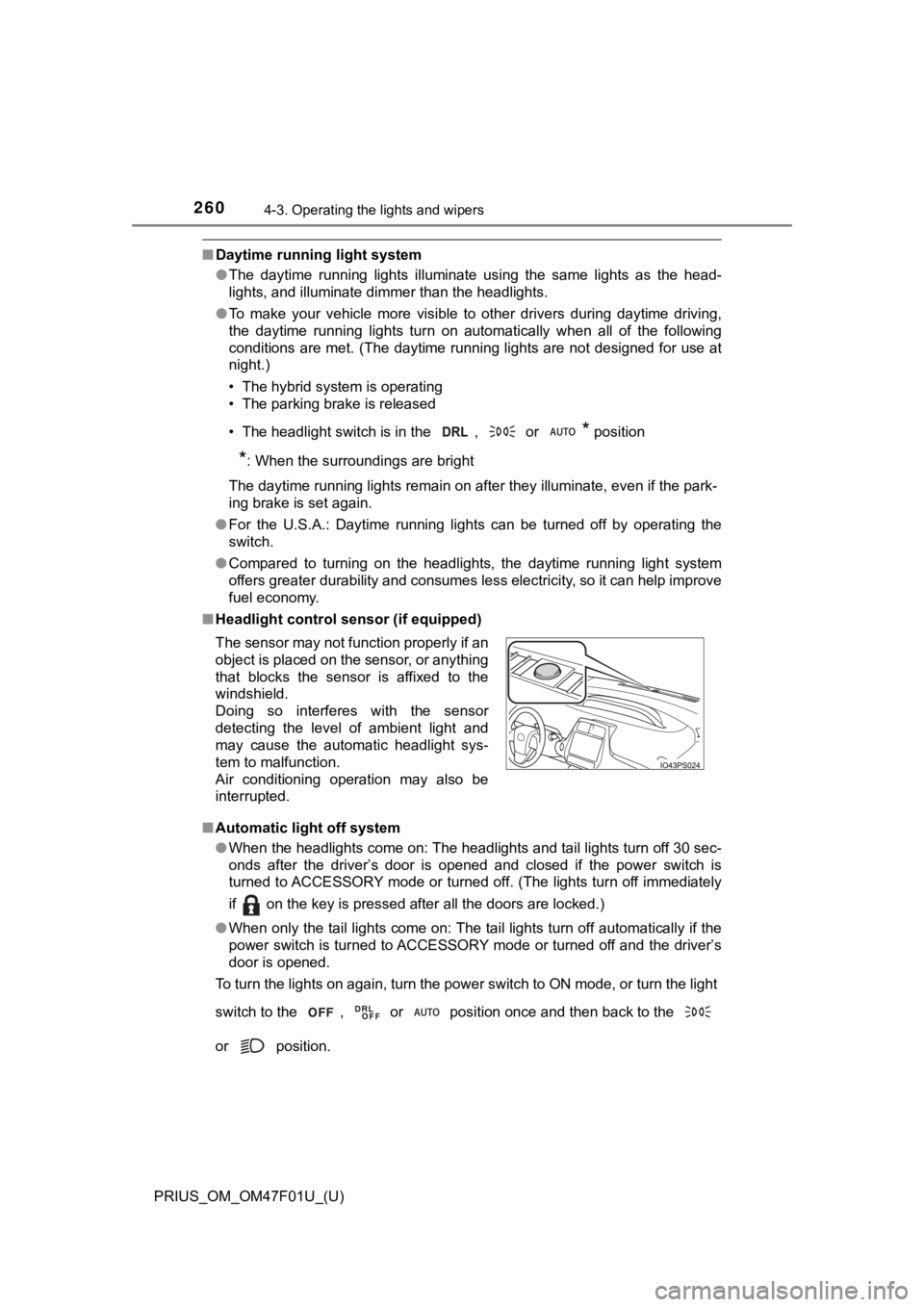
■ Headlight control sensor (if equipped)
■ Automatic light off system
●When the headlights come on: The headlights and tail lights tur n off 30 sec-
onds after the driver’s door is opened and closed if the power switch is
turned to ACCESSORY mode or turned off. (The lights turn off im mediately
if on the key is pressed after all the doors are locked.)
● When only the tail lights come on: The tail lights turn off automatically if the
power switch is turned to ACCESSORY mode or turned off and the driver’s
door is opened.
To turn the lights on again, turn the power switch to ON mode, or turn the light
switch to the , or position once and then back to the
or position. The sensor may not function properly if an
object is placed on the sensor, or anything
that blocks the sensor is affixed to the
windshield.
Doing so interferes with the sensor
detecting the level of ambient light and
may cause the automatic headlight sys-
tem to malfunction.
Air conditioning operation may also be
interrupted.
Page 261 of 744
PRIUS_OM_OM47F01U_(U)
2614-3. Operating the lights and wipers
4
Driving
■Automatic headlight leveling system (vehicles with AFS)
The level of the headlights is automatically adjusted according to the number
of passengers and the loading condition of the vehicle to ensure that the
headlights do not interfere with other road users.
■ 12-volt battery-saving function
In order to prevent the 12-volt battery of the vehicle from dis charging, if the
headlights and/or tail lights are on when the power switch is t urned off, the
12-volt battery saving function will operate and automatically turn off all the
lights after approximately 20 minutes.
When any of the following are performed, the 12-volt battery-sa ving function
is canceled once and then reactivated. All the lights will turn off automatically
20 minutes after the 12-volt battery-saving function has been reactivated:
● When the headlight switch is operated
● When a door is opened or closed
■ If “Headlight System Malfunction Visit Your Dealer” is displaye d on the
multi-information display
The system may be malfunctioning. Have the vehicle inspected by your Toy-
ota dealer.
■ If the AFS OFF indicator flashes (vehicles with AFS)
It may indicate a malfunction in the system. Contact your Toyota dealer.
■ Customization
Settings (e.g. light sensor sensitivity) can be changed.
(Customizable features: P. 686)
NOTICE
■To prevent 12-volt battery discharge
Do not leave the lights on longer than necessary when the hybrid system is
off.