change time TOYOTA PRIUS 2023 User Guide
[x] Cancel search | Manufacturer: TOYOTA, Model Year: 2023, Model line: PRIUS, Model: TOYOTA PRIUS 2023Pages: 770, PDF Size: 122.55 MB
Page 219 of 770
2173-5. Opening and closing the windows and moon roof
3
Operation of each component
PRIUS_OM_OM47F32E_(EE)■When the moon roof does not close normally
Perform the following procedure:
Stop the vehicle.
Press and hold the “CLOSE” or “UP” switch.
*
The moon roof will tilt up, stop a little time and tilt down. Then it will open
fully and close again, and then stop.
Check to make sure that the moon roof has completely stopped and then
release the switch.
*: If the switch is released at the incorrect time, the procedure will have to be
performed again from the beginning.
If the moon roof does not fully close even after performing the above proce-
dure correctly, have the vehicle inspected by any authorized Toyota retailer or
Toyota authorized repairer, or any reliable repairer.
■Moon roof open reminder function
The buzzer sounds and a message is shown on the multi-information display
in the instrument cluster when the power switch is turned off and the driver’s
door is opened with the moon roof open.
■Customization
Settings (e.g. linked door lock operation) can be changed.
(Customizable features: P. 670)
1
2
3
Page 223 of 770
2214-1. Before driving
4
Driving
PRIUS_OM_OM47F32E_(EE)
Firmly set the parking brake with the brake pedal depressed, and
then shift the shift position to D.
Release the brake pedal and gently depress the accelerator pedal.
Release the parking brake.
When the following unusual operation is performed with the accelera-
tor pedal depressed, the hybrid system output may be restrained.
●When the shift position is shifted to R
*.
●When the shift position is shifted from P or R to forward drive shift
position such as D
*.
When the system operates, a message appears on the multi-informa-
tion display. Read the message and follow the instruction.
*: Depending on the situation, the shift position may not be changed.
■When starting off on an uphill
The hill-start assist control will activate. (P. 442)
■For fuel-efficient driving
Keep in mind that hybrid vehicles are similar to conventional vehicles, and it
is necessary to refrain from activities such as sudden acceleration. (P. 449)
■Driving in the rain
●Drive carefully when it is raining, because visibility will be reduced, the win-
dows may become fogged-up, and the road will be slippery.
●Drive carefully when it starts to rain, because the road surface will be espe-
cially slippery.
●Refrain from high speeds when driving on an expressway in the rain,
because there may be a layer of water between the tires and the road sur-
face, preventing the steering and brakes from operating properly.
■Restraining the hybrid system output (Brake Override System)
●When the accelerator and brake pedals are depressed at the same time, the
hybrid system output may be restrained.
●A warning message is displayed on the multi-information display while the
system is operating. (P. 596)
Starting off on a steep uphill
Sudden start restraint control (Drive-Start Control [DSC])
1
2
3
Page 248 of 770
2464-2. Driving procedures
PRIUS_OM_OM47F32E_(EE)
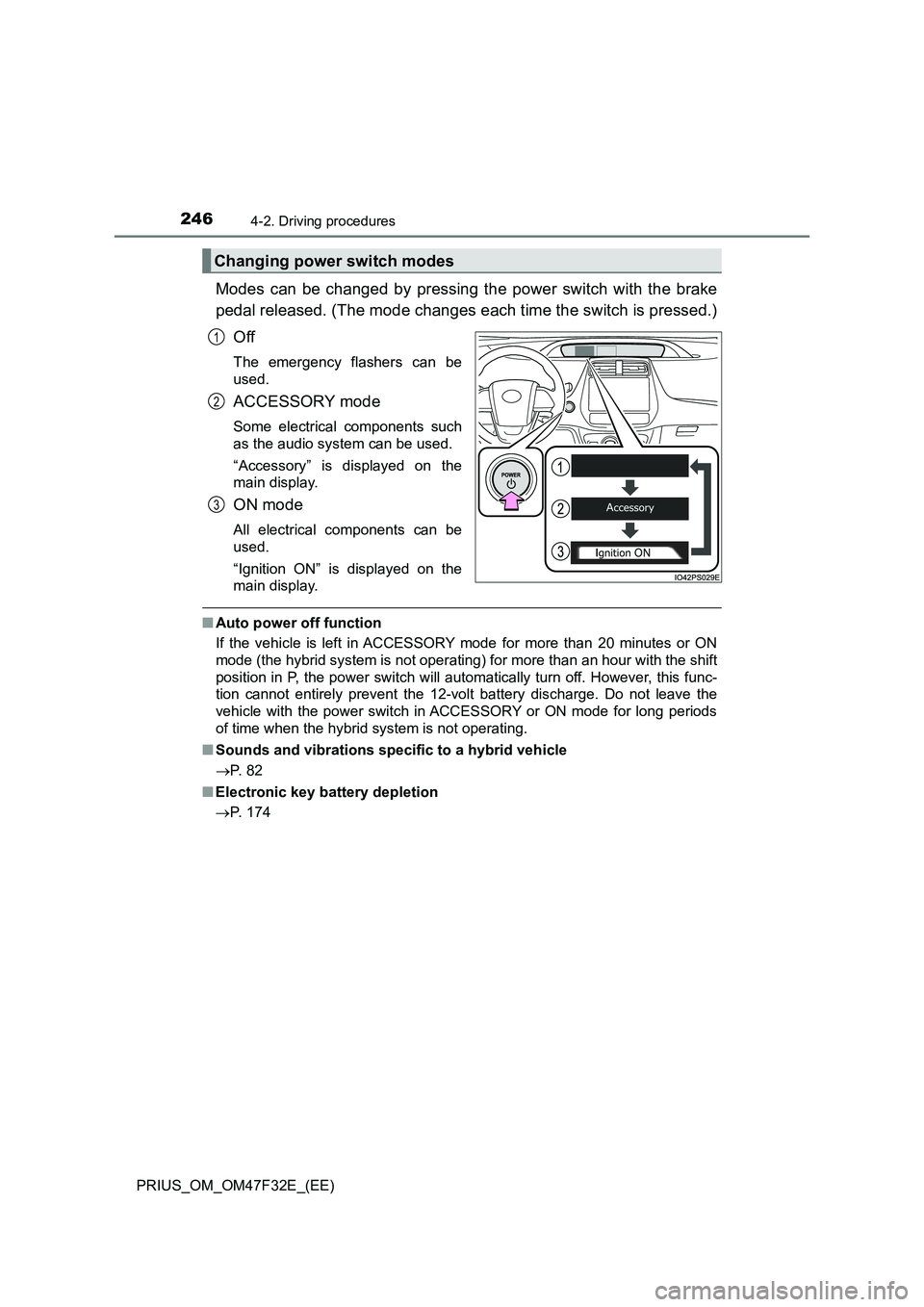
Modes can be changed by pressing the power switch with the brake
pedal released. (The mode changes each time the switch is pressed.)
Off
The emergency flashers can be
used.
ACCESSORY mode
Some electrical components such
as the audio system can be used.
“Accessory” is displayed on the
main display.
ON mode
All electrical components can be
used.
“Ignition ON” is displayed on the
main display.
■Auto power off function
If the vehicle is left in ACCESSORY mode for more than 20 minutes or ON
mode (the hybrid system is not operating) for more than an hour with the shift
position in P, the power switch will automatically turn off. However, this func-
tion cannot entirely prevent the 12-volt battery discharge. Do not leave the
vehicle with the power switch in ACCESSORY or ON mode for long periods
of time when the hybrid system is not operating.
■Sounds and vibrations specific to a hybrid vehicle
P. 8 2
■Electronic key battery depletion
P. 174
Changing power switch modes
1
2
3
Page 249 of 770
2474-2. Driving procedures
4
Driving
PRIUS_OM_OM47F32E_(EE)■When the ambient temperature is low, such as during winter driving con-
ditions
When starting the hybrid system, the flashing time of the “READY” indicator
may be long. Leave the vehicle as it is until the “READY” indicator is steady
on, as steady means the vehicle is able to move.
■Conditions affecting operation
P. 190
■Note for the entry function
P. 191
■If the hybrid system does not start
●The immobilizer system may not have been deactivated. (P. 9 1 )
Contact any authorized Toyota retailer or Toyota authorized repairer, or any
reliable repairer.
●If a message related to start-up is shown on the multi-information display,
read the message and follow the instructions.
■If the “READY” indicator does not come on
In the event that the “READY” indicator does not come on even after perform-
ing the proper procedures for starting the vehicle, contact any authorized
Toyota retailer or Toyota authorized repairer, or any reliable repairer immedi-
ately.
■If the hybrid system is malfunctioning
P. 8 5
■If the electronic key battery is depleted
P. 554
■Operation of the power switch
●If the switch is not pressed shortly and firmly, the power switch mode may
not change or the hybrid system may not start.
●If attempting to restart the hybrid system immediately after turning the power
switch off, the hybrid system may not start in some cases. After turning the
power switch off, please wait a few seconds before restarting the hybrid sys-
tem.
■Automatic P position selection function
P. 256
■When the shift control system malfunctions
When attempting to turn the power switch off while there is a malfunction in
the shift control system, the power switch mode may change to ACCES-
SORY mode. In this case, ACCESSORY mode may be turned off by applying
the parking brake and pressing the power switch again. If there is a malfunc-
tion in the system, have the vehicle inspected by any authorized Toyota
retailer or Toyota authorized repairer, or any reliable repairer immediately.
Page 250 of 770
2484-2. Driving procedures
PRIUS_OM_OM47F32E_(EE)
■ Meter display
When the power switch is turned off, each display will turn off as follows.
● The shift position indicator will turn off after approximately 2 seconds.
● The multi-information display, clock, etc. will turn off after approximately 30
seconds. (Each display will also turn off immediately if a door is locked
before 30 seconds has elapsed.)
■ If the smart entry & start system has been deactivated in a customized
setting
P. 637
WARNING
■When starting the hybrid system
Always start the hybrid system while sitting in the driver’s seat. Do not
depress the accelerator pedal while starting the hybrid system under any
circumstances.
Doing so may cause an accident resulting in death or serious injury.
■ Stopping the hybrid system in an emergency
● If you want to stop the hybrid system in an emergency while driving the
vehicle, press and hold the power switch for more than 2 seconds, or
press it briefly 3 times or more in succession. ( P. 569)
However, do not touch the power switch while driving except in an emer-
gency. Turning the hybrid system off while driving will not cause loss of
steering or braking control, however, power assist to the steering will be
lost. This will make it more difficult to steer smoothly, so you should pull
over and stop the vehicle as soon as it is safe to do so.
● If the power switch is operated while the vehicle is running, a warning
message will be shown on the multi-information display and a buzzer
sounds.
● When restarting the hybrid system after an emergency shutdown while
driving, press the power switch. When restarting the hybrid system after
stopping the vehicle, change the shift position to P and then press the
power switch.
Page 260 of 770
2584-2. Driving procedures
PRIUS_OM_OM47F32E_(EE)
NOTICE
■Hybrid battery (traction battery) charge
If the shift position is in N, the hybrid battery (traction battery) will not be
charged. To help prevent the battery fr om discharging, avoid leaving the N
position selected for an extended period of time.
■ Situations where shift control system malfunctions are possible
If any of the following situations occurs, shift control system malfunctions
are possible.
Immediately stop the vehicle in a safe place on level ground, apply the park-
ing brake, and then contact any authorized Toyota retailer or Toyota autho-
rized repairer, or any reliable repairer.
● When the warning message indicating the shift control system appears on
the multi-information display.
● The display indicates that no shift position is selected for more than a few
seconds.
■ Notes regarding shift lever and P position switch operation
Avoid repeatedly operating the shift lever and P position switch in quick suc-
cession.
The system protection function may activate and it will not be temporarily
possible to shift the shift position other than P. If this happens, please wait
for approximately 20 seconds before attempting to change the shift position
again.
■ When exiting the vehicle (driver’s seat only)
Check that the shift position indicator shows P and that the parking brake is
set before opening the door and exiting the vehicle.
Page 261 of 770
259
4
4-2. Driving procedures
Driving
PRIUS_OM_OM47F32E_(EE)
Turn signal lever
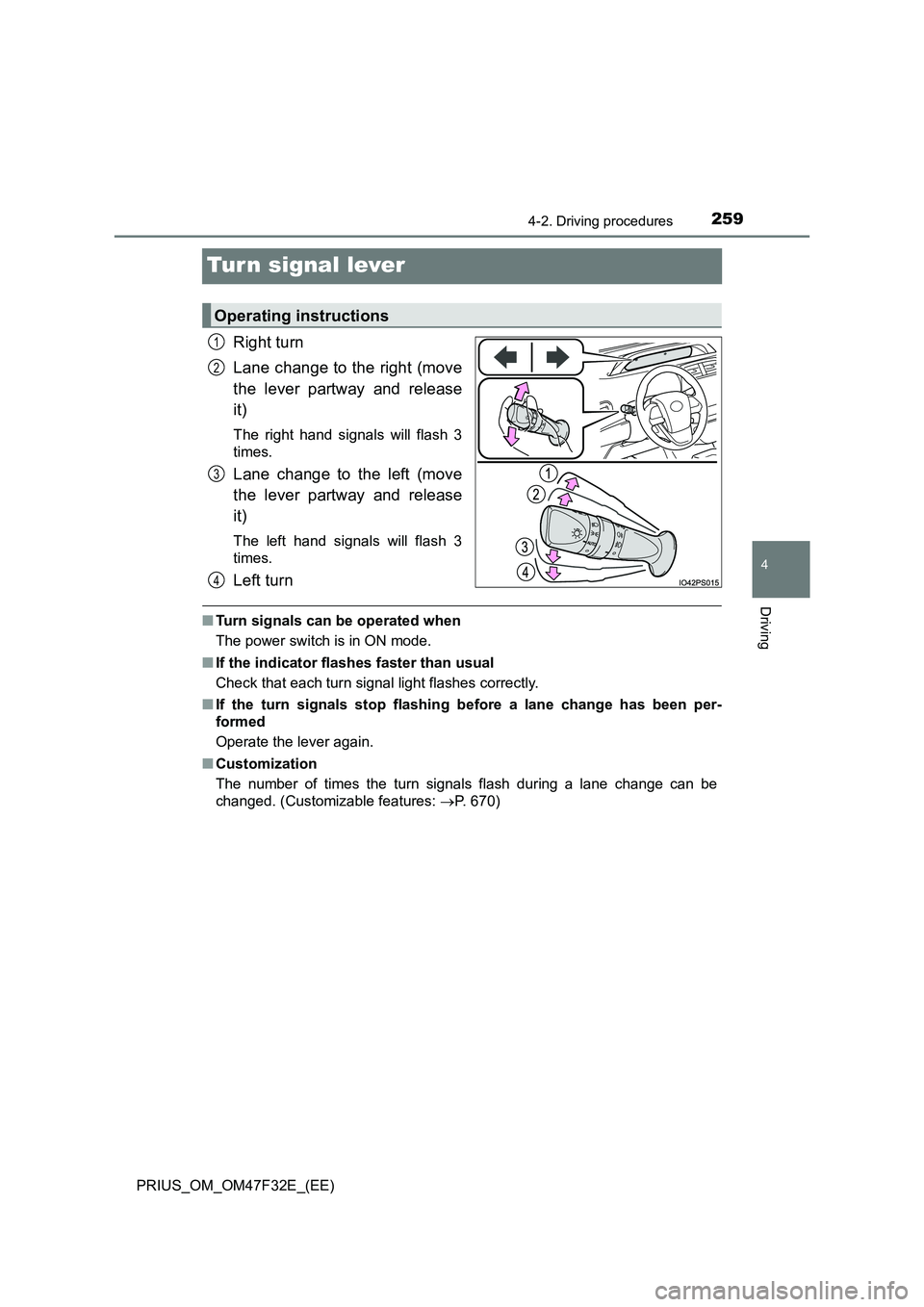
Right turn
Lane change to the right (move
the lever partway and release
it)
The right hand signals will flash 3
times.
Lane change to the left (move
the lever partway and release
it)
The left hand signals will flash 3
times.
Left turn
■ Turn signals can be operated when
The power switch is in ON mode.
■ If the indicator flashes faster than usual
Check that each turn signal light flashes correctly.
■ If the turn signals stop flashing before a lane change has been per-
formed
Operate the lever again.
■ Customization
The number of times the turn signals flash during a lane change can be
changed. (Customizable features: P. 670)
Operating instructions
1
2
3
4
Page 275 of 770
2734-3. Operating the lights and wipers
4
Driving
PRIUS_OM_OM47F32E_(EE)
■The windshield wipers and washer can be operated when
The power switch is in ON mode.
■ Dripping prevention wiper sweep (vehicles with rain-sensing windshield
wipers)
After washing and wiping operation se veral times, the wipers operate one
more time after a short delay to prevent dripping. However, this function will
not operate while driving.
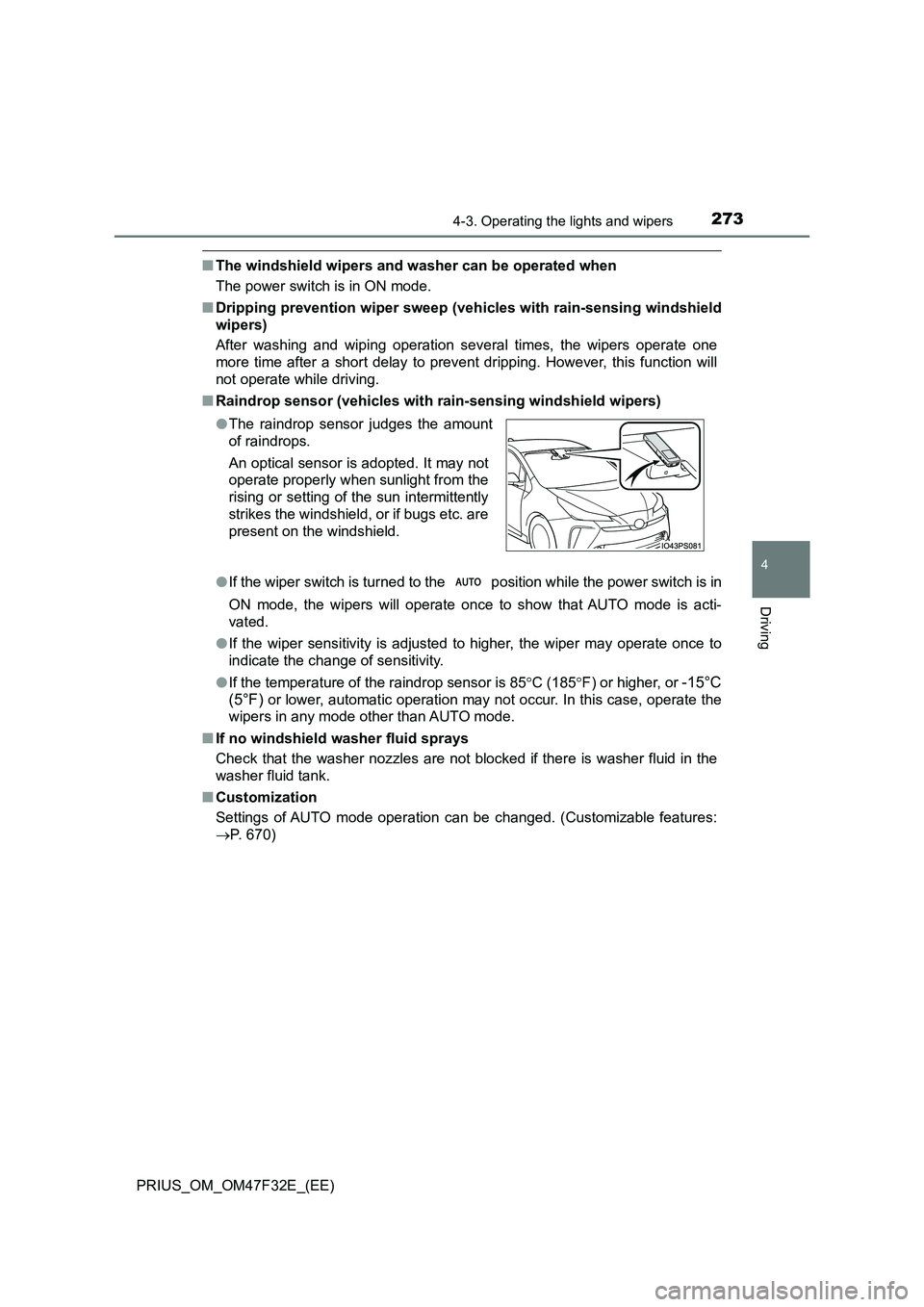
■ Raindrop sensor (vehicles with rain-sensing windshield wipers)
● If the wiper switch is turned to the position while the power switch is in
ON mode, the wipers will operate once to show that AUTO mode is acti-
vated.
● If the wiper sensitivity is adjusted to higher, the wiper may operate once to
indicate the change of sensitivity.
● If the temperature of the raindrop sensor is 85C (185F) or higher, or -15°C
(5°F) or lower, automatic operation may not occur. In this case, operate the
wipers in any mode other than AUTO mode.
■ If no windshield washer fluid sprays
Check that the washer nozzles are not blocked if there is washer fluid in the
washer fluid tank.
■ Customization
Settings of AUTO mode operation can be changed. (Customizable features:
P. 670)
● The raindrop sensor judges the amount
of raindrops.
An optical sensor is adopted. It may not
operate properly when sunlight from the
rising or setting of the sun intermittently
strikes the windshield, or if bugs etc. are
present on the windshield.
Page 297 of 770
2954-5. Using the driving support systems
4
Driving
PRIUS_OM_OM47F32E_(EE)●In the following situations, if the situation has changed (or the vehicle has
been driven for some time) and the normal operating conditions are
detected, the message will disappear and the system will become opera-
tional.
If the message does not disappear, contact any authorized Toyota retailer or
Toyota authorized repairer, or any reliable repairer.
• When the temperature around the radar sensor is outside of the opera-
tional range, such as when the vehicle is in the sun or in an extremely
cold environment
• When the front camera cannot detect objects in front of the vehicle, such
as when driving in the dark, snow, or fog, or when bright lights are shining
into the front camera
• Depending on the conditions in the vicinity of the vehicle, the radar may
judge the surrounding environment can not be properly recognized. In
that case, “Pre-Collision System Unavailable” is displayed.
Page 302 of 770
3004-5. Using the driving support systems
PRIUS_OM_OM47F32E_(EE)■
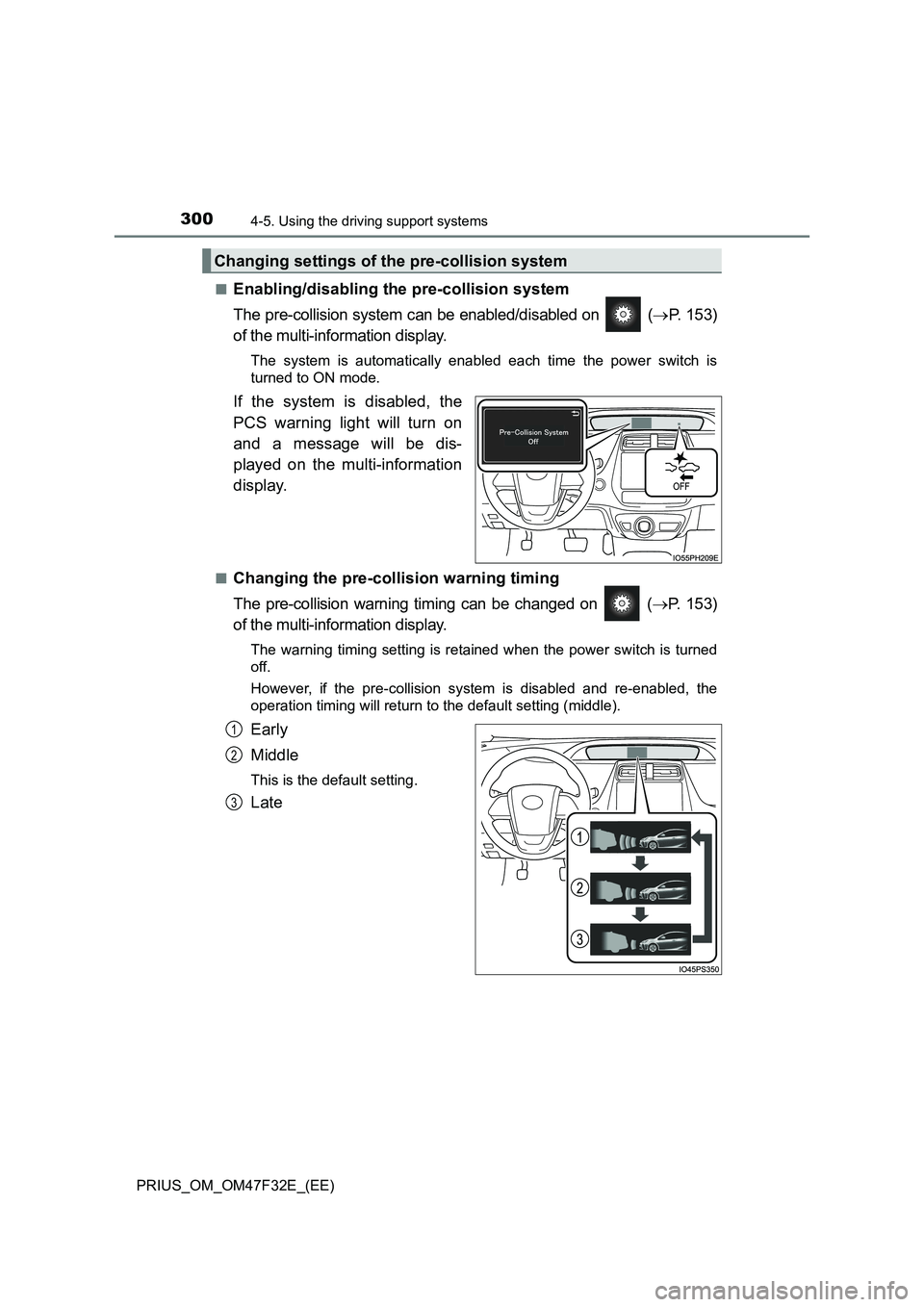
Enabling/disabling the pre-collision system
The pre-collision system can be enabled/disabled on (P. 153)
of the multi-information display.
The system is automatically enabled each time the power switch is
turned to ON mode.
If the system is disabled, the
PCS warning light will turn on
and a message will be dis-
played on the multi-information
display.
■Changing the pre-collision warning timing
The pre-collision warning timing can be changed on (P. 153)
of the multi-information display.
The warning timing setting is retained when the power switch is turned
off.
However, if the pre-collision system is disabled and re-enabled, the
operation timing will return to the default setting (middle).
Early
Middle
This is the default setting.
Late
Changing settings of the pre-collision system
1
2
3